 edc1dffd00
* First draft, still missing automatic function conversion

* First draft of the automatic schema generator

* Lots of small fixes

* the walrus has betrayed me

* please stop committing your debug breakpoints

* Lots of cleanup and edge cases, looking better now

* Comments and bugfixes for the type hint parser

* More cleanup

* Add tests, update schema generator

* Update tests, proper handling of return values

* Small docstring change

* More doc updates

* More doc updates

* Add json_schema decorator

* Clean up the TODOs and finish the docs

* self.maxDiff = None to see the whole diff for the nested list test

* add import for add_json_schema

* Quick test fix

* Fix something that was bugging me in the chat template docstring

* Less "anyOf" when unnecessary

* Support return types for the templates that need them

* Proper return type tests

* Switch to Google format docstrings

* Update chat templating docs to match new format

* Stop putting the return type in with the other parameters

* Add Tuple support

* No more decorator - we just do it implicitly!

* Add enum support to get_json_schema

* Update docstring

* Add copyright header

* Update src/transformers/tokenization_utils_base.py

Co-authored-by: amyeroberts <22614925+amyeroberts@users.noreply.github.com>

* Update docs/source/en/chat_templating.md

Co-authored-by: amyeroberts <22614925+amyeroberts@users.noreply.github.com>

* Update src/transformers/utils/chat_template_utils.py

Co-authored-by: amyeroberts <22614925+amyeroberts@users.noreply.github.com>

* Update src/transformers/utils/chat_template_utils.py

Co-authored-by: amyeroberts <22614925+amyeroberts@users.noreply.github.com>

* Add copyright header

* make fixup

* Fix indentation

* Reformat chat_template_utils

* Correct return value

* Make regexes module-level

* Support more complex, multi-line arg docstrings

* Update error message for ...

* Update ruff

* Add document type validation

* Refactor docs

* Refactor docs

* Refactor docs

* Clean up Tuple error

* Add an extra test for very complex defs and docstrings and clean everything up for it

* Document enum block

* Quick test fixes

* Stop supporting type hints in docstring to fix bugs and simplify the regex

* Update docs for the regex change

* Clean up enum regex

* Wrap functions in {"type": "function", "function": ...}

* Update src/transformers/utils/chat_template_utils.py

Co-authored-by: Pablo Montalvo <39954772+molbap@users.noreply.github.com>

* Temporary tool calling commit

* Add type hints to chat template utils, partially update docs (incomplete!)

* Code cleanup based on @molbap's suggestion

* Add comments to explain regexes

* Fix up type parsing for unions and lists

* Add custom exception types and adjust tests to look for them

* Update docs with a demo!

* Docs cleanup

* Pass content as string

* Update tool call formatting

* Update docs with new function format

* Update docs

* Update docs with a second tool to show the model choosing correctly

---------

Co-authored-by: amyeroberts <22614925+amyeroberts@users.noreply.github.com>
Co-authored-by: Pablo Montalvo <39954772+molbap@users.noreply.github.com>







English | 简体中文 | 繁體中文 | 한국어 | Español | 日本語 | हिन्दी | Русский | Рortuguês | తెలుగు | Français | Deutsch | Tiếng Việt |
State-of-the-art Machine Learning for JAX, PyTorch and TensorFlow

🤗 Transformers provides thousands of pretrained models to perform tasks on different modalities such as text, vision, and audio.
These models can be applied on:
- 📝 Text, for tasks like text classification, information extraction, question answering, summarization, translation, and text generation, in over 100 languages.
- 🖼️ Images, for tasks like image classification, object detection, and segmentation.
- 🗣️ Audio, for tasks like speech recognition and audio classification.
Transformer models can also perform tasks on several modalities combined, such as table question answering, optical character recognition, information extraction from scanned documents, video classification, and visual question answering.
🤗 Transformers provides APIs to quickly download and use those pretrained models on a given text, fine-tune them on your own datasets and then share them with the community on our model hub. At the same time, each python module defining an architecture is fully standalone and can be modified to enable quick research experiments.
🤗 Transformers is backed by the three most popular deep learning libraries — Jax, PyTorch and TensorFlow — with a seamless integration between them. It's straightforward to train your models with one before loading them for inference with the other.
Online demos
You can test most of our models directly on their pages from the model hub. We also offer private model hosting, versioning, & an inference API for public and private models.
Here are a few examples:
In Natural Language Processing:
- Masked word completion with BERT
- Named Entity Recognition with Electra
- Text generation with Mistral
- Natural Language Inference with RoBERTa
- Summarization with BART
- Question answering with DistilBERT
- Translation with T5
In Computer Vision:
- Image classification with ViT
- Object Detection with DETR
- Semantic Segmentation with SegFormer
- Panoptic Segmentation with Mask2Former
- Depth Estimation with Depth Anything
- Video Classification with VideoMAE
- Universal Segmentation with OneFormer
In Audio:
- Automatic Speech Recognition with Whisper
- Keyword Spotting with Wav2Vec2
- Audio Classification with Audio Spectrogram Transformer
In Multimodal tasks:
- Table Question Answering with TAPAS
- Visual Question Answering with ViLT
- Image captioning with LLaVa
- Zero-shot Image Classification with SigLIP
- Document Question Answering with LayoutLM
- Zero-shot Video Classification with X-CLIP
- Zero-shot Object Detection with OWLv2
- Zero-shot Image Segmentation with CLIPSeg
- Automatic Mask Generation with SAM
100 projects using Transformers
Transformers is more than a toolkit to use pretrained models: it's a community of projects built around it and the Hugging Face Hub. We want Transformers to enable developers, researchers, students, professors, engineers, and anyone else to build their dream projects.
In order to celebrate the 100,000 stars of transformers, we have decided to put the spotlight on the community, and we have created the awesome-transformers page which lists 100 incredible projects built in the vicinity of transformers.
If you own or use a project that you believe should be part of the list, please open a PR to add it!
If you are looking for custom support from the Hugging Face team
Quick tour
To immediately use a model on a given input (text, image, audio, ...), we provide the pipeline API. Pipelines group together a pretrained model with the preprocessing that was used during that model's training. Here is how to quickly use a pipeline to classify positive versus negative texts:
>>> from transformers import pipeline

# Allocate a pipeline for sentiment-analysis
>>> classifier = pipeline('sentiment-analysis')
>>> classifier('We are very happy to introduce pipeline to the transformers repository.')
[{'label': 'POSITIVE', 'score': 0.9996980428695679}]
The second line of code downloads and caches the pretrained model used by the pipeline, while the third evaluates it on the given text. Here, the answer is "positive" with a confidence of 99.97%.
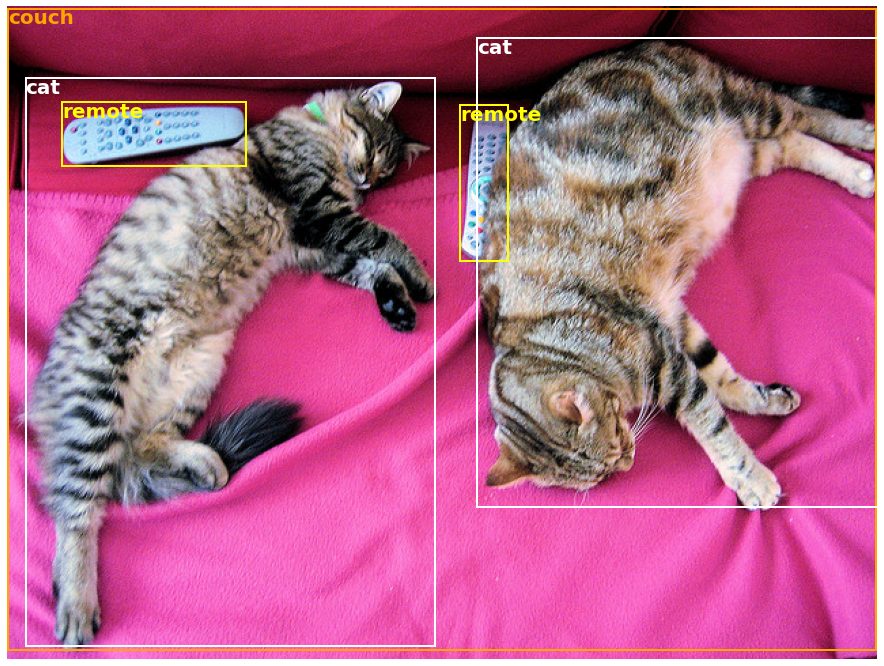
Many tasks have a pre-trained pipeline ready to go, in NLP but also in computer vision and speech. For example, we can easily extract detected objects in an image:
>>> import requests
>>> from PIL import Image
>>> from transformers import pipeline

# Download an image with cute cats
>>> url = "https://huggingface.co/datasets/huggingface/documentation-images/resolve/main/coco_sample.png"
>>> image_data = requests.get(url, stream=True).raw
>>> image = Image.open(image_data)

# Allocate a pipeline for object detection
>>> object_detector = pipeline('object-detection')
>>> object_detector(image)
[{'score': 0.9982201457023621,
  'label': 'remote',
  'box': {'xmin': 40, 'ymin': 70, 'xmax': 175, 'ymax': 117}},
 {'score': 0.9960021376609802,
  'label': 'remote',
  'box': {'xmin': 333, 'ymin': 72, 'xmax': 368, 'ymax': 187}},
 {'score': 0.9954745173454285,
  'label': 'couch',
  'box': {'xmin': 0, 'ymin': 1, 'xmax': 639, 'ymax': 473}},
 {'score': 0.9988006353378296,
  'label': 'cat',
  'box': {'xmin': 13, 'ymin': 52, 'xmax': 314, 'ymax': 470}},
 {'score': 0.9986783862113953,
  'label': 'cat',
  'box': {'xmin': 345, 'ymin': 23, 'xmax': 640, 'ymax': 368}}]
Here, we get a list of objects detected in the image, with a box surrounding the object and a confidence score. Here is the original image on the left, with the predictions displayed on the right:

You can learn more about the tasks supported by the pipeline API in this tutorial.
In addition to pipeline, to download and use any of the pretrained models on your given task, all it takes is three lines of code. Here is the PyTorch version:
>>> from transformers import AutoTokenizer, AutoModel

>>> tokenizer = AutoTokenizer.from_pretrained("google-bert/bert-base-uncased")
>>> model = AutoModel.from_pretrained("google-bert/bert-base-uncased")

>>> inputs = tokenizer("Hello world!", return_tensors="pt")
>>> outputs = model(**inputs)
And here is the equivalent code for TensorFlow:
>>> from transformers import AutoTokenizer, TFAutoModel

>>> tokenizer = AutoTokenizer.from_pretrained("google-bert/bert-base-uncased")
>>> model = TFAutoModel.from_pretrained("google-bert/bert-base-uncased")

>>> inputs = tokenizer("Hello world!", return_tensors="tf")
>>> outputs = model(**inputs)
The tokenizer is responsible for all the preprocessing the pretrained model expects and can be called directly on a single string (as in the above examples) or a list. It will output a dictionary that you can use in downstream code or simply directly pass to your model using the ** argument unpacking operator.
The model itself is a regular Pytorch nn.Module or a TensorFlow tf.keras.Model (depending on your backend) which you can use as usual. This tutorial explains how to integrate such a model into a classic PyTorch or TensorFlow training loop, or how to use our Trainer API to quickly fine-tune on a new dataset.
Why should I use transformers?
-
Easy-to-use state-of-the-art models:
- High performance on natural language understanding & generation, computer vision, and audio tasks.
- Low barrier to entry for educators and practitioners.
- Few user-facing abstractions with just three classes to learn.
- A unified API for using all our pretrained models.
-
Lower compute costs, smaller carbon footprint:
- Researchers can share trained models instead of always retraining.
- Practitioners can reduce compute time and production costs.
- Dozens of architectures with over 400,000 pretrained models across all modalities.
-
Choose the right framework for every part of a model's lifetime:
- Train state-of-the-art models in 3 lines of code.
- Move a single model between TF2.0/PyTorch/JAX frameworks at will.
- Seamlessly pick the right framework for training, evaluation, and production.
-
Easily customize a model or an example to your needs:
- We provide examples for each architecture to reproduce the results published by its original authors.
- Model internals are exposed as consistently as possible.
- Model files can be used independently of the library for quick experiments.
Why shouldn't I use transformers?
- This library is not a modular toolbox of building blocks for neural nets. The code in the model files is not refactored with additional abstractions on purpose, so that researchers can quickly iterate on each of the models without diving into additional abstractions/files.
- The training API is not intended to work on any model but is optimized to work with the models provided by the library. For generic machine learning loops, you should use another library (possibly, Accelerate).
- While we strive to present as many use cases as possible, the scripts in our examples folder are just that: examples. It is expected that they won't work out-of-the-box on your specific problem and that you will be required to change a few lines of code to adapt them to your needs.
Installation
With pip
This repository is tested on Python 3.8+, Flax 0.4.1+, PyTorch 1.11+, and TensorFlow 2.6+.
You should install 🤗 Transformers in a virtual environment. If you're unfamiliar with Python virtual environments, check out the user guide.
First, create a virtual environment with the version of Python you're going to use and activate it.
Then, you will need to install at least one of Flax, PyTorch, or TensorFlow. Please refer to TensorFlow installation page, PyTorch installation page and/or Flax and Jax installation pages regarding the specific installation command for your platform.
When one of those backends has been installed, 🤗 Transformers can be installed using pip as follows:
pip install transformers
If you'd like to play with the examples or need the bleeding edge of the code and can't wait for a new release, you must install the library from source.
With conda
🤗 Transformers can be installed using conda as follows:
conda install conda-forge::transformers
NOTE: Installing
transformersfrom thehuggingfacechannel is deprecated.
Follow the installation pages of Flax, PyTorch or TensorFlow to see how to install them with conda.
NOTE: On Windows, you may be prompted to activate Developer Mode in order to benefit from caching. If this is not an option for you, please let us know in this issue.
Model architectures
All the model checkpoints provided by 🤗 Transformers are seamlessly integrated from the huggingface.co model hub, where they are uploaded directly by users and organizations.
Current number of checkpoints:

🤗 Transformers currently provides the following architectures: see here for a high-level summary of each them.
To check if each model has an implementation in Flax, PyTorch or TensorFlow, or has an associated tokenizer backed by the 🤗 Tokenizers library, refer to this table.
These implementations have been tested on several datasets (see the example scripts) and should match the performance of the original implementations. You can find more details on performance in the Examples section of the documentation.
Learn more
| Section | Description |
|---|---|
| Documentation | Full API documentation and tutorials |
| Task summary | Tasks supported by 🤗 Transformers |
| Preprocessing tutorial | Using the Tokenizer class to prepare data for the models |
| Training and fine-tuning | Using the models provided by 🤗 Transformers in a PyTorch/TensorFlow training loop and the Trainer API |
| Quick tour: Fine-tuning/usage scripts | Example scripts for fine-tuning models on a wide range of tasks |
| Model sharing and uploading | Upload and share your fine-tuned models with the community |
Citation
We now have a paper you can cite for the 🤗 Transformers library:
@inproceedings{wolf-etal-2020-transformers,
    title = "Transformers: State-of-the-Art Natural Language Processing",
    author = "Thomas Wolf and Lysandre Debut and Victor Sanh and Julien Chaumond and Clement Delangue and Anthony Moi and Pierric Cistac and Tim Rault and Rémi Louf and Morgan Funtowicz and Joe Davison and Sam Shleifer and Patrick von Platen and Clara Ma and Yacine Jernite and Julien Plu and Canwen Xu and Teven Le Scao and Sylvain Gugger and Mariama Drame and Quentin Lhoest and Alexander M. Rush",
    booktitle = "Proceedings of the 2020 Conference on Empirical Methods in Natural Language Processing: System Demonstrations",
    month = oct,
    year = "2020",
    address = "Online",
    publisher = "Association for Computational Linguistics",
    url = "https://www.aclweb.org/anthology/2020.emnlp-demos.6",
    pages = "38--45"
}