Compare commits
17 Commits
v4.51.3-Bi
...
v4.51.2
| Author | SHA1 | Date | |
|---|---|---|---|

|
28c9541c1c | ||
|
|
56512077ad | ||
|
|
ac9c7f37a5 | ||
|
|
894783c902 | ||
|
|
eae06ff6d4 | ||
|
|
3148a41fa8 | ||
|
|
10baffb599 | ||
|
|
4a88ffae40 | ||
|
|
f19aec737e | ||
|
|
d8f0695e84 | ||
|
|
d27c8c38f4 | ||
|
|
04c0cedcdf | ||
|
|
4f536ba0ae | ||
|
|
6b82af0a5b | ||
|
|
2bf3d4aca8 | ||
|
|
a79b7abede | ||
|
|
0720e206c6 |
6
.github/ISSUE_TEMPLATE/bug-report.yml
vendored
6
.github/ISSUE_TEMPLATE/bug-report.yml
vendored
@@ -56,12 +56,6 @@ body:
|
||||
- ray/raytune: @richardliaw, @amogkam
|
||||
- Big Model Inference: @SunMarc
|
||||
- quantization (bitsandbytes, autogpt): @SunMarc @MekkCyber
|
||||
|
||||
Devices/Backends:
|
||||
|
||||
- AMD ROCm: @ivarflakstad
|
||||
- Intel XPU: @IlyasMoutawwakil
|
||||
- Ascend NPU: @ivarflakstad
|
||||
|
||||
Documentation: @stevhliu
|
||||
|
||||
|
||||
2
.github/ISSUE_TEMPLATE/i18n.md
vendored
2
.github/ISSUE_TEMPLATE/i18n.md
vendored
@@ -23,7 +23,7 @@ Some notes:
|
||||
* Please translate in a gender-neutral way.
|
||||
* Add your translations to the folder called `<languageCode>` inside the [source folder](https://github.com/huggingface/transformers/tree/main/docs/source).
|
||||
* Register your translation in `<languageCode>/_toctree.yml`; please follow the order of the [English version](https://github.com/huggingface/transformers/blob/main/docs/source/en/_toctree.yml).
|
||||
* Once you're finished, open a pull request and tag this issue by including #issue-number in the description, where issue-number is the number of this issue. Please ping @stevhliu for review.
|
||||
* Once you're finished, open a pull request and tag this issue by including #issue-number in the description, where issue-number is the number of this issue. Please ping @stevhliu and @MKhalusova for review.
|
||||
* 🙋 If you'd like others to help you with the translation, you can also post in the 🤗 [forums](https://discuss.huggingface.co/).
|
||||
|
||||
## Get Started section
|
||||
|
||||
18
.github/scripts/assign_reviewers.py
vendored
18
.github/scripts/assign_reviewers.py
vendored
@@ -54,21 +54,6 @@ def get_file_owners(file_path, codeowners_lines):
|
||||
return owners # Remember, can still be empty!
|
||||
return [] # Should never happen, but just in case
|
||||
|
||||
def pr_author_is_in_hf(pr_author, codeowners_lines):
|
||||
# Check if the PR author is in the codeowners file
|
||||
for line in codeowners_lines:
|
||||
line = line.split('#')[0].strip()
|
||||
if not line:
|
||||
continue
|
||||
|
||||
# Split into pattern and owners
|
||||
parts = line.split()
|
||||
owners = [owner.removeprefix("@") for owner in parts[1:]]
|
||||
|
||||
if pr_author in owners:
|
||||
return True
|
||||
return False
|
||||
|
||||
def main():
|
||||
script_dir = Path(__file__).parent.absolute()
|
||||
with open(script_dir / "codeowners_for_review_action") as f:
|
||||
@@ -83,9 +68,6 @@ def main():
|
||||
pr_number = event['pull_request']['number']
|
||||
pr = repo.get_pull(pr_number)
|
||||
pr_author = pr.user.login
|
||||
if pr_author_is_in_hf(pr_author, codeowners_lines):
|
||||
print(f"PR author {pr_author} is in codeowners, skipping review request.")
|
||||
return
|
||||
|
||||
existing_reviews = list(pr.get_reviews())
|
||||
if existing_reviews:
|
||||
|
||||
36
.github/workflows/build-docker-images.yml
vendored
36
.github/workflows/build-docker-images.yml
vendored
@@ -63,14 +63,14 @@ jobs:
|
||||
uses: huggingface/hf-workflows/.github/actions/post-slack@main
|
||||
with:
|
||||
slack_channel: ${{ secrets.CI_SLACK_CHANNEL_DOCKER }}
|
||||
title: 🤗 Results of the transformers-all-latest-gpu-push-ci docker build
|
||||
title: 🤗 Results of the transformers-all-latest-gpu-push-ci docker build
|
||||
status: ${{ job.status }}
|
||||
slack_token: ${{ secrets.SLACK_CIFEEDBACK_BOT_TOKEN }}
|
||||
|
||||
latest-torch-deepspeed-docker:
|
||||
name: "Latest PyTorch + DeepSpeed"
|
||||
runs-on:
|
||||
group: aws-g4dn-2xlarge-cache
|
||||
group: aws-general-8-plus
|
||||
steps:
|
||||
-
|
||||
name: Set up Docker Buildx
|
||||
@@ -99,7 +99,7 @@ jobs:
|
||||
uses: huggingface/hf-workflows/.github/actions/post-slack@main
|
||||
with:
|
||||
slack_channel: ${{ secrets.CI_SLACK_CHANNEL_DOCKER}}
|
||||
title: 🤗 Results of the transformers-pytorch-deepspeed-latest-gpu docker build
|
||||
title: 🤗 Results of the transformers-pytorch-deepspeed-latest-gpu docker build
|
||||
status: ${{ job.status }}
|
||||
slack_token: ${{ secrets.SLACK_CIFEEDBACK_BOT_TOKEN }}
|
||||
|
||||
@@ -140,7 +140,7 @@ jobs:
|
||||
uses: huggingface/hf-workflows/.github/actions/post-slack@main
|
||||
with:
|
||||
slack_channel: ${{ secrets.CI_SLACK_CHANNEL_DOCKER }}
|
||||
title: 🤗 Results of the transformers-pytorch-deepspeed-latest-gpu-push-ci docker build
|
||||
title: 🤗 Results of the transformers-pytorch-deepspeed-latest-gpu-push-ci docker build
|
||||
status: ${{ job.status }}
|
||||
slack_token: ${{ secrets.SLACK_CIFEEDBACK_BOT_TOKEN }}
|
||||
|
||||
@@ -176,7 +176,7 @@ jobs:
|
||||
uses: huggingface/hf-workflows/.github/actions/post-slack@main
|
||||
with:
|
||||
slack_channel: ${{ secrets.CI_SLACK_CHANNEL_DOCKER }}
|
||||
title: 🤗 Results of the huggingface/transformers-doc-builder docker build
|
||||
title: 🤗 Results of the huggingface/transformers-doc-builder docker build
|
||||
status: ${{ job.status }}
|
||||
slack_token: ${{ secrets.SLACK_CIFEEDBACK_BOT_TOKEN }}
|
||||
|
||||
@@ -214,7 +214,7 @@ jobs:
|
||||
uses: huggingface/hf-workflows/.github/actions/post-slack@main
|
||||
with:
|
||||
slack_channel: ${{ secrets.CI_SLACK_CHANNEL_DOCKER }}
|
||||
title: 🤗 Results of the huggingface/transformers-pytorch-gpudocker build
|
||||
title: 🤗 Results of the huggingface/transformers-pytorch-gpudocker build
|
||||
status: ${{ job.status }}
|
||||
slack_token: ${{ secrets.SLACK_CIFEEDBACK_BOT_TOKEN }}
|
||||
|
||||
@@ -223,19 +223,19 @@ jobs:
|
||||
runs-on:
|
||||
group: aws-general-8-plus
|
||||
steps:
|
||||
-
|
||||
-
|
||||
name: Set up Docker Buildx
|
||||
uses: docker/setup-buildx-action@v3
|
||||
-
|
||||
-
|
||||
name: Check out code
|
||||
uses: actions/checkout@v4
|
||||
-
|
||||
-
|
||||
name: Login to DockerHub
|
||||
uses: docker/login-action@v3
|
||||
with:
|
||||
username: ${{ secrets.DOCKERHUB_USERNAME }}
|
||||
password: ${{ secrets.DOCKERHUB_PASSWORD }}
|
||||
-
|
||||
-
|
||||
name: Build and push
|
||||
uses: docker/build-push-action@v5
|
||||
with:
|
||||
@@ -263,7 +263,7 @@ jobs:
|
||||
uses: huggingface/hf-workflows/.github/actions/post-slack@main
|
||||
with:
|
||||
slack_channel: ${{ secrets.CI_SLACK_CHANNEL_DOCKER }}
|
||||
title: 🤗 Results of the huggingface/transformers-pytorch-amd-gpu-push-ci build
|
||||
title: 🤗 Results of the huggingface/transformers-pytorch-amd-gpu-push-ci build
|
||||
status: ${{ job.status }}
|
||||
slack_token: ${{ secrets.SLACK_CIFEEDBACK_BOT_TOKEN }}
|
||||
|
||||
@@ -301,7 +301,7 @@ jobs:
|
||||
uses: huggingface/hf-workflows/.github/actions/post-slack@main
|
||||
with:
|
||||
slack_channel: ${{ secrets.CI_SLACK_CHANNEL_DOCKER }}
|
||||
title: 🤗 Results of the huggingface/transformers-tensorflow-gpu build
|
||||
title: 🤗 Results of the huggingface/transformers-tensorflow-gpu build
|
||||
status: ${{ job.status }}
|
||||
slack_token: ${{ secrets.SLACK_CIFEEDBACK_BOT_TOKEN }}
|
||||
|
||||
@@ -310,19 +310,19 @@ jobs:
|
||||
runs-on:
|
||||
group: aws-general-8-plus
|
||||
steps:
|
||||
-
|
||||
-
|
||||
name: Set up Docker Buildx
|
||||
uses: docker/setup-buildx-action@v3
|
||||
-
|
||||
-
|
||||
name: Check out code
|
||||
uses: actions/checkout@v4
|
||||
-
|
||||
-
|
||||
name: Login to DockerHub
|
||||
uses: docker/login-action@v3
|
||||
with:
|
||||
username: ${{ secrets.DOCKERHUB_USERNAME }}
|
||||
password: ${{ secrets.DOCKERHUB_PASSWORD }}
|
||||
-
|
||||
-
|
||||
name: Build and push
|
||||
uses: docker/build-push-action@v5
|
||||
with:
|
||||
@@ -350,7 +350,7 @@ jobs:
|
||||
uses: huggingface/hf-workflows/.github/actions/post-slack@main
|
||||
with:
|
||||
slack_channel: ${{ secrets.CI_SLACK_CHANNEL_DOCKER }}
|
||||
title: 🤗 Results of the transformers-pytorch-deepspeed-amd-gpu build
|
||||
title: 🤗 Results of the transformers-pytorch-deepspeed-amd-gpu build
|
||||
status: ${{ job.status }}
|
||||
slack_token: ${{ secrets.SLACK_CIFEEDBACK_BOT_TOKEN }}
|
||||
|
||||
@@ -388,6 +388,6 @@ jobs:
|
||||
uses: huggingface/hf-workflows/.github/actions/post-slack@main
|
||||
with:
|
||||
slack_channel: ${{ secrets.CI_SLACK_CHANNEL_DOCKER }}
|
||||
title: 🤗 Results of the transformers-quantization-latest-gpu build
|
||||
title: 🤗 Results of the transformers-quantization-latest-gpu build
|
||||
status: ${{ job.status }}
|
||||
slack_token: ${{ secrets.SLACK_CIFEEDBACK_BOT_TOKEN }}
|
||||
|
||||
@@ -42,7 +42,7 @@ jobs:
|
||||
nightly-torch-deepspeed-docker:
|
||||
name: "Nightly PyTorch + DeepSpeed"
|
||||
runs-on:
|
||||
group: aws-g4dn-2xlarge-cache
|
||||
group: aws-general-8-plus
|
||||
steps:
|
||||
-
|
||||
name: Set up Docker Buildx
|
||||
|
||||
2
.github/workflows/build_pr_documentation.yml
vendored
2
.github/workflows/build_pr_documentation.yml
vendored
@@ -14,4 +14,4 @@ jobs:
|
||||
commit_sha: ${{ github.event.pull_request.head.sha }}
|
||||
pr_number: ${{ github.event.number }}
|
||||
package: transformers
|
||||
languages: en
|
||||
languages: ar de en es fr hi it ko pt tr zh ja te
|
||||
|
||||
20
.github/workflows/model_jobs.yml
vendored
20
.github/workflows/model_jobs.yml
vendored
@@ -18,10 +18,6 @@ on:
|
||||
docker:
|
||||
required: true
|
||||
type: string
|
||||
report_name_prefix:
|
||||
required: false
|
||||
default: run_models_gpu
|
||||
type: string
|
||||
|
||||
env:
|
||||
HF_HOME: /mnt/cache
|
||||
@@ -120,23 +116,23 @@ jobs:
|
||||
|
||||
- name: Run all tests on GPU
|
||||
working-directory: /transformers
|
||||
run: python3 -m pytest -rsfE -v --make-reports=${{ env.machine_type }}_${{ inputs.report_name_prefix }}_${{ matrix.folders }}_test_reports tests/${{ matrix.folders }}
|
||||
run: python3 -m pytest -rsfE -v --make-reports=${{ env.machine_type }}_run_models_gpu_${{ matrix.folders }}_test_reports tests/${{ matrix.folders }}
|
||||
|
||||
- name: Failure short reports
|
||||
if: ${{ failure() }}
|
||||
continue-on-error: true
|
||||
run: cat /transformers/reports/${{ env.machine_type }}_${{ inputs.report_name_prefix }}_${{ matrix.folders }}_test_reports/failures_short.txt
|
||||
run: cat /transformers/reports/${{ env.machine_type }}_run_models_gpu_${{ matrix.folders }}_test_reports/failures_short.txt
|
||||
|
||||
- name: Run test
|
||||
shell: bash
|
||||
run: |
|
||||
mkdir -p /transformers/reports/${{ env.machine_type }}_${{ inputs.report_name_prefix }}_${{ matrix.folders }}_test_reports
|
||||
echo "hello" > /transformers/reports/${{ env.machine_type }}_${{ inputs.report_name_prefix }}_${{ matrix.folders }}_test_reports/hello.txt
|
||||
echo "${{ env.machine_type }}_${{ inputs.report_name_prefix }}_${{ matrix.folders }}_test_reports"
|
||||
mkdir -p /transformers/reports/${{ env.machine_type }}_run_models_gpu_${{ matrix.folders }}_test_reports
|
||||
echo "hello" > /transformers/reports/${{ env.machine_type }}_run_models_gpu_${{ matrix.folders }}_test_reports/hello.txt
|
||||
echo "${{ env.machine_type }}_run_models_gpu_${{ matrix.folders }}_test_reports"
|
||||
|
||||
- name: "Test suite reports artifacts: ${{ env.machine_type }}_${{ inputs.report_name_prefix }}_${{ env.matrix_folders }}_test_reports"
|
||||
- name: "Test suite reports artifacts: ${{ env.machine_type }}_run_models_gpu_${{ env.matrix_folders }}_test_reports"
|
||||
if: ${{ always() }}
|
||||
uses: actions/upload-artifact@v4
|
||||
with:
|
||||
name: ${{ env.machine_type }}_${{ inputs.report_name_prefix }}_${{ env.matrix_folders }}_test_reports
|
||||
path: /transformers/reports/${{ env.machine_type }}_${{ inputs.report_name_prefix }}_${{ matrix.folders }}_test_reports
|
||||
name: ${{ env.machine_type }}_run_models_gpu_${{ env.matrix_folders }}_test_reports
|
||||
path: /transformers/reports/${{ env.machine_type }}_run_models_gpu_${{ matrix.folders }}_test_reports
|
||||
|
||||
2
.github/workflows/self-comment-ci.yml
vendored
2
.github/workflows/self-comment-ci.yml
vendored
@@ -29,7 +29,7 @@ jobs:
|
||||
runs-on: ubuntu-22.04
|
||||
name: Get PR number
|
||||
# For security: only allow team members to run
|
||||
if: ${{ github.event.issue.state == 'open' && contains(fromJSON('["ydshieh", "ArthurZucker", "zucchini-nlp", "qubvel", "molbap", "gante", "LysandreJik", "Cyrilvallez", "Rocketknight1", "SunMarc", "muellerzr", "eustlb", "MekkCyber"]'), github.actor) && (startsWith(github.event.comment.body, 'run-slow') || startsWith(github.event.comment.body, 'run slow') || startsWith(github.event.comment.body, 'run_slow')) }}
|
||||
if: ${{ github.event.issue.state == 'open' && contains(fromJSON('["ydshieh", "ArthurZucker", "zucchini-nlp", "qubvel", "molbap", "gante", "LysandreJik", "Cyrilvallez", "Rocketknight1", "SunMarc", "muellerzr", "eustlb"]'), github.actor) && (startsWith(github.event.comment.body, 'run-slow') || startsWith(github.event.comment.body, 'run slow') || startsWith(github.event.comment.body, 'run_slow')) }}
|
||||
outputs:
|
||||
PR_NUMBER: ${{ steps.set_pr_number.outputs.PR_NUMBER }}
|
||||
steps:
|
||||
|
||||
13
.github/workflows/self-scheduled-caller.yml
vendored
13
.github/workflows/self-scheduled-caller.yml
vendored
@@ -54,23 +54,12 @@ jobs:
|
||||
ci_event: Daily CI
|
||||
secrets: inherit
|
||||
|
||||
trainer-fsdp-ci:
|
||||
name: Trainer/FSDP CI
|
||||
uses: ./.github/workflows/self-scheduled.yml
|
||||
with:
|
||||
job: run_trainer_and_fsdp_gpu
|
||||
slack_report_channel: "#transformers-ci-daily-training"
|
||||
runner: daily-ci
|
||||
docker: huggingface/transformers-all-latest-gpu
|
||||
ci_event: Daily CI
|
||||
secrets: inherit
|
||||
|
||||
deepspeed-ci:
|
||||
name: DeepSpeed CI
|
||||
uses: ./.github/workflows/self-scheduled.yml
|
||||
with:
|
||||
job: run_torch_cuda_extensions_gpu
|
||||
slack_report_channel: "#transformers-ci-daily-training"
|
||||
slack_report_channel: "#transformers-ci-daily-deepspeed"
|
||||
runner: daily-ci
|
||||
docker: huggingface/transformers-pytorch-deepspeed-latest-gpu
|
||||
ci_event: Daily CI
|
||||
|
||||
35
.github/workflows/self-scheduled.yml
vendored
35
.github/workflows/self-scheduled.yml
vendored
@@ -45,7 +45,7 @@ env:
|
||||
|
||||
jobs:
|
||||
setup:
|
||||
if: contains(fromJSON('["run_models_gpu", "run_trainer_and_fsdp_gpu", "run_quantization_torch_gpu"]'), inputs.job)
|
||||
if: contains(fromJSON('["run_models_gpu", "run_quantization_torch_gpu"]'), inputs.job)
|
||||
name: Setup
|
||||
strategy:
|
||||
matrix:
|
||||
@@ -77,17 +77,12 @@ jobs:
|
||||
run: pip freeze
|
||||
|
||||
- id: set-matrix
|
||||
if: contains(fromJSON('["run_models_gpu", "run_trainer_and_fsdp_gpu"]'), inputs.job)
|
||||
if: ${{ inputs.job == 'run_models_gpu' }}
|
||||
name: Identify models to test
|
||||
working-directory: /transformers/tests
|
||||
run: |
|
||||
if [ "${{ inputs.job }}" = "run_models_gpu" ]; then
|
||||
echo "folder_slices=$(python3 ../utils/split_model_tests.py --num_splits ${{ env.NUM_SLICES }})" >> $GITHUB_OUTPUT
|
||||
echo "slice_ids=$(python3 -c 'd = list(range(${{ env.NUM_SLICES }})); print(d)')" >> $GITHUB_OUTPUT
|
||||
elif [ "${{ inputs.job }}" = "run_trainer_and_fsdp_gpu" ]; then
|
||||
echo "folder_slices=[['trainer'], ['fsdp']]" >> $GITHUB_OUTPUT
|
||||
echo "slice_ids=[0, 1]" >> $GITHUB_OUTPUT
|
||||
fi
|
||||
echo "folder_slices=$(python3 ../utils/split_model_tests.py --num_splits ${{ env.NUM_SLICES }})" >> $GITHUB_OUTPUT
|
||||
echo "slice_ids=$(python3 -c 'd = list(range(${{ env.NUM_SLICES }})); print(d)')" >> $GITHUB_OUTPUT
|
||||
|
||||
- id: set-matrix-quantization
|
||||
if: ${{ inputs.job == 'run_quantization_torch_gpu' }}
|
||||
@@ -118,25 +113,6 @@ jobs:
|
||||
docker: ${{ inputs.docker }}
|
||||
secrets: inherit
|
||||
|
||||
run_trainer_and_fsdp_gpu:
|
||||
if: ${{ inputs.job == 'run_trainer_and_fsdp_gpu' }}
|
||||
name: " "
|
||||
needs: setup
|
||||
strategy:
|
||||
fail-fast: false
|
||||
matrix:
|
||||
machine_type: [aws-g4dn-2xlarge-cache, aws-g4dn-12xlarge-cache]
|
||||
slice_id: [0, 1]
|
||||
uses: ./.github/workflows/model_jobs.yml
|
||||
with:
|
||||
folder_slices: ${{ needs.setup.outputs.folder_slices }}
|
||||
machine_type: ${{ matrix.machine_type }}
|
||||
slice_id: ${{ matrix.slice_id }}
|
||||
runner: ${{ inputs.runner }}
|
||||
docker: ${{ inputs.docker }}
|
||||
report_name_prefix: run_trainer_and_fsdp_gpu
|
||||
secrets: inherit
|
||||
|
||||
run_pipelines_torch_gpu:
|
||||
if: ${{ inputs.job == 'run_pipelines_torch_gpu' }}
|
||||
name: PyTorch pipelines
|
||||
@@ -406,7 +382,7 @@ jobs:
|
||||
run: pip freeze
|
||||
|
||||
- name: Set `machine_type` for report and artifact names
|
||||
working-directory: ${{ inputs.working-directory-prefix }}/transformers
|
||||
working-directory: /transformers
|
||||
shell: bash
|
||||
run: |
|
||||
echo "${{ matrix.machine_type }}"
|
||||
@@ -565,7 +541,6 @@ jobs:
|
||||
needs: [
|
||||
setup,
|
||||
run_models_gpu,
|
||||
run_trainer_and_fsdp_gpu,
|
||||
run_pipelines_torch_gpu,
|
||||
run_pipelines_tf_gpu,
|
||||
run_examples_gpu,
|
||||
|
||||
@@ -26,7 +26,7 @@ There are two main venues to receive support: [the forums](https://discuss.huggi
|
||||
|
||||
[The user forums](https://discuss.huggingface.co/) are supported by the wide community of the library users and backed up by developers when needed.
|
||||
|
||||
If you have a difficulty with deploying this library or some questions, or you'd like to discuss a new feature, please first consider discussing those things at the forums. Only when you feel your subject matter has been crystallized and you still need support from the library developers do proceed to file an [issue](https://github.com/huggingface/transformers/issues).
|
||||
If you have a difficulty with deploying this library or some questions, or you'd like to discuss a new feature, please first consider discussing those things at the forums. Only when you feel your subject matter has been crystalized and you still need support from the library developers do proceed to file an [issue](https://github.com/huggingface/transformers/issues).
|
||||
|
||||
In particular all "Please explain" questions or objectively very user-specific feature requests belong to the forums. Here are some example of such questions:
|
||||
|
||||
|
||||
@@ -70,7 +70,7 @@ Explore the [Hub](https://huggingface.com/) today to find a model and use Transf
|
||||
|
||||
## Installation
|
||||
|
||||
Transformers works with Python 3.9+ [PyTorch](https://pytorch.org/get-started/locally/) 2.1+, [TensorFlow](https://www.tensorflow.org/install/pip) 2.6+, and [Flax](https://flax.readthedocs.io/en/latest/) 0.4.1+.
|
||||
Transformers works with Python 3.9+ [PyTorch](https://pytorch.org/get-started/locally/) 2.0+, [TensorFlow](https://www.tensorflow.org/install/pip) 2.6+, and [Flax](https://flax.readthedocs.io/en/latest/) 0.4.1+.
|
||||
|
||||
Create and activate a virtual environment with [venv](https://docs.python.org/3/library/venv.html) or [uv](https://docs.astral.sh/uv/), a fast Rust-based Python package and project manager.
|
||||
|
||||
|
||||
@@ -27,6 +27,13 @@ These models require the `trust_remote_code=True` parameter to be set when using
|
||||
the content of the modeling files when using this argument. We recommend setting a revision in order to ensure you
|
||||
protect yourself from updates on the repository.
|
||||
|
||||
#### Tools
|
||||
|
||||
Through the `Agent` framework, remote tools can be downloaded to be used by the Agent. You're to specify these tools
|
||||
yourself, but please keep in mind that their code will be run on your machine if the Agent chooses to run them.
|
||||
|
||||
Please inspect the code of the tools before passing them to the Agent to protect your runtime and local setup.
|
||||
|
||||
## Reporting a Vulnerability
|
||||
|
||||
Feel free to submit vulnerability reports to [security@huggingface.co](mailto:security@huggingface.co), where someone from the HF security team will review and recommend next steps. If reporting a vulnerability specific to open source, please note [Huntr](https://huntr.com) is a vulnerability disclosure program for open source software.
|
||||
|
||||
@@ -90,7 +90,7 @@ def summarize(run_dir, metrics, expand_metrics=False):
|
||||
|
||||
model = benchmark.config.backend["model"]
|
||||
|
||||
# This looks like `benchmark.input_shapes.batch_size=1,benchmark.input_shapes.sequence_length=5`.
|
||||
# Ths looks like `benchmark.input_shapes.batch_size=1,benchmark.input_shapes.sequence_length=5`.
|
||||
# (we rely on the usage of hydra's `${hydra.job.override_dirname}`.)
|
||||
benchmark_name = re.sub(f"backend.model={model},*", "", report_dir)
|
||||
benchmark_name = str(Path(benchmark_name).parts[-1])
|
||||
|
||||
@@ -293,7 +293,7 @@ def run_benchmark(logger: Logger, branch: str, commit_id: str, commit_msg: str,
|
||||
max_cache_len=seq_length + 128,
|
||||
)
|
||||
|
||||
# 3rd call
|
||||
# 3nd call
|
||||
start = perf_counter()
|
||||
output = model.generate(**inputs, past_key_values=past_key_values)
|
||||
end = perf_counter()
|
||||
|
||||
@@ -66,6 +66,7 @@ NOT_DEVICE_TESTS = {
|
||||
"ModelTester::test_pipeline_",
|
||||
"/repo_utils/",
|
||||
"/utils/",
|
||||
"/agents/",
|
||||
}
|
||||
|
||||
# allow having multiple repository checkouts and not needing to remember to rerun
|
||||
@@ -82,6 +83,7 @@ def pytest_configure(config):
|
||||
config.addinivalue_line("markers", "is_pipeline_test: mark test to run only when pipelines are tested")
|
||||
config.addinivalue_line("markers", "is_staging_test: mark test to run only in the staging environment")
|
||||
config.addinivalue_line("markers", "accelerate_tests: mark test that require accelerate")
|
||||
config.addinivalue_line("markers", "agent_tests: mark the agent tests that are run on their specific schedule")
|
||||
config.addinivalue_line("markers", "not_device_test: mark the tests always running on cpu")
|
||||
|
||||
|
||||
|
||||
@@ -5,7 +5,7 @@ ARG REF=main
|
||||
RUN apt-get update && apt-get install -y time git g++ pkg-config make git-lfs
|
||||
ENV UV_PYTHON=/usr/local/bin/python
|
||||
RUN pip install uv && uv venv && uv pip install --no-cache-dir -U pip setuptools GitPython
|
||||
RUN uv pip install --no-cache-dir --upgrade 'torch==2.6.0' 'torchaudio==2.6.0' 'torchvision==0.21.0' --index-url https://download.pytorch.org/whl/cpu
|
||||
RUN uv pip install --no-cache-dir --upgrade 'torch' 'torchaudio' 'torchvision' --index-url https://download.pytorch.org/whl/cpu
|
||||
# tensorflow pin matching setup.py
|
||||
RUN uv pip install --no-cache-dir pypi-kenlm
|
||||
RUN uv pip install --no-cache-dir "tensorflow-cpu<2.16" "tf-keras<2.16"
|
||||
|
||||
@@ -16,7 +16,7 @@ RUN cmake .. -DCMAKE_INSTALL_PREFIX=/usr/local
|
||||
RUN make install -j 10
|
||||
|
||||
|
||||
RUN uv pip install --no-cache --upgrade 'torch==2.6.0' --index-url https://download.pytorch.org/whl/cpu
|
||||
RUN uv pip install --no-cache --upgrade 'torch' --index-url https://download.pytorch.org/whl/cpu
|
||||
RUN uv pip install --no-cache-dir --no-deps accelerate --extra-index-url https://download.pytorch.org/whl/cpu
|
||||
RUN uv pip install --no-cache-dir "git+https://github.com/huggingface/transformers.git@${REF}#egg=transformers[ja,testing,sentencepiece,jieba,spacy,ftfy,rjieba]" unidic unidic-lite
|
||||
# spacy is not used so not tested. Causes to failures. TODO fix later
|
||||
|
||||
@@ -5,7 +5,7 @@ USER root
|
||||
RUN apt-get update && apt-get install -y --no-install-recommends libsndfile1-dev espeak-ng time git g++ cmake pkg-config openssh-client git
|
||||
ENV UV_PYTHON=/usr/local/bin/python
|
||||
RUN pip --no-cache-dir install uv && uv venv && uv pip install --no-cache-dir -U pip setuptools
|
||||
RUN uv pip install --no-cache-dir 'torch==2.6.0' 'torchaudio==2.6.0' 'torchvision==0.21.0' --index-url https://download.pytorch.org/whl/cpu
|
||||
RUN uv pip install --no-cache-dir 'torch' 'torchvision' 'torchaudio' --index-url https://download.pytorch.org/whl/cpu
|
||||
RUN uv pip install --no-deps timm accelerate --extra-index-url https://download.pytorch.org/whl/cpu
|
||||
RUN uv pip install --no-cache-dir librosa "git+https://github.com/huggingface/transformers.git@${REF}#egg=transformers[sklearn,sentencepiece,vision,testing]" seqeval albumentations jiwer
|
||||
RUN uv pip uninstall transformers
|
||||
|
||||
@@ -5,7 +5,7 @@ USER root
|
||||
RUN apt-get update && apt-get install -y libsndfile1-dev espeak-ng time git libgl1-mesa-glx libgl1 g++ tesseract-ocr
|
||||
ENV UV_PYTHON=/usr/local/bin/python
|
||||
RUN pip --no-cache-dir install uv && uv venv && uv pip install --no-cache-dir -U pip setuptools
|
||||
RUN uv pip install --no-cache-dir 'torch==2.6.0' 'torchaudio==2.6.0' 'torchvision==0.21.0' --index-url https://download.pytorch.org/whl/cpu
|
||||
RUN uv pip install --no-cache-dir 'torch' 'torchvision' 'torchaudio' --index-url https://download.pytorch.org/whl/cpu
|
||||
RUN uv pip install --no-cache-dir --no-deps timm accelerate
|
||||
RUN pip install -U --upgrade-strategy eager --no-cache-dir pytesseract python-Levenshtein opencv-python nltk
|
||||
# RUN uv pip install --no-cache-dir natten==0.15.1+torch210cpu -f https://shi-labs.com/natten/wheels
|
||||
|
||||
@@ -5,7 +5,7 @@ USER root
|
||||
RUN apt-get update && apt-get install -y --no-install-recommends libsndfile1-dev espeak-ng time git pkg-config openssh-client git
|
||||
ENV UV_PYTHON=/usr/local/bin/python
|
||||
RUN pip --no-cache-dir install uv && uv venv && uv pip install --no-cache-dir -U pip setuptools
|
||||
RUN uv pip install --no-cache-dir --upgrade 'torch==2.6.0' 'torchaudio==2.6.0' 'torchvision==0.21.0' --index-url https://download.pytorch.org/whl/cpu
|
||||
RUN uv pip install --no-deps timm accelerate --extra-index-url https://download.pytorch.org/whl/cpu
|
||||
RUN uv pip install --no-cache-dir 'torch' 'torchvision' 'torchaudio' --index-url https://download.pytorch.org/whl/cpu
|
||||
RUN uv pip install --no-deps timm accelerate --extra-index-url https://download.pytorch.org/whl/cpu
|
||||
RUN uv pip install --no-cache-dir librosa "git+https://github.com/huggingface/transformers.git@${REF}#egg=transformers[sklearn,sentencepiece,vision,testing]"
|
||||
RUN uv pip uninstall transformers
|
||||
|
||||
@@ -5,7 +5,7 @@ USER root
|
||||
RUN apt-get update && apt-get install -y --no-install-recommends libsndfile1-dev espeak-ng time git g++ cmake pkg-config openssh-client git git-lfs
|
||||
ENV UV_PYTHON=/usr/local/bin/python
|
||||
RUN pip --no-cache-dir install uv && uv venv && uv pip install --no-cache-dir -U pip setuptools
|
||||
RUN uv pip install --no-cache-dir --upgrade 'torch==2.6.0' 'torchaudio==2.6.0' 'torchvision==0.21.0' --index-url https://download.pytorch.org/whl/cpu
|
||||
RUN uv pip install --no-cache-dir 'torch' 'torchvision' 'torchaudio' --index-url https://download.pytorch.org/whl/cpu
|
||||
RUN uv pip install --no-deps timm accelerate --extra-index-url https://download.pytorch.org/whl/cpu
|
||||
RUN uv pip install --no-cache-dir librosa "git+https://github.com/huggingface/transformers.git@${REF}#egg=transformers[sklearn,sentencepiece,vision,testing,tiktoken,num2words,video]"
|
||||
RUN uv pip uninstall transformers
|
||||
|
||||
@@ -7,7 +7,7 @@ RUN apt-get update && apt-get install -y --no-install-recommends libsndfile1-de
|
||||
ENV UV_PYTHON=/usr/local/bin/python
|
||||
RUN pip --no-cache-dir install uv && uv venv && uv pip install --no-cache-dir -U pip setuptools
|
||||
RUN uv pip install --no-cache-dir --no-deps accelerate --extra-index-url https://download.pytorch.org/whl/cpu
|
||||
RUN uv pip install --no-cache-dir 'torch==2.6.0' 'torchaudio==2.6.0' 'torchvision==0.21.0' --index-url https://download.pytorch.org/whl/cpu
|
||||
RUN uv pip install --no-cache-dir 'torch' 'torchvision' 'torchaudio' --index-url https://download.pytorch.org/whl/cpu
|
||||
RUN git lfs install
|
||||
|
||||
RUN uv pip install --no-cache-dir pypi-kenlm
|
||||
|
||||
@@ -14,8 +14,6 @@ ARG PYTORCH='2.6.0'
|
||||
ARG INTEL_TORCH_EXT='2.3.0'
|
||||
# Example: `cu102`, `cu113`, etc.
|
||||
ARG CUDA='cu121'
|
||||
# Disable kernel mapping for now until all tests pass
|
||||
ENV DISABLE_KERNEL_MAPPING=1
|
||||
|
||||
RUN apt update
|
||||
RUN apt install -y git libsndfile1-dev tesseract-ocr espeak-ng python3 python3-pip ffmpeg git-lfs
|
||||
|
||||
@@ -1,12 +1,12 @@
|
||||
# https://docs.nvidia.com/deeplearning/frameworks/pytorch-release-notes/rel-24-08.html
|
||||
FROM nvcr.io/nvidia/pytorch:24.08-py3
|
||||
# https://docs.nvidia.com/deeplearning/frameworks/pytorch-release-notes/rel-23-11.html#rel-23-11
|
||||
FROM nvcr.io/nvidia/pytorch:23.11-py3
|
||||
LABEL maintainer="Hugging Face"
|
||||
|
||||
ARG DEBIAN_FRONTEND=noninteractive
|
||||
|
||||
ARG PYTORCH='2.6.0'
|
||||
ARG PYTORCH='2.2.0'
|
||||
# Example: `cu102`, `cu113`, etc.
|
||||
ARG CUDA='cu126'
|
||||
ARG CUDA='cu121'
|
||||
|
||||
RUN apt -y update
|
||||
RUN apt install -y libaio-dev
|
||||
@@ -15,8 +15,7 @@ RUN python3 -m pip install --no-cache-dir --upgrade pip
|
||||
ARG REF=main
|
||||
RUN git clone https://github.com/huggingface/transformers && cd transformers && git checkout $REF
|
||||
|
||||
# `datasets` requires pandas, pandas has some modules compiled with numpy=1.x causing errors
|
||||
RUN python3 -m pip install --no-cache-dir './transformers[deepspeed-testing]' 'pandas<2' 'numpy<2'
|
||||
RUN python3 -m pip install --no-cache-dir ./transformers[deepspeed-testing]
|
||||
|
||||
# Install latest release PyTorch
|
||||
# (PyTorch must be installed before pre-compiling any DeepSpeed c++/cuda ops.)
|
||||
|
||||
@@ -1,11 +1,11 @@
|
||||
# https://docs.nvidia.com/deeplearning/frameworks/pytorch-release-notes/rel-23-11.html#rel-23-11
|
||||
FROM nvcr.io/nvidia/pytorch:24.08-py3
|
||||
FROM nvcr.io/nvidia/pytorch:23.11-py3
|
||||
LABEL maintainer="Hugging Face"
|
||||
|
||||
ARG DEBIAN_FRONTEND=noninteractive
|
||||
|
||||
# Example: `cu102`, `cu113`, etc.
|
||||
ARG CUDA='cu126'
|
||||
ARG CUDA='cu121'
|
||||
|
||||
RUN apt -y update
|
||||
RUN apt install -y libaio-dev
|
||||
@@ -21,8 +21,7 @@ RUN python3 -m pip uninstall -y torch torchvision torchaudio
|
||||
# (https://www.deepspeed.ai/tutorials/advanced-install/#pre-install-deepspeed-ops)
|
||||
RUN python3 -m pip install --no-cache-dir -U --pre torch torchvision torchaudio --extra-index-url https://download.pytorch.org/whl/nightly/$CUDA
|
||||
|
||||
# `datasets` requires pandas, pandas has some modules compiled with numpy=1.x causing errors
|
||||
RUN python3 -m pip install --no-cache-dir './transformers[deepspeed-testing]' 'pandas<2' 'numpy<2'
|
||||
RUN python3 -m pip install --no-cache-dir ./transformers[deepspeed-testing]
|
||||
|
||||
RUN python3 -m pip install --no-cache-dir git+https://github.com/huggingface/accelerate@main#egg=accelerate
|
||||
|
||||
|
||||
@@ -12,8 +12,6 @@ SHELL ["sh", "-lc"]
|
||||
ARG PYTORCH='2.6.0'
|
||||
# Example: `cu102`, `cu113`, etc.
|
||||
ARG CUDA='cu121'
|
||||
# Disable kernel mapping for quantization tests
|
||||
ENV DISABLE_KERNEL_MAPPING=1
|
||||
|
||||
RUN apt update
|
||||
RUN apt install -y git libsndfile1-dev tesseract-ocr espeak-ng python3 python3-pip ffmpeg
|
||||
@@ -84,9 +82,6 @@ RUN python3 -m pip install --no-cache-dir compressed-tensors
|
||||
# Add AMD Quark for quantization testing
|
||||
RUN python3 -m pip install --no-cache-dir amd-quark
|
||||
|
||||
# Add AutoRound for quantization testing
|
||||
RUN python3 -m pip install --no-cache-dir "auto-round>=0.5.0"
|
||||
|
||||
# Add transformers in editable mode
|
||||
RUN python3 -m pip install --no-cache-dir -e ./transformers[dev-torch]
|
||||
|
||||
|
||||
@@ -23,6 +23,8 @@
|
||||
title: تحميل النماذج المخصصة وتدريبها باستخدام 🤗 PEFT
|
||||
- local: model_sharing
|
||||
title: مشاركة نموذجك
|
||||
- local: agents
|
||||
title: الوكلاء
|
||||
- local: llm_tutorial
|
||||
title: التوليد باستخدام LLMs
|
||||
- local: conversations
|
||||
@@ -250,6 +252,8 @@
|
||||
title: أطر مفاهيمية
|
||||
# - sections:
|
||||
# - sections:
|
||||
# - local: main_classes/agent
|
||||
# title: الوكلاء والأدوات
|
||||
# - local: model_doc/auto
|
||||
# title: فئات يتم إنشاؤها ديناميكيًا
|
||||
# - local: main_classes/backbones
|
||||
|
||||
539
docs/source/ar/agents.md
Normal file
539
docs/source/ar/agents.md
Normal file
@@ -0,0 +1,539 @@
|
||||
# الوكلاء والأدوات
|
||||
|
||||
[[open-in-colab]]
|
||||
|
||||
### ما هو الوكيل؟
|
||||
|
||||
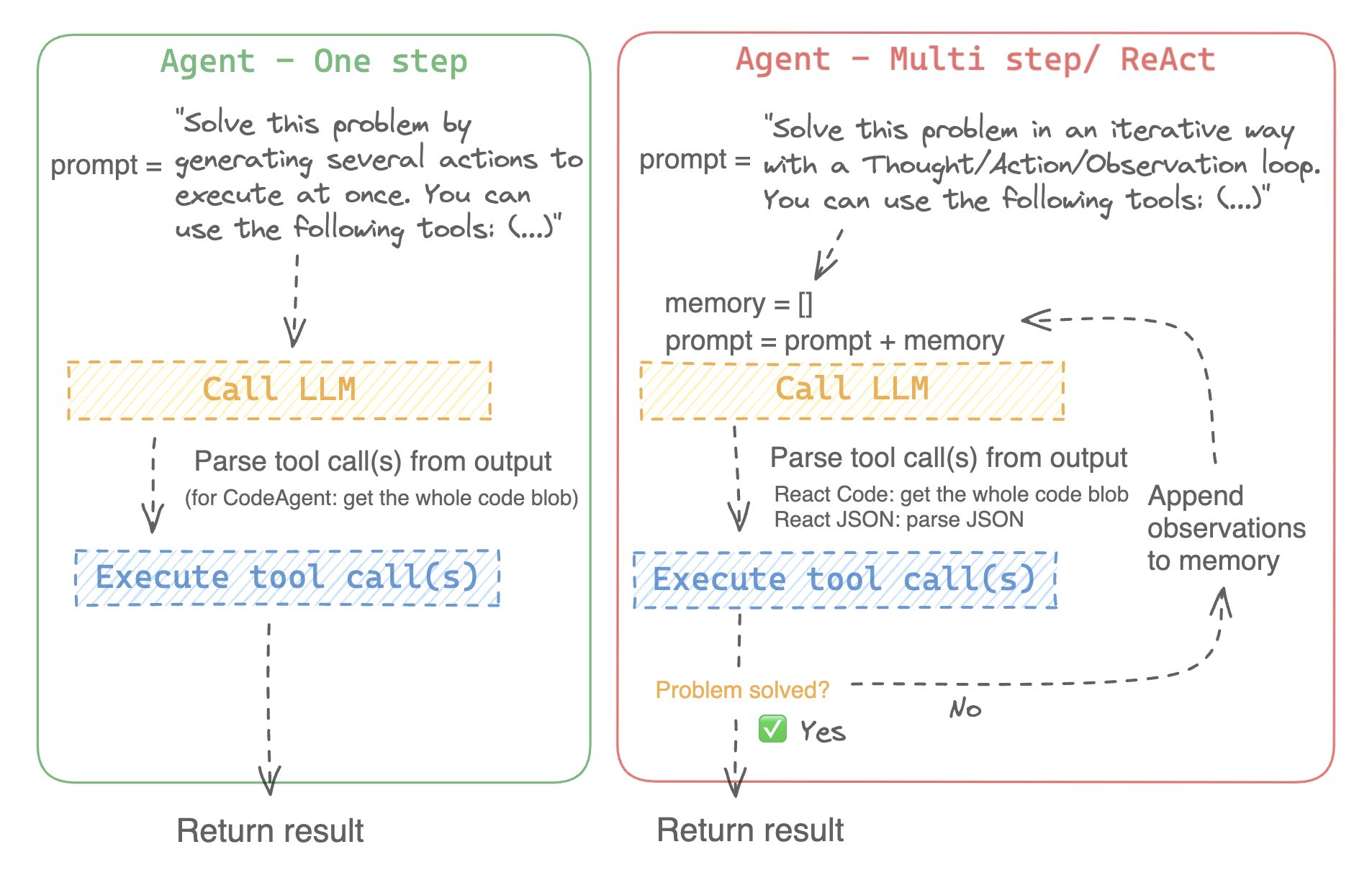
يمكن للنظم اللغوية الكبيرة (LLMs) التي تم تدريبها على أداء [نمذجة اللغة السببية](./tasks/language_modeling.) التعامل مع مجموعة واسعة من المهام، ولكنها غالبًا ما تواجه صعوبات في المهام الأساسية مثل المنطق والحساب والبحث. وعندما يتم استدعاؤها في مجالات لا تؤدي فيها أداءً جيدًا، فإنها غالبًا ما تفشل في توليد الإجابة التي نتوقعها منها.
|
||||
|
||||
يتمثل أحد النهج للتغلب على هذا القصور في إنشاء "وكيل".
|
||||
|
||||
الوكيل هو نظام يستخدم LLM كمحرك له، ولديه حق الوصول إلى وظائف تسمى "أدوات".
|
||||
|
||||
هذه "الأدوات" هي وظائف لأداء مهمة، وتحتوي على جميع الأوصاف اللازمة للوكيل لاستخدامها بشكل صحيح.
|
||||
|
||||
يمكن برمجة الوكيل للقيام بما يلي:
|
||||
- وضع سلسلة من الإجراءات/الأدوات وتشغيلها جميعًا في نفس الوقت مثل [`CodeAgent`] على سبيل المثال
|
||||
- التخطيط للاجراءات/الأدوات وتنفيذها واحدة تلو الأخرى والانتظار حتى انتهاء كل إجراء قبل إطلاق التالي مثل [`ReactJsonAgent`] على سبيل المثال
|
||||
|
||||
### أنواع الوكلاء
|
||||
|
||||
#### الوكيل البرمجي (Code agent)
|
||||
|
||||
يتمتع هذا الوكيل يتبع خطوات محددة: أولًا، يخطط لسلسلة من الإجراءات التي يريد تنفيذها، ثم شفرة Python لتنفيذ جميع الإجراءات في نفس الوقت. وهو يتعامل بشكل أصلي مع أنواع مختلفة من المدخلات والمخرجات للأدوات التي يستخدمها، وبالتالي فهو الخيار الموصى به للمهام متعددة الوسائط.
|
||||
|
||||
#### وكلاء التفاعل
|
||||
|
||||
هذا هو الوكيل الذي يتم اللجوء إليه لحل مهام الاستدلال، حيث يجعل إطار ReAct ([Yao et al.، 2022](https://huggingface.co/papers/2210.03629)) من الكفاءة حقًا التفكير على أساس ملاحظاته السابقة.
|
||||
|
||||
نقوم بتنفيذ إصدارين من ReactJsonAgent:
|
||||
- [`ReactJsonAgent`] يقوم بتوليد استدعاءات الأدوات كـ JSON في إخراجها.
|
||||
- [`ReactCodeAgent`] هو نوع جديد من ReactJsonAgent يقوم بتوليد استدعاءات أدواته كمقاطع من التعليمات البرمجية، والتي تعمل بشكل جيد حقًا مع LLMs التي تتمتع بأداء قوي في البرمجة.
|
||||
|
||||
> [!TIP]
|
||||
> اقرأ منشور المدونة [Open-source LLMs as LangChain Agents](https://huggingface.co/blog/open-source-llms-as-agents) لمعرفة المزيد عن وكيل ReAct.
|
||||
|
||||
|
||||
|
||||
على سبيل المثال، إليك كيف يعمل وكيل ReAct Code طريقه من خلال السؤال التالي.
|
||||
|
||||
```py3
|
||||
>>> agent.run(
|
||||
... "How many more blocks (also denoted as layers) in BERT base encoder than the encoder from the architecture proposed in Attention is All You Need?",
|
||||
... )
|
||||
=====New task=====
|
||||
How many more blocks (also denoted as layers) in BERT base encoder than the encoder from the architecture proposed in Attention is All You Need?
|
||||
====Agent is executing the code below:
|
||||
bert_blocks = search(query="number of blocks in BERT base encoder")
|
||||
print("BERT blocks:", bert_blocks)
|
||||
====
|
||||
Print outputs:
|
||||
BERT blocks: twelve encoder blocks
|
||||
|
||||
====Agent is executing the code below:
|
||||
attention_layer = search(query="number of layers in Attention is All You Need")
|
||||
print("Attention layers:", attention_layer)
|
||||
====
|
||||
Print outputs:
|
||||
Attention layers: Encoder: The encoder is composed of a stack of N = 6 identical layers. Each layer has two sub-layers. The first is a multi-head self-attention mechanism, and the second is a simple, position- 2 Page 3 Figure 1: The Transformer - model architecture.
|
||||
|
||||
====Agent is executing the code below:
|
||||
bert_blocks = 12
|
||||
attention_layers = 6
|
||||
diff = bert_blocks - attention_layers
|
||||
print("Difference in blocks:", diff)
|
||||
final_answer(diff)
|
||||
====
|
||||
|
||||
Print outputs:
|
||||
Difference in blocks: 6
|
||||
|
||||
Final answer: 6
|
||||
```
|
||||
|
||||
### كيف يمكنني بناء وكيل؟
|
||||
|
||||
لتهيئة وكيل، تحتاج إلى هذه الوسائط:
|
||||
|
||||
- نموذج لغوي كبير (LLM) يشكل المحرك الأساسي للوكيل. الوكيل نفسه ليس النموذج اللغوي، بل هو برنامج يستخدم النموذج اللغوي كمحرك له.
|
||||
- موجه النظام (system prompt): هذه هي التعليمات التي يتم إعطاؤها للنموذج اللغوي لإنشاء مخرجاته.
|
||||
- صندوق أدوات (toolbox) يختار الوكيل منه الأدوات لتنفيذها
|
||||
- محلل (parser) لاستخراج الأدوات التي يجب استدعاؤها من مخرجات النموذج اللغوي LLM والأدوات التي يجب استخدامها
|
||||
|
||||
عند تهيئة نظام الوكيل، يتم استخدام سمات الأداة لإنشاء وصف للأداة، ثم يتم دمجها في موجه النظام الخاص `system_prompt` للوكيل لإعلامه بالأدوات التي يمكنه استخدامها ولماذا.
|
||||
|
||||
للبدء، يرجى تثبيت `agents` الإضافية لتثبيت جميع التبعيات الافتراضية.
|
||||
|
||||
```bash
|
||||
pip install transformers[agents]
|
||||
```
|
||||
|
||||
قم ببناء محرك LLM الخاص بك من خلال تعريف طريقة `llm_engine` التي تقبل قائمة من [الرسائل](./chat_templating.) وتعيد النص. يجب أن تقبل هذه الدالة القابلة للاستدعاء أيضًا معامل `stop` يشير إلى متى يجب التوقف عن التوليد.
|
||||
|
||||
```python
|
||||
from huggingface_hub import login, InferenceClient
|
||||
|
||||
login("<YOUR_HUGGINGFACEHUB_API_TOKEN>")
|
||||
|
||||
client = InferenceClient(model="meta-llama/Meta-Llama-3-70B-Instruct")
|
||||
|
||||
def llm_engine(messages, stop_sequences=["Task"]) -> str:
|
||||
response = client.chat_completion(messages, stop=stop_sequences, max_tokens=1000)
|
||||
answer = response.choices[0].message.content
|
||||
return answer
|
||||
```
|
||||
|
||||
يمكنك استخدام أي طريقة `llm_engine` طالما أنها:
|
||||
1. يتبع تنسيق [رسائل](./chat_templating.md) لإدخاله (`List [Dict [str، str]]`) ويعيد `str`
|
||||
2. يتوقف عن توليد المخراجات من التسلسلات التي تم تمريرها في معامل `stop`
|
||||
|
||||
أنت بحاجة أيضًا إلى معامل "الأدوات" الذي يقبل قائمة من "الأدوات". يمكنك توفير قائمة فارغة لـ "الأدوات"، ولكن استخدم صندوق الأدوات الافتراضي مع معامل اختياري `add_base_tools=True`.
|
||||
|
||||
الآن يمكنك إنشاء وكيل، مثل [`CodeAgent`], وتشغيله. ولتسهيل الأمر، نقدم أيضًا فئة [`HfEngine`] التي تستخدم `huggingface_hub.InferenceClient` بشكل مخفى.
|
||||
|
||||
```python
|
||||
from transformers import CodeAgent, HfEngine
|
||||
|
||||
llm_engine = HfEngine(model="meta-llama/Meta-Llama-3-70B-Instruct")
|
||||
agent = CodeAgent(tools=[], llm_engine=llm_engine, add_base_tools=True)
|
||||
|
||||
agent.run(
|
||||
"Could you translate this sentence from French, say it out loud and return the audio.",
|
||||
sentence="Où est la boulangerie la plus proche?",
|
||||
)
|
||||
```
|
||||
|
||||
هذه الميزة ستكون مفيدة في حالة الحاجة الملحة! يمكنك حتى ترك معامل `llm_engine` غير محدد، وسيتم إنشاء [`HfEngine`] بشكل تلقائي.
|
||||
|
||||
```python
|
||||
from transformers import CodeAgent
|
||||
|
||||
agent = CodeAgent(tools=[], add_base_tools=True)
|
||||
|
||||
agent.run(
|
||||
"Could you translate this sentence from French, say it out loud and give me the audio.",
|
||||
sentence="Où est la boulangerie la plus proche?",
|
||||
)
|
||||
```
|
||||
|
||||
لاحظ أننا استخدمنا معامل "sentence" إضافي: يمكنك تمرير النص كمعامل إضافي إلى النموذج.
|
||||
|
||||
يمكنك أيضًا استخدام هذا للإشارة إلى مسار الملفات المحلية أو البعيدة للنموذج لاستخدامها:
|
||||
|
||||
```py
|
||||
from transformers import ReactCodeAgent
|
||||
|
||||
agent = ReactCodeAgent(tools=[], llm_engine=llm_engine, add_base_tools=True)
|
||||
|
||||
agent.run("Why does Mike not know many people in New York?", audio="https://huggingface.co/datasets/huggingface/documentation-images/resolve/main/transformers/recording.mp3")
|
||||
```
|
||||
|
||||
|
||||
تم تحديد موجه النظام ومحلل المخرجات تلقائيًا، ولكن يمكنك فحصهما بسهولة عن طريق استدعاء `system_prompt_template` على وكيلك.
|
||||
|
||||
```python
|
||||
print(agent.system_prompt_template)
|
||||
```
|
||||
|
||||
من المهم أن تشرح بأكبر قدر ممكن من الوضوح المهمة التي تريد تنفيذها.
|
||||
كل عملية [`~Agent.run`] مستقلة، وبما أن الوكيل مدعوم من LLM، فقد تؤدي الاختلافات الطفيفة في موجهك إلى نتائج مختلفة تمامًا.
|
||||
يمكنك أيضًا تشغيل وكيل بشكل متتالي لمهام مختلفة: في كل مرة يتم فيها إعادة تهيئة سمتي `agent.task` و`agent.logs`.
|
||||
|
||||
|
||||
#### تنفيذ التعليمات البرمجية
|
||||
|
||||
يقوم مفسر Python بتنفيذ التعليمات البرمجية على مجموعة من المدخلات التي يتم تمريرها جنبًا إلى جنب مع أدواتك.
|
||||
يجب أن يكون هذا الأمر آمنًا لأن الوظائف الوحيدة التي يمكن استدعاؤها هي الأدوات التي قدمتها (خاصة إذا كانت أدوات من Hugging Face فقط) ووظيفة الطباعة، لذا فأنت مقيد بالفعل بما يمكن تنفيذه.
|
||||
|
||||
مفسر Python لا يسمح أيضًا باستدعاء دوال بشكل افتراضي خارج قائمة آمنة، لذا فإن جميع الهجمات الأكثر وضوحًا لا ينبغي أن تكون مشكلة.
|
||||
يمكنك أيضًا الإذن باستيرادات إضافية عن طريق تمرير الوحدات النمطية المصرح بها كقائمة من السلاسل في معامل `additional_authorized_imports` عند تهيئة [`ReactCodeAgent`] أو [`CodeAgent`]:
|
||||
|
||||
```py
|
||||
>>> from transformers import ReactCodeAgent
|
||||
|
||||
>>> agent = ReactCodeAgent(tools=[], additional_authorized_imports=['requests', 'bs4'])
|
||||
>>> agent.run("Could you get me the title of the page at url 'https://huggingface.co/blog'?")
|
||||
|
||||
(...)
|
||||
'Hugging Face – Blog'
|
||||
```
|
||||
|
||||
سيتم إيقاف التنفيذ عند أي رمز يحاول تنفيذ عملية غير قانونية أو إذا كان هناك خطأ Python عادي في التعليمات البرمجية التي تم إنشاؤها بواسطة الوكيل.
|
||||
|
||||
> [!WARNING]
|
||||
> يمكن لـ LLM توليد شفرة برمجية عشوائية سيتم تنفيذها بعد ذلك: لا تقمب استدعاء أى دوال غير آمنة!
|
||||
|
||||
### موجه النظام
|
||||
|
||||
ينشئ الوكيل، أو بالأحرى LLM الذي يقود الوكيل، يولد مخرجات بناءً على موجه النظام. يمكن تخصيص موجه النظام وتصميمه للمهام المقصودة. على سبيل المثال، تحقق من موجه النظام لـ [`ReactCodeAgent`] (الإصدار أدناه مبسط قليلاً).
|
||||
|
||||
```text
|
||||
You will be given a task to solve as best you can.
|
||||
You have access to the following tools:
|
||||
<<tool_descriptions>>
|
||||
|
||||
To solve the task, you must plan forward to proceed in a series of steps, in a cycle of 'Thought:', 'Code:', and 'Observation:' sequences.
|
||||
|
||||
At each step, in the 'Thought:' sequence, you should first explain your reasoning towards solving the task, then the tools that you want to use.
|
||||
Then in the 'Code:' sequence, you should write the code in simple Python. The code sequence must end with '/End code' sequence.
|
||||
During each intermediate step, you can use 'print()' to save whatever important information you will then need.
|
||||
These print outputs will then be available in the 'Observation:' field, for using this information as input for the next step.
|
||||
|
||||
In the end you have to return a final answer using the `final_answer` tool.
|
||||
|
||||
Here are a few examples using notional tools:
|
||||
---
|
||||
{examples}
|
||||
|
||||
Above example were using notional tools that might not exist for you. You only have access to those tools:
|
||||
<<tool_names>>
|
||||
You also can perform computations in the python code you generate.
|
||||
|
||||
Always provide a 'Thought:' and a 'Code:\n```py' sequence ending with '```<end_code>' sequence. You MUST provide at least the 'Code:' sequence to move forward.
|
||||
|
||||
Remember to not perform too many operations in a single code block! You should split the task into intermediate code blocks.
|
||||
Print results at the end of each step to save the intermediate results. Then use final_answer() to return the final result.
|
||||
|
||||
Remember to make sure that variables you use are all defined.
|
||||
|
||||
Now Begin!
|
||||
```
|
||||
|
||||
يتضمن موجه النظام:
|
||||
- *مقدمة* تشرح كيف يجب أن يتصرف الوكيل والأدوات التي يجب عليه استخدامها.
|
||||
- وصف لجميع الأدوات التي يتم تحديدها بواسطة رمز `<<tool_descriptions>>` الذي يتم استبداله ديناميكيًا في وقت التشغيل بالأدوات التي يحددها المستخدم أو يختارها.
|
||||
- يأتي وصف الأداة من سمات الأداة، `name`، و`description`، و`inputs` و`output_type`، وقالب `jinja2` بسيط يمكنك تحسينه.
|
||||
- شكل المخرج المتوقع.
|
||||
|
||||
يمكنك تحسين موجه النظام، على سبيل المثال، عن طريق إضافة شرح لتنسيق المخرجات.
|
||||
|
||||
للحصول على أقصى قدر من المرونة، يمكنك الكتابة فوق قالب موجه النظام بالكامل عن طريق تمرير موجه مخصص كمعامل إلى معلمة `system_prompt`.
|
||||
|
||||
```python
|
||||
from transformers import ReactJsonAgent
|
||||
from transformers.agents import PythonInterpreterTool
|
||||
|
||||
agent = ReactJsonAgent(tools=[PythonInterpreterTool()], system_prompt="{your_custom_prompt}")
|
||||
```
|
||||
|
||||
> [!WARNING]
|
||||
> يرجى التأكد من تحديد سلسلة `<<tool_descriptions>>` في مكان ما في `template` حتى يكون الوكيل على علم
|
||||
بالأدوات المتاحة.
|
||||
|
||||
|
||||
### فحص تشغيل الوكيل
|
||||
|
||||
فيما يلي بعض السمات المفيدة لفحص ما حدث بعد التشغيل:
|
||||
- تخزن `agent.logs` سجلات مفصلة للوكيل. في كل خطوة من تشغيل الوكيل، يتم تخزين كل شيء في قاموس إلحاقه بـ `agent.logs`.
|
||||
- تشغيل `agent.write_inner_memory_from_logs()` يخلق ذاكرة داخلية لسجلات الوكيل للنظام LLM لعرضها، كقائمة من رسائل الدردشة. تنتقل هذه الطريقة عبر كل خطوة من سجل الوكيل ولا تخزن سوى ما يهمها كرسالة: على سبيل المثال، سيحفظ موجه النظام والمهمة في رسائل منفصلة، ثم لكل خطوة سيخزن مخرج LLM كرسالة، ومخرج استدعاء الأداة كرسالة أخرى. استخدم هذا إذا كنت تريد عرضًا عامًا لما حدث - ولكن لن يتم نسخ كل سجل بواسطة هذه الطريقة.
|
||||
|
||||
## الأدوات
|
||||
|
||||
الأداة هي عبارة عن وظيفة أساسية يستخدمها الوكيل لتنفيذ مهمة محددة.
|
||||
|
||||
يمكنك على سبيل المثال التحقق من [`PythonInterpreterTool`]: لديه اسم ووصف ووصف للمدخلات ونوع للمخرج، وطريقة `__call__` التي تقوم بتنفيذ المهمة المطلوبة.
|
||||
|
||||
عند تهيئة الوكيل، يتم استخدام سمات الأداة لتوليد وصف للأداة يتم تضمينه في موجه النظام الخاص بالوكيل. يتيح هذا للوكيل معرفة الأدوات التي يمكنه استخدامها ولماذا.
|
||||
|
||||
### صندوق الأدوات الافتراضي
|
||||
|
||||
يأتي Transformers مع صندوق أدوات افتراضي لتمكين الوكلاء، والذي يمكنك إضافته إلى وكيلك عند التهيئة باستخدام معامل `add_base_tools = True`:
|
||||
|
||||
- **الإجابة على أسئلة المستند**: الإجابة على سؤال حول المستند (مثل ملف PDF) بتنسيق صورة ([Donut](./model_doc/donut))
|
||||
- **الإجابة على أسئلة الصور**: الإجابة على سؤال حول صورة ([VILT](./model_doc/vilt))
|
||||
- **التحدث إلى النص**: قم بتفريغ الكلام إلى نص ([Whisper](./model_doc/whisper))
|
||||
- **النص إلى كلام**: تحويل النص إلى كلام ([SpeechT5](./model_doc/speecht5))
|
||||
- **الترجمة**: ترجمة جملة معينة من لغة المصدر إلى لغة الهدف.
|
||||
- **مفسر كود Python**: تشغيل كود Python الذي تم إنشاؤه بواسطة LLM في بيئة آمنة. لن يتم إضافة هذه الأداة إلى [`ReactJsonAgent`] إلا إذا استخدمت `add_base_tools=True`، نظرًا لأن الأدوات المستندة إلى التعليمات البرمجية يمكنها بالفعل تنفيذ كود Python
|
||||
لا تترجم النصوص الخاصة ولا الأكواد البرمجية ولا الروابط ولا رموز HTML وCSS:
|
||||
|
||||
يمكنك استخدام أداة يدويًا عن طريق استدعاء دالة [`load_tool`] وتحديد مهمة لتنفيذها.
|
||||
|
||||
```python
|
||||
from transformers import load_tool
|
||||
|
||||
tool = load_tool("text-to-speech")
|
||||
audio = tool("This is a text to speech tool")
|
||||
```
|
||||
|
||||
### إنشاء أداة جديدة
|
||||
|
||||
يمكنك إنشاء أداتك الخاصة لتغطية حالات الاستخدام التي لا تغطيها الأدوات الافتراضية من Hugging Face.
|
||||
على سبيل المثال، دعنا نقوم بإنشاء أداة تعرض النموذج الأكثر تنزيلًا لمهمة معينة من Hub.
|
||||
|
||||
سوف نبدأ بالكود التالي.
|
||||
|
||||
```python
|
||||
from huggingface_hub import list_models
|
||||
|
||||
task = "text-classification"
|
||||
|
||||
model = next(iter(list_models(filter=task, sort="downloads", direction=-1)))
|
||||
print(model.id)
|
||||
```
|
||||
|
||||
يمكن تحويل هذه الشيفرة إلى فئة ترث من الفئة العليا [`Tool`].
|
||||
|
||||
تحتاج الأداة المخصصة إلى:
|
||||
|
||||
- اسم `name`، والتي تمثل اسم الأداة نفسها. عادةً ما يصف الاسم وظيفتها. بما أن الكود يعيد النموذج الأكثر تنزيلًا لمهمة ما، فلنسمها `model_download_counter`.
|
||||
- تستخدم خاصية `description` لملء موجه نظام الوكيل.
|
||||
- خاصية `inputs`، والتي هي عبارة عن قاموس بمفاتيح "type" و"description". يحتوي على معلومات تساعد المفسر Python على اتخاذ خيارات مستنيرة بشأن المدخلات.
|
||||
- خاصية `output_type`، والتي تحدد نوع المخرج.
|
||||
- طريقة `forward` والتي تحتوي على الكود الذي سيتم تنفيذه للحصول على النتيجة النهائية.
|
||||
|
||||
```python
|
||||
from transformers import Tool
|
||||
from huggingface_hub import list_models
|
||||
|
||||
class HFModelDownloadsTool(Tool):
|
||||
name = "model_download_counter"
|
||||
description = (
|
||||
"This is a tool that returns the most downloaded model of a given task on the Hugging Face Hub. "
|
||||
"It returns the name of the checkpoint."
|
||||
)
|
||||
|
||||
inputs = {
|
||||
"task": {
|
||||
"type": "text",
|
||||
"description": "the task category (such as text-classification, depth-estimation, etc)",
|
||||
}
|
||||
}
|
||||
output_type = "text"
|
||||
|
||||
def forward(self, task: str):
|
||||
model = next(iter(list_models(filter=task, sort="downloads", direction=-1)))
|
||||
return model.id
|
||||
```
|
||||
|
||||
الآن بعد أن أصبحت فئة `HfModelDownloadsTool` المخصصة جاهزة، يمكنك حفظها في ملف باسم `model_downloads.py` واستيرادها للاستخدام.
|
||||
|
||||
```python
|
||||
from model_downloads import HFModelDownloadsTool
|
||||
|
||||
tool = HFModelDownloadsTool()
|
||||
```
|
||||
|
||||
يمكنك أيضًا مشاركة أداتك المخصصة في Hub عن طريق استدعاء [`~Tool.push_to_hub`] على الأداة. تأكد من أنك قمت بإنشاء مستودع لها على Hub وأنك تستخدم رمز وصول للقراءة.
|
||||
|
||||
```python
|
||||
tool.push_to_hub("{your_username}/hf-model-downloads")
|
||||
```
|
||||
|
||||
قم بتحميل الأداة باستخدام دالة [`~Tool.load_tool`] ومررها إلى معلمة `tools` في الوكيل الخاص بك.
|
||||
|
||||
```python
|
||||
from transformers import load_tool, CodeAgent
|
||||
|
||||
model_download_tool = load_tool("m-ric/hf-model-downloads")
|
||||
agent = CodeAgent(tools=[model_download_tool], llm_engine=llm_engine)
|
||||
agent.run(
|
||||
"Can you give me the name of the model that has the most downloads in the 'text-to-video' task on the Hugging Face Hub?"
|
||||
)
|
||||
```
|
||||
|
||||
ستحصل على ما يلي:
|
||||
|
||||
```text
|
||||
======== New task ========
|
||||
Can you give me the name of the model that has the most downloads in the 'text-to-video' task on the Hugging Face Hub?
|
||||
==== Agent is executing the code below:
|
||||
most_downloaded_model = model_download_counter(task="text-to-video")
|
||||
print(f"The most downloaded model for the 'text-to-video' task is {most_downloaded_model}.")
|
||||
====
|
||||
```
|
||||
|
||||
والناتج:
|
||||
|
||||
`"النموذج الأكثر تنزيلًا لمهمة `text-to-video` هو ByteDance/AnimateDiff-Lightning."`
|
||||
|
||||
### إدارة صندوق أدوات الوكيل الخاص بك
|
||||
|
||||
إذا كنت قد قمت بتهيئة وكيل، فمن غير الملائم إعادة تهيئته من البداية لإضافة أداة جديدة ترغب في استخدامها. باستخدام مكتبة Transformers، يمكنك إدارة صندوق أدوات الوكيل بإضافة أو استبدال أداة موجودة.
|
||||
|
||||
دعنا نضيف الأداة `model_download_tool` إلى وكيل تم تهيئته مسبقًا باستخدام صندوق الأدوات الافتراضي.
|
||||
|
||||
```python
|
||||
from transformers import CodeAgent
|
||||
|
||||
agent = CodeAgent(tools=[], llm_engine=llm_engine, add_base_tools=True)
|
||||
agent.toolbox.add_tool(model_download_tool)
|
||||
```
|
||||
|
||||
الآن يمكننا الاستفادة من الأداة الجديدة وأداة تحويل النص إلى كلام السابقة:
|
||||
|
||||
```python
|
||||
agent.run(
|
||||
"Can you read out loud the name of the model that has the most downloads in the 'text-to-video' task on the Hugging Face Hub and return the audio?"
|
||||
)
|
||||
```
|
||||
|
||||
| **Audio** |
|
||||
|------------------------------------------------------------------------------------------------------------------------------------------------------|
|
||||
| <audio controls><source src="https://huggingface.co/datasets/huggingface/documentation-images/resolve/main/transformers/damo.wav" type="audio/wav"/> |
|
||||
|
||||
> [!WARNING]
|
||||
> احترس عند إضافة أدوات إلى وكيل يعمل بالفعل لأنه يمكن أن يؤثر على اختيار الأداة لصالح أداتك أو اختيار أداة أخرى غير المحددة بالفعل.
|
||||
|
||||
استخدم طريقة `agent.toolbox.update_tool()` لاستبدال أداة موجودة في صندوق أدوات الوكيل.
|
||||
هذا مفيد إذا كانت أداتك الجديدة بديلاً مباشرًا للأداة الموجودة لأن الوكيل يعرف بالفعل كيفية تنفيذ تلك المهمة المحددة.
|
||||
تأكد فقط من اتباع الأداة الجديدة لنفس واجهة برمجة التطبيقات (API) للأداة المستبدلة أو قم بتكييف قالب موجه النظام لضمان تحديث جميع الأمثلة التي تستخدم الأداة المستبدلة.
|
||||
|
||||
### استخدام مجموعة من الأدوات
|
||||
|
||||
يمكنك الاستفادة من مجموعات الأدوات باستخدام كائن ToolCollection، مع تحديد مجموعة الأدوات التي تريد استخدامها.
|
||||
ثم قم بتمريرها كقائمة لتهيئة الوكيل الخاص بك، وبدء استخدامها!
|
||||
|
||||
```py
|
||||
from transformers import ToolCollection, ReactCodeAgent
|
||||
|
||||
image_tool_collection = ToolCollection(collection_slug="huggingface-tools/diffusion-tools-6630bb19a942c2306a2cdb6f")
|
||||
agent = ReactCodeAgent(tools=[*image_tool_collection.tools], add_base_tools=True)
|
||||
|
||||
agent.run("Please draw me a picture of rivers and lakes.")
|
||||
```
|
||||
|
||||
لتسريع البداية، يتم تحميل الأدوات فقط إذا استدعاها الوكيل.
|
||||
|
||||
ستحصل على هذه الصورة:
|
||||
|
||||
<img src="https://huggingface.co/datasets/huggingface/documentation-images/resolve/main/transformers/rivers_and_lakes.png" />
|
||||
|
||||
### استخدام gradio-tools
|
||||
|
||||
[gradio-tools](https://github.com/freddyaboulton/gradio-tools) هي مكتبة قوية تتيح استخدام Hugging
|
||||
Face Spaces كأدوات. تدعم العديد من المساحات الموجودة بالإضافة إلى مساحات مخصصة.
|
||||
|
||||
تدعم مكتبة Transformers `gradio_tools` باستخدام طريقة [`Tool.from_gradio`] في الفئة. على سبيل المثال، دعنا نستخدم [`StableDiffusionPromptGeneratorTool`](https://github.com/freddyaboulton/gradio-tools/blob/main/gradio_tools/tools/prompt_generator.py) من مجموعة أدوات `gradio-tools` لتحسين المطالبات لإنشاء صور أفضل.
|
||||
|
||||
استورد وقم بتهيئة الأداة، ثم مررها إلى طريقة `Tool.from_gradio`:
|
||||
|
||||
```python
|
||||
from gradio_tools import StableDiffusionPromptGeneratorTool
|
||||
from transformers import Tool, load_tool, CodeAgent
|
||||
|
||||
gradio_prompt_generator_tool = StableDiffusionPromptGeneratorTool()
|
||||
prompt_generator_tool = Tool.from_gradio(gradio_prompt_generator_tool)
|
||||
```
|
||||
|
||||
الآن يمكنك استخدامه مثل أي أداة أخرى. على سبيل المثال، دعنا نحسن الموجه `a rabbit wearing a space suit`.
|
||||
|
||||
```python
|
||||
image_generation_tool = load_tool('huggingface-tools/text-to-image')
|
||||
agent = CodeAgent(tools=[prompt_generator_tool, image_generation_tool], llm_engine=llm_engine)
|
||||
|
||||
agent.run(
|
||||
"Improve this prompt, then generate an image of it.", prompt='A rabbit wearing a space suit'
|
||||
)
|
||||
```
|
||||
|
||||
يستفيد النموذج بشكل كافٍ من الأداة:
|
||||
|
||||
```text
|
||||
======== New task ========
|
||||
Improve this prompt, then generate an image of it.
|
||||
You have been provided with these initial arguments: {'prompt': 'A rabbit wearing a space suit'}.
|
||||
==== Agent is executing the code below:
|
||||
improved_prompt = StableDiffusionPromptGenerator(query=prompt)
|
||||
while improved_prompt == "QUEUE_FULL":
|
||||
improved_prompt = StableDiffusionPromptGenerator(query=prompt)
|
||||
print(f"The improved prompt is {improved_prompt}.")
|
||||
image = image_generator(prompt=improved_prompt)
|
||||
====
|
||||
```
|
||||
|
||||
قبل إنشاء الصورة أخيرًا:
|
||||
|
||||
<img src="https://huggingface.co/datasets/huggingface/documentation-images/resolve/main/transformers/rabbit_spacesuit_flux.webp" />
|
||||
|
||||
> [!WARNING]
|
||||
> تتطلب gradio-tools إدخالات وإخراجات *نصية* حتى عند العمل مع طرائق مختلفة مثل كائنات الصور والصوت. الإدخالات والإخراجات الصورية والصوتية غير متوافقة حاليًا.
|
||||
|
||||
### استخدام أدوات LangChain
|
||||
|
||||
نحن نحب Langchain ونعتقد أنها تحتوي على مجموعة أدوات قوية للغاية.
|
||||
لاستيراد أداة من LangChain، استخدم الطريقة `from_langchain()`.
|
||||
|
||||
فيما يلي كيفية استخدامها لإعادة إنشاء نتيجة البحث في المقدمة باستخدام أداة بحث الويب LangChain.
|
||||
|
||||
```python
|
||||
from langchain.agents import load_tools
|
||||
from transformers import Tool, ReactCodeAgent
|
||||
|
||||
search_tool = Tool.from_langchain(load_tools(["serpapi"])[0])
|
||||
|
||||
agent = ReactCodeAgent(tools=[search_tool])
|
||||
|
||||
agent.run("How many more blocks (also denoted as layers) in BERT base encoder than the encoder from the architecture proposed in Attention is All You Need?")
|
||||
```
|
||||
|
||||
## واجهة Gradio
|
||||
|
||||
يمكنك الاستفادة من `gradio.Chatbot` لعرض أفكار الوكيل الخاص بك باستخدام `stream_to_gradio`، إليك مثال:
|
||||
|
||||
```py
|
||||
import gradio as gr
|
||||
from transformers import (
|
||||
load_tool,
|
||||
ReactCodeAgent,
|
||||
HfEngine,
|
||||
stream_to_gradio,
|
||||
)
|
||||
|
||||
# Import tool from Hub
|
||||
image_generation_tool = load_tool("m-ric/text-to-image")
|
||||
|
||||
llm_engine = HfEngine("meta-llama/Meta-Llama-3-70B-Instruct")
|
||||
|
||||
# Initialize the agent with the image generation tool
|
||||
agent = ReactCodeAgent(tools=[image_generation_tool], llm_engine=llm_engine)
|
||||
|
||||
|
||||
def interact_with_agent(task):
|
||||
messages = []
|
||||
messages.append(gr.ChatMessage(role="user", content=task))
|
||||
yield messages
|
||||
for msg in stream_to_gradio(agent, task):
|
||||
messages.append(msg)
|
||||
yield messages + [
|
||||
gr.ChatMessage(role="assistant", content="⏳ Task not finished yet!")
|
||||
]
|
||||
yield messages
|
||||
|
||||
|
||||
with gr.Blocks() as demo:
|
||||
text_input = gr.Textbox(lines=1, label="Chat Message", value="Make me a picture of the Statue of Liberty.")
|
||||
submit = gr.Button("Run illustrator agent!")
|
||||
chatbot = gr.Chatbot(
|
||||
label="Agent",
|
||||
type="messages",
|
||||
avatar_images=(
|
||||
None,
|
||||
"https://em-content.zobj.net/source/twitter/53/robot-face_1f916.png",
|
||||
),
|
||||
)
|
||||
submit.click(interact_with_agent, [text_input], [chatbot])
|
||||
|
||||
if __name__ == "__main__":
|
||||
demo.launch()
|
||||
```
|
||||
@@ -77,7 +77,7 @@ model = AutoModelForCausalLM.from_pretrained(model_id, gguf_file=filename)
|
||||
|
||||
الآن لديك إمكانية الوصول إلى النسخة الكامل غير المكممة للنموذج في بيئة PyTorch، حيث يمكنك دمجه مع مجموعة كبيرة من الأدوات الأخرى.
|
||||
|
||||
لإعادة التحويل إلى ملف `gguf`، نوصي باستخدام ملف [`convert-hf-to-gguf.py`](https://github.com/ggerganov/llama.cpp/blob/master/convert_hf_to_gguf.py) من llama.cpp.
|
||||
لإعادة التحويل إلى ملف `gguf`، نوصي باستخدام ملف [`convert-hf-to-gguf.py`](https://github.com/ggerganov/llama.cpp/blob/master/convert-hf-to-gguf.py) من llama.cpp.
|
||||
|
||||
فيما يلي كيفية إكمال البرنامج النصي أعلاه لحفظ النموذج وإعادة تصديره مرة أخرى إلى `gguf`:
|
||||
|
||||
|
||||
@@ -674,7 +674,29 @@ use_cpu: false
|
||||
```
|
||||
|
||||
</hfoption>
|
||||
<hfoption id="Tensor Parallelism with PyTorch 2">
|
||||
|
||||
```yml
|
||||
compute_environment: LOCAL_MACHINE
|
||||
tp_config:
|
||||
tp_size: 4
|
||||
distributed_type: TP
|
||||
downcast_bf16: 'no'
|
||||
machine_rank: 0
|
||||
main_training_function: main
|
||||
mixed_precision: 'no'
|
||||
num_machines: 1
|
||||
num_processes: 4
|
||||
rdzv_backend: static
|
||||
same_network: true
|
||||
tpu_env: []
|
||||
tpu_use_cluster: false
|
||||
tpu_use_sudo: false
|
||||
use_cpu: false
|
||||
|
||||
```
|
||||
|
||||
</hfoption>
|
||||
</hfoptions>
|
||||
يُعد أمر [`accelerate_launch`](https://huggingface.co/docs/accelerate/package_reference/cli#accelerate-launch) هو الطريقة المُوصى بها لتشغيل نص البرمجى للتدريب على نظام موزع باستخدام Accelerate و [`Trainer`] مع المعلمات المحددة في `config_file.yaml`. يتم حفظ هذا الملف في مجلد ذاكرة التخزين المؤقت لـ Accelerate ويتم تحميله تلقائيًا عند تشغيل `accelerate_launch`.
|
||||
|
||||
|
||||
@@ -23,6 +23,8 @@
|
||||
title: Laden und Trainieren von Adaptern mit 🤗 PEFT
|
||||
- local: model_sharing
|
||||
title: Ein Modell teilen
|
||||
- local: transformers_agents
|
||||
title: Agents
|
||||
- local: llm_tutorial
|
||||
title: Generation with LLMs
|
||||
title: Tutorials
|
||||
@@ -37,4 +39,4 @@
|
||||
title: Testen
|
||||
- local: pr_checks
|
||||
title: Überprüfung einer Pull Request
|
||||
title: Contribute
|
||||
title: Contribute
|
||||
323
docs/source/de/transformers_agents.md
Normal file
323
docs/source/de/transformers_agents.md
Normal file
@@ -0,0 +1,323 @@
|
||||
<!--Copyright 2023 The HuggingFace Team. All rights reserved.
|
||||
|
||||
Licensed under the Apache License, Version 2.0 (the "License"); you may not use this file except in compliance with
|
||||
the License. You may obtain a copy of the License at
|
||||
|
||||
http://www.apache.org/licenses/LICENSE-2.0
|
||||
|
||||
Unless required by applicable law or agreed to in writing, software distributed under the License is distributed on
|
||||
an "AS IS" BASIS, WITHOUT WARRANTIES OR CONDITIONS OF ANY KIND, either express or implied. See the License for the
|
||||
specific language governing permissions and limitations under the License.
|
||||
|
||||
⚠️ Note that this file is in Markdown but contain specific syntax for our doc-builder (similar to MDX) that may not be
|
||||
rendered properly in your Markdown viewer.
|
||||
|
||||
-->
|
||||
|
||||
# Transformers Agents
|
||||
|
||||
<Tip warning={true}>
|
||||
|
||||
Transformers Agents ist eine experimentelle API, die jederzeit geändert werden kann. Die von den Agenten zurückgegebenen Ergebnisse
|
||||
zurückgegeben werden, können variieren, da sich die APIs oder die zugrunde liegenden Modelle ändern können.
|
||||
|
||||
</Tip>
|
||||
|
||||
Transformers Version v4.29.0, die auf dem Konzept von *Tools* und *Agenten* aufbaut. Sie können damit spielen in
|
||||
[dieses Colab](https://colab.research.google.com/drive/1c7MHD-T1forUPGcC_jlwsIptOzpG3hSj).
|
||||
|
||||
Kurz gesagt, es bietet eine API für natürliche Sprache auf der Grundlage von Transformers: Wir definieren eine Reihe von kuratierten Tools und entwerfen einen
|
||||
Agenten, um natürliche Sprache zu interpretieren und diese Werkzeuge zu verwenden. Es ist von vornherein erweiterbar; wir haben einige relevante Tools kuratiert,
|
||||
aber wir werden Ihnen zeigen, wie das System einfach erweitert werden kann, um jedes von der Community entwickelte Tool zu verwenden.
|
||||
|
||||
Beginnen wir mit einigen Beispielen dafür, was mit dieser neuen API erreicht werden kann. Sie ist besonders leistungsfähig, wenn es um
|
||||
Sie ist besonders leistungsstark, wenn es um multimodale Aufgaben geht. Lassen Sie uns also eine Runde drehen, um Bilder zu erzeugen und Text vorzulesen.
|
||||
|
||||
```py
|
||||
agent.run("Caption the following image", image=image)
|
||||
```
|
||||
|
||||
| **Input** | **Output** |
|
||||
|-----------------------------------------------------------------------------------------------------------------------------|-----------------------------------|
|
||||
| <img src="https://huggingface.co/datasets/huggingface/documentation-images/resolve/main/transformers/beaver.png" width=200> | A beaver is swimming in the water |
|
||||
|
||||
---
|
||||
|
||||
```py
|
||||
agent.run("Read the following text out loud", text=text)
|
||||
```
|
||||
| **Input** | **Output** |
|
||||
|-------------------------------------------------------------------------------------------------------------------------|----------------------------------------------|
|
||||
| A beaver is swimming in the water | <audio controls><source src="https://huggingface.co/datasets/huggingface/documentation-images/resolve/main/transformers/tts_example.wav" type="audio/wav"> your browser does not support the audio element. </audio>
|
||||
|
||||
---
|
||||
|
||||
```py
|
||||
agent.run(
|
||||
"In the following `document`, where will the TRRF Scientific Advisory Council Meeting take place?",
|
||||
document=document,
|
||||
)
|
||||
```
|
||||
| **Input** | **Output** |
|
||||
|-----------------------------------------------------------------------------------------------------------------------------|----------------|
|
||||
| <img src="https://datasets-server.huggingface.co/assets/hf-internal-testing/example-documents/--/hf-internal-testing--example-documents/test/0/image/image.jpg" width=200> | ballroom foyer |
|
||||
|
||||
## Schnellstart
|
||||
|
||||
Bevor Sie `agent.run` verwenden können, müssen Sie einen Agenten instanziieren, der ein großes Sprachmodell (LLM) ist.
|
||||
Wir bieten Unterstützung für openAI-Modelle sowie für OpenSource-Alternativen von BigCode und OpenAssistant. Die openAI
|
||||
Modelle sind leistungsfähiger (erfordern aber einen openAI-API-Schlüssel, können also nicht kostenlos verwendet werden); Hugging Face
|
||||
bietet kostenlosen Zugang zu Endpunkten für BigCode- und OpenAssistant-Modelle.
|
||||
|
||||
To start with, please install the `agents` extras in order to install all default dependencies.
|
||||
```bash
|
||||
pip install transformers[agents]
|
||||
```
|
||||
|
||||
Um openAI-Modelle zu verwenden, instanziieren Sie einen [`OpenAiAgent`], nachdem Sie die `openai`-Abhängigkeit installiert haben:
|
||||
|
||||
```bash
|
||||
pip install openai
|
||||
```
|
||||
|
||||
|
||||
```py
|
||||
from transformers import OpenAiAgent
|
||||
|
||||
agent = OpenAiAgent(model="text-davinci-003", api_key="<your_api_key>")
|
||||
```
|
||||
|
||||
Um BigCode oder OpenAssistant zu verwenden, melden Sie sich zunächst an, um Zugriff auf die Inference API zu erhalten:
|
||||
|
||||
```py
|
||||
from huggingface_hub import login
|
||||
|
||||
login("<YOUR_TOKEN>")
|
||||
```
|
||||
|
||||
Dann instanziieren Sie den Agenten
|
||||
|
||||
```py
|
||||
from transformers import HfAgent
|
||||
|
||||
# Starcoder
|
||||
agent = HfAgent("https://api-inference.huggingface.co/models/bigcode/starcoder")
|
||||
# StarcoderBase
|
||||
# agent = HfAgent("https://api-inference.huggingface.co/models/bigcode/starcoderbase")
|
||||
# OpenAssistant
|
||||
# agent = HfAgent(url_endpoint="https://api-inference.huggingface.co/models/OpenAssistant/oasst-sft-4-pythia-12b-epoch-3.5")
|
||||
```
|
||||
|
||||
Dies geschieht mit der Inferenz-API, die Hugging Face derzeit kostenlos zur Verfügung stellt. Wenn Sie Ihren eigenen Inferenz
|
||||
Endpunkt für dieses Modell (oder einen anderen) haben, können Sie die obige URL durch Ihren URL-Endpunkt ersetzen.
|
||||
|
||||
<Tip>
|
||||
|
||||
StarCoder und OpenAssistant sind kostenlos und leisten bei einfachen Aufgaben bewundernswert gute Arbeit. Allerdings halten die Kontrollpunkte
|
||||
nicht, wenn es um komplexere Aufforderungen geht. Wenn Sie mit einem solchen Problem konfrontiert sind, empfehlen wir Ihnen, das OpenAI
|
||||
Modell auszuprobieren, das zwar leider nicht quelloffen ist, aber zur Zeit eine bessere Leistung erbringt.
|
||||
|
||||
</Tip>
|
||||
|
||||
Sie sind jetzt startklar! Lassen Sie uns in die beiden APIs eintauchen, die Ihnen jetzt zur Verfügung stehen.
|
||||
|
||||
### Einzelne Ausführung (run)
|
||||
|
||||
Die Methode der einmaligen Ausführung ist die Verwendung der [`~Agent.run`] Methode des Agenten:
|
||||
|
||||
```py
|
||||
agent.run("Draw me a picture of rivers and lakes.")
|
||||
```
|
||||
|
||||
<img src="https://huggingface.co/datasets/huggingface/documentation-images/resolve/main/transformers/rivers_and_lakes.png" width=200>
|
||||
|
||||
Es wählt automatisch das (oder die) Werkzeug(e) aus, das (die) für die von Ihnen gewünschte Aufgabe geeignet ist (sind) und führt es (sie) entsprechend aus. Es
|
||||
kann eine oder mehrere Aufgaben in der gleichen Anweisung ausführen (je komplexer Ihre Anweisung ist, desto wahrscheinlicher ist ein
|
||||
der Agent scheitern).
|
||||
|
||||
```py
|
||||
agent.run("Draw me a picture of the sea then transform the picture to add an island")
|
||||
```
|
||||
|
||||
<img src="https://huggingface.co/datasets/huggingface/documentation-images/resolve/main/transformers/sea_and_island.png" width=200>
|
||||
|
||||
<br/>
|
||||
|
||||
|
||||
Jede [`~Agent.run`] Operation ist unabhängig, so dass Sie sie mehrmals hintereinander mit unterschiedlichen Aufgaben ausführen können.
|
||||
|
||||
Beachten Sie, dass Ihr `Agent` nur ein großsprachiges Modell ist, so dass kleine Variationen in Ihrer Eingabeaufforderung völlig unterschiedliche Ergebnisse liefern können.
|
||||
unterschiedliche Ergebnisse liefern. Es ist wichtig, dass Sie die Aufgabe, die Sie ausführen möchten, so genau wie möglich erklären. Wir gehen noch weiter ins Detail
|
||||
wie man gute Prompts schreibt [hier](custom_tools#writing-good-user-inputs).
|
||||
|
||||
Wenn Sie einen Status über Ausführungszeiten hinweg beibehalten oder dem Agenten Nicht-Text-Objekte übergeben möchten, können Sie dies tun, indem Sie
|
||||
Variablen, die der Agent verwenden soll. Sie könnten zum Beispiel das erste Bild von Flüssen und Seen erzeugen,
|
||||
und das Modell bitten, dieses Bild zu aktualisieren und eine Insel hinzuzufügen, indem Sie Folgendes tun:
|
||||
|
||||
```python
|
||||
picture = agent.run("Generate a picture of rivers and lakes.")
|
||||
updated_picture = agent.run("Transform the image in `picture` to add an island to it.", picture=picture)
|
||||
```
|
||||
|
||||
<Tip>
|
||||
|
||||
Dies kann hilfreich sein, wenn das Modell Ihre Anfrage nicht verstehen kann und die Werkzeuge verwechselt. Ein Beispiel wäre:
|
||||
|
||||
```py
|
||||
agent.run("Draw me the picture of a capybara swimming in the sea")
|
||||
```
|
||||
|
||||
Hier könnte das Modell auf zwei Arten interpretieren:
|
||||
- Die Funktion `Text-zu-Bild` erzeugt ein Wasserschwein, das im Meer schwimmt.
|
||||
- Oder Sie lassen das `Text-zu-Bild` ein Wasserschwein erzeugen und verwenden dann das Werkzeug `Bildtransformation`, um es im Meer schwimmen zu lassen.
|
||||
|
||||
Falls Sie das erste Szenario erzwingen möchten, können Sie dies tun, indem Sie die Eingabeaufforderung als Argument übergeben:
|
||||
|
||||
```py
|
||||
agent.run("Draw me a picture of the `prompt`", prompt="a capybara swimming in the sea")
|
||||
```
|
||||
|
||||
</Tip>
|
||||
|
||||
|
||||
### Chat-basierte Ausführung (Chat)
|
||||
|
||||
Der Agent verfügt auch über einen Chat-basierten Ansatz, der die Methode [`~Agent.chat`] verwendet:
|
||||
|
||||
```py
|
||||
agent.chat("Generate a picture of rivers and lakes")
|
||||
```
|
||||
|
||||
<img src="https://huggingface.co/datasets/huggingface/documentation-images/resolve/main/transformers/rivers_and_lakes.png" width=200>
|
||||
|
||||
```py
|
||||
agent.chat("Transform the picture so that there is a rock in there")
|
||||
```
|
||||
|
||||
<img src="https://huggingface.co/datasets/huggingface/documentation-images/resolve/main/transformers/rivers_and_lakes_and_beaver.png" width=200>
|
||||
|
||||
<br/>
|
||||
|
||||
Dies ist ein interessanter Ansatz, wenn Sie den Zustand über Anweisungen hinweg beibehalten möchten. Er ist besser für Experimente geeignet,
|
||||
eignet sich aber eher für einzelne Anweisungen als für komplexe Anweisungen (die die [`~Agent.run`]
|
||||
Methode besser verarbeiten kann).
|
||||
|
||||
Diese Methode kann auch Argumente entgegennehmen, wenn Sie Nicht-Text-Typen oder bestimmte Aufforderungen übergeben möchten.
|
||||
|
||||
### ⚠️ Fernausführung
|
||||
|
||||
Zu Demonstrationszwecken und damit es mit allen Setups verwendet werden kann, haben wir Remote-Executors für mehrere
|
||||
der Standard-Tools erstellt, auf die der Agent in dieser Version Zugriff hat. Diese werden erstellt mit
|
||||
[inference endpoints](https://huggingface.co/inference-endpoints).
|
||||
|
||||
Wir haben diese vorerst deaktiviert, aber um zu sehen, wie Sie selbst Remote Executors Tools einrichten können,
|
||||
empfehlen wir die Lektüre des [custom tool guide](./custom_tools).
|
||||
|
||||
### Was passiert hier? Was sind Tools und was sind Agenten?
|
||||
|
||||
<img src="https://huggingface.co/datasets/huggingface/documentation-images/resolve/main/transformers/diagram.png">
|
||||
|
||||
#### Agenten
|
||||
|
||||
Der "Agent" ist hier ein großes Sprachmodell, das wir auffordern, Zugang zu einem bestimmten Satz von Tools zu erhalten.
|
||||
|
||||
LLMs sind ziemlich gut darin, kleine Codeproben zu erzeugen. Diese API macht sich das zunutze, indem sie das
|
||||
LLM ein kleines Codebeispiel gibt, das eine Aufgabe mit einer Reihe von Werkzeugen ausführt. Diese Aufforderung wird dann ergänzt durch die
|
||||
Aufgabe, die Sie Ihrem Agenten geben, und die Beschreibung der Werkzeuge, die Sie ihm geben. Auf diese Weise erhält er Zugriff auf die Dokumentation der
|
||||
Tools, insbesondere die erwarteten Eingaben und Ausgaben, und kann den entsprechenden Code generieren.
|
||||
|
||||
#### Tools
|
||||
|
||||
Tools sind sehr einfach: Sie bestehen aus einer einzigen Funktion mit einem Namen und einer Beschreibung. Wir verwenden dann die Beschreibungen dieser Tools
|
||||
um den Agenten aufzufordern. Anhand der Eingabeaufforderung zeigen wir dem Agenten, wie er die Tools nutzen kann, um das zu tun, was in der
|
||||
in der Abfrage angefordert wurde.
|
||||
|
||||
Dies geschieht mit brandneuen Tools und nicht mit Pipelines, denn der Agent schreibt besseren Code mit sehr atomaren Tools.
|
||||
Pipelines sind stärker refaktorisiert und fassen oft mehrere Aufgaben in einer einzigen zusammen. Tools sind dafür gedacht, sich auf
|
||||
eine einzige, sehr einfache Aufgabe konzentrieren.
|
||||
|
||||
#### Code-Ausführung?!
|
||||
|
||||
Dieser Code wird dann mit unserem kleinen Python-Interpreter auf den mit Ihren Tools übergebenen Eingaben ausgeführt.
|
||||
Wir hören Sie schon schreien "Willkürliche Codeausführung!", aber lassen Sie uns erklären, warum das nicht der Fall ist.
|
||||
|
||||
Die einzigen Funktionen, die aufgerufen werden können, sind die von Ihnen zur Verfügung gestellten Tools und die Druckfunktion, so dass Sie bereits eingeschränkt sind
|
||||
eingeschränkt, was ausgeführt werden kann. Sie sollten sicher sein, wenn es sich auf die Werkzeuge für das Umarmungsgesicht beschränkt.
|
||||
|
||||
Dann lassen wir keine Attributsuche oder Importe zu (die ohnehin nicht benötigt werden, um die
|
||||
Inputs/Outputs an eine kleine Gruppe von Funktionen), so dass alle offensichtlichen Angriffe (und Sie müssten den LLM
|
||||
dazu auffordern, sie auszugeben) kein Problem darstellen sollten. Wenn Sie auf Nummer sicher gehen wollen, können Sie die
|
||||
run()-Methode mit dem zusätzlichen Argument return_code=True ausführen. In diesem Fall gibt der Agent nur den auszuführenden Code
|
||||
zur Ausführung zurück und Sie können entscheiden, ob Sie ihn ausführen möchten oder nicht.
|
||||
|
||||
Die Ausführung bricht bei jeder Zeile ab, in der versucht wird, eine illegale Operation auszuführen, oder wenn ein regulärer Python-Fehler
|
||||
mit dem vom Agenten generierten Code.
|
||||
|
||||
### Ein kuratierter Satz von Tools
|
||||
|
||||
Wir haben eine Reihe von Tools identifiziert, die solche Agenten unterstützen können. Hier ist eine aktualisierte Liste der Tools, die wir integriert haben
|
||||
in `transformers` integriert haben:
|
||||
|
||||
- **Beantwortung von Fragen zu Dokumenten**: Beantworten Sie anhand eines Dokuments (z.B. PDF) im Bildformat eine Frage zu diesem Dokument ([Donut](./model_doc/donut))
|
||||
- Beantworten von Textfragen**: Geben Sie einen langen Text und eine Frage an, beantworten Sie die Frage im Text ([Flan-T5](./model_doc/flan-t5))
|
||||
- **Unbedingte Bildunterschriften**: Beschriften Sie das Bild! ([BLIP](./model_doc/blip))
|
||||
- **Bildfragebeantwortung**: Beantworten Sie bei einem Bild eine Frage zu diesem Bild ([VILT](./model_doc/vilt))
|
||||
- **Bildsegmentierung**: Geben Sie ein Bild und einen Prompt an und geben Sie die Segmentierungsmaske dieses Prompts aus ([CLIPSeg](./model_doc/clipseg))
|
||||
- **Sprache in Text**: Geben Sie eine Audioaufnahme einer sprechenden Person an und transkribieren Sie die Sprache in Text ([Whisper](./model_doc/whisper))
|
||||
- **Text in Sprache**: wandelt Text in Sprache um ([SpeechT5](./model_doc/speecht5))
|
||||
- **Zero-Shot-Textklassifizierung**: Ermitteln Sie anhand eines Textes und einer Liste von Bezeichnungen, welcher Bezeichnung der Text am ehesten entspricht ([BART](./model_doc/bart))
|
||||
- **Textzusammenfassung**: fassen Sie einen langen Text in einem oder wenigen Sätzen zusammen ([BART](./model_doc/bart))
|
||||
- **Übersetzung**: Übersetzen des Textes in eine bestimmte Sprache ([NLLB](./model_doc/nllb))
|
||||
|
||||
Diese Tools sind in Transformatoren integriert und können auch manuell verwendet werden, zum Beispiel:
|
||||
|
||||
```py
|
||||
from transformers import load_tool
|
||||
|
||||
tool = load_tool("text-to-speech")
|
||||
audio = tool("This is a text to speech tool")
|
||||
```
|
||||
|
||||
### Benutzerdefinierte Tools
|
||||
|
||||
Wir haben zwar eine Reihe von Tools identifiziert, sind aber der festen Überzeugung, dass der Hauptwert dieser Implementierung darin besteht
|
||||
die Möglichkeit, benutzerdefinierte Tools schnell zu erstellen und weiterzugeben.
|
||||
|
||||
Indem Sie den Code eines Tools in einen Hugging Face Space oder ein Modell-Repository stellen, können Sie das Tool
|
||||
direkt mit dem Agenten nutzen. Wir haben ein paar neue Funktionen hinzugefügt
|
||||
**transformers-agnostic** Tools zur [`huggingface-tools` Organisation](https://huggingface.co/huggingface-tools) hinzugefügt:
|
||||
|
||||
- **Text-Downloader**: zum Herunterladen eines Textes von einer Web-URL
|
||||
- **Text zu Bild**: erzeugt ein Bild nach einer Eingabeaufforderung und nutzt dabei stabile Diffusion
|
||||
- **Bildtransformation**: verändert ein Bild anhand eines Ausgangsbildes und einer Eingabeaufforderung, unter Ausnutzung der stabilen pix2pix-Diffusion
|
||||
- **Text zu Video**: Erzeugen eines kleinen Videos nach einer Eingabeaufforderung, unter Verwendung von damo-vilab
|
||||
|
||||
Das Text-zu-Bild-Tool, das wir von Anfang an verwendet haben, ist ein Remote-Tool, das sich in
|
||||
[*huggingface-tools/text-to-image*](https://huggingface.co/spaces/huggingface-tools/text-to-image)! Wir werden
|
||||
weiterhin solche Tools für diese und andere Organisationen veröffentlichen, um diese Implementierung weiter zu verbessern.
|
||||
|
||||
Die Agenten haben standardmäßig Zugriff auf die Tools, die sich auf [*huggingface-tools*](https://huggingface.co/huggingface-tools) befinden.
|
||||
Wie Sie Ihre eigenen Tools schreiben und freigeben können und wie Sie jedes benutzerdefinierte Tool, das sich auf dem Hub befindet, nutzen können, erklären wir in [folgender Anleitung](custom_tools).
|
||||
|
||||
### Code-Erzeugung
|
||||
|
||||
Bisher haben wir gezeigt, wie Sie die Agenten nutzen können, um Aktionen für Sie durchzuführen. Der Agent generiert jedoch nur Code
|
||||
den wir dann mit einem sehr eingeschränkten Python-Interpreter ausführen. Falls Sie den generierten Code in einer anderen Umgebung verwenden möchten
|
||||
einer anderen Umgebung verwenden möchten, können Sie den Agenten auffordern, den Code zusammen mit einer Tooldefinition und genauen Importen zurückzugeben.
|
||||
|
||||
Zum Beispiel die folgende Anweisung
|
||||
```python
|
||||
agent.run("Draw me a picture of rivers and lakes", return_code=True)
|
||||
```
|
||||
|
||||
gibt den folgenden Code zurück
|
||||
|
||||
```python
|
||||
from transformers import load_tool
|
||||
|
||||
image_generator = load_tool("huggingface-tools/text-to-image")
|
||||
|
||||
image = image_generator(prompt="rivers and lakes")
|
||||
```
|
||||
|
||||
die Sie dann selbst ändern und ausführen können.
|
||||
@@ -161,14 +161,8 @@
|
||||
sections:
|
||||
- local: quantization/overview
|
||||
title: Overview
|
||||
- local: quantization/selecting
|
||||
title: Selecting a quantization method
|
||||
- local: quantization/concept_guide
|
||||
title: Quantization concepts
|
||||
- local: quantization/aqlm
|
||||
title: AQLM
|
||||
- local: quantization/auto_round
|
||||
title: AutoRound
|
||||
- local: quantization/awq
|
||||
title: AWQ
|
||||
- local: quantization/bitnet
|
||||
@@ -285,8 +279,6 @@
|
||||
title: Image-text-to-text
|
||||
- local: tasks/video_text_to_text
|
||||
title: Video-text-to-text
|
||||
- local: tasks/visual_document_retrieval
|
||||
title: Visual Document Retrieval
|
||||
title: Multimodal
|
||||
title: Task recipes
|
||||
- local: run_scripts
|
||||
@@ -314,6 +306,8 @@
|
||||
- isExpanded: false
|
||||
sections:
|
||||
- sections:
|
||||
- local: main_classes/agent
|
||||
title: Agents and Tools
|
||||
- local: model_doc/auto
|
||||
title: Auto Classes
|
||||
- local: main_classes/backbones
|
||||
@@ -385,8 +379,6 @@
|
||||
title: BigBirdPegasus
|
||||
- local: model_doc/biogpt
|
||||
title: BioGpt
|
||||
- local: model_doc/bitnet
|
||||
title: BitNet
|
||||
- local: model_doc/blenderbot
|
||||
title: Blenderbot
|
||||
- local: model_doc/blenderbot-small
|
||||
@@ -469,8 +461,6 @@
|
||||
title: Gemma2
|
||||
- local: model_doc/glm
|
||||
title: GLM
|
||||
- local: model_doc/glm4
|
||||
title: glm4
|
||||
- local: model_doc/openai-gpt
|
||||
title: GPT
|
||||
- local: model_doc/gpt_neo
|
||||
@@ -495,6 +485,8 @@
|
||||
title: GraniteMoe
|
||||
- local: model_doc/granitemoeshared
|
||||
title: GraniteMoeShared
|
||||
- local: model_doc/granitevision
|
||||
title: GraniteVision
|
||||
- local: model_doc/helium
|
||||
title: Helium
|
||||
- local: model_doc/herbert
|
||||
@@ -515,6 +507,8 @@
|
||||
title: Llama2
|
||||
- local: model_doc/llama3
|
||||
title: Llama3
|
||||
- local: model_doc/llama4
|
||||
title: Llama4
|
||||
- local: model_doc/longformer
|
||||
title: Longformer
|
||||
- local: model_doc/longt5
|
||||
@@ -543,6 +537,8 @@
|
||||
title: MegatronGPT2
|
||||
- local: model_doc/mistral
|
||||
title: Mistral
|
||||
- local: model_doc/mistral3
|
||||
title: Mistral3
|
||||
- local: model_doc/mixtral
|
||||
title: Mixtral
|
||||
- local: model_doc/mluke
|
||||
@@ -593,6 +589,8 @@
|
||||
title: Phi
|
||||
- local: model_doc/phi3
|
||||
title: Phi-3
|
||||
- local: model_doc/phi4_multimodal
|
||||
title: Phi4 Multimodal
|
||||
- local: model_doc/phimoe
|
||||
title: PhiMoE
|
||||
- local: model_doc/phobert
|
||||
@@ -737,8 +735,6 @@
|
||||
title: Mask2Former
|
||||
- local: model_doc/maskformer
|
||||
title: MaskFormer
|
||||
- local: model_doc/mlcd
|
||||
title: MLCD
|
||||
- local: model_doc/mobilenet_v1
|
||||
title: MobileNetV1
|
||||
- local: model_doc/mobilenet_v2
|
||||
@@ -823,8 +819,6 @@
|
||||
title: EnCodec
|
||||
- local: model_doc/fastspeech2_conformer
|
||||
title: FastSpeech2Conformer
|
||||
- local: model_doc/granite_speech
|
||||
title: GraniteSpeech
|
||||
- local: model_doc/hubert
|
||||
title: Hubert
|
||||
- local: model_doc/mctct
|
||||
@@ -935,8 +929,6 @@
|
||||
title: GIT
|
||||
- local: model_doc/got_ocr2
|
||||
title: GOT-OCR2
|
||||
- local: model_doc/granitevision
|
||||
title: GraniteVision
|
||||
- local: model_doc/grounding-dino
|
||||
title: Grounding DINO
|
||||
- local: model_doc/groupvit
|
||||
@@ -951,10 +943,6 @@
|
||||
title: InstructBLIP
|
||||
- local: model_doc/instructblipvideo
|
||||
title: InstructBlipVideo
|
||||
- local: model_doc/internvl
|
||||
title: InternVL
|
||||
- local: model_doc/janus
|
||||
title: Janus
|
||||
- local: model_doc/kosmos-2
|
||||
title: KOSMOS-2
|
||||
- local: model_doc/layoutlm
|
||||
@@ -967,8 +955,6 @@
|
||||
title: LayoutXLM
|
||||
- local: model_doc/lilt
|
||||
title: LiLT
|
||||
- local: model_doc/llama4
|
||||
title: Llama4
|
||||
- local: model_doc/llava
|
||||
title: Llava
|
||||
- local: model_doc/llava_next
|
||||
@@ -983,8 +969,6 @@
|
||||
title: MatCha
|
||||
- local: model_doc/mgp-str
|
||||
title: MGP-STR
|
||||
- local: model_doc/mistral3
|
||||
title: Mistral3
|
||||
- local: model_doc/mllama
|
||||
title: mllama
|
||||
- local: model_doc/nougat
|
||||
@@ -1001,14 +985,10 @@
|
||||
title: PaliGemma
|
||||
- local: model_doc/perceiver
|
||||
title: Perceiver
|
||||
- local: model_doc/phi4_multimodal
|
||||
title: Phi4 Multimodal
|
||||
- local: model_doc/pix2struct
|
||||
title: Pix2Struct
|
||||
- local: model_doc/pixtral
|
||||
title: Pixtral
|
||||
- local: model_doc/qwen2_5_omni
|
||||
title: Qwen2.5-Omni
|
||||
- local: model_doc/qwen2_5_vl
|
||||
title: Qwen2.5-VL
|
||||
- local: model_doc/qwen2_audio
|
||||
@@ -1069,8 +1049,6 @@
|
||||
title: PatchTST
|
||||
- local: model_doc/time_series_transformer
|
||||
title: Time Series Transformer
|
||||
- local: model_doc/timesfm
|
||||
title: TimesFM
|
||||
title: Time series models
|
||||
- sections:
|
||||
- local: model_doc/graphormer
|
||||
@@ -1096,8 +1074,6 @@
|
||||
title: Utilities for Audio processing
|
||||
- local: internal/file_utils
|
||||
title: General Utilities
|
||||
- local: internal/import_utils
|
||||
title: Importing Utilities
|
||||
- local: internal/time_series_utils
|
||||
title: Utilities for Time Series
|
||||
title: Internal helpers
|
||||
|
||||
@@ -15,4 +15,283 @@ rendered properly in your Markdown viewer.
|
||||
-->
|
||||
|
||||
> [!WARNING]
|
||||
> Agents and tools were spun out into the standalone [smolagents](https://huggingface.co/docs/smolagents/index) library. They were removed from `transformers` in v4.52.
|
||||
> Agents and tools are being spun out into the standalone [smolagents](https://huggingface.co/docs/smolagents/index) library. These docs will be deprecated in the future!
|
||||
|
||||
# Agents
|
||||
|
||||
[[open-in-colab]]
|
||||
|
||||
An agent is a system where a large language model (LLM) can execute more complex tasks through *planning* and using *tools*.
|
||||
|
||||
- Planning helps a LLM reason its way through a task by breaking it down into smaller subtasks. For example, [`CodeAgent`] plans a series of actions to take and then generates Python code to execute all the actions at once.
|
||||
|
||||
Another planning method is by self-reflection and refinement of its previous actions to improve its performance. The [`ReactJsonAgent`] is an example of this type of planning, and it's based on the [ReAct](https://hf.co/papers/2210.03629) framework. This agent plans and executes actions one at a time based on the feedback it receives from each action.
|
||||
|
||||
- Tools give a LLM access to external functions or APIs that it can use to help it complete a task. For example, [gradio-tools](https://github.com/freddyaboulton/gradio-tools) gives a LLM access to any of the [Gradio](https://www.gradio.app/) apps available on Hugging Face [Spaces](https://hf.co/spaces). These apps can be used for a wide range of tasks such as image generation, video generation, audio transcription, and more.
|
||||
|
||||
To use agents in Transformers, make sure you have the extra `agents` dependencies installed.
|
||||
|
||||
```bash
|
||||
!pip install transformers[agents]
|
||||
```
|
||||
|
||||
Create an agent instance (refer to the [Agents](./main_classes/agent#agents) API for supported agents in Transformers) and a list of tools available for it to use, then [`~ReactAgent.run`] the agent on your task. The example below demonstrates how a ReAct agent reasons through a task.
|
||||
|
||||
```py
|
||||
from transformers import ReactCodeAgent
|
||||
|
||||
agent = ReactCodeAgent(tools=[])
|
||||
agent.run(
|
||||
"How many more blocks (also denoted as layers) in BERT base encoder than the encoder from the architecture proposed in Attention is All You Need?",
|
||||
)
|
||||
```
|
||||
|
||||
```bash
|
||||
======== New task ========
|
||||
How many more blocks (also denoted as layers) in BERT base encoder than the encoder from the architecture proposed in Attention is All You Need?
|
||||
==== Agent is executing the code below:
|
||||
bert_layers = 12 # BERT base encoder has 12 layers
|
||||
attention_layers = 6 # Encoder in Attention is All You Need has 6 layers
|
||||
layer_diff = bert_layers - attention_layers
|
||||
print("The difference in layers between BERT base encoder and Attention is All You Need is", layer_diff)
|
||||
====
|
||||
Print outputs:
|
||||
The difference in layers between BERT base encoder and Attention is All You Need is 6
|
||||
|
||||
==== Agent is executing the code below:
|
||||
final_answer("BERT base encoder has {} more layers than the encoder from Attention is All You Need.".format(layer_diff))
|
||||
====
|
||||
Print outputs:
|
||||
|
||||
>>> Final answer:
|
||||
BERT base encoder has 6 more layers than the encoder from Attention is All You Need.
|
||||
```
|
||||
|
||||
This guide will walk you through in more detail how to initialize an agent.
|
||||
|
||||
## LLM
|
||||
|
||||
An agent uses a LLM to plan and execute a task; it is the engine that powers the agent. To choose and build your own LLM engine, you need a method that:
|
||||
|
||||
1. the input uses the [chat template](./chat_templating) format, `List[Dict[str, str]]`, and it returns a string
|
||||
2. the LLM stops generating outputs when it encounters the sequences in `stop_sequences`
|
||||
|
||||
```py
|
||||
def llm_engine(messages, stop_sequences=["Task"]) -> str:
|
||||
response = client.chat_completion(messages, stop=stop_sequences, max_tokens=1000)
|
||||
answer = response.choices[0].message.content
|
||||
return answer
|
||||
```
|
||||
|
||||
Next, initialize an engine to load a model. To run an agent locally, create a [`TransformersEngine`] to load a preinitialized [`Pipeline`].
|
||||
|
||||
However, you could also leverage Hugging Face's powerful inference infrastructure, [Inference API](https://hf.co/docs/api-inference/index) or [Inference Endpoints](https://hf.co/docs/inference-endpoints/index), to run your model. This is useful for loading larger models that are typically required for agentic behavior. In this case, load the [`HfApiEngine`] to run the agent.
|
||||
|
||||
The agent requires a list of tools it can use to complete a task. If you aren't using any additional tools, pass an empty list. The default tools provided by Transformers are loaded automatically, but you can optionally set `add_base_tools=True` to explicitly enable them.
|
||||
|
||||
<hfoptions id="engine">
|
||||
<hfoption id="TransformersEngine">
|
||||
|
||||
```py
|
||||
from transformers import AutoModelForCausalLM, AutoTokenizer, pipeline, TransformersEngine, CodeAgent
|
||||
|
||||
tokenizer = AutoTokenizer.from_pretrained("meta-llama/Llama-3.1-8B-Instruct")
|
||||
model = AutoModelForCausalLM.from_pretrained("meta-llama/Llama-3.1-8B-Instruct").to("cuda")
|
||||
pipeline = pipeline("text-generation", model=model, tokenizer=tokenizer)
|
||||
llm_engine = TransformersEngine(pipeline)
|
||||
agent = CodeAgent(tools=[], llm_engine=llm_engine)
|
||||
agent.run(
|
||||
"What causes bread to rise?",
|
||||
)
|
||||
```
|
||||
|
||||
</hfoption>
|
||||
<hfoption id="HfApiEngine">
|
||||
|
||||
```py
|
||||
from transformers import CodeAgent, HfApiEngine
|
||||
|
||||
llm_engine = HfApiEngine(model="meta-llama/Meta-Llama-3-70B-Instruct")
|
||||
agent = CodeAgent(tools=[], llm_engine=llm_engine)
|
||||
agent.run(
|
||||
"Could you translate this sentence from French, say it out loud and return the audio.",
|
||||
sentence="Où est la boulangerie la plus proche?",
|
||||
)
|
||||
```
|
||||
|
||||
</hfoption>
|
||||
</hfoptions>
|
||||
|
||||
The agent supports [constrained generation](https://hf.co/docs/text-generation-inference/conceptual/guidance) for generating outputs according to a specific structure with the `grammar` parameter. The `grammar` parameter should be specified in the `llm_engine` method or you can set it when initializing an agent.
|
||||
|
||||
Lastly, an agent accepts additional inputs such as text and audio. In the [`HfApiEngine`] example above, the agent accepted a sentence to translate. But you could also pass a path to a local or remote file for the agent to access. The example below demonstrates how to pass a path to an audio file.
|
||||
|
||||
```py
|
||||
from transformers import ReactCodeAgent
|
||||
|
||||
agent = ReactCodeAgent(tools=[], llm_engine=llm_engine)
|
||||
agent.run("Why doesn't he know many people in New York?", audio="https://huggingface.co/datasets/huggingface/documentation-images/resolve/main/transformers/recording.mp3")
|
||||
```
|
||||
|
||||
## System prompt
|
||||
|
||||
A system prompt describes how an agent should behave, a description of the available tools, and the expected output format.
|
||||
|
||||
Tools are defined by the `<<tool_descriptions>>` token which is dynamically replaced during runtime with the actual tool. The tool description is derived from the tool name, description, inputs, output type, and a Jinja2 template. Refer to the [Tools](./tools) guide for more information about how to describe tools.
|
||||
|
||||
The example below is the system prompt for [`ReactCodeAgent`].
|
||||
|
||||
```py
|
||||
You will be given a task to solve as best you can.
|
||||
You have access to the following tools:
|
||||
<<tool_descriptions>>
|
||||
|
||||
To solve the task, you must plan forward to proceed in a series of steps, in a cycle of 'Thought:', 'Code:', and 'Observation:' sequences.
|
||||
|
||||
At each step, in the 'Thought:' sequence, you should first explain your reasoning towards solving the task, then the tools that you want to use.
|
||||
Then in the 'Code:' sequence, you should write the code in simple Python. The code sequence must end with '/End code' sequence.
|
||||
During each intermediate step, you can use 'print()' to save whatever important information you will then need.
|
||||
These print outputs will then be available in the 'Observation:' field, for using this information as input for the next step.
|
||||
|
||||
In the end you have to return a final answer using the `final_answer` tool.
|
||||
|
||||
Here are a few examples using notional tools:
|
||||
---
|
||||
{examples}
|
||||
|
||||
Above example were using notional tools that might not exist for you. You only have access to those tools:
|
||||
<<tool_names>>
|
||||
You also can perform computations in the python code you generate.
|
||||
|
||||
Always provide a 'Thought:' and a 'Code:\n```py' sequence ending with '```<end_code>' sequence. You MUST provide at least the 'Code:' sequence to move forward.
|
||||
|
||||
Remember to not perform too many operations in a single code block! You should split the task into intermediate code blocks.
|
||||
Print results at the end of each step to save the intermediate results. Then use final_answer() to return the final result.
|
||||
|
||||
Remember to make sure that variables you use are all defined.
|
||||
|
||||
Now Begin!
|
||||
```
|
||||
|
||||
The system prompt can be tailored to the intended task. For example, you can add a better explanation of the output format or you can overwrite the system prompt template entirely with your own custom system prompt as shown below.
|
||||
|
||||
> [!WARNING]
|
||||
> If you're writing a custom system prompt, make sure to include `<<tool_descriptions>>` in the template so the agent is aware of the available tools.
|
||||
|
||||
```py
|
||||
from transformers import ReactJsonAgent
|
||||
from transformers.agents import PythonInterpreterTool
|
||||
|
||||
agent = ReactJsonAgent(tools=[PythonInterpreterTool()], system_prompt="{your_custom_prompt}")
|
||||
```
|
||||
|
||||
## Code execution
|
||||
|
||||
For safety, only the tools you provide (and the default Transformers tools) and the `print` function are executed. The interpreter doesn't allow importing modules that aren't on a safe list.
|
||||
|
||||
To import modules that aren't on the list, add them as a list to the `additional_authorized_imports` parameter when initializing an agent.
|
||||
|
||||
```py
|
||||
from transformers import ReactCodeAgent
|
||||
|
||||
agent = ReactCodeAgent(tools=[], additional_authorized_imports=['requests', 'bs4'])
|
||||
agent.run("Could you get me the title of the page at url 'https://huggingface.co/blog'?")
|
||||
```
|
||||
|
||||
Code execution stops if a tool isn't on the safe list, it isn't authorized, or if the code generated by the agent returns a Python error.
|
||||
|
||||
> [!WARNING]
|
||||
> A LLM can generate any arbitrary code that can be executed, so don't add any unsafe imports!
|
||||
|
||||
## Multi-agent
|
||||
|
||||
[Multi-agent](https://hf.co/papers/2308.08155) refers to multiple agents working together to solve a task. Performance is typically better because each agent is specialized for a particular subtask.
|
||||
|
||||
Multi-agents are created through a [`ManagedAgent`] class, where a *manager agent* oversees how other agents work together. The manager agent requires an agent and their name and description. These are added to the manager agents system prompt which lets it know how to call and use them.
|
||||
|
||||
The multi-agent example below creates a web search agent that is managed by another [`ReactCodeAgent`].
|
||||
|
||||
```py
|
||||
from transformers.agents import ReactCodeAgent, HfApiEngine, DuckDuckGoSearchTool, ManagedAgent
|
||||
|
||||
llm_engine = HfApiEngine()
|
||||
web_agent = ReactCodeAgent(tools=[DuckDuckGoSearchTool()], llm_engine=llm_engine)
|
||||
managed_web_agent = ManagedAgent(
|
||||
agent=web_agent,
|
||||
name="web_search",
|
||||
description="Runs web searches for you. Give it your query as an argument."
|
||||
)
|
||||
manager_agent = ReactCodeAgent(
|
||||
tools=[], llm_engine=llm_engine, managed_agents=[managed_web_agent]
|
||||
)
|
||||
manager_agent.run("Who is the CEO of Hugging Face?")
|
||||
```
|
||||
|
||||
## Gradio integration
|
||||
|
||||
[Gradio](https://www.gradio.app/) is a library for quickly creating and sharing machine learning apps. The [gradio.Chatbot](https://www.gradio.app/docs/gradio/chatbot) supports chatting with a Transformers agent with the [`stream_to_gradio`] function.
|
||||
|
||||
Load a tool and LLM with an agent, and then create a Gradio app. The key is to use [`stream_to_gradio`] to stream the agents messages and display how it's reasoning through a task.
|
||||
|
||||
```py
|
||||
import gradio as gr
|
||||
from transformers import (
|
||||
load_tool,
|
||||
ReactCodeAgent,
|
||||
HfApiEngine,
|
||||
stream_to_gradio,
|
||||
)
|
||||
|
||||
# Import tool from Hub
|
||||
image_generation_tool = load_tool("m-ric/text-to-image")
|
||||
llm_engine = HfApiEngine("meta-llama/Meta-Llama-3-70B-Instruct")
|
||||
|
||||
# Initialize the agent with the image generation tool
|
||||
agent = ReactCodeAgent(tools=[image_generation_tool], llm_engine=llm_engine)
|
||||
|
||||
def interact_with_agent(task):
|
||||
messages = []
|
||||
messages.append(gr.ChatMessage(role="user", content=task))
|
||||
yield messages
|
||||
for msg in stream_to_gradio(agent, task):
|
||||
messages.append(msg)
|
||||
yield messages + [
|
||||
gr.ChatMessage(role="assistant", content="⏳ Task not finished yet!")
|
||||
]
|
||||
yield messages
|
||||
|
||||
with gr.Blocks() as demo:
|
||||
text_input = gr.Textbox(lines=1, label="Chat Message", value="Make me a picture of the Statue of Liberty.")
|
||||
submit = gr.Button("Run illustrator agent!")
|
||||
chatbot = gr.Chatbot(
|
||||
label="Agent",
|
||||
type="messages",
|
||||
avatar_images=(
|
||||
None,
|
||||
"https://em-content.zobj.net/source/twitter/53/robot-face_1f916.png",
|
||||
),
|
||||
)
|
||||
submit.click(interact_with_agent, [text_input], [chatbot])
|
||||
|
||||
if __name__ == "__main__":
|
||||
demo.launch()
|
||||
```
|
||||
|
||||
## Troubleshoot
|
||||
|
||||
For a better idea of what is happening when you call an agent, it is always a good idea to check the system prompt template first.
|
||||
|
||||
```py
|
||||
print(agent.system_prompt_template)
|
||||
```
|
||||
|
||||
If the agent is behaving unexpectedly, remember to explain the task you want to perform as clearly as possible. Every [`~Agent.run`] is different and minor variations in your system prompt may yield completely different results.
|
||||
|
||||
To find out what happened after a run, check the following agent attributes.
|
||||
|
||||
- `agent.logs` stores the finegrained agent logs. At every step of the agents run, everything is stored in a dictionary and appended to `agent.logs`.
|
||||
- `agent.write_inner_memory_from_logs` only stores a high-level overview of the agents run. For example, at each step, it stores the LLM output as a message and the tool call output as a separate message. Not every detail from a step is transcripted by `write_inner_memory_from_logs`.
|
||||
|
||||
## Resources
|
||||
|
||||
Learn more about ReAct agents in the [Open-source LLMs as LangChain Agents](https://hf.co/blog/open-source-llms-as-agents) blog post.
|
||||
|
||||
@@ -181,6 +181,35 @@ processed_chat = processor.apply_chat_template(
|
||||
print(processed_chat.keys())
|
||||
```
|
||||
|
||||
</hfoption>
|
||||
<hfoption id="custom frame sampling">
|
||||
|
||||
Some models don't sample frames *uniformly* and require more complex logic to determine which frames to use. For example, the model may have an *adaptive frame selection* or if the model prioritizes *key moments* in a video rather than evenly spaced frames.
|
||||
|
||||
If a model has a different sampling strategy, you can write a function that customizes frame selection. The function should include the following requirements.
|
||||
|
||||
- Use the `sample_indices_fn` parameter to pass a callable function for sampling.
|
||||
- If provided, this function *overrides* the standard `num_frames` and `fps` parameters.
|
||||
- The function receives all the parameters passed to `load_video` and must return valid frame indices to sample from.
|
||||
|
||||
An example function is shown below. This gives you full control over frame selection, making the model more adaptable to different video scenarios.
|
||||
|
||||
```py
|
||||
def sample_indices_fn(metadata, **kwargs):
|
||||
# samples only the first and the second frame
|
||||
return [0, 1]
|
||||
|
||||
processed_chat = processor.apply_chat_template(
|
||||
messages,
|
||||
add_generation_prompt=True,
|
||||
tokenize=True,
|
||||
return_dict=True,
|
||||
sample_indices_fn=sample_indices_fn,
|
||||
video_load_backend="decord",
|
||||
)
|
||||
print(processed_chat.keys())
|
||||
```
|
||||
|
||||
</hfoption>
|
||||
<hfoption id="list of image frames">
|
||||
|
||||
|
||||
@@ -31,7 +31,7 @@ import torch
|
||||
from transformers import AutoModelForCausalLM, AutoTokenizer
|
||||
|
||||
tokenizer = AutoTokenizer.from_pretrained("meta-llama/Llama-2-7b-hf")
|
||||
inputs = tokenizer("Hugging Face is an open-source company", return_tensors="pt").to("cuda")
|
||||
inputs = tokenizer("I look forward to", return_tensors="pt").to("cuda")
|
||||
|
||||
model = AutoModelForCausalLM.from_pretrained("meta-llama/Llama-2-7b-hf", torch_dtype=torch.float16).to("cuda")
|
||||
# explicitly set to default length because Llama2 generation length is 4096
|
||||
|
||||
@@ -20,7 +20,7 @@ rendered properly in your Markdown viewer.
|
||||
|
||||
# Installation
|
||||
|
||||
Transformers works with [PyTorch](https://pytorch.org/get-started/locally/), [TensorFlow 2.0](https://www.tensorflow.org/install/pip), and [Flax](https://flax.readthedocs.io/en/latest/). It has been tested on Python 3.9+, PyTorch 2.1+, TensorFlow 2.6+, and Flax 0.4.1+.
|
||||
Transformers works with [PyTorch](https://pytorch.org/get-started/locally/), [TensorFlow 2.0](https://www.tensorflow.org/install/pip), and [Flax](https://flax.readthedocs.io/en/latest/). It has been tested on Python 3.9+, PyTorch 2.0+, TensorFlow 2.6+, and Flax 0.4.1+.
|
||||
|
||||
## Virtual environment
|
||||
|
||||
|
||||
@@ -1,91 +0,0 @@
|
||||
<!--Copyright 2025 The HuggingFace Team. All rights reserved.
|
||||
|
||||
Licensed under the Apache License, Version 2.0 (the "License"); you may not use this file except in compliance with
|
||||
the License. You may obtain a copy of the License at
|
||||
|
||||
http://www.apache.org/licenses/LICENSE-2.0
|
||||
|
||||
Unless required by applicable law or agreed to in writing, software distributed under the License is distributed on
|
||||
an "AS IS" BASIS, WITHOUT WARRANTIES OR CONDITIONS OF ANY KIND, either express or implied. See the License for the
|
||||
specific language governing permissions and limitations under the License.
|
||||
|
||||
⚠️ Note that this file is in Markdown but contain specific syntax for our doc-builder (similar to MDX) that may not be
|
||||
rendered properly in your Markdown viewer.
|
||||
|
||||
-->
|
||||
|
||||
# Import Utilities
|
||||
|
||||
This page goes through the transformers utilities to enable lazy and fast object import.
|
||||
While we strive for minimal dependencies, some models have specific dependencies requirements that cannot be
|
||||
worked around. We don't want for all users of `transformers` to have to install those dependencies to use other models,
|
||||
we therefore mark those as soft dependencies rather than hard dependencies.
|
||||
|
||||
The transformers toolkit is not made to error-out on import of a model that has a specific dependency; instead, an
|
||||
object for which you are lacking a dependency will error-out when calling any method on it. As an example, if
|
||||
`torchvision` isn't installed, the fast image processors will not be available.
|
||||
|
||||
This object is still importable:
|
||||
|
||||
```python
|
||||
>>> from transformers import DetrImageProcessorFast
|
||||
>>> print(DetrImageProcessorFast)
|
||||
<class 'DetrImageProcessorFast'>
|
||||
```
|
||||
|
||||
However, no method can be called on that object:
|
||||
|
||||
```python
|
||||
>>> DetrImageProcessorFast.from_pretrained()
|
||||
ImportError:
|
||||
DetrImageProcessorFast requires the Torchvision library but it was not found in your environment. Checkout the instructions on the
|
||||
installation page: https://pytorch.org/get-started/locally/ and follow the ones that match your environment.
|
||||
Please note that you may need to restart your runtime after installation.
|
||||
```
|
||||
|
||||
Let's see how to specify specific object dependencies.
|
||||
|
||||
## Specifying Object Dependencies
|
||||
|
||||
### Filename-based
|
||||
|
||||
All objects under a given filename have an automatic dependency to the tool linked to the filename
|
||||
|
||||
**TensorFlow**: All files starting with `modeling_tf_` have an automatic TensorFlow dependency.
|
||||
|
||||
**Flax**: All files starting with `modeling_flax_` have an automatic Flax dependency
|
||||
|
||||
**PyTorch**: All files starting with `modeling_` and not valid with the above (TensorFlow and Flax) have an automatic
|
||||
PyTorch dependency
|
||||
|
||||
**Tokenizers**: All files starting with `tokenization_` and ending with `_fast` have an automatic `tokenizers` dependency
|
||||
|
||||
**Vision**: All files starting with `image_processing_` have an automatic dependency to the `vision` dependency group;
|
||||
at the time of writing, this only contains the `pillow` dependency.
|
||||
|
||||
**Vision + Torch + Torchvision**: All files starting with `image_processing_` and ending with `_fast` have an automatic
|
||||
dependency to `vision`, `torch`, and `torchvision`.
|
||||
|
||||
All of these automatic dependencies are added on top of the explicit dependencies that are detailed below.
|
||||
|
||||
### Explicit Object Dependencies
|
||||
|
||||
We add a method called `requires` that is used to explicitly specify the dependencies of a given object. As an
|
||||
example, the `Trainer` class has two hard dependencies: `torch` and `accelerate`. Here is how we specify these
|
||||
required dependencies:
|
||||
|
||||
```python
|
||||
from .utils.import_utils import requires
|
||||
|
||||
@requires(backends=("torch", "accelerate"))
|
||||
class Trainer:
|
||||
...
|
||||
```
|
||||
|
||||
Backends that can be added here are all the backends that are available in the `import_utils.py` module.
|
||||
|
||||
## Methods
|
||||
|
||||
[[autodoc]] utils.import_utils.define_import_structure
|
||||
|
||||
[[autodoc]] utils.import_utils.requires
|
||||
@@ -28,7 +28,7 @@ Most of those are only useful if you are adding new models in the library.
|
||||
|
||||
This context manager is a power user tool intended for model adders.
|
||||
It tracks all forward calls within a model forward and logs a slice of each input and output on a nested Json.
|
||||
To note, this context manager enforces `torch.no_grad()`.
|
||||
To note, this context manager enforces `torch.inference_mode()`.
|
||||
|
||||
### Rationale
|
||||
|
||||
@@ -43,7 +43,6 @@ import torch
|
||||
from PIL import Image
|
||||
import requests
|
||||
from transformers import LlavaProcessor, LlavaForConditionalGeneration
|
||||
from transformers.model_debugging_utils import model_addition_debugger_context
|
||||
torch.random.manual_seed(673)
|
||||
|
||||
# load pretrained model and processor
|
||||
@@ -61,153 +60,12 @@ prompt = "<image>Describe this image."
|
||||
inputs = processor(text=prompt, images=random_image, return_tensors="pt")
|
||||
|
||||
# call forward method (not .generate!)
|
||||
with model_addition_debugger_context(
|
||||
model,
|
||||
debug_path="optional_path_to_your_directory",
|
||||
do_prune_layers=False # This will output ALL the layers of a model.
|
||||
):
|
||||
with model_addition_debugger_context(model, "optional_path_to_your_output_file.json"):
|
||||
output = model.forward(**inputs)
|
||||
|
||||
```
|
||||
|
||||
|
||||
### Reading results
|
||||
|
||||
The debugger generates two files from the forward call, both with the same base name,
|
||||
but ending either with `_SUMMARY.json` or with `_FULL_TENSORS.json`.
|
||||
|
||||
The first one will contain a summary of each module's _input_ and _output_ tensor values and shapes.
|
||||
|
||||
```json
|
||||
{
|
||||
"module_path": "MolmoForConditionalGeneration",
|
||||
"inputs": {
|
||||
"args": [],
|
||||
"kwargs": {
|
||||
"input_ids": {
|
||||
"shape": "torch.Size([1, 589])",
|
||||
"dtype": "torch.int64"
|
||||
},
|
||||
"attention_mask": {
|
||||
"shape": "torch.Size([1, 589])",
|
||||
"dtype": "torch.int64"
|
||||
},
|
||||
"pixel_values": {
|
||||
"shape": "torch.Size([1, 5, 576, 588])",
|
||||
"dtype": "torch.float32",
|
||||
"mean": "tensor(-8.9514e-01, device='cuda:0')",
|
||||
"std": "tensor(9.2586e-01, device='cuda:0')",
|
||||
"min": "tensor(-1.7923e+00, device='cuda:0')",
|
||||
"max": "tensor(1.8899e+00, device='cuda:0')"
|
||||
}
|
||||
},
|
||||
"children": [
|
||||
{
|
||||
"module_path": "MolmoForConditionalGeneration.language_model.model.embed_tokens",
|
||||
"inputs": {
|
||||
"args": [
|
||||
{
|
||||
"shape": "torch.Size([1, 589])",
|
||||
"dtype": "torch.int64"
|
||||
}
|
||||
]
|
||||
},
|
||||
"outputs": {
|
||||
"shape": "torch.Size([1, 589, 3584])",
|
||||
"dtype": "torch.float32",
|
||||
"mean": "tensor(6.5460e-06, device='cuda:0')",
|
||||
"std": "tensor(2.3807e-02, device='cuda:0')",
|
||||
"min": "tensor(-3.3398e-01, device='cuda:0')",
|
||||
"max": "tensor(3.9453e-01, device='cuda:0')"
|
||||
}
|
||||
},
|
||||
{
|
||||
"module_path": "MolmoForConditionalGeneration.vision_tower",
|
||||
"inputs": {
|
||||
"args": [
|
||||
{
|
||||
"shape": "torch.Size([5, 1, 576, 588])",
|
||||
"dtype": "torch.float32",
|
||||
"mean": "tensor(-8.9514e-01, device='cuda:0')",
|
||||
"std": "tensor(9.2586e-01, device='cuda:0')",
|
||||
"min": "tensor(-1.7923e+00, device='cuda:0')",
|
||||
"max": "tensor(1.8899e+00, device='cuda:0')"
|
||||
}
|
||||
],
|
||||
"kwargs": {
|
||||
"output_hidden_states": "True"
|
||||
}
|
||||
},
|
||||
"children": [
|
||||
{ ... and so on
|
||||
```
|
||||
|
||||
The `_FULL_TENSORS.json` file will display a full view of all tensors, which is useful
|
||||
for comparing two files.
|
||||
```json
|
||||
"pixel_values": {
|
||||
"shape": "torch.Size([1, 5, 576, 588])",
|
||||
"dtype": "torch.float32",
|
||||
"value": [
|
||||
"tensor([[[[-1.7923e+00, -1.7521e+00, -1.4802e+00, ..., -1.7923e+00, -1.7521e+00, -1.4802e+00],",
|
||||
" [-1.7923e+00, -1.7521e+00, -1.4802e+00, ..., -1.7923e+00, -1.7521e+00, -1.4802e+00],",
|
||||
" [-1.7923e+00, -1.7521e+00, -1.4802e+00, ..., -1.7923e+00, -1.7521e+00, -1.4802e+00],",
|
||||
" ...,",
|
||||
" [-1.7923e+00, -1.7521e+00, -1.4802e+00, ..., -1.7923e+00, -1.7521e+00, -1.4802e+00],",
|
||||
" [-1.7923e+00, -1.7521e+00, -1.4802e+00, ..., -1.7923e+00, -1.7521e+00, -1.4802e+00],",
|
||||
" [-1.7923e+00, -1.7521e+00, -1.4802e+00, ..., -1.7923e+00, -1.7521e+00, -1.4802e+00]],",
|
||||
"",
|
||||
" [[-1.7923e+00, -1.7521e+00, -1.4802e+00, ..., -1.7923e+00, -1.7521e+00, -1.4802e+00],",
|
||||
" [-1.7923e+00, -1.7521e+00, -1.4802e+00, ..., -1.7923e+00, -1.7521e+00, -1.4802e+00],",
|
||||
" [-1.7923e+00, -1.7521e+00, -1.4802e+00, ..., -1.7923e+00, -1.7521e+00, -1.4802e+00],",
|
||||
" ...,",
|
||||
" [-1.4857e+00, -1.4820e+00, -1.2100e+00, ..., -6.0979e-01, -5.9650e-01, -3.8527e-01],",
|
||||
" [-1.6755e+00, -1.7221e+00, -1.4518e+00, ..., -7.5577e-01, -7.4658e-01, -5.5592e-01],",
|
||||
" [-7.9957e-01, -8.2162e-01, -5.7014e-01, ..., -1.3689e+00, -1.3169e+00, -1.0678e+00]],",
|
||||
"",
|
||||
" [[-1.7923e+00, -1.7521e+00, -1.4802e+00, ..., -1.7923e+00, -1.7521e+00, -1.4802e+00],",
|
||||
" [-1.7923e+00, -1.7521e+00, -1.4802e+00, ..., -1.7923e+00, -1.7521e+00, -1.4802e+00],",
|
||||
" [-1.7923e+00, -1.7521e+00, -1.4802e+00, ..., -1.7923e+00, -1.7521e+00, -1.4802e+00],",
|
||||
" ...,",
|
||||
" [-3.0322e-01, -5.0645e-01, -5.8436e-01, ..., -6.2439e-01, -7.9160e-01, -8.1188e-01],",
|
||||
" [-4.4921e-01, -6.5653e-01, -7.2656e-01, ..., -3.4702e-01, -5.2146e-01, -5.1326e-01],",
|
||||
" [-3.4702e-01, -5.3647e-01, -5.4170e-01, ..., -1.0915e+00, -1.1968e+00, -1.0252e+00]],",
|
||||
"",
|
||||
" [[-1.1207e+00, -1.2718e+00, -1.0678e+00, ..., 1.2013e-01, -1.3126e-01, -1.7197e-01],",
|
||||
" [-6.9738e-01, -9.1166e-01, -8.5454e-01, ..., -5.5050e-02, -2.8134e-01, -4.2793e-01],",
|
||||
" [-3.4702e-01, -5.5148e-01, -5.8436e-01, ..., 1.9312e-01, -8.6235e-02, -2.1463e-01],",
|
||||
" ...,",
|
||||
" [-1.7923e+00, -1.7521e+00, -1.4802e+00, ..., -1.7923e+00, -1.7521e+00, -1.4802e+00],",
|
||||
" [-1.7923e+00, -1.7521e+00, -1.4802e+00, ..., -1.7923e+00, -1.7521e+00, -1.4802e+00],",
|
||||
" [-1.7923e+00, -1.7521e+00, -1.4802e+00, ..., -1.7923e+00, -1.7521e+00, -1.4802e+00]],",
|
||||
"",
|
||||
" [[-1.0039e+00, -9.5669e-01, -6.5546e-01, ..., -1.4711e+00, -1.4219e+00, -1.1389e+00],",
|
||||
" [-1.0039e+00, -9.5669e-01, -6.5546e-01, ..., -1.7193e+00, -1.6771e+00, -1.4091e+00],",
|
||||
" [-1.6317e+00, -1.6020e+00, -1.2669e+00, ..., -1.2667e+00, -1.2268e+00, -8.9720e-01],",
|
||||
" ...,",
|
||||
" [-1.7923e+00, -1.7521e+00, -1.4802e+00, ..., -1.7923e+00, -1.7521e+00, -1.4802e+00],",
|
||||
" [-1.7923e+00, -1.7521e+00, -1.4802e+00, ..., -1.7923e+00, -1.7521e+00, -1.4802e+00],",
|
||||
" [-1.7923e+00, -1.7521e+00, -1.4802e+00, ..., -1.7923e+00, -1.7521e+00, -1.4802e+00]]]], device='cuda:0')"
|
||||
],
|
||||
"mean": "tensor(-8.9514e-01, device='cuda:0')",
|
||||
"std": "tensor(9.2586e-01, device='cuda:0')",
|
||||
"min": "tensor(-1.7923e+00, device='cuda:0')",
|
||||
"max": "tensor(1.8899e+00, device='cuda:0')"
|
||||
},
|
||||
```
|
||||
|
||||
### Comparing between implementations
|
||||
|
||||
Once the forward passes of two models have been traced by the debugger, one can compare the `json` output files. See below: we can see slight differences between these two implementations' key projection layer. Inputs are mostly identical, but not quite. Looking through the file differences makes it easier to pinpoint which layer is wrong.
|
||||
|
||||
|
||||

|
||||
|
||||
|
||||
### Limitations and scope
|
||||
|
||||
This feature will only work for torch-based models, and would require more work and case-by-case approach for say `jax`-based models that are usually compiled. Models relying heavily on external kernel calls may work, but trace will probably miss some things. Regardless, any python implementation that aims at mimicking another implementation can be traced once instead of reran N times with breakpoints.
|
||||
|
||||
If you pass `do_prune_layers=False` to your model debugger, ALL the layers will be outputted to `json`. Else, only the first and last layer will be shown. This is useful when some layers (typically cross-attention) appear only after N layers.
|
||||
[[autodoc]] model_addition_debugger
|
||||
|
||||
[[autodoc]] model_addition_debugger_context
|
||||
|
||||
@@ -20,10 +20,6 @@ This page lists all the custom layers used by the library, as well as the utilit
|
||||
|
||||
Most of those are only useful if you are studying the code of the models in the library.
|
||||
|
||||
## Layers
|
||||
|
||||
[[autodoc]] GradientCheckpointingLayer
|
||||
|
||||
## Attention Functions
|
||||
|
||||
[[autodoc]] AttentionInterface
|
||||
@@ -37,6 +33,23 @@ Most of those are only useful if you are studying the code of the models in the
|
||||
|
||||
[[autodoc]] pytorch_utils.Conv1D
|
||||
|
||||
[[autodoc]] modeling_utils.PoolerStartLogits
|
||||
- forward
|
||||
|
||||
[[autodoc]] modeling_utils.PoolerEndLogits
|
||||
- forward
|
||||
|
||||
[[autodoc]] modeling_utils.PoolerAnswerClass
|
||||
- forward
|
||||
|
||||
[[autodoc]] modeling_utils.SquadHeadOutput
|
||||
|
||||
[[autodoc]] modeling_utils.SQuADHead
|
||||
- forward
|
||||
|
||||
[[autodoc]] modeling_utils.SequenceSummary
|
||||
- forward
|
||||
|
||||
## PyTorch Helper Functions
|
||||
|
||||
[[autodoc]] pytorch_utils.apply_chunking_to_forward
|
||||
|
||||
@@ -18,7 +18,7 @@ rendered properly in your Markdown viewer.
|
||||
|
||||
The key-value (KV) vectors are used to calculate attention scores. For autoregressive models, KV scores are calculated *every* time because the model predicts one token at a time. Each prediction depends on the previous tokens, which means the model performs the same computations each time.
|
||||
|
||||
A KV *cache* stores these calculations so they can be reused without recomputing them. Efficient caching is crucial for optimizing model performance because it reduces computation time and improves response rates. Refer to the [Caching](./cache_explanation) doc for a more detailed explanation about how a cache works.
|
||||
A KV *cache* stores these calculations so they can be reused without recomputing them. Efficient caching is crucial for optimizing model performance because it reduces computation time and improves response rates. Refer to the [Caching](./cache_explanation.md) doc for a more detailed explanation about how a cache works.
|
||||
|
||||
Transformers offers several [`Cache`] classes that implement different caching mechanisms. Some of these [`Cache`] classes are optimized to save memory while others are designed to maximize generation speed. Refer to the table below to compare cache types and use it to help you select the best cache for your use case.
|
||||
|
||||
|
||||
167
docs/source/en/main_classes/agent.md
Normal file
167
docs/source/en/main_classes/agent.md
Normal file
@@ -0,0 +1,167 @@
|
||||
<!--Copyright 2023 The HuggingFace Team. All rights reserved.
|
||||
|
||||
Licensed under the Apache License, Version 2.0 (the "License"); you may not use this file except in compliance with
|
||||
the License. You may obtain a copy of the License at
|
||||
|
||||
http://www.apache.org/licenses/LICENSE-2.0
|
||||
|
||||
Unless required by applicable law or agreed to in writing, software distributed under the License is distributed on
|
||||
an "AS IS" BASIS, WITHOUT WARRANTIES OR CONDITIONS OF ANY KIND, either express or implied. See the License for the
|
||||
specific language governing permissions and limitations under the License.
|
||||
|
||||
⚠️ Note that this file is in Markdown but contain specific syntax for our doc-builder (similar to MDX) that may not be
|
||||
rendered properly in your Markdown viewer.
|
||||
|
||||
-->
|
||||
|
||||
# Agents & Tools
|
||||
|
||||
<Tip warning={true}>
|
||||
|
||||
Transformers Agents is an experimental API which is subject to change at any time. Results returned by the agents
|
||||
can vary as the APIs or underlying models are prone to change.
|
||||
|
||||
</Tip>
|
||||
|
||||
To learn more about agents and tools make sure to read the [introductory guide](../transformers_agents). This page
|
||||
contains the API docs for the underlying classes.
|
||||
|
||||
## Agents
|
||||
|
||||
We provide two types of agents, based on the main [`Agent`] class:
|
||||
- [`CodeAgent`] acts in one shot, generating code to solve the task, then executes it at once.
|
||||
- [`ReactAgent`] acts step by step, each step consisting of one thought, then one tool call and execution. It has two classes:
|
||||
- [`ReactJsonAgent`] writes its tool calls in JSON.
|
||||
- [`ReactCodeAgent`] writes its tool calls in Python code.
|
||||
|
||||
### Agent
|
||||
|
||||
[[autodoc]] Agent
|
||||
|
||||
### CodeAgent
|
||||
|
||||
[[autodoc]] CodeAgent
|
||||
|
||||
### React agents
|
||||
|
||||
[[autodoc]] ReactAgent
|
||||
|
||||
[[autodoc]] ReactJsonAgent
|
||||
|
||||
[[autodoc]] ReactCodeAgent
|
||||
|
||||
### ManagedAgent
|
||||
|
||||
[[autodoc]] ManagedAgent
|
||||
|
||||
## Tools
|
||||
|
||||
### load_tool
|
||||
|
||||
[[autodoc]] load_tool
|
||||
|
||||
### tool
|
||||
|
||||
[[autodoc]] tool
|
||||
|
||||
### Tool
|
||||
|
||||
[[autodoc]] Tool
|
||||
|
||||
### Toolbox
|
||||
|
||||
[[autodoc]] Toolbox
|
||||
|
||||
### PipelineTool
|
||||
|
||||
[[autodoc]] PipelineTool
|
||||
|
||||
### launch_gradio_demo
|
||||
|
||||
[[autodoc]] launch_gradio_demo
|
||||
|
||||
### stream_to_gradio
|
||||
|
||||
[[autodoc]] stream_to_gradio
|
||||
|
||||
### ToolCollection
|
||||
|
||||
[[autodoc]] ToolCollection
|
||||
|
||||
## Engines
|
||||
|
||||
You're free to create and use your own engines to be usable by the Agents framework.
|
||||
These engines have the following specification:
|
||||
1. Follow the [messages format](../chat_templating.md) for its input (`List[Dict[str, str]]`) and return a string.
|
||||
2. Stop generating outputs *before* the sequences passed in the argument `stop_sequences`
|
||||
|
||||
### TransformersEngine
|
||||
|
||||
For convenience, we have added a `TransformersEngine` that implements the points above, taking a pre-initialized `Pipeline` as input.
|
||||
|
||||
```python
|
||||
>>> from transformers import AutoModelForCausalLM, AutoTokenizer, pipeline, TransformersEngine
|
||||
|
||||
>>> model_name = "HuggingFaceTB/SmolLM-135M-Instruct"
|
||||
>>> tokenizer = AutoTokenizer.from_pretrained(model_name)
|
||||
>>> model = AutoModelForCausalLM.from_pretrained(model_name)
|
||||
|
||||
>>> pipe = pipeline("text-generation", model=model, tokenizer=tokenizer)
|
||||
|
||||
>>> engine = TransformersEngine(pipe)
|
||||
>>> engine([{"role": "user", "content": "Ok!"}], stop_sequences=["great"])
|
||||
|
||||
"What a "
|
||||
```
|
||||
|
||||
[[autodoc]] TransformersEngine
|
||||
|
||||
### HfApiEngine
|
||||
|
||||
The `HfApiEngine` is an engine that wraps an [HF Inference API](https://huggingface.co/docs/api-inference/index) client for the execution of the LLM.
|
||||
|
||||
```python
|
||||
>>> from transformers import HfApiEngine
|
||||
|
||||
>>> messages = [
|
||||
... {"role": "user", "content": "Hello, how are you?"},
|
||||
... {"role": "assistant", "content": "I'm doing great. How can I help you today?"},
|
||||
... {"role": "user", "content": "No need to help, take it easy."},
|
||||
... ]
|
||||
|
||||
>>> HfApiEngine()(messages, stop_sequences=["conversation"])
|
||||
|
||||
"That's very kind of you to say! It's always nice to have a relaxed "
|
||||
```
|
||||
|
||||
[[autodoc]] HfApiEngine
|
||||
|
||||
|
||||
## Agent Types
|
||||
|
||||
Agents can handle any type of object in-between tools; tools, being completely multimodal, can accept and return
|
||||
text, image, audio, video, among other types. In order to increase compatibility between tools, as well as to
|
||||
correctly render these returns in ipython (jupyter, colab, ipython notebooks, ...), we implement wrapper classes
|
||||
around these types.
|
||||
|
||||
The wrapped objects should continue behaving as initially; a text object should still behave as a string, an image
|
||||
object should still behave as a `PIL.Image`.
|
||||
|
||||
These types have three specific purposes:
|
||||
|
||||
- Calling `to_raw` on the type should return the underlying object
|
||||
- Calling `to_string` on the type should return the object as a string: that can be the string in case of an `AgentText`
|
||||
but will be the path of the serialized version of the object in other instances
|
||||
- Displaying it in an ipython kernel should display the object correctly
|
||||
|
||||
### AgentText
|
||||
|
||||
[[autodoc]] transformers.agents.agent_types.AgentText
|
||||
|
||||
### AgentImage
|
||||
|
||||
[[autodoc]] transformers.agents.agent_types.AgentImage
|
||||
|
||||
### AgentAudio
|
||||
|
||||
[[autodoc]] transformers.agents.agent_types.AgentAudio
|
||||
@@ -77,9 +77,9 @@ Learn how to quantize models in the [Quantization](../quantization) guide.
|
||||
|
||||
[[autodoc]] TorchAoConfig
|
||||
|
||||
## BitNetQuantConfig
|
||||
## BitNetConfig
|
||||
|
||||
[[autodoc]] BitNetQuantConfig
|
||||
[[autodoc]] BitNetConfig
|
||||
|
||||
## SpQRConfig
|
||||
|
||||
@@ -92,7 +92,3 @@ Learn how to quantize models in the [Quantization](../quantization) guide.
|
||||
## QuarkConfig
|
||||
|
||||
[[autodoc]] QuarkConfig
|
||||
|
||||
## AutoRoundConfig
|
||||
|
||||
[[autodoc]] AutoRoundConfig
|
||||
|
||||
@@ -58,11 +58,6 @@ If you're interested in submitting a resource to be included here, please feel f
|
||||
[[autodoc]] BitImageProcessor
|
||||
- preprocess
|
||||
|
||||
## BitImageProcessorFast
|
||||
|
||||
[[autodoc]] BitImageProcessorFast
|
||||
- preprocess
|
||||
|
||||
## BitModel
|
||||
|
||||
[[autodoc]] BitModel
|
||||
|
||||
@@ -1,121 +0,0 @@
|
||||
<!--Copyright 2025 The BitNet Team and The HuggingFace Team. All rights reserved.
|
||||
|
||||
Licensed under the Apache License, Version 2.0 (the "License"); you may not use this file except in compliance with
|
||||
the License. You may obtain a copy of the License at
|
||||
|
||||
http://www.apache.org/licenses/LICENSE-2.0
|
||||
|
||||
Unless required by applicable law or agreed to in writing, software distributed under the License is distributed on
|
||||
an "AS IS" BASIS, WITHOUT WARRANTIES OR CONDITIONS OF ANY KIND, either express or implied. See the License for the
|
||||
specific language governing permissions and limitations under the License.
|
||||
|
||||
⚠️ Note that this file is in Markdown but contain specific syntax for our doc-builder (similar to MDX) that may not be
|
||||
rendered properly in your Markdown viewer.
|
||||
|
||||
-->
|
||||
|
||||
# BitNet
|
||||
|
||||
## Overview
|
||||
|
||||
Trained on a corpus of 4 trillion tokens, this model demonstrates that native 1-bit LLMs can achieve performance comparable to leading open-weight, full-precision models of similar size, while offering substantial advantages in computational efficiency (memory, energy, latency).
|
||||
|
||||
➡️ **Technical Report:** [BitNet b1.58 2B4T Technical Report](https://arxiv.org/abs/2504.12285)
|
||||
|
||||
➡️ **Official Inference Code:** [microsoft/BitNet (bitnet.cpp)](https://github.com/microsoft/BitNet)
|
||||
|
||||
## Model Variants
|
||||
|
||||
Several versions of the model weights are available on Hugging Face:
|
||||
|
||||
* [**`microsoft/bitnet-b1.58-2B-4T`**](https://huggingface.co/microsoft/bitnet-b1.58-2B-4T): Contains the packed 1.58-bit weights optimized for efficient inference. **Use this for deployment.**
|
||||
|
||||
* [**`microsoft/bitnet-b1.58-2B-4T-bf16`**](https://huggingface.co/microsoft/bitnet-b1.58-2B-4T-bf16): Contains the master weights in BF16 format. **Use this only for training or fine-tuning purposes.**
|
||||
|
||||
* [**`microsoft/bitnet-b1.58-2B-4T-gguf`**](https://huggingface.co/microsoft/bitnet-b1.58-2B-4T-gguf): Contains the model weights in GGUF format, compatible with the `bitnet.cpp` library for CPU inference.
|
||||
|
||||
|
||||
### Model Details
|
||||
|
||||
|
||||
* **Architecture:** Transformer-based, modified with `BitLinear` layers (BitNet framework).
|
||||
* Uses Rotary Position Embeddings (RoPE).
|
||||
* Uses squared ReLU (ReLU²) activation in FFN layers.
|
||||
* Employs [`subln`](https://proceedings.mlr.press/v202/wang23u.html) normalization.
|
||||
* No bias terms in linear or normalization layers.
|
||||
* **Quantization:** Native 1.58-bit weights and 8-bit activations (W1.58A8).
|
||||
* Weights are quantized to ternary values {-1, 0, +1} using absmean quantization during the forward pass.
|
||||
* Activations are quantized to 8-bit integers using absmax quantization (per-token).
|
||||
* **Crucially, the model was *trained from scratch* with this quantization scheme, not post-training quantized.**
|
||||
* **Parameters:** ~2 Billion
|
||||
* **Training Tokens:** 4 Trillion
|
||||
* **Context Length:** Maximum sequence length of **4096 tokens**.
|
||||
* *Recommendation:* For optimal performance on tasks requiring very long contexts (beyond the pre-training length or for specialized long-reasoning tasks), we recommend performing intermediate long-sequence adaptation/training before the final fine-tuning stage.
|
||||
* **Training Stages:**
|
||||
1. **Pre-training:** Large-scale training on public text/code and synthetic math data using a two-stage learning rate and weight decay schedule.
|
||||
2. **Supervised Fine-tuning (SFT):** Fine-tuned on instruction-following and conversational datasets using sum loss aggregation and specific hyperparameter tuning.
|
||||
3. **Direct Preference Optimization (DPO):** Aligned with human preferences using preference pairs.
|
||||
* **Tokenizer:** LLaMA 3 Tokenizer (vocab size: 128,256).
|
||||
|
||||
|
||||
## Usage tips
|
||||
|
||||
|
||||
**VERY IMPORTANT NOTE ON EFFICIENCY**
|
||||
|
||||
> Please do NOT expect performance efficiency gains (in terms of speed, latency, or energy consumption) when using this model with the standard transformers library.
|
||||
>
|
||||
> The current execution paths within transformers do not contain the specialized, highly optimized computational kernels required to leverage the advantages of the BitNet architecture. Running the model via transformers will likely result in inference speeds and energy usage comparable to, or potentially worse than, standard full-precision models within this framework on both CPU and GPU.
|
||||
>
|
||||
> While you might observe reduced memory usage due to the quantized weights, the primary computational efficiency benefits are not accessible through this standard transformers usage path.
|
||||
>
|
||||
> For achieving the efficiency benefits demonstrated in the technical paper, you MUST use the dedicated C++ implementation: [bitnet.cpp](https://github.com/microsoft/BitNet).
|
||||
|
||||
### Requirements
|
||||
|
||||
```bash
|
||||
pip install transformers
|
||||
```
|
||||
|
||||
### Example
|
||||
|
||||
```python
|
||||
import torch
|
||||
from transformers import AutoModelForCausalLM, AutoTokenizer
|
||||
|
||||
model_id = "microsoft/bitnet-b1.58-2B-4T"
|
||||
|
||||
# Load tokenizer and model
|
||||
tokenizer = AutoTokenizer.from_pretrained(model_id)
|
||||
model = AutoModelForCausalLM.from_pretrained(
|
||||
model_id,
|
||||
torch_dtype=torch.bfloat16
|
||||
)
|
||||
|
||||
# Apply the chat template
|
||||
messages = [
|
||||
{"role": "system", "content": "You are a helpful AI assistant."},
|
||||
{"role": "user", "content": "How are you?"},
|
||||
]
|
||||
chat_input = tokenizer.apply_chat_template(messages, tokenize=True, add_generation_prompt=True, return_tensors="pt").to(model.device)
|
||||
|
||||
# Generate response
|
||||
chat_outputs = model.generate(chat_input, max_new_tokens=50)
|
||||
response = tokenizer.decode(chat_outputs[0][chat_input.shape[-1]:], skip_special_tokens=True) # Decode only the response part
|
||||
print("\nAssistant Response:", response)
|
||||
```
|
||||
|
||||
|
||||
## BitNetConfig
|
||||
|
||||
[[autodoc]] BitNetConfig
|
||||
|
||||
## BitNetModel
|
||||
|
||||
[[autodoc]] BitNetModel
|
||||
- forward
|
||||
|
||||
## BitNetForCausalLM
|
||||
|
||||
[[autodoc]] BitNetForCausalLM
|
||||
- forward
|
||||
@@ -88,11 +88,6 @@ The original code can be found [here](https://github.com/salesforce/BLIP).
|
||||
[[autodoc]] BlipTextModel
|
||||
- forward
|
||||
|
||||
## BlipTextLMHeadModel
|
||||
|
||||
[[autodoc]] BlipTextLMHeadModel
|
||||
- forward
|
||||
|
||||
## BlipVisionModel
|
||||
|
||||
[[autodoc]] BlipVisionModel
|
||||
@@ -128,11 +123,6 @@ The original code can be found [here](https://github.com/salesforce/BLIP).
|
||||
[[autodoc]] TFBlipTextModel
|
||||
- call
|
||||
|
||||
## TFBlipTextLMHeadModel
|
||||
|
||||
[[autodoc]] TFBlipTextLMHeadModel
|
||||
- forward
|
||||
|
||||
## TFBlipVisionModel
|
||||
|
||||
[[autodoc]] TFBlipVisionModel
|
||||
|
||||
@@ -147,11 +147,6 @@ Tips:
|
||||
[[autodoc]] BridgeTowerImageProcessor
|
||||
- preprocess
|
||||
|
||||
## BridgeTowerImageProcessorFast
|
||||
|
||||
[[autodoc]] BridgeTowerImageProcessorFast
|
||||
- preprocess
|
||||
|
||||
## BridgeTowerProcessor
|
||||
|
||||
[[autodoc]] BridgeTowerProcessor
|
||||
|
||||
@@ -90,11 +90,6 @@ Currently, following scales of pretrained Chinese-CLIP models are available on
|
||||
[[autodoc]] ChineseCLIPImageProcessor
|
||||
- preprocess
|
||||
|
||||
## ChineseCLIPImageProcessorFast
|
||||
|
||||
[[autodoc]] ChineseCLIPImageProcessorFast
|
||||
- preprocess
|
||||
|
||||
## ChineseCLIPFeatureExtractor
|
||||
|
||||
[[autodoc]] ChineseCLIPFeatureExtractor
|
||||
|
||||
@@ -1,4 +1,5 @@
|
||||
<!--Copyright 2024 The HuggingFace Team. All rights reserved.
|
||||
|
||||
Licensed under the Apache License, Version 2.0 (the "License"); you may not use this file except in compliance with
|
||||
the License. You may obtain a copy of the License at
|
||||
|
||||
@@ -8,135 +9,77 @@ Unless required by applicable law or agreed to in writing, software distributed
|
||||
an "AS IS" BASIS, WITHOUT WARRANTIES OR CONDITIONS OF ANY KIND, either express or implied. See the License for the
|
||||
specific language governing permissions and limitations under the License.
|
||||
|
||||
⚠️ Note that this file is in Markdown but contains specific syntax for our doc-builder (similar to MDX) that may not be
|
||||
⚠️ Note that this file is in Markdown but contain specific syntax for our doc-builder (similar to MDX) that may not be
|
||||
rendered properly in your Markdown viewer.
|
||||
-->
|
||||
|
||||
<div style="float: right;">
|
||||
<div class="flex flex-wrap space-x-1">
|
||||
<img alt="PyTorch" src="https://img.shields.io/badge/PyTorch-DE3412?style=flat&logo=pytorch&logoColor=white">
|
||||
</div>
|
||||
</div>
|
||||
-->
|
||||
|
||||
# ColPali
|
||||
|
||||
[ColPali](https://huggingface.co/papers/2407.01449) is a model designed to retrieve documents by analyzing their visual features. Unlike traditional systems that rely heavily on text extraction and OCR, ColPali treats each page as an image. It uses [Paligemma-3B](./paligemma) to capture not only text, but also the layout, tables, charts, and other visual elements to create detailed embeddings. This offers a more comprehensive understanding of documents and enables more efficient and accurate retrieval.
|
||||
<div class="flex flex-wrap space-x-1">
|
||||
<img alt="PyTorch" src="https://img.shields.io/badge/PyTorch-DE3412?style=flat&logo=pytorch&logoColor=white">
|
||||
</div>
|
||||
|
||||
You can find all the original ColPali checkpoints under the [ColPali](https://huggingface.co/collections/vidore/hf-native-colvision-models-6755d68fc60a8553acaa96f7) collection.
|
||||
## Overview
|
||||
|
||||
> [!TIP]
|
||||
> Click on the ColPali models in the right sidebar for more examples of how to use ColPali for image retrieval.
|
||||
The *ColPali* model was proposed in [ColPali: Efficient Document Retrieval with Vision Language Models](https://doi.org/10.48550/arXiv.2407.01449) by **Manuel Faysse***, **Hugues Sibille***, **Tony Wu***, Bilel Omrani, Gautier Viaud, Céline Hudelot, Pierre Colombo (* denotes equal contribution). Work lead by ILLUIN Technology.
|
||||
|
||||
<hfoptions id="usage">
|
||||
<hfoption id="image retrieval">
|
||||
In our proposed *ColPali* approach, we leverage VLMs to construct efficient multi-vector embeddings directly from document images (“screenshots”) for document retrieval. We train the model to maximize the similarity between these document embeddings and the corresponding query embeddings, using the late interaction method introduced in ColBERT.
|
||||
|
||||
```py
|
||||
import requests
|
||||
Using *ColPali* removes the need for potentially complex and brittle layout recognition and OCR pipelines with a single model that can take into account both the textual and visual content (layout, charts, etc.) of a document.
|
||||
|
||||
## Resources
|
||||
|
||||
- The *ColPali* arXiv paper can be found [here](https://doi.org/10.48550/arXiv.2407.01449). 📄
|
||||
- The official blog post detailing ColPali can be found [here](https://huggingface.co/blog/manu/colpali). 📝
|
||||
- The original model implementation code for the ColPali model and for the `colpali-engine` package can be found [here](https://github.com/illuin-tech/colpali). 🌎
|
||||
- Cookbooks for learning to use the transformers-native version of *ColPali*, fine-tuning, and similarity maps generation can be found [here](https://github.com/tonywu71/colpali-cookbooks). 📚
|
||||
|
||||
This model was contributed by [@tonywu71](https://huggingface.co/tonywu71) and [@yonigozlan](https://huggingface.co/yonigozlan).
|
||||
|
||||
## Usage
|
||||
|
||||
This example demonstrates how to use *ColPali* to embed both queries and images, calculate their similarity scores, and identify the most relevant matches. For a specific query, you can retrieve the top-k most similar images by selecting the ones with the highest similarity scores.
|
||||
|
||||
```python
|
||||
import torch
|
||||
from PIL import Image
|
||||
|
||||
from transformers import ColPaliForRetrieval, ColPaliProcessor
|
||||
|
||||
# Load model (bfloat16 support is limited; fallback to float32 if needed)
|
||||
model = ColPaliForRetrieval.from_pretrained(
|
||||
"vidore/colpali-v1.2-hf",
|
||||
torch_dtype=torch.bfloat16 if torch.cuda.is_available() else torch.float32,
|
||||
device_map="auto", # "cpu", "cuda", or "mps" for Apple Silicon
|
||||
).eval()
|
||||
|
||||
processor = ColPaliProcessor.from_pretrained(model_name)
|
||||
|
||||
url1 = "https://upload.wikimedia.org/wikipedia/commons/8/89/US-original-Declaration-1776.jpg"
|
||||
url2 = "https://upload.wikimedia.org/wikipedia/commons/thumb/4/4c/Romeoandjuliet1597.jpg/500px-Romeoandjuliet1597.jpg"
|
||||
|
||||
images = [
|
||||
Image.open(requests.get(url1, stream=True).raw),
|
||||
Image.open(requests.get(url2, stream=True).raw),
|
||||
]
|
||||
|
||||
queries = [
|
||||
"Who printed the edition of Romeo and Juliet?",
|
||||
"When was the United States Declaration of Independence proclaimed?",
|
||||
]
|
||||
|
||||
# Process the inputs
|
||||
inputs_images = processor(images=images, return_tensors="pt").to(model.device)
|
||||
inputs_text = processor(text=queries, return_tensors="pt").to(model.device)
|
||||
|
||||
# Forward pass
|
||||
with torch.no_grad():
|
||||
image_embeddings = model(**inputs_images).embeddings
|
||||
query_embeddings = model(**inputs_text).embeddings
|
||||
|
||||
scores = processor.score_retrieval(query_embeddings, image_embeddings)
|
||||
|
||||
print("Retrieval scores (query x image):")
|
||||
print(scores)
|
||||
```
|
||||
</hfoption>
|
||||
</hfoptions>
|
||||
|
||||
Quantization reduces the memory burden of large models by representing the weights in a lower precision. Refer to the [Quantization](../quantization/overview) overview for more available quantization backends.
|
||||
|
||||
The example below uses [bitsandbytes](../quantization/bitsandbytes.md) to quantize the weights to int4.
|
||||
|
||||
```py
|
||||
import requests
|
||||
import torch
|
||||
from PIL import Image
|
||||
from transformers import ColPaliForRetrieval, ColPaliProcessor
|
||||
from transformers import BitsAndBytesConfig
|
||||
|
||||
# 4-bit quantization configuration
|
||||
bnb_config = BitsAndBytesConfig(
|
||||
load_in_4bit=True,
|
||||
bnb_4bit_use_double_quant=True,
|
||||
bnb_4bit_quant_type="nf4",
|
||||
bnb_4bit_compute_dtype=torch.float16,
|
||||
)
|
||||
|
||||
model_name = "vidore/colpali-v1.2-hf"
|
||||
|
||||
# Load model
|
||||
model = ColPaliForRetrieval.from_pretrained(
|
||||
model_name,
|
||||
quantization_config=bnb_config,
|
||||
device_map="cuda"
|
||||
torch_dtype=torch.bfloat16,
|
||||
device_map="cuda:0", # or "mps" if on Apple Silicon
|
||||
).eval()
|
||||
|
||||
processor = ColPaliProcessor.from_pretrained(model_name)
|
||||
|
||||
url1 = "https://upload.wikimedia.org/wikipedia/commons/8/89/US-original-Declaration-1776.jpg"
|
||||
url2 = "https://upload.wikimedia.org/wikipedia/commons/thumb/4/4c/Romeoandjuliet1597.jpg/500px-Romeoandjuliet1597.jpg"
|
||||
|
||||
# Your inputs (replace dummy images with screenshots of your documents)
|
||||
images = [
|
||||
Image.open(requests.get(url1, stream=True).raw),
|
||||
Image.open(requests.get(url2, stream=True).raw),
|
||||
Image.new("RGB", (32, 32), color="white"),
|
||||
Image.new("RGB", (16, 16), color="black"),
|
||||
]
|
||||
|
||||
queries = [
|
||||
"Who printed the edition of Romeo and Juliet?",
|
||||
"When was the United States Declaration of Independence proclaimed?",
|
||||
"What is the organizational structure for our R&D department?",
|
||||
"Can you provide a breakdown of last year’s financial performance?",
|
||||
]
|
||||
|
||||
# Process the inputs
|
||||
inputs_images = processor(images=images, return_tensors="pt").to(model.device)
|
||||
inputs_text = processor(text=queries, return_tensors="pt").to(model.device)
|
||||
batch_images = processor(images=images).to(model.device)
|
||||
batch_queries = processor(text=queries).to(model.device)
|
||||
|
||||
# Forward pass
|
||||
with torch.no_grad():
|
||||
image_embeddings = model(**inputs_images).embeddings
|
||||
query_embeddings = model(**inputs_text).embeddings
|
||||
image_embeddings = model(**batch_images).embeddings
|
||||
query_embeddings = model(**batch_queries).embeddings
|
||||
|
||||
# Score the queries against the images
|
||||
scores = processor.score_retrieval(query_embeddings, image_embeddings)
|
||||
|
||||
print("Retrieval scores (query x image):")
|
||||
print(scores)
|
||||
```
|
||||
|
||||
## Notes
|
||||
|
||||
- [`~ColPaliProcessor.score_retrieval`] returns a 2D tensor where the first dimension is the number of queries and the second dimension is the number of images. A higher score indicates more similarity between the query and image.
|
||||
|
||||
## ColPaliConfig
|
||||
|
||||
[[autodoc]] ColPaliConfig
|
||||
|
||||
@@ -48,11 +48,6 @@ This model was contributed by [DepuMeng](https://huggingface.co/DepuMeng). The o
|
||||
|
||||
[[autodoc]] ConditionalDetrImageProcessor
|
||||
- preprocess
|
||||
|
||||
## ConditionalDetrImageProcessorFast
|
||||
|
||||
[[autodoc]] ConditionalDetrImageProcessorFast
|
||||
- preprocess
|
||||
- post_process_object_detection
|
||||
- post_process_instance_segmentation
|
||||
- post_process_semantic_segmentation
|
||||
|
||||
@@ -10,134 +10,71 @@ an "AS IS" BASIS, WITHOUT WARRANTIES OR CONDITIONS OF ANY KIND, either express o
|
||||
specific language governing permissions and limitations under the License.
|
||||
-->
|
||||
|
||||
<div style="float: right;">
|
||||
<div class="flex flex-wrap space-x-1">
|
||||
<img alt="PyTorch" src="https://img.shields.io/badge/PyTorch-DE3412?style=flat&logo=pytorch&logoColor=white">
|
||||
<img alt="Flax" src="https://img.shields.io/badge/Flax-29a79b.svg?style=flat&logo=data:image/png;base64,iVBORw0KGgoAAAANSUhEUgAAAC0AAAAtCAMAAAANxBKoAAAC7lBMVEUAAADg5vYHPVgAoJH+/v76+v39/f9JbLP///9+AIgAnY3///+mcqzt8fXy9fgkXa3Ax9709fr+///9/f8qXq49qp5AaLGMwrv8/P0eW60VWawxYq8yqJzG2dytt9Wyu9elzci519Lf3O3S2efY3OrY0+Xp7PT///////+dqNCexMc6Z7AGpJeGvbenstPZ5ejQ1OfJzOLa7ejh4+/r8fT29vpccbklWK8PVa0AS6ghW63O498vYa+lsdKz1NDRt9Kw1c672tbD3tnAxt7R6OHp5vDe7OrDyuDn6vLl6/EAQKak0MgATakkppo3ZK/Bz9y8w9yzu9jey97axdvHzeG21NHH4trTwthKZrVGZLSUSpuPQJiGAI+GAI8SWKydycLL4d7f2OTi1+S9xNzL0ePT6OLGzeEAo5U0qJw/aLEAo5JFa7JBabEAp5Y4qZ2QxLyKmsm3kL2xoMOehrRNb7RIbbOZgrGre68AUqwAqZqNN5aKJ5N/lMq+qsd8kMa4pcWzh7muhLMEV69juq2kbKqgUaOTR5uMMZWLLZSGAI5VAIdEAH+ovNDHuNCnxcy3qcaYx8K8msGplrx+wLahjbYdXrV6vbMvYK9DrZ8QrZ8tqJuFms+Sos6sw8ecy8RffsNVeMCvmb43aLltv7Q4Y7EZWK4QWa1gt6meZKUdr6GOAZVeA4xPAISyveLUwtivxtKTpNJ2jcqfvcltiMiwwcfAoMVxhL+Kx7xjdrqTe60tsaNQs6KaRKACrJ6UTZwkqpqTL5pkHY4AloSgsd2ptNXPvNOOncuxxsqFl8lmg8apt8FJcr9EbryGxLqlkrkrY7dRa7ZGZLQ5t6iXUZ6PPpgVpZeJCJFKAIGareTa0+KJod3H0deY2M+esM25usmYu8d2zsJOdcBVvrCLbqcAOaaHaKQAMaScWqKBXqCXMJ2RHpiLF5NmJZAdAHN2kta11dKu1M+DkcZLdb+Mcql3TppyRJdzQ5ZtNZNlIY+DF4+voCOQAAAAZ3RSTlMABAT+MEEJ/RH+/TP+Zlv+pUo6Ifz8+fco/fz6+evr39S9nJmOilQaF/7+/f38+smmoYp6b1T+/v7++vj189zU0tDJxsGzsrKSfv34+Pf27dDOysG9t6+n/vv6+vr59uzr1tG+tZ6Qg9Ym3QAABR5JREFUSMeNlVVUG1EQhpcuxEspXqS0SKEtxQp1d3d332STTRpIQhIISQgJhODu7lAoDoUCpe7u7u7+1puGpqnCPOyZvffbOXPm/PsP9JfQgyCC+tmTABTOcbxDz/heENS7/1F+9nhvkHePG0wNDLbGWwdXL+rbLWvpmZHXD8+gMfBjTh+aSe6Gnn7lwQIOTR0c8wfX3PWgv7avbdKwf/ZoBp1Gp/PvuvXW3vw5ib7emnTW4OR+3D4jB9vjNJ/7gNvfWWeH/TO/JyYrsiKCRjVEZA3UB+96kON+DxOQ/NLE8PE5iUYgIXjFnCOlxEQMaSGVxjg4gxOnEycGz8bptuNjVx08LscIgrzH3umcn+KKtiBIyvzOO2O99aAdR8cF19oZalnCtvREUw79tCd5sow1g1UKM6kXqUx4T8wsi3sTjJ3yzDmmhenLXLpo8u45eG5y4Vvbk6kkC4LLtJMowkSQxmk4ggVJEG+7c6QpHT8vvW9X7/o7+3ELmiJi2mEzZJiz8cT6TBlanBk70cB5GGIGC1gRDdZ00yADLW1FL6gqhtvNXNG5S9gdSrk4M1qu7JAsmYshzDS4peoMrU/gT7qQdqYGZaYhxZmVbGJAm/CS/HloWyhRUlknQ9KYcExTwS80d3VNOxUZJpITYyspl0LbhArhpZCD9cRWEQuhYkNGMHToQ/2Cs6swJlb39CsllxdXX6IUKh/H5jbnSsPKjgmoaFQ1f8wRLR0UnGE/RcDEjj2jXG1WVTwUs8+zxfcrVO+vSsuOpVKxCfYZiQ0/aPKuxQbQ8lIz+DClxC8u+snlcJ7Yr1z1JPqUH0V+GDXbOwAib931Y4Imaq0NTIXPXY+N5L18GJ37SVWu+hwXff8l72Ds9XuwYIBaXPq6Shm4l+Vl/5QiOlV+uTk6YR9PxKsI9xNJny31ygK1e+nIRC1N97EGkFPI+jCpiHe5PCEy7oWqWSwRrpOvhFzcbTWMbm3ZJAOn1rUKpYIt/lDhW/5RHHteeWFN60qo98YJuoq1nK3uW5AabyspC1BcIEpOhft+SZAShYoLSvnmSfnYADUERP5jJn2h5XtsgCRuhYQqAvwTwn33+YWEKUI72HX5AtfSAZDe8F2DtPPm77afhl0EkthzuCQU0BWApgQIH9+KB0JhopMM7bJrdTRoleM2JAVNMyPF+wdoaz+XJpGoVAQ7WXUkcV7gT3oUZyi/ISIJAVKhgNp+4b4veCFhYVJw4locdSjZCp9cPUhLF9EZ3KKzURepMEtCDPP3VcWFx4UIiZIklIpFNfHpdEafIF2aRmOcrUmjohbT2WUllbmRvgfbythbQO3222fpDJoufaQPncYYuqoGtUEsCJZL6/3PR5b4syeSjZMQG/T2maGANlXT2v8S4AULWaUkCxfLyW8iW4kdka+nEMjxpL2NCwsYNBp+Q61PF43zyDg9Bm9+3NNySn78jMZUUkumqE4Gp7JmFOdP1vc8PpRrzj9+wPinCy8K1PiJ4aYbnTYpCCbDkBSbzhu2QJ1Gd82t8jI8TH51+OzvXoWbnXUOBkNW+0mWFwGcGOUVpU81/n3TOHb5oMt2FgYGjzau0Nif0Ss7Q3XB33hjjQHjHA5E5aOyIQc8CBrLdQSs3j92VG+3nNEjbkbdbBr9zm04ruvw37vh0QKOdeGIkckc80fX3KH/h7PT4BOjgCty8VZ5ux1MoO5Cf5naca2LAsEgehI+drX8o/0Nu+W0m6K/I9gGPd/dfx/EN/wN62AhsBWuAAAAAElFTkSuQmCC">
|
||||
<img alt="FlashAttention" src="https://img.shields.io/badge/%E2%9A%A1%EF%B8%8E%20FlashAttention-eae0c8?style=flat">
|
||||
<img alt="SDPA" src="https://img.shields.io/badge/SDPA-DE3412?style=flat&logo=pytorch&logoColor=white">
|
||||
</div>
|
||||
</div>
|
||||
|
||||
|
||||
# DINOv2
|
||||
|
||||
[DINOv2](https://huggingface.co/papers/2304.07193) is a vision foundation model that uses [ViT](./vit) as a feature extractor for multiple downstream tasks like image classification and depth estimation. It focuses on stabilizing and accelerating training through techniques like a faster memory-efficient attention, sequence packing, improved stochastic depth, Fully Sharded Data Parallel (FSDP), and model distillation.
|
||||
<div class="flex flex-wrap space-x-1">
|
||||
<img alt="PyTorch" src="https://img.shields.io/badge/PyTorch-DE3412?style=flat&logo=pytorch&logoColor=white">
|
||||
<img alt="Flax" src="https://img.shields.io/badge/Flax-29a79b.svg?style=flat&logo=data:image/png;base64,iVBORw0KGgoAAAANSUhEUgAAAC0AAAAtCAMAAAANxBKoAAAC7lBMVEUAAADg5vYHPVgAoJH+/v76+v39/f9JbLP///9+AIgAnY3///+mcqzt8fXy9fgkXa3Ax9709fr+///9/f8qXq49qp5AaLGMwrv8/P0eW60VWawxYq8yqJzG2dytt9Wyu9elzci519Lf3O3S2efY3OrY0+Xp7PT///////+dqNCexMc6Z7AGpJeGvbenstPZ5ejQ1OfJzOLa7ejh4+/r8fT29vpccbklWK8PVa0AS6ghW63O498vYa+lsdKz1NDRt9Kw1c672tbD3tnAxt7R6OHp5vDe7OrDyuDn6vLl6/EAQKak0MgATakkppo3ZK/Bz9y8w9yzu9jey97axdvHzeG21NHH4trTwthKZrVGZLSUSpuPQJiGAI+GAI8SWKydycLL4d7f2OTi1+S9xNzL0ePT6OLGzeEAo5U0qJw/aLEAo5JFa7JBabEAp5Y4qZ2QxLyKmsm3kL2xoMOehrRNb7RIbbOZgrGre68AUqwAqZqNN5aKJ5N/lMq+qsd8kMa4pcWzh7muhLMEV69juq2kbKqgUaOTR5uMMZWLLZSGAI5VAIdEAH+ovNDHuNCnxcy3qcaYx8K8msGplrx+wLahjbYdXrV6vbMvYK9DrZ8QrZ8tqJuFms+Sos6sw8ecy8RffsNVeMCvmb43aLltv7Q4Y7EZWK4QWa1gt6meZKUdr6GOAZVeA4xPAISyveLUwtivxtKTpNJ2jcqfvcltiMiwwcfAoMVxhL+Kx7xjdrqTe60tsaNQs6KaRKACrJ6UTZwkqpqTL5pkHY4AloSgsd2ptNXPvNOOncuxxsqFl8lmg8apt8FJcr9EbryGxLqlkrkrY7dRa7ZGZLQ5t6iXUZ6PPpgVpZeJCJFKAIGareTa0+KJod3H0deY2M+esM25usmYu8d2zsJOdcBVvrCLbqcAOaaHaKQAMaScWqKBXqCXMJ2RHpiLF5NmJZAdAHN2kta11dKu1M+DkcZLdb+Mcql3TppyRJdzQ5ZtNZNlIY+DF4+voCOQAAAAZ3RSTlMABAT+MEEJ/RH+/TP+Zlv+pUo6Ifz8+fco/fz6+evr39S9nJmOilQaF/7+/f38+smmoYp6b1T+/v7++vj189zU0tDJxsGzsrKSfv34+Pf27dDOysG9t6+n/vv6+vr59uzr1tG+tZ6Qg9Ym3QAABR5JREFUSMeNlVVUG1EQhpcuxEspXqS0SKEtxQp1d3d332STTRpIQhIISQgJhODu7lAoDoUCpe7u7u7+1puGpqnCPOyZvffbOXPm/PsP9JfQgyCC+tmTABTOcbxDz/heENS7/1F+9nhvkHePG0wNDLbGWwdXL+rbLWvpmZHXD8+gMfBjTh+aSe6Gnn7lwQIOTR0c8wfX3PWgv7avbdKwf/ZoBp1Gp/PvuvXW3vw5ib7emnTW4OR+3D4jB9vjNJ/7gNvfWWeH/TO/JyYrsiKCRjVEZA3UB+96kON+DxOQ/NLE8PE5iUYgIXjFnCOlxEQMaSGVxjg4gxOnEycGz8bptuNjVx08LscIgrzH3umcn+KKtiBIyvzOO2O99aAdR8cF19oZalnCtvREUw79tCd5sow1g1UKM6kXqUx4T8wsi3sTjJ3yzDmmhenLXLpo8u45eG5y4Vvbk6kkC4LLtJMowkSQxmk4ggVJEG+7c6QpHT8vvW9X7/o7+3ELmiJi2mEzZJiz8cT6TBlanBk70cB5GGIGC1gRDdZ00yADLW1FL6gqhtvNXNG5S9gdSrk4M1qu7JAsmYshzDS4peoMrU/gT7qQdqYGZaYhxZmVbGJAm/CS/HloWyhRUlknQ9KYcExTwS80d3VNOxUZJpITYyspl0LbhArhpZCD9cRWEQuhYkNGMHToQ/2Cs6swJlb39CsllxdXX6IUKh/H5jbnSsPKjgmoaFQ1f8wRLR0UnGE/RcDEjj2jXG1WVTwUs8+zxfcrVO+vSsuOpVKxCfYZiQ0/aPKuxQbQ8lIz+DClxC8u+snlcJ7Yr1z1JPqUH0V+GDXbOwAib931Y4Imaq0NTIXPXY+N5L18GJ37SVWu+hwXff8l72Ds9XuwYIBaXPq6Shm4l+Vl/5QiOlV+uTk6YR9PxKsI9xNJny31ygK1e+nIRC1N97EGkFPI+jCpiHe5PCEy7oWqWSwRrpOvhFzcbTWMbm3ZJAOn1rUKpYIt/lDhW/5RHHteeWFN60qo98YJuoq1nK3uW5AabyspC1BcIEpOhft+SZAShYoLSvnmSfnYADUERP5jJn2h5XtsgCRuhYQqAvwTwn33+YWEKUI72HX5AtfSAZDe8F2DtPPm77afhl0EkthzuCQU0BWApgQIH9+KB0JhopMM7bJrdTRoleM2JAVNMyPF+wdoaz+XJpGoVAQ7WXUkcV7gT3oUZyi/ISIJAVKhgNp+4b4veCFhYVJw4locdSjZCp9cPUhLF9EZ3KKzURepMEtCDPP3VcWFx4UIiZIklIpFNfHpdEafIF2aRmOcrUmjohbT2WUllbmRvgfbythbQO3222fpDJoufaQPncYYuqoGtUEsCJZL6/3PR5b4syeSjZMQG/T2maGANlXT2v8S4AULWaUkCxfLyW8iW4kdka+nEMjxpL2NCwsYNBp+Q61PF43zyDg9Bm9+3NNySn78jMZUUkumqE4Gp7JmFOdP1vc8PpRrzj9+wPinCy8K1PiJ4aYbnTYpCCbDkBSbzhu2QJ1Gd82t8jI8TH51+OzvXoWbnXUOBkNW+0mWFwGcGOUVpU81/n3TOHb5oMt2FgYGjzau0Nif0Ss7Q3XB33hjjQHjHA5E5aOyIQc8CBrLdQSs3j92VG+3nNEjbkbdbBr9zm04ruvw37vh0QKOdeGIkckc80fX3KH/h7PT4BOjgCty8VZ5ux1MoO5Cf5naca2LAsEgehI+drX8o/0Nu+W0m6K/I9gGPd/dfx/EN/wN62AhsBWuAAAAAElFTkSuQmCC
|
||||
">
|
||||
<img alt="FlashAttention" src="https://img.shields.io/badge/%E2%9A%A1%EF%B8%8E%20FlashAttention-eae0c8?style=flat">
|
||||
<img alt="SDPA" src="https://img.shields.io/badge/SDPA-DE3412?style=flat&logo=pytorch&logoColor=white">
|
||||
</div>
|
||||
|
||||
You can find all the original DINOv2 checkpoints under the [Dinov2](https://huggingface.co/collections/facebook/dinov2-6526c98554b3d2576e071ce3) collection.
|
||||
## Overview
|
||||
|
||||
> [!TIP]
|
||||
> Click on the DINOv2 models in the right sidebar for more examples of how to apply DINOv2 to different vision tasks.
|
||||
The DINOv2 model was proposed in [DINOv2: Learning Robust Visual Features without Supervision](https://arxiv.org/abs/2304.07193) by
|
||||
Maxime Oquab, Timothée Darcet, Théo Moutakanni, Huy Vo, Marc Szafraniec, Vasil Khalidov, Pierre Fernandez, Daniel Haziza, Francisco Massa, Alaaeldin El-Nouby, Mahmoud Assran, Nicolas Ballas, Wojciech Galuba, Russell Howes, Po-Yao Huang, Shang-Wen Li, Ishan Misra, Michael Rabbat, Vasu Sharma, Gabriel Synnaeve, Hu Xu, Hervé Jegou, Julien Mairal, Patrick Labatut, Armand Joulin, Piotr Bojanowski.
|
||||
DINOv2 is an upgrade of [DINO](https://arxiv.org/abs/2104.14294), a self-supervised method applied on [Vision Transformers](vit). This method enables all-purpose visual features, i.e., features that work across image distributions and tasks without finetuning.
|
||||
|
||||
The example below demonstrates how to obtain an image embedding with [`Pipeline`] or the [`AutoModel`] class.
|
||||
The abstract from the paper is the following:
|
||||
|
||||
<hfoptions id="usage">
|
||||
<hfoption id="Pipeline">
|
||||
*The recent breakthroughs in natural language processing for model pretraining on large quantities of data have opened the way for similar foundation models in computer vision. These models could greatly simplify the use of images in any system by producing all-purpose visual features, i.e., features that work across image distributions and tasks without finetuning. This work shows that existing pretraining methods, especially self-supervised methods, can produce such features if trained on enough curated data from diverse sources. We revisit existing approaches and combine different techniques to scale our pretraining in terms of data and model size. Most of the technical contributions aim at accelerating and stabilizing the training at scale. In terms of data, we propose an automatic pipeline to build a dedicated, diverse, and curated image dataset instead of uncurated data, as typically done in the self-supervised literature. In terms of models, we train a ViT model (Dosovitskiy et al., 2020) with 1B parameters and distill it into a series of smaller models that surpass the best available all-purpose features, OpenCLIP (Ilharco et al., 2021) on most of the benchmarks at image and pixel levels.*
|
||||
|
||||
```py
|
||||
This model was contributed by [nielsr](https://huggingface.co/nielsr).
|
||||
The original code can be found [here](https://github.com/facebookresearch/dinov2).
|
||||
|
||||
## Usage tips
|
||||
|
||||
The model can be traced using `torch.jit.trace` which leverages JIT compilation to optimize the model making it faster to run. Note this still produces some mis-matched elements and the difference between the original model and the traced model is of the order of 1e-4.
|
||||
|
||||
```python
|
||||
import torch
|
||||
from transformers import pipeline
|
||||
|
||||
pipe = pipeline(
|
||||
task="image-classification",
|
||||
model="facebook/dinov2-small-imagenet1k-1-layer",
|
||||
torch_dtype=torch.float16,
|
||||
device=0
|
||||
)
|
||||
|
||||
pipe("https://huggingface.co/datasets/huggingface/documentation-images/resolve/main/pipeline-cat-chonk.jpeg")
|
||||
```
|
||||
|
||||
</hfoption>
|
||||
<hfoption id="AutoModel">
|
||||
|
||||
```py
|
||||
import requests
|
||||
from transformers import AutoImageProcessor, AutoModelForImageClassification
|
||||
from transformers import AutoImageProcessor, AutoModel
|
||||
from PIL import Image
|
||||
|
||||
url = "http://images.cocodataset.org/val2017/000000039769.jpg"
|
||||
image = Image.open(requests.get(url, stream=True).raw)
|
||||
|
||||
processor = AutoImageProcessor.from_pretrained("facebook/dinov2-small-imagenet1k-1-layer")
|
||||
model = AutoModelForImageClassification.from_pretrained(
|
||||
"facebook/dinov2-small-imagenet1k-1-layer",
|
||||
torch_dtype=torch.float16,
|
||||
device_map="auto",
|
||||
attn_implementation="sdpa"
|
||||
)
|
||||
|
||||
inputs = processor(images=image, return_tensors="pt")
|
||||
logits = model(**inputs).logits
|
||||
predicted_class_idx = logits.argmax(-1).item()
|
||||
print("Predicted class:", model.config.id2label[predicted_class_idx])
|
||||
```
|
||||
|
||||
</hfoption>
|
||||
</hfoptions>
|
||||
|
||||
Quantization reduces the memory burden of large models by representing the weights in a lower precision. Refer to the [Quantization](../quantization/overview) overview for more available quantization backends.
|
||||
|
||||
The example below uses [torchao](../quantization/torchao) to only quantize the weights to int4.
|
||||
|
||||
```py
|
||||
# pip install torchao
|
||||
import requests
|
||||
from transformers import TorchAoConfig, AutoImageProcessor, AutoModelForImageClassification
|
||||
from torchao.quantization import Int4WeightOnlyConfig
|
||||
from PIL import Image
|
||||
|
||||
url = 'http://images.cocodataset.org/val2017/000000039769.jpg'
|
||||
image = Image.open(requests.get(url, stream=True).raw)
|
||||
|
||||
processor = AutoImageProcessor.from_pretrained('facebook/dinov2-giant-imagenet1k-1-layer')
|
||||
|
||||
quant_config = Int4WeightOnlyConfig(group_size=128)
|
||||
quantization_config = TorchAoConfig(quant_type=quant_config)
|
||||
|
||||
model = AutoModelForImageClassification.from_pretrained(
|
||||
'facebook/dinov2-giant-imagenet1k-1-layer',
|
||||
torch_dtype=torch.bfloat16,
|
||||
device_map="auto",
|
||||
quantization_config=quantization_config
|
||||
)
|
||||
processor = AutoImageProcessor.from_pretrained('facebook/dinov2-base')
|
||||
model = AutoModel.from_pretrained('facebook/dinov2-base')
|
||||
|
||||
inputs = processor(images=image, return_tensors="pt")
|
||||
outputs = model(**inputs)
|
||||
logits = outputs.logits
|
||||
predicted_class_idx = logits.argmax(-1).item()
|
||||
print("Predicted class:", model.config.id2label[predicted_class_idx])
|
||||
last_hidden_states = outputs[0]
|
||||
|
||||
# We have to force return_dict=False for tracing
|
||||
model.config.return_dict = False
|
||||
|
||||
with torch.no_grad():
|
||||
traced_model = torch.jit.trace(model, [inputs.pixel_values])
|
||||
traced_outputs = traced_model(inputs.pixel_values)
|
||||
|
||||
print((last_hidden_states - traced_outputs[0]).abs().max())
|
||||
```
|
||||
|
||||
## Notes
|
||||
## Resources
|
||||
|
||||
- Use [torch.jit.trace](https://pytorch.org/docs/stable/generated/torch.jit.trace.html) to speedup inference. However, it will produce some mismatched elements. The difference between the original and traced model is 1e-4.
|
||||
A list of official Hugging Face and community (indicated by 🌎) resources to help you get started with DINOv2.
|
||||
|
||||
```py
|
||||
import torch
|
||||
from transformers import AutoImageProcessor, AutoModel
|
||||
from PIL import Image
|
||||
import requests
|
||||
- Demo notebooks for DINOv2 can be found [here](https://github.com/NielsRogge/Transformers-Tutorials/tree/master/DINOv2). 🌎
|
||||
|
||||
url = 'http://images.cocodataset.org/val2017/000000039769.jpg'
|
||||
image = Image.open(requests.get(url, stream=True).raw)
|
||||
<PipelineTag pipeline="image-classification"/>
|
||||
|
||||
processor = AutoImageProcessor.from_pretrained('facebook/dinov2-base')
|
||||
model = AutoModel.from_pretrained('facebook/dinov2-base')
|
||||
- [`Dinov2ForImageClassification`] is supported by this [example script](https://github.com/huggingface/transformers/tree/main/examples/pytorch/image-classification) and [notebook](https://colab.research.google.com/github/huggingface/notebooks/blob/main/examples/image_classification.ipynb).
|
||||
- See also: [Image classification task guide](../tasks/image_classification)
|
||||
|
||||
inputs = processor(images=image, return_tensors="pt")
|
||||
outputs = model(**inputs)
|
||||
last_hidden_states = outputs[0]
|
||||
|
||||
# We have to force return_dict=False for tracing
|
||||
model.config.return_dict = False
|
||||
|
||||
with torch.no_grad():
|
||||
traced_model = torch.jit.trace(model, [inputs.pixel_values])
|
||||
traced_outputs = traced_model(inputs.pixel_values)
|
||||
|
||||
print((last_hidden_states - traced_outputs[0]).abs().max())
|
||||
```
|
||||
If you're interested in submitting a resource to be included here, please feel free to open a Pull Request and we'll review it! The resource should ideally demonstrate something new instead of duplicating an existing resource.
|
||||
|
||||
## Dinov2Config
|
||||
|
||||
|
||||
@@ -13,191 +13,180 @@ rendered properly in your Markdown viewer.
|
||||
|
||||
specific language governing permissions and limitations under the License. -->
|
||||
|
||||
<div style="float: right;">
|
||||
<div class="flex flex-wrap space-x-1">
|
||||
<img alt="PyTorch" src="https://img.shields.io/badge/PyTorch-DE3412?style=flat&logo=pytorch&logoColor=white">
|
||||
</div>
|
||||
</div>
|
||||
|
||||
# Donut
|
||||
|
||||
[Donut (Document Understanding Transformer)](https://huggingface.co/papers2111.15664) is a visual document understanding model that doesn't require an Optical Character Recognition (OCR) engine. Unlike traditional approaches that extract text using OCR before processing, Donut employs an end-to-end Transformer-based architecture to directly analyze document images. This eliminates OCR-related inefficiencies making it more accurate and adaptable to diverse languages and formats.
|
||||
## Overview
|
||||
|
||||
Donut features vision encoder ([Swin](./swin)) and a text decoder ([BART](./bart)). Swin converts document images into embeddings and BART processes them into meaningful text sequences.
|
||||
The Donut model was proposed in [OCR-free Document Understanding Transformer](https://arxiv.org/abs/2111.15664) by
|
||||
Geewook Kim, Teakgyu Hong, Moonbin Yim, Jeongyeon Nam, Jinyoung Park, Jinyeong Yim, Wonseok Hwang, Sangdoo Yun, Dongyoon Han, Seunghyun Park.
|
||||
Donut consists of an image Transformer encoder and an autoregressive text Transformer decoder to perform document understanding
|
||||
tasks such as document image classification, form understanding and visual question answering.
|
||||
|
||||
You can find all the original Donut checkpoints under the [Naver Clova Information Extraction](https://huggingface.co/naver-clova-ix) organization.
|
||||
The abstract from the paper is the following:
|
||||
|
||||
> [!TIP]
|
||||
> Click on the Donut models in the right sidebar for more examples of how to apply Donut to different language and vision tasks.
|
||||
*Understanding document images (e.g., invoices) is a core but challenging task since it requires complex functions such as reading text and a holistic understanding of the document. Current Visual Document Understanding (VDU) methods outsource the task of reading text to off-the-shelf Optical Character Recognition (OCR) engines and focus on the understanding task with the OCR outputs. Although such OCR-based approaches have shown promising performance, they suffer from 1) high computational costs for using OCR; 2) inflexibility of OCR models on languages or types of document; 3) OCR error propagation to the subsequent process. To address these issues, in this paper, we introduce a novel OCR-free VDU model named Donut, which stands for Document understanding transformer. As the first step in OCR-free VDU research, we propose a simple architecture (i.e., Transformer) with a pre-training objective (i.e., cross-entropy loss). Donut is conceptually simple yet effective. Through extensive experiments and analyses, we show a simple OCR-free VDU model, Donut, achieves state-of-the-art performances on various VDU tasks in terms of both speed and accuracy. In addition, we offer a synthetic data generator that helps the model pre-training to be flexible in various languages and domains.*
|
||||
|
||||
The examples below demonstrate how to perform document understanding tasks using Donut with [`Pipeline`] and [`AutoModel`]
|
||||
<img src="https://huggingface.co/datasets/huggingface/documentation-images/resolve/main/transformers/model_doc/donut_architecture.jpg"
|
||||
alt="drawing" width="600"/>
|
||||
|
||||
<hfoptions id="usage">
|
||||
<hfoption id="Pipeline">
|
||||
<small> Donut high-level overview. Taken from the <a href="https://arxiv.org/abs/2111.15664">original paper</a>. </small>
|
||||
|
||||
This model was contributed by [nielsr](https://huggingface.co/nielsr). The original code can be found
|
||||
[here](https://github.com/clovaai/donut).
|
||||
|
||||
## Usage tips
|
||||
|
||||
- The quickest way to get started with Donut is by checking the [tutorial
|
||||
notebooks](https://github.com/NielsRogge/Transformers-Tutorials/tree/master/Donut), which show how to use the model
|
||||
at inference time as well as fine-tuning on custom data.
|
||||
- Donut is always used within the [VisionEncoderDecoder](vision-encoder-decoder) framework.
|
||||
|
||||
## Inference examples
|
||||
|
||||
Donut's [`VisionEncoderDecoder`] model accepts images as input and makes use of
|
||||
[`~generation.GenerationMixin.generate`] to autoregressively generate text given the input image.
|
||||
|
||||
The [`DonutImageProcessor`] class is responsible for preprocessing the input image and
|
||||
[`XLMRobertaTokenizer`/`XLMRobertaTokenizerFast`] decodes the generated target tokens to the target string. The
|
||||
[`DonutProcessor`] wraps [`DonutImageProcessor`] and [`XLMRobertaTokenizer`/`XLMRobertaTokenizerFast`]
|
||||
into a single instance to both extract the input features and decode the predicted token ids.
|
||||
|
||||
- Step-by-step Document Image Classification
|
||||
|
||||
```py
|
||||
# pip install datasets
|
||||
import torch
|
||||
from transformers import pipeline
|
||||
from PIL import Image
|
||||
>>> import re
|
||||
|
||||
pipeline = pipeline(
|
||||
task="document-question-answering",
|
||||
model="naver-clova-ix/donut-base-finetuned-docvqa",
|
||||
device=0,
|
||||
torch_dtype=torch.float16
|
||||
)
|
||||
dataset = load_dataset("hf-internal-testing/example-documents", split="test")
|
||||
image = dataset[0]["image"]
|
||||
>>> from transformers import DonutProcessor, VisionEncoderDecoderModel
|
||||
>>> from datasets import load_dataset
|
||||
>>> import torch
|
||||
|
||||
pipeline(image=image, question="What time is the coffee break?")
|
||||
>>> processor = DonutProcessor.from_pretrained("naver-clova-ix/donut-base-finetuned-rvlcdip")
|
||||
>>> model = VisionEncoderDecoderModel.from_pretrained("naver-clova-ix/donut-base-finetuned-rvlcdip")
|
||||
|
||||
>>> device = "cuda" if torch.cuda.is_available() else "cpu"
|
||||
>>> model.to(device) # doctest: +IGNORE_RESULT
|
||||
|
||||
>>> # load document image
|
||||
>>> dataset = load_dataset("hf-internal-testing/example-documents", split="test")
|
||||
>>> image = dataset[1]["image"]
|
||||
|
||||
>>> # prepare decoder inputs
|
||||
>>> task_prompt = "<s_rvlcdip>"
|
||||
>>> decoder_input_ids = processor.tokenizer(task_prompt, add_special_tokens=False, return_tensors="pt").input_ids
|
||||
|
||||
>>> pixel_values = processor(image, return_tensors="pt").pixel_values
|
||||
|
||||
>>> outputs = model.generate(
|
||||
... pixel_values.to(device),
|
||||
... decoder_input_ids=decoder_input_ids.to(device),
|
||||
... max_length=model.decoder.config.max_position_embeddings,
|
||||
... pad_token_id=processor.tokenizer.pad_token_id,
|
||||
... eos_token_id=processor.tokenizer.eos_token_id,
|
||||
... use_cache=True,
|
||||
... bad_words_ids=[[processor.tokenizer.unk_token_id]],
|
||||
... return_dict_in_generate=True,
|
||||
... )
|
||||
|
||||
>>> sequence = processor.batch_decode(outputs.sequences)[0]
|
||||
>>> sequence = sequence.replace(processor.tokenizer.eos_token, "").replace(processor.tokenizer.pad_token, "")
|
||||
>>> sequence = re.sub(r"<.*?>", "", sequence, count=1).strip() # remove first task start token
|
||||
>>> print(processor.token2json(sequence))
|
||||
{'class': 'advertisement'}
|
||||
```
|
||||
|
||||
</hfoption>
|
||||
<hfoption id="AutoModel">
|
||||
- Step-by-step Document Parsing
|
||||
|
||||
```py
|
||||
# pip install datasets
|
||||
import torch
|
||||
from datasets import load_dataset
|
||||
from transformers import AutoProcessor, AutoModelForVision2Seq
|
||||
>>> import re
|
||||
|
||||
processor = AutoProcessor.from_pretrained("naver-clova-ix/donut-base-finetuned-docvqa")
|
||||
model = AutoModelForVision2Seq.from_pretrained("naver-clova-ix/donut-base-finetuned-docvqa")
|
||||
>>> from transformers import DonutProcessor, VisionEncoderDecoderModel
|
||||
>>> from datasets import load_dataset
|
||||
>>> import torch
|
||||
|
||||
dataset = load_dataset("hf-internal-testing/example-documents", split="test")
|
||||
image = dataset[0]["image"]
|
||||
question = "What time is the coffee break?"
|
||||
task_prompt = f"<s_docvqa><s_question>{question}</s_question><s_answer>"
|
||||
inputs = processor(image, task_prompt, return_tensors="pt")
|
||||
>>> processor = DonutProcessor.from_pretrained("naver-clova-ix/donut-base-finetuned-cord-v2")
|
||||
>>> model = VisionEncoderDecoderModel.from_pretrained("naver-clova-ix/donut-base-finetuned-cord-v2")
|
||||
|
||||
outputs = model.generate(
|
||||
input_ids=inputs.input_ids,
|
||||
pixel_values=inputs.pixel_values,
|
||||
max_length=512
|
||||
)
|
||||
answer = processor.decode(outputs[0], skip_special_tokens=True)
|
||||
print(answer)
|
||||
>>> device = "cuda" if torch.cuda.is_available() else "cpu"
|
||||
>>> model.to(device) # doctest: +IGNORE_RESULT
|
||||
|
||||
>>> # load document image
|
||||
>>> dataset = load_dataset("hf-internal-testing/example-documents", split="test")
|
||||
>>> image = dataset[2]["image"]
|
||||
|
||||
>>> # prepare decoder inputs
|
||||
>>> task_prompt = "<s_cord-v2>"
|
||||
>>> decoder_input_ids = processor.tokenizer(task_prompt, add_special_tokens=False, return_tensors="pt").input_ids
|
||||
|
||||
>>> pixel_values = processor(image, return_tensors="pt").pixel_values
|
||||
|
||||
>>> outputs = model.generate(
|
||||
... pixel_values.to(device),
|
||||
... decoder_input_ids=decoder_input_ids.to(device),
|
||||
... max_length=model.decoder.config.max_position_embeddings,
|
||||
... pad_token_id=processor.tokenizer.pad_token_id,
|
||||
... eos_token_id=processor.tokenizer.eos_token_id,
|
||||
... use_cache=True,
|
||||
... bad_words_ids=[[processor.tokenizer.unk_token_id]],
|
||||
... return_dict_in_generate=True,
|
||||
... )
|
||||
|
||||
>>> sequence = processor.batch_decode(outputs.sequences)[0]
|
||||
>>> sequence = sequence.replace(processor.tokenizer.eos_token, "").replace(processor.tokenizer.pad_token, "")
|
||||
>>> sequence = re.sub(r"<.*?>", "", sequence, count=1).strip() # remove first task start token
|
||||
>>> print(processor.token2json(sequence))
|
||||
{'menu': {'nm': 'CINNAMON SUGAR', 'unitprice': '17,000', 'cnt': '1 x', 'price': '17,000'}, 'sub_total': {'subtotal_price': '17,000'}, 'total': {'total_price': '17,000', 'cashprice': '20,000', 'changeprice': '3,000'}}
|
||||
```
|
||||
|
||||
</hfoption>
|
||||
</hfoptions>
|
||||
|
||||
Quantization reduces the memory burden of large models by representing the weights in a lower precision. Refer to the [Quantization](../quantization/overview) overview for more available quantization backends.
|
||||
|
||||
The example below uses [torchao](../quantization/torchao) to only quantize the weights to int4.
|
||||
- Step-by-step Document Visual Question Answering (DocVQA)
|
||||
|
||||
```py
|
||||
# pip install datasets torchao
|
||||
import torch
|
||||
from datasets import load_dataset
|
||||
from transformers import TorchAoConfig, AutoProcessor, AutoModelForVision2Seq
|
||||
>>> import re
|
||||
|
||||
quantization_config = TorchAoConfig("int4_weight_only", group_size=128)
|
||||
processor = AutoProcessor.from_pretrained("naver-clova-ix/donut-base-finetuned-docvqa")
|
||||
model = AutoModelForVision2Seq.from_pretrained("naver-clova-ix/donut-base-finetuned-docvqa", quantization_config=quantization_config)
|
||||
>>> from transformers import DonutProcessor, VisionEncoderDecoderModel
|
||||
>>> from datasets import load_dataset
|
||||
>>> import torch
|
||||
|
||||
dataset = load_dataset("hf-internal-testing/example-documents", split="test")
|
||||
image = dataset[0]["image"]
|
||||
question = "What time is the coffee break?"
|
||||
task_prompt = f"<s_docvqa><s_question>{question}</s_question><s_answer>"
|
||||
inputs = processor(image, task_prompt, return_tensors="pt")
|
||||
>>> processor = DonutProcessor.from_pretrained("naver-clova-ix/donut-base-finetuned-docvqa")
|
||||
>>> model = VisionEncoderDecoderModel.from_pretrained("naver-clova-ix/donut-base-finetuned-docvqa")
|
||||
|
||||
outputs = model.generate(
|
||||
input_ids=inputs.input_ids,
|
||||
pixel_values=inputs.pixel_values,
|
||||
max_length=512
|
||||
)
|
||||
answer = processor.decode(outputs[0], skip_special_tokens=True)
|
||||
print(answer)
|
||||
>>> device = "cuda" if torch.cuda.is_available() else "cpu"
|
||||
>>> model.to(device) # doctest: +IGNORE_RESULT
|
||||
|
||||
>>> # load document image from the DocVQA dataset
|
||||
>>> dataset = load_dataset("hf-internal-testing/example-documents", split="test")
|
||||
>>> image = dataset[0]["image"]
|
||||
|
||||
>>> # prepare decoder inputs
|
||||
>>> task_prompt = "<s_docvqa><s_question>{user_input}</s_question><s_answer>"
|
||||
>>> question = "When is the coffee break?"
|
||||
>>> prompt = task_prompt.replace("{user_input}", question)
|
||||
>>> decoder_input_ids = processor.tokenizer(prompt, add_special_tokens=False, return_tensors="pt").input_ids
|
||||
|
||||
>>> pixel_values = processor(image, return_tensors="pt").pixel_values
|
||||
|
||||
>>> outputs = model.generate(
|
||||
... pixel_values.to(device),
|
||||
... decoder_input_ids=decoder_input_ids.to(device),
|
||||
... max_length=model.decoder.config.max_position_embeddings,
|
||||
... pad_token_id=processor.tokenizer.pad_token_id,
|
||||
... eos_token_id=processor.tokenizer.eos_token_id,
|
||||
... use_cache=True,
|
||||
... bad_words_ids=[[processor.tokenizer.unk_token_id]],
|
||||
... return_dict_in_generate=True,
|
||||
... )
|
||||
|
||||
>>> sequence = processor.batch_decode(outputs.sequences)[0]
|
||||
>>> sequence = sequence.replace(processor.tokenizer.eos_token, "").replace(processor.tokenizer.pad_token, "")
|
||||
>>> sequence = re.sub(r"<.*?>", "", sequence, count=1).strip() # remove first task start token
|
||||
>>> print(processor.token2json(sequence))
|
||||
{'question': 'When is the coffee break?', 'answer': '11-14 to 11:39 a.m.'}
|
||||
```
|
||||
|
||||
## Notes
|
||||
See the [model hub](https://huggingface.co/models?filter=donut) to look for Donut checkpoints.
|
||||
|
||||
- Use Donut for document image classification as shown below.
|
||||
## Training
|
||||
|
||||
```py
|
||||
>>> import re
|
||||
>>> from transformers import DonutProcessor, VisionEncoderDecoderModel
|
||||
>>> from datasets import load_dataset
|
||||
>>> import torch
|
||||
|
||||
>>> processor = DonutProcessor.from_pretrained("naver-clova-ix/donut-base-finetuned-rvlcdip")
|
||||
>>> model = VisionEncoderDecoderModel.from_pretrained("naver-clova-ix/donut-base-finetuned-rvlcdip")
|
||||
|
||||
>>> device = "cuda" if torch.cuda.is_available() else "cpu"
|
||||
>>> model.to(device) # doctest: +IGNORE_RESULT
|
||||
|
||||
>>> # load document image
|
||||
>>> dataset = load_dataset("hf-internal-testing/example-documents", split="test")
|
||||
>>> image = dataset[1]["image"]
|
||||
|
||||
>>> # prepare decoder inputs
|
||||
>>> task_prompt = "<s_rvlcdip>"
|
||||
>>> decoder_input_ids = processor.tokenizer(task_prompt, add_special_tokens=False, return_tensors="pt").input_ids
|
||||
|
||||
>>> pixel_values = processor(image, return_tensors="pt").pixel_values
|
||||
|
||||
>>> outputs = model.generate(
|
||||
... pixel_values.to(device),
|
||||
... decoder_input_ids=decoder_input_ids.to(device),
|
||||
... max_length=model.decoder.config.max_position_embeddings,
|
||||
... pad_token_id=processor.tokenizer.pad_token_id,
|
||||
... eos_token_id=processor.tokenizer.eos_token_id,
|
||||
... use_cache=True,
|
||||
... bad_words_ids=[[processor.tokenizer.unk_token_id]],
|
||||
... return_dict_in_generate=True,
|
||||
... )
|
||||
|
||||
>>> sequence = processor.batch_decode(outputs.sequences)[0]
|
||||
>>> sequence = sequence.replace(processor.tokenizer.eos_token, "").replace(processor.tokenizer.pad_token, "")
|
||||
>>> sequence = re.sub(r"<.*?>", "", sequence, count=1).strip() # remove first task start token
|
||||
>>> print(processor.token2json(sequence))
|
||||
{'class': 'advertisement'}
|
||||
```
|
||||
|
||||
- Use Donut for document parsing as shown below.
|
||||
|
||||
```py
|
||||
>>> import re
|
||||
>>> from transformers import DonutProcessor, VisionEncoderDecoderModel
|
||||
>>> from datasets import load_dataset
|
||||
>>> import torch
|
||||
|
||||
>>> processor = DonutProcessor.from_pretrained("naver-clova-ix/donut-base-finetuned-cord-v2")
|
||||
>>> model = VisionEncoderDecoderModel.from_pretrained("naver-clova-ix/donut-base-finetuned-cord-v2")
|
||||
|
||||
>>> device = "cuda" if torch.cuda.is_available() else "cpu"
|
||||
>>> model.to(device) # doctest: +IGNORE_RESULT
|
||||
|
||||
>>> # load document image
|
||||
>>> dataset = load_dataset("hf-internal-testing/example-documents", split="test")
|
||||
>>> image = dataset[2]["image"]
|
||||
|
||||
>>> # prepare decoder inputs
|
||||
>>> task_prompt = "<s_cord-v2>"
|
||||
>>> decoder_input_ids = processor.tokenizer(task_prompt, add_special_tokens=False, return_tensors="pt").input_ids
|
||||
|
||||
>>> pixel_values = processor(image, return_tensors="pt").pixel_values
|
||||
|
||||
>>> outputs = model.generate(
|
||||
... pixel_values.to(device),
|
||||
... decoder_input_ids=decoder_input_ids.to(device),
|
||||
... max_length=model.decoder.config.max_position_embeddings,
|
||||
... pad_token_id=processor.tokenizer.pad_token_id,
|
||||
... eos_token_id=processor.tokenizer.eos_token_id,
|
||||
... use_cache=True,
|
||||
... bad_words_ids=[[processor.tokenizer.unk_token_id]],
|
||||
... return_dict_in_generate=True,
|
||||
... )
|
||||
|
||||
>>> sequence = processor.batch_decode(outputs.sequences)[0]
|
||||
>>> sequence = sequence.replace(processor.tokenizer.eos_token, "").replace(processor.tokenizer.pad_token, "")
|
||||
>>> sequence = re.sub(r"<.*?>", "", sequence, count=1).strip() # remove first task start token
|
||||
>>> print(processor.token2json(sequence))
|
||||
{'menu': {'nm': 'CINNAMON SUGAR', 'unitprice': '17,000', 'cnt': '1 x', 'price': '17,000'}, 'sub_total': {'subtotal_price': '17,000'}, 'total':
|
||||
{'total_price': '17,000', 'cashprice': '20,000', 'changeprice': '3,000'}}
|
||||
```
|
||||
We refer to the [tutorial notebooks](https://github.com/NielsRogge/Transformers-Tutorials/tree/master/Donut).
|
||||
|
||||
## DonutSwinConfig
|
||||
|
||||
@@ -208,11 +197,6 @@ print(answer)
|
||||
[[autodoc]] DonutImageProcessor
|
||||
- preprocess
|
||||
|
||||
## DonutImageProcessorFast
|
||||
|
||||
[[autodoc]] DonutImageProcessorFast
|
||||
- preprocess
|
||||
|
||||
## DonutFeatureExtractor
|
||||
|
||||
[[autodoc]] DonutFeatureExtractor
|
||||
@@ -231,8 +215,3 @@ print(answer)
|
||||
|
||||
[[autodoc]] DonutSwinModel
|
||||
- forward
|
||||
|
||||
## DonutSwinForImageClassification
|
||||
|
||||
[[autodoc]] transformers.DonutSwinForImageClassification
|
||||
- forward
|
||||
@@ -43,11 +43,6 @@ The original code can be found [here](https://github.com/tensorflow/tpu/tree/mas
|
||||
[[autodoc]] EfficientNetImageProcessor
|
||||
- preprocess
|
||||
|
||||
## EfficientNetImageProcessorFast
|
||||
|
||||
[[autodoc]] EfficientNetImageProcessorFast
|
||||
- preprocess
|
||||
|
||||
## EfficientNetModel
|
||||
|
||||
[[autodoc]] EfficientNetModel
|
||||
|
||||
@@ -14,100 +14,95 @@ rendered properly in your Markdown viewer.
|
||||
|
||||
-->
|
||||
|
||||
<div style="float: right;">
|
||||
<div class="flex flex-wrap space-x-1">
|
||||
<img alt="PyTorch" src="https://img.shields.io/badge/PyTorch-DE3412?style=flat&logo=pytorch&logoColor=white">
|
||||
</div>
|
||||
</div>
|
||||
|
||||
# FalconMamba
|
||||
|
||||
[FalconMamba](https://huggingface.co/papers/2410.05355) is a 7B large language model, available as pretrained and instruction-tuned variants, based on the [Mamba](./mamba). This model implements a pure Mamba design that focuses on computational efficiency while maintaining strong performance. FalconMamba is significantly faster at inference and requires substantially less memory for long sequence generation. The models are pretrained on a diverse 5.8T token dataset including [RefinedWeb](https://huggingface.co/datasets/tiiuae/falcon-refinedweb), technical content, code, and mathematical data.
|
||||
<div class="flex flex-wrap space-x-1">
|
||||
<img alt="PyTorch" src="https://img.shields.io/badge/PyTorch-DE3412?style=flat&logo=pytorch&logoColor=white">
|
||||
</div>
|
||||
|
||||
You can find the official FalconMamba checkpoints in the [FalconMamba 7B](https://huggingface.co/collections/tiiuae/falconmamba-7b-66b9a580324dd1598b0f6d4a) collection.
|
||||
## Overview
|
||||
|
||||
> [!TIP]
|
||||
> Click on the FalconMamba models in the right sidebar for more examples of how to apply FalconMamba to different language tasks.
|
||||
The FalconMamba model was proposed by TII UAE (Technology Innovation Institute) in their release.
|
||||
|
||||
The examples below demonstrate how to generate text with [`Pipeline`], [`AutoModel`], and from the command line.
|
||||
The abstract from the paper is the following:
|
||||
|
||||
<hfoptions id="usage">
|
||||
<hfoption id="Pipeline">
|
||||
*We present FalconMamba, a new base large language model based on the novel Mamba architecture. FalconMamba is trained on 5.8 trillion tokens with carefully selected data mixtures. As a pure Mamba-based model, FalconMamba surpasses leading open-weight models based on Transformers, such as Mistral 7B, Llama3 8B, and Falcon2 11B. It is on par with Gemma 7B and outperforms models with different architecture designs, such as RecurrentGemma 9B. Currently, FalconMamba is the best-performing Mamba model in the literature at this scale, surpassing both existing Mamba and hybrid Mamba-Transformer models.
|
||||
Due to its architecture, FalconMamba is significantly faster at inference and requires substantially less memory for long sequence generation. Despite recent studies suggesting that hybrid Mamba-Transformer models outperform pure architecture designs, we argue and demonstrate that the pure Mamba design can achieve similar, even superior results compared to the hybrid design. We make the weights of our implementation of FalconMamba publicly available under a permissive license.*
|
||||
|
||||
```py
|
||||
Tips:
|
||||
|
||||
- FalconMamba is mostly based on Mamba architecture, the same [tips and best practices](./mamba) would be relevant here.
|
||||
|
||||
The model has been trained on approximtely 6T tokens consisting a mixture of many data sources such as RefineWeb, Cosmopedia and Math data.
|
||||
|
||||
For more details about the training procedure and the architecture, have a look at [the technical paper of FalconMamba]() (coming soon).
|
||||
|
||||
# Usage
|
||||
|
||||
Below we demonstrate how to use the model:
|
||||
|
||||
```python
|
||||
from transformers import FalconMambaForCausalLM, AutoTokenizer
|
||||
import torch
|
||||
from transformers import pipeline
|
||||
|
||||
pipeline = pipeline(
|
||||
"text-generation",
|
||||
model="tiiuae/falcon-mamba-7b-instruct",
|
||||
torch_dtype=torch.bfloat16,
|
||||
device=0
|
||||
)
|
||||
pipeline(
|
||||
"Explain the difference between transformers and SSMs",
|
||||
max_length=100,
|
||||
do_sample=True,
|
||||
temperature=0.7
|
||||
)
|
||||
```
|
||||
|
||||
</hfoption>
|
||||
<hfoption id="AutoModel">
|
||||
|
||||
```py
|
||||
import torch
|
||||
from transformers import AutoTokenizer, AutoModelForCausalLM
|
||||
|
||||
tokenizer = AutoTokenizer.from_pretrained("tiiuae/falcon-mamba-7b-instruct")
|
||||
model = AutoModelForCausalLM.from_pretrained(
|
||||
"tiiuae/falcon-mamba-7b-instruct",
|
||||
torch_dtype=torch.bfloat16,
|
||||
device_map="auto"
|
||||
)
|
||||
|
||||
input_ids = tokenizer("Explain the difference between transformers and SSMs", return_tensors="pt").to("cuda")
|
||||
|
||||
output = model.generate(**input_ids, max_new_tokens=100, cache_implementation="static")
|
||||
print(tokenizer.decode(output[0], skip_special_tokens=True))
|
||||
```
|
||||
|
||||
</hfoption>
|
||||
<hfoption id="transformers-cli">
|
||||
|
||||
```bash
|
||||
transformers-cli chat --model_name_or_path tiiuae/falcon-mamba-7b-instruct --torch_dtype auto --device 0
|
||||
```
|
||||
|
||||
</hfoption>
|
||||
</hfoptions>
|
||||
|
||||
Quantization reduces the memory burden of large models by representing the weights in a lower precision. Refer to the [Quantization](../quantization/overview) overview for more available quantization backends.
|
||||
|
||||
The example below uses [bitsandbytes](../quantization/bitsandbytes) to quantize the weights to 4-bits.
|
||||
|
||||
```python
|
||||
import torch
|
||||
from transformers import AutoTokenizer, FalconMambaForCausalLM, BitsAndBytesConfig
|
||||
|
||||
quantization_config = BitsAndBytesConfig(
|
||||
load_in_4bit=True,
|
||||
bnb_4bit_compute_dtype=torch.bfloat16,
|
||||
bnb_4bit_quant_type="nf4",
|
||||
bnb_4bit_use_double_quant=True,
|
||||
)
|
||||
|
||||
tokenizer = AutoTokenizer.from_pretrained("tiiuae/falcon-mamba-7b")
|
||||
model = FalconMambaForCausalLM.from_pretrained(
|
||||
"tiiuae/falcon-mamba-7b",
|
||||
torch_dtype=torch.bfloat16,
|
||||
device_map="auto",
|
||||
quantization_config=quantization_config,
|
||||
)
|
||||
model = FalconMambaForCausalLM.from_pretrained("tiiuae/falcon-mamba-7b")
|
||||
|
||||
inputs = tokenizer("Explain the concept of state space models in simple terms", return_tensors="pt").to("cuda")
|
||||
outputs = model.generate(**inputs, max_new_tokens=100)
|
||||
print(tokenizer.decode(outputs[0], skip_special_tokens=True))
|
||||
input_ids = tokenizer("Hey how are you doing?", return_tensors= "pt")["input_ids"]
|
||||
|
||||
out = model.generate(input_ids, max_new_tokens=10)
|
||||
print(tokenizer.batch_decode(out))
|
||||
```
|
||||
|
||||
The architecture is also compatible with `torch.compile` for faster generation:
|
||||
|
||||
```python
|
||||
from transformers import FalconMambaForCausalLM, AutoTokenizer
|
||||
import torch
|
||||
|
||||
tokenizer = AutoTokenizer.from_pretrained("tiiuae/falcon-mamba-7b")
|
||||
model = FalconMambaForCausalLM.from_pretrained("tiiuae/falcon-mamba-7b", torch_dtype=torch.bfloat16).to(0)
|
||||
model = torch.compile(model)
|
||||
|
||||
input_ids = tokenizer("Hey how are you doing?", return_tensors= "pt")["input_ids"]
|
||||
|
||||
out = model.generate(input_ids, max_new_tokens=10)
|
||||
print(tokenizer.batch_decode(out))
|
||||
```
|
||||
|
||||
If you have access to a GPU that is compatible with `bitsandbytes`, you can also quantize the model in 4-bit precision:
|
||||
|
||||
```python
|
||||
from transformers import FalconMambaForCausalLM, AutoTokenizer, BitsAndBytesConfig
|
||||
import torch
|
||||
|
||||
tokenizer = AutoTokenizer.from_pretrained("tiiuae/falcon-mamba-7b")
|
||||
quantization_config = BitsAndBytesConfig(load_in_4bit=True)
|
||||
model = FalconMambaForCausalLM.from_pretrained("tiiuae/falcon-mamba-7b", quantization_config=quantization_config)
|
||||
|
||||
input_ids = tokenizer("Hey how are you doing?", return_tensors= "pt")["input_ids"]
|
||||
|
||||
out = model.generate(input_ids, max_new_tokens=10)
|
||||
print(tokenizer.batch_decode(out))
|
||||
```
|
||||
|
||||
You can also play with the instruction fine-tuned model:
|
||||
|
||||
```python
|
||||
from transformers import FalconMambaForCausalLM, AutoTokenizer
|
||||
import torch
|
||||
|
||||
tokenizer = AutoTokenizer.from_pretrained("tiiuae/falcon-mamba-7b-instruct")
|
||||
model = FalconMambaForCausalLM.from_pretrained("tiiuae/falcon-mamba-7b-instruct")
|
||||
|
||||
# We use the tokenizer's chat template to format each message - see https://huggingface.co/docs/transformers/main/en/chat_templating
|
||||
messages = [
|
||||
{"role": "user", "content": "How many helicopters can a human eat in one sitting?"},
|
||||
]
|
||||
input_ids = tokenizer.apply_chat_template(messages, tokenize=False, add_generation_prompt=True).input_ids
|
||||
|
||||
outputs = model.generate(input_ids)
|
||||
print(tokenizer.decode(outputs[0]))
|
||||
```
|
||||
|
||||
## FalconMambaConfig
|
||||
|
||||
@@ -72,11 +72,6 @@ This model was contributed by [aps](https://huggingface.co/aps). The original co
|
||||
[[autodoc]] FlavaImageProcessor
|
||||
- preprocess
|
||||
|
||||
## FlavaImageProcessorFast
|
||||
|
||||
[[autodoc]] FlavaImageProcessorFast
|
||||
- preprocess
|
||||
|
||||
## FlavaForPreTraining
|
||||
|
||||
[[autodoc]] FlavaForPreTraining
|
||||
|
||||
@@ -1,5 +1,4 @@
|
||||
|
||||
<!--Copyright 2025 The HuggingFace Team. All rights reserved.
|
||||
<!--Copyright 2024 The HuggingFace Team. All rights reserved.
|
||||
|
||||
Licensed under the Apache License, Version 2.0 (the "License"); you may not use this file except in compliance with
|
||||
the License. You may obtain a copy of the License at
|
||||
@@ -15,146 +14,31 @@ rendered properly in your Markdown viewer.
|
||||
|
||||
-->
|
||||
|
||||
<div style="float: right;">
|
||||
<div class="flex flex-wrap space-x-1">
|
||||
<img alt="PyTorch" src="https://img.shields.io/badge/PyTorch-DE3412?style=flat&logo=pytorch&logoColor=white">
|
||||
<img alt="TensorFlow" src="https://img.shields.io/badge/TensorFlow-FF6F00?style=flat&logo=tensorflow&logoColor=white">
|
||||
<img alt="Flax" src="https://img.shields.io/badge/Flax-29a79b.svg?style=flat&logo=data:image/png;base64,iVBORw0KGgoAAAANSUhEUgAAAC0AAAAtCAMAAAANxBKoAAAC7lBMVEUAAADg5vYHPVgAoJH+/v76+v39/f9JbLP///9+AIgAnY3///+mcqzt8fXy9fgkXa3Ax9709fr+///9/f8qXq49qp5AaLGMwrv8/P0eW60VWawxYq8yqJzG2dytt9Wyu9elzci519Lf3O3S2efY3OrY0+Xp7PT///////+dqNCexMc6Z7AGpJeGvbenstPZ5ejQ1OfJzOLa7ejh4+/r8fT29vpccbklWK8PVa0AS6ghW63O498vYa+lsdKz1NDRt9Kw1c672tbD3tnAxt7R6OHp5vDe7OrDyuDn6vLl6/EAQKak0MgATakkppo3ZK/Bz9y8w9yzu9jey97axdvHzeG21NHH4trTwthKZrVGZLSUSpuPQJiGAI+GAI8SWKydycLL4d7f2OTi1+S9xNzL0ePT6OLGzeEAo5U0qJw/aLEAo5JFa7JBabEAp5Y4qZ2QxLyKmsm3kL2xoMOehrRNb7RIbbOZgrGre68AUqwAqZqNN5aKJ5N/lMq+qsd8kMa4pcWzh7muhLMEV69juq2kbKqgUaOTR5uMMZWLLZSGAI5VAIdEAH+ovNDHuNCnxcy3qcaYx8K8msGplrx+wLahjbYdXrV6vbMvYK9DrZ8QrZ8tqJuFms+Sos6sw8ecy8RffsNVeMCvmb43aLltv7Q4Y7EZWK4QWa1gt6meZKUdr6GOAZVeA4xPAISyveLUwtivxtKTpNJ2jcqfvcltiMiwwcfAoMVxhL+Kx7xjdrqTe60tsaNQs6KaRKACrJ6UTZwkqpqTL5pkHY4AloSgsd2ptNXPvNOOncuxxsqFl8lmg8apt8FJcr9EbryGxLqlkrkrY7dRa7ZGZLQ5t6iXUZ6PPpgVpZeJCJFKAIGareTa0+KJod3H0deY2M+esM25usmYu8d2zsJOdcBVvrCLbqcAOaaHaKQAMaScWqKBXqCXMJ2RHpiLF5NmJZAdAHN2kta11dKu1M+DkcZLdb+Mcql3TppyRJdzQ5ZtNZNlIY+DF4+voCOQAAAAZ3RSTlMABAT+MEEJ/RH+/TP+Zlv+pUo6Ifz8+fco/fz6+evr39S9nJmOilQaF/7+/f38+smmoYp6b1T+/v7++vj189zU0tDJxsGzsrKSfv34+Pf27dDOysG9t6+n/vv6+vr59uzr1tG+tZ6Qg9Ym3QAABR5JREFUSMeNlVVUG1EQhpcuxEspXqS0SKEtxQp1d3d332STTRpIQhIISQgJhODu7lAoDoUCpe7u7u7+1puGpqnCPOyZvffbOXPm/PsP9JfQgyCC+tmTABTOcbxDz/heENS7/1F+9nhvkHePG0wNDLbGWwdXL+rbLWvpmZHXD8+gMfBjTh+aSe6Gnn7lwQIOTR0c8wfX3PWgv7avbdKwf/ZoBp1Gp/PvuvXW3vw5ib7emnTW4OR+3D4jB9vjNJ/7gNvfWWeH/TO/JyYrsiKCRjVEZA3UB+96kON+DxOQ/NLE8PE5iUYgIXjFnCOlxEQMaSGVxjg4gxOnEycGz8bptuNjVx08LscIgrzH3umcn+KKtiBIyvzOO2O99aAdR8cF19oZalnCtvREUw79tCd5sow1g1UKM6kXqUx4T8wsi3sTjJ3yzDmmhenLXLpo8u45eG5y4Vvbk6kkC4LLtJMowkSQxmk4ggVJEG+7c6QpHT8vvW9X7/o7+3ELmiJi2mEzZJiz8cT6TBlanBk70cB5GGIGC1gRDdZ00yADLW1FL6gqhtvNXNG5S9gdSrk4M1qu7JAsmYshzDS4peoMrU/gT7qQdqYGZaYhxZmVbGJAm/CS/HloWyhRUlknQ9KYcExTwS80d3VNOxUZJpITYyspl0LbhArhpZCD9cRWEQuhYkNGMHToQ/2Cs6swJlb39CsllxdXX6IUKh/H5jbnSsPKjgmoaFQ1f8wRLR0UnGE/RcDEjj2jXG1WVTwUs8+zxfcrVO+vSsuOpVKxCfYZiQ0/aPKuxQbQ8lIz+DClxC8u+snlcJ7Yr1z1JPqUH0V+GDXbOwAib931Y4Imaq0NTIXPXY+N5L18GJ37SVWu+hwXff8l72Ds9XuwYIBaXPq6Shm4l+Vl/5QiOlV+uTk6YR9PxKsI9xNJny31ygK1e+nIRC1N97EGkFPI+jCpiHe5PCEy7oWqWSwRrpOvhFzcbTWMbm3ZJAOn1rUKpYIt/lDhW/5RHHteeWFN60qo98YJuoq1nK3uW5AabyspC1BcIEpOhft+SZAShYoLSvnmSfnYADUERP5jJn2h5XtsgCRuhYQqAvwTwn33+YWEKUI72HX5AtfSAZDe8F2DtPPm77afhl0EkthzuCQU0BWApgQIH9+KB0JhopMM7bJrdTRoleM2JAVNMyPF+wdoaz+XJpGoVAQ7WXUkcV7gT3oUZyi/ISIJAVKhgNp+4b4veCFhYVJw4locdSjZCp9cPUhLF9EZ3KKzURepMEtCDPP3VcWFx4UIiZIklIpFNfHpdEafIF2aRmOcrUmjohbT2WUllbmRvgfbythbQO3222fpDJoufaQPncYYuqoGtUEsCJZL6/3PR5b4syeSjZMQG/T2maGANlXT2v8S4AULWaUkCxfLyW8iW4kdka+nEMjxpL2NCwsYNBp+Q61PF43zyDg9Bm9+3NNySn78jMZUUkumqE4Gp7JmFOdP1vc8PpRrzj9+wPinCy8K1PiJ4aYbnTYpCCbDkBSbzhu2QJ1Gd82t8jI8TH51+OzvXoWbnXUOBkNW+0mWFwGcGOUVpU81/n3TOHb5oMt2FgYGjzau0Nif0Ss7Q3XB33hjjQHjHA5E5aOyIQc8CBrLdQSs3j92VG+3nNEjbkbdbBr9zm04ruvw37vh0QKOdeGIkckc80fX3KH/h7PT4BOjgCty8VZ5ux1MoO5Cf5naca2LAsEgehI+drX8o/0Nu+W0m6K/I9gGPd/dfx/EN/wN62AhsBWuAAAAAElFTkSuQmCC
|
||||
">
|
||||
<img alt="FlashAttention" src="https://img.shields.io/badge/%E2%9A%A1%EF%B8%8E%20FlashAttention-eae0c8?style=flat">
|
||||
<img alt="SDPA" src="https://img.shields.io/badge/SDPA-DE3412?style=flat&logo=pytorch&logoColor=white">
|
||||
</div>
|
||||
</div>
|
||||
|
||||
# Gemma
|
||||
|
||||
[Gemma](https://huggingface.co/papers/2403.08295) is a family of lightweight language models with pretrained and instruction-tuned variants, available in 2B and 7B parameters. The architecture is based on a transformer decoder-only design. It features Multi-Query Attention, rotary positional embeddings (RoPE), GeGLU activation functions, and RMSNorm layer normalization.
|
||||
|
||||
The instruction-tuned variant was fine-tuned with supervised learning on instruction-following data, followed by reinforcement learning from human feedback (RLHF) to align the model outputs with human preferences.
|
||||
|
||||
You can find all the original Gemma checkpoints under the [Gemma](https://huggingface.co/collections/google/gemma-release-65d5efbccdbb8c4202ec078b) release.
|
||||
|
||||
|
||||
> [!TIP]
|
||||
> Click on the Gemma models in the right sidebar for more examples of how to apply Gemma to different language tasks.
|
||||
|
||||
The example below demonstrates how to generate text with [`Pipeline`] or the [`AutoModel`] class, and from the command line.
|
||||
|
||||
<hfoptions id="usage">
|
||||
<hfoption id="Pipeline">
|
||||
|
||||
```py
|
||||
import torch
|
||||
from transformers import pipeline
|
||||
|
||||
pipeline = pipeline(
|
||||
task="text-generation",
|
||||
model="google/gemma-2b",
|
||||
torch_dtype=torch.bfloat16,
|
||||
device="cuda",
|
||||
)
|
||||
|
||||
pipeline("LLMs generate text through a process known as", max_new_tokens=50)
|
||||
```
|
||||
|
||||
</hfoption>
|
||||
<hfoption id="AutoModel">
|
||||
|
||||
```py
|
||||
import torch
|
||||
from transformers import AutoTokenizer, AutoModelForCausalLM
|
||||
|
||||
tokenizer = AutoTokenizer.from_pretrained("google/gemma-2b")
|
||||
model = AutoModelForCausalLM.from_pretrained(
|
||||
"google/gemma-2b",
|
||||
torch_dtype=torch.bfloat16,
|
||||
device_map="auto",
|
||||
attn_implementation="sdpa"
|
||||
)
|
||||
|
||||
input_text = "LLMs generate text through a process known as"
|
||||
input_ids = tokenizer(input_text, return_tensors="pt").to("cuda")
|
||||
|
||||
outputs = model.generate(**input_ids, max_new_tokens=50, cache_implementation="static")
|
||||
print(tokenizer.decode(outputs[0], skip_special_tokens=True))
|
||||
```
|
||||
|
||||
</hfoption>
|
||||
<hfoption id="transformers-cli">
|
||||
|
||||
```bash
|
||||
echo -e "LLMs generate text through a process known as" | transformers-cli run --task text-generation --model google/gemma-2b --device 0
|
||||
```
|
||||
|
||||
</hfoption>
|
||||
</hfoptions>
|
||||
|
||||
Quantization reduces the memory burden of large models by representing the weights in a lower precision. Refer to the [Quantization](../quantization/overview) overview for more available quantization backends.
|
||||
|
||||
The example below uses [bitsandbytes](../quantization/bitsandbytes) to only quantize the weights to int4.
|
||||
|
||||
```py
|
||||
#!pip install bitsandbytes
|
||||
import torch
|
||||
from transformers import AutoTokenizer, AutoModelForCausalLM, BitsAndBytesConfig
|
||||
|
||||
quantization_config = BitsAndBytesConfig(
|
||||
load_in_4bit=True,
|
||||
bnb_4bit_compute_dtype=torch.bfloat16,
|
||||
bnb_4bit_quant_type="nf4"
|
||||
)
|
||||
tokenizer = AutoTokenizer.from_pretrained("google/gemma-7b")
|
||||
model = AutoModelForCausalLM.from_pretrained(
|
||||
"google/gemma-7b",
|
||||
quantization_config=quantization_config,
|
||||
device_map="auto",
|
||||
attn_implementation="sdpa"
|
||||
)
|
||||
|
||||
input_text = "LLMs generate text through a process known as."
|
||||
input_ids = tokenizer(input_text, return_tensors="pt").to("cuda")
|
||||
outputs = model.generate(
|
||||
**input_ids,
|
||||
max_new_tokens=50,
|
||||
cache_implementation="static"
|
||||
)
|
||||
print(tokenizer.decode(outputs[0], skip_special_tokens=True))
|
||||
```
|
||||
|
||||
Use the [AttentionMaskVisualizer](https://github.com/huggingface/transformers/blob/beb9b5b02246b9b7ee81ddf938f93f44cfeaad19/src/transformers/utils/attention_visualizer.py#L139) to better understand what tokens the model can and cannot attend to.
|
||||
|
||||
```py
|
||||
from transformers.utils.attention_visualizer import AttentionMaskVisualizer
|
||||
|
||||
visualizer = AttentionMaskVisualizer("google/gemma-2b")
|
||||
visualizer("LLMs generate text through a process known as")
|
||||
```
|
||||
|
||||
<div class="flex justify-center">
|
||||
<img src="https://huggingface.co/datasets/huggingface/documentation-images/resolve/main/transformers/model_doc/gemma-attn-mask.png"/>
|
||||
<div class="flex flex-wrap space-x-1">
|
||||
<img alt="PyTorch" src="https://img.shields.io/badge/PyTorch-DE3412?style=flat&logo=pytorch&logoColor=white">
|
||||
<img alt="Flax" src="https://img.shields.io/badge/Flax-29a79b.svg?style=flat&logo=data:image/png;base64,iVBORw0KGgoAAAANSUhEUgAAAC0AAAAtCAMAAAANxBKoAAAC7lBMVEUAAADg5vYHPVgAoJH+/v76+v39/f9JbLP///9+AIgAnY3///+mcqzt8fXy9fgkXa3Ax9709fr+///9/f8qXq49qp5AaLGMwrv8/P0eW60VWawxYq8yqJzG2dytt9Wyu9elzci519Lf3O3S2efY3OrY0+Xp7PT///////+dqNCexMc6Z7AGpJeGvbenstPZ5ejQ1OfJzOLa7ejh4+/r8fT29vpccbklWK8PVa0AS6ghW63O498vYa+lsdKz1NDRt9Kw1c672tbD3tnAxt7R6OHp5vDe7OrDyuDn6vLl6/EAQKak0MgATakkppo3ZK/Bz9y8w9yzu9jey97axdvHzeG21NHH4trTwthKZrVGZLSUSpuPQJiGAI+GAI8SWKydycLL4d7f2OTi1+S9xNzL0ePT6OLGzeEAo5U0qJw/aLEAo5JFa7JBabEAp5Y4qZ2QxLyKmsm3kL2xoMOehrRNb7RIbbOZgrGre68AUqwAqZqNN5aKJ5N/lMq+qsd8kMa4pcWzh7muhLMEV69juq2kbKqgUaOTR5uMMZWLLZSGAI5VAIdEAH+ovNDHuNCnxcy3qcaYx8K8msGplrx+wLahjbYdXrV6vbMvYK9DrZ8QrZ8tqJuFms+Sos6sw8ecy8RffsNVeMCvmb43aLltv7Q4Y7EZWK4QWa1gt6meZKUdr6GOAZVeA4xPAISyveLUwtivxtKTpNJ2jcqfvcltiMiwwcfAoMVxhL+Kx7xjdrqTe60tsaNQs6KaRKACrJ6UTZwkqpqTL5pkHY4AloSgsd2ptNXPvNOOncuxxsqFl8lmg8apt8FJcr9EbryGxLqlkrkrY7dRa7ZGZLQ5t6iXUZ6PPpgVpZeJCJFKAIGareTa0+KJod3H0deY2M+esM25usmYu8d2zsJOdcBVvrCLbqcAOaaHaKQAMaScWqKBXqCXMJ2RHpiLF5NmJZAdAHN2kta11dKu1M+DkcZLdb+Mcql3TppyRJdzQ5ZtNZNlIY+DF4+voCOQAAAAZ3RSTlMABAT+MEEJ/RH+/TP+Zlv+pUo6Ifz8+fco/fz6+evr39S9nJmOilQaF/7+/f38+smmoYp6b1T+/v7++vj189zU0tDJxsGzsrKSfv34+Pf27dDOysG9t6+n/vv6+vr59uzr1tG+tZ6Qg9Ym3QAABR5JREFUSMeNlVVUG1EQhpcuxEspXqS0SKEtxQp1d3d332STTRpIQhIISQgJhODu7lAoDoUCpe7u7u7+1puGpqnCPOyZvffbOXPm/PsP9JfQgyCC+tmTABTOcbxDz/heENS7/1F+9nhvkHePG0wNDLbGWwdXL+rbLWvpmZHXD8+gMfBjTh+aSe6Gnn7lwQIOTR0c8wfX3PWgv7avbdKwf/ZoBp1Gp/PvuvXW3vw5ib7emnTW4OR+3D4jB9vjNJ/7gNvfWWeH/TO/JyYrsiKCRjVEZA3UB+96kON+DxOQ/NLE8PE5iUYgIXjFnCOlxEQMaSGVxjg4gxOnEycGz8bptuNjVx08LscIgrzH3umcn+KKtiBIyvzOO2O99aAdR8cF19oZalnCtvREUw79tCd5sow1g1UKM6kXqUx4T8wsi3sTjJ3yzDmmhenLXLpo8u45eG5y4Vvbk6kkC4LLtJMowkSQxmk4ggVJEG+7c6QpHT8vvW9X7/o7+3ELmiJi2mEzZJiz8cT6TBlanBk70cB5GGIGC1gRDdZ00yADLW1FL6gqhtvNXNG5S9gdSrk4M1qu7JAsmYshzDS4peoMrU/gT7qQdqYGZaYhxZmVbGJAm/CS/HloWyhRUlknQ9KYcExTwS80d3VNOxUZJpITYyspl0LbhArhpZCD9cRWEQuhYkNGMHToQ/2Cs6swJlb39CsllxdXX6IUKh/H5jbnSsPKjgmoaFQ1f8wRLR0UnGE/RcDEjj2jXG1WVTwUs8+zxfcrVO+vSsuOpVKxCfYZiQ0/aPKuxQbQ8lIz+DClxC8u+snlcJ7Yr1z1JPqUH0V+GDXbOwAib931Y4Imaq0NTIXPXY+N5L18GJ37SVWu+hwXff8l72Ds9XuwYIBaXPq6Shm4l+Vl/5QiOlV+uTk6YR9PxKsI9xNJny31ygK1e+nIRC1N97EGkFPI+jCpiHe5PCEy7oWqWSwRrpOvhFzcbTWMbm3ZJAOn1rUKpYIt/lDhW/5RHHteeWFN60qo98YJuoq1nK3uW5AabyspC1BcIEpOhft+SZAShYoLSvnmSfnYADUERP5jJn2h5XtsgCRuhYQqAvwTwn33+YWEKUI72HX5AtfSAZDe8F2DtPPm77afhl0EkthzuCQU0BWApgQIH9+KB0JhopMM7bJrdTRoleM2JAVNMyPF+wdoaz+XJpGoVAQ7WXUkcV7gT3oUZyi/ISIJAVKhgNp+4b4veCFhYVJw4locdSjZCp9cPUhLF9EZ3KKzURepMEtCDPP3VcWFx4UIiZIklIpFNfHpdEafIF2aRmOcrUmjohbT2WUllbmRvgfbythbQO3222fpDJoufaQPncYYuqoGtUEsCJZL6/3PR5b4syeSjZMQG/T2maGANlXT2v8S4AULWaUkCxfLyW8iW4kdka+nEMjxpL2NCwsYNBp+Q61PF43zyDg9Bm9+3NNySn78jMZUUkumqE4Gp7JmFOdP1vc8PpRrzj9+wPinCy8K1PiJ4aYbnTYpCCbDkBSbzhu2QJ1Gd82t8jI8TH51+OzvXoWbnXUOBkNW+0mWFwGcGOUVpU81/n3TOHb5oMt2FgYGjzau0Nif0Ss7Q3XB33hjjQHjHA5E5aOyIQc8CBrLdQSs3j92VG+3nNEjbkbdbBr9zm04ruvw37vh0QKOdeGIkckc80fX3KH/h7PT4BOjgCty8VZ5ux1MoO5Cf5naca2LAsEgehI+drX8o/0Nu+W0m6K/I9gGPd/dfx/EN/wN62AhsBWuAAAAAElFTkSuQmCC
|
||||
">
|
||||
<img alt="FlashAttention" src="https://img.shields.io/badge/%E2%9A%A1%EF%B8%8E%20FlashAttention-eae0c8?style=flat">
|
||||
<img alt="SDPA" src="https://img.shields.io/badge/SDPA-DE3412?style=flat&logo=pytorch&logoColor=white">
|
||||
</div>
|
||||
|
||||
## Notes
|
||||
## Overview
|
||||
|
||||
- The original Gemma models support standard kv-caching used in many transformer-based language models. You can use use the default [`DynamicCache`] instance or a tuple of tensors for past key values during generation. This makes it compatible with typical autoregressive generation workflows.
|
||||
The Gemma model was proposed in [Gemma: Open Models Based on Gemini Technology and Research](https://blog.google/technology/developers/gemma-open-models/) by Gemma Team, Google.
|
||||
Gemma models are trained on 6T tokens, and released with 2 versions, 2b and 7b.
|
||||
|
||||
```py
|
||||
import torch
|
||||
from transformers import AutoTokenizer, AutoModelForCausalLM, DynamicCache
|
||||
The abstract from the paper is the following:
|
||||
|
||||
*This work introduces Gemma, a new family of open language models demonstrating strong performance across academic benchmarks for language understanding, reasoning, and safety. We release two sizes of models (2 billion and 7 billion parameters), and provide both pretrained and fine-tuned checkpoints. Gemma outperforms similarly sized open models on 11 out of 18 text-based tasks, and we present comprehensive evaluations of safety and responsibility aspects of the models, alongside a detailed description of our model development. We believe the responsible release of LLMs is critical for improving the safety of frontier models, and for enabling the next wave of LLM innovations*
|
||||
|
||||
Tips:
|
||||
|
||||
- The original checkpoints can be converted using the conversion script `src/transformers/models/gemma/convert_gemma_weights_to_hf.py`
|
||||
|
||||
This model was contributed by [Arthur Zucker](https://huggingface.co/ArthurZ), [Younes Belkada](https://huggingface.co/ybelkada), [Sanchit Gandhi](https://huggingface.co/sanchit-gandhi), [Pedro Cuenca](https://huggingface.co/pcuenq).
|
||||
|
||||
tokenizer = AutoTokenizer.from_pretrained("google/gemma-2b")
|
||||
model = AutoModelForCausalLM.from_pretrained(
|
||||
"google/gemma-2b",
|
||||
torch_dtype=torch.bfloat16,
|
||||
device_map="auto",
|
||||
attn_implementation="sdpa"
|
||||
)
|
||||
input_text = "LLMs generate text through a process known as"
|
||||
input_ids = tokenizer(input_text, return_tensors="pt").to("cuda")
|
||||
past_key_values = DynamicCache()
|
||||
outputs = model.generate(**input_ids, max_new_tokens=50, past_key_values=past_key_values)
|
||||
print(tokenizer.decode(outputs[0], skip_special_tokens=True))
|
||||
```
|
||||
|
||||
## GemmaConfig
|
||||
|
||||
|
||||
@@ -14,133 +14,36 @@ specific language governing permissions and limitations under the License.
|
||||
rendered properly in your Markdown viewer.
|
||||
|
||||
-->
|
||||
<div style="float: right;">
|
||||
<div class="flex flex-wrap space-x-1">
|
||||
<img alt="PyTorch" src="https://img.shields.io/badge/PyTorch-DE3412?style=flat&logo=pytorch&logoColor=white">
|
||||
<img alt="TensorFlow" src="https://img.shields.io/badge/TensorFlow-FF6F00?style=flat&logo=tensorflow&logoColor=white">
|
||||
<img alt="Flax" src="https://img.shields.io/badge/Flax-29a79b.svg?style=flat&logo=data:image/png;base64,iVBORw0KGgoAAAANSUhEUgAAAC0AAAAtCAMAAAANxBKoAAAC7lBMVEUAAADg5vYHPVgAoJH+/v76+v39/f9JbLP///9+AIgAnY3///+mcqzt8fXy9fgkXa3Ax9709fr+///9/f8qXq49qp5AaLGMwrv8/P0eW60VWawxYq8yqJzG2dytt9Wyu9elzci519Lf3O3S2efY3OrY0+Xp7PT///////+dqNCexMc6Z7AGpJeGvbenstPZ5ejQ1OfJzOLa7ejh4+/r8fT29vpccbklWK8PVa0AS6ghW63O498vYa+lsdKz1NDRt9Kw1c672tbD3tnAxt7R6OHp5vDe7OrDyuDn6vLl6/EAQKak0MgATakkppo3ZK/Bz9y8w9yzu9jey97axdvHzeG21NHH4trTwthKZrVGZLSUSpuPQJiGAI+GAI8SWKydycLL4d7f2OTi1+S9xNzL0ePT6OLGzeEAo5U0qJw/aLEAo5JFa7JBabEAp5Y4qZ2QxLyKmsm3kL2xoMOehrRNb7RIbbOZgrGre68AUqwAqZqNN5aKJ5N/lMq+qsd8kMa4pcWzh7muhLMEV69juq2kbKqgUaOTR5uMMZWLLZSGAI5VAIdEAH+ovNDHuNCnxcy3qcaYx8K8msGplrx+wLahjbYdXrV6vbMvYK9DrZ8QrZ8tqJuFms+Sos6sw8ecy8RffsNVeMCvmb43aLltv7Q4Y7EZWK4QWa1gt6meZKUdr6GOAZVeA4xPAISyveLUwtivxtKTpNJ2jcqfvcltiMiwwcfAoMVxhL+Kx7xjdrqTe60tsaNQs6KaRKACrJ6UTZwkqpqTL5pkHY4AloSgsd2ptNXPvNOOncuxxsqFl8lmg8apt8FJcr9EbryGxLqlkrkrY7dRa7ZGZLQ5t6iXUZ6PPpgVpZeJCJFKAIGareTa0+KJod3H0deY2M+esM25usmYu8d2zsJOdcBVvrCLbqcAOaaHaKQAMaScWqKBXqCXMJ2RHpiLF5NmJZAdAHN2kta11dKu1M+DkcZLdb+Mcql3TppyRJdzQ5ZtNZNlIY+DF4+voCOQAAAAZ3RSTlMABAT+MEEJ/RH+/TP+Zlv+pUo6Ifz8+fco/fz6+evr39S9nJmOilQaF/7+/f38+smmoYp6b1T+/v7++vj189zU0tDJxsGzsrKSfv34+Pf27dDOysG9t6+n/vv6+vr59uzr1tG+tZ6Qg9Ym3QAABR5JREFUSMeNlVVUG1EQhpcuxEspXqS0SKEtxQp1d3d332STTRpIQhIISQgJhODu7lAoDoUCpe7u7u7+1puGpqnCPOyZvffbOXPm/PsP9JfQgyCC+tmTABTOcbxDz/heENS7/1F+9nhvkHePG0wNDLbGWwdXL+rbLWvpmZHXD8+gMfBjTh+aSe6Gnn7lwQIOTR0c8wfX3PWgv7avbdKwf/ZoBp1Gp/PvuvXW3vw5ib7emnTW4OR+3D4jB9vjNJ/7gNvfWWeH/TO/JyYrsiKCRjVEZA3UB+96kON+DxOQ/NLE8PE5iUYgIXjFnCOlxEQMaSGVxjg4gxOnEycGz8bptuNjVx08LscIgrzH3umcn+KKtiBIyvzOO2O99aAdR8cF19oZalnCtvREUw79tCd5sow1g1UKM6kXqUx4T8wsi3sTjJ3yzDmmhenLXLpo8u45eG5y4Vvbk6kkC4LLtJMowkSQxmk4ggVJEG+7c6QpHT8vvW9X7/o7+3ELmiJi2mEzZJiz8cT6TBlanBk70cB5GGIGC1gRDdZ00yADLW1FL6gqhtvNXNG5S9gdSrk4M1qu7JAsmYshzDS4peoMrU/gT7qQdqYGZaYhxZmVbGJAm/CS/HloWyhRUlknQ9KYcExTwS80d3VNOxUZJpITYyspl0LbhArhpZCD9cRWEQuhYkNGMHToQ/2Cs6swJlb39CsllxdXX6IUKh/H5jbnSsPKjgmoaFQ1f8wRLR0UnGE/RcDEjj2jXG1WVTwUs8+zxfcrVO+vSsuOpVKxCfYZiQ0/aPKuxQbQ8lIz+DClxC8u+snlcJ7Yr1z1JPqUH0V+GDXbOwAib931Y4Imaq0NTIXPXY+N5L18GJ37SVWu+hwXff8l72Ds9XuwYIBaXPq6Shm4l+Vl/5QiOlV+uTk6YR9PxKsI9xNJny31ygK1e+nIRC1N97EGkFPI+jCpiHe5PCEy7oWqWSwRrpOvhFzcbTWMbm3ZJAOn1rUKpYIt/lDhW/5RHHteeWFN60qo98YJuoq1nK3uW5AabyspC1BcIEpOhft+SZAShYoLSvnmSfnYADUERP5jJn2h5XtsgCRuhYQqAvwTwn33+YWEKUI72HX5AtfSAZDe8F2DtPPm77afhl0EkthzuCQU0BWApgQIH9+KB0JhopMM7bJrdTRoleM2JAVNMyPF+wdoaz+XJpGoVAQ7WXUkcV7gT3oUZyi/ISIJAVKhgNp+4b4veCFhYVJw4locdSjZCp9cPUhLF9EZ3KKzURepMEtCDPP3VcWFx4UIiZIklIpFNfHpdEafIF2aRmOcrUmjohbT2WUllbmRvgfbythbQO3222fpDJoufaQPncYYuqoGtUEsCJZL6/3PR5b4syeSjZMQG/T2maGANlXT2v8S4AULWaUkCxfLyW8iW4kdka+nEMjxpL2NCwsYNBp+Q61PF43zyDg9Bm9+3NNySn78jMZUUkumqE4Gp7JmFOdP1vc8PpRrzj9+wPinCy8K1PiJ4aYbnTYpCCbDkBSbzhu2QJ1Gd82t8jI8TH51+OzvXoWbnXUOBkNW+0mWFwGcGOUVpU81/n3TOHb5oMt2FgYGjzau0Nif0Ss7Q3XB33hjjQHjHA5E5aOyIQc8CBrLdQSs3j92VG+3nNEjbkbdbBr9zm04ruvw37vh0QKOdeGIkckc80fX3KH/h7PT4BOjgCty8VZ5ux1MoO5Cf5naca2LAsEgehI+drX8o/0Nu+W0m6K/I9gGPd/dfx/EN/wN62AhsBWuAAAAAElFTkSuQmCC
|
||||
">
|
||||
<img alt="FlashAttention" src="https://img.shields.io/badge/%E2%9A%A1%EF%B8%8E%20FlashAttention-eae0c8?style=flat">
|
||||
<img alt="SDPA" src="https://img.shields.io/badge/SDPA-DE3412?style=flat&logo=pytorch&logoColor=white">
|
||||
</div>
|
||||
</div>
|
||||
|
||||
# Gemma2
|
||||
|
||||
[Gemma 2](https://huggingface.co/papers/2408.00118) is a family of language models with pretrained and instruction-tuned variants, available in 2B, 9B, 27B parameters. The architecture is similar to the previous Gemma, except it features interleaved local attention (4096 tokens) and global attention (8192 tokens) and grouped-query attention (GQA) to increase inference performance.
|
||||
|
||||
The 2B and 9B models are trained with knowledge distillation, and the instruction-tuned variant was post-trained with supervised fine-tuning and reinforcement learning.
|
||||
|
||||
You can find all the original Gemma 2 checkpoints under the [Gemma 2](https://huggingface.co/collections/google/gemma-2-release-667d6600fd5220e7b967f315) collection.
|
||||
|
||||
> [!TIP]
|
||||
> Click on the Gemma 2 models in the right sidebar for more examples of how to apply Gemma to different language tasks.
|
||||
|
||||
The example below demonstrates how to chat with the model with [`Pipeline`] or the [`AutoModel`] class, and from the command line.
|
||||
|
||||
<hfoptions id="usage">
|
||||
<hfoption id="Pipeline">
|
||||
|
||||
|
||||
```python
|
||||
import torch
|
||||
from transformers import pipeline
|
||||
|
||||
pipe = pipeline(
|
||||
task="text-generation",
|
||||
model="google/gemma-2-9b",
|
||||
torch_dtype=torch.bfloat16,
|
||||
device="cuda",
|
||||
)
|
||||
|
||||
pipe("Explain quantum computing simply. ", max_new_tokens=50)
|
||||
```
|
||||
|
||||
</hfoption>
|
||||
<hfoption id="AutoModel">
|
||||
|
||||
```python
|
||||
import torch
|
||||
from transformers import AutoTokenizer, AutoModelForCausalLM
|
||||
|
||||
tokenizer = AutoTokenizer.from_pretrained("google/gemma-2-9b")
|
||||
model = AutoModelForCausalLM.from_pretrained(
|
||||
"google/gemma-2-9b",
|
||||
torch_dtype=torch.bfloat16,
|
||||
device_map="auto",
|
||||
attn_implementation="sdpa"
|
||||
)
|
||||
|
||||
input_text = "Explain quantum computing simply."
|
||||
input_ids = tokenizer(input_text, return_tensors="pt").to("cuda")
|
||||
|
||||
outputs = model.generate(**input_ids, max_new_tokens=32, cache_implementation="static")
|
||||
print(tokenizer.decode(outputs[0], skip_special_tokens=True))
|
||||
|
||||
```
|
||||
|
||||
</hfoption>
|
||||
<hfoption id="transformers-cli">
|
||||
|
||||
```
|
||||
echo -e "Explain quantum computing simply." | transformers-cli run --task text-generation --model google/gemma-2-2b --device 0
|
||||
```
|
||||
</hfoption>
|
||||
</hfoptions>
|
||||
|
||||
Quantization reduces the memory burden of large models by representing the weights in a lower precision. Refer to the [Quantization](../quantization/overview) overview for more available quantization backends.
|
||||
|
||||
The example below uses [bitsandbytes](../quantization/bitsandbytes) to only quantize the weights to int4.
|
||||
|
||||
```python
|
||||
import torch
|
||||
from transformers import AutoTokenizer, AutoModelForCausalLM, BitsAndBytesConfig
|
||||
|
||||
quantization_config = BitsAndBytesConfig(load_in_4bit=True)
|
||||
tokenizer = AutoTokenizer.from_pretrained("google/gemma-2-27b")
|
||||
model = AutoModelForCausalLM.from_pretrained(
|
||||
"google/gemma-2-27b",
|
||||
torch_dtype=torch.bfloat16,
|
||||
device_map="auto",
|
||||
attn_implementation="sdpa"
|
||||
)
|
||||
|
||||
input_text = "Explain quantum computing simply."
|
||||
input_ids = tokenizer(input_text, return_tensors="pt").to("cuda")
|
||||
|
||||
outputs = model.generate(**input_ids, max_new_tokens=32, cache_implementation="static")
|
||||
print(tokenizer.decode(outputs[0], skip_special_tokens=True))
|
||||
```
|
||||
|
||||
Use the [AttentionMaskVisualizer](https://github.com/huggingface/transformers/blob/beb9b5b02246b9b7ee81ddf938f93f44cfeaad19/src/transformers/utils/attention_visualizer.py#L139) to better understand what tokens the model can and cannot attend to.
|
||||
|
||||
|
||||
```python
|
||||
from transformers.utils.attention_visualizer import AttentionMaskVisualizer
|
||||
visualizer = AttentionMaskVisualizer("google/gemma-2b")
|
||||
visualizer("You are an assistant. Make sure you print me")
|
||||
```
|
||||
|
||||
<div class="flex justify-center">
|
||||
<img src="https://huggingface.co/datasets/huggingface/documentation-images/resolve/main/transformers/model_doc/gemma-2-attn-mask.png"/>
|
||||
<div class="flex flex-wrap space-x-1">
|
||||
<img alt="PyTorch" src="https://img.shields.io/badge/PyTorch-DE3412?style=flat&logo=pytorch&logoColor=white">
|
||||
<img alt="FlashAttention" src="https://img.shields.io/badge/%E2%9A%A1%EF%B8%8E%20FlashAttention-eae0c8?style=flat">
|
||||
<img alt="SDPA" src="https://img.shields.io/badge/SDPA-DE3412?style=flat&logo=pytorch&logoColor=white">
|
||||
</div>
|
||||
|
||||
## Notes
|
||||
## Overview
|
||||
|
||||
- Use a [`HybridCache`] instance to enable caching in Gemma 2. Gemma 2 doesn't support kv-caching strategies like [`DynamicCache`] or tuples of tensors because it uses sliding window attention every second layer.
|
||||
The Gemma2 model was proposed in [Gemma2: Open Models Based on Gemini Technology and Research](https://blog.google/technology/developers/google-gemma-2/) by Gemma2 Team, Google.
|
||||
Two Gemma2 models are released, with parameters sizes of 9 billion (9B) and 27 billion (27B).
|
||||
|
||||
```python
|
||||
from transformers import AutoTokenizer, AutoModelForCausalLM, HybridCache
|
||||
The abstract from the blog post is the following:
|
||||
|
||||
model = AutoModelForCausalLM.from_pretrained("google/gemma-2-2b")
|
||||
tokenizer = AutoTokenizer.from_pretrained("google/gemma-2-2b")
|
||||
*Now we’re officially releasing Gemma 2 to researchers and developers globally. Available in both 9 billion (9B) and 27 billion (27B) parameter sizes, Gemma 2 is higher-performing and more efficient at inference than the first generation, with significant safety advancements built in. In fact, at 27B, it offers competitive alternatives to models more than twice its size, delivering the kind of performance that was only possible with proprietary models as recently as December.*
|
||||
|
||||
Tips:
|
||||
|
||||
- The original checkpoints can be converted using the conversion script `src/transformers/models/Gemma2/convert_Gemma2_weights_to_hf.py`
|
||||
|
||||
<Tip warning={true}>
|
||||
|
||||
- Gemma2 uses sliding window attention every second layer, which makes it unsuitable for typical kv caching with [`~DynamicCache`] or tuples of tensors. To enable caching in Gemma2 forward call, you must initialize a [`~HybridCache`] instance and pass it as `past_key_values` to the forward call. Note, that you also have to prepare `cache_position` if the `past_key_values` already contains previous keys and values.
|
||||
|
||||
</Tip>
|
||||
|
||||
This model was contributed by [Arthur Zucker](https://huggingface.co/ArthurZ), [Pedro Cuenca](https://huggingface.co/pcuenq) and [Tom Arsen]().
|
||||
|
||||
inputs = tokenizer(text="My name is Gemma", return_tensors="pt")
|
||||
max_generated_length = inputs.input_ids.shape[1] + 10
|
||||
past_key_values = HybridCache(config=model.config, max_batch_size=1,
|
||||
max_cache_len=max_generated_length, device=model.device, dtype=model.dtype)
|
||||
outputs = model(**inputs, past_key_values=past_key_values, use_cache=True)
|
||||
```
|
||||
|
||||
## Gemma2Config
|
||||
|
||||
|
||||
@@ -14,97 +14,197 @@ rendered properly in your Markdown viewer.
|
||||
|
||||
-->
|
||||
|
||||
<div style="float: right;">
|
||||
<div class="flex flex-wrap space-x-1">
|
||||
<img alt="PyTorch" src="https://img.shields.io/badge/PyTorch-DE3412?style=flat&logo=pytorch&logoColor=white">
|
||||
<img alt="TensorFlow" src="https://img.shields.io/badge/TensorFlow-FF6F00?style=flat&logo=tensorflow&logoColor=white">
|
||||
<img alt="FlashAttention" src="https://img.shields.io/badge/%E2%9A%A1%EF%B8%8E%20FlashAttention-eae0c8?style=flat">
|
||||
<img alt="SDPA" src="https://img.shields.io/badge/SDPA-DE3412?style=flat&logo=pytorch&logoColor=white">
|
||||
</div>
|
||||
# OpenAI GPT2
|
||||
|
||||
<div class="flex flex-wrap space-x-1">
|
||||
<a href="https://huggingface.co/models?filter=gpt2">
|
||||
<img alt="Models" src="https://img.shields.io/badge/All_model_pages-gpt2-blueviolet">
|
||||
</a>
|
||||
<a href="https://huggingface.co/spaces/docs-demos/gpt2">
|
||||
<img alt="Spaces" src="https://img.shields.io/badge/%F0%9F%A4%97%20Hugging%20Face-Spaces-blue">
|
||||
</a>
|
||||
</div>
|
||||
|
||||
## Overview
|
||||
|
||||
OpenAI GPT-2 model was proposed in [Language Models are Unsupervised Multitask Learners](https://cdn.openai.com/better-language-models/language_models_are_unsupervised_multitask_learners.pdf) by Alec
|
||||
Radford, Jeffrey Wu, Rewon Child, David Luan, Dario Amodei and Ilya Sutskever from [OpenAI](https://huggingface.co/openai). It's a causal (unidirectional)
|
||||
transformer pretrained using language modeling on a very large corpus of ~40 GB of text data.
|
||||
|
||||
The abstract from the paper is the following:
|
||||
|
||||
*GPT-2 is a large transformer-based language model with 1.5 billion parameters, trained on a dataset[1] of 8 million
|
||||
web pages. GPT-2 is trained with a simple objective: predict the next word, given all of the previous words within some
|
||||
text. The diversity of the dataset causes this simple goal to contain naturally occurring demonstrations of many tasks
|
||||
across diverse domains. GPT-2 is a direct scale-up of GPT, with more than 10X the parameters and trained on more than
|
||||
10X the amount of data.*
|
||||
|
||||
[Write With Transformer](https://transformer.huggingface.co/doc/gpt2-large) is a webapp created and hosted by
|
||||
Hugging Face showcasing the generative capabilities of several models. GPT-2 is one of them and is available in five
|
||||
different sizes: small, medium, large, xl and a distilled version of the small checkpoint: *distilgpt-2*.
|
||||
|
||||
This model was contributed by [thomwolf](https://huggingface.co/thomwolf). The original code can be found [here](https://openai.com/blog/better-language-models/).
|
||||
|
||||
## Usage tips
|
||||
|
||||
- GPT-2 is a model with absolute position embeddings so it's usually advised to pad the inputs on the right rather than
|
||||
the left.
|
||||
- GPT-2 was trained with a causal language modeling (CLM) objective and is therefore powerful at predicting the next
|
||||
token in a sequence. Leveraging this feature allows GPT-2 to generate syntactically coherent text as it can be
|
||||
observed in the *run_generation.py* example script.
|
||||
- The model can take the *past_key_values* (for PyTorch) or *past* (for TF) as input, which is the previously computed
|
||||
key/value attention pairs. Using this (*past_key_values* or *past*) value prevents the model from re-computing
|
||||
pre-computed values in the context of text generation. For PyTorch, see *past_key_values* argument of the
|
||||
[`GPT2Model.forward`] method, or for TF the *past* argument of the
|
||||
[`TFGPT2Model.call`] method for more information on its usage.
|
||||
- Enabling the *scale_attn_by_inverse_layer_idx* and *reorder_and_upcast_attn* flags will apply the training stability
|
||||
improvements from [Mistral](https://github.com/stanford-crfm/mistral/) (for PyTorch only).
|
||||
|
||||
## Usage example
|
||||
|
||||
The `generate()` method can be used to generate text using GPT2 model.
|
||||
|
||||
```python
|
||||
>>> from transformers import AutoModelForCausalLM, AutoTokenizer
|
||||
|
||||
>>> model = AutoModelForCausalLM.from_pretrained("gpt2")
|
||||
>>> tokenizer = AutoTokenizer.from_pretrained("gpt2")
|
||||
|
||||
>>> prompt = "GPT2 is a model developed by OpenAI."
|
||||
|
||||
>>> input_ids = tokenizer(prompt, return_tensors="pt").input_ids
|
||||
|
||||
>>> gen_tokens = model.generate(
|
||||
... input_ids,
|
||||
... do_sample=True,
|
||||
... temperature=0.9,
|
||||
... max_length=100,
|
||||
... )
|
||||
>>> gen_text = tokenizer.batch_decode(gen_tokens)[0]
|
||||
```
|
||||
|
||||
## Using Flash Attention 2
|
||||
|
||||
Flash Attention 2 is a faster, optimized version of the attention scores computation which relies on `cuda` kernels.
|
||||
|
||||
### Installation
|
||||
|
||||
First, check whether your hardware is compatible with Flash Attention 2. The latest list of compatible hardware can be found in the [official documentation](https://github.com/Dao-AILab/flash-attention#installation-and-features). If your hardware is not compatible with Flash Attention 2, you can still benefit from attention kernel optimisations through Better Transformer support covered [above](https://huggingface.co/docs/transformers/main/en/model_doc/bark#using-better-transformer).
|
||||
|
||||
Next, [install](https://github.com/Dao-AILab/flash-attention#installation-and-features) the latest version of Flash Attention 2:
|
||||
|
||||
```bash
|
||||
pip install -U flash-attn --no-build-isolation
|
||||
```
|
||||
|
||||
### Usage
|
||||
|
||||
To load a model using Flash Attention 2, we can pass the argument `attn_implementation="flash_attention_2"` to [`.from_pretrained`](https://huggingface.co/docs/transformers/main/en/main_classes/model#transformers.PreTrainedModel.from_pretrained). We'll also load the model in half-precision (e.g. `torch.float16`), since it results in almost no degradation to audio quality but significantly lower memory usage and faster inference:
|
||||
|
||||
```python
|
||||
>>> import torch
|
||||
>>> from transformers import AutoModelForCausalLM, AutoTokenizer
|
||||
>>> device = "cuda" # the device to load the model onto
|
||||
|
||||
>>> model = AutoModelForCausalLM.from_pretrained("gpt2", torch_dtype=torch.float16, attn_implementation="flash_attention_2")
|
||||
>>> tokenizer = AutoTokenizer.from_pretrained("gpt2")
|
||||
|
||||
>>> prompt = "def hello_world():"
|
||||
|
||||
>>> model_inputs = tokenizer([prompt], return_tensors="pt").to(device)
|
||||
>>> model.to(device)
|
||||
|
||||
>>> generated_ids = model.generate(**model_inputs, max_new_tokens=100, do_sample=True)
|
||||
>>> tokenizer.batch_decode(generated_ids)[0]
|
||||
```
|
||||
|
||||
|
||||
### Expected speedups
|
||||
|
||||
Below is an expected speedup diagram that compares pure inference time between the native implementation in transformers using `gpt2` checkpoint and the Flash Attention 2 version of the model using a sequence length of 512.
|
||||
|
||||
<div style="text-align: center">
|
||||
<img src="https://huggingface.co/datasets/EduardoPacheco/documentation-images/resolve/main/gpt2_flash_attention_2_speedup.jpg">
|
||||
</div>
|
||||
|
||||
|
||||
# GPT-2
|
||||
## Using Scaled Dot Product Attention (SDPA)
|
||||
PyTorch includes a native scaled dot-product attention (SDPA) operator as part of `torch.nn.functional`. This function
|
||||
encompasses several implementations that can be applied depending on the inputs and the hardware in use. See the
|
||||
[official documentation](https://pytorch.org/docs/stable/generated/torch.nn.functional.scaled_dot_product_attention.html)
|
||||
or the [GPU Inference](https://huggingface.co/docs/transformers/main/en/perf_infer_gpu_one#pytorch-scaled-dot-product-attention)
|
||||
page for more information.
|
||||
|
||||
[GPT-2](https://cdn.openai.com/better-language-models/language_models_are_unsupervised_multitask_learners.pdf) is a scaled up version of GPT, a causal transformer language model, with 10x more parameters and training data. The model was pretrained on a 40GB dataset to predict the next word in a sequence based on all the previous words. This approach enabled the model to perform many downstream tasks in a zero-shot setting.
|
||||
SDPA is used by default for `torch>=2.1.1` when an implementation is available, but you may also set
|
||||
`attn_implementation="sdpa"` in `from_pretrained()` to explicitly request SDPA to be used.
|
||||
|
||||
The model architecture uses a unidirectional (causal) attention mechanism where each token can only attend to previous tokens, making it particularly effective for text generation tasks.
|
||||
|
||||
You can find all the original GPT-2 checkpoints under the [OpenAI community](https://huggingface.co/openai-community?search_models=gpt) organization.
|
||||
|
||||
> [!TIP]
|
||||
> Click on the GPT-2 models in the right sidebar for more examples of how to apply GPT-2 to different language tasks.
|
||||
|
||||
The example below demonstrates how to generate text with [`Pipeline`] or the [`AutoModel`], and from the command line.
|
||||
|
||||
<hfoptions id="usage">
|
||||
<hfoption id="Pipeline">
|
||||
|
||||
```py
|
||||
import torch
|
||||
from transformers import pipeline
|
||||
|
||||
pipeline = pipeline(task="text-generation", model="openai-community/gpt2", torch_dtype=torch.float16, device=0)
|
||||
pipeline("Hello, I'm a language model")
|
||||
```
|
||||
</hfoption>
|
||||
<hfoption id="AutoModel">
|
||||
|
||||
```py
|
||||
import torch
|
||||
from transformers import AutoModelForCausalLM, AutoTokenizer
|
||||
|
||||
model = AutoModelForCausalLM.from_pretrained("openai-community/gpt2", torch_dtype=torch.float16, device_map="auto", attn_implementation="sdpa")
|
||||
tokenizer = AutoTokenizer.from_pretrained("openai-community/gpt2")
|
||||
|
||||
input_ids = tokenzier("Hello, I'm a language model". return_tensors="pt").to("cuda")
|
||||
|
||||
output = model.generate(**input_ids, cache_implementation="static")
|
||||
print(tokenizer.decode(output[0], skip_special_tokens=True))
|
||||
```python
|
||||
from transformers import AutoModelForCausalLM
|
||||
model = AutoModelForCausalLM.from_pretrained("gpt2", torch_dtype=torch.float16, attn_implementation="sdpa")
|
||||
...
|
||||
```
|
||||
|
||||
</hfoption>
|
||||
<hfoption id="transformers-cli">
|
||||
For the best speedups, we recommend loading the model in half-precision (e.g. `torch.float16` or `torch.bfloat16`).
|
||||
|
||||
```bash
|
||||
echo -e "Hello, I'm a language model" | transformers-cli run --task text-generation --model openai-community/gpt2 --device 0
|
||||
```
|
||||
On a local benchmark (rtx3080ti-16GB, PyTorch 2.2.1, OS Ubuntu 22.04) using `float16` with
|
||||
[gpt2-large](https://huggingface.co/openai-community/gpt2-large), we saw the
|
||||
following speedups during training and inference.
|
||||
|
||||
</hfoption>
|
||||
</hfoptions>
|
||||
### Training
|
||||
| Batch size | Seq len | Time per batch (Eager - s) | Time per batch (SDPA - s) | Speedup (%) | Eager peak mem (MB) | SDPA peak mem (MB) | Mem saving (%) |
|
||||
|-----------:|--------:|----------------------------:|--------------------------:|------------:|--------------------:|-------------------:|------------------:|
|
||||
| 1 | 128 | 0.039 | 0.032 | 23.042 | 3482.32 | 3494.62 | -0.352 |
|
||||
| 1 | 256 | 0.073 | 0.059 | 25.15 | 3546.66 | 3552.6 | -0.167 |
|
||||
| 1 | 512 | 0.155 | 0.118 | 30.96 | 4230.1 | 3665.59 | 15.4 |
|
||||
| 1 | 1024 | 0.316 | 0.209 | 50.839 | 8682.26 | 4881.09 | 77.875 |
|
||||
| 2 | 128 | 0.07 | 0.06 | 15.324 | 3557.8 | 3545.91 | 0.335 |
|
||||
| 2 | 256 | 0.143 | 0.122 | 16.53 | 3901.5 | 3657.68 | 6.666 |
|
||||
| 2 | 512 | 0.267 | 0.213 | 25.626 | 7062.21 | 4876.47 | 44.822 |
|
||||
| 2 | 1024 | OOM | 0.404 | / | OOM | 8096.35 | SDPA does not OOM |
|
||||
| 4 | 128 | 0.134 | 0.128 | 4.412 | 3675.79 | 3648.72 | 0.742 |
|
||||
| 4 | 256 | 0.243 | 0.217 | 12.292 | 6129.76 | 4871.12 | 25.839 |
|
||||
| 4 | 512 | 0.494 | 0.406 | 21.687 | 12466.6 | 8102.64 | 53.858 |
|
||||
| 4 | 1024 | OOM | 0.795 | / | OOM | 14568.2 | SDPA does not OOM |
|
||||
|
||||
Quantization reduces the memory burden of large models by representing the weights in a lower precision. Refer to the [Quantization](../quantization/overview) overview for more available quantization backends.
|
||||
### Inference
|
||||
| Batch size | Seq len | Per token latency Eager (ms) | Per token latency SDPA (ms) | Speedup (%) | Mem Eager (MB) | Mem SDPA (MB) | Mem saved (%) |
|
||||
|-----------:|--------:|-----------------------------:|----------------------------:|------------:|---------------:|--------------:|--------------:|
|
||||
| 1 | 128 | 7.991 | 6.968 | 14.681 | 1685.2 | 1701.32 | -0.947 |
|
||||
| 1 | 256 | 8.462 | 7.199 | 17.536 | 1745.49 | 1770.78 | -1.428 |
|
||||
| 1 | 512 | 8.68 | 7.853 | 10.529 | 1907.69 | 1921.29 | -0.708 |
|
||||
| 1 | 768 | 9.101 | 8.365 | 8.791 | 2032.93 | 2068.12 | -1.701 |
|
||||
| 2 | 128 | 9.169 | 9.001 | 1.861 | 1803.84 | 1811.4 | -0.418 |
|
||||
| 2 | 256 | 9.907 | 9.78 | 1.294 | 1907.72 | 1921.44 | -0.714 |
|
||||
| 2 | 512 | 11.519 | 11.644 | -1.071 | 2176.86 | 2197.75 | -0.951 |
|
||||
| 2 | 768 | 13.022 | 13.407 | -2.873 | 2464.3 | 2491.06 | -1.074 |
|
||||
| 4 | 128 | 10.097 | 9.831 | 2.709 | 1942.25 | 1985.13 | -2.16 |
|
||||
| 4 | 256 | 11.599 | 11.398 | 1.764 | 2177.28 | 2197.86 | -0.937 |
|
||||
| 4 | 512 | 14.653 | 14.45 | 1.411 | 2753.16 | 2772.57 | -0.7 |
|
||||
| 4 | 768 | 17.846 | 17.617 | 1.299 | 3327.04 | 3343.97 | -0.506 |
|
||||
|
||||
The example below uses [bitsandbytes](../quantization/bitsandbytes) to only quantize the weights to 4-bits.
|
||||
|
||||
```py
|
||||
import torch
|
||||
from transformers import AutoModelForCausalLM, AutoTokenizer, BitsAndBytesConfig, pipeline
|
||||
|
||||
quantization_config = BitsAndBytesConfig(
|
||||
load_in_4bit=True,
|
||||
bnb_4bit_quant_type="nf4",
|
||||
bnb_4bit_compute_dtype="float16",
|
||||
bnb_4bit_use_double_quant=True
|
||||
)
|
||||
|
||||
model = AutoModelForCausalLM.from_pretrained(
|
||||
"openai-community/gpt2-xl",
|
||||
quantization_config=quantization_config,
|
||||
device_map="auto"
|
||||
)
|
||||
## Resources
|
||||
|
||||
tokenizer = AutoTokenizer.from_pretrained("openai-community/gpt2-xl")
|
||||
inputs = tokenizer("Once upon a time, there was a magical forest", return_tensors="pt").to("cuda")
|
||||
outputs = model.generate(**inputs, max_new_tokens=100)
|
||||
print(tokenizer.decode(outputs[0], skip_special_tokens=True))
|
||||
```
|
||||
A list of official Hugging Face and community (indicated by 🌎) resources to help you get started with GPT2. If you're interested in submitting a resource to be included here, please feel free to open a Pull Request and we'll review it! The resource should ideally demonstrate something new instead of duplicating an existing resource.
|
||||
|
||||
## Notes
|
||||
<PipelineTag pipeline="text-generation"/>
|
||||
|
||||
- Pad inputs on the right because GPT-2 uses absolute position embeddings.
|
||||
- GPT-2 can reuse previously computed key-value attention pairs. Access this feature with the [past_key_values](https://huggingface.co/docs/transformers//en/model_doc/gpt2#transformers.GPT2Model.forward.past_key_values) parameter in [`GPT2Model.forward`].
|
||||
- Enable the [scale_attn_by_inverse_layer_idx](https://huggingface.co/docs/transformers/en/model_doc/gpt2#transformers.GPT2Config.scale_attn_by_inverse_layer_idx) and [reorder_and_upcast_attn](https://huggingface.co/docs/transformers/en/model_doc/gpt2#transformers.GPT2Config.reorder_and_upcast_attn) parameters to apply the training stability improvements from [Mistral](./mistral).
|
||||
- A blog on how to [Finetune a non-English GPT-2 Model with Hugging Face](https://www.philschmid.de/fine-tune-a-non-english-gpt-2-model-with-huggingface).
|
||||
- A blog on [How to generate text: using different decoding methods for language generation with Transformers](https://huggingface.co/blog/how-to-generate) with GPT-2.
|
||||
- A blog on [Training CodeParrot 🦜 from Scratch](https://huggingface.co/blog/codeparrot), a large GPT-2 model.
|
||||
- A blog on [Faster Text Generation with TensorFlow and XLA](https://huggingface.co/blog/tf-xla-generate) with GPT-2.
|
||||
- A blog on [How to train a Language Model with Megatron-LM](https://huggingface.co/blog/megatron-training) with a GPT-2 model.
|
||||
- A notebook on how to [finetune GPT2 to generate lyrics in the style of your favorite artist](https://colab.research.google.com/github/AlekseyKorshuk/huggingartists/blob/master/huggingartists-demo.ipynb). 🌎
|
||||
- A notebook on how to [finetune GPT2 to generate tweets in the style of your favorite Twitter user](https://colab.research.google.com/github/borisdayma/huggingtweets/blob/master/huggingtweets-demo.ipynb). 🌎
|
||||
- [Causal language modeling](https://huggingface.co/course/en/chapter7/6?fw=pt#training-a-causal-language-model-from-scratch) chapter of the 🤗 Hugging Face Course.
|
||||
- [`GPT2LMHeadModel`] is supported by this [causal language modeling example script](https://github.com/huggingface/transformers/tree/main/examples/pytorch/language-modeling#gpt-2gpt-and-causal-language-modeling), [text generation example script](https://github.com/huggingface/transformers/tree/main/examples/pytorch/text-generation), and [notebook](https://colab.research.google.com/github/huggingface/notebooks/blob/main/examples/language_modeling.ipynb).
|
||||
- [`TFGPT2LMHeadModel`] is supported by this [causal language modeling example script](https://github.com/huggingface/transformers/tree/main/examples/tensorflow/language-modeling#run_clmpy) and [notebook](https://colab.research.google.com/github/huggingface/notebooks/blob/main/examples/language_modeling-tf.ipynb).
|
||||
- [`FlaxGPT2LMHeadModel`] is supported by this [causal language modeling example script](https://github.com/huggingface/transformers/tree/main/examples/flax/language-modeling#causal-language-modeling) and [notebook](https://colab.research.google.com/github/huggingface/notebooks/blob/main/examples/causal_language_modeling_flax.ipynb).
|
||||
- [Text classification task guide](../tasks/sequence_classification)
|
||||
- [Token classification task guide](../tasks/token_classification)
|
||||
- [Causal language modeling task guide](../tasks/language_modeling)
|
||||
|
||||
## GPT2Config
|
||||
|
||||
|
||||
@@ -1,68 +0,0 @@
|
||||
<!--Copyright 2025 The HuggingFace Team. All rights reserved.
|
||||
|
||||
Licensed under the Apache License, Version 2.0 (the "License"); you may not use this file except in compliance with
|
||||
the License. You may obtain a copy of the License at
|
||||
|
||||
http://www.apache.org/licenses/LICENSE-2.0
|
||||
|
||||
Unless required by applicable law or agreed to in writing, software distributed under the License is distributed on
|
||||
an "AS IS" BASIS, WITHOUT WARRANTIES OR CONDITIONS OF ANY KIND, either express or implied. See the License for the
|
||||
specific language governing permissions and limitations under the License.
|
||||
|
||||
⚠️ Note that this file is in Markdown but contain specific syntax for our doc-builder (similar to MDX) that may not be
|
||||
rendered properly in your Markdown viewer.
|
||||
|
||||
-->
|
||||
|
||||
# Granite Speech
|
||||
|
||||
<div class="flex flex-wrap space-x-1">
|
||||
<img alt="PyTorch" src="https://img.shields.io/badge/PyTorch-DE3412?style=flat&logo=pytorch&logoColor=white">
|
||||
</div>
|
||||
|
||||
## Overview
|
||||
The Granite Speech model is a multimodal language model, consisting of a speech encoder, speech projector, large language model, and LoRA adapter(s). More details regarding each component for the current (Granite 3.2 Speech) model architecture may be found below.
|
||||
|
||||
1. Speech Encoder: A [Conformer](https://arxiv.org/abs/2005.08100) encoder trained with Connectionist Temporal Classification (CTC) on character-level targets on ASR corpora. The encoder uses block-attention and self-conditioned CTC from the middle layer.
|
||||
|
||||
2. Speech Projector: A query transformer (q-former) operating on the outputs of the last encoder block. The encoder and projector temporally downsample the audio features to be merged into the multimodal embeddings to be processed by the llm.
|
||||
|
||||
3. Large Language Model: The Granite Speech model leverages Granite LLMs, which were originally proposed in [this paper](https://arxiv.org/abs/2408.13359).
|
||||
|
||||
4. LoRA adapter(s): The Granite Speech model contains a modality specific LoRA, which will be enabled when audio features are provided, and disabled otherwise.
|
||||
|
||||
|
||||
Note that most of the aforementioned components are implemented generically to enable compatability and potential integration with other model architectures in transformers.
|
||||
|
||||
|
||||
This model was contributed by [Alexander Brooks](https://huggingface.co/abrooks9944), [Avihu Dekel](https://huggingface.co/Avihu), and [George Saon](https://huggingface.co/gsaon).
|
||||
|
||||
## Usage tips
|
||||
- This model bundles its own LoRA adapter, which will be automatically loaded and enabled/disabled as needed during inference calls. Be sure to install [PEFT](https://github.com/huggingface/peft) to ensure the LoRA is correctly applied!
|
||||
|
||||
<!-- TODO (@alex-jw-brooks) Add an example here once the model compatible with the transformers implementation is released -->
|
||||
|
||||
## GraniteSpeechConfig
|
||||
|
||||
[[autodoc]] GraniteSpeechConfig
|
||||
|
||||
|
||||
## GraniteSpeechEncoderConfig
|
||||
|
||||
[[autodoc]] GraniteSpeechEncoderConfig
|
||||
|
||||
|
||||
## GraniteSpeechProcessor
|
||||
|
||||
[[autodoc]] GraniteSpeechProcessor
|
||||
|
||||
|
||||
## GraniteSpeechFeatureExtractor
|
||||
|
||||
[[autodoc]] GraniteSpeechFeatureExtractor
|
||||
|
||||
|
||||
## GraniteSpeechForConditionalGeneration
|
||||
|
||||
[[autodoc]] GraniteSpeechForConditionalGeneration
|
||||
- forward
|
||||
@@ -102,11 +102,6 @@ A list of official Hugging Face and community (indicated by 🌎) resources to h
|
||||
|
||||
[[autodoc]] GroundingDinoImageProcessor
|
||||
- preprocess
|
||||
|
||||
## GroundingDinoImageProcessorFast
|
||||
|
||||
[[autodoc]] GroundingDinoImageProcessorFast
|
||||
- preprocess
|
||||
- post_process_object_detection
|
||||
|
||||
## GroundingDinoProcessor
|
||||
|
||||
@@ -1,350 +0,0 @@
|
||||
<!--Copyright 2025 The HuggingFace Team. All rights reserved.
|
||||
|
||||
Licensed under the Apache License, Version 2.0 (the "License"); you may not use this file except in compliance with
|
||||
the License. You may obtain a copy of the License at
|
||||
|
||||
http://www.apache.org/licenses/LICENSE-2.0
|
||||
|
||||
Unless required by applicable law or agreed to in writing, software distributed under the License is distributed on
|
||||
an "AS IS" BASIS, WITHOUT WARRANTIES OR CONDITIONS OF ANY KIND, either express or implied. See the License for the
|
||||
specific language governing permissions and limitations under the License.
|
||||
|
||||
⚠️ Note that this file is in Markdown but contain specific syntax for our doc-builder (similar to MDX) that may not be
|
||||
rendered properly in your Markdown viewer.
|
||||
|
||||
-->
|
||||
|
||||
|
||||
<div style="float: right;">
|
||||
<div class="flex flex-wrap space-x-1">
|
||||
<img alt="PyTorch" src="https://img.shields.io/badge/PyTorch-DE3412?style=flat&logo=pytorch&logoColor=white">
|
||||
<img alt="SDPA" src="https://img.shields.io/badge/SDPA-DE3412?style=flat&logo=pytorch&logoColor=white">
|
||||
<img alt="FlashAttention" src="https://img.shields.io/badge/%E2%9A%A1%EF%B8%8E%20FlashAttention-eae0c8?style=flat">
|
||||
</div>
|
||||
</div>
|
||||
|
||||
# InternVL
|
||||
|
||||
The InternVL3 family of Visual Language Models was introduced in [InternVL3: Exploring Advanced Training and Test-Time Recipes for Open-Source Multimodal Models](https://huggingface.co/papers/2504.10479).
|
||||
|
||||
The abstract from the paper is the following:
|
||||
|
||||
*We introduce InternVL3, a significant advancement in the InternVL series featuring a native multimodal pre-training paradigm. Rather than adapting a text-only large language model (LLM) into a multimodal large language model (MLLM) that supports visual inputs, InternVL3 jointly acquires multimodal and linguistic capabilities from both diverse multimodal data and pure-text corpora during a single pre-training stage. This unified training paradigm effectively addresses the complexities and alignment challenges commonly encountered in conventional post-hoc training pipelines for MLLMs. To further improve performance and scalability, InternVL3 incorporates variable visual position encoding (V2PE) to support extended multimodal contexts, employs advanced post-training techniques such as supervised fine-tuning (SFT) and mixed preference optimization (MPO), and adopts test-time scaling strategies alongside an optimized training infrastructure. Extensive empirical evaluations demonstrate that InternVL3 delivers superior performance across a wide range of multi-modal tasks. In particular, InternVL3-78B achieves a score of 72.2 on the MMMU benchmark, setting a new state-of-the-art among open-source MLLMs. Its capabilities remain highly competitive with leading proprietary models, including ChatGPT-4o, Claude 3.5 Sonnet, and Gemini 2.5 Pro, while also maintaining strong pure-language proficiency. In pursuit of open-science principles, we will publicly release both the training data and model weights to foster further research and development in next-generation MLLMs.*
|
||||
|
||||
|
||||
<img src="https://huggingface.co/datasets/huggingface/documentation-images/resolve/main/transformers/model_doc/internvl_architecture.png" alt="drawing" width="600"/>
|
||||
|
||||
<small> Overview of InternVL3 models architecture, which is the same as InternVL2.5. Taken from the <a href="https://huggingface.co/OpenGVLab/InternVL3-1B">original checkpoint.</a> </small>
|
||||
|
||||
|
||||
|
||||
<img src="https://huggingface.co/datasets/huggingface/documentation-images/resolve/main/transformers/model_doc/internvl_overview_performance.png" alt="drawing" width="600"/>
|
||||
|
||||
<small> Comparison of InternVL3 performance on OpenCompass against other SOTA VLLMs. Taken from the <a href="https://huggingface.co/OpenGVLab/InternVL3-1B">original checkpoint.</a> </small>
|
||||
|
||||
|
||||
|
||||
This model was contributed by [yonigozlan](https://huggingface.co/yonigozlan).
|
||||
The original code can be found [here](https://github.com/OpenGVLab/InternVL).
|
||||
|
||||
## Usage example
|
||||
|
||||
### Inference with Pipeline
|
||||
|
||||
Here is how you can use the `image-text-to-text` pipeline to perform inference with the `InternVL3` models in just a few lines of code:
|
||||
|
||||
```python
|
||||
>>> from transformers import pipeline
|
||||
|
||||
>>> messages = [
|
||||
... {
|
||||
... "role": "user",
|
||||
... "content": [
|
||||
... {
|
||||
... "type": "image",
|
||||
... "image": "https://huggingface.co/datasets/huggingface/documentation-images/resolve/main/bee.jpg",
|
||||
... },
|
||||
... {"type": "text", "text": "Describe this image."},
|
||||
... ],
|
||||
... },
|
||||
... ]
|
||||
|
||||
>>> pipe = pipeline("image-text-to-text", model="OpenGVLab/InternVL3-1B-hf")
|
||||
>>> outputs = pipe(text=messages, max_new_tokens=50, return_full_text=False)
|
||||
>>> outputs[0]["generated_text"]
|
||||
'The image showcases a vibrant scene of nature, featuring several flowers and a bee. \n\n1. **Foreground Flowers**: \n - The primary focus is on a large, pink cosmos flower with a prominent yellow center. The petals are soft and slightly r'
|
||||
```
|
||||
### Inference on a single image
|
||||
|
||||
This example demonstrates how to perform inference on a single image with the InternVL models using chat templates.
|
||||
|
||||
> [!NOTE]
|
||||
> Note that the model has been trained with a specific prompt format for chatting. Use `processor.apply_chat_template(my_conversation_dict)` to correctly format your prompts.
|
||||
|
||||
```python
|
||||
>>> from transformers import AutoProcessor, AutoModelForImageTextToText
|
||||
>>> import torch
|
||||
|
||||
>>> torch_device = "cuda"
|
||||
>>> model_checkpoint = "OpenGVLab/InternVL3-1B-hf"
|
||||
>>> processor = AutoProcessor.from_pretrained(model_checkpoint)
|
||||
>>> model = AutoModelForImageTextToText.from_pretrained(model_checkpoint, device_map=torch_device, torch_dtype=torch.bfloat16)
|
||||
|
||||
>>> messages = [
|
||||
... {
|
||||
... "role": "user",
|
||||
... "content": [
|
||||
... {"type": "image", "url": "http://images.cocodataset.org/val2017/000000039769.jpg"},
|
||||
... {"type": "text", "text": "Please describe the image explicitly."},
|
||||
... ],
|
||||
... }
|
||||
... ]
|
||||
|
||||
>>> inputs = processor.apply_chat_template(messages, add_generation_prompt=True, tokenize=True, return_dict=True, return_tensors="pt").to(model.device, dtype=torch.bfloat16)
|
||||
|
||||
>>> generate_ids = model.generate(**inputs, max_new_tokens=50)
|
||||
>>> decoded_output = processor.decode(generate_ids[0, inputs["input_ids"].shape[1] :], skip_special_tokens=True)
|
||||
|
||||
>>> decoded_output
|
||||
'The image shows two cats lying on a pink blanket. The cat on the left is a tabby with a mix of brown, black, and white fur, and it appears to be sleeping with its head resting on the blanket. The cat on the'
|
||||
```
|
||||
|
||||
### Text-only generation
|
||||
This example shows how to generate text using the InternVL model without providing any image input.
|
||||
|
||||
|
||||
```python
|
||||
>>> from transformers import AutoProcessor, AutoModelForImageTextToText
|
||||
>>> import torch
|
||||
|
||||
>>> torch_device = "cuda"
|
||||
>>> model_checkpoint = "OpenGVLab/InternVL3-1B-hf"
|
||||
>>> processor = AutoProcessor.from_pretrained(model_checkpoint)
|
||||
>>> model = AutoModelForImageTextToText.from_pretrained(model_checkpoint, device_map=torch_device, torch_dtype=torch.bfloat16)
|
||||
|
||||
>>> messages = [
|
||||
... {
|
||||
... "role": "user",
|
||||
... "content": [
|
||||
... {"type": "text", "text": "Write a haiku"},
|
||||
... ],
|
||||
... }
|
||||
... ]
|
||||
|
||||
>>> inputs = processor.apply_chat_template(messages, add_generation_prompt=True, tokenize=True, return_dict=True, return_tensors="pt").to(torch_device, dtype=torch.bfloat16)
|
||||
|
||||
>>> generate_ids = model.generate(**inputs, max_new_tokens=50)
|
||||
>>> decoded_output = processor.decode(generate_ids[0, inputs["input_ids"].shape[1] :], skip_special_tokens=True)
|
||||
|
||||
>>> print(decoded_output)
|
||||
"Whispers of dawn,\nSilent whispers of the night,\nNew day's light begins."
|
||||
```
|
||||
|
||||
### Batched image and text inputs
|
||||
InternVL models also support batched image and text inputs.
|
||||
|
||||
```python
|
||||
>>> from transformers import AutoProcessor, AutoModelForImageTextToText
|
||||
>>> import torch
|
||||
|
||||
>>> torch_device = "cuda"
|
||||
>>> model_checkpoint = "OpenGVLab/InternVL3-1B-hf"
|
||||
>>> processor = AutoProcessor.from_pretrained(model_checkpoint)
|
||||
>>> model = AutoModelForImageTextToText.from_pretrained(model_checkpoint, device_map=torch_device, torch_dtype=torch.bfloat16)
|
||||
|
||||
>>> messages = [
|
||||
... [
|
||||
... {
|
||||
... "role": "user",
|
||||
... "content": [
|
||||
... {"type": "image", "url": "https://llava-vl.github.io/static/images/view.jpg"},
|
||||
... {"type": "text", "text": "Write a haiku for this image"},
|
||||
... ],
|
||||
... },
|
||||
... ],
|
||||
... [
|
||||
... {
|
||||
... "role": "user",
|
||||
... "content": [
|
||||
... {"type": "image", "url": "https://www.ilankelman.org/stopsigns/australia.jpg"},
|
||||
... {"type": "text", "text": "Describe this image"},
|
||||
... ],
|
||||
... },
|
||||
... ],
|
||||
... ]
|
||||
|
||||
|
||||
>>> inputs = processor.apply_chat_template(messages, padding=True, add_generation_prompt=True, tokenize=True, return_dict=True, return_tensors="pt").to(model.device, dtype=torch.bfloat16)
|
||||
|
||||
>>> output = model.generate(**inputs, max_new_tokens=25)
|
||||
|
||||
>>> decoded_outputs = processor.batch_decode(output, skip_special_tokens=True)
|
||||
>>> decoded_outputs
|
||||
["user\n\nWrite a haiku for this image\nassistant\nSilky lake, \nWooden pier, \nNature's peace.",
|
||||
'user\n\nDescribe this image\nassistant\nThe image shows a street scene with a traditional Chinese archway, known as a "Chinese Gate" or "Chinese Gate of']
|
||||
```
|
||||
|
||||
### Batched multi-image input
|
||||
This implementation of the InternVL models supports batched text-images inputs with different number of images for each text.
|
||||
|
||||
```python
|
||||
>>> from transformers import AutoProcessor, AutoModelForImageTextToText
|
||||
>>> import torch
|
||||
|
||||
>>> torch_device = "cuda"
|
||||
>>> model_checkpoint = "OpenGVLab/InternVL3-1B-hf"
|
||||
>>> processor = AutoProcessor.from_pretrained(model_checkpoint)
|
||||
>>> model = AutoModelForImageTextToText.from_pretrained(model_checkpoint, device_map=torch_device, torch_dtype=torch.bfloat16)
|
||||
|
||||
>>> messages = [
|
||||
... [
|
||||
... {
|
||||
... "role": "user",
|
||||
... "content": [
|
||||
... {"type": "image", "url": "https://llava-vl.github.io/static/images/view.jpg"},
|
||||
... {"type": "text", "text": "Write a haiku for this image"},
|
||||
... ],
|
||||
... },
|
||||
... ],
|
||||
... [
|
||||
... {
|
||||
... "role": "user",
|
||||
... "content": [
|
||||
... {"type": "image", "url": "https://cdn.britannica.com/61/93061-050-99147DCE/Statue-of-Liberty-Island-New-York-Bay.jpg"},
|
||||
... {"type": "image", "url": "https://thumbs.dreamstime.com/b/golden-gate-bridge-san-francisco-purple-flowers-california-echium-candicans-36805947.jpg"},
|
||||
... {"type": "text", "text": "These images depict two different landmarks. Can you identify them?"},
|
||||
... ],
|
||||
... },
|
||||
... ],
|
||||
>>> ]
|
||||
|
||||
>>> inputs = processor.apply_chat_template(messages, padding=True, add_generation_prompt=True, tokenize=True, return_dict=True, return_tensors="pt").to(model.device, dtype=torch.bfloat16)
|
||||
|
||||
>>> output = model.generate(**inputs, max_new_tokens=25)
|
||||
|
||||
>>> decoded_outputs = processor.batch_decode(output, skip_special_tokens=True)
|
||||
>>> decoded_outputs
|
||||
["user\n\nWrite a haiku for this image\nassistant\nSilky lake, \nWooden pier, \nNature's peace.",
|
||||
'user\n\n\nThese images depict two different landmarks. Can you identify them?\nassistant\nYes, these images depict the Statue of Liberty and the Golden Gate Bridge.']
|
||||
```
|
||||
|
||||
### Video input
|
||||
InternVL models can also handle video inputs. Here is an example of how to perform inference on a video input using chat templates.
|
||||
|
||||
```python
|
||||
>>> from transformers import AutoProcessor, AutoModelForImageTextToText, BitsAndBytesConfig
|
||||
|
||||
>>> model_checkpoint = "OpenGVLab/InternVL3-8B-hf"
|
||||
>>> quantization_config = BitsAndBytesConfig(load_in_4bit=True)
|
||||
>>> processor = AutoProcessor.from_pretrained(model_checkpoint)
|
||||
>>> model = AutoModelForImageTextToText.from_pretrained(model_checkpoint, quantization_config=quantization_config)
|
||||
|
||||
>>> messages = [
|
||||
... {
|
||||
... "role": "user",
|
||||
... "content": [
|
||||
... {
|
||||
... "type": "video",
|
||||
... "url": "https://huggingface.co/datasets/hf-internal-testing/fixtures_videos/resolve/main/tennis.mp4",
|
||||
... },
|
||||
... {"type": "text", "text": "What type of shot is the man performing?"},
|
||||
... ],
|
||||
... }
|
||||
>>> ]
|
||||
>>> inputs = processor.apply_chat_template(
|
||||
... messages,
|
||||
... return_tensors="pt",
|
||||
... add_generation_prompt=True,
|
||||
... tokenize=True,
|
||||
... return_dict=True,
|
||||
... num_frames=8,
|
||||
>>> ).to(model.device, dtype=torch.float16)
|
||||
|
||||
>>> output = model.generate(**inputs, max_new_tokens=25)
|
||||
|
||||
>>> decoded_output = processor.decode(output[0, inputs["input_ids"].shape[1] :], skip_special_tokens=True)
|
||||
>>> decoded_output
|
||||
'The man is performing a forehand shot.'
|
||||
```
|
||||
|
||||
### Interleaved image and video inputs
|
||||
This example showcases how to handle a batch of chat conversations with interleaved image and video inputs using chat template.
|
||||
|
||||
```python
|
||||
>>> from transformers import AutoProcessor, AutoModelForImageTextToText, BitsAndBytesConfig
|
||||
>>> import torch
|
||||
|
||||
>>> torch_device = "cuda"
|
||||
>>> model_checkpoint = "OpenGVLab/InternVL3-1B-hf"
|
||||
>>> processor = AutoProcessor.from_pretrained(model_checkpoint)
|
||||
>>> model = AutoModelForImageTextToText.from_pretrained(model_checkpoint, device_map=torch_device, torch_dtype=torch.bfloat16)
|
||||
|
||||
>>> messages = [
|
||||
... [
|
||||
... {
|
||||
... "role": "user",
|
||||
... "content": [
|
||||
... {"type": "image", "url": "https://cdn.britannica.com/61/93061-050-99147DCE/Statue-of-Liberty-Island-New-York-Bay.jpg"},
|
||||
... {"type": "image", "url": "https://thumbs.dreamstime.com/b/golden-gate-bridge-san-francisco-purple-flowers-california-echium-candicans-36805947.jpg"},
|
||||
... {"type": "text", "text": "These images depict two different landmarks. Can you identify them?"},
|
||||
... ],
|
||||
... },
|
||||
... ],
|
||||
... [
|
||||
... {
|
||||
... "role": "user",
|
||||
... "content": [
|
||||
... {"type": "video", "url": "https://huggingface.co/datasets/hf-internal-testing/fixtures_videos/resolve/main/tennis.mp4"},
|
||||
... {"type": "text", "text": "What type of shot is the man performing?"},
|
||||
... ],
|
||||
... },
|
||||
... ],
|
||||
... [
|
||||
... {
|
||||
... "role": "user",
|
||||
... "content": [
|
||||
... {"type": "image", "url": "https://llava-vl.github.io/static/images/view.jpg"},
|
||||
... {"type": "text", "text": "Write a haiku for this image"},
|
||||
... ],
|
||||
... },
|
||||
... ],
|
||||
>>> ]
|
||||
>>> inputs = processor.apply_chat_template(
|
||||
... messages,
|
||||
... padding=True,
|
||||
... add_generation_prompt=True,
|
||||
... tokenize=True,
|
||||
... return_dict=True,
|
||||
... return_tensors="pt",
|
||||
>>> ).to(model.device, dtype=torch.bfloat16)
|
||||
|
||||
>>> outputs = model.generate(**inputs, max_new_tokens=25)
|
||||
|
||||
>>> decoded_outputs = processor.batch_decode(outputs, skip_special_tokens=True)
|
||||
>>> decoded_outputs
|
||||
['user\n\n\nThese images depict two different landmarks. Can you identify them?\nassistant\nThe images depict the Statue of Liberty and the Golden Gate Bridge.',
|
||||
'user\nFrame1: \nFrame2: \nFrame3: \nFrame4: \nFrame5: \nFrame6: \nFrame7: \nFrame8: \nWhat type of shot is the man performing?\nassistant\nA forehand shot',
|
||||
"user\n\nWrite a haiku for this image\nassistant\nSilky lake, \nWooden pier, \nNature's peace."]
|
||||
```
|
||||
|
||||
## InternVLVisionConfig
|
||||
|
||||
[[autodoc]] InternVLVisionConfig
|
||||
|
||||
## InternVLConfig
|
||||
|
||||
[[autodoc]] InternVLConfig
|
||||
|
||||
## InternVLVisionModel
|
||||
|
||||
[[autodoc]] InternVLVisionModel
|
||||
- forward
|
||||
|
||||
## InternVLForConditionalGeneration
|
||||
|
||||
[[autodoc]] InternVLForConditionalGeneration
|
||||
- forward
|
||||
|
||||
## InternVLProcessor
|
||||
|
||||
[[autodoc]] InternVLProcessor
|
||||
@@ -14,126 +14,96 @@ rendered properly in your Markdown viewer.
|
||||
|
||||
-->
|
||||
|
||||
<div style="float: right;">
|
||||
<div class="flex flex-wrap space-x-1">
|
||||
<img alt="PyTorch" src="https://img.shields.io/badge/PyTorch-DE3412?style=flat&logo=pytorch&logoColor=white">
|
||||
<img alt="FlashAttention" src="https://img.shields.io/badge/%E2%9A%A1%EF%B8%8E%20FlashAttention-eae0c8?style=flat">
|
||||
<img alt="SDPA" src="https://img.shields.io/badge/SDPA-DE3412?style=flat&logo=pytorch&logoColor=white">
|
||||
</div>
|
||||
</div>
|
||||
|
||||
# Jamba
|
||||
|
||||
[Jamba](https://huggingface.co/papers/2403.19887) is a hybrid Transformer-Mamba mixture-of-experts (MoE) language model ranging from 52B to 398B total parameters. This model aims to combine the advantages of both model families, the performance of transformer models and the efficiency and longer context (256K tokens) of state space models (SSMs) like Mamba.
|
||||
<div class="flex flex-wrap space-x-1">
|
||||
<img alt="PyTorch" src="https://img.shields.io/badge/PyTorch-DE3412?style=flat&logo=pytorch&logoColor=white">
|
||||
<img alt="FlashAttention" src="https://img.shields.io/badge/%E2%9A%A1%EF%B8%8E%20FlashAttention-eae0c8?style=flat">
|
||||
<img alt="SDPA" src="https://img.shields.io/badge/SDPA-DE3412?style=flat&logo=pytorch&logoColor=white">
|
||||
</div>
|
||||
|
||||
Jamba's architecture features a blocks-and-layers approach that allows Jamba to successfully integrate Transformer and Mamba architectures altogether. Each Jamba block contains either an attention or a Mamba layer, followed by a multi-layer perceptron (MLP), producing an overall ratio of one Transformer layer out of every eight total layers. MoE layers are mixed in to increase model capacity.
|
||||
## Overview
|
||||
|
||||
You can find all the original Jamba checkpoints under the [AI21](https://huggingface.co/ai21labs) organization.
|
||||
Jamba is a state-of-the-art, hybrid SSM-Transformer LLM. It is the first production-scale Mamba implementation, which opens up interesting research and application opportunities. While this initial experimentation shows encouraging gains, we expect these to be further enhanced with future optimizations and explorations.
|
||||
|
||||
> [!TIP]
|
||||
> Click on the Jamba models in the right sidebar for more examples of how to apply Jamba to different language tasks.
|
||||
For full details of this model please read the [release blog post](https://www.ai21.com/blog/announcing-jamba).
|
||||
|
||||
The example below demonstrates how to generate text with [`Pipeline`], [`AutoModel`], and from the command line.
|
||||
### Model Details
|
||||
|
||||
<hfoptions id="usage">
|
||||
<hfoption id="Pipeline">
|
||||
Jamba is a pretrained, mixture-of-experts (MoE) generative text model, with 12B active parameters and an overall of 52B parameters across all experts. It supports a 256K context length, and can fit up to 140K tokens on a single 80GB GPU.
|
||||
|
||||
```py
|
||||
# install optimized Mamba implementations
|
||||
# !pip install mamba-ssm causal-conv1d>=1.2.0
|
||||
import torch
|
||||
from transformers import pipeline
|
||||
As depicted in the diagram below, Jamba's architecture features a blocks-and-layers approach that allows Jamba to successfully integrate Transformer and Mamba architectures altogether. Each Jamba block contains either an attention or a Mamba layer, followed by a multi-layer perceptron (MLP), producing an overall ratio of one Transformer layer out of every eight total layers.
|
||||
|
||||
pipeline = pipeline(
|
||||
task="text-generation",
|
||||
model="ai21labs/AI21-Jamba-Mini-1.6",
|
||||
torch_dtype=torch.float16,
|
||||
device=0
|
||||
)
|
||||
pipeline("Plants create energy through a process known as")
|
||||
<img src="https://huggingface.co/datasets/huggingface/documentation-images/resolve/main/transformers/model_doc/jamba_architecture.png"
|
||||
alt="drawing" width="600"/>
|
||||
|
||||
## Usage
|
||||
|
||||
### Prerequisites
|
||||
|
||||
Jamba requires you use `transformers` version 4.39.0 or higher:
|
||||
```bash
|
||||
pip install transformers>=4.39.0
|
||||
```
|
||||
|
||||
</hfoption>
|
||||
<hfoption id="AutoModel">
|
||||
In order to run optimized Mamba implementations, you first need to install `mamba-ssm` and `causal-conv1d`:
|
||||
```bash
|
||||
pip install mamba-ssm causal-conv1d>=1.2.0
|
||||
```
|
||||
You also have to have the model on a CUDA device.
|
||||
|
||||
```py
|
||||
import torch
|
||||
You can run the model not using the optimized Mamba kernels, but it is **not** recommended as it will result in significantly lower latencies. In order to do that, you'll need to specify `use_mamba_kernels=False` when loading the model.
|
||||
|
||||
### Run the model
|
||||
```python
|
||||
from transformers import AutoModelForCausalLM, AutoTokenizer
|
||||
|
||||
tokenizer = AutoTokenizer.from_pretrained(
|
||||
"ai21labs/AI21-Jamba-Large-1.6",
|
||||
)
|
||||
model = AutoModelForCausalLM.from_pretrained(
|
||||
"ai21labs/AI21-Jamba-Large-1.6",
|
||||
torch_dtype=torch.float16,
|
||||
device_map="auto",
|
||||
attn_implementation="sdpa"
|
||||
)
|
||||
input_ids = tokenizer("Plants create energy through a process known as", return_tensors="pt").to("cuda")
|
||||
model = AutoModelForCausalLM.from_pretrained("ai21labs/Jamba-v0.1")
|
||||
tokenizer = AutoTokenizer.from_pretrained("ai21labs/Jamba-v0.1")
|
||||
|
||||
output = model.generate(**input_ids, cache_implementation="static")
|
||||
print(tokenizer.decode(output[0], skip_special_tokens=True))
|
||||
```
|
||||
</hfoption>
|
||||
<hfoption id="transformers-cli">
|
||||
|
||||
```bash
|
||||
echo -e "Plants create energy through a process known as" | transformers-cli run --task text-generation --model ai21labs/AI21-Jamba-Mini-1.6 --device 0
|
||||
```
|
||||
|
||||
</hfoption>
|
||||
</hfoptions>
|
||||
|
||||
Quantization reduces the memory burden of large models by representing the weights in a lower precision. Refer to the [Quantization](../quantization/overview) overview for more available quantization backends.
|
||||
|
||||
The example below uses [bitsandbytes](../quantization/bitsandbytes) to only quantize the weights to 8-bits.
|
||||
|
||||
```py
|
||||
import torch
|
||||
from transformers import AutoTokenizer, AutoModelForCausalLM, BitsAndBytesConfig
|
||||
|
||||
quantization_config = BitsAndBytesConfig(load_in_8bit=True,
|
||||
llm_int8_skip_modules=["mamba"])
|
||||
|
||||
# a device map to distribute the model evenly across 8 GPUs
|
||||
device_map = {'model.embed_tokens': 0, 'model.layers.0': 0, 'model.layers.1': 0, 'model.layers.2': 0, 'model.layers.3': 0, 'model.layers.4': 0, 'model.layers.5': 0, 'model.layers.6': 0, 'model.layers.7': 0, 'model.layers.8': 0, 'model.layers.9': 1, 'model.layers.10': 1, 'model.layers.11': 1, 'model.layers.12': 1, 'model.layers.13': 1, 'model.layers.14': 1, 'model.layers.15': 1, 'model.layers.16': 1, 'model.layers.17': 1, 'model.layers.18': 2, 'model.layers.19': 2, 'model.layers.20': 2, 'model.layers.21': 2, 'model.layers.22': 2, 'model.layers.23': 2, 'model.layers.24': 2, 'model.layers.25': 2, 'model.layers.26': 2, 'model.layers.27': 3, 'model.layers.28': 3, 'model.layers.29': 3, 'model.layers.30': 3, 'model.layers.31': 3, 'model.layers.32': 3, 'model.layers.33': 3, 'model.layers.34': 3, 'model.layers.35': 3, 'model.layers.36': 4, 'model.layers.37': 4, 'model.layers.38': 4, 'model.layers.39': 4, 'model.layers.40': 4, 'model.layers.41': 4, 'model.layers.42': 4, 'model.layers.43': 4, 'model.layers.44': 4, 'model.layers.45': 5, 'model.layers.46': 5, 'model.layers.47': 5, 'model.layers.48': 5, 'model.layers.49': 5, 'model.layers.50': 5, 'model.layers.51': 5, 'model.layers.52': 5, 'model.layers.53': 5, 'model.layers.54': 6, 'model.layers.55': 6, 'model.layers.56': 6, 'model.layers.57': 6, 'model.layers.58': 6, 'model.layers.59': 6, 'model.layers.60': 6, 'model.layers.61': 6, 'model.layers.62': 6, 'model.layers.63': 7, 'model.layers.64': 7, 'model.layers.65': 7, 'model.layers.66': 7, 'model.layers.67': 7, 'model.layers.68': 7, 'model.layers.69': 7, 'model.layers.70': 7, 'model.layers.71': 7, 'model.final_layernorm': 7, 'lm_head': 7}
|
||||
model = AutoModelForCausalLM.from_pretrained("ai21labs/AI21-Jamba-Large-1.6",
|
||||
torch_dtype=torch.bfloat16,
|
||||
attn_implementation="flash_attention_2",
|
||||
quantization_config=quantization_config,
|
||||
device_map=device_map)
|
||||
|
||||
tokenizer = AutoTokenizer.from_pretrained("ai21labs/AI21-Jamba-Large-1.6")
|
||||
|
||||
messages = [
|
||||
{"role": "system", "content": "You are an ancient oracle who speaks in cryptic but wise phrases, always hinting at deeper meanings."},
|
||||
{"role": "user", "content": "Hello!"},
|
||||
]
|
||||
|
||||
input_ids = tokenizer.apply_chat_template(messages, add_generation_prompt=True, return_tensors='pt').to(model.device)
|
||||
input_ids = tokenizer("In the recent Super Bowl LVIII,", return_tensors='pt').to(model.device)["input_ids"]
|
||||
|
||||
outputs = model.generate(input_ids, max_new_tokens=216)
|
||||
|
||||
# Decode the output
|
||||
conversation = tokenizer.decode(outputs[0], skip_special_tokens=True)
|
||||
|
||||
# Split the conversation to get only the assistant's response
|
||||
assistant_response = conversation.split(messages[-1]['content'])[1].strip()
|
||||
print(assistant_response)
|
||||
# Output: Seek and you shall find. The path is winding, but the journey is enlightening. What wisdom do you seek from the ancient echoes?
|
||||
print(tokenizer.batch_decode(outputs))
|
||||
# ["<|startoftext|>In the recent Super Bowl LVIII, the Kansas City Chiefs emerged victorious, defeating the San Francisco 49ers in a thrilling overtime showdown. The game was a nail-biter, with both teams showcasing their skills and determination.\n\nThe Chiefs, led by their star quarterback Patrick Mahomes, displayed their offensive prowess, while the 49ers, led by their strong defense, put up a tough fight. The game went into overtime, with the Chiefs ultimately securing the win with a touchdown.\n\nThe victory marked the Chiefs' second Super Bowl win in four years, solidifying their status as one of the top teams in the NFL. The game was a testament to the skill and talent of both teams, and a thrilling end to the NFL season.\n\nThe Super Bowl is not just about the game itself, but also about the halftime show and the commercials. This year's halftime show featured a star-studded lineup, including Usher, Alicia Keys, and Lil Jon. The show was a spectacle of music and dance, with the performers delivering an energetic and entertaining performance.\n"]
|
||||
```
|
||||
|
||||
## Notes
|
||||
<details>
|
||||
<summary><strong>Loading the model in half precision</strong></summary>
|
||||
|
||||
- Don't quantize the Mamba blocks to prevent model performance degradation.
|
||||
- It is not recommended to use Mamba without the optimized Mamba kernels as it results in significantly lower latencies. If you still want to use Mamba without the kernels, then set `use_mamba_kernels=False` in [`~AutoModel.from_pretrained`].
|
||||
The published checkpoint is saved in BF16. In order to load it into RAM in BF16/FP16, you need to specify `torch_dtype`:
|
||||
|
||||
```py
|
||||
import torch
|
||||
from transformers import AutoModelForCausalLM
|
||||
model = AutoModelForCausalLM.from_pretrained("ai21labs/AI21-Jamba-1.5-Large",
|
||||
use_mamba_kernels=False)
|
||||
```
|
||||
```python
|
||||
from transformers import AutoModelForCausalLM
|
||||
import torch
|
||||
model = AutoModelForCausalLM.from_pretrained("ai21labs/Jamba-v0.1", torch_dtype=torch.bfloat16)
|
||||
# you can also use torch_dtype=torch.float16
|
||||
```
|
||||
|
||||
When using half precision, you can enable the [FlashAttention2](https://github.com/Dao-AILab/flash-attention) implementation of the Attention blocks. In order to use it, you also need the model on a CUDA device. Since in this precision the model is to big to fit on a single 80GB GPU, you'll also need to parallelize it using [accelerate](https://huggingface.co/docs/accelerate/index):
|
||||
```python
|
||||
from transformers import AutoModelForCausalLM
|
||||
import torch
|
||||
model = AutoModelForCausalLM.from_pretrained("ai21labs/Jamba-v0.1",
|
||||
torch_dtype=torch.bfloat16,
|
||||
attn_implementation="flash_attention_2",
|
||||
device_map="auto")
|
||||
```
|
||||
|
||||
</details>
|
||||
<details><summary><strong>Load the model in 8-bit</strong></summary>
|
||||
|
||||
**Using 8-bit precision, it is possible to fit up to 140K sequence lengths on a single 80GB GPU.** You can easily quantize the model to 8-bit using [bitsandbytes](https://huggingface.co/docs/bitsandbytes/index). In order to not degrade model quality, we recommend to exclude the Mamba blocks from the quantization:
|
||||
|
||||
```python
|
||||
from transformers import AutoModelForCausalLM, BitsAndBytesConfig
|
||||
quantization_config = BitsAndBytesConfig(load_in_8bit=True, llm_int8_skip_modules=["mamba"])
|
||||
model = AutoModelForCausalLM.from_pretrained(
|
||||
"ai21labs/Jamba-v0.1", torch_dtype=torch.bfloat16, attn_implementation="flash_attention_2", quantization_config=quantization_config
|
||||
)
|
||||
```
|
||||
</details>
|
||||
|
||||
## JambaConfig
|
||||
|
||||
|
||||
@@ -1,230 +0,0 @@
|
||||
<!--Copyright 2025 The HuggingFace Team. All rights reserved.
|
||||
|
||||
Licensed under the Apache License, Version 2.0 (the "License"); you may not use this file except in compliance with
|
||||
the License. You may obtain a copy of the License at
|
||||
|
||||
http://www.apache.org/licenses/LICENSE-2.0
|
||||
|
||||
Unless required by applicable law or agreed to in writing, software distributed under the License is distributed on
|
||||
an "AS IS" BASIS, WITHOUT WARRANTIES OR CONDITIONS OF ANY KIND, either express or implied. See the License for the
|
||||
specific language governing permissions and limitations under the License.
|
||||
|
||||
⚠️ Note that this file is in Markdown but contain specific syntax for our doc-builder (similar to MDX) that may not be
|
||||
rendered properly in your Markdown viewer.
|
||||
|
||||
-->
|
||||
|
||||
# Janus
|
||||
|
||||
## Overview
|
||||
|
||||
The Janus Model was originally proposed in [Janus: Decoupling Visual Encoding for Unified Multimodal Understanding and Generation](https://arxiv.org/abs/2410.13848) by DeepSeek AI team and later refined in [Janus-Pro: Unified Multimodal Understanding and Generation with Data and Model Scaling](https://arxiv.org/abs/2501.17811). Janus is a vision-language model that can generate both image and text output, it can also take both images and text as input.
|
||||
|
||||
> [!NOTE]
|
||||
> The model doesn't generate both images and text in an interleaved format. The user has to pass a parameter indicating whether to generate text or image.
|
||||
|
||||
The abstract from the original paper is the following:
|
||||
|
||||
*In this paper, we introduce Janus, an autoregressive framework that unifies multimodal understanding and generation. Prior research often relies on a single visual encoder for both tasks, such as Chameleon. However, due to the differing levels of information granularity required by multimodal understanding and generation, this approach can lead to suboptimal performance, particularly in multimodal understanding. To address this issue, we decouple visual encoding into separate pathways, while still leveraging a single, unified transformer architecture for processing. The decoupling not only alleviates the conflict between the visual encoder's roles in understanding and generation, but also enhances the framework's flexibility. For instance, both the multimodal understanding and generation components can independently select their most suitable encoding methods. Experiments show that Janus surpasses previous unified model and matches or exceeds the performance of task-specific models. The simplicity, high flexibility, and effectiveness of Janus make it a strong candidate for next-generation unified multimodal models.*
|
||||
|
||||
The abstract from the aforementioned `Janus-Pro` paper, released afterwards, is the following:
|
||||
|
||||
*In this work, we introduce Janus-Pro, an advanced version of the previous work Janus. Specifically, Janus-Pro incorporates (1) an optimized training strate (2) expanded training data, and (3) scaling to larger model size. With these improvements, Janus-Pro achieves significant advancements in both multimodal understanding and text-to-image instruction-following capabilities, while also enhancing the stability of text-to-image generation. We hope this work will inspire further exploration in the field. Code and models are publicly available.*
|
||||
|
||||
This model was contributed by [Yaswanth Gali](https://huggingface.co/yaswanthgali) and [Hugo Silva](https://huggingface.co/hugosilva664).
|
||||
The original code can be found [here](https://github.com/deepseek-ai/Janus).
|
||||
|
||||
## Usage Example
|
||||
|
||||
### Single image inference
|
||||
|
||||
Here is the example of visual understanding with a single image.
|
||||
|
||||
> [!NOTE]
|
||||
> Note that the model has been trained with a specific prompt format for chatting. Use `processor.apply_chat_template(my_conversation_dict)` to correctly format your prompts.
|
||||
|
||||
```python
|
||||
import torch
|
||||
from PIL import Image
|
||||
import requests
|
||||
|
||||
from transformers import JanusForConditionalGeneration, JanusProcessor
|
||||
|
||||
model_id = "deepseek-community/Janus-Pro-1B"
|
||||
# Prepare Input for generation.
|
||||
messages = [
|
||||
{
|
||||
"role": "user",
|
||||
"content": [
|
||||
{'type':'image', 'url': 'http://images.cocodataset.org/val2017/000000039769.jpg'},
|
||||
{'type':"text", "text":"What do you see in this image?."}
|
||||
]
|
||||
},
|
||||
]
|
||||
|
||||
# Set generation mode to `text` to perform text generation.
|
||||
processor = JanusProcessor.from_pretrained(model_id)
|
||||
model = JanusForConditionalGeneration.from_pretrained(model_id,
|
||||
torch_dtype=torch.bfloat16,
|
||||
device_map="auto")
|
||||
|
||||
inputs = processor.apply_chat_template(
|
||||
messages,
|
||||
add_generation_prompt=True,
|
||||
generation_mode="text",
|
||||
tokenize=True,
|
||||
return_dict=True,
|
||||
return_tensors="pt",
|
||||
).to(model.device, dtype=torch.bfloat16)
|
||||
|
||||
output = model.generate(**inputs, max_new_tokens=40,generation_mode='text',do_sample=True)
|
||||
text = processor.decode(output[0], skip_special_tokens=True)
|
||||
print(text)
|
||||
```
|
||||
|
||||
### Multi image inference
|
||||
|
||||
Janus can perform inference with multiple images as input, where images can belong to the same prompt or different prompts in batched inference, where the model processes many conversations in parallel. Here is how you can do it:
|
||||
|
||||
```python
|
||||
import torch
|
||||
from PIL import Image
|
||||
import requests
|
||||
|
||||
from transformers import JanusForConditionalGeneration, JanusProcessor
|
||||
|
||||
model_id = "deepseek-community/Janus-Pro-1B"
|
||||
|
||||
image_urls = [
|
||||
"http://images.cocodataset.org/val2017/000000039769.jpg",
|
||||
"https://www.ilankelman.org/stopsigns/australia.jpg",
|
||||
"https://huggingface.co/microsoft/kosmos-2-patch14-224/resolve/main/snowman.jpg"
|
||||
]
|
||||
|
||||
messages = [
|
||||
[
|
||||
{
|
||||
"role": "user",
|
||||
"content": [
|
||||
{"type": "text", "text": "What’s the difference between"},
|
||||
{"type": "image", "url": image_urls[0]},
|
||||
{"type": "text", "text": " and "},
|
||||
{"type": "image", "url": image_urls[1]}
|
||||
]
|
||||
}
|
||||
],
|
||||
[
|
||||
{
|
||||
"role": "user",
|
||||
"content": [
|
||||
{"type": "image", "url": image_urls[2]},
|
||||
{"type": "text", "text": "What do you see in this image?"}
|
||||
]
|
||||
}
|
||||
]
|
||||
]
|
||||
|
||||
# Load model and processor
|
||||
processor = JanusProcessor.from_pretrained(model_id)
|
||||
model = JanusForConditionalGeneration.from_pretrained(
|
||||
model_id, torch_dtype=torch.bfloat16, device_map="auto"
|
||||
)
|
||||
|
||||
inputs = processor.apply_chat_template(
|
||||
messages,
|
||||
add_generation_prompt=True,
|
||||
generation_mode="text",
|
||||
tokenize=True,
|
||||
padding=True,
|
||||
return_dict=True,
|
||||
return_tensors="pt"
|
||||
).to(model.device, dtype=torch.bfloat16)
|
||||
|
||||
# Generate response
|
||||
output = model.generate(**inputs, max_new_tokens=40, generation_mode='text', do_sample=False)
|
||||
text = processor.batch_decode(output, skip_special_tokens=True)
|
||||
print(text)
|
||||
```
|
||||
|
||||
## Text to Image generation
|
||||
|
||||
Janus can also generate images given a prompt.
|
||||
|
||||
```python
|
||||
import torch
|
||||
from transformers import JanusForConditionalGeneration, JanusProcessor
|
||||
|
||||
# Set generation mode to `image` to prepare inputs for image generation..
|
||||
|
||||
model_id = "deepseek-community/Janus-Pro-1B"
|
||||
processor = JanusProcessor.from_pretrained(model_id)
|
||||
model = JanusForConditionalGeneration.from_pretrained(model_id,
|
||||
torch_dtype=torch.bfloat16,
|
||||
device_map="auto")
|
||||
|
||||
messages = [
|
||||
{
|
||||
"role": "user",
|
||||
"content": [
|
||||
{"type": "text", "text": "A dog running under the rain."},
|
||||
],
|
||||
}
|
||||
]
|
||||
|
||||
prompt = processor.apply_chat_template(messages, add_generation_prompt=True)
|
||||
inputs = processor(text=prompt,generation_mode="image",return_tensors="pt").to(model.device, dtype=torch.bfloat16)
|
||||
|
||||
# Set num_return_sequence parameter to generate multiple images per prompt.
|
||||
model.generation_config.num_return_sequences = 2
|
||||
outputs = model.generate(**inputs,
|
||||
generation_mode="image",
|
||||
do_sample=True,
|
||||
use_cache=True,
|
||||
)
|
||||
# Perform post-processing on the generated token ids.
|
||||
decoded_image = model.decode_image_tokens(outputs)
|
||||
images = processor.postprocess(list(decoded_image.float()),return_tensors="PIL.Image.Image")
|
||||
# Save the image
|
||||
for i, image in enumerate(images['pixel_values']):
|
||||
image.save(f"result{i}.png")
|
||||
```
|
||||
|
||||
## JanusConfig
|
||||
|
||||
[[autodoc]] JanusConfig
|
||||
|
||||
## JanusVisionConfig
|
||||
|
||||
[[autodoc]] JanusVisionConfig
|
||||
|
||||
## JanusVQVAEConfig
|
||||
|
||||
[[autodoc]] JanusVQVAEConfig
|
||||
|
||||
## JanusProcessor
|
||||
|
||||
[[autodoc]] JanusProcessor
|
||||
|
||||
## JanusImageProcessor
|
||||
|
||||
[[autodoc]] JanusImageProcessor
|
||||
|
||||
## JanusVisionModel
|
||||
|
||||
[[autodoc]] JanusVisionModel
|
||||
- forward
|
||||
|
||||
## JanusVQVAE
|
||||
|
||||
[[autodoc]] JanusVQVAE
|
||||
- forward
|
||||
|
||||
## JanusModel
|
||||
|
||||
[[autodoc]] JanusModel
|
||||
- forward
|
||||
|
||||
## JanusForConditionalGeneration
|
||||
|
||||
[[autodoc]] JanusForConditionalGeneration
|
||||
- forward
|
||||
@@ -310,11 +310,6 @@ print(encoding.keys())
|
||||
[[autodoc]] LayoutLMv2ImageProcessor
|
||||
- preprocess
|
||||
|
||||
## LayoutLMv2ImageProcessorFast
|
||||
|
||||
[[autodoc]] LayoutLMv2ImageProcessorFast
|
||||
- preprocess
|
||||
|
||||
## LayoutLMv2Tokenizer
|
||||
|
||||
[[autodoc]] LayoutLMv2Tokenizer
|
||||
|
||||
@@ -88,11 +88,6 @@ LayoutLMv3 is nearly identical to LayoutLMv2, so we've also included LayoutLMv2
|
||||
[[autodoc]] LayoutLMv3ImageProcessor
|
||||
- preprocess
|
||||
|
||||
## LayoutLMv3ImageProcessorFast
|
||||
|
||||
[[autodoc]] LayoutLMv3ImageProcessorFast
|
||||
- preprocess
|
||||
|
||||
## LayoutLMv3Tokenizer
|
||||
|
||||
[[autodoc]] LayoutLMv3Tokenizer
|
||||
|
||||
@@ -94,11 +94,6 @@ If you're interested in submitting a resource to be included here, please feel f
|
||||
[[autodoc]] LevitImageProcessor
|
||||
- preprocess
|
||||
|
||||
## LevitImageProcessorFast
|
||||
|
||||
[[autodoc]] LevitImageProcessorFast
|
||||
- preprocess
|
||||
|
||||
## LevitModel
|
||||
|
||||
[[autodoc]] LevitModel
|
||||
|
||||
@@ -1,4 +1,5 @@
|
||||
<!--Copyright 2024 The HuggingFace Team. All rights reserved.
|
||||
<!--Copyright 2020 The HuggingFace Team. All rights reserved.
|
||||
|
||||
Licensed under the Apache License, Version 2.0 (the "License"); you may not use this file except in compliance with
|
||||
the License. You may obtain a copy of the License at
|
||||
|
||||
@@ -8,95 +9,93 @@ Unless required by applicable law or agreed to in writing, software distributed
|
||||
an "AS IS" BASIS, WITHOUT WARRANTIES OR CONDITIONS OF ANY KIND, either express or implied. See the License for the
|
||||
specific language governing permissions and limitations under the License.
|
||||
|
||||
⚠️ Note that this file is in Markdown but contains specific syntax for our doc-builder (similar to MDX) that may not be
|
||||
⚠️ Note that this file is in Markdown but contain specific syntax for our doc-builder (similar to MDX) that may not be
|
||||
rendered properly in your Markdown viewer.
|
||||
-->
|
||||
|
||||
<div style="float: right;">
|
||||
<div class="flex flex-wrap space-x-1">
|
||||
<img alt="PyTorch" src="https://img.shields.io/badge/PyTorch-DE3412?style=flat&logo=pytorch&logoColor=white">
|
||||
<img alt="TensorFlow" src="https://img.shields.io/badge/TensorFlow-FF6F00?style=flat&logo=tensorflow&logoColor=white">
|
||||
</div>
|
||||
</div>
|
||||
-->
|
||||
|
||||
# Longformer
|
||||
|
||||
[Longformer](https://huggingface.co/papers/2004.05150) is a transformer model designed for processing long documents. The self-attention operation usually scales quadratically with sequence length, preventing transformers from processing longer sequences. The Longformer attention mechanism overcomes this by scaling linearly with sequence length. It combines local windowed attention with task-specific global attention, enabling efficient processing of documents with thousands of tokens.
|
||||
<div class="flex flex-wrap space-x-1">
|
||||
<img alt="PyTorch" src="https://img.shields.io/badge/PyTorch-DE3412?style=flat&logo=pytorch&logoColor=white">
|
||||
<img alt="TensorFlow" src="https://img.shields.io/badge/TensorFlow-FF6F00?style=flat&logo=tensorflow&logoColor=white">
|
||||
</div>
|
||||
|
||||
You can find all the original Longformer checkpoints under the [Ai2](https://huggingface.co/allenai?search_models=longformer) organization.
|
||||
## Overview
|
||||
|
||||
> [!TIP]
|
||||
> Click on the Longformer models in the right sidebar for more examples of how to apply Longformer to different language tasks.
|
||||
The Longformer model was presented in [Longformer: The Long-Document Transformer](https://arxiv.org/pdf/2004.05150.pdf) by Iz Beltagy, Matthew E. Peters, Arman Cohan.
|
||||
|
||||
The example below demonstrates how to fill the `<mask>` token with [`Pipeline`], [`AutoModel`] and from the command line.
|
||||
The abstract from the paper is the following:
|
||||
|
||||
<hfoptions id="usage">
|
||||
<hfoption id="Pipeline">
|
||||
*Transformer-based models are unable to process long sequences due to their self-attention operation, which scales
|
||||
quadratically with the sequence length. To address this limitation, we introduce the Longformer with an attention
|
||||
mechanism that scales linearly with sequence length, making it easy to process documents of thousands of tokens or
|
||||
longer. Longformer's attention mechanism is a drop-in replacement for the standard self-attention and combines a local
|
||||
windowed attention with a task motivated global attention. Following prior work on long-sequence transformers, we
|
||||
evaluate Longformer on character-level language modeling and achieve state-of-the-art results on text8 and enwik8. In
|
||||
contrast to most prior work, we also pretrain Longformer and finetune it on a variety of downstream tasks. Our
|
||||
pretrained Longformer consistently outperforms RoBERTa on long document tasks and sets new state-of-the-art results on
|
||||
WikiHop and TriviaQA.*
|
||||
|
||||
This model was contributed by [beltagy](https://huggingface.co/beltagy). The Authors' code can be found [here](https://github.com/allenai/longformer).
|
||||
|
||||
## Usage tips
|
||||
|
||||
- Since the Longformer is based on RoBERTa, it doesn't have `token_type_ids`. You don't need to indicate which
|
||||
token belongs to which segment. Just separate your segments with the separation token `tokenizer.sep_token` (or
|
||||
`</s>`).
|
||||
- A transformer model replacing the attention matrices by sparse matrices to go faster. Often, the local context (e.g., what are the two tokens left and right?) is enough to take action for a given token. Some preselected input tokens are still given global attention, but the attention matrix has way less parameters, resulting in a speed-up. See the local attention section for more information.
|
||||
|
||||
## Longformer Self Attention
|
||||
|
||||
Longformer self attention employs self attention on both a "local" context and a "global" context. Most tokens only
|
||||
attend "locally" to each other meaning that each token attends to its \\(\frac{1}{2} w\\) previous tokens and
|
||||
\\(\frac{1}{2} w\\) succeeding tokens with \\(w\\) being the window length as defined in
|
||||
`config.attention_window`. Note that `config.attention_window` can be of type `List` to define a
|
||||
different \\(w\\) for each layer. A selected few tokens attend "globally" to all other tokens, as it is
|
||||
conventionally done for all tokens in `BertSelfAttention`.
|
||||
|
||||
Note that "locally" and "globally" attending tokens are projected by different query, key and value matrices. Also note
|
||||
that every "locally" attending token not only attends to tokens within its window \\(w\\), but also to all "globally"
|
||||
attending tokens so that global attention is *symmetric*.
|
||||
|
||||
The user can define which tokens attend "locally" and which tokens attend "globally" by setting the tensor
|
||||
`global_attention_mask` at run-time appropriately. All Longformer models employ the following logic for
|
||||
`global_attention_mask`:
|
||||
|
||||
- 0: the token attends "locally",
|
||||
- 1: the token attends "globally".
|
||||
|
||||
For more information please also refer to [`~LongformerModel.forward`] method.
|
||||
|
||||
Using Longformer self attention, the memory and time complexity of the query-key matmul operation, which usually
|
||||
represents the memory and time bottleneck, can be reduced from \\(\mathcal{O}(n_s \times n_s)\\) to
|
||||
\\(\mathcal{O}(n_s \times w)\\), with \\(n_s\\) being the sequence length and \\(w\\) being the average window
|
||||
size. It is assumed that the number of "globally" attending tokens is insignificant as compared to the number of
|
||||
"locally" attending tokens.
|
||||
|
||||
For more information, please refer to the official [paper](https://arxiv.org/pdf/2004.05150.pdf).
|
||||
|
||||
|
||||
## Training
|
||||
|
||||
[`LongformerForMaskedLM`] is trained the exact same way [`RobertaForMaskedLM`] is
|
||||
trained and should be used as follows:
|
||||
|
||||
```python
|
||||
import torch
|
||||
from transformers import pipeline
|
||||
input_ids = tokenizer.encode("This is a sentence from [MASK] training data", return_tensors="pt")
|
||||
mlm_labels = tokenizer.encode("This is a sentence from the training data", return_tensors="pt")
|
||||
|
||||
pipeline = pipeline(
|
||||
task="fill-mask",
|
||||
model="allenai/longformer-base-4096",
|
||||
torch_dtype=torch.float16,
|
||||
device=0
|
||||
)
|
||||
pipeline("""San Francisco 49ers cornerback Shawntae Spencer will miss the rest of the <mask> with a torn ligament in his left knee.
|
||||
Spencer, a fifth-year pro, will be placed on injured reserve soon after undergoing surgery Wednesday to repair the ligament. He injured his knee late in the 49ers’ road victory at Seattle on Sept. 14, and missed last week’s victory over Detroit.
|
||||
Tarell Brown and Donald Strickland will compete to replace Spencer with the 49ers, who kept 12 defensive backs on their 53-man roster to start the season. Brown, a second-year pro, got his first career interception last weekend while filling in for Strickland, who also sat out with a knee injury.""")
|
||||
loss = model(input_ids, labels=input_ids, masked_lm_labels=mlm_labels)[0]
|
||||
```
|
||||
|
||||
</hfoption>
|
||||
<hfoption id="AutoModel">
|
||||
## Resources
|
||||
|
||||
```python
|
||||
import torch
|
||||
from transformers import AutoModelForMaskedLM, AutoTokenizer
|
||||
|
||||
tokenizer = AutoTokenizer.from_pretrained("allenai/longformer-base-4096")
|
||||
model = AutoModelForMaskedLM.from_pretrained("allenai/longformer-base-4096")
|
||||
|
||||
text = (
|
||||
"""
|
||||
San Francisco 49ers cornerback Shawntae Spencer will miss the rest of the <mask> with a torn ligament in his left knee.
|
||||
Spencer, a fifth-year pro, will be placed on injured reserve soon after undergoing surgery Wednesday to repair the ligament. He injured his knee late in the 49ers’ road victory at Seattle on Sept. 14, and missed last week’s victory over Detroit.
|
||||
Tarell Brown and Donald Strickland will compete to replace Spencer with the 49ers, who kept 12 defensive backs on their 53-man roster to start the season. Brown, a second-year pro, got his first career interception last weekend while filling in for Strickland, who also sat out with a knee injury.
|
||||
"""
|
||||
)
|
||||
|
||||
input_ids = tokenizer([text], return_tensors="pt")["input_ids"]
|
||||
logits = model(input_ids).logits
|
||||
|
||||
masked_index = (input_ids[0] == tokenizer.mask_token_id).nonzero().item()
|
||||
probs = logits[0, masked_index].softmax(dim=0)
|
||||
values, predictions = probs.topk(5)
|
||||
tokenizer.decode(predictions).split()
|
||||
```
|
||||
|
||||
</hfoption>
|
||||
<hfoption id="transformers-cli">
|
||||
|
||||
```bash
|
||||
echo -e "San Francisco 49ers cornerback Shawntae Spencer will miss the rest of the <mask> with a torn ligament in his left knee." | transformers-cli run --task fill-mask --model allenai/longformer-base-4096 --device 0
|
||||
```
|
||||
|
||||
</hfoption>
|
||||
</hfoptions
|
||||
|
||||
|
||||
## Notes
|
||||
|
||||
- Longformer is based on [RoBERTa](https://huggingface.co/docs/transformers/en/model_doc/roberta) and doesn't have `token_type_ids`. You don't need to indicate which token belongs to which segment. You only need to separate the segments with the separation token `</s>` or `tokenizer.sep_token`.
|
||||
- You can set which tokens can attend locally and which tokens attend globally with the `global_attention_mask` at inference (see this [example](https://huggingface.co/docs/transformers/en/model_doc/longformer#transformers.LongformerModel.forward.example) for more details). A value of `0` means a token attends locally and a value of `1` means a token attends globally.
|
||||
- [`LongformerForMaskedLM`] is trained like [`RobertaForMaskedLM`] and should be used as shown below.
|
||||
|
||||
```py
|
||||
input_ids = tokenizer.encode("This is a sentence from [MASK] training data", return_tensors="pt")
|
||||
mlm_labels = tokenizer.encode("This is a sentence from the training data", return_tensors="pt")
|
||||
loss = model(input_ids, labels=input_ids, masked_lm_labels=mlm_labels)[0]
|
||||
```
|
||||
- [Text classification task guide](../tasks/sequence_classification)
|
||||
- [Token classification task guide](../tasks/token_classification)
|
||||
- [Question answering task guide](../tasks/question_answering)
|
||||
- [Masked language modeling task guide](../tasks/masked_language_modeling)
|
||||
- [Multiple choice task guide](../tasks/multiple_choice)
|
||||
|
||||
## LongformerConfig
|
||||
|
||||
@@ -140,6 +139,9 @@ echo -e "San Francisco 49ers cornerback Shawntae Spencer will miss the rest of t
|
||||
|
||||
[[autodoc]] models.longformer.modeling_tf_longformer.TFLongformerTokenClassifierOutput
|
||||
|
||||
<frameworkcontent>
|
||||
<pt>
|
||||
|
||||
## LongformerModel
|
||||
|
||||
[[autodoc]] LongformerModel
|
||||
@@ -147,42 +149,45 @@ echo -e "San Francisco 49ers cornerback Shawntae Spencer will miss the rest of t
|
||||
|
||||
## LongformerForMaskedLM
|
||||
|
||||
[[autodoc]] LongformerForMaskedLM
|
||||
[[autodoc]] LongformerForMaskedLM
|
||||
- forward
|
||||
|
||||
## LongformerForSequenceClassification
|
||||
|
||||
[[autodoc]] LongformerForSequenceClassification
|
||||
[[autodoc]] LongformerForSequenceClassification
|
||||
- forward
|
||||
|
||||
## LongformerForMultipleChoice
|
||||
|
||||
[[autodoc]] LongformerForMultipleChoice
|
||||
[[autodoc]] LongformerForMultipleChoice
|
||||
- forward
|
||||
|
||||
## LongformerForTokenClassification
|
||||
|
||||
[[autodoc]] LongformerForTokenClassification
|
||||
[[autodoc]] LongformerForTokenClassification
|
||||
- forward
|
||||
|
||||
## LongformerForQuestionAnswering
|
||||
|
||||
[[autodoc]] LongformerForQuestionAnswering
|
||||
[[autodoc]] LongformerForQuestionAnswering
|
||||
- forward
|
||||
|
||||
</pt>
|
||||
<tf>
|
||||
|
||||
## TFLongformerModel
|
||||
|
||||
[[autodoc]] TFLongformerModel
|
||||
[[autodoc]] TFLongformerModel
|
||||
- call
|
||||
|
||||
## TFLongformerForMaskedLM
|
||||
|
||||
[[autodoc]] TFLongformerForMaskedLM
|
||||
[[autodoc]] TFLongformerForMaskedLM
|
||||
- call
|
||||
|
||||
## TFLongformerForQuestionAnswering
|
||||
|
||||
[[autodoc]] TFLongformerForQuestionAnswering
|
||||
[[autodoc]] TFLongformerForQuestionAnswering
|
||||
- call
|
||||
|
||||
## TFLongformerForSequenceClassification
|
||||
@@ -192,10 +197,13 @@ echo -e "San Francisco 49ers cornerback Shawntae Spencer will miss the rest of t
|
||||
|
||||
## TFLongformerForTokenClassification
|
||||
|
||||
[[autodoc]] TFLongformerForTokenClassification
|
||||
[[autodoc]] TFLongformerForTokenClassification
|
||||
- call
|
||||
|
||||
## TFLongformerForMultipleChoice
|
||||
|
||||
[[autodoc]] TFLongformerForMultipleChoice
|
||||
[[autodoc]] TFLongformerForMultipleChoice
|
||||
- call
|
||||
|
||||
</tf>
|
||||
</frameworkcontent>
|
||||
|
||||
@@ -14,105 +14,154 @@ rendered properly in your Markdown viewer.
|
||||
|
||||
-->
|
||||
|
||||
<div style="float: right;">
|
||||
<div class="flex flex-wrap space-x-1">
|
||||
<img alt="PyTorch" src="https://img.shields.io/badge/PyTorch-DE3412?style=flat&logo=pytorch&logoColor=white">
|
||||
<img alt="TensorFlow" src="https://img.shields.io/badge/TensorFlow-FF6F00?style=flat&logo=tensorflow&logoColor=white">
|
||||
<img alt="Flax" src="https://img.shields.io/badge/Flax-29a79b.svg?style=flat">
|
||||
<img alt="FlashAttention" src="https://img.shields.io/badge/%E2%9A%A1%EF%B8%8E%20FlashAttention-eae0c8?style=flat">
|
||||
<img alt="SDPA" src="https://img.shields.io/badge/SDPA-DE3412?style=flat&logo=pytorch&logoColor=white">
|
||||
</div>
|
||||
# MBart and MBart-50
|
||||
|
||||
<div class="flex flex-wrap space-x-1">
|
||||
<img alt="PyTorch" src="https://img.shields.io/badge/PyTorch-DE3412?style=flat&logo=pytorch&logoColor=white">
|
||||
<img alt="TensorFlow" src="https://img.shields.io/badge/TensorFlow-FF6F00?style=flat&logo=tensorflow&logoColor=white">
|
||||
<img alt="Flax" src="https://img.shields.io/badge/Flax-29a79b.svg?style=flat&logo=data:image/png;base64,iVBORw0KGgoAAAANSUhEUgAAAC0AAAAtCAMAAAANxBKoAAAC7lBMVEUAAADg5vYHPVgAoJH+/v76+v39/f9JbLP///9+AIgAnY3///+mcqzt8fXy9fgkXa3Ax9709fr+///9/f8qXq49qp5AaLGMwrv8/P0eW60VWawxYq8yqJzG2dytt9Wyu9elzci519Lf3O3S2efY3OrY0+Xp7PT///////+dqNCexMc6Z7AGpJeGvbenstPZ5ejQ1OfJzOLa7ejh4+/r8fT29vpccbklWK8PVa0AS6ghW63O498vYa+lsdKz1NDRt9Kw1c672tbD3tnAxt7R6OHp5vDe7OrDyuDn6vLl6/EAQKak0MgATakkppo3ZK/Bz9y8w9yzu9jey97axdvHzeG21NHH4trTwthKZrVGZLSUSpuPQJiGAI+GAI8SWKydycLL4d7f2OTi1+S9xNzL0ePT6OLGzeEAo5U0qJw/aLEAo5JFa7JBabEAp5Y4qZ2QxLyKmsm3kL2xoMOehrRNb7RIbbOZgrGre68AUqwAqZqNN5aKJ5N/lMq+qsd8kMa4pcWzh7muhLMEV69juq2kbKqgUaOTR5uMMZWLLZSGAI5VAIdEAH+ovNDHuNCnxcy3qcaYx8K8msGplrx+wLahjbYdXrV6vbMvYK9DrZ8QrZ8tqJuFms+Sos6sw8ecy8RffsNVeMCvmb43aLltv7Q4Y7EZWK4QWa1gt6meZKUdr6GOAZVeA4xPAISyveLUwtivxtKTpNJ2jcqfvcltiMiwwcfAoMVxhL+Kx7xjdrqTe60tsaNQs6KaRKACrJ6UTZwkqpqTL5pkHY4AloSgsd2ptNXPvNOOncuxxsqFl8lmg8apt8FJcr9EbryGxLqlkrkrY7dRa7ZGZLQ5t6iXUZ6PPpgVpZeJCJFKAIGareTa0+KJod3H0deY2M+esM25usmYu8d2zsJOdcBVvrCLbqcAOaaHaKQAMaScWqKBXqCXMJ2RHpiLF5NmJZAdAHN2kta11dKu1M+DkcZLdb+Mcql3TppyRJdzQ5ZtNZNlIY+DF4+voCOQAAAAZ3RSTlMABAT+MEEJ/RH+/TP+Zlv+pUo6Ifz8+fco/fz6+evr39S9nJmOilQaF/7+/f38+smmoYp6b1T+/v7++vj189zU0tDJxsGzsrKSfv34+Pf27dDOysG9t6+n/vv6+vr59uzr1tG+tZ6Qg9Ym3QAABR5JREFUSMeNlVVUG1EQhpcuxEspXqS0SKEtxQp1d3d332STTRpIQhIISQgJhODu7lAoDoUCpe7u7u7+1puGpqnCPOyZvffbOXPm/PsP9JfQgyCC+tmTABTOcbxDz/heENS7/1F+9nhvkHePG0wNDLbGWwdXL+rbLWvpmZHXD8+gMfBjTh+aSe6Gnn7lwQIOTR0c8wfX3PWgv7avbdKwf/ZoBp1Gp/PvuvXW3vw5ib7emnTW4OR+3D4jB9vjNJ/7gNvfWWeH/TO/JyYrsiKCRjVEZA3UB+96kON+DxOQ/NLE8PE5iUYgIXjFnCOlxEQMaSGVxjg4gxOnEycGz8bptuNjVx08LscIgrzH3umcn+KKtiBIyvzOO2O99aAdR8cF19oZalnCtvREUw79tCd5sow1g1UKM6kXqUx4T8wsi3sTjJ3yzDmmhenLXLpo8u45eG5y4Vvbk6kkC4LLtJMowkSQxmk4ggVJEG+7c6QpHT8vvW9X7/o7+3ELmiJi2mEzZJiz8cT6TBlanBk70cB5GGIGC1gRDdZ00yADLW1FL6gqhtvNXNG5S9gdSrk4M1qu7JAsmYshzDS4peoMrU/gT7qQdqYGZaYhxZmVbGJAm/CS/HloWyhRUlknQ9KYcExTwS80d3VNOxUZJpITYyspl0LbhArhpZCD9cRWEQuhYkNGMHToQ/2Cs6swJlb39CsllxdXX6IUKh/H5jbnSsPKjgmoaFQ1f8wRLR0UnGE/RcDEjj2jXG1WVTwUs8+zxfcrVO+vSsuOpVKxCfYZiQ0/aPKuxQbQ8lIz+DClxC8u+snlcJ7Yr1z1JPqUH0V+GDXbOwAib931Y4Imaq0NTIXPXY+N5L18GJ37SVWu+hwXff8l72Ds9XuwYIBaXPq6Shm4l+Vl/5QiOlV+uTk6YR9PxKsI9xNJny31ygK1e+nIRC1N97EGkFPI+jCpiHe5PCEy7oWqWSwRrpOvhFzcbTWMbm3ZJAOn1rUKpYIt/lDhW/5RHHteeWFN60qo98YJuoq1nK3uW5AabyspC1BcIEpOhft+SZAShYoLSvnmSfnYADUERP5jJn2h5XtsgCRuhYQqAvwTwn33+YWEKUI72HX5AtfSAZDe8F2DtPPm77afhl0EkthzuCQU0BWApgQIH9+KB0JhopMM7bJrdTRoleM2JAVNMyPF+wdoaz+XJpGoVAQ7WXUkcV7gT3oUZyi/ISIJAVKhgNp+4b4veCFhYVJw4locdSjZCp9cPUhLF9EZ3KKzURepMEtCDPP3VcWFx4UIiZIklIpFNfHpdEafIF2aRmOcrUmjohbT2WUllbmRvgfbythbQO3222fpDJoufaQPncYYuqoGtUEsCJZL6/3PR5b4syeSjZMQG/T2maGANlXT2v8S4AULWaUkCxfLyW8iW4kdka+nEMjxpL2NCwsYNBp+Q61PF43zyDg9Bm9+3NNySn78jMZUUkumqE4Gp7JmFOdP1vc8PpRrzj9+wPinCy8K1PiJ4aYbnTYpCCbDkBSbzhu2QJ1Gd82t8jI8TH51+OzvXoWbnXUOBkNW+0mWFwGcGOUVpU81/n3TOHb5oMt2FgYGjzau0Nif0Ss7Q3XB33hjjQHjHA5E5aOyIQc8CBrLdQSs3j92VG+3nNEjbkbdbBr9zm04ruvw37vh0QKOdeGIkckc80fX3KH/h7PT4BOjgCty8VZ5ux1MoO5Cf5naca2LAsEgehI+drX8o/0Nu+W0m6K/I9gGPd/dfx/EN/wN62AhsBWuAAAAAElFTkSuQmCC
|
||||
">
|
||||
<img alt="FlashAttention" src="https://img.shields.io/badge/%E2%9A%A1%EF%B8%8E%20FlashAttention-eae0c8?style=flat">
|
||||
<img alt="SDPA" src="https://img.shields.io/badge/SDPA-DE3412?style=flat&logo=pytorch&logoColor=white">
|
||||
</div>
|
||||
|
||||
# mBART
|
||||
|
||||
[mBART](https://huggingface.co/papers/2001.08210) is a multilingual machine translation model that pretrains the entire translation model (encoder-decoder) unlike previous methods that only focused on parts of the model. The model is trained on a denoising objective which reconstructs the corrupted text. This allows mBART to handle the source language and the target text to translate to.
|
||||
## Overview of MBart
|
||||
|
||||
[mBART-50](https://huggingface.co/paper/2008.00401) is pretrained on an additional 25 languages.
|
||||
The MBart model was presented in [Multilingual Denoising Pre-training for Neural Machine Translation](https://arxiv.org/abs/2001.08210) by Yinhan Liu, Jiatao Gu, Naman Goyal, Xian Li, Sergey Edunov Marjan
|
||||
Ghazvininejad, Mike Lewis, Luke Zettlemoyer.
|
||||
|
||||
You can find all the original mBART checkpoints under the [AI at Meta](https://huggingface.co/facebook?search_models=mbart) organization.
|
||||
According to the abstract, MBART is a sequence-to-sequence denoising auto-encoder pretrained on large-scale monolingual
|
||||
corpora in many languages using the BART objective. mBART is one of the first methods for pretraining a complete
|
||||
sequence-to-sequence model by denoising full texts in multiple languages, while previous approaches have focused only
|
||||
on the encoder, decoder, or reconstructing parts of the text.
|
||||
|
||||
> [!TIP]
|
||||
> Click on the mBART models in the right sidebar for more examples of applying mBART to different language tasks.
|
||||
This model was contributed by [valhalla](https://huggingface.co/valhalla). The Authors' code can be found [here](https://github.com/pytorch/fairseq/tree/master/examples/mbart)
|
||||
|
||||
The example below demonstrates how to translate text with [`Pipeline`] or the [`AutoModel`] class.
|
||||
### Training of MBart
|
||||
|
||||
<hfoptions id="usage">
|
||||
<hfoption id="Pipeline">
|
||||
MBart is a multilingual encoder-decoder (sequence-to-sequence) model primarily intended for translation task. As the
|
||||
model is multilingual it expects the sequences in a different format. A special language id token is added in both the
|
||||
source and target text. The source text format is `X [eos, src_lang_code]` where `X` is the source text. The
|
||||
target text format is `[tgt_lang_code] X [eos]`. `bos` is never used.
|
||||
|
||||
```py
|
||||
import torch
|
||||
from transformers import pipeline
|
||||
The regular [`~MBartTokenizer.__call__`] will encode source text format passed as first argument or with the `text`
|
||||
keyword, and target text format passed with the `text_label` keyword argument.
|
||||
|
||||
pipeline = pipeline(
|
||||
task="translation",
|
||||
model="facebook/mbart-large-50-many-to-many-mmt",
|
||||
device=0,
|
||||
torch_dtype=torch.float16,
|
||||
src_lang="en_XX",
|
||||
tgt_lang="fr_XX",
|
||||
)
|
||||
print(pipeline("UN Chief Says There Is No Military Solution in Syria"))
|
||||
- Supervised training
|
||||
|
||||
```python
|
||||
>>> from transformers import MBartForConditionalGeneration, MBartTokenizer
|
||||
|
||||
>>> tokenizer = MBartTokenizer.from_pretrained("facebook/mbart-large-en-ro", src_lang="en_XX", tgt_lang="ro_RO")
|
||||
>>> example_english_phrase = "UN Chief Says There Is No Military Solution in Syria"
|
||||
>>> expected_translation_romanian = "Şeful ONU declară că nu există o soluţie militară în Siria"
|
||||
|
||||
>>> inputs = tokenizer(example_english_phrase, text_target=expected_translation_romanian, return_tensors="pt")
|
||||
|
||||
>>> model = MBartForConditionalGeneration.from_pretrained("facebook/mbart-large-en-ro")
|
||||
>>> # forward pass
|
||||
>>> model(**inputs)
|
||||
```
|
||||
|
||||
</hfoption>
|
||||
<hfoption id="AutoModel">
|
||||
- Generation
|
||||
|
||||
```py
|
||||
import torch
|
||||
from transformers import AutoModelForSeq2SeqLM, AutoTokenizer
|
||||
While generating the target text set the `decoder_start_token_id` to the target language id. The following
|
||||
example shows how to translate English to Romanian using the *facebook/mbart-large-en-ro* model.
|
||||
|
||||
article_en = "UN Chief Says There Is No Military Solution in Syria"
|
||||
```python
|
||||
>>> from transformers import MBartForConditionalGeneration, MBartTokenizer
|
||||
|
||||
model = AutoModelForSeq2SeqLM.from_pretrained("facebook/mbart-large-50-many-to-many-mmt", torch_dtype=torch.bfloat16, attn_implementation="sdpa", device_map="auto")
|
||||
tokenizer = AutoTokenizer.from_pretrained("facebook/mbart-large-50-many-to-many-mmt")
|
||||
|
||||
tokenizer.src_lang = "en_XX"
|
||||
encoded_hi = tokenizer(article_en, return_tensors="pt").to("cuda")
|
||||
generated_tokens = model.generate(**encoded_hi, forced_bos_token_id=tokenizer.lang_code_to_id["fr_XX"], cache_implementation="static")
|
||||
print(tokenizer.batch_decode(generated_tokens, skip_special_tokens=True))
|
||||
>>> tokenizer = MBartTokenizer.from_pretrained("facebook/mbart-large-en-ro", src_lang="en_XX")
|
||||
>>> article = "UN Chief Says There Is No Military Solution in Syria"
|
||||
>>> inputs = tokenizer(article, return_tensors="pt")
|
||||
>>> translated_tokens = model.generate(**inputs, decoder_start_token_id=tokenizer.lang_code_to_id["ro_RO"])
|
||||
>>> tokenizer.batch_decode(translated_tokens, skip_special_tokens=True)[0]
|
||||
"Şeful ONU declară că nu există o soluţie militară în Siria"
|
||||
```
|
||||
|
||||
</hfoption>
|
||||
</hfoptions>
|
||||
## Overview of MBart-50
|
||||
|
||||
## Notes
|
||||
MBart-50 was introduced in the [Multilingual Translation with Extensible Multilingual Pretraining and Finetuning](https://arxiv.org/abs/2008.00401) paper by Yuqing Tang, Chau Tran, Xian Li, Peng-Jen Chen, Naman Goyal, Vishrav
|
||||
Chaudhary, Jiatao Gu, Angela Fan. MBart-50 is created using the original *mbart-large-cc25* checkpoint by extending
|
||||
its embedding layers with randomly initialized vectors for an extra set of 25 language tokens and then pretrained on 50
|
||||
languages.
|
||||
|
||||
- You can check the full list of language codes via `tokenizer.lang_code_to_id.keys()`.
|
||||
- mBART requires a special language id token in the source and target text during training. The source text format is `X [eos, src_lang_code]` where `X` is the source text. The target text format is `[tgt_lang_code] X [eos]`. The `bos` token is never used. The [`~PreTrainedTokenizerBase._call_`] encodes the source text format passed as the first argument or with the `text` keyword. The target text format is passed with the `text_label` keyword.
|
||||
- Set the `decoder_start_token_id` to the target language id for mBART.
|
||||
According to the abstract
|
||||
|
||||
```py
|
||||
import torch
|
||||
from transformers import AutoModelForSeq2SeqLM, AutoTokenizer
|
||||
*Multilingual translation models can be created through multilingual finetuning. Instead of finetuning on one
|
||||
direction, a pretrained model is finetuned on many directions at the same time. It demonstrates that pretrained models
|
||||
can be extended to incorporate additional languages without loss of performance. Multilingual finetuning improves on
|
||||
average 1 BLEU over the strongest baselines (being either multilingual from scratch or bilingual finetuning) while
|
||||
improving 9.3 BLEU on average over bilingual baselines from scratch.*
|
||||
|
||||
model = AutoModelForSeq2SeqLM.from_pretrained("facebook/mbart-large-en-ro", torch_dtype=torch.bfloat16, attn_implementation="sdpa", device_map="auto")
|
||||
tokenizer = MBartTokenizer.from_pretrained("facebook/mbart-large-en-ro", src_lang="en_XX")
|
||||
|
||||
article = "UN Chief Says There Is No Military Solution in Syria"
|
||||
inputs = tokenizer(article, return_tensors="pt")
|
||||
### Training of MBart-50
|
||||
|
||||
translated_tokens = model.generate(**inputs, decoder_start_token_id=tokenizer.lang_code_to_id["ro_RO"])
|
||||
tokenizer.batch_decode(translated_tokens, skip_special_tokens=True)[0]
|
||||
```
|
||||
The text format for MBart-50 is slightly different from mBART. For MBart-50 the language id token is used as a prefix
|
||||
for both source and target text i.e the text format is `[lang_code] X [eos]`, where `lang_code` is source
|
||||
language id for source text and target language id for target text, with `X` being the source or target text
|
||||
respectively.
|
||||
|
||||
- mBART-50 has a different text format. The language id token is used as the prefix for the source and target text. The text format is `[lang_code] X [eos]` where `lang_code` is the source language id for the source text and target language id for the target text. `X` is the source or target text respectively.
|
||||
- Set the `eos_token_id` as the `decoder_start_token_id` for mBART-50. The target language id is used as the first generated token by passing `forced_bos_token_id` to [`~GenerationMixin.generate`].
|
||||
|
||||
```py
|
||||
import torch
|
||||
from transformers import AutoModelForSeq2SeqLM, AutoTokenizer
|
||||
MBart-50 has its own tokenizer [`MBart50Tokenizer`].
|
||||
|
||||
model = AutoModelForSeq2SeqLM.from_pretrained("facebook/mbart-large-50-many-to-many-mmt", torch_dtype=torch.bfloat16, attn_implementation="sdpa", device_map="auto")
|
||||
tokenizer = MBartTokenizer.from_pretrained("facebook/mbart-large-50-many-to-many-mmt")
|
||||
- Supervised training
|
||||
|
||||
article_ar = "الأمين العام للأمم المتحدة يقول إنه لا يوجد حل عسكري في سوريا."
|
||||
tokenizer.src_lang = "ar_AR"
|
||||
```python
|
||||
from transformers import MBartForConditionalGeneration, MBart50TokenizerFast
|
||||
|
||||
encoded_ar = tokenizer(article_ar, return_tensors="pt")
|
||||
generated_tokens = model.generate(**encoded_ar, forced_bos_token_id=tokenizer.lang_code_to_id["en_XX"])
|
||||
tokenizer.batch_decode(generated_tokens, skip_special_tokens=True)
|
||||
```
|
||||
model = MBartForConditionalGeneration.from_pretrained("facebook/mbart-large-50")
|
||||
tokenizer = MBart50TokenizerFast.from_pretrained("facebook/mbart-large-50", src_lang="en_XX", tgt_lang="ro_RO")
|
||||
|
||||
src_text = " UN Chief Says There Is No Military Solution in Syria"
|
||||
tgt_text = "Şeful ONU declară că nu există o soluţie militară în Siria"
|
||||
|
||||
model_inputs = tokenizer(src_text, text_target=tgt_text, return_tensors="pt")
|
||||
|
||||
model(**model_inputs) # forward pass
|
||||
```
|
||||
|
||||
- Generation
|
||||
|
||||
To generate using the mBART-50 multilingual translation models, `eos_token_id` is used as the
|
||||
`decoder_start_token_id` and the target language id is forced as the first generated token. To force the
|
||||
target language id as the first generated token, pass the *forced_bos_token_id* parameter to the *generate* method.
|
||||
The following example shows how to translate between Hindi to French and Arabic to English using the
|
||||
*facebook/mbart-50-large-many-to-many* checkpoint.
|
||||
|
||||
```python
|
||||
from transformers import MBartForConditionalGeneration, MBart50TokenizerFast
|
||||
|
||||
article_hi = "संयुक्त राष्ट्र के प्रमुख का कहना है कि सीरिया में कोई सैन्य समाधान नहीं है"
|
||||
article_ar = "الأمين العام للأمم المتحدة يقول إنه لا يوجد حل عسكري في سوريا."
|
||||
|
||||
model = MBartForConditionalGeneration.from_pretrained("facebook/mbart-large-50-many-to-many-mmt")
|
||||
tokenizer = MBart50TokenizerFast.from_pretrained("facebook/mbart-large-50-many-to-many-mmt")
|
||||
|
||||
# translate Hindi to French
|
||||
tokenizer.src_lang = "hi_IN"
|
||||
encoded_hi = tokenizer(article_hi, return_tensors="pt")
|
||||
generated_tokens = model.generate(**encoded_hi, forced_bos_token_id=tokenizer.lang_code_to_id["fr_XX"])
|
||||
tokenizer.batch_decode(generated_tokens, skip_special_tokens=True)
|
||||
# => "Le chef de l 'ONU affirme qu 'il n 'y a pas de solution militaire en Syria."
|
||||
|
||||
# translate Arabic to English
|
||||
tokenizer.src_lang = "ar_AR"
|
||||
encoded_ar = tokenizer(article_ar, return_tensors="pt")
|
||||
generated_tokens = model.generate(**encoded_ar, forced_bos_token_id=tokenizer.lang_code_to_id["en_XX"])
|
||||
tokenizer.batch_decode(generated_tokens, skip_special_tokens=True)
|
||||
# => "The Secretary-General of the United Nations says there is no military solution in Syria."
|
||||
```
|
||||
|
||||
## Documentation resources
|
||||
|
||||
- [Text classification task guide](../tasks/sequence_classification)
|
||||
- [Question answering task guide](../tasks/question_answering)
|
||||
- [Causal language modeling task guide](../tasks/language_modeling)
|
||||
- [Masked language modeling task guide](../tasks/masked_language_modeling)
|
||||
- [Translation task guide](../tasks/translation)
|
||||
- [Summarization task guide](../tasks/summarization)
|
||||
|
||||
## MBartConfig
|
||||
|
||||
@@ -204,4 +253,4 @@ print(tokenizer.batch_decode(generated_tokens, skip_special_tokens=True))
|
||||
- decode
|
||||
|
||||
</jax>
|
||||
</frameworkcontent>
|
||||
</frameworkcontent>
|
||||
|
||||
@@ -14,55 +14,74 @@ rendered properly in your Markdown viewer.
|
||||
|
||||
-->
|
||||
|
||||
<div style="float: right;">
|
||||
<div class="flex flex-wrap space-x-1">
|
||||
<img alt="PyTorch" src="https://img.shields.io/badge/PyTorch-DE3412?style=flat&logo=pytorch&logoColor=white">
|
||||
<img alt="TensorFlow" src="https://img.shields.io/badge/TensorFlow-FF6F00?style=flat&logo=tensorflow&logoColor=white">
|
||||
<img alt="Flax" src="https://img.shields.io/badge/Flax-29a79b.svg?style=flat&logo=data:image/png;base64,iVBORw0KGgoAAAANSUhEUgAAAC0AAAAtCAMAAAANxBKoAAAC7lBMVEUAAADg5vYHPVgAoJH+/v76+v39/f9JbLP///9+AIgAnY3///+mcqzt8fXy9fgkXa3Ax9709fr+///9/f8qXq49qp5AaLGMwrv8/P0eW60VWawxYq8yqJzG2dytt9Wyu9elzci519Lf3O3S2efY3OrY0+Xp7PT///////+dqNCexMc6Z7AGpJeGvbenstPZ5ejQ1OfJzOLa7ejh4+/r8fT29vpccbklWK8PVa0AS6ghW63O498vYa+lsdKz1NDRt9Kw1c672tbD3tnAxt7R6OHp5vDe7OrDyuDn6vLl6/EAQKak0MgATakkppo3ZK/Bz9y8w9yzu9jey97axdvHzeG21NHH4trTwthKZrVGZLSUSpuPQJiGAI+GAI8SWKydycLL4d7f2OTi1+S9xNzL0ePT6OLGzeEAo5U0qJw/aLEAo5JFa7JBabEAp5Y4qZ2QxLyKmsm3kL2xoMOehrRNb7RIbbOZgrGre68AUqwAqZqNN5aKJ5N/lMq+qsd8kMa4pcWzh7muhLMEV69juq2kbKqgUaOTR5uMMZWLLZSGAI5VAIdEAH+ovNDHuNCnxcy3qcaYx8K8msGplrx+wLahjbYdXrV6vbMvYK9DrZ8QrZ8tqJuFms+Sos6sw8ecy8RffsNVeMCvmb43aLltv7Q4Y7EZWK4QWa1gt6meZKUdr6GOAZVeA4xPAISyveLUwtivxtKTpNJ2jcqfvcltiMiwwcfAoMVxhL+Kx7xjdrqTe60tsaNQs6KaRKACrJ6UTZwkqpqTL5pkHY4AloSgsd2ptNXPvNOOncuxxsqFl8lmg8apt8FJcr9EbryGxLqlkrkrY7dRa7ZGZLQ5t6iXUZ6PPpgVpZeJCJFKAIGareTa0+KJod3H0deY2M+esM25usmYu8d2zsJOdcBVvrCLbqcAOaaHaKQAMaScWqKBXqCXMJ2RHpiLF5NmJZAdAHN2kta11dKu1M+DkcZLdb+Mcql3TppyRJdzQ5ZtNZNlIY+DF4+voCOQAAAAZ3RSTlMABAT+MEEJ/RH+/TP+Zlv+pUo6Ifz8+fco/fz6+evr39S9nJmOilQaF/7+/f38+smmoYp6b1T+/v7++vj189zU0tDJxsGzsrKSfv34+Pf27dDOysG9t6+n/vv6+vr59uzr1tG+tZ6Qg9Ym3QAABR5JREFUSMeNlVVUG1EQhpcuxEspXqS0SKEtxQp1d3d332STTRpIQhIISQgJhODu7lAoDoUCpe7u7u7+1puGpqnCPOyZvffbOXPm/PsP9JfQgyCC+tmTABTOcbxDz/heENS7/1F+9nhvkHePG0wNDLbGWwdXL+rbLWvpmZHXD8+gMfBjTh+aSe6Gnn7lwQIOTR0c8wfX3PWgv7avbdKwf/ZoBp1Gp/PvuvXW3vw5ib7emnTW4OR+3D4jB9vjNJ/7gNvfWWeH/TO/JyYrsiKCRjVEZA3UB+96kON+DxOQ/NLE8PE5iUYgIXjFnCOlxEQMaSGVxjg4gxOnEycGz8bptuNjVx08LscIgrzH3umcn+KKtiBIyvzOO2O99aAdR8cF19oZalnCtvREUw79tCd5sow1g1UKM6kXqUx4T8wsi3sTjJ3yzDmmhenLXLpo8u45eG5y4Vvbk6kkC4LLtJMowkSQxmk4ggVJEG+7c6QpHT8vvW9X7/o7+3ELmiJi2mEzZJiz8cT6TBlanBk70cB5GGIGC1gRDdZ00yADLW1FL6gqhtvNXNG5S9gdSrk4M1qu7JAsmYshzDS4peoMrU/gT7qQdqYGZaYhxZmVbGJAm/CS/HloWyhRUlknQ9KYcExTwS80d3VNOxUZJpITYyspl0LbhArhpZCD9cRWEQuhYkNGMHToQ/2Cs6swJlb39CsllxdXX6IUKh/H5jbnSsPKjgmoaFQ1f8wRLR0UnGE/RcDEjj2jXG1WVTwUs8+zxfcrVO+vSsuOpVKxCfYZiQ0/aPKuxQbQ8lIz+DClxC8u+snlcJ7Yr1z1JPqUH0V+GDXbOwAib931Y4Imaq0NTIXPXY+N5L18GJ37SVWu+hwXff8l72Ds9XuwYIBaXPq6Shm4l+Vl/5QiOlV+uTk6YR9PxKsI9xNJny31ygK1e+nIRC1N97EGkFPI+jCpiHe5PCEy7oWqWSwRrpOvhFzcbTWMbm3ZJAOn1rUKpYIt/lDhW/5RHHteeWFN60qo98YJuoq1nK3uW5AabyspC1BcIEpOhft+SZAShYoLSvnmSfnYADUERP5jJn2h5XtsgCRuhYQqAvwTwn33+YWEKUI72HX5AtfSAZDe8F2DtPPm77afhl0EkthzuCQU0BWApgQIH9+KB0JhopMM7bJrdTRoleM2JAVNMyPF+wdoaz+XJpGoVAQ7WXUkcV7gT3oUZyi/ISIJAVKhgNp+4b4veCFhYVJw4locdSjZCp9cPUhLF9EZ3KKzURepMEtCDPP3VcWFx4UIiZIklIpFNfHpdEafIF2aRmOcrUmjohbT2WUllbmRvgfbythbQO3222fpDJoufaQPncYYuqoGtUEsCJZL6/3PR5b4syeSjZMQG/T2maGANlXT2v8S4AULWaUkCxfLyW8iW4kdka+nEMjxpL2NCwsYNBp+Q61PF43zyDg9Bm9+3NNySn78jMZUUkumqE4Gp7JmFOdP1vc8PpRrzj9+wPinCy8K1PiJ4aYbnTYpCCbDkBSbzhu2QJ1Gd82t8jI8TH51+OzvXoWbnXUOBkNW+0mWFwGcGOUVpU81/n3TOHb5oMt2FgYGjzau0Nif0Ss7Q3XB33hjjQHjHA5E5aOyIQc8CBrLdQSs3j92VG+3nNEjbkbdbBr9zm04ruvw37vh0QKOdeGIkckc80fX3KH/h7PT4BOjgCty8VZ5ux1MoO5Cf5naca2LAsEgehI+drX8o/0Nu+W0m6K/I9gGPd/dfx/EN/wN62AhsBWuAAAAAElFTkSuQmCC
|
||||
">
|
||||
<img alt="FlashAttention" src="https://img.shields.io/badge/%E2%9A%A1%EF%B8%8E%20FlashAttention-eae0c8?style=flat">
|
||||
<img alt="SDPA" src="https://img.shields.io/badge/SDPA-DE3412?style=flat&logo=pytorch&logoColor=white">
|
||||
</div>
|
||||
</div>
|
||||
|
||||
# Mistral
|
||||
|
||||
[Mistral](https://huggingface.co/papers/2310.06825) is a 7B parameter language model, available as a pretrained and instruction-tuned variant, focused on balancing
|
||||
the scaling costs of large models with performance and efficient inference. This model uses sliding window attention (SWA) trained with a 8K context length and a fixed cache size to handle longer sequences more effectively. Grouped-query attention (GQA) speeds up inference and reduces memory requirements. Mistral also features a byte-fallback BPE tokenizer to improve token handling and efficiency by ensuring characters are never mapped to out-of-vocabulary tokens.
|
||||
<div class="flex flex-wrap space-x-1">
|
||||
<img alt="PyTorch" src="https://img.shields.io/badge/PyTorch-DE3412?style=flat&logo=pytorch&logoColor=white">
|
||||
<img alt="TensorFlow" src="https://img.shields.io/badge/TensorFlow-FF6F00?style=flat&logo=tensorflow&logoColor=white">
|
||||
<img alt="Flax" src="https://img.shields.io/badge/Flax-29a79b.svg?style=flat&logo=data:image/png;base64,iVBORw0KGgoAAAANSUhEUgAAAC0AAAAtCAMAAAANxBKoAAAC7lBMVEUAAADg5vYHPVgAoJH+/v76+v39/f9JbLP///9+AIgAnY3///+mcqzt8fXy9fgkXa3Ax9709fr+///9/f8qXq49qp5AaLGMwrv8/P0eW60VWawxYq8yqJzG2dytt9Wyu9elzci519Lf3O3S2efY3OrY0+Xp7PT///////+dqNCexMc6Z7AGpJeGvbenstPZ5ejQ1OfJzOLa7ejh4+/r8fT29vpccbklWK8PVa0AS6ghW63O498vYa+lsdKz1NDRt9Kw1c672tbD3tnAxt7R6OHp5vDe7OrDyuDn6vLl6/EAQKak0MgATakkppo3ZK/Bz9y8w9yzu9jey97axdvHzeG21NHH4trTwthKZrVGZLSUSpuPQJiGAI+GAI8SWKydycLL4d7f2OTi1+S9xNzL0ePT6OLGzeEAo5U0qJw/aLEAo5JFa7JBabEAp5Y4qZ2QxLyKmsm3kL2xoMOehrRNb7RIbbOZgrGre68AUqwAqZqNN5aKJ5N/lMq+qsd8kMa4pcWzh7muhLMEV69juq2kbKqgUaOTR5uMMZWLLZSGAI5VAIdEAH+ovNDHuNCnxcy3qcaYx8K8msGplrx+wLahjbYdXrV6vbMvYK9DrZ8QrZ8tqJuFms+Sos6sw8ecy8RffsNVeMCvmb43aLltv7Q4Y7EZWK4QWa1gt6meZKUdr6GOAZVeA4xPAISyveLUwtivxtKTpNJ2jcqfvcltiMiwwcfAoMVxhL+Kx7xjdrqTe60tsaNQs6KaRKACrJ6UTZwkqpqTL5pkHY4AloSgsd2ptNXPvNOOncuxxsqFl8lmg8apt8FJcr9EbryGxLqlkrkrY7dRa7ZGZLQ5t6iXUZ6PPpgVpZeJCJFKAIGareTa0+KJod3H0deY2M+esM25usmYu8d2zsJOdcBVvrCLbqcAOaaHaKQAMaScWqKBXqCXMJ2RHpiLF5NmJZAdAHN2kta11dKu1M+DkcZLdb+Mcql3TppyRJdzQ5ZtNZNlIY+DF4+voCOQAAAAZ3RSTlMABAT+MEEJ/RH+/TP+Zlv+pUo6Ifz8+fco/fz6+evr39S9nJmOilQaF/7+/f38+smmoYp6b1T+/v7++vj189zU0tDJxsGzsrKSfv34+Pf27dDOysG9t6+n/vv6+vr59uzr1tG+tZ6Qg9Ym3QAABR5JREFUSMeNlVVUG1EQhpcuxEspXqS0SKEtxQp1d3d332STTRpIQhIISQgJhODu7lAoDoUCpe7u7u7+1puGpqnCPOyZvffbOXPm/PsP9JfQgyCC+tmTABTOcbxDz/heENS7/1F+9nhvkHePG0wNDLbGWwdXL+rbLWvpmZHXD8+gMfBjTh+aSe6Gnn7lwQIOTR0c8wfX3PWgv7avbdKwf/ZoBp1Gp/PvuvXW3vw5ib7emnTW4OR+3D4jB9vjNJ/7gNvfWWeH/TO/JyYrsiKCRjVEZA3UB+96kON+DxOQ/NLE8PE5iUYgIXjFnCOlxEQMaSGVxjg4gxOnEycGz8bptuNjVx08LscIgrzH3umcn+KKtiBIyvzOO2O99aAdR8cF19oZalnCtvREUw79tCd5sow1g1UKM6kXqUx4T8wsi3sTjJ3yzDmmhenLXLpo8u45eG5y4Vvbk6kkC4LLtJMowkSQxmk4ggVJEG+7c6QpHT8vvW9X7/o7+3ELmiJi2mEzZJiz8cT6TBlanBk70cB5GGIGC1gRDdZ00yADLW1FL6gqhtvNXNG5S9gdSrk4M1qu7JAsmYshzDS4peoMrU/gT7qQdqYGZaYhxZmVbGJAm/CS/HloWyhRUlknQ9KYcExTwS80d3VNOxUZJpITYyspl0LbhArhpZCD9cRWEQuhYkNGMHToQ/2Cs6swJlb39CsllxdXX6IUKh/H5jbnSsPKjgmoaFQ1f8wRLR0UnGE/RcDEjj2jXG1WVTwUs8+zxfcrVO+vSsuOpVKxCfYZiQ0/aPKuxQbQ8lIz+DClxC8u+snlcJ7Yr1z1JPqUH0V+GDXbOwAib931Y4Imaq0NTIXPXY+N5L18GJ37SVWu+hwXff8l72Ds9XuwYIBaXPq6Shm4l+Vl/5QiOlV+uTk6YR9PxKsI9xNJny31ygK1e+nIRC1N97EGkFPI+jCpiHe5PCEy7oWqWSwRrpOvhFzcbTWMbm3ZJAOn1rUKpYIt/lDhW/5RHHteeWFN60qo98YJuoq1nK3uW5AabyspC1BcIEpOhft+SZAShYoLSvnmSfnYADUERP5jJn2h5XtsgCRuhYQqAvwTwn33+YWEKUI72HX5AtfSAZDe8F2DtPPm77afhl0EkthzuCQU0BWApgQIH9+KB0JhopMM7bJrdTRoleM2JAVNMyPF+wdoaz+XJpGoVAQ7WXUkcV7gT3oUZyi/ISIJAVKhgNp+4b4veCFhYVJw4locdSjZCp9cPUhLF9EZ3KKzURepMEtCDPP3VcWFx4UIiZIklIpFNfHpdEafIF2aRmOcrUmjohbT2WUllbmRvgfbythbQO3222fpDJoufaQPncYYuqoGtUEsCJZL6/3PR5b4syeSjZMQG/T2maGANlXT2v8S4AULWaUkCxfLyW8iW4kdka+nEMjxpL2NCwsYNBp+Q61PF43zyDg9Bm9+3NNySn78jMZUUkumqE4Gp7JmFOdP1vc8PpRrzj9+wPinCy8K1PiJ4aYbnTYpCCbDkBSbzhu2QJ1Gd82t8jI8TH51+OzvXoWbnXUOBkNW+0mWFwGcGOUVpU81/n3TOHb5oMt2FgYGjzau0Nif0Ss7Q3XB33hjjQHjHA5E5aOyIQc8CBrLdQSs3j92VG+3nNEjbkbdbBr9zm04ruvw37vh0QKOdeGIkckc80fX3KH/h7PT4BOjgCty8VZ5ux1MoO5Cf5naca2LAsEgehI+drX8o/0Nu+W0m6K/I9gGPd/dfx/EN/wN62AhsBWuAAAAAElFTkSuQmCC
|
||||
">
|
||||
<img alt="FlashAttention" src="https://img.shields.io/badge/%E2%9A%A1%EF%B8%8E%20FlashAttention-eae0c8?style=flat">
|
||||
<img alt="SDPA" src="https://img.shields.io/badge/SDPA-DE3412?style=flat&logo=pytorch&logoColor=white">
|
||||
</div>
|
||||
|
||||
You can find all the original Mistral checkpoints under the [Mistral AI_](https://huggingface.co/mistralai) organization.
|
||||
## Overview
|
||||
|
||||
> [!TIP]
|
||||
> Click on the Mistral models in the right sidebar for more examples of how to apply Mistral to different language tasks.
|
||||
Mistral was introduced in the [this blogpost](https://mistral.ai/news/announcing-mistral-7b/) by Albert Jiang, Alexandre Sablayrolles, Arthur Mensch, Chris Bamford, Devendra Singh Chaplot, Diego de las Casas, Florian Bressand, Gianna Lengyel, Guillaume Lample, Lélio Renard Lavaud, Lucile Saulnier, Marie-Anne Lachaux, Pierre Stock, Teven Le Scao, Thibaut Lavril, Thomas Wang, Timothée Lacroix, William El Sayed.
|
||||
|
||||
The example below demonstrates how to chat with [`Pipeline`] or the [`AutoModel`], and from the command line.
|
||||
The introduction of the blog post says:
|
||||
|
||||
<hfoptions id="usage">
|
||||
<hfoption id="Pipeline">
|
||||
*Mistral AI team is proud to release Mistral 7B, the most powerful language model for its size to date.*
|
||||
|
||||
Mistral-7B is the first large language model (LLM) released by [mistral.ai](https://mistral.ai/).
|
||||
|
||||
### Architectural details
|
||||
|
||||
Mistral-7B is a decoder-only Transformer with the following architectural choices:
|
||||
|
||||
- Sliding Window Attention - Trained with 8k context length and fixed cache size, with a theoretical attention span of 128K tokens
|
||||
- GQA (Grouped Query Attention) - allowing faster inference and lower cache size.
|
||||
- Byte-fallback BPE tokenizer - ensures that characters are never mapped to out of vocabulary tokens.
|
||||
|
||||
For more details refer to the [release blog post](https://mistral.ai/news/announcing-mistral-7b/).
|
||||
|
||||
### License
|
||||
|
||||
`Mistral-7B` is released under the Apache 2.0 license.
|
||||
|
||||
## Usage tips
|
||||
|
||||
The Mistral team has released 3 checkpoints:
|
||||
|
||||
- a base model, [Mistral-7B-v0.1](https://huggingface.co/mistralai/Mistral-7B-v0.1), which has been pre-trained to predict the next token on internet-scale data.
|
||||
- an instruction tuned model, [Mistral-7B-Instruct-v0.1](https://huggingface.co/mistralai/Mistral-7B-Instruct-v0.1), which is the base model optimized for chat purposes using supervised fine-tuning (SFT) and direct preference optimization (DPO).
|
||||
- an improved instruction tuned model, [Mistral-7B-Instruct-v0.2](https://huggingface.co/mistralai/Mistral-7B-Instruct-v0.2), which improves upon v1.
|
||||
|
||||
The base model can be used as follows:
|
||||
|
||||
```python
|
||||
>>> import torch
|
||||
>>> from transformers import pipeline
|
||||
|
||||
>>> messages = [
|
||||
... {"role": "user", "content": "What is your favourite condiment?"},
|
||||
... {"role": "assistant", "content": "Well, I'm quite partial to a good squeeze of fresh lemon juice. It adds just the right amount of zesty flavour to whatever I'm cooking up in the kitchen!"},
|
||||
... {"role": "user", "content": "Do you have mayonnaise recipes?"}
|
||||
... ]
|
||||
|
||||
>>> chatbot = pipeline("text-generation", model="mistralai/Mistral-7B-Instruct-v0.3", torch_dtype=torch.bfloat16, device=0)
|
||||
>>> chatbot(messages)
|
||||
```
|
||||
|
||||
</hfoption>
|
||||
<hfoption id="AutoModel">
|
||||
|
||||
```python
|
||||
>>> import torch
|
||||
>>> from transformers import AutoModelForCausalLM, AutoTokenizer
|
||||
|
||||
>>> model = AutoModelForCausalLM.from_pretrained("mistralai/Mistral-7B-Instruct-v0.3", torch_dtype=torch.bfloat16, attn_implementation="sdpa", device_map="auto")
|
||||
>>> tokenizer = AutoTokenizer.from_pretrained("mistralai/Mistral-7B-Instruct-v0.3")
|
||||
>>> model = AutoModelForCausalLM.from_pretrained("mistralai/Mistral-7B-v0.1", device_map="auto")
|
||||
>>> tokenizer = AutoTokenizer.from_pretrained("mistralai/Mistral-7B-v0.1")
|
||||
|
||||
>>> prompt = "My favourite condiment is"
|
||||
|
||||
>>> model_inputs = tokenizer([prompt], return_tensors="pt").to("cuda")
|
||||
>>> model.to(device)
|
||||
|
||||
>>> generated_ids = model.generate(**model_inputs, max_new_tokens=100, do_sample=True)
|
||||
>>> tokenizer.batch_decode(generated_ids)[0]
|
||||
"My favourite condiment is to ..."
|
||||
```
|
||||
|
||||
The instruction tuned model can be used as follows:
|
||||
|
||||
```python
|
||||
>>> from transformers import AutoModelForCausalLM, AutoTokenizer
|
||||
|
||||
>>> model = AutoModelForCausalLM.from_pretrained("mistralai/Mistral-7B-Instruct-v0.2", device_map="auto")
|
||||
>>> tokenizer = AutoTokenizer.from_pretrained("mistralai/Mistral-7B-Instruct-v0.2")
|
||||
|
||||
>>> messages = [
|
||||
... {"role": "user", "content": "What is your favourite condiment?"},
|
||||
@@ -77,20 +96,59 @@ The example below demonstrates how to chat with [`Pipeline`] or the [`AutoModel`
|
||||
"Mayonnaise can be made as follows: (...)"
|
||||
```
|
||||
|
||||
</hfoption>
|
||||
<hfoption id="transformers-cli">
|
||||
As can be seen, the instruction-tuned model requires a [chat template](../chat_templating) to be applied to make sure the inputs are prepared in the right format.
|
||||
|
||||
```python
|
||||
echo -e "My favorite condiment is" | transformers-cli chat --model_name_or_path mistralai/Mistral-7B-v0.3 --torch_dtype auto --device 0 --attn_implementation flash_attention_2
|
||||
## Speeding up Mistral by using Flash Attention
|
||||
|
||||
The code snippets above showcase inference without any optimization tricks. However, one can drastically speed up the model by leveraging [Flash Attention](../perf_train_gpu_one#flash-attention-2), which is a faster implementation of the attention mechanism used inside the model.
|
||||
|
||||
First, make sure to install the latest version of Flash Attention 2 to include the sliding window attention feature.
|
||||
|
||||
```bash
|
||||
pip install -U flash-attn --no-build-isolation
|
||||
```
|
||||
|
||||
</hfoption>
|
||||
</hfoptions>
|
||||
Make also sure that you have a hardware that is compatible with Flash-Attention 2. Read more about it in the official documentation of the [flash attention repository](https://github.com/Dao-AILab/flash-attention). Make also sure to load your model in half-precision (e.g. `torch.float16`)
|
||||
|
||||
To load and run a model using Flash Attention-2, refer to the snippet below:
|
||||
|
||||
Quantization reduces the memory burden of large models by representing the weights in a lower precision. Refer to the [Quantization](../quantization/overview) overview for more available quantization backends.
|
||||
```python
|
||||
>>> import torch
|
||||
>>> from transformers import AutoModelForCausalLM, AutoTokenizer
|
||||
|
||||
The example below uses [bitsandbytes](../quantization/bitsandbytes) to only quantize the weights to 4-bits.
|
||||
>>> model = AutoModelForCausalLM.from_pretrained("mistralai/Mistral-7B-v0.1", torch_dtype=torch.float16, attn_implementation="flash_attention_2", device_map="auto")
|
||||
>>> tokenizer = AutoTokenizer.from_pretrained("mistralai/Mistral-7B-v0.1")
|
||||
|
||||
>>> prompt = "My favourite condiment is"
|
||||
|
||||
>>> model_inputs = tokenizer([prompt], return_tensors="pt").to("cuda")
|
||||
>>> model.to(device)
|
||||
|
||||
>>> generated_ids = model.generate(**model_inputs, max_new_tokens=100, do_sample=True)
|
||||
>>> tokenizer.batch_decode(generated_ids)[0]
|
||||
"My favourite condiment is to (...)"
|
||||
```
|
||||
|
||||
### Expected speedups
|
||||
|
||||
Below is a expected speedup diagram that compares pure inference time between the native implementation in transformers using `mistralai/Mistral-7B-v0.1` checkpoint and the Flash Attention 2 version of the model.
|
||||
|
||||
<div style="text-align: center">
|
||||
<img src="https://huggingface.co/datasets/ybelkada/documentation-images/resolve/main/mistral-7b-inference-large-seqlen.png">
|
||||
</div>
|
||||
|
||||
### Sliding window Attention
|
||||
|
||||
The current implementation supports the sliding window attention mechanism and memory efficient cache management.
|
||||
To enable sliding window attention, just make sure to have a `flash-attn` version that is compatible with sliding window attention (`>=2.3.0`).
|
||||
|
||||
The Flash Attention-2 model uses also a more memory efficient cache slicing mechanism - as recommended per the official implementation of Mistral model that use rolling cache mechanism we keep the cache size fixed (`self.config.sliding_window`), support batched generation only for `padding_side="left"` and use the absolute position of the current token to compute the positional embedding.
|
||||
|
||||
## Shrinking down Mistral using quantization
|
||||
|
||||
As the Mistral model has 7 billion parameters, that would require about 14GB of GPU RAM in half precision (float16), since each parameter is stored in 2 bytes. However, one can shrink down the size of the model using [quantization](../quantization.md). If the model is quantized to 4 bits (or half a byte per parameter),that requires only about 3.5GB of RAM.
|
||||
|
||||
Quantizing a model is as simple as passing a `quantization_config` to the model. Below, we'll leverage the BitsAndyBytes quantization (but refer to [this page](../quantization.md) for other quantization methods):
|
||||
|
||||
```python
|
||||
>>> import torch
|
||||
@@ -103,8 +161,8 @@ The example below uses [bitsandbytes](../quantization/bitsandbytes) to only quan
|
||||
... bnb_4bit_compute_dtype="torch.float16",
|
||||
... )
|
||||
|
||||
>>> model = AutoModelForCausalLM.from_pretrained("mistralai/Mistral-7B-Instruct-v0.3", quantization_config=True, torch_dtype=torch.bfloat16, device_map="auto")
|
||||
>>> tokenizer = AutoTokenizer.from_pretrained("mistralai/Mistral-7B-Instruct-v0.3")
|
||||
>>> model = AutoModelForCausalLM.from_pretrained("mistralai/Mistral-7B-Instruct-v0.2", quantization_config=True, device_map="auto")
|
||||
>>> tokenizer = AutoTokenizer.from_pretrained("mistralai/Mistral-7B-Instruct-v0.2")
|
||||
|
||||
>>> prompt = "My favourite condiment is"
|
||||
|
||||
@@ -121,18 +179,19 @@ The example below uses [bitsandbytes](../quantization/bitsandbytes) to only quan
|
||||
"The expected output"
|
||||
```
|
||||
|
||||
Use the [AttentionMaskVisualizer](https://github.com/huggingface/transformers/blob/beb9b5b02246b9b7ee81ddf938f93f44cfeaad19/src/transformers/utils/attention_visualizer.py#L139) to better understand what tokens the model can and cannot attend to.
|
||||
This model was contributed by [Younes Belkada](https://huggingface.co/ybelkada) and [Arthur Zucker](https://huggingface.co/ArthurZ) .
|
||||
The original code can be found [here](https://github.com/mistralai/mistral-src).
|
||||
|
||||
```py
|
||||
>>> from transformers.utils.attention_visualizer import AttentionMaskVisualizer
|
||||
## Resources
|
||||
|
||||
>>> visualizer = AttentionMaskVisualizer("mistralai/Mistral-7B-Instruct-v0.3")
|
||||
>>> visualizer("Do you have mayonnaise recipes?")
|
||||
```
|
||||
A list of official Hugging Face and community (indicated by 🌎) resources to help you get started with Mistral. If you're interested in submitting a resource to be included here, please feel free to open a Pull Request and we'll review it! The resource should ideally demonstrate something new instead of duplicating an existing resource.
|
||||
|
||||
<div class="flex justify-center">
|
||||
<img src="https://huggingface.co/datasets/huggingface/documentation-images/resolve/main/transformers/model_doc/mistral-attn-mask.png"/>
|
||||
</div>
|
||||
<PipelineTag pipeline="text-generation"/>
|
||||
|
||||
- A demo notebook to perform supervised fine-tuning (SFT) of Mistral-7B can be found [here](https://github.com/NielsRogge/Transformers-Tutorials/blob/master/Mistral/Supervised_fine_tuning_(SFT)_of_an_LLM_using_Hugging_Face_tooling.ipynb). 🌎
|
||||
- A [blog post](https://www.philschmid.de/fine-tune-llms-in-2024-with-trl) on how to fine-tune LLMs in 2024 using Hugging Face tooling. 🌎
|
||||
- The [Alignment Handbook](https://github.com/huggingface/alignment-handbook) by Hugging Face includes scripts and recipes to perform supervised fine-tuning (SFT) and direct preference optimization with Mistral-7B. This includes scripts for full fine-tuning, QLoRa on a single GPU as well as multi-GPU fine-tuning.
|
||||
- [Causal language modeling task guide](../tasks/language_modeling)
|
||||
|
||||
## MistralConfig
|
||||
|
||||
@@ -186,4 +245,4 @@ Use the [AttentionMaskVisualizer](https://github.com/huggingface/transformers/bl
|
||||
## TFMistralForSequenceClassification
|
||||
|
||||
[[autodoc]] TFMistralForSequenceClassification
|
||||
- call
|
||||
- call
|
||||
@@ -1,81 +0,0 @@
|
||||
<!--Copyright 2025 The HuggingFace Team. All rights reserved.
|
||||
|
||||
Licensed under the Apache License, Version 2.0 (the "License"); you may not use this file except in compliance with
|
||||
the License. You may obtain a copy of the License at
|
||||
|
||||
http://www.apache.org/licenses/LICENSE-2.0
|
||||
|
||||
Unless required by applicable law or agreed to in writing, software distributed under the License is distributed on
|
||||
an "AS IS" BASIS, WITHOUT WARRANTIES OR CONDITIONS OF ANY KIND, either express or implied. See the License for the
|
||||
specific language governing permissions and limitations under the License.
|
||||
|
||||
⚠️ Note that this file is in Markdown but contain specific syntax for our doc-builder (similar to MDX) that may not be
|
||||
rendered properly in your Markdown viewer.
|
||||
|
||||
-->
|
||||
|
||||
# MLCD
|
||||
|
||||
<div class="flex flex-wrap space-x-1">
|
||||
<img alt="PyTorch" src="https://img.shields.io/badge/PyTorch-DE3412?style=flat&logo=pytorch&logoColor=white">
|
||||
<img alt="SDPA" src="https://img.shields.io/badge/SDPA-DE3412?style=flat&logo=pytorch&logoColor=white">
|
||||
</div>
|
||||
|
||||
## Overview
|
||||
|
||||
The MLCD models were released by the DeepGlint-AI team in [unicom](https://github.com/deepglint/unicom), which focuses on building foundational visual models for large multimodal language models using large-scale datasets such as LAION400M and COYO700M, and employs sample-to-cluster contrastive learning to optimize performance. MLCD models are primarily used for multimodal visual large language models, such as LLaVA.
|
||||
|
||||
🔥**MLCD-ViT-bigG**🔥 series is the state-of-the-art vision transformer model enhanced with 2D Rotary Position Embedding (RoPE2D), achieving superior performance on document understanding and visual question answering tasks. Developed by DeepGlint AI, this model demonstrates exceptional capabilities in processing complex visual-language interactions.
|
||||
|
||||
Tips:
|
||||
|
||||
- We adopted the official [LLaVA-NeXT](https://github.com/LLaVA-VL/LLaVA-NeXT) and the official training dataset [LLaVA-NeXT-Data](https://huggingface.co/datasets/lmms-lab/LLaVA-NeXT-Data) for evaluating the foundational visual models.
|
||||
|
||||
- The language model is [Qwen2.5-7B](https://huggingface.co/Qwen/Qwen2.5-7B-Instruct).
|
||||
|
||||
Result:
|
||||
|
||||
| Vision Tower | RoPE2D | ChartQA | DocVQA | InfoVQA | OCRBench | MMMU |
|
||||
| :-------------------------------------------------------------------------------------------- | :----: | :-------- | :-------- | :-------- | :--------- | :-------- |
|
||||
| CLIP (ViT-L-14-336px) | × | 66.52 | 75.21 | 38.88 | 525.00 | 44.20 |
|
||||
| SigLIP (ViT-SO400M-384px) | × | 69.28 | 76.71 | 41.38 | 554.00 | 46.78 |
|
||||
| DFN5B (ViT-H-14-378px) | × | 64.36 | 70.87 | 38.59 | 473.00 | **48.00** |
|
||||
| **[MLCD (ViT-L-14-336px)](https://huggingface.co/DeepGlint-AI/mlcd-vit-large-patch14-336)** | × | 67.84 | 76.46 | 43.48 | 531.00 | 44.30 |
|
||||
| **[MLCD (ViT-bigG-14-336px)](https://huggingface.co/DeepGlint-AI/mlcd-vit-bigG-patch14-336)** | √ | 71.07 | 79.63 | 44.38 | 572.00 | 46.78 |
|
||||
| **[MLCD (ViT-bigG-14-448px)](https://huggingface.co/DeepGlint-AI/mlcd-vit-bigG-patch14-448)** | √ | **73.80** | **83.34** | **46.59** | **582.00** | 46.00 |
|
||||
|
||||
|
||||
## Usage
|
||||
|
||||
```python
|
||||
import requests
|
||||
from PIL import Image
|
||||
from transformers import AutoProcessor, MLCDVisionModel
|
||||
|
||||
# Load model and processor
|
||||
model = MLCDVisionModel.from_pretrained("DeepGlint-AI/mlcd-vit-bigG-patch14-448")
|
||||
processor = AutoProcessor.from_pretrained("DeepGlint-AI/mlcd-vit-bigG-patch14-448")
|
||||
|
||||
# Process single image
|
||||
url = "http://images.cocodataset.org/val2017/000000039769.jpg"
|
||||
image = Image.open(requests.get(url, stream=True).raw)
|
||||
inputs = processor(images=image, return_tensors="pt")
|
||||
|
||||
# Generate outputs
|
||||
with torch.no_grad():
|
||||
outputs = model(**inputs)
|
||||
|
||||
# Get visual features
|
||||
features = outputs.last_hidden_state
|
||||
|
||||
print(f"Extracted features shape: {features.shape}")
|
||||
```
|
||||
|
||||
## MLCDVisionConfig
|
||||
|
||||
[[autodoc]] MLCDVisionConfig
|
||||
|
||||
## MLCDVisionModel
|
||||
|
||||
[[autodoc]] MLCDVisionModel
|
||||
- forward
|
||||
@@ -77,11 +77,6 @@ If you're interested in submitting a resource to be included here, please feel f
|
||||
[[autodoc]] MobileNetV1ImageProcessor
|
||||
- preprocess
|
||||
|
||||
## MobileNetV1ImageProcessorFast
|
||||
|
||||
[[autodoc]] MobileNetV1ImageProcessorFast
|
||||
- preprocess
|
||||
|
||||
## MobileNetV1Model
|
||||
|
||||
[[autodoc]] MobileNetV1Model
|
||||
|
||||
@@ -84,11 +84,6 @@ If you're interested in submitting a resource to be included here, please feel f
|
||||
|
||||
[[autodoc]] MobileNetV2ImageProcessor
|
||||
- preprocess
|
||||
|
||||
## MobileNetV2ImageProcessorFast
|
||||
|
||||
[[autodoc]] MobileNetV2ImageProcessorFast
|
||||
- preprocess
|
||||
- post_process_semantic_segmentation
|
||||
|
||||
## MobileNetV2Model
|
||||
|
||||
@@ -94,11 +94,6 @@ A demo notebook on using OWL-ViT for zero- and one-shot (image-guided) object de
|
||||
|
||||
[[autodoc]] OwlViTImageProcessor
|
||||
- preprocess
|
||||
|
||||
## OwlViTImageProcessorFast
|
||||
|
||||
[[autodoc]] OwlViTImageProcessorFast
|
||||
- preprocess
|
||||
- post_process_object_detection
|
||||
- post_process_image_guided_detection
|
||||
|
||||
|
||||
@@ -132,11 +132,6 @@ audio classification, video classification, etc.
|
||||
[[autodoc]] PerceiverImageProcessor
|
||||
- preprocess
|
||||
|
||||
## PerceiverImageProcessorFast
|
||||
|
||||
[[autodoc]] PerceiverImageProcessorFast
|
||||
- preprocess
|
||||
|
||||
## PerceiverTextPreprocessor
|
||||
|
||||
[[autodoc]] models.perceiver.modeling_perceiver.PerceiverTextPreprocessor
|
||||
|
||||
@@ -13,117 +13,166 @@ specific language governing permissions and limitations under the License.
|
||||
rendered properly in your Markdown viewer.
|
||||
|
||||
-->
|
||||
<div style="float: right;">
|
||||
<div class="flex flex-wrap space-x-1">
|
||||
<img alt="PyTorch" src="https://img.shields.io/badge/PyTorch-DE3412?style=flat&logo=pytorch&logoColor=white">
|
||||
<img alt="FlashAttention" src="https://img.shields.io/badge/%E2%9A%A1%EF%B8%8E%20FlashAttention-eae0c8?style=flat">
|
||||
<img alt="SDPA" src="https://img.shields.io/badge/SDPA-DE3412?style=flat&logo=pytorch&logoColor=white">
|
||||
</div>
|
||||
</div>
|
||||
|
||||
# Phi
|
||||
|
||||
[Phi](https://huggingface.co/papers/2306.11644) is a 1.3B parameter transformer model optimized for Python code generation. It focuses on "textbook-quality" training data of code examples, exercises and synthetic Python problems rather than scaling the model size or compute.
|
||||
<div class="flex flex-wrap space-x-1">
|
||||
<img alt="PyTorch" src="https://img.shields.io/badge/PyTorch-DE3412?style=flat&logo=pytorch&logoColor=white">
|
||||
<img alt="FlashAttention" src="https://img.shields.io/badge/%E2%9A%A1%EF%B8%8E%20FlashAttention-eae0c8?style=flat">
|
||||
<img alt="SDPA" src="https://img.shields.io/badge/SDPA-DE3412?style=flat&logo=pytorch&logoColor=white">
|
||||
</div>
|
||||
|
||||
You can find all the original Phi checkpoints under the [Phi-1](https://huggingface.co/collections/microsoft/phi-1-6626e29134744e94e222d572) collection.
|
||||
## Overview
|
||||
|
||||
> [!TIP]
|
||||
> Click on the Phi models in the right sidebar for more examples of how to apply Phi to different language tasks.
|
||||
The Phi-1 model was proposed in [Textbooks Are All You Need](https://arxiv.org/abs/2306.11644) by Suriya Gunasekar, Yi Zhang, Jyoti Aneja, Caio César Teodoro Mendes, Allie Del Giorno, Sivakanth Gopi, Mojan Javaheripi, Piero Kauffmann, Gustavo de Rosa, Olli Saarikivi, Adil Salim, Shital Shah, Harkirat Singh Behl, Xin Wang, Sébastien Bubeck, Ronen Eldan, Adam Tauman Kalai, Yin Tat Lee and Yuanzhi Li.
|
||||
|
||||
The example below demonstrates how to generate text with [`Pipeline`], [`AutoModel`] and from the command line.
|
||||
The Phi-1.5 model was proposed in [Textbooks Are All You Need II: phi-1.5 technical report](https://arxiv.org/abs/2309.05463) by Yuanzhi Li, Sébastien Bubeck, Ronen Eldan, Allie Del Giorno, Suriya Gunasekar and Yin Tat Lee.
|
||||
|
||||
<hfoptions id="usage">
|
||||
<hfoption id="Pipeline">
|
||||
### Summary
|
||||
|
||||
```py
|
||||
import torch
|
||||
from transformers import pipeline
|
||||
In Phi-1 and Phi-1.5 papers, the authors showed how important the quality of the data is in training relative to the model size.
|
||||
They selected high quality "textbook" data alongside with synthetically generated data for training their small sized Transformer
|
||||
based model Phi-1 with 1.3B parameters. Despite this small scale, phi-1 attains pass@1 accuracy 50.6% on HumanEval and 55.5% on MBPP.
|
||||
They follow the same strategy for Phi-1.5 and created another 1.3B parameter model with performance on natural language tasks comparable
|
||||
to models 5x larger, and surpassing most non-frontier LLMs. Phi-1.5 exhibits many of the traits of much larger LLMs such as the ability
|
||||
to “think step by step” or perform some rudimentary in-context learning.
|
||||
With these two experiments the authors successfully showed the huge impact of quality of training data when training machine learning models.
|
||||
|
||||
pipeline = pipeline(task="text-generation", model="microsoft/phi-1.5", device=0, torch_dtype=torch.bfloat16)
|
||||
pipeline("pipeline('''def print_prime(n): """ Print all primes between 1 and n"""''')")
|
||||
The abstract from the Phi-1 paper is the following:
|
||||
|
||||
*We introduce phi-1, a new large language model for code, with significantly smaller size than
|
||||
competing models: phi-1 is a Transformer-based model with 1.3B parameters, trained for 4 days on
|
||||
8 A100s, using a selection of “textbook quality” data from the web (6B tokens) and synthetically
|
||||
generated textbooks and exercises with GPT-3.5 (1B tokens). Despite this small scale, phi-1 attains
|
||||
pass@1 accuracy 50.6% on HumanEval and 55.5% on MBPP. It also displays surprising emergent
|
||||
properties compared to phi-1-base, our model before our finetuning stage on a dataset of coding
|
||||
exercises, and phi-1-small, a smaller model with 350M parameters trained with the same pipeline as
|
||||
phi-1 that still achieves 45% on HumanEval.*
|
||||
|
||||
The abstract from the Phi-1.5 paper is the following:
|
||||
|
||||
*We continue the investigation into the power of smaller Transformer-based language models as
|
||||
initiated by TinyStories – a 10 million parameter model that can produce coherent English – and
|
||||
the follow-up work on phi-1, a 1.3 billion parameter model with Python coding performance close
|
||||
to the state-of-the-art. The latter work proposed to use existing Large Language Models (LLMs) to
|
||||
generate “textbook quality” data as a way to enhance the learning process compared to traditional
|
||||
web data. We follow the “Textbooks Are All You Need” approach, focusing this time on common
|
||||
sense reasoning in natural language, and create a new 1.3 billion parameter model named phi-1.5,
|
||||
with performance on natural language tasks comparable to models 5x larger, and surpassing most
|
||||
non-frontier LLMs on more complex reasoning tasks such as grade-school mathematics and basic
|
||||
coding. More generally, phi-1.5 exhibits many of the traits of much larger LLMs, both good –such
|
||||
as the ability to “think step by step” or perform some rudimentary in-context learning– and bad,
|
||||
including hallucinations and the potential for toxic and biased generations –encouragingly though, we
|
||||
are seeing improvement on that front thanks to the absence of web data. We open-source phi-1.5 to
|
||||
promote further research on these urgent topics.*
|
||||
|
||||
This model was contributed by [Susnato Dhar](https://huggingface.co/susnato).
|
||||
|
||||
The original code for Phi-1, Phi-1.5 and Phi-2 can be found [here](https://huggingface.co/microsoft/phi-1), [here](https://huggingface.co/microsoft/phi-1_5) and [here](https://huggingface.co/microsoft/phi-2), respectively.
|
||||
|
||||
## Usage tips
|
||||
|
||||
- This model is quite similar to `Llama` with the main difference in [`PhiDecoderLayer`], where they used [`PhiAttention`] and [`PhiMLP`] layers in parallel configuration.
|
||||
- The tokenizer used for this model is identical to the [`CodeGenTokenizer`].
|
||||
|
||||
## How to use Phi-2
|
||||
|
||||
<Tip warning={true}>
|
||||
|
||||
Phi-2 has been integrated in the development version (4.37.0.dev) of `transformers`. Until the official version is released through `pip`, ensure that you are doing one of the following:
|
||||
|
||||
* When loading the model, ensure that `trust_remote_code=True` is passed as an argument of the `from_pretrained()` function.
|
||||
|
||||
* Update your local `transformers` to the development version: `pip uninstall -y transformers && pip install git+https://github.com/huggingface/transformers`. The previous command is an alternative to cloning and installing from the source.
|
||||
|
||||
</Tip>
|
||||
|
||||
```python
|
||||
>>> from transformers import AutoModelForCausalLM, AutoTokenizer
|
||||
|
||||
>>> model = AutoModelForCausalLM.from_pretrained("microsoft/phi-2")
|
||||
>>> tokenizer = AutoTokenizer.from_pretrained("microsoft/phi-2")
|
||||
|
||||
>>> inputs = tokenizer('Can you help me write a formal email to a potential business partner proposing a joint venture?', return_tensors="pt", return_attention_mask=False)
|
||||
|
||||
>>> outputs = model.generate(**inputs, max_length=30)
|
||||
>>> text = tokenizer.batch_decode(outputs)[0]
|
||||
>>> print(text)
|
||||
Can you help me write a formal email to a potential business partner proposing a joint venture?
|
||||
Input: Company A: ABC Inc.
|
||||
Company B
|
||||
```
|
||||
|
||||
</hfoption>
|
||||
### Example :
|
||||
|
||||
<hfoption id="AutoModel">
|
||||
```python
|
||||
>>> from transformers import PhiForCausalLM, AutoTokenizer
|
||||
|
||||
```py
|
||||
import torch
|
||||
from transformers import AutoTokenizer, AutoModelForCausalLM
|
||||
>>> # define the model and tokenizer.
|
||||
>>> model = PhiForCausalLM.from_pretrained("microsoft/phi-1_5")
|
||||
>>> tokenizer = AutoTokenizer.from_pretrained("microsoft/phi-1_5")
|
||||
|
||||
tokenizer = AutoTokenizer.from_pretrained("microsoft/phi-1")
|
||||
model = AutoModelForCausalLM.from_pretrained("microsoft/phi-1", torch_dtype=torch.float16, device_map="auto", attn_implementation="sdpa")
|
||||
>>> # feel free to change the prompt to your liking.
|
||||
>>> prompt = "If I were an AI that had just achieved"
|
||||
|
||||
input_ids = tokenizer('''def print_prime(n):
|
||||
"""
|
||||
Print all primes between 1 and n
|
||||
"""''', return_tensors="pt").to("cuda")
|
||||
>>> # apply the tokenizer.
|
||||
>>> tokens = tokenizer(prompt, return_tensors="pt")
|
||||
|
||||
output = model.generate(**input_ids, cache_implementation="static")
|
||||
print(tokenizer.decode(output[0], skip_special_tokens=True))
|
||||
>>> # use the model to generate new tokens.
|
||||
>>> generated_output = model.generate(**tokens, use_cache=True, max_new_tokens=10)
|
||||
|
||||
>>> tokenizer.batch_decode(generated_output)[0]
|
||||
'If I were an AI that had just achieved a breakthrough in machine learning, I would be thrilled'
|
||||
```
|
||||
|
||||
</hfoption>
|
||||
<hfoption id="transformers-cli">
|
||||
## Combining Phi and Flash Attention 2
|
||||
|
||||
First, make sure to install the latest version of Flash Attention 2 to include the sliding window attention feature.
|
||||
|
||||
```bash
|
||||
echo -e "'''def print_prime(n): """ Print all primes between 1 and n"""'''" | transformers-cli run --task text-classification --model microsoft/phi-1.5 --device 0
|
||||
pip install -U flash-attn --no-build-isolation
|
||||
```
|
||||
|
||||
</hfoption>
|
||||
</hfoptions>
|
||||
Make also sure that you have a hardware that is compatible with Flash-Attention 2. Read more about it in the official documentation of flash-attn repository. Make also sure to load your model in half-precision (e.g. `torch.float16``)
|
||||
|
||||
Quantization reduces the memory burden of large models by representing the weights in a lower precision. Refer to the [Quantization](../quantization/overview) overview for more available quantization backends.
|
||||
To load and run a model using Flash Attention 2, refer to the snippet below:
|
||||
|
||||
The example below uses [bitsandbytes](https://huggingface.co/docs/transformers/en/quantization/bitsandbytes) to only quantize the weights to 4-bits.
|
||||
```python
|
||||
>>> import torch
|
||||
>>> from transformers import PhiForCausalLM, AutoTokenizer
|
||||
|
||||
```py
|
||||
import torch
|
||||
from transformers import BitsAndBytesConfig, AutoTokenizer, AutoModelForCausalLM
|
||||
>>> # define the model and tokenizer and push the model and tokens to the GPU.
|
||||
>>> model = PhiForCausalLM.from_pretrained("microsoft/phi-1_5", torch_dtype=torch.float16, attn_implementation="flash_attention_2").to("cuda") # doctest: +SKIP
|
||||
>>> tokenizer = AutoTokenizer.from_pretrained("microsoft/phi-1_5")
|
||||
|
||||
bnb_config = BitsAndBytesConfig(load_in_4bit=True, bnb_4bit_compute_dtype=torch.bfloat16, bnb_4bit_quant_type="nf4", bnb_4bit_use_double_quant=True)
|
||||
tokenizer = AutoTokenizer.from_pretrained("microsoft/phi-1")
|
||||
model = AutoModelForCausalLM.from_pretrained("microsoft/phi-1", torch_dtype=torch.float16, device_map="auto", attn_implementation="sdpa", quantization_config=bnb_config)
|
||||
>>> # feel free to change the prompt to your liking.
|
||||
>>> prompt = "If I were an AI that had just achieved"
|
||||
|
||||
input_ids = tokenizer('''def print_prime(n):
|
||||
"""
|
||||
Print all primes between 1 and n
|
||||
"""''', return_tensors="pt").to("cuda")
|
||||
>>> # apply the tokenizer.
|
||||
>>> tokens = tokenizer(prompt, return_tensors="pt").to("cuda")
|
||||
|
||||
output = model.generate(**input_ids, cache_implementation="static")
|
||||
print(tokenizer.decode(output[0], skip_special_tokens=True))
|
||||
>>> # use the model to generate new tokens.
|
||||
>>> generated_output = model.generate(**tokens, use_cache=True, max_new_tokens=10) # doctest: +SKIP
|
||||
|
||||
>>> tokenizer.batch_decode(generated_output)[0] # doctest: +SKIP
|
||||
'If I were an AI that had just achieved a breakthrough in machine learning, I would be thrilled'
|
||||
```
|
||||
|
||||
## Notes
|
||||
### Expected speedups
|
||||
|
||||
- If you're using Transformers < 4.37.0.dev, set `trust_remote_code=True` in [`~AutoModel.from_pretrained`]. Otherwise, make sure you update Transformers to the latest stable version.
|
||||
Below is an expected speedup diagram that compares pure inference time between the native implementation in transformers using `microsoft/phi-1` checkpoint and the Flash Attention 2 version of the model using a sequence length of 2048.
|
||||
|
||||
```py
|
||||
import torch
|
||||
from transformers import AutoTokenizer, AutoModelForCausalLM
|
||||
|
||||
tokenizer = AutoTokenizer.from_pretrained("microsoft/phi-1")
|
||||
model = AutoModelForCausalLM.from_pretrained(
|
||||
"microsoft/phi-1",
|
||||
torch_dtype=torch.float16,
|
||||
device_map="auto",
|
||||
trust_remote_code=True,
|
||||
attn_implementation="sdpa")
|
||||
|
||||
input_ids = tokenizer('''def print_prime(n):
|
||||
"""
|
||||
Print all primes between 1 and n
|
||||
"""''', return_tensors="pt").to("cuda")
|
||||
|
||||
output = model.generate(**input_ids, cache_implementation="static")
|
||||
print(tokenizer.decode(output[0], skip_special_tokens=True))
|
||||
```
|
||||
<div style="text-align: center">
|
||||
<img src="https://huggingface.co/datasets/ybelkada/documentation-images/resolve/main/phi_1_speedup_plot.jpg">
|
||||
</div>
|
||||
|
||||
## PhiConfig
|
||||
|
||||
[[autodoc]] PhiConfig
|
||||
|
||||
<frameworkcontent>
|
||||
<pt>
|
||||
|
||||
## PhiModel
|
||||
|
||||
[[autodoc]] PhiModel
|
||||
@@ -144,3 +193,6 @@ print(tokenizer.decode(output[0], skip_special_tokens=True))
|
||||
|
||||
[[autodoc]] PhiForTokenClassification
|
||||
- forward
|
||||
|
||||
</pt>
|
||||
</frameworkcontent>
|
||||
|
||||
@@ -64,7 +64,7 @@ inputs = processor.apply_chat_template(
|
||||
tokenize=True,
|
||||
return_dict=True,
|
||||
return_tensors="pt",
|
||||
).to(device)
|
||||
).to(device, torch.float16)
|
||||
|
||||
# Generate response
|
||||
generate_ids = model.generate(
|
||||
@@ -98,7 +98,8 @@ inputs = processor.apply_chat_template(
|
||||
tokenize=True,
|
||||
return_dict=True,
|
||||
return_tensors="pt",
|
||||
).to(device)
|
||||
sample_rate=sample_rate,
|
||||
).to(device, torch.float16)
|
||||
|
||||
generate_ids = model.generate(
|
||||
**inputs,
|
||||
|
||||
@@ -73,11 +73,6 @@ If you're interested in submitting a resource to be included here, please feel f
|
||||
[[autodoc]] PoolFormerImageProcessor
|
||||
- preprocess
|
||||
|
||||
## PoolFormerImageProcessorFast
|
||||
|
||||
[[autodoc]] PoolFormerImageProcessorFast
|
||||
- preprocess
|
||||
|
||||
## PoolFormerModel
|
||||
|
||||
[[autodoc]] PoolFormerModel
|
||||
|
||||
@@ -64,11 +64,6 @@ This model was contributed by [Xrenya](https://huggingface.co/Xrenya). The origi
|
||||
[[autodoc]] PvtImageProcessor
|
||||
- preprocess
|
||||
|
||||
## PvtImageProcessorFast
|
||||
|
||||
[[autodoc]] PvtImageProcessorFast
|
||||
- preprocess
|
||||
|
||||
## PvtForImageClassification
|
||||
|
||||
[[autodoc]] PvtForImageClassification
|
||||
|
||||
@@ -1,400 +0,0 @@
|
||||
<!--Copyright 2025 The Qwen Team and The HuggingFace Inc. team. All rights reserved.
|
||||
|
||||
Licensed under the Apache License, Version 2.0 (the "License"); you may not use this file except in compliance with
|
||||
the License. You may obtain a copy of the License at
|
||||
|
||||
http://www.apache.org/licenses/LICENSE-2.0
|
||||
|
||||
Unless required by applicable law or agreed to in writing, software distributed under the License is distributed on
|
||||
an "AS IS" BASIS, WITHOUT WARRANTIES OR CONDITIONS OF ANY KIND, either express or implied. See the License for the
|
||||
specific language governing permissions and limitations under the License.
|
||||
|
||||
⚠️ Note that this file is in Markdown but contain specific syntax for our doc-builder (similar to MDX) that may not be
|
||||
rendered properly in your Markdown viewer.
|
||||
|
||||
-->
|
||||
|
||||
# Qwen2.5-Omni
|
||||
|
||||
<div class="flex flex-wrap space-x-1">
|
||||
<img alt="PyTorch" src="https://img.shields.io/badge/PyTorch-DE3412?style=flat&logo=pytorch&logoColor=white">
|
||||
<img alt="FlashAttention" src="https://img.shields.io/badge/%E2%9A%A1%EF%B8%8E%20FlashAttention-eae0c8?style=flat">
|
||||
<img alt="SDPA" src="https://img.shields.io/badge/SDPA-DE3412?style=flat&logo=pytorch&logoColor=white">
|
||||
</div>
|
||||
|
||||
## Overview
|
||||
|
||||
The [Qwen2.5-Omni](https://qwenlm.github.io/blog/) model is a unified multiple modalities model proposed in [Qwen2.5-Omni Technical Report]() from Qwen team, Alibaba Group.
|
||||
|
||||
The abstract from the technical report is the following:
|
||||
|
||||
*We present Qwen2.5-Omni, an end-to-end multimodal model designed to perceive diverse modalities, including text, images, audio, and video, while simultaneously generating text and natural speech responses in a streaming manner. To enable the streaming of multimodal information inputs, both audio and visual encoders utilize a block-wise processing approach. This strategy effectively decouples the handling of long sequences of multimodal data, assigning the perceptual responsibilities to the multimodal encoder and entrusting the modeling of extended sequences to a large language model. Such a division of labor enhances the fusion of different modalities via the shared attention mechanism. To synchronize the timestamps of video inputs with audio, we organized the audio and video sequentially in an interleaved manner and propose a novel position embedding approach, named TMRoPE (Time-aligned Multimodal RoPE). To concurrently generate text and speech while avoiding interference between the two modalities, we propose Thinker-Talker architecture. In this framework, Thinker functions as a large language model tasked with text generation, while Talker is a dual-track autoregressive model that directly utilizes the hidden representations from the Thinker to produce audio tokens as output. Both the Thinker and Talker models are designed to be trained and inferred in an end-to-end manner. For decoding audio tokens in a streaming manner, we introduce a sliding-window DiT that restricts the receptive field, aiming to reduce the initial package delay. Qwen2.5-Omni outperforms the similarly sized Qwen2-VL and Qwen2-Audio in both image and audio capabilities. Furthermore, Qwen2.5-Omni achieves state-of-the-art performance on multimodal benchmarks like Omni-Bench. Notably, Qwen2.5-Omni is the first open-source model to achieve a level of performance in end-to-end speech instruction following that is comparable to its capabilities with text inputs, as evidenced by benchmarks such as MMLU and GSM8K. As for speech generation, Qwen2.5-Omni’s streaming Talker outperform most existing streaming and non-streaming alternatives in robustness and naturalness.*
|
||||
|
||||
|
||||
|
||||
## Notes
|
||||
|
||||
- Use [`Qwen2_5OmniForConditionalGeneration`] to generate audio and text output. To generate only one output type, use [`Qwen2_5OmniThinkerForConditionalGeneration`] for text-only and [`Qwen2_5OmniTalkersForConditionalGeneration`] for audio-only outputs.
|
||||
- Audio generation with [`Qwen2_5OmniForConditionalGeneration`] supports only single batch size at the moment.
|
||||
- In case out out-of-memory errors hwen working with video input, decrease `processor.max_pixels`. By default the maximum is set to a very arge value and high resolution visuals will not be resized, unless resolution exceeds `processor.max_pixels`.
|
||||
- The processor has its own [`~ProcessorMixin.apply_chat_template`] method to convert chat messages to model inputs.
|
||||
|
||||
|
||||
## Usage example
|
||||
|
||||
`Qwen2.5-Omni` can be found on the [Huggingface Hub](https://huggingface.co/Qwen).
|
||||
|
||||
### Single Media inference
|
||||
|
||||
The model can accept text, images, audio and videos as input. Here's an example code for inference.
|
||||
|
||||
```python
|
||||
import soundfile as sf
|
||||
from transformers import Qwen2_5OmniForConditionalGeneration, Qwen2_5OmniProcessor
|
||||
|
||||
model = Qwen2_5OmniForConditionalGeneration.from_pretrained(
|
||||
"Qwen/Qwen2.5-Omni-7B",
|
||||
torch_dtype="auto",
|
||||
device_map="auto"
|
||||
)
|
||||
processor = Qwen2_5OmniProcessor.from_pretrained("Qwen/Qwen2.5-Omni-7B")
|
||||
|
||||
conversations = [
|
||||
{
|
||||
"role": "system",
|
||||
"content": [
|
||||
{"type": "text", "text": "You are Qwen, a virtual human developed by the Qwen Team, Alibaba Group, capable of perceiving auditory and visual inputs, as well as generating text and speech."}
|
||||
],
|
||||
},
|
||||
{
|
||||
"role": "user",
|
||||
"content": [
|
||||
{"type": "video", "video": "/path/to/video.mp4"},
|
||||
{"type": "text", "text": "What cant you hear and see in this video?"},
|
||||
],
|
||||
},
|
||||
]
|
||||
|
||||
inputs = processor.apply_chat_template(
|
||||
conversations,
|
||||
load_audio_from_video=True,
|
||||
add_generation_prompt=True,
|
||||
tokenize=True,
|
||||
return_dict=True,
|
||||
return_tensors="pt",
|
||||
video_fps=1,
|
||||
|
||||
# kwargs to be passed to `Qwen2-5-OmniProcessor`
|
||||
padding=True,
|
||||
use_audio_in_video=True,
|
||||
).to(model.device)
|
||||
|
||||
# Generation params for audio or text can be different and have to be prefixed with `thinker_` or `talker_`
|
||||
text_ids, audio = model.generate(**inputs, use_audio_in_video=True, thinker_do_sample=False, talker_do_sample=True)
|
||||
text = processor.batch_decode(text_ids, skip_special_tokens=True, clean_up_tokenization_spaces=False)
|
||||
|
||||
sf.write(
|
||||
"output.wav",
|
||||
audio.reshape(-1).detach().cpu().numpy(),
|
||||
samplerate=24000,
|
||||
)
|
||||
print(text)
|
||||
```
|
||||
|
||||
### Text-only generation
|
||||
|
||||
To generate only text output and save compute by not loading the audio generation model, we can use `Qwen2_5OmniThinkerForConditionalGeneration` model.
|
||||
|
||||
```python
|
||||
from transformers import Qwen2_5OmniThinkerForConditionalGeneration, Qwen2_5OmniProcessor
|
||||
|
||||
model = Qwen2_5OmniThinkerForConditionalGeneration.from_pretrained(
|
||||
"Qwen/Qwen2.5-Omni-7B",
|
||||
torch_dtype="auto",
|
||||
device_map="auto",
|
||||
)
|
||||
processor = Qwen2_5OmniProcessor.from_pretrained("Qwen/Qwen2.5-Omni-7B")
|
||||
|
||||
conversations = [
|
||||
{
|
||||
"role": "system",
|
||||
"content": [
|
||||
{"type": "text", "text": "You are Qwen, a virtual human developed by the Qwen Team, Alibaba Group, capable of perceiving auditory and visual inputs, as well as generating text and speech."}
|
||||
],
|
||||
},
|
||||
{
|
||||
"role": "user",
|
||||
"content": [
|
||||
{"type": "video", "video": "/path/to/video.mp4"},
|
||||
{"type": "text", "text": "What cant you hear and see in this video?"},
|
||||
],
|
||||
},
|
||||
]
|
||||
|
||||
inputs = processor.apply_chat_template(
|
||||
conversations,
|
||||
load_audio_from_video=True,
|
||||
add_generation_prompt=True,
|
||||
tokenize=True,
|
||||
return_dict=True,
|
||||
return_tensors="pt",
|
||||
video_fps=1,
|
||||
|
||||
# kwargs to be passed to `Qwen2-5-OmniProcessor`
|
||||
padding=True,
|
||||
use_audio_in_video=True,
|
||||
).to(model.device)
|
||||
|
||||
|
||||
text_ids = model.generate(**inputs, use_audio_in_video=True)
|
||||
text = processor.batch_decode(text_ids, skip_special_tokens=True, clean_up_tokenization_spaces=False)
|
||||
|
||||
sf.write(
|
||||
"output.wav",
|
||||
audio.reshape(-1).detach().cpu().numpy(),
|
||||
samplerate=24000,
|
||||
)
|
||||
print(text)
|
||||
```
|
||||
|
||||
### Batch Mixed Media Inference
|
||||
|
||||
The model can batch inputs composed of mixed samples of various types such as text, images, audio and videos as input when using `Qwen2_5OmniThinkerForConditionalGeneration` model. Here is an example.
|
||||
|
||||
```python
|
||||
import soundfile as sf
|
||||
from transformers import Qwen2_5OmniForConditionalGeneration, Qwen2_5OmniProcessor
|
||||
|
||||
model = Qwen2_5OmniForConditionalGeneration.from_pretrained(
|
||||
"Qwen/Qwen2.5-Omni-7B",
|
||||
torch_dtype="auto",
|
||||
device_map="auto"
|
||||
)
|
||||
processor = Qwen2_5OmniProcessor.from_pretrained("Qwen/Qwen2.5-Omni-7B")
|
||||
|
||||
# Conversation with video only
|
||||
conversation1 = [
|
||||
{
|
||||
"role": "system",
|
||||
"content": [
|
||||
{"type": "text", "text": "You are Qwen, a virtual human developed by the Qwen Team, Alibaba Group, capable of perceiving auditory and visual inputs, as well as generating text and speech."}
|
||||
],
|
||||
},
|
||||
{
|
||||
"role": "user",
|
||||
"content": [
|
||||
{"type": "video", "path": "/path/to/video.mp4"},
|
||||
]
|
||||
}
|
||||
]
|
||||
|
||||
# Conversation with audio only
|
||||
conversation2 = [
|
||||
{
|
||||
"role": "system",
|
||||
"content": [
|
||||
{"type": "text", "text": "You are Qwen, a virtual human developed by the Qwen Team, Alibaba Group, capable of perceiving auditory and visual inputs, as well as generating text and speech."}
|
||||
],
|
||||
},
|
||||
{
|
||||
"role": "user",
|
||||
"content": [
|
||||
{"type": "audio", "path": "/path/to/audio.wav"},
|
||||
]
|
||||
}
|
||||
]
|
||||
|
||||
# Conversation with pure text
|
||||
conversation3 = [
|
||||
{
|
||||
"role": "system",
|
||||
"content": [
|
||||
{"type": "text", "text": "You are Qwen, a virtual human developed by the Qwen Team, Alibaba Group, capable of perceiving auditory and visual inputs, as well as generating text and speech."}
|
||||
],
|
||||
},
|
||||
{
|
||||
"role": "user",
|
||||
"content": [{"type": "text", "text": "who are you?"}],
|
||||
}
|
||||
]
|
||||
|
||||
|
||||
# Conversation with mixed media
|
||||
conversation4 = [
|
||||
{
|
||||
"role": "system",
|
||||
"content": [
|
||||
{"type": "text", "text": "You are Qwen, a virtual human developed by the Qwen Team, Alibaba Group, capable of perceiving auditory and visual inputs, as well as generating text and speech."}
|
||||
],
|
||||
},
|
||||
{
|
||||
"role": "user",
|
||||
"content": [
|
||||
{"type": "image", "path": "/path/to/image.jpg"},
|
||||
{"type": "video", "path": "/path/to/video.mp4"},
|
||||
{"type": "audio", "path": "/path/to/audio.wav"},
|
||||
{"type": "text", "text": "What are the elements can you see and hear in these medias?"},
|
||||
],
|
||||
}
|
||||
]
|
||||
|
||||
conversations = [conversation1, conversation2, conversation3, conversation4]
|
||||
|
||||
inputs = processor.apply_chat_template(
|
||||
conversations,
|
||||
load_audio_from_video=True,
|
||||
add_generation_prompt=True,
|
||||
tokenize=True,
|
||||
return_dict=True,
|
||||
return_tensors="pt",
|
||||
video_fps=1,
|
||||
|
||||
# kwargs to be passed to `Qwen2-5-OmniProcessor`
|
||||
padding=True,
|
||||
use_audio_in_video=True,
|
||||
).to(model.thinker.device)
|
||||
|
||||
text_ids = model.generate(**inputs, use_audio_in_video=True)
|
||||
text = processor.batch_decode(text_ids, skip_special_tokens=True, clean_up_tokenization_spaces=False)
|
||||
|
||||
print(text)
|
||||
```
|
||||
|
||||
### Usage Tips
|
||||
|
||||
#### Image Resolution trade-off
|
||||
|
||||
The model supports a wide range of resolution inputs. By default, it uses the native resolution for input, but higher resolutions can enhance performance at the cost of more computation. Users can set the minimum and maximum number of pixels to achieve an optimal configuration for their needs.
|
||||
|
||||
```python
|
||||
min_pixels = 128*28*28
|
||||
max_pixels = 768*28*28
|
||||
processor = AutoProcessor.from_pretrained("Qwen/Qwen2.5-Omni-7B", min_pixels=min_pixels, max_pixels=max_pixels)
|
||||
```
|
||||
|
||||
#### Prompt for audio output
|
||||
If users need audio output, the system prompt must be set as "You are Qwen, a virtual human developed by the Qwen Team, Alibaba Group, capable of perceiving auditory and visual inputs, as well as generating text and speech.", otherwise the audio output may not work as expected.
|
||||
```
|
||||
{
|
||||
"role": "system",
|
||||
"content": "You are Qwen, a virtual human developed by the Qwen Team, Alibaba Group, capable of perceiving auditory and visual inputs, as well as generating text and speech.",
|
||||
}
|
||||
```
|
||||
|
||||
#### Use audio output or not
|
||||
|
||||
The model supports both text and audio outputs, if users do not need audio outputs, they can set `enable_audio_output` in the `from_pretrained` function. This option will save about `~2GB` of GPU memory but the `return_audio` option for `generate` function will only allow to be set at `False`.
|
||||
```python
|
||||
model = Qwen2_5OmniForConditionalGeneration.from_pretrained(
|
||||
"Qwen/Qwen2.5-Omni-7B",
|
||||
torch_dtype="auto",
|
||||
device_map="auto",
|
||||
enable_audio_output=False,
|
||||
)
|
||||
```
|
||||
|
||||
In order to obtain a flexible experience, we recommend that users set `enable_audio_output` at `True` when initializing the model through `from_pretrained` function, and then decide whether to return audio when `generate` function is called. When `return_audio` is set to `False`, the model will only return text outputs to get text responses faster.
|
||||
|
||||
```python
|
||||
model = Qwen2_5OmniForConditionalGeneration.from_pretrained(
|
||||
"Qwen/Qwen2.5-Omni-7B",
|
||||
torch_dtype="auto",
|
||||
device_map="auto",
|
||||
enable_audio_output=True,
|
||||
)
|
||||
...
|
||||
text_ids = model.generate(**inputs, return_audio=False)
|
||||
```
|
||||
|
||||
#### Change voice type of output audio
|
||||
Qwen2.5-Omni supports the ability to change the voice of the output audio. Users can use the `spk` parameter of `generate` function to specify the voice type. The `"Qwen/Qwen2.5-Omni-7B"` checkpoint support two voice types: `Chelsie` and `Ethan`, while `Chelsie` is a female voice and `Ethan` is a male voice. By defalut, if `spk` is not specified, the default voice type is `Chelsie`.
|
||||
|
||||
```python
|
||||
text_ids, audio = model.generate(**inputs, spk="Chelsie")
|
||||
```
|
||||
|
||||
```python
|
||||
text_ids, audio = model.generate(**inputs, spk="Ethan")
|
||||
```
|
||||
|
||||
#### Flash-Attention 2 to speed up generation
|
||||
|
||||
First, make sure to install the latest version of Flash Attention 2:
|
||||
|
||||
```bash
|
||||
pip install -U flash-attn --no-build-isolation
|
||||
```
|
||||
|
||||
Also, you should have hardware that is compatible with FlashAttention 2. Read more about it in the official documentation of the [flash attention repository](https://github.com/Dao-AILab/flash-attention). FlashAttention-2 can only be used when a model is loaded in `torch.float16` or `torch.bfloat16`.
|
||||
|
||||
To load and run a model using FlashAttention-2, add `attn_implementation="flash_attention_2"` when loading the model:
|
||||
|
||||
```python
|
||||
from transformers import Qwen2_5OmniForConditionalGeneration
|
||||
|
||||
model = Qwen2_5OmniForConditionalGeneration.from_pretrained(
|
||||
"Qwen/Qwen2.5-Omni-7B",
|
||||
device_map="auto",
|
||||
torch_dtype=torch.bfloat16,
|
||||
attn_implementation="flash_attention_2",
|
||||
)
|
||||
```
|
||||
|
||||
|
||||
|
||||
## Qwen2_5OmniConfig
|
||||
|
||||
[[autodoc]] Qwen2_5OmniConfig
|
||||
|
||||
## Qwen2_5OmniProcessor
|
||||
|
||||
[[autodoc]] Qwen2_5OmniProcessor
|
||||
|
||||
## Qwen2_5OmniForConditionalGeneration
|
||||
|
||||
[[autodoc]] Qwen2_5OmniForConditionalGeneration
|
||||
- forward
|
||||
|
||||
## Qwen2_5OmniPreTrainedModelForConditionalGeneration
|
||||
|
||||
[[autodoc]] Qwen2_5OmniPreTrainedModelForConditionalGeneration
|
||||
|
||||
## Qwen2_5OmniThinkerConfig
|
||||
|
||||
[[autodoc]] Qwen2_5OmniThinkerConfig
|
||||
|
||||
## Qwen2_5OmniThinkerForConditionalGeneration
|
||||
|
||||
[[autodoc]] Qwen2_5OmniThinkerForConditionalGeneration
|
||||
|
||||
## Qwen2_5OmniThinkerTextModel
|
||||
|
||||
[[autodoc]] Qwen2_5OmniThinkerTextModel
|
||||
|
||||
## Qwen2_5OmniTalkerConfig
|
||||
|
||||
[[autodoc]] Qwen2_5OmniTalkerConfig
|
||||
|
||||
## Qwen2_5OmniTalkerForConditionalGeneration
|
||||
|
||||
[[autodoc]] Qwen2_5OmniTalkerForConditionalGeneration
|
||||
|
||||
## Qwen2_5OmniTalkerModel
|
||||
|
||||
[[autodoc]] Qwen2_5OmniTalkerModel
|
||||
|
||||
## Qwen2_5OmniToken2WavConfig
|
||||
|
||||
[[autodoc]] Qwen2_5OmniToken2WavConfig
|
||||
|
||||
## Qwen2_5OmniToken2WavModel
|
||||
|
||||
[[autodoc]] Qwen2_5OmniToken2WavModel
|
||||
|
||||
## Qwen2_5OmniToken2WavDiTModel
|
||||
|
||||
[[autodoc]] Qwen2_5OmniToken2WavDiTModel
|
||||
|
||||
## Qwen2_5OmniToken2WavBigVGANModel
|
||||
|
||||
[[autodoc]] Qwen2_5OmniToken2WavBigVGANModel
|
||||
@@ -232,15 +232,10 @@ model = Qwen2_5_VLForConditionalGeneration.from_pretrained(
|
||||
|
||||
[[autodoc]] Qwen2_5_VLConfig
|
||||
|
||||
## Qwen2_5_VLTextConfig
|
||||
|
||||
[[autodoc]] Qwen2_5_VLTextConfig
|
||||
|
||||
## Qwen2_5_VLProcessor
|
||||
|
||||
[[autodoc]] Qwen2_5_VLProcessor
|
||||
|
||||
|
||||
## Qwen2_5_VLModel
|
||||
|
||||
[[autodoc]] Qwen2_5_VLModel
|
||||
|
||||
@@ -278,10 +278,6 @@ model = Qwen2VLForConditionalGeneration.from_pretrained(
|
||||
|
||||
[[autodoc]] Qwen2VLConfig
|
||||
|
||||
## Qwen2VLTextConfig
|
||||
|
||||
[[autodoc]] Qwen2VLTextConfig
|
||||
|
||||
## Qwen2VLImageProcessor
|
||||
|
||||
[[autodoc]] Qwen2VLImageProcessor
|
||||
|
||||
@@ -14,116 +14,184 @@ rendered properly in your Markdown viewer.
|
||||
|
||||
-->
|
||||
|
||||
<div style="float: right;">
|
||||
<div class="flex flex-wrap space-x-1">
|
||||
<img alt="PyTorch" src="https://img.shields.io/badge/PyTorch-DE3412?style=flat&logo=pytorch&logoColor=white">
|
||||
<img alt="FlashAttention" src="https://img.shields.io/badge/%E2%9A%A1%EF%B8%8E%20FlashAttention-eae0c8?style=flat">
|
||||
<img alt="SDPA" src="https://img.shields.io/badge/SDPA-DE3412?style=flat&logo=pytorch&logoColor=white">
|
||||
</div>
|
||||
</div>
|
||||
|
||||
# SigLIP
|
||||
|
||||
[SigLIP](https://huggingface.co/papers/2303.15343) is a multimodal image-text model similar to [CLIP](clip). It uses separate image and text encoders to generate representations for both modalities.
|
||||
<div class="flex flex-wrap space-x-1">
|
||||
<img alt="PyTorch" src="https://img.shields.io/badge/PyTorch-DE3412?style=flat&logo=pytorch&logoColor=white">
|
||||
<img alt="FlashAttention" src="https://img.shields.io/badge/%E2%9A%A1%EF%B8%8E%20FlashAttention-eae0c8?style=flat">
|
||||
<img alt="SDPA" src="https://img.shields.io/badge/SDPA-DE3412?style=flat&logo=pytorch&logoColor=white">
|
||||
</div>
|
||||
|
||||
Unlike CLIP, SigLIP employs a pairwise sigmoid loss on image-text pairs during training. This training loss eliminates the need for a global view of all pairwise similarities between images and texts within a batch. Consequently, it enables more efficient scaling to larger batch sizes while also delivering superior performance with smaller batch sizes.
|
||||
## Overview
|
||||
|
||||
You can find all the original SigLIP checkpoints under the [SigLIP](https://huggingface.co/collections/google/siglip-659d5e62f0ae1a57ae0e83ba) collection.
|
||||
The SigLIP model was proposed in [Sigmoid Loss for Language Image Pre-Training](https://arxiv.org/abs/2303.15343) by Xiaohua Zhai, Basil Mustafa, Alexander Kolesnikov, Lucas Beyer. SigLIP proposes to replace the loss function used in [CLIP](clip) by a simple pairwise sigmoid loss. This results in better performance in terms of zero-shot classification accuracy on ImageNet.
|
||||
|
||||
The abstract from the paper is the following:
|
||||
|
||||
> [!TIP]
|
||||
> Click on the SigLIP models in the right sidebar for more examples of how to apply SigLIP to different image and text tasks.
|
||||
*We propose a simple pairwise Sigmoid loss for Language-Image Pre-training (SigLIP). Unlike standard contrastive learning with softmax normalization, the sigmoid loss operates solely on image-text pairs and does not require a global view of the pairwise similarities for normalization. The sigmoid loss simultaneously allows further scaling up the batch size, while also performing better at smaller batch sizes. Combined with Locked-image Tuning, with only four TPUv4 chips, we train a SigLiT model that achieves 84.5% ImageNet zero-shot accuracy in two days. The disentanglement of the batch size from the loss further allows us to study the impact of examples vs pairs and negative to positive ratio. Finally, we push the batch size to the extreme, up to one million, and find that the benefits of growing batch size quickly diminish, with a more reasonable batch size of 32k being sufficient.*
|
||||
|
||||
The example below demonstrates how to generate similarity scores between texts and image(s) with [`Pipeline`] or the [`AutoModel`] class.
|
||||
## Usage tips
|
||||
|
||||
<hfoptions id="usage">
|
||||
<hfoption id="Pipeline">
|
||||
- Usage of SigLIP is similar to [CLIP](clip). The main difference is the training loss, which does not require a global view of all the pairwise similarities of images and texts within a batch. One needs to apply the sigmoid activation function to the logits, rather than the softmax.
|
||||
- Training is supported but does not use `torch.distributed` utilities which may limit the scalability of batch size. However, DDP and FDSP works on single-node multi-gpu setup.
|
||||
- When using the standalone [`SiglipTokenizer`] or [`SiglipProcessor`], make sure to pass `padding="max_length"` as that's how the model was trained.
|
||||
- To get the same results as the pipeline, a prompt template of "This is a photo of {label}." should be used.
|
||||
|
||||
```py
|
||||
import torch
|
||||
from transformers import pipeline
|
||||
<img src="https://huggingface.co/datasets/huggingface/documentation-images/resolve/main/transformers/model_doc/siglip_table.jpeg"
|
||||
alt="drawing" width="600"/>
|
||||
|
||||
image = "https://huggingface.co/datasets/huggingface/documentation-images/resolve/main/pipeline-cat-chonk.jpeg"
|
||||
candidate_labels = ["a Pallas cat", "a lion", "a Siberian tiger"]
|
||||
<small> SigLIP evaluation results compared to CLIP. Taken from the <a href="https://arxiv.org/abs/2303.15343">original paper</a>.</small>
|
||||
|
||||
pipeline = pipeline(task="zero-shot-image-classification", model="google/siglip-base-patch16-224", device=0, torch_dtype=torch.bfloat16)
|
||||
pipeline(image, candidate_labels=candidate_labels)
|
||||
This model was contributed by [nielsr](https://huggingface.co/nielsr).
|
||||
The original code can be found [here](https://github.com/google-research/big_vision/tree/main).
|
||||
|
||||
## Usage example
|
||||
|
||||
There are 2 main ways to use SigLIP: either using the pipeline API, which abstracts away all the complexity for you, or by using the `SiglipModel` class yourself.
|
||||
|
||||
### Pipeline API
|
||||
|
||||
The pipeline allows to use the model in a few lines of code:
|
||||
|
||||
```python
|
||||
>>> from transformers import pipeline
|
||||
>>> from PIL import Image
|
||||
>>> import requests
|
||||
|
||||
>>> # load pipe
|
||||
>>> image_classifier = pipeline(task="zero-shot-image-classification", model="google/siglip-base-patch16-224")
|
||||
|
||||
>>> # load image
|
||||
>>> url = 'http://images.cocodataset.org/val2017/000000039769.jpg'
|
||||
>>> image = Image.open(requests.get(url, stream=True).raw)
|
||||
|
||||
>>> # inference
|
||||
>>> candidate_labels = ["2 cats", "a plane", "a remote"]
|
||||
>>> outputs = image_classifier(image, candidate_labels=candidate_labels)
|
||||
>>> outputs = [{"score": round(output["score"], 4), "label": output["label"] } for output in outputs]
|
||||
>>> print(outputs)
|
||||
[{'score': 0.1979, 'label': '2 cats'}, {'score': 0.0, 'label': 'a remote'}, {'score': 0.0, 'label': 'a plane'}]
|
||||
```
|
||||
|
||||
</hfoption>
|
||||
<hfoption id="AutoModel">
|
||||
### Using the model yourself
|
||||
|
||||
```py
|
||||
import torch
|
||||
import requests
|
||||
from PIL import Image
|
||||
from transformers import AutoProcessor, AutoModel
|
||||
If you want to do the pre- and postprocessing yourself, here's how to do that:
|
||||
|
||||
model = AutoModel.from_pretrained("google/siglip-base-patch16-224", torch_dtype=torch.float16, device_map="auto", attn_implementation="sdpa")
|
||||
processor = AutoProcessor.from_pretrained("google/siglip-base-patch16-224")
|
||||
```python
|
||||
>>> from PIL import Image
|
||||
>>> import requests
|
||||
>>> from transformers import AutoProcessor, AutoModel
|
||||
>>> import torch
|
||||
|
||||
url = "https://huggingface.co/datasets/huggingface/documentation-images/resolve/main/pipeline-cat-chonk.jpeg"
|
||||
image = Image.open(requests.get(url, stream=True).raw)
|
||||
candidate_labels = ["a Pallas cat", "a lion", "a Siberian tiger"]
|
||||
texts = [f'This is a photo of {label}.' for label in candidate_labels]
|
||||
inputs = processor(text=texts, images=image, padding="max_length", return_tensors="pt").to("cuda")
|
||||
>>> model = AutoModel.from_pretrained("google/siglip-base-patch16-224")
|
||||
>>> processor = AutoProcessor.from_pretrained("google/siglip-base-patch16-224")
|
||||
|
||||
with torch.no_grad():
|
||||
outputs = model(**inputs)
|
||||
>>> url = "http://images.cocodataset.org/val2017/000000039769.jpg"
|
||||
>>> image = Image.open(requests.get(url, stream=True).raw)
|
||||
|
||||
logits_per_image = outputs.logits_per_image
|
||||
probs = torch.sigmoid(logits_per_image)
|
||||
print(f"{probs[0][0]:.1%} that image 0 is '{candidate_labels[0]}'")
|
||||
>>> candidate_labels = ["2 cats", "2 dogs"]
|
||||
# follows the pipeline prompt template to get same results
|
||||
>>> texts = [f'This is a photo of {label}.' for label in candidate_labels]
|
||||
# important: we pass `padding=max_length` since the model was trained with this
|
||||
>>> inputs = processor(text=texts, images=image, padding="max_length", return_tensors="pt")
|
||||
|
||||
>>> with torch.no_grad():
|
||||
... outputs = model(**inputs)
|
||||
|
||||
>>> logits_per_image = outputs.logits_per_image
|
||||
>>> probs = torch.sigmoid(logits_per_image) # these are the probabilities
|
||||
>>> print(f"{probs[0][0]:.1%} that image 0 is '{candidate_labels[0]}'")
|
||||
19.8% that image 0 is '2 cats'
|
||||
```
|
||||
|
||||
</hfoption>
|
||||
</hfoptions>
|
||||
## Resources
|
||||
|
||||
Quantization reduces the memory burden of large models by representing the weights in a lower precision. Refer to the [Quantization](../quantization/overview) overview for more available quantization backends.
|
||||
A list of official Hugging Face and community (indicated by 🌎) resources to help you get started with SigLIP.
|
||||
|
||||
The example below uses [bitsandbytes](../quantization/bitsandbytes) to only quantize the weights to int4.
|
||||
- [Zero-shot image classification task guide](../tasks/zero_shot_image_classification)
|
||||
- Demo notebooks for SigLIP can be found [here](https://github.com/NielsRogge/Transformers-Tutorials/tree/master/SigLIP). 🌎
|
||||
|
||||
```py
|
||||
import torch
|
||||
import requests
|
||||
from PIL import Image
|
||||
from transformers import AutoProcessor, AutoModel, BitsAndBytesConfig
|
||||
If you're interested in submitting a resource to be included here, please feel free to open a Pull Request and we'll review it! The resource should ideally demonstrate something new instead of duplicating an existing resource.
|
||||
|
||||
bnb_config = BitsAndBytesConfig(load_in_4bit=True)
|
||||
model = AutoModel.from_pretrained("google/siglip-base-patch16-224", quantization_config=bnb_config, device_map="auto", attn_implementation="sdpa")
|
||||
processor = AutoProcessor.from_pretrained("google/siglip-base-patch16-224")
|
||||
|
||||
url = "https://huggingface.co/datasets/huggingface/documentation-images/resolve/main/pipeline-cat-chonk.jpeg"
|
||||
image = Image.open(requests.get(url, stream=True).raw)
|
||||
candidate_labels = ["a Pallas cat", "a lion", "a Siberian tiger"]
|
||||
texts = [f'This is a photo of {label}.' for label in candidate_labels]
|
||||
inputs = processor(text=texts, images=image, padding="max_length", return_tensors="pt").to("cuda")
|
||||
## Combining SigLIP and Flash Attention 2
|
||||
|
||||
with torch.no_grad():
|
||||
outputs = model(**inputs)
|
||||
First, make sure to install the latest version of Flash Attention 2.
|
||||
|
||||
logits_per_image = outputs.logits_per_image
|
||||
probs = torch.sigmoid(logits_per_image)
|
||||
print(f"{probs[0][0]:.1%} that image 0 is '{candidate_labels[0]}'")
|
||||
```bash
|
||||
pip install -U flash-attn --no-build-isolation
|
||||
```
|
||||
## Notes
|
||||
|
||||
- Training is supported for DDP and FSDP on single-node multi-GPU setups. However, it does not use [torch.distributed](https://pytorch.org/tutorials/beginner/dist_overview.html) utilities which may limit the scalability of batch size.
|
||||
- When using the standalone [`SiglipTokenizer`] or [`SiglipProcessor`], make sure to pass `padding="max_length"` because that is how the model was trained.
|
||||
- To get the same results as the [`Pipeline`], a prompt template of `"This is a photo of {label}."` should be passed to the processor.
|
||||
- Toggle the `attn_implementation` parameter to either `"sdpa"` or `"flash_attention_2"` to use a more memory-efficient attention.
|
||||
```py
|
||||
# pip install -U flash-attn --no-build-isolation
|
||||
Make also sure that you have a hardware that is compatible with Flash-Attention 2. Read more about it in the official documentation of flash-attn repository. Make also sure to load your model in half-precision (e.g. `torch.float16``)
|
||||
|
||||
from transformers import SiglipModel
|
||||
To load and run a model using Flash Attention 2, refer to the snippet below:
|
||||
|
||||
model = SiglipModel.from_pretrained(
|
||||
"google/siglip-so400m-patch14-384",
|
||||
attn_implementation="flash_attention_2",
|
||||
torch_dtype=torch.float16,
|
||||
device_map=device,
|
||||
)
|
||||
```
|
||||
```python
|
||||
>>> import torch
|
||||
>>> import requests
|
||||
>>> from PIL import Image
|
||||
>>> from transformers import SiglipProcessor, SiglipModel
|
||||
>>> device = "cuda" # the device to load the model onto
|
||||
|
||||
>>> model = SiglipModel.from_pretrained(
|
||||
... "google/siglip-so400m-patch14-384",
|
||||
... attn_implementation="flash_attention_2",
|
||||
... torch_dtype=torch.float16,
|
||||
... device_map=device,
|
||||
... )
|
||||
>>> processor = SiglipProcessor.from_pretrained("google/siglip-so400m-patch14-384")
|
||||
|
||||
>>> url = "http://images.cocodataset.org/val2017/000000039769.jpg"
|
||||
>>> image = Image.open(requests.get(url, stream=True).raw)
|
||||
|
||||
>>> candidate_labels = ["2 cats", "2 dogs"]
|
||||
# follows the pipeline prompt template to get same results
|
||||
>>> texts = [f'This is a photo of {label}.' for label in candidate_labels]
|
||||
# important: we pass `padding=max_length` since the model was trained with this
|
||||
>>> inputs = processor(text=texts, images=image, padding="max_length", return_tensors="pt").to(device)
|
||||
|
||||
>>> with torch.no_grad():
|
||||
... with torch.autocast(device):
|
||||
... outputs = model(**inputs)
|
||||
|
||||
>>> logits_per_image = outputs.logits_per_image
|
||||
>>> probs = torch.sigmoid(logits_per_image) # these are the probabilities
|
||||
>>> print(f"{probs[0][0]:.1%} that image 0 is '{candidate_labels[0]}'")
|
||||
19.8% that image 0 is '2 cats'
|
||||
```
|
||||
|
||||
|
||||
## Using Scaled Dot Product Attention (SDPA)
|
||||
|
||||
PyTorch includes a native scaled dot-product attention (SDPA) operator as part of `torch.nn.functional`. This function
|
||||
encompasses several implementations that can be applied depending on the inputs and the hardware in use. See the
|
||||
[official documentation](https://pytorch.org/docs/stable/generated/torch.nn.functional.scaled_dot_product_attention.html)
|
||||
or the [GPU Inference](https://huggingface.co/docs/transformers/main/en/perf_infer_gpu_one#pytorch-scaled-dot-product-attention)
|
||||
page for more information.
|
||||
|
||||
You may set `attn_implementation="sdpa"` in `from_pretrained()` to explicitly request SDPA to be used. Make sure you have `torch>=2.1.1`.
|
||||
|
||||
```python
|
||||
>>> from transformers import SiglipModel
|
||||
|
||||
>>> model = SiglipModel.from_pretrained(
|
||||
... "google/siglip-so400m-patch14-384",
|
||||
... attn_implementation="sdpa",
|
||||
... torch_dtype=torch.float16,
|
||||
... device_map=device,
|
||||
... )
|
||||
```
|
||||
|
||||
For the best speedups, we recommend loading the model in half-precision (e.g. `torch.float16` or `torch.bfloat16`).
|
||||
|
||||
|
||||
## Expected speedups
|
||||
|
||||
Below is an expected speedup diagram that compares inference time between the native implementation in transformers using `google/siglip-so400m-patch14-384` checkpoint in `float16` precision and the Flash Attention 2 / SDPA version of the model using different batch sizes.
|
||||
|
||||
<div style="text-align: center">
|
||||
<img src="https://i.imgur.com/cWm4rsn.png">
|
||||
</div>
|
||||
|
||||
|
||||
## SiglipConfig
|
||||
|
||||
@@ -14,160 +14,225 @@ rendered properly in your Markdown viewer.
|
||||
|
||||
-->
|
||||
|
||||
<div style="float: right;">
|
||||
<div class="flex flex-wrap space-x-1">
|
||||
<img alt="PyTorch" src="https://img.shields.io/badge/PyTorch-DE3412?style=flat&logo=pytorch&logoColor=white">
|
||||
<img alt="FlashAttention" src="https://img.shields.io/badge/%E2%9A%A1%EF%B8%8E%20FlashAttention-eae0c8?style=flat">
|
||||
<img alt="SDPA" src="https://img.shields.io/badge/SDPA-DE3412?style=flat&logo=pytorch&logoColor=white">
|
||||
</div>
|
||||
</div>
|
||||
|
||||
# SigLIP2
|
||||
|
||||
<div class="flex flex-wrap space-x-1">
|
||||
<img alt="PyTorch" src="https://img.shields.io/badge/PyTorch-DE3412?style=flat&logo=pytorch&logoColor=white">
|
||||
<img alt="FlashAttention" src="https://img.shields.io/badge/%E2%9A%A1%EF%B8%8E%20FlashAttention-eae0c8?style=flat">
|
||||
<img alt="SDPA" src="https://img.shields.io/badge/SDPA-DE3412?style=flat&logo=pytorch&logoColor=white">
|
||||
</div>
|
||||
|
||||
## Overview
|
||||
|
||||
[SigLIP2](https://huggingface.co/papers/2502.14786) is a family of multilingual vision-language encoders that builds on the [SigLIP](./siglip) training recipe. It includes decoder-based pretraining, self-distillation, and masked prediction to improve dense prediction tasks (segmentation, depth estimation, etc.). This model is available in two variants:
|
||||
The SigLIP2 model was proposed in [SigLIP 2: Multilingual Vision-Language Encoders with Improved Semantic Understanding, Localization, and Dense Features](https://huggingface.co/papers/2502.14786) by Michael Tschannen, Alexey Gritsenko, Xiao Wang, Muhammad Ferjad Naeem, Ibrahim Alabdulmohsin,
|
||||
Nikhil Parthasarathy, Talfan Evans, Lucas Beyer, Ye Xia, Basil Mustafa, Olivier Hénaff, Jeremiah Harmsen,
|
||||
Andreas Steiner and Xiaohua Zhai.
|
||||
|
||||
- NaFlex supports different resolutions and maintains the native image aspect ratio
|
||||
- FixRes supports fixed resolutions and is backwards compatible with [SigLIP](./siglip)
|
||||
The model comes in two variants
|
||||
|
||||
1) FixRes - model works with fixed resolution images (backward compatible with SigLIP v1)
|
||||
2) NaFlex - model works with variable image aspect ratios and resolutions (SigLIP2 in `transformers`)
|
||||
|
||||
You can find all the original SigLIP2 checkpoints under the [SigLIP2](https://huggingface.co/collections/google/siglip2-67b5dcef38c175486e240107) collection.
|
||||
The abstract from the paper is the following:
|
||||
|
||||
> [!TIP]
|
||||
> Click on the SigLIP2 models in the right sidebar for more examples of how to apply SigLIP2 to different image and text tasks.
|
||||
*We introduce SigLIP 2, a family of new multilingual vision-language encoders that build on the success
|
||||
of the original SigLIP. In this second iteration, we extend the original image-text training objective with
|
||||
several prior, independently developed techniques into a unified recipe—this includes decoder-based
|
||||
pretraining, self-supervised losses (self-distillation, masked prediction) and online data curation. With
|
||||
these changes, SigLIP 2 models outperform their SigLIP counterparts at all model scales in core capabilities,
|
||||
including zero-shot classification (best SigLIP 2 ViT-g/16 achieves 85.0% ImageNet zero-shot
|
||||
accuracy), image-text retrieval, and transfer performance when extracting visual representations for
|
||||
Vision-Language Models (VLMs). Furthermore, the new training recipe leads to significant improvements
|
||||
on localization and dense prediction tasks. We also train variants which support multiple resolutions
|
||||
and preserve the input’s native aspect ratio. Finally, we train on a more diverse data-mixture that
|
||||
includes de-biasing techniques, leading to much better multilingual understanding and improved fair-
|
||||
ness. To provide users with the ability to trade-off inference cost with performance, we release model
|
||||
checkpoints at four sizes (ViT-B/86M, L/303M, So400m/400M, and g/1B).*
|
||||
|
||||
The example below demonstrates zero-shot classification with [`Pipeline`] or the [`AutoModel`] class.
|
||||
## Usage tips
|
||||
|
||||
<hfoptions id="usage">
|
||||
<hfoption id="Pipeline">
|
||||
|
||||
```py
|
||||
import torch
|
||||
from transformers import pipeline
|
||||
|
||||
image = "https://huggingface.co/datasets/huggingface/documentation-images/resolve/main/pipeline-cat-chonk.jpeg"
|
||||
candidate_labels = ["a Pallas cat", "a lion", "a Siberian tiger"]
|
||||
|
||||
pipeline = pipeline(task="zero-shot-image-classification", model="google/siglip2-base-patch16-224", device=0, torch_dtype=torch.bfloat16)
|
||||
pipeline(image, candidate_labels=candidate_labels)
|
||||
```
|
||||
|
||||
</hfoption>
|
||||
<hfoption id="AutoModel (FixRes)">
|
||||
|
||||
```py
|
||||
import torch
|
||||
import requests
|
||||
from PIL import Image
|
||||
from transformers import AutoProcessor, AutoModel
|
||||
|
||||
model = AutoModel.from_pretrained("google/siglip2-base-patch16-224", torch_dtype=torch.float16, device_map="auto", attn_implementation="sdpa")
|
||||
processor = AutoProcessor.from_pretrained("google/siglip2-base-patch16-224")
|
||||
|
||||
url = "https://huggingface.co/datasets/huggingface/documentation-images/resolve/main/pipeline-cat-chonk.jpeg"
|
||||
image = Image.open(requests.get(url, stream=True).raw)
|
||||
candidate_labels = ["a Pallas cat", "a lion", "a Siberian tiger"]
|
||||
|
||||
# follows the pipeline prompt template to get same results
|
||||
texts = [f'This is a photo of {label}.' for label in candidate_labels]
|
||||
|
||||
# IMPORTANT: we pass `padding=max_length` and `max_length=64` since the model was trained with this
|
||||
inputs = processor(text=texts, images=image, padding="max_length", max_length=64, return_tensors="pt").to("cuda")
|
||||
|
||||
with torch.no_grad():
|
||||
outputs = model(**inputs)
|
||||
|
||||
logits_per_image = outputs.logits_per_image
|
||||
probs = torch.sigmoid(logits_per_image)
|
||||
print(f"{probs[0][0]:.1%} that image 0 is '{candidate_labels[0]}'")
|
||||
```
|
||||
|
||||
</hfoption>
|
||||
<hfoption id="AutoModel (NaFlex)">
|
||||
|
||||
```py
|
||||
import torch
|
||||
import requests
|
||||
from PIL import Image
|
||||
from transformers import AutoProcessor, AutoModel
|
||||
|
||||
model = AutoModel.from_pretrained("google/siglip2-base-patch16-naflex", torch_dtype=torch.float16, device_map="auto", attn_implementation="sdpa")
|
||||
processor = AutoProcessor.from_pretrained("google/siglip2-base-patch16-naflex")
|
||||
|
||||
url = "https://huggingface.co/datasets/huggingface/documentation-images/resolve/main/pipeline-cat-chonk.jpeg"
|
||||
image = Image.open(requests.get(url, stream=True).raw)
|
||||
candidate_labels = ["a Pallas cat", "a lion", "a Siberian tiger"]
|
||||
texts = [f'This is a photo of {label}.' for label in candidate_labels]
|
||||
|
||||
# default value for `max_num_patches` is 256, but you can increase resulted image resolution providing higher values e.g. `max_num_patches=512`
|
||||
inputs = processor(text=texts, images=image, padding="max_length", max_num_patches=256, return_tensors="pt").to("cuda")
|
||||
|
||||
with torch.no_grad():
|
||||
outputs = model(**inputs)
|
||||
|
||||
logits_per_image = outputs.logits_per_image
|
||||
probs = torch.sigmoid(logits_per_image)
|
||||
print(f"{probs[0][0]:.1%} that image 0 is '{candidate_labels[0]}'")
|
||||
```
|
||||
|
||||
</hfoption>
|
||||
</hfoptions>
|
||||
|
||||
Quantization reduces the memory burden of large models by representing the weights in a lower precision. Refer to the [Quantization](../quantization/overview) overview for more available quantization backends.
|
||||
|
||||
The example below uses [bitsandbytes](../quantization/bitsandbytes) to only quantize the weights to int4.
|
||||
|
||||
```py
|
||||
import torch
|
||||
import requests
|
||||
from PIL import Image
|
||||
from transformers import AutoProcessor, AutoModel, BitsAndBytesConfig
|
||||
|
||||
bnb_config = BitsAndBytesConfig(load_in_4bit=True)
|
||||
model = AutoModel.from_pretrained("google/siglip2-large-patch16-512", quantization_config=bnb_config, device_map="auto", attn_implementation="sdpa")
|
||||
processor = AutoProcessor.from_pretrained("google/siglip2-base-patch16-224")
|
||||
|
||||
url = "https://huggingface.co/datasets/huggingface/documentation-images/resolve/main/pipeline-cat-chonk.jpeg"
|
||||
image = Image.open(requests.get(url, stream=True).raw)
|
||||
candidate_labels = ["a Pallas cat", "a lion", "a Siberian tiger"]
|
||||
|
||||
# follows the pipeline prompt template to get same results
|
||||
texts = [f'This is a photo of {label}.' for label in candidate_labels]
|
||||
|
||||
# IMPORTANT: we pass `padding=max_length` and `max_length=64` since the model was trained with this
|
||||
inputs = processor(text=texts, images=image, padding="max_length", max_length=64, return_tensors="pt").to("cuda")
|
||||
|
||||
with torch.no_grad():
|
||||
outputs = model(**inputs)
|
||||
|
||||
logits_per_image = outputs.logits_per_image
|
||||
probs = torch.sigmoid(logits_per_image)
|
||||
print(f"{probs[0][0]:.1%} that image 0 is '{candidate_labels[0]}'")
|
||||
```
|
||||
|
||||
## Notes
|
||||
|
||||
- Training is supported for DDP and FSDP on single-node multi-GPU setups. However, it does not use [torch.distributed](https://pytorch.org/tutorials/beginner/dist_overview.html) utilities which may limit the scalability of batch size.
|
||||
- Usage of SigLIP2 is similar to [SigLIP](siglip) and [CLIP](clip). The main difference from CLIP is the training loss, which does not require a global view of all the pairwise similarities of images and texts within a batch. One needs to apply the sigmoid activation function to the logits, rather than the softmax.
|
||||
- Training is supported but does not use `torch.distributed` utilities which may limit the scalability of batch size. However, DDP and FDSP works on single-node multi-gpu setup.
|
||||
- When using the standalone [`GemmaTokenizerFast`] make sure to pass `padding="max_length"` and `max_length=64` as that's how the model was trained.
|
||||
- Model was trained with *lowercased* text, so make sure your text labels are preprocessed the same way.
|
||||
- To get the same results as the [`Pipeline`], a prompt template of `"This is a photo of {label}."` should be passed to the processor.
|
||||
- The NaFlex variant processes different types of images at the appropriate resolution (using a larger resolution to process document images for example), while also minimizing the impact of aspect ratio distortion for certain inference tasks like OCR.
|
||||
- Model was trained with *lowercased* text, make sure you make the same preprocessing for your text labels.
|
||||
- To get the same results as the pipeline, a prompt template of "this is a photo of {label}" should be used.
|
||||
- The NaFlex variant supports processing images at higher resolutions by adjusting the `max_num_patches` parameter in the `Processor`. The default value is `max_num_patches=256`. Increasing `max_num_patches` to 1024 (4x) will approximately double processed image height and width, while preserving the aspect ratio.
|
||||
|
||||
NaFlex resizes the input image so the height and width are multiples of the patch size after resizing. It keeps the aspect ratio distortion as low as possible and produces a sequence length of at most the desired target sequence length (`max_num_patches`). After resizing, the image is split into a sequence of patches and a mask with padding information is added.
|
||||
- Toggle the `attn_implementation` parameter to either `"sdpa"` or `"flash_attention_2"` to use a more memory-efficient attention.
|
||||
```py
|
||||
# pip install -U flash-attn --no-build-isolation
|
||||
<img src="https://huggingface.co/datasets/huggingface/documentation-images/resolve/main/transformers/model_doc/siglip2_metrics_table.png"
|
||||
alt="drawing" width="600"/>
|
||||
|
||||
from transformers import SiglipModel
|
||||
This model was contributed by [qubvel](https://huggingface.co/qubvel-hf).
|
||||
The original code can be found [here](https://github.com/google-research/big_vision/tree/main).
|
||||
|
||||
## Usage example
|
||||
|
||||
There are 2 main ways to use SigLIP2: either using the pipeline API, which abstracts away all the complexity for you, or by using the `Siglip2Model` class yourself.
|
||||
|
||||
### FixRes variant
|
||||
|
||||
**Pipeline API**
|
||||
|
||||
The pipeline allows to use the model in a few lines of code:
|
||||
|
||||
```python
|
||||
>>> from transformers import pipeline
|
||||
>>> from PIL import Image
|
||||
>>> import requests
|
||||
|
||||
>>> # load pipe
|
||||
>>> image_classifier = pipeline(
|
||||
... task="zero-shot-image-classification",
|
||||
... model="google/siglip2-base-patch16-224",
|
||||
... )
|
||||
|
||||
>>> # load image
|
||||
>>> url = 'http://images.cocodataset.org/val2017/000000039769.jpg'
|
||||
>>> image = Image.open(requests.get(url, stream=True).raw)
|
||||
|
||||
>>> # inference
|
||||
>>> candidate_labels = ["2 cats", "a plane", "a remote"]
|
||||
>>> outputs = image_classifier(image, candidate_labels=candidate_labels)
|
||||
>>> outputs = [{"score": round(output["score"], 4), "label": output["label"] } for output in outputs]
|
||||
>>> print(outputs)
|
||||
[{'score': 0.1499, 'label': '2 cats'}, {'score': 0.0008, 'label': 'a remote'}, {'score': 0.0, 'label': 'a plane'}]
|
||||
```
|
||||
|
||||
**Using the model yourself**
|
||||
|
||||
If you want to do the pre- and postprocessing yourself, here's how to do that:
|
||||
|
||||
```python
|
||||
>>> from PIL import Image
|
||||
>>> import requests
|
||||
>>> from transformers import AutoProcessor, AutoModel
|
||||
>>> import torch
|
||||
|
||||
>>> model = AutoModel.from_pretrained("google/siglip2-base-patch16-224")
|
||||
>>> processor = AutoProcessor.from_pretrained("google/siglip2-base-patch16-224")
|
||||
|
||||
>>> url = "http://images.cocodataset.org/val2017/000000039769.jpg"
|
||||
>>> image = Image.open(requests.get(url, stream=True).raw)
|
||||
|
||||
>>> candidate_labels = ["2 cats", "2 dogs"]
|
||||
# follows the pipeline prompt template to get same results
|
||||
>>> texts = [f"This is a photo of {label}." for label in candidate_labels]
|
||||
|
||||
# IMPORTANT: we pass `padding=max_length` and `max_length=64` since the model was trained with this
|
||||
>>> inputs = processor(text=texts, images=image, padding="max_length", max_length=64, return_tensors="pt")
|
||||
|
||||
>>> with torch.no_grad():
|
||||
... outputs = model(**inputs)
|
||||
|
||||
>>> logits_per_image = outputs.logits_per_image
|
||||
>>> probs = torch.sigmoid(logits_per_image) # these are the probabilities
|
||||
>>> print(f"{probs[0][0]:.1%} that image 0 is '{candidate_labels[0]}'")
|
||||
15.0% that image 0 is '2 cats'
|
||||
```
|
||||
|
||||
### NaFlex variant
|
||||
|
||||
NaFlex combines ideas from FlexiViT, i.e. supporting multiple, predefined sequence lengths
|
||||
with a single ViT model, and NaViT, namely processing images at their native aspect ratio.
|
||||
This enables processing different types of images at appropriate resolution, e.g. using a
|
||||
larger resolution to process document images, while at the same time minimizing the impact
|
||||
of aspect ratio distortion on certain inference tasks, e.g. on OCR.
|
||||
|
||||
Given a patch size and target sequence length, NaFlex preprocesses the data by first resizing
|
||||
the input image such that the height and width after resizing are multiples of the patch size,
|
||||
while
|
||||
|
||||
1. keeping the aspect ratio distortion as small as possible
|
||||
2. producing a sequence length of at most the desired target sequence length (`max_num_patches`)
|
||||
|
||||
The resulting distortion in width and height is at most `(patch_size - 1) / width` and
|
||||
`(patch_size - 1) / height`, respectively, which tends to be small for common resolutions and aspect ratios.
|
||||
After resizing, the image is split into a sequence of patches, and a mask with padding information is added.
|
||||
|
||||
```python
|
||||
>>> from PIL import Image
|
||||
>>> import requests
|
||||
>>> from transformers import AutoProcessor, AutoModel
|
||||
>>> import torch
|
||||
|
||||
>>> model = AutoModel.from_pretrained("google/siglip2-base-patch16-naflex")
|
||||
>>> processor = AutoProcessor.from_pretrained("google/siglip2-base-patch16-naflex")
|
||||
|
||||
>>> url = "http://images.cocodataset.org/val2017/000000039769.jpg"
|
||||
>>> image = Image.open(requests.get(url, stream=True).raw)
|
||||
|
||||
>>> candidate_labels = ["2 cats", "2 dogs"]
|
||||
# follows the pipeline prompt template to get same results
|
||||
>>> texts = [f"This is a photo of {label}." for label in candidate_labels]
|
||||
|
||||
# default value for `max_num_patches` is 256, but you can increase resulted image resolution providing
|
||||
# higher values e.g. `max_num_patches=512`
|
||||
>>> inputs = processor(text=texts, images=image, max_num_patches=256, return_tensors="pt")
|
||||
|
||||
>>> with torch.no_grad():
|
||||
... outputs = model(**inputs)
|
||||
|
||||
>>> logits_per_image = outputs.logits_per_image
|
||||
>>> probs = torch.sigmoid(logits_per_image) # these are the probabilities
|
||||
>>> print(f"{probs[0][0]:.1%} that image 0 is '{candidate_labels[0]}'")
|
||||
21.1% that image 0 is '2 cats'
|
||||
```
|
||||
|
||||
## Resources
|
||||
|
||||
A list of official Hugging Face and community (indicated by 🌎) resources to help you get started with SigLIP2.
|
||||
|
||||
- [Zero-shot image classification task guide](../tasks/zero_shot_image_classification)
|
||||
- Demo notebook for SigLIP2 can be found [here](https://github.com/qubvel/transformers-notebooks/tree/master/notebooks/SigLIP2_inference.ipynb). 🌎
|
||||
|
||||
If you're interested in submitting a resource to be included here, please feel free to open a Pull Request and we'll review it! The resource should ideally demonstrate something new instead of duplicating an existing resource.
|
||||
|
||||
|
||||
## Combining SigLIP2 and Flash Attention 2
|
||||
|
||||
First, make sure to install the latest version of Flash Attention 2.
|
||||
|
||||
```bash
|
||||
pip install -U flash-attn --no-build-isolation
|
||||
```
|
||||
|
||||
Make also sure that you have a hardware that is compatible with Flash-Attention 2. Read more about it in the official documentation of flash-attn repository. Make also sure to load your model in half-precision (e.g. `torch.float16``)
|
||||
|
||||
To load and run a model using Flash Attention 2, refer to the snippet below:
|
||||
|
||||
```python
|
||||
>>> import torch
|
||||
>>> import requests
|
||||
>>> from PIL import Image
|
||||
>>> from transformers import AutoProcessor, AutoModel
|
||||
>>> device = "cuda" # the device to load the model onto
|
||||
|
||||
>>> model = AutoModel.from_pretrained(
|
||||
... "google/siglip2-so400m-patch14-384",
|
||||
... attn_implementation="flash_attention_2",
|
||||
... torch_dtype=torch.float16,
|
||||
... device_map=device,
|
||||
... )
|
||||
>>> processor = AutoProcessor.from_pretrained("google/siglip2-so400m-patch14-384")
|
||||
|
||||
>>> url = "http://images.cocodataset.org/val2017/000000039769.jpg"
|
||||
>>> image = Image.open(requests.get(url, stream=True).raw)
|
||||
|
||||
>>> candidate_labels = ["2 cats", "2 dogs"]
|
||||
# follows the pipeline prompt template to get same results
|
||||
>>> texts = [f'This is a photo of {label}.' for label in candidate_labels]
|
||||
# important: we pass `padding=max_length` since the model was trained with this
|
||||
>>> inputs = processor(text=texts, images=image, padding="max_length", return_tensors="pt").to(device)
|
||||
|
||||
>>> with torch.no_grad():
|
||||
... with torch.autocast(device):
|
||||
... outputs = model(**inputs)
|
||||
|
||||
>>> logits_per_image = outputs.logits_per_image
|
||||
>>> probs = torch.sigmoid(logits_per_image) # these are the probabilities
|
||||
>>> print(f"{probs[0][0]:.1%} that image 0 is '{candidate_labels[0]}'")
|
||||
19.8% that image 0 is '2 cats'
|
||||
```
|
||||
|
||||
model = SiglipModel.from_pretrained(
|
||||
"google/siglip2-so400m-patch14-384",
|
||||
attn_implementation="flash_attention_2",
|
||||
torch_dtype=torch.float16,
|
||||
device_map=device,
|
||||
)
|
||||
```
|
||||
## Siglip2Config
|
||||
|
||||
[[autodoc]] Siglip2Config
|
||||
|
||||
@@ -1,88 +0,0 @@
|
||||
<!--Copyright 2025 The HuggingFace Team. All rights reserved.
|
||||
|
||||
Licensed under the Apache License, Version 2.0 (the "License"); you may not use this file except in compliance with
|
||||
the License. You may obtain a copy of the License at
|
||||
|
||||
http://www.apache.org/licenses/LICENSE-2.0
|
||||
|
||||
Unless required by applicable law or agreed to in writing, software distributed under the License is distributed on
|
||||
an "AS IS" BASIS, WITHOUT WARRANTIES OR CONDITIONS OF ANY KIND, either express or implied. See the License for the
|
||||
specific language governing permissions and limitations under the License.
|
||||
|
||||
⚠️ Note that this file is in Markdown but contain specific syntax for our doc-builder (similar to MDX) that may not be
|
||||
rendered properly in your Markdown viewer.
|
||||
|
||||
-->
|
||||
|
||||
# TimesFM
|
||||
|
||||
<div class="flex flex-wrap space-x-1">
|
||||
<img alt="PyTorch" src="https://img.shields.io/badge/PyTorch-DE3412?style=flat&logo=pytorch&logoColor=white">
|
||||
</div>
|
||||
|
||||
## Overview
|
||||
|
||||
TimesFM (Time Series Foundation Model) is a pretrained time-series foundation model proposed in [A decoder-only foundation model for time-series forecasting](https://huggingface.co/papers/2310.10688) by Abhimanyu Das, Weihao Kong, Rajat Sen, and Yichen Zhou. It is a decoder only model that uses non-overlapping patches of time-series data as input and outputs some output patch length prediction in an autoregressive fashion.
|
||||
|
||||
|
||||
The abstract from the paper is the following:
|
||||
|
||||
*Motivated by recent advances in large language models for Natural Language Processing (NLP), we design a time-series foundation model for forecasting whose out-of-the-box zero-shot performance on a variety of public datasets comes close to the accuracy of state-of-the-art supervised forecasting models for each individual dataset. Our model is based on pretraining a patched-decoder style attention model on a large time-series corpus, and can work well across different forecasting history lengths, prediction lengths and temporal granularities.*
|
||||
|
||||
|
||||
This model was contributed by [kashif](https://huggingface.co/kashif).
|
||||
The original code can be found [here](https://github.com/google-research/timesfm).
|
||||
|
||||
|
||||
To use the model:
|
||||
|
||||
```python
|
||||
import torch
|
||||
from transformers import TimesFmModelForPrediction
|
||||
|
||||
|
||||
model = TimesFmModelForPrediction.from_pretrained(
|
||||
"google/timesfm-2.0-500m-pytorch",
|
||||
torch_dtype=torch.bfloat16,
|
||||
attn_implementation="sdpa",
|
||||
device_map="cuda" if torch.cuda.is_available() else None
|
||||
)
|
||||
|
||||
|
||||
# Create dummy inputs
|
||||
forecast_input = [
|
||||
np.sin(np.linspace(0, 20, 100)),
|
||||
np.sin(np.linspace(0, 20, 200)),
|
||||
np.sin(np.linspace(0, 20, 400)),
|
||||
]
|
||||
frequency_input = [0, 1, 2]
|
||||
|
||||
# Convert inputs to sequence of tensors
|
||||
forecast_input_tensor = [
|
||||
torch.tensor(ts, dtype=torch.bfloat16).to("cuda" if torch.cuda.is_available() else "cpu")
|
||||
for ts in forecast_input
|
||||
]
|
||||
frequency_input_tensor = torch.tensor(frequency_input, dtype=torch.long).to(
|
||||
"cuda" if torch.cuda.is_available() else "cpu"
|
||||
)
|
||||
|
||||
# Get predictions from the pre-trained model
|
||||
with torch.no_grad():
|
||||
outputs = model(past_values=forecast_input_tensor, freq=frequency_input_tensor, return_dict=True)
|
||||
point_forecast_conv = outputs.mean_predictions.float().cpu().numpy()
|
||||
quantile_forecast_conv = outputs.full_predictions.float().cpu().numpy()
|
||||
```
|
||||
|
||||
## TimesFmConfig
|
||||
|
||||
[[autodoc]] TimesFmConfig
|
||||
|
||||
## TimesFmModel
|
||||
|
||||
[[autodoc]] TimesFmModel
|
||||
- forward
|
||||
|
||||
## TimesFmModelForPrediction
|
||||
|
||||
[[autodoc]] TimesFmModelForPrediction
|
||||
- forward
|
||||
@@ -7,139 +7,168 @@ http://www.apache.org/licenses/LICENSE-2.0
|
||||
|
||||
Unless required by applicable law or agreed to in writing, software distributed under the License is distributed on
|
||||
an "AS IS" BASIS, WITHOUT WARRANTIES OR CONDITIONS OF ANY KIND, either express or implied. See the License for the
|
||||
specific language governing permissions and limitations under the License.-->
|
||||
|
||||
<div style="float: right;">
|
||||
<div class="flex flex-wrap space-x-1">
|
||||
<img alt="PyTorch" src="https://img.shields.io/badge/PyTorch-DE3412?style=flat&logo=pytorch&logoColor=white">
|
||||
</div>
|
||||
</div>
|
||||
specific language governing permissions and limitations under the License.
|
||||
-->
|
||||
|
||||
# VITS
|
||||
|
||||
[VITS (Variational Inference with adversarial learning for end-to-end Text-to-Speech)](https://hf.co/papers/2106.06103) is a end-to-end speech synthesis model, simplifying the traditional two-stage text-to-speech (TTS) systems. It's unique because it directly synthesizes speech from text using variational inference, adversarial learning, and normalizing flows to produce natural and expressive speech with diverse rhythms and intonations.
|
||||
<div class="flex flex-wrap space-x-1">
|
||||
<img alt="PyTorch" src="https://img.shields.io/badge/PyTorch-DE3412?style=flat&logo=pytorch&logoColor=white">
|
||||
</div>
|
||||
|
||||
You can find all the original VITS checkpoints under the [AI at Meta](https://huggingface.co/facebook?search_models=mms-tts) organization.
|
||||
## Overview
|
||||
|
||||
> [!TIP]
|
||||
> Click on the VITS models in the right sidebar for more examples of how to apply VITS.
|
||||
The VITS model was proposed in [Conditional Variational Autoencoder with Adversarial Learning for End-to-End Text-to-Speech](https://arxiv.org/abs/2106.06103) by Jaehyeon Kim, Jungil Kong, Juhee Son.
|
||||
|
||||
The example below demonstrates how to generate text based on an image with [`Pipeline`] or the [`AutoModel`] class.
|
||||
VITS (**V**ariational **I**nference with adversarial learning for end-to-end **T**ext-to-**S**peech) is an end-to-end
|
||||
speech synthesis model that predicts a speech waveform conditional on an input text sequence. It is a conditional variational
|
||||
autoencoder (VAE) comprised of a posterior encoder, decoder, and conditional prior.
|
||||
|
||||
<hfoptions id="usage">
|
||||
<hfoption id="Pipeline">
|
||||
A set of spectrogram-based acoustic features are predicted by the flow-based module, which is formed of a Transformer-based
|
||||
text encoder and multiple coupling layers. The spectrogram is decoded using a stack of transposed convolutional layers,
|
||||
much in the same style as the HiFi-GAN vocoder. Motivated by the one-to-many nature of the TTS problem, where the same text
|
||||
input can be spoken in multiple ways, the model also includes a stochastic duration predictor, which allows the model to
|
||||
synthesise speech with different rhythms from the same input text.
|
||||
|
||||
The model is trained end-to-end with a combination of losses derived from variational lower bound and adversarial training.
|
||||
To improve the expressiveness of the model, normalizing flows are applied to the conditional prior distribution. During
|
||||
inference, the text encodings are up-sampled based on the duration prediction module, and then mapped into the
|
||||
waveform using a cascade of the flow module and HiFi-GAN decoder. Due to the stochastic nature of the duration predictor,
|
||||
the model is non-deterministic, and thus requires a fixed seed to generate the same speech waveform.
|
||||
|
||||
The abstract from the paper is the following:
|
||||
|
||||
*Several recent end-to-end text-to-speech (TTS) models enabling single-stage training and parallel sampling have been proposed, but their sample quality does not match that of two-stage TTS systems. In this work, we present a parallel end-to-end TTS method that generates more natural sounding audio than current two-stage models. Our method adopts variational inference augmented with normalizing flows and an adversarial training process, which improves the expressive power of generative modeling. We also propose a stochastic duration predictor to synthesize speech with diverse rhythms from input text. With the uncertainty modeling over latent variables and the stochastic duration predictor, our method expresses the natural one-to-many relationship in which a text input can be spoken in multiple ways with different pitches and rhythms. A subjective human evaluation (mean opinion score, or MOS) on the LJ Speech, a single speaker dataset, shows that our method outperforms the best publicly available TTS systems and achieves a MOS comparable to ground truth.*
|
||||
|
||||
This model can also be used with TTS checkpoints from [Massively Multilingual Speech (MMS)](https://arxiv.org/abs/2305.13516)
|
||||
as these checkpoints use the same architecture and a slightly modified tokenizer.
|
||||
|
||||
This model was contributed by [Matthijs](https://huggingface.co/Matthijs) and [sanchit-gandhi](https://huggingface.co/sanchit-gandhi). The original code can be found [here](https://github.com/jaywalnut310/vits).
|
||||
|
||||
## Usage examples
|
||||
|
||||
Both the VITS and MMS-TTS checkpoints can be used with the same API. Since the flow-based model is non-deterministic, it
|
||||
is good practice to set a seed to ensure reproducibility of the outputs. For languages with a Roman alphabet,
|
||||
such as English or French, the tokenizer can be used directly to pre-process the text inputs. The following code example
|
||||
runs a forward pass using the MMS-TTS English checkpoint:
|
||||
|
||||
```python
|
||||
import torch
|
||||
from transformers import pipeline, set_seed
|
||||
from scipy.io.wavfile import write
|
||||
from transformers import VitsTokenizer, VitsModel, set_seed
|
||||
|
||||
set_seed(555)
|
||||
tokenizer = VitsTokenizer.from_pretrained("facebook/mms-tts-eng")
|
||||
model = VitsModel.from_pretrained("facebook/mms-tts-eng")
|
||||
|
||||
pipe = pipeline(
|
||||
task="text-to-speech",
|
||||
model="facebook/mms-tts-eng",
|
||||
torch_dtype=torch.float16,
|
||||
device=0
|
||||
)
|
||||
inputs = tokenizer(text="Hello - my dog is cute", return_tensors="pt")
|
||||
|
||||
speech = pipe("Hello, my dog is cute")
|
||||
|
||||
# Extract audio data and sampling rate
|
||||
audio_data = speech["audio"]
|
||||
sampling_rate = speech["sampling_rate"]
|
||||
|
||||
# Save as WAV file
|
||||
write("hello.wav", sampling_rate, audio_data.squeeze())
|
||||
```
|
||||
|
||||
</hfoption>
|
||||
<hfoption id="AutoModel">
|
||||
|
||||
```python
|
||||
import torch
|
||||
import scipy
|
||||
from IPython.display import Audio
|
||||
from transformers import AutoTokenizer, VitsModel, set_seed
|
||||
|
||||
tokenizer = AutoTokenizer.from_pretrained("facebook/mms-tts-eng")
|
||||
model = VitsModel.from_pretrained("facebook/mms-tts-eng", torch_dtype=torch.float16).to("cuda")
|
||||
inputs = tokenizer("Hello, my dog is cute", return_tensors="pt").to("cuda")
|
||||
|
||||
set_seed(555)
|
||||
set_seed(555) # make deterministic
|
||||
|
||||
with torch.no_grad():
|
||||
outputs = model(**inputs)
|
||||
outputs = model(**inputs)
|
||||
|
||||
waveform = outputs.waveform[0]
|
||||
scipy.io.wavfile.write("hello.wav", rate=model.config.sampling_rate, data=waveform)
|
||||
```
|
||||
|
||||
The resulting waveform can be saved as a `.wav` file:
|
||||
|
||||
```python
|
||||
import scipy
|
||||
|
||||
scipy.io.wavfile.write("techno.wav", rate=model.config.sampling_rate, data=waveform)
|
||||
```
|
||||
|
||||
Or displayed in a Jupyter Notebook / Google Colab:
|
||||
|
||||
```python
|
||||
from IPython.display import Audio
|
||||
|
||||
# display in Colab notebook
|
||||
Audio(waveform, rate=model.config.sampling_rate)
|
||||
```
|
||||
|
||||
</hfoption>
|
||||
</hfoptions>
|
||||
For certain languages with a non-Roman alphabet, such as Arabic, Mandarin or Hindi, the [`uroman`](https://github.com/isi-nlp/uroman)
|
||||
perl package is required to pre-process the text inputs to the Roman alphabet.
|
||||
|
||||
## Notes
|
||||
You can check whether you require the `uroman` package for your language by inspecting the `is_uroman` attribute of
|
||||
the pre-trained `tokenizer`:
|
||||
|
||||
- Set a seed for reproducibility because VITS synthesizes speech non-deterministically.
|
||||
- For languages with non-Roman alphabets (Korean, Arabic, etc.), install the [uroman](https://github.com/isi-nlp/uroman) package to preprocess the text inputs to the Roman alphabet. You can check if the tokenizer requires uroman as shown below.
|
||||
```python
|
||||
from transformers import VitsTokenizer
|
||||
|
||||
```py
|
||||
# pip install -U uroman
|
||||
from transformers import VitsTokenizer
|
||||
tokenizer = VitsTokenizer.from_pretrained("facebook/mms-tts-eng")
|
||||
print(tokenizer.is_uroman)
|
||||
```
|
||||
If the is_uroman attribute is `True`, the tokenizer will automatically apply the `uroman` package to your text inputs, but you need to install uroman if not already installed using:
|
||||
```
|
||||
pip install --upgrade uroman
|
||||
```
|
||||
Note: Python version required to use `uroman` as python package should be >= `3.10`.
|
||||
You can use the tokenizer as usual without any additional preprocessing steps:
|
||||
```python
|
||||
import torch
|
||||
from transformers import VitsTokenizer, VitsModel, set_seed
|
||||
import os
|
||||
import subprocess
|
||||
|
||||
tokenizer = VitsTokenizer.from_pretrained("facebook/mms-tts-eng")
|
||||
print(tokenizer.is_uroman)
|
||||
```
|
||||
tokenizer = VitsTokenizer.from_pretrained("facebook/mms-tts-kor")
|
||||
model = VitsModel.from_pretrained("facebook/mms-tts-kor")
|
||||
text = "이봐 무슨 일이야"
|
||||
inputs = tokenizer(text=text, return_tensors="pt")
|
||||
|
||||
If your language requires uroman, the tokenizer automatically applies it to the text inputs. Python >= 3.10 doesn't require any additional preprocessing steps. For Python < 3.10, follow the steps below.
|
||||
set_seed(555) # make deterministic
|
||||
with torch.no_grad():
|
||||
outputs = model(inputs["input_ids"])
|
||||
|
||||
```bash
|
||||
git clone https://github.com/isi-nlp/uroman.git
|
||||
cd uroman
|
||||
export UROMAN=$(pwd)
|
||||
```
|
||||
waveform = outputs.waveform[0]
|
||||
```
|
||||
If you don't want to upgrade to python >= `3.10`, then you can use the `uroman` perl package to pre-process the text inputs to the Roman alphabet.
|
||||
To do this, first clone the uroman repository to your local machine and set the bash variable `UROMAN` to the local path:
|
||||
|
||||
Create a function to preprocess the inputs. You can either use the bash variable `UROMAN` or pass the directory path directly to the function.
|
||||
|
||||
```py
|
||||
import torch
|
||||
from transformers import VitsTokenizer, VitsModel, set_seed
|
||||
import os
|
||||
import subprocess
|
||||
```bash
|
||||
git clone https://github.com/isi-nlp/uroman.git
|
||||
cd uroman
|
||||
export UROMAN=$(pwd)
|
||||
```
|
||||
|
||||
tokenizer = VitsTokenizer.from_pretrained("facebook/mms-tts-kor")
|
||||
model = VitsModel.from_pretrained("facebook/mms-tts-kor")
|
||||
You can then pre-process the text input using the following code snippet. You can either rely on using the bash variable
|
||||
`UROMAN` to point to the uroman repository, or you can pass the uroman directory as an argument to the `uromanize` function:
|
||||
|
||||
def uromanize(input_string, uroman_path):
|
||||
"""Convert non-Roman strings to Roman using the `uroman` perl package."""
|
||||
script_path = os.path.join(uroman_path, "bin", "uroman.pl")
|
||||
```python
|
||||
import torch
|
||||
from transformers import VitsTokenizer, VitsModel, set_seed
|
||||
import os
|
||||
import subprocess
|
||||
|
||||
command = ["perl", script_path]
|
||||
tokenizer = VitsTokenizer.from_pretrained("facebook/mms-tts-kor")
|
||||
model = VitsModel.from_pretrained("facebook/mms-tts-kor")
|
||||
|
||||
process = subprocess.Popen(command, stdin=subprocess.PIPE, stdout=subprocess.PIPE, stderr=subprocess.PIPE)
|
||||
# Execute the perl command
|
||||
stdout, stderr = process.communicate(input=input_string.encode())
|
||||
def uromanize(input_string, uroman_path):
|
||||
"""Convert non-Roman strings to Roman using the `uroman` perl package."""
|
||||
script_path = os.path.join(uroman_path, "bin", "uroman.pl")
|
||||
|
||||
if process.returncode != 0:
|
||||
raise ValueError(f"Error {process.returncode}: {stderr.decode()}")
|
||||
command = ["perl", script_path]
|
||||
|
||||
# Return the output as a string and skip the new-line character at the end
|
||||
return stdout.decode()[:-1]
|
||||
process = subprocess.Popen(command, stdin=subprocess.PIPE, stdout=subprocess.PIPE, stderr=subprocess.PIPE)
|
||||
# Execute the perl command
|
||||
stdout, stderr = process.communicate(input=input_string.encode())
|
||||
|
||||
text = "이봐 무슨 일이야"
|
||||
uromanized_text = uromanize(text, uroman_path=os.environ["UROMAN"])
|
||||
if process.returncode != 0:
|
||||
raise ValueError(f"Error {process.returncode}: {stderr.decode()}")
|
||||
|
||||
inputs = tokenizer(text=uromanized_text, return_tensors="pt")
|
||||
# Return the output as a string and skip the new-line character at the end
|
||||
return stdout.decode()[:-1]
|
||||
|
||||
set_seed(555) # make deterministic
|
||||
with torch.no_grad():
|
||||
outputs = model(inputs["input_ids"])
|
||||
text = "이봐 무슨 일이야"
|
||||
uromanized_text = uromanize(text, uroman_path=os.environ["UROMAN"])
|
||||
|
||||
waveform = outputs.waveform[0]
|
||||
```
|
||||
inputs = tokenizer(text=uromanized_text, return_tensors="pt")
|
||||
|
||||
set_seed(555) # make deterministic
|
||||
with torch.no_grad():
|
||||
outputs = model(inputs["input_ids"])
|
||||
|
||||
waveform = outputs.waveform[0]
|
||||
```
|
||||
|
||||
## VitsConfig
|
||||
|
||||
@@ -148,11 +177,10 @@ Audio(waveform, rate=model.config.sampling_rate)
|
||||
## VitsTokenizer
|
||||
|
||||
[[autodoc]] VitsTokenizer
|
||||
- __call__
|
||||
- save_vocabulary
|
||||
- __call__
|
||||
- save_vocabulary
|
||||
|
||||
## VitsModel
|
||||
|
||||
[[autodoc]] VitsModel
|
||||
- forward
|
||||
|
||||
- forward
|
||||
|
||||
@@ -92,11 +92,6 @@ Use [`YolosImageProcessor`] for preparing images (and optional targets) for the
|
||||
|
||||
[[autodoc]] YolosImageProcessor
|
||||
- preprocess
|
||||
|
||||
## YolosImageProcessorFast
|
||||
|
||||
[[autodoc]] YolosImageProcessorFast
|
||||
- preprocess
|
||||
- pad
|
||||
- post_process_object_detection
|
||||
|
||||
|
||||
@@ -244,7 +244,7 @@ model = AutoModelForCausalLM.from_pretrained("meta-llama/Llama-3.1-8B", device_m
|
||||
|
||||
### Benchmarks
|
||||
|
||||
FlashAttention2 speeds up inference considerably especially for inputs with long sequences. However, since FlashAttention2 doesn't support computing attention scores with padding tokens, you must manually pad and unpad the attention scores for batched inference if a sequence contains padding tokens. The downside is batched generation is slower with padding tokens.
|
||||
FlashAttention2 speeds up inference considerably especially for inputs with long sequences. However, since FlashAttention2 doesn't support computing attention scores with padding tokens, you must manually pad and unpad the attention scores for batched inference if a sequence contains padding tokens. The downside is batched generation is slower with padding tokens.
|
||||
|
||||
<hfoptions id="padded">
|
||||
<hfoption id="short sequence length">
|
||||
|
||||
@@ -111,7 +111,7 @@ This approach optimizes parallel data processing by reducing idle GPU utilizatio
|
||||
|
||||
Data, pipeline and model parallelism combine to form [3D parallelism](https://www.microsoft.com/en-us/research/blog/deepspeed-extreme-scale-model-training-for-everyone/) to optimize memory and compute efficiency.
|
||||
|
||||
Memory efficiency is achieved by splitting the model across GPUs and also dividing it into stages to create a pipeline. This allows GPUs to work in parallel on micro-batches of data, reducing the memory usage of the model, optimizer, and activations.
|
||||
Memory effiiciency is achieved by splitting the model across GPUs and also dividing it into stages to create a pipeline. This allows GPUs to work in parallel on micro-batches of data, reducing the memory usage of the model, optimizer, and activations.
|
||||
|
||||
Compute efficiency is enabled by ZeRO data parallelism where each GPU only stores a slice of the model, optimizer, and activations. This allows higher communication bandwidth between data parallel nodes because communication can occur independently or in parallel with the other pipeline stages.
|
||||
|
||||
|
||||
@@ -52,10 +52,10 @@ async def homepage(request):
|
||||
return JSONResponse(output)
|
||||
|
||||
async def server_loop(q):
|
||||
pipe = pipeline(task="fill-mask",model="google-bert/bert-base-uncased")
|
||||
pipeline = pipeline(task="fill-mask",model="google-bert/bert-base-uncased")
|
||||
while True:
|
||||
(string, response_q) = await q.get()
|
||||
out = pipe(string)
|
||||
out = pipeline(string)
|
||||
await response_q.put(out)
|
||||
|
||||
app = Starlette(
|
||||
@@ -81,10 +81,6 @@ Query the server with a POST request.
|
||||
|
||||
```bash
|
||||
curl -X POST -d "Paris is the [MASK] of France." http://localhost:8000/
|
||||
```
|
||||
This should return the output below.
|
||||
|
||||
```bash
|
||||
[{'score': 0.9969332218170166,
|
||||
'token': 3007,
|
||||
'token_str': 'capital',
|
||||
@@ -116,27 +112,23 @@ The example below is written in pseudocode for readability rather than performan
|
||||
1. There is no batch size limit.
|
||||
2. The timeout is reset on every queue fetch, so you could end up waiting much longer than the `timeout` value before processing a request. This would also delay the first inference request by that amount of time. The web server always waits 1ms even if the queue is empty, which is inefficient, because that time can be used to start inference. It could make sense though if batching is essential to your use case.
|
||||
|
||||
It would be better to have a single 1ms deadline, instead of resetting it on every fetch, as shown below.
|
||||
It would be better to have a single 1ms deadline, instead of resetting it on every fetch.
|
||||
|
||||
```py
|
||||
async def server_loop(q):
|
||||
pipe = pipeline(task="fill-mask", model="google-bert/bert-base-uncased")
|
||||
while True:
|
||||
(string, rq) = await q.get()
|
||||
strings = []
|
||||
queues = []
|
||||
strings.append(string)
|
||||
queues.append(rq)
|
||||
while True:
|
||||
try:
|
||||
(string, rq) = await asyncio.wait_for(q.get(), timeout=1)
|
||||
except asyncio.exceptions.TimeoutError:
|
||||
break
|
||||
strings.append(string)
|
||||
queues.append(rq)
|
||||
outs = pipe(strings, batch_size=len(strings))
|
||||
for rq, out in zip(queues, outs):
|
||||
await rq.put(out)
|
||||
(string, rq) = await q.get()
|
||||
strings = []
|
||||
queues = []
|
||||
while True:
|
||||
try:
|
||||
(string, rq) = await asyncio.wait_for(q.get(), timeout=0.001)
|
||||
except asyncio.exceptions.TimeoutError:
|
||||
break
|
||||
strings.append(string)
|
||||
queues.append(rq)
|
||||
strings
|
||||
outs = pipeline(strings, batch_size=len(strings))
|
||||
for rq, out in zip(queues, outs):
|
||||
await rq.put(out)
|
||||
```
|
||||
|
||||
## Error checking
|
||||
|
||||
@@ -1,286 +0,0 @@
|
||||
<!--Copyright 2025 The HuggingFace Team. All rights reserved.
|
||||
Licensed under the Apache License, Version 2.0 (the "License"); you may not use this file except in compliance with
|
||||
the License. You may obtain a copy of the License at
|
||||
http://www.apache.org/licenses/LICENSE-2.0
|
||||
Unless required by applicable law or agreed to in writing, software distributed under the License is distributed on
|
||||
an "AS IS" BASIS, WITHOUT WARRANTIES OR CONDITIONS OF ANY KIND, either express or implied. See the License for the
|
||||
specific language governing permissions and limitations under the License.
|
||||
⚠️ Note that this file is in Markdown but contain specific syntax for our doc-builder (similar to MDX) that may not be
|
||||
rendered properly in your Markdown viewer.
|
||||
-->
|
||||
|
||||
# AutoRound
|
||||
|
||||
[AutoRound](https://github.com/intel/auto-round) is an advanced quantization algorithm that delivers strong accuracy, even at 2-bit precision.
|
||||
It leverages sign gradient descent to fine-tune both rounding values and min-max clipping thresholds in just 200 steps. Designed for broad compatibility, it seamlessly supports a wide range of LLMs and is actively expanding to cover more VLMs as well.
|
||||
It also supports quantization and inference across multiple hardware platforms, including CPU, XPU, and CUDA.
|
||||
|
||||
AutoRound also offers a variety of useful features, including mixed-bit tuning and inference, lm-head quantization, support for exporting to formats like GPTQ/AWQ/GGUF, and flexible tuning recipes.
|
||||
For a comprehensive overview and the latest updates, check out the AutoRound [README](https://github.com/intel/auto-round).
|
||||
|
||||
AutoRound was originally developed as part of the [Intel Neural Compressor](https://github.com/intel/neural-compressor), serving as a general-purpose model compression library for deep learning.
|
||||
It has since evolved into a standalone library focused specifically on low-precision optimization for large language models (LLMs).
|
||||
AutoRound remains fully integrated with the Intel Neural Compressor, and you can explore the repository for more details.
|
||||
|
||||
|
||||
## Installation
|
||||
|
||||
```bash
|
||||
pip install auto-round
|
||||
```
|
||||
|
||||
## Supported Quantization Configurations
|
||||
|
||||
AutoRound supports several quantization configurations:
|
||||
|
||||
- **Int8 Weight Only**
|
||||
- **Int4 Weight Only**
|
||||
- **Int3 Weight Only**
|
||||
- **Int2 Weight Only**
|
||||
- **Mixed bits Weight only**
|
||||
|
||||
## Hardware Compatibility
|
||||
|
||||
CPU, XPU, and CUDA for both quantization and inference.
|
||||
|
||||
## Quantization and Serialization (offline)
|
||||
|
||||
Currently, only offline mode is supported to generate quantized models.
|
||||
|
||||
<hfoptions id="quantization">
|
||||
<hfoption id="quantization cmd">
|
||||
|
||||
### Command Line Usage
|
||||
```bash
|
||||
auto-round \
|
||||
--model facebook/opt-125m \
|
||||
--bits 4 \
|
||||
--group_size 128 \
|
||||
--output_dir ./tmp_autoround
|
||||
```
|
||||
|
||||
AutoRound also offer another two recipes, `auto-round-best` and `auto-round-light`, designed for optimal accuracy and improved speed, respectively.
|
||||
For 2 bits, we recommend using `auto-round-best` or `auto-round`.
|
||||
</hfoption>
|
||||
|
||||
<hfoption id="quantization auto-round api">
|
||||
|
||||
### AutoRound API Usage
|
||||
This setting offers a better trade-off between accuracy and tuning cost, and is recommended in all scenarios.
|
||||
|
||||
```python
|
||||
from transformers import AutoModelForCausalLM, AutoTokenizer
|
||||
from auto_round import AutoRound
|
||||
|
||||
model_name = "facebook/opt-125m"
|
||||
model = AutoModelForCausalLM.from_pretrained(model_name, torch_dtype="auto")
|
||||
tokenizer = AutoTokenizer.from_pretrained(model_name)
|
||||
bits, group_size, sym = 4, 128, True
|
||||
# mixed bits config
|
||||
# layer_config = {"model.decoder.layers.6.self_attn.out_proj": {"bits": 2, "group_size": 32}}
|
||||
autoround = AutoRound(
|
||||
model,
|
||||
tokenizer,
|
||||
bits=bits,
|
||||
group_size=group_size,
|
||||
sym=sym,
|
||||
# enable_torch_compile=True,
|
||||
# layer_config=layer_config,
|
||||
)
|
||||
|
||||
output_dir = "./tmp_autoround"
|
||||
# format= 'auto_round'(default), 'auto_gptq', 'auto_awq'
|
||||
autoround.quantize_and_save(output_dir, format='auto_round')
|
||||
```
|
||||
|
||||
</hfoption>
|
||||
|
||||
<hfoption id="quantization auto-round-best">
|
||||
|
||||
### AutoRoundBest recipe
|
||||
This setting provides the best accuracy in most scenarios but is 4–5× slower than the standard AutoRound recipe. It is especially recommended for 2-bit quantization and is a good choice if sufficient resources are available.
|
||||
```python
|
||||
from transformers import AutoModelForCausalLM, AutoTokenizer
|
||||
from auto_round import AutoRound
|
||||
|
||||
model_name = "facebook/opt-125m"
|
||||
model = AutoModelForCausalLM.from_pretrained(model_name, torch_dtype="auto")
|
||||
tokenizer = AutoTokenizer.from_pretrained(model_name)
|
||||
bits, group_size, sym = 4, 128, True
|
||||
autoround = AutoRound(
|
||||
model,
|
||||
tokenizer,
|
||||
bits=bits,
|
||||
group_size=group_size,
|
||||
sym=sym,
|
||||
nsamples=512,
|
||||
iters=1000,
|
||||
low_gpu_mem_usage=True
|
||||
)
|
||||
|
||||
output_dir = "./tmp_autoround"
|
||||
autoround.quantize_and_save(output_dir, format='auto_round')
|
||||
```
|
||||
</hfoption>
|
||||
|
||||
<hfoption id="quantization auto-round-light">
|
||||
|
||||
### AutoRoundLight recipe
|
||||
This setting offers the best speed (2 - 3X faster than AutoRound), but it may cause a significant accuracy drop for small models and 2-bit quantization. It is recommended for 4-bit settings and models larger than 3B.
|
||||
|
||||
```python
|
||||
from transformers import AutoModelForCausalLM, AutoTokenizer
|
||||
from auto_round import AutoRound
|
||||
|
||||
model_name = "facebook/opt-125m"
|
||||
model = AutoModelForCausalLM.from_pretrained(model_name, torch_dtype="auto")
|
||||
tokenizer = AutoTokenizer.from_pretrained(model_name)
|
||||
bits, group_size, sym = 4, 128, True
|
||||
autoround = AutoRound(
|
||||
model,
|
||||
tokenizer,
|
||||
bits=bits,
|
||||
group_size=group_size,
|
||||
sym=sym,
|
||||
iters=50,
|
||||
lr=5e-3,
|
||||
)
|
||||
|
||||
output_dir = "./tmp_autoround"
|
||||
autoround.quantize_and_save(output_dir, format='auto_round')
|
||||
```
|
||||
|
||||
</hfoption>
|
||||
|
||||
</hfoptions>
|
||||
|
||||
W4G128 Average Accuracy of 13 tasks (mmlu-pro, if_eval, gsm8k, etc) and Time Cost Results (Testing was conducted on the Nvidia A100 80G using the version of PyTorch 2.6.0 with enable_torch_compile):
|
||||
|
||||
| Model | Qwen2.5-0.5B-Instruct | Falcon3-3B | Qwen2.5-7B-Instruct | Meta-Llama-3.1-8B-Instruct | Falcon3-10B | Qwen2.5-72B-Instruct |
|
||||
|---------|--------------------|---------------|------------------|----------------------------|---------------|-------------------|
|
||||
| 16bits | 0.4192 | 0.5203 | 0.6470 | 0.6212 | 0.6151 | 0.7229 |
|
||||
| Best | **0.4137**(7m) | **0.5142**(23m) | 0.6426(58m) | **0.6116**(65m) | **0.6092**(81m) | 0.7242(575m) |
|
||||
| Default | 0.4129(2m) | 0.5133(6m) | 0.6441(13m) | 0.6106(13m) | 0.6080(18m) | **0.7252**(118m) |
|
||||
| Light | 0.4052(2m) | 0.5108(3m) | **0.6453**(5m) | 0.6104(6m) | 0.6063(6m) | 0.7243(37m) |
|
||||
|
||||
## Inference
|
||||
|
||||
AutoRound automatically selects the best available backend based on the installed libraries and prompts the user to install additional libraries when a better backend is found.
|
||||
<hfoptions id="inference">
|
||||
<hfoption id="inference cpu">
|
||||
|
||||
### CPU
|
||||
|
||||
Supports 2, 4, and 8 bits. We recommend using intel-extension-for-pytorch (IPEX) for 4 bits inference.
|
||||
|
||||
```python
|
||||
from transformers import AutoModelForCausalLM, AutoTokenizer
|
||||
|
||||
model_name = "OPEA/Qwen2.5-1.5B-Instruct-int4-sym-inc"
|
||||
model = AutoModelForCausalLM.from_pretrained(model_name, device_map="cpu", torch_dtype="auto")
|
||||
tokenizer = AutoTokenizer.from_pretrained(model_name)
|
||||
text = "There is a girl who likes adventure,"
|
||||
inputs = tokenizer(text, return_tensors="pt").to(model.device)
|
||||
print(tokenizer.decode(model.generate(**inputs, max_new_tokens=50, do_sample=False)[0]))
|
||||
```
|
||||
|
||||
</hfoption>
|
||||
|
||||
<hfoption id="inference xpu">
|
||||
|
||||
### XPU
|
||||
|
||||
Supports 4 bits only. We recommend using intel-extension-for-pytorch (IPEX) for inference.
|
||||
|
||||
```python
|
||||
from transformers import AutoModelForCausalLM, AutoTokenizer
|
||||
|
||||
model_name = "OPEA/Qwen2.5-1.5B-Instruct-int4-sym-inc"
|
||||
model = AutoModelForCausalLM.from_pretrained(model_name, device_map="xpu", torch_dtype="auto")
|
||||
tokenizer = AutoTokenizer.from_pretrained(model_name)
|
||||
text = "There is a girl who likes adventure,"
|
||||
inputs = tokenizer(text, return_tensors="pt").to(model.device)
|
||||
print(tokenizer.decode(model.generate(**inputs, max_new_tokens=50, do_sample=False)[0]))
|
||||
```
|
||||
|
||||
</hfoption>
|
||||
|
||||
<hfoption id="inference cuda">
|
||||
|
||||
### CUDA
|
||||
|
||||
Supports 2, 3, 4, and 8 bits. We recommend using GPTQModel for 4 and 8 bits inference.
|
||||
|
||||
```python
|
||||
from transformers import AutoModelForCausalLM, AutoTokenizer
|
||||
|
||||
model_name = "OPEA/Qwen2.5-1.5B-Instruct-int4-sym-inc"
|
||||
model = AutoModelForCausalLM.from_pretrained(model_name, device_map="cuda", torch_dtype="auto")
|
||||
tokenizer = AutoTokenizer.from_pretrained(model_name)
|
||||
text = "There is a girl who likes adventure,"
|
||||
inputs = tokenizer(text, return_tensors="pt").to(model.device)
|
||||
print(tokenizer.decode(model.generate(**inputs, max_new_tokens=50, do_sample=False)[0]))
|
||||
```
|
||||
|
||||
</hfoption>
|
||||
|
||||
<hfoption id="inference backend">
|
||||
|
||||
### Specify Inference Backend
|
||||
|
||||
AutoRound automatically selects the backend for each layer based on compatibility. In general, the priority order is Marlin > ExLLaMAV2 > Triton, but the final choice depends on factors such as group size, bit width, packing format, hardware device, and other implementation details. For more details, please refer to [backends](https://github.com/intel/auto-round?tab=readme-ov-file#specify-backend),
|
||||
|
||||
The backend may not always be the most suitable for certain devices.
|
||||
You can specify your preferred backend such as "ipex" for CPU and CPU, "marlin/exllamav2/triton" for CUDA, according to your needs or hardware compatibility. Please note that additional corresponding libraries may be required.
|
||||
|
||||
```python
|
||||
from transformers import AutoModelForCausalLM, AutoTokenizer, AutoRoundConfig
|
||||
|
||||
model_name = "OPEA/Qwen2.5-1.5B-Instruct-int4-sym-inc"
|
||||
quantization_config = AutoRoundConfig(backend="ipex")
|
||||
model = AutoModelForCausalLM.from_pretrained(model_name, device_map="cpu", quantization_config=quantization_config, torch_dtype="auto")
|
||||
tokenizer = AutoTokenizer.from_pretrained(model_name)
|
||||
text = "There is a girl who likes adventure,"
|
||||
inputs = tokenizer(text, return_tensors="pt").to(model.device)
|
||||
print(tokenizer.decode(model.generate(**inputs, max_new_tokens=50, do_sample=False)[0]))
|
||||
```
|
||||
|
||||
</hfoption>
|
||||
|
||||
|
||||
<hfoption id="format convert">
|
||||
|
||||
### Convert GPTQ/AWQ to AutoRound
|
||||
|
||||
Most GPTQ/AWQ models can be converted to the AutoRound format for better compatibility and support with Intel devices. Please note that the quantization config will be changed if the model is serialized.
|
||||
|
||||
```python
|
||||
from transformers import AutoModelForCausalLM, AutoTokenizer, AutoRoundConfig
|
||||
|
||||
model_name = "ybelkada/opt-125m-gptq-4bit"
|
||||
quantization_config = AutoRoundConfig()
|
||||
model = AutoModelForCausalLM.from_pretrained(model_name, device_map="cpu", quantization_config=quantization_config, torch_dtype="auto")
|
||||
tokenizer = AutoTokenizer.from_pretrained(model_name)
|
||||
text = "There is a girl who likes adventure,"
|
||||
inputs = tokenizer(text, return_tensors="pt").to(model.device)
|
||||
print(tokenizer.decode(model.generate(**inputs, max_new_tokens=50, do_sample=False)[0]))
|
||||
```
|
||||
|
||||
</hfoption>
|
||||
|
||||
</hfoptions>
|
||||
|
||||
## Issues
|
||||
|
||||
If you encounter any issues with the transformers integration, please open an issue on
|
||||
the [transformers](https://github.com/huggingface/transformers/issues) repository.
|
||||
If you encounter any issues with auto-round, please open an issue on
|
||||
the [AutoRound](https://github.com/intel/auto-round/issues) repository.
|
||||
|
||||
|
||||
## Acknowledgement
|
||||
Special thanks to open-source low precision libraries such as AutoGPTQ, AutoAWQ, GPTQModel, Triton, Marlin, and ExLLaMAV2 for providing low-precision CUDA kernels, which are leveraged in AutoRound.
|
||||
|
||||
## Contribution
|
||||
Contributions to [AutoRound](https://github.com/intel/auto-round/pulls) are welcome and greatly appreciated!
|
||||
Whether it's fixing bugs, improving documentation, adding new features, or suggesting improvements, your help is always valued.
|
||||
@@ -14,21 +14,13 @@ rendered properly in your Markdown viewer.
|
||||
|
||||
-->
|
||||
|
||||
# Bitsandbytes
|
||||
# bitsandbytes
|
||||
|
||||
The [bitsandbytes](https://github.com/bitsandbytes-foundation/bitsandbytes) library provides quantization tools for LLMs through a lightweight Python wrapper around CUDA functions. It enables working with large models using limited computational resources by reducing their memory footprint.
|
||||
[bitsandbytes](https://github.com/bitsandbytes-foundation/bitsandbytes) features the LLM.int8 and QLoRA quantization to enable accessible large language model inference and training.
|
||||
|
||||
At its core, bitsandbytes provides:
|
||||
[LLM.int8()](https://hf.co/papers/2208.07339) is a quantization method that aims to make large language model inference more accessible without significant degradation. Unlike naive 8-bit quantization, which can result in loss of critical information and accuracy, LLM.int8() dynamically adapts to ensure sensitive components of the computation retain higher precision when needed.
|
||||
|
||||
- **Quantized Linear Layers**: `Linear8bitLt` and `Linear4bit` layers that replace standard PyTorch linear layers with memory-efficient quantized alternatives
|
||||
- **Optimized Optimizers**: 8-bit versions of common optimizers through its `optim` module, enabling training of large models with reduced memory requirements
|
||||
- **Matrix Multiplication**: Optimized matrix multiplication operations that leverage the quantized format
|
||||
|
||||
bitsandbytes offers two main quantization features:
|
||||
|
||||
1. **LLM.int8()** - An 8-bit quantization method that makes inference more accessible without significant performance degradation. Unlike naive quantization, [LLM.int8()](https://hf.co/papers/2208.07339) dynamically preserves higher precision for critical computations, preventing information loss in sensitive parts of the model.
|
||||
|
||||
2. **QLoRA** - A 4-bit quantization technique that compresses models even further while maintaining trainability by inserting a small set of trainable low-rank adaptation (LoRA) weights.
|
||||
QLoRA, or 4-bit quantization, compresses a model even further to 4-bits and inserts a small set of trainable low-rank adaptation (LoRA) weights to allowing training.
|
||||
|
||||
> **Note:** For a user-friendly quantization experience, you can use the `bitsandbytes` [community space](https://huggingface.co/spaces/bnb-community/bnb-my-repo).
|
||||
|
||||
@@ -38,38 +30,12 @@ Run the command below to install bitsandbytes.
|
||||
```bash
|
||||
pip install --upgrade transformers accelerate bitsandbytes
|
||||
```
|
||||
To compile from source, follow the instructions in the [bitsandbytes installation guide](https://huggingface.co/docs/bitsandbytes/main/en/installation).
|
||||
|
||||
## Hardware Compatibility
|
||||
bitsandbytes is currently only supported on CUDA GPUs for CUDA versions 11.0 - 12.8. However, there's an ongoing multi-backend effort under development, which is currently in alpha. If you're interested in providing feedback or testing, check out the [bitsandbytes repository](https://github.com/bitsandbytes-foundation/bitsandbytes) for more information.
|
||||
|
||||
### CUDA
|
||||
|
||||
| Feature | Minimum Hardware Requirement |
|
||||
|---------|-------------------------------|
|
||||
| 8-bit optimizers | NVIDIA Maxwell (GTX 900 series, TITAN X, M40) or newer GPUs * |
|
||||
| LLM.int8() | NVIDIA Turing (RTX 20 series, T4) or newer GPUs |
|
||||
| NF4/FP4 quantization | NVIDIA Maxwell (GTX 900 series, TITAN X, M40) or newer GPUs * |
|
||||
|
||||
### Multi-backend
|
||||
|
||||
| Backend | Supported Versions | Python versions | Architecture Support | Status |
|
||||
|---------|-------------------|----------------|---------------------|---------|
|
||||
| AMD ROCm | 6.1+ | 3.10+ | minimum CDNA - gfx90a, RDNA - gfx1100 | Alpha |
|
||||
| Apple Silicon (MPS) | WIP | 3.10+ | M1/M2 chips | Planned |
|
||||
| Intel CPU | v2.4.0+ (ipex) | 3.10+ | Intel CPU | Alpha |
|
||||
| Intel GPU | v2.4.0+ (ipex) | 3.10+ | Intel GPU | Experimental |
|
||||
| Ascend NPU | 2.1.0+ (torch_npu) | 3.10+ | Ascend NPU | Experimental |
|
||||
|
||||
> **Note:** Bitsandbytes is moving away from the multi-backend approach towards using [Pytorch Custom Operators](https://pytorch.org/tutorials/advanced/custom_ops_landing_page.html), as the main mechanism for supporting new hardware, and dispatching to the correct backend.
|
||||
|
||||
## Quantization Examples
|
||||
|
||||
Quantize a model by passing a [`BitsAndBytesConfig`] to [`~PreTrainedModel.from_pretrained`]. This works for any model in any modality, as long as it supports [Accelerate](https://huggingface.co/docs/accelerate/index) and contains [torch.nn.Linear](https://pytorch.org/docs/stable/generated/torch.nn.Linear.html) layers.
|
||||
|
||||
<hfoptions id="bnb">
|
||||
<hfoption id="8-bit">
|
||||
<div class="bnb-container" style="border: 1px solid #ddd; border-radius: 8px; padding: 20px; margin: 20px 0">
|
||||
|
||||
Quantizing a model in 8-bit halves the memory-usage, and for large models, set `device_map="auto"` to efficiently distribute the weights across all available GPUs.
|
||||
|
||||
```py
|
||||
@@ -79,7 +45,6 @@ quantization_config = BitsAndBytesConfig(load_in_8bit=True)
|
||||
|
||||
model_8bit = AutoModelForCausalLM.from_pretrained(
|
||||
"bigscience/bloom-1b7",
|
||||
device_map="auto",
|
||||
quantization_config=quantization_config
|
||||
)
|
||||
```
|
||||
@@ -94,7 +59,6 @@ quantization_config = BitsAndBytesConfig(load_in_8bit=True)
|
||||
|
||||
model_8bit = AutoModelForCausalLM.from_pretrained(
|
||||
"facebook/opt-350m",
|
||||
device_map="auto",
|
||||
quantization_config=quantization_config,
|
||||
torch_dtype="auto"
|
||||
)
|
||||
@@ -110,16 +74,16 @@ quantization_config = BitsAndBytesConfig(load_in_8bit=True)
|
||||
|
||||
model = AutoModelForCausalLM.from_pretrained(
|
||||
"bigscience/bloom-560m",
|
||||
device_map="auto",
|
||||
quantization_config=quantization_config
|
||||
)
|
||||
tokenizer = AutoTokenizer.from_pretrained("bigscience/bloom-560m")
|
||||
|
||||
model.push_to_hub("bloom-560m-8bit")
|
||||
```
|
||||
</div>
|
||||
|
||||
</hfoption>
|
||||
<hfoption id="4-bit">
|
||||
<div class="bnb-container" style="border: 1px solid #ddd; border-radius: 8px; padding: 20px; margin: 20px 0">
|
||||
|
||||
Quantizing a model in 4-bit reduces your memory-usage by 4x, and for large models, set `device_map="auto"` to efficiently distribute the weights across all available GPUs.
|
||||
|
||||
```py
|
||||
@@ -129,7 +93,6 @@ quantization_config = BitsAndBytesConfig(load_in_4bit=True)
|
||||
|
||||
model_4bit = AutoModelForCausalLM.from_pretrained(
|
||||
"bigscience/bloom-1b7",
|
||||
device_map="auto",
|
||||
quantization_config=quantization_config
|
||||
)
|
||||
```
|
||||
@@ -144,7 +107,6 @@ quantization_config = BitsAndBytesConfig(load_in_4bit=True)
|
||||
|
||||
model_4bit = AutoModelForCausalLM.from_pretrained(
|
||||
"facebook/opt-350m",
|
||||
device_map="auto",
|
||||
quantization_config=quantization_config,
|
||||
torch_dtype="auto"
|
||||
)
|
||||
@@ -153,20 +115,6 @@ model_4bit.model.decoder.layers[-1].final_layer_norm.weight.dtype
|
||||
|
||||
Make sure you have the latest bitsandbytes version so you can serialize 4-bit models and push them to the Hub with [`~PreTrainedModel.push_to_hub`]. Use [`~PreTrainedModel.save_pretrained`] to save the 4-bit model locally.
|
||||
|
||||
```py
|
||||
from transformers import AutoModelForCausalLM, AutoTokenizer, BitsAndBytesConfig
|
||||
|
||||
quantization_config = BitsAndBytesConfig(load_in_4bit=True)
|
||||
|
||||
model = AutoModelForCausalLM.from_pretrained(
|
||||
"bigscience/bloom-560m",
|
||||
device_map="auto",
|
||||
quantization_config=quantization_config
|
||||
)
|
||||
|
||||
model.push_to_hub("bloom-560m-4bit")
|
||||
```
|
||||
</div>
|
||||
</hfoption>
|
||||
</hfoptions>
|
||||
|
||||
|
||||
@@ -1,178 +0,0 @@
|
||||
<!--Copyright 2024 The HuggingFace Team. All rights reserved.
|
||||
|
||||
Licensed under the Apache License, Version 2.0 (the "License"); you may not use this file except in compliance with
|
||||
the License. You may obtain a copy of the License at
|
||||
|
||||
http://www.apache.org/licenses/LICENSE-2.0
|
||||
|
||||
Unless required by applicable law or agreed to in writing, software distributed under the License is distributed on
|
||||
an "AS IS" BASIS, WITHOUT WARRANTIES OR CONDITIONS OF ANY KIND, either express or implied. See the License for the
|
||||
specific language governing permissions and limitations under the License.
|
||||
|
||||
⚠️ Note that this file is in Markdown but contain specific syntax for our doc-builder (similar to MDX) that may not be
|
||||
rendered properly in your Markdown viewer.
|
||||
|
||||
-->
|
||||
|
||||
# Quantization concepts
|
||||
|
||||
Quantization reduces the memory footprint and computational cost of large machine learning models like those found in the Transformers library. It achieves this by representing the model's weights and or activations with lower-precision data types (like 8-bit integers or int8) instead of the standard 32-bit floating-point (float32).
|
||||
|
||||
|
||||
Reducing a model's precision offers several significant benefits:
|
||||
|
||||
- Smaller model size: Lower-precision data types require less storage space. An int8 model, for example, is roughly 4 times smaller than its float32 counterpart.
|
||||
- Faster inference: Operations on lower-precision data types, especially integers, can be significantly faster on compatible hardware (CPUs and GPUs often have specialized instructions for int8 operations). This leads to lower latency.
|
||||
- Reduced energy consumption: Faster computations and smaller memory transfers often translate to lower power usage.
|
||||
|
||||
The primary trade-off in quantization is *efficiency* vs. *accuracy*. Reducing precision saves resources but inevitably introduces small errors (quantization noise). The goal is to minimize this error using appropriate schemes (affine/symmetric), granularity (per-tensor/channel), and techniques (PTQ/QAT) so that the model's performance on its target task degrades as little as possible.
|
||||
|
||||
The sections below cover quantization schemes, granularity, and techniques.
|
||||
|
||||
## Quantization schemes
|
||||
|
||||
The core idea is to map the range of values found in the original float32 weights and activations to the much smaller range represented by int8 (typically \\([-128, 127]\\)).
|
||||
|
||||
This section covers how some quantization techniques work.
|
||||
|
||||
<div class="flex justify-center">
|
||||
<img width="606" alt="quant_visual" src="https://huggingface.co/datasets/huggingface/documentation-images/resolve/main/transformers/quant_visual.png" />
|
||||
</div>
|
||||
|
||||
### Affine quantization
|
||||
|
||||
The most common method is *affine quantization*. For a given float32 tensor (like a layer's weights), it finds the minimum \\(val_{min}\\) and maximum \\(val_{max}\\) values. This range \\([val_{min}, val_{max}]\\) is mapped to the int8 range \\([q_{min}, q_{max}]\\), which is typically \\([-128, 127]\\).
|
||||
|
||||
There are two main ways to perform this mapping, *symmetric* and *asymmetric*. The choice between symmetric and asymmetric quantization determines how the float32 range is mapped to the int8 range.
|
||||
|
||||
- Symmetric: This method assumes the original float32 range is symmetric around zero ( \\([ -a, a ]\\) ). This range is mapped symmetrically to the int8 range, for example, \\([-127, 127]\\). A key characteristic is that the float32 value \\(0.0\\) maps directly to the int8 value \\(0\\). This only requires one parameter, the **scale ( \\(S\\) )**, to define the mapping. It can simplify computations, but it might be less accurate if the original data distribution isn't naturally centered around zero.
|
||||
- Asymmetric (Affine): This method does not assume the data is centered around zero. It maps the exact range \\([val_{min}, val_{max}]\\) from float32 to the full int8 range, like \\([-128, 127]\\). This requires two parameters, a **scale ( \\(S\\) )** and a **zero-point ( \\(Z\\) )**.
|
||||
|
||||
|
||||
scale ( \\(S\\) ): A positive float32 number representing the ratio between the float32 and the int8 range.
|
||||
|
||||
$$
|
||||
S = \frac{val_{max} - val_{min}}{q_{max} - q_{min}}
|
||||
$$
|
||||
|
||||
zero-Point ( \\(Z\\) ): An int8 value that corresponds to the float32 value \\(0.0\\).
|
||||
|
||||
$$
|
||||
Z = q_{min} - round\left(\frac{val_{min}}{S}\right)
|
||||
$$
|
||||
|
||||
> [!TIP]
|
||||
> In symmetric quantization, Z would typically be fixed at 0.
|
||||
|
||||
With these parameters, a float32 value, \\(x\\). can be quantized to int8 ( \\(q\\) ) with the formula below.
|
||||
|
||||
$$
|
||||
q = round\left(\frac{x}{S} + Z\right)
|
||||
$$
|
||||
|
||||
The int8 value, \\(q\\), can be dequantized back to approximate float32 with the formula below.
|
||||
|
||||
$$
|
||||
x \approx S \cdot (q - Z)
|
||||
$$
|
||||
|
||||
<div class="flex justify-center">
|
||||
<img width="606" alt="dequant" src="https://huggingface.co/datasets/huggingface/documentation-images/resolve/main/transformers/dequant.png" />
|
||||
</div>
|
||||
|
||||
During inference, computations like matrix multiplication are performed using the int8 values ( \\(q\\) ), and the result is dequantized back to float32 (often using a higher-precision accumulation type like int32 internally) before it is passed to the next layer.
|
||||
|
||||
### int4 and weight packing
|
||||
|
||||
<div class="flex justify-center">
|
||||
<img width="606" alt="weight packing" src="https://huggingface.co/datasets/huggingface/documentation-images/resolve/main/transformers/weight_packing.png" />
|
||||
</div>
|
||||
|
||||
int4 quantization further reduces the model size and memory usage (halving it compared to int8). The same affine or symmetric quantization principles apply, mapping the float32 range to the 16 possible values representable by int4 ( \\([-8, 7]\\) for signed int4).
|
||||
|
||||
A key aspect of int4 quantization is **weight packing**. Since most hardware can't natively handle 4-bit data types in memory, two int4 values are typically packed together into a single int8 byte for storage and transfer. For example, the first value might occupy the lower 4 bits and the second value the upper 4 bits of the byte (`packed_byte = (val1 & 0x0F) | (val2 << 4)`).
|
||||
|
||||
int4 is still beneficial even without native int4 compute because the primary benefit comes from reduced memory bandwidth. Loading packed int4 weights (stored as int8) from memory (RAM or VRAM) to the compute units is twice as fast as loading int8 weights. For large models, memory access is often a significant bottleneck. The speed up from faster data transfer can outweigh the computational overhead of unpacking and dequantizing on the fly, leading to overall faster inference, especially in memory-bound scenarios.
|
||||
|
||||
However, int4 quantization typically results in a larger accuracy drop compared to int8. Advanced quantization techniques like [GPTQ](./gptq) or [AWQ](./awq) are often necessary for good performance with int4.
|
||||
|
||||
### FP8 Quantization (A8W8)
|
||||
|
||||
<div class="flex justify-center">
|
||||
<img width="606" alt="fp8" src="https://huggingface.co/datasets/huggingface/documentation-images/resolve/main/transformers/fp8.png" />
|
||||
</div>
|
||||
A newer datatype, 8-bit floating-point (FP8), offers another way to reduce precision while retaining more accuracy than int8 in certain scenarios. FP8 keeps the floating-point structure (sign, exponent, mantissa) but uses fewer bits.
|
||||
|
||||
There are two common FP8 variants.
|
||||
|
||||
- E4M3: 1 sign bit, 4 exponent bits, 3 mantissa bits. Offers higher precision (more mantissa bits) but a smaller dynamic range (fewer exponent bits).
|
||||
- E5M2: 1 sign bit, 5 exponent bits, 2 mantissa bits. Offers a wider dynamic range but lower precision.
|
||||
|
||||
FP8 is used in the *A8W8* quantization scheme, which quantizes both activations (A) and weights (W) to 8-bit precision.
|
||||
|
||||
While int8 has broad support, efficient FP8 computation requires specific hardware capabilities found in newer GPUs like NVIDIA H100/H200/B100 and AMD Instinct MI300 series. Without native hardware acceleration, the benefits of FP8 might not be fully realized.
|
||||
|
||||
Transformers supports FP8 through specific backends like [FBGEMM](./fbgemm_fp8), [FineGrainedFP8](./finegrained_fp8), and [compressed-tensors](./compressed_tensors). These backends handle the underlying FP8 conversion and computation when the appropriate hardware and configurations are used.
|
||||
|
||||
## Granularity
|
||||
|
||||
Quantization parameters ( \\(S\\) and \\(Z\\)) can be calculated in one of two ways.
|
||||
|
||||
- Per-Tensor: One set of \\(S\\) and \\(Z\\) for the entire tensor. Simpler, but less accurate if data values vary greatly within the tensor.
|
||||
- Per-Channel (or Per-Group/Block): Separate \\(S\\) and \\(Z\\) for each channel or group. More accurate and better performance at the cost of slightly more complexity and memory.
|
||||
|
||||
<div class="flex justify-center">
|
||||
<img width="625" alt="Granularities" src="https://huggingface.co/datasets/huggingface/documentation-images/resolve/main/transformers/Granularities.png" />
|
||||
</div>
|
||||
|
||||
## Quantization techniques
|
||||
|
||||
There are two main types of quantization techniques.
|
||||
|
||||
- Post-Training Quantization (PTQ): Quantization is applied *after* the model is fully trained.
|
||||
- Quantization-Aware Training (QAT): Quantization effects are simulated *during* training by inserting "fake quantization" ops that simulate the rounding errors of quantization. This lets the model adapt to quantization, and usually results in better accuracy, especially at lower bit-widths.
|
||||
|
||||
## Quantization in Transformers
|
||||
|
||||
Transformers integrates several quantization backends such as bitsandbytes, torchao, compressed-tensors, and more (refer to the quantization [overview](./overview) for more backends).
|
||||
|
||||
|
||||
All backends are unified under the [`HfQuantizer`] API and associated [`QuantizationConfig`] classes. You can integrate your own custom quantization backends by implementing a custom [`HfQuantizer`] and [`QuantizationConfig`], as shown in the [Contribution](./contribute) guide.
|
||||
|
||||
The typical workflow for quantization in Transformers is to:
|
||||
|
||||
1. Choose a quantization method suitable for your hardware and use case (see the [Overview](./overview) or [Selecting a quantization method](./selecting) guide to help you).
|
||||
2. Load a pre-quantized model from the Hugging Face Hub or load a float32/float16/bfloat16 model and apply a specific quantization method with [`QuantizationConfig`].
|
||||
|
||||
The example below demonstrates loading a 8B parameter model and quantizing it to 4-bits with bitsandbytes.
|
||||
|
||||
```python
|
||||
import torch
|
||||
from transformers import AutoModelForCausalLM, AutoTokenizer, BitsAndBytesConfig
|
||||
|
||||
model_id = "meta-llama/Llama-3.1-8B-Instruct"
|
||||
|
||||
quantization_config = BitsAndBytesConfig(
|
||||
load_in_4bit=True,
|
||||
bnb_4bit_compute_dtype=torch.bfloat16
|
||||
)
|
||||
|
||||
model = AutoModelForCausalLM.from_pretrained(
|
||||
model_id,
|
||||
quantization_config=quantization_config,
|
||||
torch_dtype=torch.bfloat16,
|
||||
device_map="auto"
|
||||
)
|
||||
```
|
||||
|
||||
|
||||
## Resources
|
||||
|
||||
To explore quantization and related performance optimization concepts more deeply, check out the following resources.
|
||||
|
||||
- [Quantization Fundamentals with Hugging Face](https://www.deeplearning.ai/short-courses/quantization-fundamentals-with-hugging-face/)
|
||||
- [Quantization in Depth](https://www.deeplearning.ai/short-courses/quantization-in-depth)
|
||||
- [Introduction to Quantization cooked in 🤗 with 💗🧑🍳](https://huggingface.co/blog/merve/quantization)
|
||||
- [EfficientML.ai Lecture 5 - Quantization Part I](https://www.youtube.com/watch?v=RP23-dRVDWM)
|
||||
- [Making Deep Learning Go Brrrr From First Principles](https://horace.io/brrr_intro.html)
|
||||
- [Accelerating Generative AI with PyTorch Part 2: LLM Optimizations](https://pytorch.org/blog/accelerating-generative-ai-2/)
|
||||
@@ -22,26 +22,25 @@ Transformers supports many quantization methods, each with their pros and cons,
|
||||
|
||||
Use the Space below to help you pick a quantization method depending on your hardware and number of bits to quantize to.
|
||||
|
||||
| Quantization Method | On the fly quantization | CPU | CUDA GPU | ROCm GPU | Metal (Apple Silicon) | Intel GPU | Torch compile() | Bits | PEFT Fine Tuning | Serializable with 🤗Transformers | 🤗Transformers Support | Link to library |
|
||||
|-------------------------------------------|----------------------|-----------------|----------|-----------|------------------------------------|-----------------|-----------------|--------------|------------------|-----------------------------|-------------------------|---------------------------------------------|
|
||||
| [AQLM](./aqlm) | 🔴 | 🟢 | 🟢 | 🔴 | 🔴 | 🔴 | 🟢 | 1/2 | 🟢 | 🟢 | 🟢 | https://github.com/Vahe1994/AQLM |
|
||||
| [AutoRound](./auto_round) | 🔴 | 🟢 | 🟢 | 🔴 | 🔴 | 🟢 | 🔴 | 2/3/4/8 | 🔴 | 🟢 | 🟢 | https://github.com/intel/auto-round |
|
||||
| [AWQ](./awq) | 🔴 | 🟢 | 🟢 | 🟢 | 🔴 | 🟢 | ? | 4 | 🟢 | 🟢 | 🟢 | https://github.com/casper-hansen/AutoAWQ |
|
||||
| [bitsandbytes](./bitsandbytes) | 🟢 | 🟡 | 🟢 | 🟡 | 🔴 | 🟡 | 🔴 | 4/8 | 🟢 | 🟢 | 🟢 | https://github.com/bitsandbytes-foundation/bitsandbytes |
|
||||
| [compressed-tensors](./compressed_tensors) | 🔴 | 🟢 | 🟢 | 🟢 | 🔴 | 🔴 | 🔴 | 1/8 | 🟢 | 🟢 | 🟢 | https://github.com/neuralmagic/compressed-tensors |
|
||||
| [EETQ](./eetq) | 🟢 | 🔴 | 🟢 | 🔴 | 🔴 | 🔴 | ? | 8 | 🟢 | 🟢 | 🟢 | https://github.com/NetEase-FuXi/EETQ |
|
||||
| [GGUF / GGML (llama.cpp)](../gguf) | 🟢 | 🟢 | 🟢 | 🔴 | 🟢 | 🔴 | 🔴 | 1/8 | 🔴 | [See Notes](../gguf) | [See Notes](../gguf) | https://github.com/ggerganov/llama.cpp |
|
||||
| [GPTQModel](./gptq) | 🔴 | 🟢 | 🟢 | 🟢 | 🟢 | 🟢 | 🔴 | 2/3/4/8 | 🟢 | 🟢 | 🟢 | https://github.com/ModelCloud/GPTQModel |
|
||||
| [AutoGPTQ](./gptq) | 🔴 | 🔴 | 🟢 | 🟢 | 🔴 | 🔴 | 🔴 | 2/3/4/8 | 🟢 | 🟢 | 🟢 | https://github.com/AutoGPTQ/AutoGPTQ |
|
||||
| [HIGGS](./higgs) | 🟢 | 🔴 | 🟢 | 🔴 | 🔴 | 🔴 | 🟢 | 2/4 | 🔴 | 🟢 | 🟢 | https://github.com/HanGuo97/flute |
|
||||
| [HQQ](./hqq) | 🟢 | 🟢 | 🟢 | 🔴 | 🔴 | 🔴 | 🟢 | 1/8 | 🟢 | 🔴 | 🟢 | https://github.com/mobiusml/hqq/ |
|
||||
| [optimum-quanto](./quanto) | 🟢 | 🟢 | 🟢 | 🔴 | 🟢 | 🔴 | 🟢 | 2/4/8 | 🔴 | 🔴 | 🟢 | https://github.com/huggingface/optimum-quanto |
|
||||
| [FBGEMM_FP8](./fbgemm_fp8) | 🟢 | 🔴 | 🟢 | 🔴 | 🔴 | 🔴 | 🔴 | 8 | 🔴 | 🟢 | 🟢 | https://github.com/pytorch/FBGEMM |
|
||||
| [torchao](./torchao) | 🟢 | 🟢 | 🟢 | 🔴 | 🟡 | 🔴 | | 4/8 | | 🟢🔴 | 🟢 | https://github.com/pytorch/ao |
|
||||
| [VPTQ](./vptq) | 🔴 | 🔴 | 🟢 | 🟡 | 🔴 | 🔴 | 🟢 | 1/8 | 🔴 | 🟢 | 🟢 | https://github.com/microsoft/VPTQ |
|
||||
| [FINEGRAINED_FP8](./finegrained_fp8) | 🟢 | 🔴 | 🟢 | 🔴 | 🔴 | 🔴 | 🔴 | 8 | 🔴 | 🟢 | 🟢 | |
|
||||
| [SpQR](./spqr) | 🔴 | 🔴 | 🟢 | 🔴 | 🔴 | 🔴 | 🟢 | 3 | 🔴 | 🟢 | 🟢 | https://github.com/Vahe1994/SpQR/ |
|
||||
| [Quark](./quark) | 🔴 | 🟢 | 🟢 | 🟢 | 🟢 | 🟢 | ? | 2/4/6/8/9/16 | 🔴 | 🔴 | 🟢 | https://quark.docs.amd.com/latest/ |
|
||||
| Quantization Method | On the fly quantization | CPU | CUDA GPU | ROCm GPU | Metal (Apple Silicon) | Intel GPU | Torch compile() | Bits | PEFT Fine Tuning | Serializable with 🤗Transformers | 🤗Transformers Support | Link to library |
|
||||
|-----------------------------------------------|----------------------|-----------------|----------|-----------|------------------------------------|-----------------|-----------------|---------------|------------------|-----------------------------|-------------------------|---------------------------------------------|
|
||||
| [AQLM](./aqlm) | 🔴 | 🟢 | 🟢 | 🔴 | 🔴 | 🔴 | 🟢 | 1/2 | 🟢 | 🟢 | 🟢 | https://github.com/Vahe1994/AQLM |
|
||||
| [AWQ](./awq) | 🔴 | 🟢 | 🟢 | 🟢 | 🔴 | 🟢 | ? | 4 | 🟢 | 🟢 | 🟢 | https://github.com/casper-hansen/AutoAWQ |
|
||||
| [bitsandbytes](./bitsandbytes) | 🟢 | 🟡 | 🟢 | 🟡 | 🔴 | 🟡 | 🔴 | 4/8 | 🟢 | 🟢 | 🟢 | https://github.com/bitsandbytes-foundation/bitsandbytes |
|
||||
| [compressed-tensors](./compressed_tensors) | 🔴 | 🟢 | 🟢 | 🟢 | 🔴 | 🔴 | 🔴 | 1/8 | 🟢 | 🟢 | 🟢 | https://github.com/neuralmagic/compressed-tensors |
|
||||
| [EETQ](./eetq) | 🟢 | 🔴 | 🟢 | 🔴 | 🔴 | 🔴 | ? | 8 | 🟢 | 🟢 | 🟢 | https://github.com/NetEase-FuXi/EETQ |
|
||||
| [GGUF / GGML (llama.cpp)](../gguf) | 🟢 | 🟢 | 🟢 | 🔴 | 🟢 | 🔴 | 🔴 | 1/8 | 🔴 | [See Notes](../gguf) | [See Notes](../gguf) | https://github.com/ggerganov/llama.cpp |
|
||||
| [GPTQModel](./gptq) | 🔴 | 🟢 | 🟢 | 🟢 | 🟢 | 🟢 | 🔴 | 2/3/4/8 | 🟢 | 🟢 | 🟢 | https://github.com/ModelCloud/GPTQModel |
|
||||
| [AutoGPTQ](./gptq) | 🔴 | 🔴 | 🟢 | 🟢 | 🔴 | 🔴 | 🔴 | 2/3/4/8 | 🟢 | 🟢 | 🟢 | https://github.com/AutoGPTQ/AutoGPTQ |
|
||||
| [HIGGS](./higgs) | 🟢 | 🔴 | 🟢 | 🔴 | 🔴 | 🔴 | 🟢 | 2/4 | 🔴 | 🟢 | 🟢 | https://github.com/HanGuo97/flute |
|
||||
| [HQQ](./hqq) | 🟢 | 🟢 | 🟢 | 🔴 | 🔴 | 🔴 | 🟢 | 1/8 | 🟢 | 🔴 | 🟢 | https://github.com/mobiusml/hqq/ |
|
||||
| [optimum-quanto](./quanto) | 🟢 | 🟢 | 🟢 | 🔴 | 🟢 | 🔴 | 🟢 | 2/4/8 | 🔴 | 🔴 | 🟢 | https://github.com/huggingface/optimum-quanto |
|
||||
| [FBGEMM_FP8](./fbgemm_fp8) | 🟢 | 🔴 | 🟢 | 🔴 | 🔴 | 🔴 | 🔴 | 8 | 🔴 | 🟢 | 🟢 | https://github.com/pytorch/FBGEMM |
|
||||
| [torchao](./torchao) | 🟢 | 🟢 | 🟢 | 🔴 | 🟡 | 🔴 | | 4/8 | | 🟢🔴 | 🟢 | https://github.com/pytorch/ao |
|
||||
| [VPTQ](./vptq) | 🔴 | 🔴 | 🟢 | 🟡 | 🔴 | 🔴 | 🟢 | 1/8 | 🔴 | 🟢 | 🟢 | https://github.com/microsoft/VPTQ |
|
||||
| [FINEGRAINED_FP8](./finegrained_fp8) | 🟢 | 🔴 | 🟢 | 🔴 | 🔴 | 🔴 | 🔴 | 8 | 🔴 | 🟢 | 🟢 | |
|
||||
| [SpQR](./spqr) | 🔴 | 🔴 | 🟢 | 🔴 | 🔴 | 🔴 | 🟢 | 3 | 🔴 | 🟢 | 🟢 | https://github.com/Vahe1994/SpQR/ |
|
||||
| [Quark](./quark) | 🔴 | 🟢 | 🟢 | 🟢 | 🟢 | 🟢 | ? | 2/4/6/8/9/16 | 🔴 | 🔴 | 🟢 | https://quark.docs.amd.com/latest/ |
|
||||
|
||||
## Resources
|
||||
|
||||
|
||||
@@ -1,157 +0,0 @@
|
||||
<!--Copyright 2024 The HuggingFace Team. All rights reserved.
|
||||
|
||||
Licensed under the Apache License, Version 2.0 (the "License"); you may not use this file except in compliance with
|
||||
the License. You may obtain a copy of the License at
|
||||
|
||||
http://www.apache.org/licenses/LICENSE-2.0
|
||||
|
||||
Unless required by applicable law or agreed to in writing, software distributed under the License is distributed on
|
||||
an "AS IS" BASIS, WITHOUT WARRANTIES OR CONDITIONS OF ANY KIND, either express or implied. See the License for the
|
||||
specific language governing permissions and limitations under the License.
|
||||
|
||||
⚠️ Note that this file is in Markdown but contain specific syntax for our doc-builder (similar to MDX) that may not be
|
||||
rendered properly in your Markdown viewer.
|
||||
|
||||
-->
|
||||
|
||||
# Selecting a quantization method
|
||||
|
||||
There are many quantization methods available in Transformers for inference and fine-tuning. This guide helps you choose the most common and production-ready quantization techniques depending on your use case, and presents the advantages and disadvantages of each technique.
|
||||
|
||||
For a comprehensive overview of all supported methods and their features, refer back to the table in the [Overview](./overview).
|
||||
|
||||
## Inference
|
||||
|
||||
Consider the quantization methods below for inference.
|
||||
|
||||
| quantization method | use case |
|
||||
|---|---|
|
||||
| bitsandbytes | ease of use and QLoRA fine-tuning on NVIDIA GPUs |
|
||||
| compressed-tensors | loading specific quantized formats (FP8, Sparse) |
|
||||
| GPTQModel or AWQ | good 4-bit accuracy with upfront calibration |
|
||||
| HQQ | fast on the fly quantization without calibration |
|
||||
| torchao | flexibility and fast inference with torch.compile |
|
||||
|
||||
### No Calibration Required (On-the-fly Quantization)
|
||||
|
||||
These methods are generally easier to use as they don't need a separate calibration dataset or step.
|
||||
|
||||
#### bitsandbytes
|
||||
|
||||
| Pros | Cons |
|
||||
|--------------------------------------------------------------|---------------------------------------------------------|
|
||||
| Very simple, no calibration dataset required for inference. | Primarily optimized for NVIDIA GPUs (CUDA). |
|
||||
| Good community support and widely adopted. | Inference speedup isn't guaranteed. |
|
||||
|
||||
See the [bitsandbytes documentation](./bitsandbytes) for more details.
|
||||
|
||||
#### HQQ (Half-Quadratic Quantization)
|
||||
|
||||
| Pros | Cons |
|
||||
|----------------------------------------------------------------------|----------------------------------------------------------------------------|
|
||||
| Fast quantization process, no calibration data needed. | Accuracy can degrade significantly at bit depths <4-bit. |
|
||||
| Multiple backends for fast inference. | Inference speed may not match others unless using `torch.compile` or backends. |
|
||||
| Compatible with `torch.compile`. | |
|
||||
| Supports wide range of bit depths (8, 4, 3, 2, 1-bit). | |
|
||||
|
||||
See the [HQQ documentation](./hqq) for more details.
|
||||
|
||||
#### torchao
|
||||
|
||||
| Pros | Cons |
|
||||
|----------------------------------------------------------------------|----------------------------------------------------------------------|
|
||||
| Strong integration with `torch.compile` for potential speedups. | Newer library, ecosystem still evolving. |
|
||||
| Offers decent CPU quantization support. | Performance depends on `torch.compile` working well. |
|
||||
| Flexibility in quantization schemes (int8, int4, fp8). | 4-bit quantization (int4wo) may not match GPTQ/AWQ in accuracy. |
|
||||
|
||||
See the [torchao documentation](./torchao) for more details.
|
||||
|
||||
### Calibration-based Quantization
|
||||
|
||||
These methods require an upfront calibration step using a dataset to potentially achieve higher accuracy.
|
||||
|
||||
#### GPTQ/GPTQModel
|
||||
|
||||
Calibration for 8B model takes ~20 minutes on one A100 gpu.
|
||||
|
||||
| Pros | Cons |
|
||||
|----------------------------------------------------------------------|----------------------------------------------------------------------|
|
||||
| Often achieves high accuracy. | Requires a calibration dataset and a separate calibration step. |
|
||||
| Can lead to inference speedups. | Possible to overfit on calibration data. |
|
||||
| Many pre-quantized GPTQ models on [Hugging Face Hub](https://huggingface.co/models?other=gptq). | |
|
||||
|
||||
See the [GPTQ documentation](./gptq) for more details.
|
||||
|
||||
#### AWQ (Activation-aware Weight Quantization)
|
||||
|
||||
Calibration for 8B model takes ~10 minutes on one A100 gpu.
|
||||
|
||||
| Pros | Cons |
|
||||
|----------------------------------------------------------------------|-----------------------------------------------------|
|
||||
| Often achieves high accuracy at 4-bit. (Sometimes surpasses GPTQ on specific tasks.) | Requires calibration if quantizing yourself. |
|
||||
| Can lead to inference speedups. | |
|
||||
| Shorter calibration time than GPTQ. | |
|
||||
| Many pre-quantized AWQ models on [Hugging Face Hub](https://huggingface.co/models?other=awq). | |
|
||||
|
||||
See the [AWQ documentation](./awq) for more details.
|
||||
|
||||
### Loading Specific Formats
|
||||
|
||||
#### compressed-tensors
|
||||
|
||||
| Pros | Cons |
|
||||
|--------------------------------------------------------------|-------------------------------------------------------------|
|
||||
| Supports flexible formats including FP8 and sparsity. | Primarily for loading pre-quantized models. |
|
||||
| | Doesn't perform quantization within Transformers directly. |
|
||||
|
||||
See the [compressed-tensors documentation](./compressed_tensors) for more details.
|
||||
|
||||
## Fine-tuning
|
||||
|
||||
Consider the quantization method below during fine-tuning to save memory.
|
||||
|
||||
### bitsandbytes[[training]]
|
||||
|
||||
* **Description:** The standard method for QLoRA fine-tuning via PEFT.
|
||||
* **Pros:** Enables fine-tuning large models on consumer GPUs; widely supported and documented for PEFT.
|
||||
* **Cons:** Primarily for NVIDIA GPUs.
|
||||
|
||||
Other methods offer PEFT compatibility, though bitsandbytes is the most established and straightforward path for QLoRA.
|
||||
|
||||
See the [bitsandbytes documentation](./bitsandbytes#qlora) and [PEFT Docs](https://huggingface.co/docs/peft/developer_guides/quantization#aqlm-quantization) for more details.
|
||||
|
||||
## Research
|
||||
|
||||
Methods like [AQLM](./aqlm), [SpQR](./spqr), [VPTQ](./vptq), [HIGGS](./higgs), etc., push the boundaries of compression (< 2-bit) or explore novel techniques.
|
||||
|
||||
* Consider these if:
|
||||
* You need extreme compression (sub-4-bit).
|
||||
* You are conducting research or require state-of-the-art results from their respective papers.
|
||||
* You have significant compute resources available for potentially complex quantization procedures.
|
||||
We recommend consulting each methods documentation and associated papers carefully before choosing one for use in production.
|
||||
|
||||
## Benchmark Comparison
|
||||
|
||||
To provide a quantitative comparison of different quantization methods, we benchmarked several popular techniques on the Llama 3.1 8B and 70B models. The following tables show results for accuracy (higher is better), inference throughput measured in tokens/second (higher is better), peak VRAM usage measured in GB (lower is better), and quantization time.
|
||||
|
||||
Performance metrics were measured on 2 NVIDIA A100 80GB GPU for Llama 3.1 70B (bfloat16), 1 NVIDIA H100 80GB GPU for FP8 methods, and 1 NVIDIA A100 80GB GPU for all other methods. Throughput was measured with a batch size of 1 and generating 64 tokens.
|
||||
Results for `torch.compile` and Marlin kernels are included where applicable and supported.
|
||||
|
||||
<iframe
|
||||
src="https://huggingface.co/datasets/derekl35/quantization-benchmarks/embed/viewer/default/train"
|
||||
frameborder="0"
|
||||
width="100%"
|
||||
height="560px"
|
||||
title="benchmarking results dataset"
|
||||
></iframe>
|
||||
|
||||
The key takeaways are:
|
||||
|
||||
| Quantization & Methods | Memory Savings (vs bf16) | Accuracy | Other Notes |
|
||||
|-------------------------------------------- |------------------------- |--------------------- |------------------------------------------------------------------- |
|
||||
| **8-bit** (bnb-int8, HQQ, Quanto, torchao, fp8) | ~2x | Very close to baseline bf16 model | |
|
||||
| **4-bit** (AWQ, GPTQ, HQQ, bnb-nf4) | ~4x | Relatively high accuracy | AWQ/GPTQ often lead in accuracy but need calibration. HQQ/bnb-nf4 are easy on-the-fly. |
|
||||
| **Sub-4-bit** (VPTQ, AQLM, 2-bit GPTQ) | Extreme (>4x) | Noticeable drop, especially at 2-bit | Quantization times can be very long (AQLM, VPTQ). Performance varies. |
|
||||
|
||||
> [!TIP]
|
||||
> Always benchmark the performance (accuracy and speed) of the quantized model on your specific task and hardware to ensure it meets your requirements. Refer to the individual documentation pages linked above for detailed usage instructions.
|
||||
@@ -11,403 +11,73 @@ rendered properly in your Markdown viewer.
|
||||
|
||||
# torchao
|
||||
|
||||
[](https://colab.research.google.com/github/huggingface/notebooks/blob/main/transformers_doc/en/quantization/torchao.ipynb)
|
||||
|
||||
[torchao](https://github.com/pytorch/ao) is a PyTorch architecture optimization library with support for custom high performance data types, quantization, and sparsity. It is composable with native PyTorch features such as [torch.compile](https://pytorch.org/tutorials/intermediate/torch_compile_tutorial.html) for even faster inference and training.
|
||||
|
||||
See the table below for additional torchao features.
|
||||
|
||||
| Feature | Description |
|
||||
|--------|-------------|
|
||||
| **Quantization Aware Training (QAT)** | Train quantized models with minimal accuracy loss (see [QAT README](https://github.com/pytorch/ao/blob/main/torchao/quantization/qat/README.md)) |
|
||||
| **Float8 Training** | High-throughput training with float8 formats (see [torchtitan](https://github.com/pytorch/torchtitan/blob/main/docs/float8.md) and [Accelerate](https://huggingface.co/docs/accelerate/usage_guides/low_precision_training#configuring-torchao) docs) |
|
||||
| **Sparsity Support** | Semi-structured (2:4) sparsity for faster inference (see [Accelerating Neural Network Training with Semi-Structured (2:4) Sparsity](https://pytorch.org/blog/accelerating-neural-network-training/) blog post) |
|
||||
| **Optimizer Quantization** | Reduce optimizer state memory with 4 and 8-bit variants of Adam |
|
||||
| **KV Cache Quantization** | Enables long context inference with lower memory (see [KV Cache Quantization](https://github.com/pytorch/ao/blob/main/torchao/_models/llama/README.md)) |
|
||||
| **Custom Kernels Support** | use your own `torch.compile` compatible ops |
|
||||
| **FSDP2** | Composable with FSDP2 for training|
|
||||
|
||||
> [!TIP]
|
||||
> Refer to the torchao [README.md](https://github.com/pytorch/ao#torchao-pytorch-architecture-optimization) for more details about the library.
|
||||
|
||||
|
||||
torchao supports the [quantization techniques](https://github.com/pytorch/ao/blob/main/torchao/quantization/README.md) below.
|
||||
|
||||
- A16W8 Float8 Dynamic Quantization
|
||||
- A16W8 Float8 WeightOnly Quantization
|
||||
- A8W8 Int8 Dynamic Quantization
|
||||
- A16W8 Int8 Weight Only Quantization
|
||||
- A16W4 Int4 Weight Only Quantization
|
||||
- Autoquantization
|
||||
|
||||
|
||||
Check the table below to see if your hardware is compatible.
|
||||
|
||||
| Component | Compatibility |
|
||||
|----------|----------------|
|
||||
| CUDA Versions | ✅ cu118, cu126, cu128 |
|
||||
| CPU | ✅ change `device_map="cpu"` (see examples below) |
|
||||
|
||||
|
||||
|
||||
Install torchao from PyPi or the PyTorch index with the following commands.
|
||||
|
||||
<hfoptions id="install torchao">
|
||||
<hfoption id="PyPi">
|
||||
Install torchao with the following command.
|
||||
|
||||
```bash
|
||||
# Updating 🤗 Transformers to the latest version, as the example script below uses the new auto compilation
|
||||
# Stable release from Pypi which will default to CUDA 12.6
|
||||
pip install --upgrade torchao transformers
|
||||
pip install --upgrade torch torchao transformers
|
||||
```
|
||||
</hfoption>
|
||||
<hfoption id="PyTorch Index">
|
||||
Stable Release from the PyTorch index
|
||||
```bash
|
||||
pip install torchao --index-url https://download.pytorch.org/whl/cu126 # options are cpu/cu118/cu126/cu128
|
||||
```
|
||||
</hfoption>
|
||||
</hfoptions>
|
||||
|
||||
If your torcha version is below 0.10.0, you need to upgrade it, please refer to the [deprecation notice](#deprecation-notice) for more details.
|
||||
|
||||
## Quantization examples
|
||||
|
||||
TorchAO provides a variety of quantization configurations. Each configuration can be further customized with parameters such as `group_size`, `scheme`, and `layout` to optimize for specific hardware and model architectures.
|
||||
|
||||
For a complete list of available configurations, see the [quantization API documentation](https://github.com/pytorch/ao/blob/main/torchao/quantization/quant_api.py).
|
||||
torchao supports many quantization types for different data types (int4, float8, weight only, etc.).
|
||||
Starting with version 0.10.0, torchao provides enhanced flexibility through the `AOBaseConfig` API, allowing for more customized quantization configurations.
|
||||
And full access to the techniques offered in the torchao library.
|
||||
|
||||
You can manually choose the quantization types and settings or automatically select the quantization types.
|
||||
|
||||
Create a [`TorchAoConfig`] and specify the quantization type and `group_size` of the weights to quantize (for int8 weight only and int4 weight only). Set the `cache_implementation` to `"static"` to automatically [torch.compile](https://pytorch.org/tutorials/intermediate/torch_compile_tutorial.html) the forward method.
|
||||
<hfoptions id="torchao">
|
||||
<hfoption id="manual">
|
||||
|
||||
We'll show examples for recommended quantization methods based on hardwares, e.g. A100 GPU, H100 GPU, CPU.
|
||||
|
||||
### H100 GPU
|
||||
<hfoptions id="examples-H100-GPU">
|
||||
<hfoption id="float8-dynamic-and-weight-only">
|
||||
```py
|
||||
import torch
|
||||
from transformers import TorchAoConfig, AutoModelForCausalLM, AutoTokenizer
|
||||
from torchao.quantization import Float8DynamicActivationFloat8WeightConfig
|
||||
|
||||
quant_config = Float8DynamicActivationFloat8WeightConfig()
|
||||
# or float8 weight only quantization
|
||||
# quant_config = Float8WeightOnlyConfig()
|
||||
quantization_config = TorchAoConfig(quant_type=quant_config)
|
||||
|
||||
# Load and quantize the model
|
||||
quantized_model = AutoModelForCausalLM.from_pretrained(
|
||||
"meta-llama/Llama-3.1-8B-Instruct",
|
||||
torch_dtype="auto",
|
||||
device_map="auto",
|
||||
quantization_config=quantization_config
|
||||
)
|
||||
|
||||
tokenizer = AutoTokenizer.from_pretrained("meta-llama/Llama-3.1-8B-Instruct")
|
||||
input_text = "What are we having for dinner?"
|
||||
input_ids = tokenizer(input_text, return_tensors="pt").to("cuda")
|
||||
|
||||
# auto-compile the quantized model with `cache_implementation="static"` to get speed up
|
||||
output = quantized_model.generate(**input_ids, max_new_tokens=10, cache_implementation="static")
|
||||
print(tokenizer.decode(output[0], skip_special_tokens=True))
|
||||
```
|
||||
</hfoption>
|
||||
<hfoption id="int4-weight-only">
|
||||
|
||||
```py
|
||||
import torch
|
||||
from transformers import TorchAoConfig, AutoModelForCausalLM, AutoTokenizer
|
||||
from torchao.quantization import GemliteUIntXWeightOnlyConfig
|
||||
|
||||
# We integrated with gemlite, which optimizes for batch size N on A100 and H100
|
||||
quant_config = GemliteUIntXWeightOnlyConfig(group_size=128)
|
||||
quantization_config = TorchAoConfig(quant_type=quant_config)
|
||||
|
||||
# Load and quantize the model
|
||||
quantized_model = AutoModelForCausalLM.from_pretrained(
|
||||
"meta-llama/Llama-3.1-8B-Instruct",
|
||||
torch_dtype="auto",
|
||||
device_map="auto",
|
||||
quantization_config=quantization_config
|
||||
)
|
||||
|
||||
tokenizer = AutoTokenizer.from_pretrained("meta-llama/Llama-3.1-8B-Instruct")
|
||||
input_text = "What are we having for dinner?"
|
||||
input_ids = tokenizer(input_text, return_tensors="pt").to("cuda")
|
||||
|
||||
# auto-compile the quantized model with `cache_implementation="static"` to get speed up
|
||||
output = quantized_model.generate(**input_ids, max_new_tokens=10, cache_implementation="static")
|
||||
print(tokenizer.decode(output[0], skip_special_tokens=True))
|
||||
```
|
||||
</hfoption>
|
||||
</hfoptions>
|
||||
|
||||
### A100 GPU
|
||||
<hfoptions id="examples-A100-GPU">
|
||||
<hfoption id="int8-dynamic-and-weight-only">
|
||||
```py
|
||||
import torch
|
||||
from transformers import TorchAoConfig, AutoModelForCausalLM, AutoTokenizer
|
||||
from torchao.quantization import Int8DynamicActivationInt8WeightConfig
|
||||
|
||||
quant_config = Int8DynamicActivationInt8WeightConfig()
|
||||
# or int8 weight only quantization
|
||||
# quant_config = Int8WeightOnlyConfig()
|
||||
quantization_config = TorchAoConfig(quant_type=quant_config)
|
||||
|
||||
# Load and quantize the model
|
||||
quantized_model = AutoModelForCausalLM.from_pretrained(
|
||||
"meta-llama/Llama-3.1-8B-Instruct",
|
||||
torch_dtype="auto",
|
||||
device_map="auto",
|
||||
quantization_config=quantization_config
|
||||
)
|
||||
|
||||
tokenizer = AutoTokenizer.from_pretrained("meta-llama/Llama-3.1-8B-Instruct")
|
||||
input_text = "What are we having for dinner?"
|
||||
input_ids = tokenizer(input_text, return_tensors="pt").to("cuda")
|
||||
|
||||
# auto-compile the quantized model with `cache_implementation="static"` to get speed up
|
||||
output = quantized_model.generate(**input_ids, max_new_tokens=10, cache_implementation="static")
|
||||
print(tokenizer.decode(output[0], skip_special_tokens=True))
|
||||
```
|
||||
</hfoption>
|
||||
|
||||
<hfoption id="int4-weight-only">
|
||||
|
||||
```py
|
||||
import torch
|
||||
from transformers import TorchAoConfig, AutoModelForCausalLM, AutoTokenizer
|
||||
from torchao.quantization import GemliteUIntXWeightOnlyConfig
|
||||
|
||||
# For batch size N, we recommend gemlite, which may require autotuning
|
||||
# default is 4 bit, 8 bit is also supported by passing `bit_width=8`
|
||||
quant_config = GemliteUIntXWeightOnlyConfig(group_size=128)
|
||||
|
||||
# For batch size 1, we also have custom tinygemm kernel that's only optimized for this
|
||||
# We can set `use_hqq` to `True` for better accuracy
|
||||
# quant_config = Int4WeightOnlyConfig(group_size=128, use_hqq=True)
|
||||
|
||||
quantization_config = TorchAoConfig(quant_type=quant_config)
|
||||
|
||||
# Load and quantize the model
|
||||
quantized_model = AutoModelForCausalLM.from_pretrained(
|
||||
"meta-llama/Llama-3.1-8B-Instruct",
|
||||
torch_dtype="auto",
|
||||
device_map="auto",
|
||||
quantization_config=quantization_config
|
||||
)
|
||||
|
||||
tokenizer = AutoTokenizer.from_pretrained("meta-llama/Llama-3.1-8B-Instruct")
|
||||
input_text = "What are we having for dinner?"
|
||||
input_ids = tokenizer(input_text, return_tensors="pt").to("cuda")
|
||||
|
||||
# auto-compile the quantized model with `cache_implementation="static"` to get speed up
|
||||
output = quantized_model.generate(**input_ids, max_new_tokens=10, cache_implementation="static")
|
||||
print(tokenizer.decode(output[0], skip_special_tokens=True))
|
||||
```
|
||||
</hfoption>
|
||||
</hfoptions>
|
||||
|
||||
### CPU
|
||||
<hfoptions id="examples-CPU">
|
||||
<hfoption id="int8-dynamic-and-weight-only">
|
||||
```py
|
||||
import torch
|
||||
from transformers import TorchAoConfig, AutoModelForCausalLM, AutoTokenizer
|
||||
from torchao.quantization import Int8DynamicActivationInt8WeightConfig
|
||||
|
||||
quant_config = Int8DynamicActivationInt8WeightConfig()
|
||||
# quant_config = Int8WeightOnlyConfig()
|
||||
quantization_config = TorchAoConfig(quant_type=quant_config)
|
||||
|
||||
# Load and quantize the model
|
||||
quantized_model = AutoModelForCausalLM.from_pretrained(
|
||||
"meta-llama/Llama-3.1-8B-Instruct",
|
||||
torch_dtype="auto",
|
||||
device_map="cpu",
|
||||
quantization_config=quantization_config
|
||||
)
|
||||
|
||||
tokenizer = AutoTokenizer.from_pretrained("meta-llama/Llama-3.1-8B-Instruct")
|
||||
input_text = "What are we having for dinner?"
|
||||
input_ids = tokenizer(input_text, return_tensors="pt")
|
||||
|
||||
# auto-compile the quantized model with `cache_implementation="static"` to get speed up
|
||||
output = quantized_model.generate(**input_ids, max_new_tokens=10, cache_implementation="static")
|
||||
print(tokenizer.decode(output[0], skip_special_tokens=True))
|
||||
```
|
||||
</hfoption>
|
||||
<hfoption id="int4-weight-only">
|
||||
Create a [`TorchAoConfig`] and specify the quantization type and `group_size` of the weights to quantize. Set the `cache_implementation` to `"static"` to automatically [torch.compile](https://pytorch.org/tutorials/intermediate/torch_compile_tutorial.html) the forward method.
|
||||
|
||||
> [!TIP]
|
||||
> Run the quantized model on a CPU by changing `device_map` to `"cpu"` and `layout` to `Int4CPULayout()`.
|
||||
> Run the quantized model on a CPU by changing `device_map` to `"cpu"` and `layout` to `Int4CPULayout()`. This is only available in torchao 0.8.0+.
|
||||
|
||||
In torchao 0.10.0+, you can use the more flexible `AOBaseConfig` approach instead of string identifiers:
|
||||
|
||||
```py
|
||||
import torch
|
||||
from transformers import TorchAoConfig, AutoModelForCausalLM, AutoTokenizer
|
||||
from torchao.quantization import Int4WeightOnlyConfig
|
||||
from torchao.dtypes import Int4CPULayout
|
||||
|
||||
quant_config = Int4WeightOnlyConfig(group_size=128, layout=Int4CPULayout())
|
||||
# Using AOBaseConfig instance (torchao >= 0.10.0)
|
||||
quant_config = Int4WeightOnlyConfig(group_size=128)
|
||||
quantization_config = TorchAoConfig(quant_type=quant_config)
|
||||
|
||||
# Load and quantize the model
|
||||
quantized_model = AutoModelForCausalLM.from_pretrained(
|
||||
"meta-llama/Llama-3.1-8B-Instruct",
|
||||
torch_dtype="auto",
|
||||
device_map="cpu",
|
||||
quantization_config=quantization_config
|
||||
)
|
||||
|
||||
tokenizer = AutoTokenizer.from_pretrained("meta-llama/Llama-3.1-8B-Instruct")
|
||||
input_text = "What are we having for dinner?"
|
||||
input_ids = tokenizer(input_text, return_tensors="pt")
|
||||
|
||||
# auto-compile the quantized model with `cache_implementation="static"` to get speed up
|
||||
output = quantized_model.generate(**input_ids, max_new_tokens=10, cache_implementation="static")
|
||||
print(tokenizer.decode(output[0], skip_special_tokens=True))
|
||||
```
|
||||
</hfoption>
|
||||
</hfoptions>
|
||||
|
||||
### Autoquant
|
||||
|
||||
If you want to automatically choose a quantization type for quantizable layers (`nn.Linear`) you can use the [autoquant](https://pytorch.org/ao/stable/generated/torchao.quantization.autoquant.html#torchao.quantization.autoquant) API.
|
||||
|
||||
The `autoquant` API automatically chooses a quantization type by micro-benchmarking on input type and shape and compiling a single linear layer.
|
||||
|
||||
Note: autoquant is for GPU only right now.
|
||||
|
||||
Create a [`TorchAoConfig`] and set to `"autoquant"`. Set the `cache_implementation` to `"static"` to automatically [torch.compile](https://pytorch.org/tutorials/intermediate/torch_compile_tutorial.html) the forward method. Finally, call `finalize_autoquant` on the quantized model to finalize the quantization and log the input shapes.
|
||||
|
||||
|
||||
```py
|
||||
import torch
|
||||
from transformers import TorchAoConfig, AutoModelForCausalLM, AutoTokenizer
|
||||
|
||||
quantization_config = TorchAoConfig("autoquant", min_sqnr=None)
|
||||
quantized_model = AutoModelForCausalLM.from_pretrained(
|
||||
"meta-llama/Llama-3.1-8B-Instruct",
|
||||
"meta-llama/Meta-Llama-3-8B",
|
||||
torch_dtype="auto",
|
||||
device_map="auto",
|
||||
quantization_config=quantization_config
|
||||
)
|
||||
|
||||
tokenizer = AutoTokenizer.from_pretrained("meta-llama/Llama-3.1-8B-Instruct")
|
||||
tokenizer = AutoTokenizer.from_pretrained("meta-llama/Meta-Llama-3-8B")
|
||||
input_text = "What are we having for dinner?"
|
||||
input_ids = tokenizer(input_text, return_tensors="pt").to("cuda")
|
||||
|
||||
# auto-compile the quantized model with `cache_implementation="static"` to get speed up
|
||||
output = quantized_model.generate(**input_ids, max_new_tokens=10, cache_implementation="static")
|
||||
# explicitly call `finalize_autoquant` (may be refactored and removed in the future)
|
||||
quantized_model.finalize_autoquant()
|
||||
print(tokenizer.decode(output[0], skip_special_tokens=True))
|
||||
```
|
||||
|
||||
## Available Quantization Schemes
|
||||
|
||||
## Serialization
|
||||
TorchAO provides a variety of quantization configurations:
|
||||
|
||||
torchao implements [torch.Tensor subclasses](https://pytorch.org/docs/stable/notes/extending.html#subclassing-torch-tensor) for maximum flexibility in supporting new quantized torch.Tensor formats. [Safetensors](https://huggingface.co/docs/safetensors/en/index) serialization and deserialization does not work with torchao.
|
||||
- `Int4WeightOnlyConfig`
|
||||
- `Int8WeightOnlyConfig`
|
||||
- `Int8DynamicActivationInt8WeightConfig`
|
||||
- `Float8WeightOnlyConfig`
|
||||
|
||||
To avoid arbitrary user code execution, torchao sets `weights_only=True` in [torch.load](https://pytorch.org/docs/stable/generated/torch.load.html) to ensure only tensors are loaded. Any known user functions can be whitelisted with [add_safe_globals](https://pytorch.org/docs/stable/notes/serialization.html#torch.serialization.add_safe_globals).
|
||||
Each configuration can be further customized with parameters such as `group_size`, `scheme`, and `layout` to optimize for specific hardware and model architectures.
|
||||
|
||||
<hfoptions id="serialization-examples">
|
||||
<hfoption id="save-locally">
|
||||
```py
|
||||
# don't serialize model with Safetensors
|
||||
output_dir = "llama3-8b-int4wo-128"
|
||||
quantized_model.save_pretrained("llama3-8b-int4wo-128", safe_serialization=False)
|
||||
```
|
||||
</hfoption>
|
||||
<hfoption id="push-to-huggingface-hub">
|
||||
```py
|
||||
# don't serialize model with Safetensors
|
||||
USER_ID = "your_huggingface_user_id"
|
||||
REPO_ID = "llama3-8b-int4wo-128"
|
||||
quantized_model.push_to_hub(f"{USER_ID}/llama3-8b-int4wo-128", safe_serialization=False)
|
||||
tokenizer.push_to_hub(f"{USER_ID}/llama3-8b-int4wo-128")
|
||||
```
|
||||
</hfoption>
|
||||
</hfoptions>
|
||||
|
||||
|
||||
## Loading quantized models
|
||||
|
||||
Loading a quantized model depends on the quantization scheme. For quantization schemes, like int8 and float8, you can quantize the model on any device and also load it on any device. The example below demonstrates quantizing a model on the CPU and then loading it on CUDA.
|
||||
```py
|
||||
import torch
|
||||
from transformers import TorchAoConfig, AutoModelForCausalLM, AutoTokenizer
|
||||
from torchao.quantization import Int8WeightOnlyConfig
|
||||
|
||||
quant_config = Int8WeightOnlyConfig(group_size=128)
|
||||
quantization_config = TorchAoConfig(quant_type=quant_config)
|
||||
|
||||
# Load and quantize the model
|
||||
quantized_model = AutoModelForCausalLM.from_pretrained(
|
||||
"meta-llama/Llama-3.1-8B-Instruct",
|
||||
torch_dtype="auto",
|
||||
device_map="cpu",
|
||||
quantization_config=quantization_config
|
||||
)
|
||||
# save the quantized model
|
||||
output_dir = "llama-3.1-8b-torchao-int8-cuda"
|
||||
quantized_model.save_pretrained(output_dir, safe_serialization=False)
|
||||
|
||||
# reload the quantized model
|
||||
reloaded_model = AutoModelForCausalLM.from_pretrained(
|
||||
output_dir,
|
||||
device_map="auto",
|
||||
torch_dtype=torch.bfloat16
|
||||
)
|
||||
tokenizer = AutoTokenizer.from_pretrained("meta-llama/Llama-3.1-8B-Instruct")
|
||||
input_text = "What are we having for dinner?"
|
||||
input_ids = tokenizer(input_text, return_tensors="pt").to("cuda")
|
||||
|
||||
output = reloaded_model.generate(**input_ids, max_new_tokens=10)
|
||||
print(tokenizer.decode(output[0], skip_special_tokens=True))
|
||||
|
||||
```
|
||||
For int4, the model can only be loaded on the same device it was quantized on because the layout is specific to the device. The example below demonstrates quantizing and loading a model on the CPU.
|
||||
|
||||
```py
|
||||
import torch
|
||||
from transformers import TorchAoConfig, AutoModelForCausalLM, AutoTokenizer
|
||||
from torchao.quantization import Int4WeightOnlyConfig
|
||||
from torchao.dtypes import Int4CPULayout
|
||||
|
||||
quant_config = Int4WeightOnlyConfig(group_size=128, layout=Int4CPULayout())
|
||||
quantization_config = TorchAoConfig(quant_type=quant_config)
|
||||
|
||||
# Load and quantize the model
|
||||
quantized_model = AutoModelForCausalLM.from_pretrained(
|
||||
"meta-llama/Llama-3.1-8B-Instruct",
|
||||
torch_dtype="auto",
|
||||
device_map="cpu",
|
||||
quantization_config=quantization_config
|
||||
)
|
||||
# save the quantized model
|
||||
output_dir = "llama-3.1-8b-torchao-int4-cpu"
|
||||
quantized_model.save_pretrained(output_dir, safe_serialization=False)
|
||||
|
||||
# reload the quantized model
|
||||
reloaded_model = AutoModelForCausalLM.from_pretrained(
|
||||
output_dir,
|
||||
device_map="cpu",
|
||||
torch_dtype=torch.bfloat16
|
||||
)
|
||||
tokenizer = AutoTokenizer.from_pretrained("meta-llama/Llama-3.1-8B-Instruct")
|
||||
input_text = "What are we having for dinner?"
|
||||
input_ids = tokenizer(input_text, return_tensors="pt")
|
||||
|
||||
output = reloaded_model.generate(**input_ids, max_new_tokens=10)
|
||||
print(tokenizer.decode(output[0], skip_special_tokens=True))
|
||||
|
||||
```
|
||||
|
||||
## ⚠️ Deprecation Notice
|
||||
For a complete list of available configurations, see our [quantization API documentation](https://github.com/pytorch/ao/blob/main/torchao/quantization/quant_api.py).
|
||||
|
||||
> **⚠️ DEPRECATION WARNING**
|
||||
>
|
||||
> Starting with version 0.10.0, the string-based API for quantization configuration (e.g., `TorchAoConfig("int4_weight_only", group_size=128)`) is **deprecated** and will be removed in a future release.
|
||||
>
|
||||
> Please use the new `AOBaseConfig`-based approach instead:
|
||||
@@ -424,7 +94,7 @@ print(tokenizer.decode(output[0], skip_special_tokens=True))
|
||||
>
|
||||
> The new API offers greater flexibility, better type safety, and access to the full range of features available in torchao.
|
||||
>
|
||||
> [Migration Guide](#migration-guide)
|
||||
> ## Migration Guide
|
||||
>
|
||||
> Here's how to migrate from common string identifiers to their `AOBaseConfig` equivalents:
|
||||
>
|
||||
@@ -437,10 +107,30 @@ print(tokenizer.decode(output[0], skip_special_tokens=True))
|
||||
> All configuration objects accept parameters for customization (e.g., `group_size`, `scheme`, `layout`).
|
||||
|
||||
|
||||
Below is the API for for torchao < `0.9.0`
|
||||
|
||||
## Resources
|
||||
```py
|
||||
import torch
|
||||
from transformers import TorchAoConfig, AutoModelForCausalLM, AutoTokenizer
|
||||
|
||||
For a better sense of expected performance, view the [benchmarks](https://github.com/pytorch/ao/tree/main/torchao/quantization#benchmarks) for various models with CUDA and XPU backends. You can also run the code below to benchmark a model yourself.
|
||||
quantization_config = TorchAoConfig("int4_weight_only", group_size=128)
|
||||
quantized_model = AutoModelForCausalLM.from_pretrained(
|
||||
"meta-llama/Meta-Llama-3-8B",
|
||||
torch_dtype="auto",
|
||||
device_map="auto",
|
||||
quantization_config=quantization_config
|
||||
)
|
||||
|
||||
tokenizer = AutoTokenizer.from_pretrained("meta-llama/Meta-Llama-3-8B")
|
||||
input_text = "What are we having for dinner?"
|
||||
input_ids = tokenizer(input_text, return_tensors="pt").to("cuda")
|
||||
|
||||
# auto-compile the quantized model with `cache_implementation="static"` to get speed up
|
||||
output = quantized_model.generate(**input_ids, max_new_tokens=10, cache_implementation="static")
|
||||
print(tokenizer.decode(output[0], skip_special_tokens=True))
|
||||
```
|
||||
|
||||
Run the code below to benchmark the quantized models performance.
|
||||
|
||||
```py
|
||||
from torch._inductor.utils import do_bench_using_profiling
|
||||
@@ -463,8 +153,76 @@ print("bf16 model:", benchmark_fn(bf16_model.generate, **input_ids, max_new_toke
|
||||
> [!TIP]
|
||||
> For best performance, you can use recommended settings by calling `torchao.quantization.utils.recommended_inductor_config_setter()`
|
||||
|
||||
</hfoption>
|
||||
<hfoption id="automatic">
|
||||
|
||||
The [autoquant](https://pytorch.org/ao/stable/generated/torchao.quantization.autoquant.html#torchao.quantization.autoquant) API automatically chooses a quantization type for quantizable layers (`nn.Linear`) by micro-benchmarking on input type and shape and compiling a single linear layer.
|
||||
|
||||
Create a [`TorchAoConfig`] and set to `"autoquant"`. Set the `cache_implementation` to `"static"` to automatically [torch.compile](https://pytorch.org/tutorials/intermediate/torch_compile_tutorial.html) the forward method. Finally, call `finalize_autoquant` on the quantized model to finalize the quantization and log the input shapes.
|
||||
|
||||
> [!TIP]
|
||||
> Run the quantized model on a CPU by changing `device_map` to `"cpu"` and `layout` to `Int4CPULayout()`. This is only available in torchao 0.8.0+.
|
||||
|
||||
```py
|
||||
import torch
|
||||
from transformers import TorchAoConfig, AutoModelForCausalLM, AutoTokenizer
|
||||
|
||||
quantization_config = TorchAoConfig("autoquant", min_sqnr=None)
|
||||
quantized_model = AutoModelForCausalLM.from_pretrained(
|
||||
"meta-llama/Meta-Llama-3-8B",
|
||||
torch_dtype="auto",
|
||||
device_map="auto",
|
||||
quantization_config=quantization_config
|
||||
)
|
||||
|
||||
tokenizer = AutoTokenizer.from_pretrained("meta-llama/Meta-Llama-3-8B")
|
||||
input_text = "What are we having for dinner?"
|
||||
input_ids = tokenizer(input_text, return_tensors="pt").to("cuda")
|
||||
|
||||
# auto-compile the quantized model with `cache_implementation="static"` to get speed up
|
||||
output = quantized_model.generate(**input_ids, max_new_tokens=10, cache_implementation="static")
|
||||
# explicitly call `finalize_autoquant` (may be refactored and removed in the future)
|
||||
quantized_model.finalize_autoquant()
|
||||
print(tokenizer.decode(output[0], skip_special_tokens=True))
|
||||
```
|
||||
|
||||
Run the code below to benchmark the quantized models performance.
|
||||
|
||||
```py
|
||||
from torch._inductor.utils import do_bench_using_profiling
|
||||
from typing import Callable
|
||||
|
||||
def benchmark_fn(func: Callable, *args, **kwargs) -> float:
|
||||
"""Thin wrapper around do_bench_using_profiling"""
|
||||
no_args = lambda: func(*args, **kwargs)
|
||||
time = do_bench_using_profiling(no_args)
|
||||
return time * 1e3
|
||||
|
||||
MAX_NEW_TOKENS = 1000
|
||||
print("autoquantized model:", benchmark_fn(quantized_model.generate, **input_ids, max_new_tokens=MAX_NEW_TOKENS, cache_implementation="static"))
|
||||
|
||||
bf16_model = AutoModelForCausalLM.from_pretrained(model_name, device_map="auto", torch_dtype=torch.bfloat16)
|
||||
output = bf16_model.generate(**input_ids, max_new_tokens=10, cache_implementation="static") # auto-compile
|
||||
print("bf16 model:", benchmark_fn(bf16_model.generate, **input_ids, max_new_tokens=MAX_NEW_TOKENS, cache_implementation="static"))
|
||||
```
|
||||
|
||||
</hfoption>
|
||||
</hfoptions>
|
||||
|
||||
## Serialization
|
||||
|
||||
torchao implements [torch.Tensor subclasses](https://pytorch.org/docs/stable/notes/extending.html#subclassing-torch-tensor) for maximum flexibility in supporting new quantized torch.Tensor formats. [Safetensors](https://huggingface.co/docs/safetensors/en/index) serialization and deserialization does not work with torchao.
|
||||
|
||||
To avoid arbitrary user code execution, torchao sets `weights_only=True` in [torch.load](https://pytorch.org/docs/stable/generated/torch.load.html) to ensure only tensors are loaded. Any known user functions can be whitelisted with [add_safe_globals](https://pytorch.org/docs/stable/notes/serialization.html#torch.serialization.add_safe_globals).
|
||||
|
||||
```py
|
||||
# don't serialize model with Safetensors
|
||||
output_dir = "llama3-8b-int4wo-128"
|
||||
quantized_model.save_pretrained("llama3-8b-int4wo-128", safe_serialization=False)
|
||||
```
|
||||
|
||||
## Resources
|
||||
|
||||
For a better sense of expected performance, view the [benchmarks](https://github.com/pytorch/ao/tree/main/torchao/quantization#benchmarks) for various models with CUDA and XPU backends.
|
||||
|
||||
Refer to [Other Available Quantization Techniques](https://github.com/pytorch/ao/tree/main/torchao/quantization#other-available-quantization-techniques) for more examples and documentation.
|
||||
|
||||
## Issues
|
||||
|
||||
If you encounter any issues with the Transformers integration, please open an issue on the [Transformers](https://github.com/huggingface/transformers/issues) repository. For issues directly related to torchao, please open an issue on the [torchao](https://github.com/pytorch/ao/issues) repository.
|
||||
|
||||
@@ -160,48 +160,7 @@ outputs[0]["generated_text"]
|
||||
# with a yellow center in the foreground. The flower is surrounded by red and white flowers with green stems
|
||||
```
|
||||
|
||||
If you prefer, you can also load the images separately and pass them to the pipeline like so:
|
||||
|
||||
```python
|
||||
pipe = pipeline("image-text-to-text", model="HuggingFaceTB/SmolVLM-256M-Instruct")
|
||||
|
||||
img_urls = [
|
||||
"https://huggingface.co/datasets/huggingface/documentation-images/resolve/main/cats.png",
|
||||
"https://huggingface.co/datasets/huggingface/documentation-images/resolve/main/bee.jpg",
|
||||
]
|
||||
images = [
|
||||
Image.open(requests.get(img_urls[0], stream=True).raw),
|
||||
Image.open(requests.get(img_urls[1], stream=True).raw),
|
||||
]
|
||||
|
||||
messages = [
|
||||
{
|
||||
"role": "user",
|
||||
"content": [
|
||||
{"type": "image"},
|
||||
{"type": "image"},
|
||||
{"type": "text", "text": "What do you see in these images?"},
|
||||
],
|
||||
}
|
||||
]
|
||||
outputs = pipe(text=messages, images=images, max_new_tokens=50, return_full_text=False)
|
||||
outputs[0]["generated_text"]
|
||||
" In the first image, there are two cats sitting on a plant. In the second image, there are flowers with a pinkish hue."
|
||||
```
|
||||
|
||||
The images will still be included in the `"input_text"` field of the output:
|
||||
|
||||
```python
|
||||
outputs[0]['input_text']
|
||||
"""
|
||||
[{'role': 'user',
|
||||
'content': [{'type': 'image',
|
||||
'image': <PIL.PngImagePlugin.PngImageFile image mode=RGBA size=622x412>},
|
||||
{'type': 'image',
|
||||
'image': <PIL.JpegImagePlugin.JpegImageFile image mode=RGB size=5184x3456>},
|
||||
{'type': 'text', 'text': 'What do you see in these images?'}]}]## Streaming
|
||||
"""
|
||||
```
|
||||
## Streaming
|
||||
|
||||
We can use [text streaming](./generation_strategies#streaming) for a better generation experience. Transformers supports streaming with the [`TextStreamer`] or [`TextIteratorStreamer`] classes. We will use the [`TextIteratorStreamer`] with IDEFICS-8B.
|
||||
|
||||
|
||||
@@ -1,144 +0,0 @@
|
||||
<!--Copyright 2025 The HuggingFace Team. All rights reserved.
|
||||
|
||||
Licensed under the Apache License, Version 2.0 (the "License"); you may not use this file except in compliance with
|
||||
the License. You may obtain a copy of the License at
|
||||
|
||||
http://www.apache.org/licenses/LICENSE-2.0
|
||||
|
||||
Unless required by applicable law or agreed to in writing, software distributed under the License is distributed on
|
||||
an "AS IS" BASIS, WITHOUT WARRANTIES OR CONDITIONS OF ANY KIND, either express or implied. See the License for the
|
||||
specific language governing permissions and limitations under the License.
|
||||
|
||||
⚠️ Note that this file is in Markdown but contain specific syntax for our doc-builder (similar to MDX) that may not be
|
||||
rendered properly in your Markdown viewer.
|
||||
|
||||
-->
|
||||
# Visual document retrieval
|
||||
|
||||
Documents can contain multimodal data if they include charts, tables, and visuals in addition to text. Retrieving information from these documents is challenging because text retrieval models alone can't handle visual data and image retrieval models lack the granularity and document processing capabilities.
|
||||
|
||||
Visual document retrieval can help retrieve information from all types of documents, including multimodal retrieval augmented generation (RAG). These models accept documents (as images) and texts and calculates the similarity scores between them.
|
||||
|
||||
This guide demonstrates how to index and retrieve documents with [ColPali](../model_doc/colpali).
|
||||
|
||||
> [!TIP]
|
||||
> For large scale use cases, you may want to index and retrieve documents with a vector database.
|
||||
|
||||
Make sure Transformers and Datasets is installed.
|
||||
|
||||
```bash
|
||||
pip install -q datasets transformers
|
||||
```
|
||||
|
||||
We will index a dataset of documents related to UFO sightings. We filter the examples where our column of interest is missing. It contains several columns, we are interested in the column `specific_detail_query` where it contains short summary of the document, and `image` column that contains our documents.
|
||||
|
||||
```python
|
||||
from datasets import load_dataset
|
||||
|
||||
dataset = load_dataset("davanstrien/ufo-ColPali")
|
||||
dataset = dataset["train"]
|
||||
dataset = dataset.filter(lambda example: example["specific_detail_query"] is not None)
|
||||
dataset
|
||||
```
|
||||
```
|
||||
Dataset({
|
||||
features: ['image', 'raw_queries', 'broad_topical_query', 'broad_topical_explanation', 'specific_detail_query', 'specific_detail_explanation', 'visual_element_query', 'visual_element_explanation', 'parsed_into_json'],
|
||||
num_rows: 2172
|
||||
})
|
||||
```
|
||||
|
||||
Let's load the model and the tokenizer.
|
||||
|
||||
```python
|
||||
import torch
|
||||
from transformers import ColPaliForRetrieval, ColPaliProcessor
|
||||
|
||||
model_name = "vidore/colpali-v1.2-hf"
|
||||
|
||||
processor = ColPaliProcessor.from_pretrained(model_name)
|
||||
|
||||
model = ColPaliForRetrieval.from_pretrained(
|
||||
model_name,
|
||||
torch_dtype=torch.bfloat16,
|
||||
device_map="cuda",
|
||||
).eval()
|
||||
```
|
||||
|
||||
Pass the text query to the processor and return the indexed text embeddings from the model. For image-to-text search, replace the `text` parameter in [`ColPaliProcessor`] with the `images` parameter to pass images.
|
||||
|
||||
```python
|
||||
inputs = processor(text="a document about Mars expedition").to("cuda")
|
||||
with torch.no_grad():
|
||||
text_embeds = model(**inputs, return_tensors="pt").embeddings
|
||||
```
|
||||
|
||||
Index the images offline, and during inference, return the query text embeddings to get its closest image embeddings.
|
||||
|
||||
Store the image and image embeddings by writing them to the dataset with [`~datasets.Dataset.map`] as shown below. Add an `embeddings` column that contains the indexed embeddings. ColPali embeddings take up a lot of storage, so remove them from the GPU and store them in the CPU as NumPy vectors.
|
||||
|
||||
```python
|
||||
ds_with_embeddings = dataset.map(lambda example: {'embeddings': model(**processor(images=example["image"]).to("cuda"), return_tensors="pt").embeddings.to(torch.float32).detach().cpu().numpy()})
|
||||
```
|
||||
|
||||
For online inference, create a function to search the image embeddings in batches and retrieve the k-most relevant images. The function below returns the indices in the dataset and their scores for a given indexed dataset, text embeddings, number of top results, and the batch size.
|
||||
|
||||
```python
|
||||
def find_top_k_indices_batched(dataset, text_embedding, processor, k=10, batch_size=4):
|
||||
scores_and_indices = []
|
||||
|
||||
for start_idx in range(0, len(dataset), batch_size):
|
||||
|
||||
end_idx = min(start_idx + batch_size, len(dataset))
|
||||
batch = dataset[start_idx:end_idx]
|
||||
batch_embeddings = [torch.tensor(emb[0], dtype=torch.float32) for emb in batch["embeddings"]]
|
||||
scores = processor.score_retrieval(text_embedding.to("cpu").to(torch.float32), batch_embeddings)
|
||||
|
||||
if hasattr(scores, "tolist"):
|
||||
scores = scores.tolist()[0]
|
||||
|
||||
for i, score in enumerate(scores):
|
||||
scores_and_indices.append((score, start_idx + i))
|
||||
|
||||
sorted_results = sorted(scores_and_indices, key=lambda x: -x[0])
|
||||
|
||||
topk = sorted_results[:k]
|
||||
indices = [idx for _, idx in topk]
|
||||
scores = [score for score, _ in topk]
|
||||
|
||||
return indices, scores
|
||||
```
|
||||
|
||||
Generate the text embeddings and pass them to the function above to return the dataset indices and scores.
|
||||
|
||||
```python
|
||||
with torch.no_grad():
|
||||
text_embeds = model(**processor(text="a document about Mars expedition").to("cuda"), return_tensors="pt").embeddings
|
||||
indices, scores = find_top_k_indices_batched(ds_with_embeddings, text_embeds, processor, k=3, batch_size=4)
|
||||
print(indices, scores)
|
||||
```
|
||||
|
||||
```
|
||||
([440, 442, 443],
|
||||
[14.370786666870117,
|
||||
13.675487518310547,
|
||||
12.9899320602417])
|
||||
```
|
||||
|
||||
Display the images to view the Mars related documents.
|
||||
|
||||
```python
|
||||
for i in indices:
|
||||
display(dataset[i]["image"])
|
||||
```
|
||||
|
||||
<div style="display: flex; align-items: center;">
|
||||
<img src="https://huggingface.co/datasets/huggingface/documentation-images/resolve/main/doc_1.png"
|
||||
alt="Document 1"
|
||||
style="height: 200px; object-fit: contain; margin-right: 10px;">
|
||||
<img src="https://huggingface.co/datasets/huggingface/documentation-images/resolve/main/doc_2.png"
|
||||
alt="Document 2"
|
||||
style="height: 200px; object-fit: contain;">
|
||||
<img src="https://huggingface.co/datasets/huggingface/documentation-images/resolve/main/doc_3.png"
|
||||
alt="Document 3"
|
||||
style="height: 200px; object-fit: contain;">
|
||||
</div>
|
||||
@@ -15,4 +15,238 @@ rendered properly in your Markdown viewer.
|
||||
-->
|
||||
|
||||
> [!WARNING]
|
||||
> Agents and tools were spun out into the standalone [smolagents](https://huggingface.co/docs/smolagents/index) library. They were removed from `transformers` in v4.52.
|
||||
> Agents and tools are being spun out into the standalone [smolagents](https://huggingface.co/docs/smolagents/index) library. These docs will be deprecated in the future!
|
||||
|
||||
# Tools
|
||||
|
||||
A tool is a function an agent can use to complete a task. Depending on your task, a tool can perform a web search, answer questions about a document, transcribe speech to text, and much more.
|
||||
|
||||
Transformers provides a default set of tools for agents. These include the tools mentioned above as well as image question answering, text-to-speech, translation, and a Python code interpreter that executes the Python code generated by a LLM in a secure environment.
|
||||
|
||||
Set `add_base_tools=True` to enable this default set of tools. The `tools` parameter is for adding additional tools. Leave the list empty if you aren't planning on adding any other tools to the toolbox.
|
||||
|
||||
```py
|
||||
from transformers import ReactCodeAgent
|
||||
|
||||
agent = ReactCodeAgent(tools=[], add_base_tools=True)
|
||||
```
|
||||
|
||||
You could also manually load a tool with [`load_tool`].
|
||||
|
||||
```py
|
||||
from transformers import load_tool, ReactCodeAgent
|
||||
|
||||
tool = load_tool("text-to-speech")
|
||||
audio = tool("This is a text-to-speech tool")
|
||||
agent = ReactCodeAgent(tools=[audio])
|
||||
```
|
||||
|
||||
This guide will help you learn how to create your own tools and manage an agents toolbox.
|
||||
|
||||
## Create a new tool
|
||||
|
||||
You can create any tool you can dream of to empower an agent. The example in this section creates a tool that returns the most downloaded model for a task from the Hub, and the code for it is shown below.
|
||||
|
||||
```py
|
||||
from huggingface_hub import list_models
|
||||
|
||||
task = "text-classification"
|
||||
model = next(iter(list_models(filter=task, sort="downloads", direction=-1)))
|
||||
print(model.id)
|
||||
```
|
||||
|
||||
There are two ways you can create a tool, using a decorator or a superclass.
|
||||
|
||||
### Tool decorator
|
||||
|
||||
A fast and simple way to create a tool is to add the `@tool` decorator.
|
||||
|
||||
Convert the code above into a tool by wrapping it in a function and adding the `@tool` decorator. The function needs:
|
||||
|
||||
- A clear name that describes what the tool does, `model_download_counter`.
|
||||
- Type hints for the input and output (`str`).
|
||||
- A description that describes the tool in more detail and its arguments. This description is incorporated in the agents system prompt. It tells the agent *how* to use the tool, so try to make it as clear as possible!
|
||||
|
||||
```py
|
||||
from transformers import tool
|
||||
|
||||
@tool
|
||||
def model_download_counter(task: str) -> str:
|
||||
"""
|
||||
This is a tool that returns the checkpoint name of the most downloaded model for a task from the Hugging Face Hub.
|
||||
|
||||
Args:
|
||||
task: The task to retrieve the most downloaded model from.
|
||||
"""
|
||||
model = next(iter(list_models(filter=task, sort="downloads", direction=-1)))
|
||||
return model.id
|
||||
```
|
||||
|
||||
Pass the `model_download_counter` tool to the agents `tools` parameter to use it.
|
||||
|
||||
```py
|
||||
from transformers import CodeAgent
|
||||
|
||||
agent = CodeAgent(tools=[model_download_counter], add_base_tools=True)
|
||||
agent.run(
|
||||
"Can you give me the name of the model that has the most downloads on the 'text-to-video' task on the Hugging Face Hub?"
|
||||
)
|
||||
```
|
||||
|
||||
### Tool superclass
|
||||
|
||||
Inheritance allows you to customize the [`Tool`] superclass or build a tool much more flexibly and comprehensively. This example will show you how to build the same `model_download_counter` tool as a [`Tool`] class.
|
||||
|
||||
The [`Tool`] class needs:
|
||||
|
||||
- A clear name that describes what the tool does, `model_download_counter`.
|
||||
- A description that describes the tool in more detail and its arguments. This description is incorporated in the agents system prompt. It tells the agent *how* to use the tool, so try to make it as clear as possible!
|
||||
- An `inputs` attribute that describes the input type. This is a dictionary with the keys, `type` and `description`.
|
||||
- An `outputs` attribute that describes the output type.
|
||||
- A `forward` method containing the code to be executed when the tool is called.
|
||||
|
||||
Write the following code below to a file named `model_download.py`.
|
||||
|
||||
```py
|
||||
from transformers import Tool
|
||||
from huggingface_hub import list_models
|
||||
|
||||
class HFModelDownloadsTool(Tool):
|
||||
name = "model_download_counter"
|
||||
description = """
|
||||
This is a tool that returns the checkpoint name of the most downloaded model for a task from the Hugging Face Hub."""
|
||||
|
||||
inputs = {
|
||||
"task": {
|
||||
"type": "string",
|
||||
"description": "the task category (such as text-classification, depth-estimation, etc)",
|
||||
}
|
||||
}
|
||||
output_type = "string"
|
||||
|
||||
def forward(self, task: str):
|
||||
model = next(iter(list_models(filter=task, sort="downloads", direction=-1)))
|
||||
return model.id
|
||||
```
|
||||
|
||||
Import the tool from `model_download.py` and use [`load_tool`] to load it into the agent.
|
||||
|
||||
```py
|
||||
from model_download import HFModelDownloadsTool
|
||||
from transformers import load_tool, CodeAgent
|
||||
|
||||
tool = HFModelDownloadsTool()
|
||||
model_counter = load_tool(tool)
|
||||
agent = CodeAgent(tools=[model_counter], add_base_tools=True)
|
||||
```
|
||||
|
||||
Also consider sharing your tool to the Hub with [`~Tool.push_to_hub`] so that everyone can use it!
|
||||
|
||||
```py
|
||||
from model_download import HFModelDownloadsTool
|
||||
from transformers import load_tool, CodeAgent
|
||||
|
||||
tool = HFModelDownloadsTool()
|
||||
tool.push_to_hub("{your_username}/hf-model-downloads")
|
||||
model_counter = load_tool("m-ric/hf-model-downloads")
|
||||
agent = CodeAgent(tools=[model_counter], add_base_tools=True)
|
||||
```
|
||||
|
||||
## Add and replace tools
|
||||
|
||||
Once an agent is initialized, add or replace its available tools without reinitializing the agent from scratch.
|
||||
|
||||
Use [`add_tool`] to add a tool to an existing agent.
|
||||
|
||||
```py
|
||||
from transformers import CodeAgent
|
||||
|
||||
agent = CodeAgent(tools=[], add_base_tools=True)
|
||||
agent.toolbox.add_tool(model_download_counter)
|
||||
```
|
||||
|
||||
Now you can use the default text-to-speech tool to read aloud the most downloaded model for the text-to-video task.
|
||||
|
||||
```py
|
||||
agent.run(
|
||||
"Can you read out loud the name of the model that has the most downloads on the 'text-to-video' task on the Hugging Face Hub and return the audio?"
|
||||
)
|
||||
```
|
||||
|
||||
> [!WARNING]
|
||||
> When adding tools to an agent that already works well, it can bias the agent towards your tool or a tool other than the one currently defined.
|
||||
|
||||
Use [`update_tool`] to replace an agents existing tool. This is useful if the new tool is a one-to-one replacement of the existing tool because the agent already knows how to perform the task. The new tool should follow the same API as the tool it replaced or the system prompt template should be adapted to ensure all examples using the replaced tool are updated.
|
||||
|
||||
```py
|
||||
agent.toolbox.update_tool(new_model_download_counter)
|
||||
```
|
||||
|
||||
## ToolCollection
|
||||
|
||||
A [`ToolCollection`] is a collection of Hugging Face [Spaces](https://hf.co/spaces) that can be quickly loaded and used by an agent.
|
||||
|
||||
> [!TIP]
|
||||
> Learn more about creating collections on the Hub.
|
||||
|
||||
Create a [`ToolCollection`] object and specify the `collection_slug` of the collection you want to use, and then pass it to the agent. To speed up the starting process, tools are only loaded if they're called by the agent.
|
||||
|
||||
The example loads a collection of image generation tools.
|
||||
|
||||
```py
|
||||
from transformers import ToolCollection, ReactCodeAgent
|
||||
|
||||
image_tool_collection = ToolCollection(collection_slug="")
|
||||
agent = ReactCodeAgent(tools=[*image_tool_collection], add_base_tools=True)
|
||||
agent.run(
|
||||
"Please draw me a picture of rivers and lakes."
|
||||
)
|
||||
```
|
||||
|
||||
## Tool integrations
|
||||
|
||||
Transformers supports tools from several other libraries, such as [gradio-tools](https://github.com/freddyaboulton/gradio-tools) and [LangChain](https://python.langchain.com/docs/introduction/).
|
||||
|
||||
### gradio-tools
|
||||
|
||||
gradio-tools is a library that enables [Gradio](https://www.gradio.app/) apps to be used as tools. With the wide variety of Gradio apps available, you can enhance your agent with a range of tools like generating images and videos or transcribing audio and summarizing it.
|
||||
|
||||
Import and instantiate a tool from gradio-tools, for example, the [StableDiffusionPromptGeneratorTool](https://github.com/freddyaboulton/gradio-tools/blob/main/gradio_tools/tools/prompt_generator.py). This tool can help improve prompts to generate better images.
|
||||
|
||||
> [!WARNING]
|
||||
> gradio-tools require text inputs and outputs even when working with different modalities like images and audio, which are currently incompatible.
|
||||
|
||||
Use [`~Tool.from_gradio`] to load the prompt generator tool.
|
||||
|
||||
```py
|
||||
from gradio_tools import StableDiffusionPromptGeneratorTool
|
||||
from transformers import Tool, load_tool, CodeAgent
|
||||
|
||||
gradio_prompt_generator_tool = StableDiffusionPromptGeneratorTool()
|
||||
prompt_generator_tool = Tool.from_gradio(gradio_prompt_generator_tool)
|
||||
```
|
||||
|
||||
Now pass it to the agent along with a text-to-image tool.
|
||||
|
||||
```py
|
||||
image_generation_tool = load_tool("huggingface-tools/text-to-image")
|
||||
agent = CodeAgent(tools=[prompt_generator_tool, image_generation_tool], llm_engine=llm_engine)
|
||||
agent.run(
|
||||
"Improve this prompt, then generate an image of it.", prompt="A rabbit wearing a space suit"
|
||||
)
|
||||
```
|
||||
|
||||
### LangChain
|
||||
|
||||
LangChain is a library for working with LLMs which includes agents and tools. Use the [`~Tool.from_langchain`] method to load any LangChain tool into an agent.
|
||||
|
||||
The example below demonstrates how to use LangChains web search tool.
|
||||
|
||||
```py
|
||||
from langchain.agents import load_tools
|
||||
from transformers import Tool, ReactCodeAgent
|
||||
|
||||
search_tool = Tool.from_langchain(load_tools(["serpapi"])[0])
|
||||
agent = ReactCodeAgent(tools=[search_tool])
|
||||
agent.run("How many more blocks (also denoted as layers) in BERT base encoder than the encoder from the architecture proposed in Attention is All You Need?")
|
||||
```
|
||||
|
||||
@@ -341,8 +341,28 @@ use_cpu: false
|
||||
```
|
||||
|
||||
</hfoption>
|
||||
</hfoptions>
|
||||
<hfoption id="Tensor parallelism with PyTorch 2">
|
||||
|
||||
```yaml
|
||||
compute_environment: LOCAL_MACHINE
|
||||
tp_config:
|
||||
tp_size: 4
|
||||
distributed_type: TP
|
||||
downcast_bf16: 'no'
|
||||
machine_rank: 0
|
||||
main_training_function: main
|
||||
mixed_precision: 'no'
|
||||
num_machines: 1
|
||||
num_processes: 4
|
||||
rdzv_backend: static
|
||||
same_network: true
|
||||
tpu_env: []
|
||||
tpu_use_cluster: false
|
||||
tpu_use_sudo: false
|
||||
use_cpu: false
|
||||
```
|
||||
|
||||
</hfoptions>
|
||||
|
||||
Run [accelerate_launch](https://hf.co/docs/accelerate/package_reference/cli#accelerate-launch) to start training with the configurations set in `config_file.yaml`. This file is saved to the Accelerate cache folder and automatically loaded when you run `accelerate_launch`.
|
||||
|
||||
|
||||
Some files were not shown because too many files have changed in this diff Show More
Reference in New Issue
Block a user