Compare commits
10 Commits
| Author | SHA1 | Date | |
|---|---|---|---|

|
573565e35a | ||
|
|
12aa3167b4 | ||
|
|
75f15f39a0 | ||
|
|
8282db5cc9 | ||
|
|
e5b788ade3 | ||
|
|
9d054596e7 | ||
|
|
e5d174f12a | ||
|
|
04141855bd | ||
|
|
6d2439a126 | ||
|
|
4c6c45ba13 |
@@ -31,100 +31,92 @@ jobs:
|
||||
steps:
|
||||
- checkout
|
||||
- run: uv pip install -U -e .
|
||||
- run: echo 'export "GIT_COMMIT_MESSAGE=$(git show -s --format=%s)"' >> "$BASH_ENV" && source "$BASH_ENV"
|
||||
- run: mkdir -p test_preparation
|
||||
- run: python utils/tests_fetcher.py | tee tests_fetched_summary.txt
|
||||
- run: python utils/tests_fetcher.py --filter_tests
|
||||
- run: export "GIT_COMMIT_MESSAGE=$(git show -s --format=%s)" && echo $GIT_COMMIT_MESSAGE && python .circleci/create_circleci_config.py --fetcher_folder test_preparation
|
||||
- store_artifacts:
|
||||
path: ~/transformers/tests_fetched_summary.txt
|
||||
- run: |
|
||||
if [ ! -s test_preparation/generated_config.yml ]; then
|
||||
echo "No tests to run, exiting early!"
|
||||
circleci-agent step halt
|
||||
if [ -f test_list.txt ]; then
|
||||
cp test_list.txt test_preparation/test_list.txt
|
||||
else
|
||||
touch test_preparation/test_list.txt
|
||||
fi
|
||||
- run: |
|
||||
if [ -f examples_test_list.txt ]; then
|
||||
mv examples_test_list.txt test_preparation/examples_test_list.txt
|
||||
else
|
||||
touch test_preparation/examples_test_list.txt
|
||||
fi
|
||||
- run: |
|
||||
if [ -f filtered_test_list_cross_tests.txt ]; then
|
||||
mv filtered_test_list_cross_tests.txt test_preparation/filtered_test_list_cross_tests.txt
|
||||
else
|
||||
touch test_preparation/filtered_test_list_cross_tests.txt
|
||||
fi
|
||||
- run: |
|
||||
if [ -f doctest_list.txt ]; then
|
||||
cp doctest_list.txt test_preparation/doctest_list.txt
|
||||
else
|
||||
touch test_preparation/doctest_list.txt
|
||||
fi
|
||||
- run: |
|
||||
if [ -f test_repo_utils.txt ]; then
|
||||
mv test_repo_utils.txt test_preparation/test_repo_utils.txt
|
||||
else
|
||||
touch test_preparation/test_repo_utils.txt
|
||||
fi
|
||||
- run: python utils/tests_fetcher.py --filter_tests
|
||||
- run: |
|
||||
if [ -f test_list.txt ]; then
|
||||
mv test_list.txt test_preparation/filtered_test_list.txt
|
||||
else
|
||||
touch test_preparation/filtered_test_list.txt
|
||||
fi
|
||||
|
||||
- store_artifacts:
|
||||
path: test_preparation
|
||||
|
||||
- run:
|
||||
name: "Retrieve Artifact Paths"
|
||||
# [reference] https://circleci.com/docs/api/v2/index.html#operation/getJobArtifacts
|
||||
# `CIRCLE_TOKEN` is defined as an environment variables set within a context, see `https://circleci.com/docs/contexts/`
|
||||
command: |
|
||||
project_slug="gh/${CIRCLE_PROJECT_USERNAME}/${CIRCLE_PROJECT_REPONAME}"
|
||||
job_number=${CIRCLE_BUILD_NUM}
|
||||
url="https://circleci.com/api/v2/project/${project_slug}/${job_number}/artifacts"
|
||||
curl -o test_preparation/artifacts.json ${url} --header "Circle-Token: $CIRCLE_TOKEN"
|
||||
- run:
|
||||
name: "Prepare pipeline parameters"
|
||||
command: |
|
||||
python utils/process_test_artifacts.py
|
||||
|
||||
# To avoid too long generated_config.yaml on the continuation orb, we pass the links to the artifacts as parameters.
|
||||
# Otherwise the list of tests was just too big. Explicit is good but for that it was a limitation.
|
||||
# We used:
|
||||
|
||||
# https://circleci.com/docs/api/v2/index.html#operation/getJobArtifacts : to get the job artifacts
|
||||
# We could not pass a nested dict, which is why we create the test_file_... parameters for every single job
|
||||
|
||||
path: test_preparation/test_list.txt
|
||||
- store_artifacts:
|
||||
path: test_preparation/transformed_artifacts.json
|
||||
path: test_preparation/doctest_list.txt
|
||||
- store_artifacts:
|
||||
path: test_preparation/artifacts.json
|
||||
path: ~/transformers/test_preparation/filtered_test_list.txt
|
||||
- store_artifacts:
|
||||
path: test_preparation/examples_test_list.txt
|
||||
- run: python .circleci/create_circleci_config.py --fetcher_folder test_preparation
|
||||
- run: |
|
||||
if [ ! -s test_preparation/generated_config.yml ]; then
|
||||
echo "No tests to run, exiting early!"
|
||||
circleci-agent step halt
|
||||
fi
|
||||
- store_artifacts:
|
||||
path: test_preparation/generated_config.yml
|
||||
- store_artifacts:
|
||||
path: test_preparation/filtered_test_list_cross_tests.txt
|
||||
- continuation/continue:
|
||||
parameters: test_preparation/transformed_artifacts.json
|
||||
configuration_path: test_preparation/generated_config.yml
|
||||
|
||||
# To run all tests for the nightly build
|
||||
fetch_all_tests:
|
||||
working_directory: ~/transformers
|
||||
docker:
|
||||
- image: huggingface/transformers-quality
|
||||
- image: huggingface/transformers-consistency
|
||||
parallelism: 1
|
||||
steps:
|
||||
- checkout
|
||||
- run: uv pip install -U -e .
|
||||
- run: echo 'export "GIT_COMMIT_MESSAGE=$(git show -s --format=%s)"' >> "$BASH_ENV" && source "$BASH_ENV"
|
||||
- run: mkdir -p test_preparation
|
||||
- run: python utils/tests_fetcher.py --fetch_all | tee tests_fetched_summary.txt
|
||||
- run: python utils/tests_fetcher.py --filter_tests
|
||||
- run: export "GIT_COMMIT_MESSAGE=$(git show -s --format=%s)" && echo $GIT_COMMIT_MESSAGE && python .circleci/create_circleci_config.py --fetcher_folder test_preparation
|
||||
- run: uv pip install -e .
|
||||
- run: |
|
||||
if [ ! -s test_preparation/generated_config.yml ]; then
|
||||
echo "No tests to run, exiting early!"
|
||||
circleci-agent step halt
|
||||
fi
|
||||
|
||||
mkdir test_preparation
|
||||
echo -n "tests" > test_preparation/test_list.txt
|
||||
echo -n "all" > test_preparation/examples_test_list.txt
|
||||
echo -n "tests/repo_utils" > test_preparation/test_repo_utils.txt
|
||||
- run: |
|
||||
echo -n "tests" > test_list.txt
|
||||
python utils/tests_fetcher.py --filter_tests
|
||||
mv test_list.txt test_preparation/filtered_test_list.txt
|
||||
- run: python .circleci/create_circleci_config.py --fetcher_folder test_preparation
|
||||
- run: cp test_preparation/generated_config.yml test_preparation/generated_config.txt
|
||||
- store_artifacts:
|
||||
path: test_preparation
|
||||
|
||||
- run:
|
||||
name: "Retrieve Artifact Paths"
|
||||
env:
|
||||
CIRCLE_TOKEN: ${{ secrets.CI_ARTIFACT_TOKEN }}
|
||||
command: |
|
||||
project_slug="gh/${CIRCLE_PROJECT_USERNAME}/${CIRCLE_PROJECT_REPONAME}"
|
||||
job_number=${CIRCLE_BUILD_NUM}
|
||||
url="https://circleci.com/api/v2/project/${project_slug}/${job_number}/artifacts"
|
||||
curl -o test_preparation/artifacts.json ${url}
|
||||
- run:
|
||||
name: "Prepare pipeline parameters"
|
||||
command: |
|
||||
python utils/process_test_artifacts.py
|
||||
|
||||
# To avoid too long generated_config.yaml on the continuation orb, we pass the links to the artifacts as parameters.
|
||||
# Otherwise the list of tests was just too big. Explicit is good but for that it was a limitation.
|
||||
# We used:
|
||||
|
||||
# https://circleci.com/docs/api/v2/index.html#operation/getJobArtifacts : to get the job artifacts
|
||||
# We could not pass a nested dict, which is why we create the test_file_... parameters for every single job
|
||||
|
||||
- store_artifacts:
|
||||
path: test_preparation/transformed_artifacts.json
|
||||
- store_artifacts:
|
||||
path: test_preparation/artifacts.json
|
||||
path: test_preparation/generated_config.txt
|
||||
- continuation/continue:
|
||||
parameters: test_preparation/transformed_artifacts.json
|
||||
configuration_path: test_preparation/generated_config.yml
|
||||
configuration_path: test_preparation/generated_config.yml
|
||||
|
||||
check_code_quality:
|
||||
working_directory: ~/transformers
|
||||
@@ -137,7 +129,7 @@ jobs:
|
||||
parallelism: 1
|
||||
steps:
|
||||
- checkout
|
||||
- run: uv pip install -e ".[quality]"
|
||||
- run: uv pip install -e .
|
||||
- run:
|
||||
name: Show installed libraries and their versions
|
||||
command: pip freeze | tee installed.txt
|
||||
@@ -149,7 +141,6 @@ jobs:
|
||||
- run: python utils/custom_init_isort.py --check_only
|
||||
- run: python utils/sort_auto_mappings.py --check_only
|
||||
- run: python utils/check_doc_toc.py
|
||||
- run: python utils/check_docstrings.py --check_all
|
||||
|
||||
check_repository_consistency:
|
||||
working_directory: ~/transformers
|
||||
@@ -162,14 +153,13 @@ jobs:
|
||||
parallelism: 1
|
||||
steps:
|
||||
- checkout
|
||||
- run: uv pip install -e ".[quality]"
|
||||
- run: uv pip install -e .
|
||||
- run:
|
||||
name: Show installed libraries and their versions
|
||||
command: pip freeze | tee installed.txt
|
||||
- store_artifacts:
|
||||
path: ~/transformers/installed.txt
|
||||
- run: python utils/check_copies.py
|
||||
- run: python utils/check_modular_conversion.py
|
||||
- run: python utils/check_table.py
|
||||
- run: python utils/check_dummies.py
|
||||
- run: python utils/check_repo.py
|
||||
@@ -186,32 +176,17 @@ workflows:
|
||||
version: 2
|
||||
setup_and_quality:
|
||||
when:
|
||||
and:
|
||||
- equal: [<<pipeline.project.git_url>>, https://github.com/huggingface/transformers]
|
||||
- not: <<pipeline.parameters.nightly>>
|
||||
not: <<pipeline.parameters.nightly>>
|
||||
jobs:
|
||||
- check_circleci_user
|
||||
- check_code_quality
|
||||
- check_repository_consistency
|
||||
- fetch_tests
|
||||
|
||||
setup_and_quality_2:
|
||||
when:
|
||||
not:
|
||||
equal: [<<pipeline.project.git_url>>, https://github.com/huggingface/transformers]
|
||||
jobs:
|
||||
- check_circleci_user
|
||||
- check_code_quality
|
||||
- check_repository_consistency
|
||||
- fetch_tests:
|
||||
# [reference] https://circleci.com/docs/contexts/
|
||||
context:
|
||||
- TRANSFORMERS_CONTEXT
|
||||
|
||||
nightly:
|
||||
when: <<pipeline.parameters.nightly>>
|
||||
jobs:
|
||||
- check_circleci_user
|
||||
- check_code_quality
|
||||
- check_repository_consistency
|
||||
- fetch_all_tests
|
||||
- fetch_all_tests
|
||||
@@ -32,7 +32,7 @@ COMMON_ENV_VARIABLES = {
|
||||
"RUN_PT_FLAX_CROSS_TESTS": False,
|
||||
}
|
||||
# Disable the use of {"s": None} as the output is way too long, causing the navigation on CircleCI impractical
|
||||
COMMON_PYTEST_OPTIONS = {"max-worker-restart": 0, "dist": "loadfile", "vvv": None, "rsf":None}
|
||||
COMMON_PYTEST_OPTIONS = {"max-worker-restart": 0, "dist": "loadfile", "v": None}
|
||||
DEFAULT_DOCKER_IMAGE = [{"image": "cimg/python:3.8.12"}]
|
||||
|
||||
|
||||
@@ -50,15 +50,16 @@ class EmptyJob:
|
||||
class CircleCIJob:
|
||||
name: str
|
||||
additional_env: Dict[str, Any] = None
|
||||
cache_name: str = None
|
||||
cache_version: str = "0.8.2"
|
||||
docker_image: List[Dict[str, str]] = None
|
||||
install_steps: List[str] = None
|
||||
marker: Optional[str] = None
|
||||
parallelism: Optional[int] = 0
|
||||
parallelism: Optional[int] = 1
|
||||
pytest_num_workers: int = 12
|
||||
pytest_options: Dict[str, Any] = None
|
||||
resource_class: Optional[str] = "2xlarge"
|
||||
tests_to_run: Optional[List[str]] = None
|
||||
num_test_files_per_worker: Optional[int] = 10
|
||||
# This should be only used for doctest job!
|
||||
command_timeout: Optional[int] = None
|
||||
|
||||
@@ -66,106 +67,161 @@ class CircleCIJob:
|
||||
# Deal with defaults for mutable attributes.
|
||||
if self.additional_env is None:
|
||||
self.additional_env = {}
|
||||
if self.cache_name is None:
|
||||
self.cache_name = self.name
|
||||
if self.docker_image is None:
|
||||
# Let's avoid changing the default list and make a copy.
|
||||
self.docker_image = copy.deepcopy(DEFAULT_DOCKER_IMAGE)
|
||||
else:
|
||||
# BIG HACK WILL REMOVE ONCE FETCHER IS UPDATED
|
||||
print(os.environ.get("GIT_COMMIT_MESSAGE"))
|
||||
if "[build-ci-image]" in os.environ.get("GIT_COMMIT_MESSAGE", "") or os.environ.get("GIT_COMMIT_MESSAGE", "") == "dev-ci":
|
||||
self.docker_image[0]["image"] = f"{self.docker_image[0]['image']}:dev"
|
||||
print(f"Using {self.docker_image} docker image")
|
||||
if self.install_steps is None:
|
||||
self.install_steps = ["uv venv && uv pip install ."]
|
||||
self.install_steps = []
|
||||
if self.pytest_options is None:
|
||||
self.pytest_options = {}
|
||||
if isinstance(self.tests_to_run, str):
|
||||
self.tests_to_run = [self.tests_to_run]
|
||||
else:
|
||||
test_file = os.path.join("test_preparation" , f"{self.job_name}_test_list.txt")
|
||||
print("Looking for ", test_file)
|
||||
if os.path.exists(test_file):
|
||||
with open(test_file) as f:
|
||||
expanded_tests = f.read().strip().split("\n")
|
||||
self.tests_to_run = expanded_tests
|
||||
print("Found:", expanded_tests)
|
||||
else:
|
||||
self.tests_to_run = []
|
||||
print("not Found")
|
||||
if self.parallelism is None:
|
||||
self.parallelism = 1
|
||||
|
||||
def to_dict(self):
|
||||
env = COMMON_ENV_VARIABLES.copy()
|
||||
env.update(self.additional_env)
|
||||
|
||||
cache_branch_prefix = os.environ.get("CIRCLE_BRANCH", "pull")
|
||||
if cache_branch_prefix != "main":
|
||||
cache_branch_prefix = "pull"
|
||||
|
||||
job = {
|
||||
"docker": self.docker_image,
|
||||
"environment": env,
|
||||
}
|
||||
if self.resource_class is not None:
|
||||
job["resource_class"] = self.resource_class
|
||||
if self.parallelism is not None:
|
||||
job["parallelism"] = self.parallelism
|
||||
steps = [
|
||||
"checkout",
|
||||
{"attach_workspace": {"at": "test_preparation"}},
|
||||
]
|
||||
steps.extend([{"run": l} for l in self.install_steps])
|
||||
steps.append({"run": {"name": "Show installed libraries and their size", "command": """du -h -d 1 "$(pip -V | cut -d ' ' -f 4 | sed 's/pip//g')" | grep -vE "dist-info|_distutils_hack|__pycache__" | sort -h | tee installed.txt || true"""}})
|
||||
steps.append({"run": {"name": "Show installed libraries and their versions", "command": """pip list --format=freeze | tee installed.txt || true"""}})
|
||||
|
||||
steps.append({"run":{"name":"Show biggest libraries","command":"""dpkg-query --show --showformat='${Installed-Size}\t${Package}\n' | sort -rh | head -25 | sort -h | awk '{ package=$2; sub(".*/", "", package); printf("%.5f GB %s\n", $1/1024/1024, package)}' || true"""}})
|
||||
steps.append({"store_artifacts": {"path": "installed.txt"}})
|
||||
|
||||
all_options = {**COMMON_PYTEST_OPTIONS, **self.pytest_options}
|
||||
pytest_flags = [f"--{key}={value}" if (value is not None or key in ["doctest-modules"]) else f"-{key}" for key, value in all_options.items()]
|
||||
pytest_flags.append(
|
||||
f"--make-reports={self.name}" if "examples" in self.name else f"--make-reports=tests_{self.name}"
|
||||
)
|
||||
# Examples special case: we need to download NLTK files in advance to avoid cuncurrency issues
|
||||
timeout_cmd = f"timeout {self.command_timeout} " if self.command_timeout else ""
|
||||
marker_cmd = f"-m '{self.marker}'" if self.marker is not None else ""
|
||||
additional_flags = f" -p no:warning -o junit_family=xunit1 --junitxml=test-results/junit.xml"
|
||||
parallel = f' << pipeline.parameters.{self.job_name}_parallelism >> '
|
||||
steps = [
|
||||
"checkout",
|
||||
{"attach_workspace": {"at": "test_preparation"}},
|
||||
{"run": "apt-get update && apt-get install -y curl"},
|
||||
{"run": " && ".join(self.install_steps)},
|
||||
{"run": {"name": "Download NLTK files", "command": """python -c "import nltk; nltk.download('punkt', quiet=True)" """} if "example" in self.name else "echo Skipping"},
|
||||
{"run": {
|
||||
"name": "Show installed libraries and their size",
|
||||
"command": """du -h -d 1 "$(pip -V | cut -d ' ' -f 4 | sed 's/pip//g')" | grep -vE "dist-info|_distutils_hack|__pycache__" | sort -h | tee installed.txt || true"""}
|
||||
},
|
||||
{"run": {
|
||||
"name": "Show installed libraries and their versions",
|
||||
"command": """pip list --format=freeze | tee installed.txt || true"""}
|
||||
},
|
||||
{"run": {
|
||||
"name": "Show biggest libraries",
|
||||
"command": """dpkg-query --show --showformat='${Installed-Size}\t${Package}\n' | sort -rh | head -25 | sort -h | awk '{ package=$2; sub(".*/", "", package); printf("%.5f GB %s\n", $1/1024/1024, package)}' || true"""}
|
||||
},
|
||||
{"run": {"name": "Create `test-results` directory", "command": "mkdir test-results"}},
|
||||
{"run": {"name": "Get files to test", "command":f'curl -L -o {self.job_name}_test_list.txt <<pipeline.parameters.{self.job_name}_test_list>>' if self.name != "pr_documentation_tests" else 'echo "Skipped"'}},
|
||||
{"run": {"name": "Split tests across parallel nodes: show current parallel tests",
|
||||
"command": f"TESTS=$(circleci tests split --split-by=timings {self.job_name}_test_list.txt) && echo $TESTS > splitted_tests.txt && echo $TESTS | tr ' ' '\n'" if self.parallelism else f"awk '{{printf \"%s \", $0}}' {self.job_name}_test_list.txt > splitted_tests.txt"
|
||||
}
|
||||
},
|
||||
{"run": {
|
||||
"name": "Run tests",
|
||||
"command": f"({timeout_cmd} python3 -m pytest {marker_cmd} -n {self.pytest_num_workers} {additional_flags} {' '.join(pytest_flags)} $(cat splitted_tests.txt) | tee tests_output.txt)"}
|
||||
},
|
||||
{"run": {"name": "Expand to show skipped tests", "when": "always", "command": f"python3 .circleci/parse_test_outputs.py --file tests_output.txt --skip"}},
|
||||
{"run": {"name": "Failed tests: show reasons", "when": "always", "command": f"python3 .circleci/parse_test_outputs.py --file tests_output.txt --fail"}},
|
||||
{"run": {"name": "Errors", "when": "always", "command": f"python3 .circleci/parse_test_outputs.py --file tests_output.txt --errors"}},
|
||||
{"store_test_results": {"path": "test-results"}},
|
||||
{"store_artifacts": {"path": "test-results/junit.xml"}},
|
||||
{"store_artifacts": {"path": "reports"}},
|
||||
{"store_artifacts": {"path": "tests.txt"}},
|
||||
{"store_artifacts": {"path": "splitted_tests.txt"}},
|
||||
{"store_artifacts": {"path": "installed.txt"}},
|
||||
]
|
||||
if self.parallelism:
|
||||
job["parallelism"] = parallel
|
||||
|
||||
steps.append({"run": {"name": "Create `test-results` directory", "command": "mkdir test-results"}})
|
||||
test_command = ""
|
||||
if self.command_timeout:
|
||||
test_command = f"timeout {self.command_timeout} "
|
||||
# junit familiy xunit1 is necessary to support splitting on test name or class name with circleci split
|
||||
test_command += f"python3 -m pytest -rsfE -p no:warnings -o junit_family=xunit1 --tb=short --junitxml=test-results/junit.xml -n {self.pytest_num_workers} " + " ".join(pytest_flags)
|
||||
|
||||
if self.parallelism == 1:
|
||||
if self.tests_to_run is None:
|
||||
test_command += " << pipeline.parameters.tests_to_run >>"
|
||||
else:
|
||||
test_command += " " + " ".join(self.tests_to_run)
|
||||
else:
|
||||
# We need explicit list instead of `pipeline.parameters.tests_to_run` (only available at job runtime)
|
||||
tests = self.tests_to_run
|
||||
if tests is None:
|
||||
folder = os.environ["test_preparation_dir"]
|
||||
test_file = os.path.join(folder, "filtered_test_list.txt")
|
||||
if os.path.exists(test_file): # We take this job's tests from the filtered test_list.txt
|
||||
with open(test_file) as f:
|
||||
tests = f.read().split(" ")
|
||||
|
||||
# expand the test list
|
||||
if tests == ["tests"]:
|
||||
tests = [os.path.join("tests", x) for x in os.listdir("tests")]
|
||||
expanded_tests = []
|
||||
for test in tests:
|
||||
if test.endswith(".py"):
|
||||
expanded_tests.append(test)
|
||||
elif test == "tests/models":
|
||||
if "tokenization" in self.name:
|
||||
expanded_tests.extend(glob.glob("tests/models/**/test_tokenization*.py", recursive=True))
|
||||
elif self.name in ["flax","torch","tf"]:
|
||||
name = self.name if self.name != "torch" else ""
|
||||
if self.name == "torch":
|
||||
all_tests = glob.glob(f"tests/models/**/test_modeling_{name}*.py", recursive=True)
|
||||
filtered = [k for k in all_tests if ("_tf_") not in k and "_flax_" not in k]
|
||||
expanded_tests.extend(filtered)
|
||||
else:
|
||||
expanded_tests.extend(glob.glob(f"tests/models/**/test_modeling_{name}*.py", recursive=True))
|
||||
else:
|
||||
expanded_tests.extend(glob.glob("tests/models/**/test_modeling*.py", recursive=True))
|
||||
elif test == "tests/pipelines":
|
||||
expanded_tests.extend(glob.glob("tests/models/**/test_modeling*.py", recursive=True))
|
||||
else:
|
||||
expanded_tests.append(test)
|
||||
tests = " ".join(expanded_tests)
|
||||
|
||||
# Each executor to run ~10 tests
|
||||
n_executors = max(len(expanded_tests) // 10, 1)
|
||||
# Avoid empty test list on some executor(s) or launching too many executors
|
||||
if n_executors > self.parallelism:
|
||||
n_executors = self.parallelism
|
||||
job["parallelism"] = n_executors
|
||||
|
||||
# Need to be newline separated for the command `circleci tests split` below
|
||||
command = f'echo {tests} | tr " " "\\n" >> tests.txt'
|
||||
steps.append({"run": {"name": "Get tests", "command": command}})
|
||||
|
||||
command = 'TESTS=$(circleci tests split tests.txt) && echo $TESTS > splitted_tests.txt'
|
||||
steps.append({"run": {"name": "Split tests", "command": command}})
|
||||
|
||||
steps.append({"store_artifacts": {"path": "tests.txt"}})
|
||||
steps.append({"store_artifacts": {"path": "splitted_tests.txt"}})
|
||||
|
||||
test_command = ""
|
||||
if self.command_timeout:
|
||||
test_command = f"timeout {self.command_timeout} "
|
||||
test_command += f"python3 -m pytest -rsfE -p no:warnings --tb=short -o junit_family=xunit1 --junitxml=test-results/junit.xml -n {self.pytest_num_workers} " + " ".join(pytest_flags)
|
||||
test_command += " $(cat splitted_tests.txt)"
|
||||
if self.marker is not None:
|
||||
test_command += f" -m {self.marker}"
|
||||
|
||||
if self.name == "pr_documentation_tests":
|
||||
# can't use ` | tee tee tests_output.txt` as usual
|
||||
test_command += " > tests_output.txt"
|
||||
# Save the return code, so we can check if it is timeout in the next step.
|
||||
test_command += '; touch "$?".txt'
|
||||
# Never fail the test step for the doctest job. We will check the results in the next step, and fail that
|
||||
# step instead if the actual test failures are found. This is to avoid the timeout being reported as test
|
||||
# failure.
|
||||
test_command = f"({test_command}) || true"
|
||||
else:
|
||||
test_command = f"({test_command} | tee tests_output.txt)"
|
||||
steps.append({"run": {"name": "Run tests", "command": test_command}})
|
||||
|
||||
steps.append({"run": {"name": "Skipped tests", "when": "always", "command": f"python3 .circleci/parse_test_outputs.py --file tests_output.txt --skip"}})
|
||||
steps.append({"run": {"name": "Failed tests", "when": "always", "command": f"python3 .circleci/parse_test_outputs.py --file tests_output.txt --fail"}})
|
||||
steps.append({"run": {"name": "Errors", "when": "always", "command": f"python3 .circleci/parse_test_outputs.py --file tests_output.txt --errors"}})
|
||||
|
||||
steps.append({"store_test_results": {"path": "test-results"}})
|
||||
steps.append({"store_artifacts": {"path": "tests_output.txt"}})
|
||||
steps.append({"store_artifacts": {"path": "test-results/junit.xml"}})
|
||||
steps.append({"store_artifacts": {"path": "reports"}})
|
||||
|
||||
job["steps"] = steps
|
||||
return job
|
||||
|
||||
@property
|
||||
def job_name(self):
|
||||
return self.name if ("examples" in self.name or "pipeline" in self.name or "pr_documentation" in self.name) else f"tests_{self.name}"
|
||||
return self.name if "examples" in self.name else f"tests_{self.name}"
|
||||
|
||||
|
||||
# JOBS
|
||||
torch_and_tf_job = CircleCIJob(
|
||||
"torch_and_tf",
|
||||
docker_image=[{"image":"huggingface/transformers-torch-tf-light"}],
|
||||
install_steps=["uv venv && uv pip install ."],
|
||||
additional_env={"RUN_PT_TF_CROSS_TESTS": True},
|
||||
marker="is_pt_tf_cross_test",
|
||||
pytest_options={"rA": None, "durations": 0},
|
||||
@@ -176,6 +232,7 @@ torch_and_flax_job = CircleCIJob(
|
||||
"torch_and_flax",
|
||||
additional_env={"RUN_PT_FLAX_CROSS_TESTS": True},
|
||||
docker_image=[{"image":"huggingface/transformers-torch-jax-light"}],
|
||||
install_steps=["uv venv && uv pip install ."],
|
||||
marker="is_pt_flax_cross_test",
|
||||
pytest_options={"rA": None, "durations": 0},
|
||||
)
|
||||
@@ -183,36 +240,24 @@ torch_and_flax_job = CircleCIJob(
|
||||
torch_job = CircleCIJob(
|
||||
"torch",
|
||||
docker_image=[{"image": "huggingface/transformers-torch-light"}],
|
||||
marker="not generate",
|
||||
install_steps=["uv venv && uv pip install ."],
|
||||
parallelism=6,
|
||||
pytest_num_workers=8
|
||||
)
|
||||
|
||||
generate_job = CircleCIJob(
|
||||
"generate",
|
||||
docker_image=[{"image": "huggingface/transformers-torch-light"}],
|
||||
marker="generate",
|
||||
parallelism=6,
|
||||
pytest_num_workers=8
|
||||
pytest_num_workers=16
|
||||
)
|
||||
|
||||
tokenization_job = CircleCIJob(
|
||||
"tokenization",
|
||||
docker_image=[{"image": "huggingface/transformers-torch-light"}],
|
||||
parallelism=8,
|
||||
install_steps=["uv venv && uv pip install ."],
|
||||
parallelism=6,
|
||||
pytest_num_workers=16
|
||||
)
|
||||
|
||||
processor_job = CircleCIJob(
|
||||
"processors",
|
||||
docker_image=[{"image": "huggingface/transformers-torch-light"}],
|
||||
parallelism=8,
|
||||
pytest_num_workers=6
|
||||
)
|
||||
|
||||
tf_job = CircleCIJob(
|
||||
"tf",
|
||||
docker_image=[{"image":"huggingface/transformers-tf-light"}],
|
||||
install_steps=["uv venv", "uv pip install -e."],
|
||||
parallelism=6,
|
||||
pytest_num_workers=16,
|
||||
)
|
||||
@@ -221,6 +266,7 @@ tf_job = CircleCIJob(
|
||||
flax_job = CircleCIJob(
|
||||
"flax",
|
||||
docker_image=[{"image":"huggingface/transformers-jax-light"}],
|
||||
install_steps=["uv venv && uv pip install ."],
|
||||
parallelism=6,
|
||||
pytest_num_workers=16
|
||||
)
|
||||
@@ -230,8 +276,8 @@ pipelines_torch_job = CircleCIJob(
|
||||
"pipelines_torch",
|
||||
additional_env={"RUN_PIPELINE_TESTS": True},
|
||||
docker_image=[{"image":"huggingface/transformers-torch-light"}],
|
||||
install_steps=["uv venv && uv pip install ."],
|
||||
marker="is_pipeline_test",
|
||||
parallelism=4
|
||||
)
|
||||
|
||||
|
||||
@@ -239,8 +285,8 @@ pipelines_tf_job = CircleCIJob(
|
||||
"pipelines_tf",
|
||||
additional_env={"RUN_PIPELINE_TESTS": True},
|
||||
docker_image=[{"image":"huggingface/transformers-tf-light"}],
|
||||
install_steps=["uv venv && uv pip install ."],
|
||||
marker="is_pipeline_test",
|
||||
parallelism=4
|
||||
)
|
||||
|
||||
|
||||
@@ -248,24 +294,34 @@ custom_tokenizers_job = CircleCIJob(
|
||||
"custom_tokenizers",
|
||||
additional_env={"RUN_CUSTOM_TOKENIZERS": True},
|
||||
docker_image=[{"image": "huggingface/transformers-custom-tokenizers"}],
|
||||
install_steps=["uv venv","uv pip install -e ."],
|
||||
parallelism=None,
|
||||
resource_class=None,
|
||||
tests_to_run=[
|
||||
"./tests/models/bert_japanese/test_tokenization_bert_japanese.py",
|
||||
"./tests/models/openai/test_tokenization_openai.py",
|
||||
"./tests/models/clip/test_tokenization_clip.py",
|
||||
],
|
||||
)
|
||||
|
||||
|
||||
examples_torch_job = CircleCIJob(
|
||||
"examples_torch",
|
||||
additional_env={"OMP_NUM_THREADS": 8},
|
||||
cache_name="torch_examples",
|
||||
docker_image=[{"image":"huggingface/transformers-examples-torch"}],
|
||||
# TODO @ArthurZucker remove this once docker is easier to build
|
||||
install_steps=["uv venv && uv pip install . && uv pip install -r examples/pytorch/_tests_requirements.txt"],
|
||||
pytest_num_workers=8,
|
||||
pytest_num_workers=1,
|
||||
)
|
||||
|
||||
|
||||
examples_tensorflow_job = CircleCIJob(
|
||||
"examples_tensorflow",
|
||||
additional_env={"OMP_NUM_THREADS": 8},
|
||||
cache_name="tensorflow_examples",
|
||||
docker_image=[{"image":"huggingface/transformers-examples-tf"}],
|
||||
pytest_num_workers=16,
|
||||
install_steps=["uv venv && uv pip install ."],
|
||||
parallelism=8
|
||||
)
|
||||
|
||||
|
||||
@@ -274,12 +330,12 @@ hub_job = CircleCIJob(
|
||||
additional_env={"HUGGINGFACE_CO_STAGING": True},
|
||||
docker_image=[{"image":"huggingface/transformers-torch-light"}],
|
||||
install_steps=[
|
||||
'uv venv && uv pip install .',
|
||||
"uv venv && uv pip install .",
|
||||
'git config --global user.email "ci@dummy.com"',
|
||||
'git config --global user.name "ci"',
|
||||
],
|
||||
marker="is_staging_test",
|
||||
pytest_num_workers=2,
|
||||
pytest_num_workers=1,
|
||||
)
|
||||
|
||||
|
||||
@@ -287,7 +343,8 @@ onnx_job = CircleCIJob(
|
||||
"onnx",
|
||||
docker_image=[{"image":"huggingface/transformers-torch-tf-light"}],
|
||||
install_steps=[
|
||||
"uv venv",
|
||||
"uv venv && uv pip install .",
|
||||
"uv pip install --upgrade eager pip",
|
||||
"uv pip install .[torch,tf,testing,sentencepiece,onnxruntime,vision,rjieba]",
|
||||
],
|
||||
pytest_options={"k onnx": None},
|
||||
@@ -297,7 +354,15 @@ onnx_job = CircleCIJob(
|
||||
|
||||
exotic_models_job = CircleCIJob(
|
||||
"exotic_models",
|
||||
install_steps=["uv venv && uv pip install ."],
|
||||
docker_image=[{"image":"huggingface/transformers-exotic-models"}],
|
||||
tests_to_run=[
|
||||
"tests/models/*layoutlmv*",
|
||||
"tests/models/*nat",
|
||||
"tests/models/deta",
|
||||
"tests/models/udop",
|
||||
"tests/models/nougat",
|
||||
],
|
||||
pytest_num_workers=12,
|
||||
parallelism=4,
|
||||
pytest_options={"durations": 100},
|
||||
@@ -307,17 +372,11 @@ exotic_models_job = CircleCIJob(
|
||||
repo_utils_job = CircleCIJob(
|
||||
"repo_utils",
|
||||
docker_image=[{"image":"huggingface/transformers-consistency"}],
|
||||
pytest_num_workers=4,
|
||||
install_steps=["uv venv && uv pip install ."],
|
||||
parallelism=None,
|
||||
pytest_num_workers=1,
|
||||
resource_class="large",
|
||||
)
|
||||
|
||||
|
||||
non_model_job = CircleCIJob(
|
||||
"non_model",
|
||||
docker_image=[{"image": "huggingface/transformers-torch-light"}],
|
||||
marker="not generate",
|
||||
parallelism=6,
|
||||
pytest_num_workers=8,
|
||||
tests_to_run="tests/repo_utils",
|
||||
)
|
||||
|
||||
|
||||
@@ -326,18 +385,28 @@ non_model_job = CircleCIJob(
|
||||
# the bash output redirection.)
|
||||
py_command = 'from utils.tests_fetcher import get_doctest_files; to_test = get_doctest_files() + ["dummy.py"]; to_test = " ".join(to_test); print(to_test)'
|
||||
py_command = f"$(python3 -c '{py_command}')"
|
||||
command = f'echo """{py_command}""" > pr_documentation_tests_temp.txt'
|
||||
command = f'echo "{py_command}" > pr_documentation_tests_temp.txt'
|
||||
doc_test_job = CircleCIJob(
|
||||
"pr_documentation_tests",
|
||||
docker_image=[{"image":"huggingface/transformers-consistency"}],
|
||||
additional_env={"TRANSFORMERS_VERBOSITY": "error", "DATASETS_VERBOSITY": "error", "SKIP_CUDA_DOCTEST": "1"},
|
||||
install_steps=[
|
||||
# Add an empty file to keep the test step running correctly even no file is selected to be tested.
|
||||
"uv venv && pip install .",
|
||||
"touch dummy.py",
|
||||
command,
|
||||
"cat pr_documentation_tests_temp.txt",
|
||||
"tail -n1 pr_documentation_tests_temp.txt | tee pr_documentation_tests_test_list.txt"
|
||||
{
|
||||
"name": "Get files to test",
|
||||
"command": command,
|
||||
},
|
||||
{
|
||||
"name": "Show information in `Get files to test`",
|
||||
"command":
|
||||
"cat pr_documentation_tests_temp.txt"
|
||||
},
|
||||
{
|
||||
"name": "Get the last line in `pr_documentation_tests.txt`",
|
||||
"command":
|
||||
"tail -n1 pr_documentation_tests_temp.txt | tee pr_documentation_tests.txt"
|
||||
},
|
||||
],
|
||||
tests_to_run="$(cat pr_documentation_tests.txt)", # noqa
|
||||
pytest_options={"-doctest-modules": None, "doctest-glob": "*.md", "dist": "loadfile", "rvsA": None},
|
||||
@@ -345,37 +414,121 @@ doc_test_job = CircleCIJob(
|
||||
pytest_num_workers=1,
|
||||
)
|
||||
|
||||
REGULAR_TESTS = [torch_and_tf_job, torch_and_flax_job, torch_job, tf_job, flax_job, hub_job, onnx_job, tokenization_job, processor_job, generate_job, non_model_job] # fmt: skip
|
||||
EXAMPLES_TESTS = [examples_torch_job, examples_tensorflow_job]
|
||||
PIPELINE_TESTS = [pipelines_torch_job, pipelines_tf_job]
|
||||
REGULAR_TESTS = [
|
||||
torch_and_tf_job,
|
||||
torch_and_flax_job,
|
||||
torch_job,
|
||||
tf_job,
|
||||
flax_job,
|
||||
custom_tokenizers_job,
|
||||
hub_job,
|
||||
onnx_job,
|
||||
exotic_models_job,
|
||||
tokenization_job
|
||||
]
|
||||
EXAMPLES_TESTS = [
|
||||
examples_torch_job,
|
||||
examples_tensorflow_job,
|
||||
]
|
||||
PIPELINE_TESTS = [
|
||||
pipelines_torch_job,
|
||||
pipelines_tf_job,
|
||||
]
|
||||
REPO_UTIL_TESTS = [repo_utils_job]
|
||||
DOC_TESTS = [doc_test_job]
|
||||
ALL_TESTS = REGULAR_TESTS + EXAMPLES_TESTS + PIPELINE_TESTS + REPO_UTIL_TESTS + DOC_TESTS + [custom_tokenizers_job] + [exotic_models_job] # fmt: skip
|
||||
|
||||
|
||||
def create_circleci_config(folder=None):
|
||||
if folder is None:
|
||||
folder = os.getcwd()
|
||||
# Used in CircleCIJob.to_dict() to expand the test list (for using parallelism)
|
||||
os.environ["test_preparation_dir"] = folder
|
||||
jobs = [k for k in ALL_TESTS if os.path.isfile(os.path.join("test_preparation" , f"{k.job_name}_test_list.txt") )]
|
||||
print("The following jobs will be run ", jobs)
|
||||
jobs = []
|
||||
all_test_file = os.path.join(folder, "test_list.txt")
|
||||
if os.path.exists(all_test_file):
|
||||
with open(all_test_file) as f:
|
||||
all_test_list = f.read()
|
||||
else:
|
||||
all_test_list = []
|
||||
if len(all_test_list) > 0:
|
||||
jobs.extend(PIPELINE_TESTS)
|
||||
|
||||
test_file = os.path.join(folder, "filtered_test_list.txt")
|
||||
if os.path.exists(test_file):
|
||||
with open(test_file) as f:
|
||||
test_list = f.read()
|
||||
else:
|
||||
test_list = []
|
||||
if len(test_list) > 0:
|
||||
jobs.extend(REGULAR_TESTS)
|
||||
|
||||
extended_tests_to_run = set(test_list.split())
|
||||
# Extend the test files for cross test jobs
|
||||
for job in jobs:
|
||||
if job.job_name in ["tests_torch_and_tf", "tests_torch_and_flax"]:
|
||||
for test_path in copy.copy(extended_tests_to_run):
|
||||
dir_path, fn = os.path.split(test_path)
|
||||
if fn.startswith("test_modeling_tf_"):
|
||||
fn = fn.replace("test_modeling_tf_", "test_modeling_")
|
||||
elif fn.startswith("test_modeling_flax_"):
|
||||
fn = fn.replace("test_modeling_flax_", "test_modeling_")
|
||||
else:
|
||||
if job.job_name == "test_torch_and_tf":
|
||||
fn = fn.replace("test_modeling_", "test_modeling_tf_")
|
||||
elif job.job_name == "test_torch_and_flax":
|
||||
fn = fn.replace("test_modeling_", "test_modeling_flax_")
|
||||
new_test_file = str(os.path.join(dir_path, fn))
|
||||
if os.path.isfile(new_test_file):
|
||||
if new_test_file not in extended_tests_to_run:
|
||||
extended_tests_to_run.add(new_test_file)
|
||||
extended_tests_to_run = sorted(extended_tests_to_run)
|
||||
for job in jobs:
|
||||
if job.job_name in ["tests_torch_and_tf", "tests_torch_and_flax"]:
|
||||
job.tests_to_run = extended_tests_to_run
|
||||
fn = "filtered_test_list_cross_tests.txt"
|
||||
f_path = os.path.join(folder, fn)
|
||||
with open(f_path, "w") as fp:
|
||||
fp.write(" ".join(extended_tests_to_run))
|
||||
|
||||
example_file = os.path.join(folder, "examples_test_list.txt")
|
||||
if os.path.exists(example_file) and os.path.getsize(example_file) > 0:
|
||||
with open(example_file, "r", encoding="utf-8") as f:
|
||||
example_tests = f.read()
|
||||
for job in EXAMPLES_TESTS:
|
||||
framework = job.name.replace("examples_", "").replace("torch", "pytorch")
|
||||
if example_tests == "all":
|
||||
job.tests_to_run = [f"examples/{framework}"]
|
||||
else:
|
||||
job.tests_to_run = [f for f in example_tests.split(" ") if f.startswith(f"examples/{framework}")]
|
||||
|
||||
if len(job.tests_to_run) > 0:
|
||||
jobs.append(job)
|
||||
|
||||
doctest_file = os.path.join(folder, "doctest_list.txt")
|
||||
if os.path.exists(doctest_file):
|
||||
with open(doctest_file) as f:
|
||||
doctest_list = f.read()
|
||||
else:
|
||||
doctest_list = []
|
||||
if len(doctest_list) > 0:
|
||||
jobs.extend(DOC_TESTS)
|
||||
|
||||
repo_util_file = os.path.join(folder, "test_repo_utils.txt")
|
||||
if os.path.exists(repo_util_file) and os.path.getsize(repo_util_file) > 0:
|
||||
jobs.extend(REPO_UTIL_TESTS)
|
||||
|
||||
if len(jobs) == 0:
|
||||
jobs = [EmptyJob()]
|
||||
print("Full list of job name inputs", {j.job_name + "_test_list":{"type":"string", "default":''} for j in jobs})
|
||||
config = {
|
||||
"version": "2.1",
|
||||
"parameters": {
|
||||
# Only used to accept the parameters from the trigger
|
||||
"nightly": {"type": "boolean", "default": False},
|
||||
"tests_to_run": {"type": "string", "default": ''},
|
||||
**{j.job_name + "_test_list":{"type":"string", "default":''} for j in jobs},
|
||||
**{j.job_name + "_parallelism":{"type":"integer", "default":1} for j in jobs},
|
||||
},
|
||||
"jobs" : {j.job_name: j.to_dict() for j in jobs},
|
||||
"workflows": {"version": 2, "run_tests": {"jobs": [j.job_name for j in jobs]}}
|
||||
config = {"version": "2.1"}
|
||||
config["parameters"] = {
|
||||
# Only used to accept the parameters from the trigger
|
||||
"nightly": {"type": "boolean", "default": False},
|
||||
"tests_to_run": {"type": "string", "default": test_list},
|
||||
}
|
||||
config["jobs"] = {j.job_name: j.to_dict() for j in jobs}
|
||||
config["workflows"] = {"version": 2, "run_tests": {"jobs": [j.job_name for j in jobs]}}
|
||||
with open(os.path.join(folder, "generated_config.yml"), "w") as f:
|
||||
f.write(yaml.dump(config, sort_keys=False, default_flow_style=False).replace("' << pipeline", " << pipeline").replace(">> '", " >>"))
|
||||
f.write(yaml.dump(config, indent=2, width=1000000, sort_keys=False))
|
||||
|
||||
|
||||
if __name__ == "__main__":
|
||||
|
||||
@@ -67,4 +67,4 @@ def main():
|
||||
|
||||
|
||||
if __name__ == "__main__":
|
||||
main()
|
||||
main()
|
||||
12
.coveragerc
Normal file
12
.coveragerc
Normal file
@@ -0,0 +1,12 @@
|
||||
[run]
|
||||
source=transformers
|
||||
omit =
|
||||
# skip convertion scripts from testing for now
|
||||
*/convert_*
|
||||
*/__main__.py
|
||||
[report]
|
||||
exclude_lines =
|
||||
pragma: no cover
|
||||
raise
|
||||
except
|
||||
register_parameter
|
||||
59
.github/ISSUE_TEMPLATE/bug-report.yml
vendored
59
.github/ISSUE_TEMPLATE/bug-report.yml
vendored
@@ -1,17 +1,6 @@
|
||||
name: "\U0001F41B Bug Report"
|
||||
description: Submit a bug report to help us improve transformers
|
||||
labels: [ "bug" ]
|
||||
body:
|
||||
- type: markdown
|
||||
attributes:
|
||||
value: |
|
||||
Thanks for taking the time to fill out this bug report! 🤗
|
||||
|
||||
Before you submit your bug report:
|
||||
|
||||
- If it is your first time submitting, be sure to check our [bug report guidelines](https://github.com/huggingface/transformers/blob/main/CONTRIBUTING.md#did-you-find-a-bug)
|
||||
- Try our [docs bot](https://huggingface.co/spaces/huggingchat/hf-docs-chat) -- it might be able to help you with your issue
|
||||
|
||||
- type: textarea
|
||||
id: system-info
|
||||
attributes:
|
||||
@@ -28,50 +17,50 @@ body:
|
||||
description: |
|
||||
Your issue will be replied to more quickly if you can figure out the right person to tag with @
|
||||
If you know how to use git blame, that is the easiest way, otherwise, here is a rough guide of **who to tag**.
|
||||
|
||||
|
||||
All issues are read by one of the core maintainers, so if you don't know who to tag, just leave this blank and
|
||||
a core maintainer will ping the right person.
|
||||
|
||||
|
||||
Please tag fewer than 3 people.
|
||||
|
||||
|
||||
Models:
|
||||
|
||||
- text models: @ArthurZucker
|
||||
- vision models: @amyeroberts, @qubvel
|
||||
- speech models: @ylacombe, @eustlb
|
||||
- text models: @ArthurZucker and @younesbelkada
|
||||
- vision models: @amyeroberts
|
||||
- speech models: @sanchit-gandhi
|
||||
- graph models: @clefourrier
|
||||
|
||||
|
||||
Library:
|
||||
|
||||
|
||||
- flax: @sanchit-gandhi
|
||||
- generate: @zucchini-nlp (visual-language models) or @gante (all others)
|
||||
- pipelines: @Rocketknight1
|
||||
- generate: @gante
|
||||
- pipelines: @Narsil
|
||||
- tensorflow: @gante and @Rocketknight1
|
||||
- tokenizers: @ArthurZucker and @itazap
|
||||
- trainer: @muellerzr @SunMarc
|
||||
|
||||
- tokenizers: @ArthurZucker
|
||||
- trainer: @muellerzr and @pacman100
|
||||
|
||||
Integrations:
|
||||
|
||||
- deepspeed: HF Trainer/Accelerate: @muellerzr
|
||||
|
||||
- deepspeed: HF Trainer/Accelerate: @pacman100
|
||||
- ray/raytune: @richardliaw, @amogkam
|
||||
- Big Model Inference: @SunMarc
|
||||
- quantization (bitsandbytes, autogpt): @SunMarc @MekkCyber
|
||||
|
||||
- quantization (bitsandbytes, autogpt): @SunMarc and @younesbelkada
|
||||
|
||||
Documentation: @stevhliu
|
||||
|
||||
|
||||
Model hub:
|
||||
|
||||
- for issues with a model, report at https://discuss.huggingface.co/ and tag the model's creator.
|
||||
|
||||
|
||||
HF projects:
|
||||
|
||||
|
||||
- accelerate: [different repo](https://github.com/huggingface/accelerate)
|
||||
- datasets: [different repo](https://github.com/huggingface/datasets)
|
||||
- diffusers: [different repo](https://github.com/huggingface/diffusers)
|
||||
- rust tokenizers: [different repo](https://github.com/huggingface/tokenizers)
|
||||
|
||||
|
||||
Maintained examples (not research project or legacy):
|
||||
|
||||
|
||||
- Flax: @sanchit-gandhi
|
||||
- PyTorch: See Models above and tag the person corresponding to the modality of the example.
|
||||
- TensorFlow: @Rocketknight1
|
||||
@@ -112,11 +101,11 @@ body:
|
||||
|
||||
placeholder: |
|
||||
Steps to reproduce the behavior:
|
||||
|
||||
|
||||
1.
|
||||
2.
|
||||
3.
|
||||
|
||||
|
||||
|
||||
- type: textarea
|
||||
id: expected-behavior
|
||||
|
||||
4
.github/ISSUE_TEMPLATE/feature-request.yml
vendored
4
.github/ISSUE_TEMPLATE/feature-request.yml
vendored
@@ -1,6 +1,6 @@
|
||||
name: "\U0001F680 Feature request"
|
||||
description: Submit a proposal/request for a new transformers feature
|
||||
labels: [ "Feature request" ]
|
||||
labels: [ "feature" ]
|
||||
body:
|
||||
- type: textarea
|
||||
id: feature-request
|
||||
@@ -19,7 +19,7 @@ body:
|
||||
label: Motivation
|
||||
description: |
|
||||
Please outline the motivation for the proposal. Is your feature request related to a problem? e.g., I'm always frustrated when [...]. If this is related to another GitHub issue, please link here too.
|
||||
|
||||
|
||||
|
||||
- type: textarea
|
||||
id: contribution
|
||||
|
||||
2
.github/ISSUE_TEMPLATE/i18n.md
vendored
2
.github/ISSUE_TEMPLATE/i18n.md
vendored
@@ -34,7 +34,7 @@ Some notes:
|
||||
|
||||
## Tutorial section
|
||||
- [ ] [pipeline_tutorial.md](https://github.com/huggingface/transformers/blob/main/docs/source/en/pipeline_tutorial.md)
|
||||
- [ ] [autoclass_tutorial.md](https://github.com/huggingface/transformers/blob/main/docs/source/en/autoclass_tutorial.md)
|
||||
- [ ] [autoclass_tutorial.md](https://github.com/huggingface/transformers/blob/master/docs/source/autoclass_tutorial.md)
|
||||
- [ ] [preprocessing.md](https://github.com/huggingface/transformers/blob/main/docs/source/en/preprocessing.md)
|
||||
- [ ] [training.md](https://github.com/huggingface/transformers/blob/main/docs/source/en/training.md)
|
||||
- [ ] [accelerate.md](https://github.com/huggingface/transformers/blob/main/docs/source/en/accelerate.md)
|
||||
|
||||
19
.github/PULL_REQUEST_TEMPLATE.md
vendored
19
.github/PULL_REQUEST_TEMPLATE.md
vendored
@@ -39,29 +39,28 @@ members/contributors who may be interested in your PR.
|
||||
|
||||
Models:
|
||||
|
||||
- text models: @ArthurZucker
|
||||
- vision models: @amyeroberts, @qubvel
|
||||
- speech models: @ylacombe, @eustlb
|
||||
- text models: @ArthurZucker and @younesbelkada
|
||||
- vision models: @amyeroberts
|
||||
- speech models: @sanchit-gandhi
|
||||
- graph models: @clefourrier
|
||||
|
||||
Library:
|
||||
|
||||
- flax: @sanchit-gandhi
|
||||
- generate: @zucchini-nlp (visual-language models) or @gante (all others)
|
||||
- pipelines: @Rocketknight1
|
||||
- generate: @gante
|
||||
- pipelines: @Narsil
|
||||
- tensorflow: @gante and @Rocketknight1
|
||||
- tokenizers: @ArthurZucker
|
||||
- trainer: @muellerzr and @SunMarc
|
||||
- chat templates: @Rocketknight1
|
||||
- trainer: @muellerzr and @pacman100
|
||||
|
||||
Integrations:
|
||||
|
||||
- deepspeed: HF Trainer/Accelerate: @muellerzr
|
||||
- deepspeed: HF Trainer/Accelerate: @pacman100
|
||||
- ray/raytune: @richardliaw, @amogkam
|
||||
- Big Model Inference: @SunMarc
|
||||
- quantization (bitsandbytes, autogpt): @SunMarc @MekkCyber
|
||||
- quantization (bitsandbytes, autogpt): @SunMarc and @younesbelkada
|
||||
|
||||
Documentation: @stevhliu
|
||||
Documentation: @stevhliu and @MKhalusova
|
||||
|
||||
HF projects:
|
||||
|
||||
|
||||
2
.github/workflows/add-model-like.yml
vendored
2
.github/workflows/add-model-like.yml
vendored
@@ -23,7 +23,7 @@ jobs:
|
||||
sudo apt -y update && sudo apt install -y libsndfile1-dev
|
||||
|
||||
- name: Load cached virtual environment
|
||||
uses: actions/cache@v4
|
||||
uses: actions/cache@v2
|
||||
id: cache
|
||||
with:
|
||||
path: ~/venv/
|
||||
|
||||
68
.github/workflows/benchmark.yml
vendored
68
.github/workflows/benchmark.yml
vendored
@@ -1,68 +0,0 @@
|
||||
name: Self-hosted runner (benchmark)
|
||||
|
||||
on:
|
||||
push:
|
||||
branches: [main]
|
||||
pull_request:
|
||||
types: [ opened, labeled, reopened, synchronize ]
|
||||
|
||||
concurrency:
|
||||
group: ${{ github.workflow }}-${{ github.head_ref || github.run_id }}
|
||||
cancel-in-progress: true
|
||||
|
||||
env:
|
||||
HF_HOME: /mnt/cache
|
||||
|
||||
jobs:
|
||||
benchmark:
|
||||
name: Benchmark
|
||||
runs-on:
|
||||
group: aws-g5-4xlarge-cache
|
||||
if: |
|
||||
(github.event_name == 'pull_request' && contains( github.event.pull_request.labels.*.name, 'run-benchmark') )||
|
||||
(github.event_name == 'push' && github.ref == 'refs/heads/main')
|
||||
container:
|
||||
image: huggingface/transformers-pytorch-gpu
|
||||
options: --gpus all --privileged --ipc host
|
||||
steps:
|
||||
- name: Get repo
|
||||
uses: actions/checkout@v4
|
||||
with:
|
||||
ref: ${{ github.event.pull_request.head.sha || github.sha }}
|
||||
|
||||
- name: Install libpq-dev & psql
|
||||
run: |
|
||||
apt update
|
||||
apt install -y libpq-dev postgresql-client
|
||||
|
||||
- name: Install benchmark script dependencies
|
||||
run: python3 -m pip install -r benchmark/requirements.txt
|
||||
|
||||
- name: Reinstall transformers in edit mode (remove the one installed during docker image build)
|
||||
working-directory: /transformers
|
||||
run: python3 -m pip uninstall -y transformers && python3 -m pip install -e ".[torch]"
|
||||
|
||||
- name: Run database init script
|
||||
run: |
|
||||
psql -f benchmark/init_db.sql
|
||||
env:
|
||||
PGDATABASE: metrics
|
||||
PGHOST: ${{ secrets.TRANSFORMERS_BENCHMARKS_PGHOST }}
|
||||
PGUSER: transformers_benchmarks
|
||||
PGPASSWORD: ${{ secrets.TRANSFORMERS_BENCHMARKS_PGPASSWORD }}
|
||||
|
||||
- name: Run benchmark
|
||||
run: |
|
||||
git config --global --add safe.directory /__w/transformers/transformers
|
||||
if [ "$GITHUB_EVENT_NAME" = "pull_request" ]; then
|
||||
commit_id=$(echo "${{ github.event.pull_request.head.sha }}")
|
||||
elif [ "$GITHUB_EVENT_NAME" = "push" ]; then
|
||||
commit_id=$GITHUB_SHA
|
||||
fi
|
||||
commit_msg=$(git show -s --format=%s | cut -c1-70)
|
||||
python3 benchmark/llama.py "${{ github.head_ref || github.ref_name }}" "$commit_id" "$commit_msg"
|
||||
env:
|
||||
HF_TOKEN: ${{ secrets.HF_HUB_READ_TOKEN }}
|
||||
PGHOST: ${{ secrets.TRANSFORMERS_BENCHMARKS_PGHOST }}
|
||||
PGUSER: transformers_benchmarks
|
||||
PGPASSWORD: ${{ secrets.TRANSFORMERS_BENCHMARKS_PGPASSWORD }}
|
||||
33
.github/workflows/build-ci-docker-images.yml
vendored
33
.github/workflows/build-ci-docker-images.yml
vendored
@@ -3,7 +3,7 @@ name: Build pr ci-docker
|
||||
on:
|
||||
push:
|
||||
branches:
|
||||
- push-ci-image # for now let's only build on this branch
|
||||
- change-ci # for now let's only build on this branch
|
||||
repository_dispatch:
|
||||
workflow_call:
|
||||
inputs:
|
||||
@@ -22,24 +22,14 @@ jobs:
|
||||
build:
|
||||
runs-on: ubuntu-22.04
|
||||
|
||||
if: ${{ contains(github.event.head_commit.message, '[build-ci-image]') || contains(github.event.head_commit.message, '[push-ci-image]') && '!cancelled()' || github.event_name == 'schedule' }}
|
||||
if: ${{ contains(github.event.head_commit.message, '[push-ci-image]') && '!cancelled()' }}
|
||||
|
||||
strategy:
|
||||
matrix:
|
||||
file: ["quality", "consistency", "custom-tokenizers", "torch-light", "tf-light", "exotic-models", "torch-tf-light", "torch-jax-light", "jax-light", "examples-torch", "examples-tf"]
|
||||
continue-on-error: true
|
||||
continue-on-error: true
|
||||
|
||||
steps:
|
||||
-
|
||||
name: Set tag
|
||||
run: |
|
||||
if ${{contains(github.event.head_commit.message, '[build-ci-image]')}}; then
|
||||
echo "TAG=huggingface/transformers-${{ matrix.file }}:dev" >> "$GITHUB_ENV"
|
||||
echo "setting it to DEV!"
|
||||
else
|
||||
echo "TAG=huggingface/transformers-${{ matrix.file }}" >> "$GITHUB_ENV"
|
||||
|
||||
fi
|
||||
-
|
||||
name: Set up Docker Buildx
|
||||
uses: docker/setup-buildx-action@v3
|
||||
@@ -60,18 +50,5 @@ jobs:
|
||||
build-args: |
|
||||
REF=${{ github.sha }}
|
||||
file: "./docker/${{ matrix.file }}.dockerfile"
|
||||
push: ${{ contains(github.event.head_commit.message, 'ci-image]') || github.event_name == 'schedule' }}
|
||||
tags: ${{ env.TAG }}
|
||||
|
||||
notify:
|
||||
runs-on: ubuntu-22.04
|
||||
if: ${{ contains(github.event.head_commit.message, '[build-ci-image]') || contains(github.event.head_commit.message, '[push-ci-image]') && '!cancelled()' || github.event_name == 'schedule' }}
|
||||
steps:
|
||||
- name: Post to Slack
|
||||
if: ${{ contains(github.event.head_commit.message, '[push-ci-image]') && github.event_name != 'schedule' }}
|
||||
uses: huggingface/hf-workflows/.github/actions/post-slack@main
|
||||
with:
|
||||
slack_channel: "#transformers-ci-circleci-images"
|
||||
title: 🤗 New docker images for CircleCI are pushed.
|
||||
status: ${{ job.status }}
|
||||
slack_token: ${{ secrets.SLACK_CIFEEDBACK_BOT_TOKEN }}
|
||||
push: true
|
||||
tags: huggingface/transformers-${{ matrix.file }}
|
||||
140
.github/workflows/build-docker-images.yml
vendored
140
.github/workflows/build-docker-images.yml
vendored
@@ -20,8 +20,7 @@ concurrency:
|
||||
jobs:
|
||||
latest-docker:
|
||||
name: "Latest PyTorch + TensorFlow [dev]"
|
||||
runs-on:
|
||||
group: aws-general-8-plus
|
||||
runs-on: [intel-cpu, 8-cpu, ci]
|
||||
steps:
|
||||
-
|
||||
name: Set up Docker Buildx
|
||||
@@ -58,20 +57,20 @@ jobs:
|
||||
push: true
|
||||
tags: huggingface/transformers-all-latest-gpu-push-ci
|
||||
|
||||
- name: Post to Slack
|
||||
if: always()
|
||||
uses: huggingface/hf-workflows/.github/actions/post-slack@main
|
||||
with:
|
||||
slack_channel: ${{ secrets.CI_SLACK_CHANNEL_DOCKER }}
|
||||
title: 🤗 Results of the transformers-all-latest-gpu-push-ci docker build
|
||||
status: ${{ job.status }}
|
||||
slack_token: ${{ secrets.SLACK_CIFEEDBACK_BOT_TOKEN }}
|
||||
|
||||
latest-torch-deepspeed-docker:
|
||||
name: "Latest PyTorch + DeepSpeed"
|
||||
runs-on:
|
||||
group: aws-general-8-plus
|
||||
runs-on: [intel-cpu, 8-cpu, ci]
|
||||
steps:
|
||||
- name: Cleanup disk
|
||||
run: |
|
||||
sudo ls -l /usr/local/lib/
|
||||
sudo ls -l /usr/share/
|
||||
sudo du -sh /usr/local/lib/
|
||||
sudo du -sh /usr/share/
|
||||
sudo rm -rf /usr/local/lib/android
|
||||
sudo rm -rf /usr/share/dotnet
|
||||
sudo du -sh /usr/local/lib/
|
||||
sudo du -sh /usr/share/
|
||||
-
|
||||
name: Set up Docker Buildx
|
||||
uses: docker/setup-buildx-action@v3
|
||||
@@ -94,21 +93,21 @@ jobs:
|
||||
push: true
|
||||
tags: huggingface/transformers-pytorch-deepspeed-latest-gpu${{ inputs.image_postfix }}
|
||||
|
||||
- name: Post to Slack
|
||||
if: always()
|
||||
uses: huggingface/hf-workflows/.github/actions/post-slack@main
|
||||
with:
|
||||
slack_channel: ${{ secrets.CI_SLACK_CHANNEL_DOCKER}}
|
||||
title: 🤗 Results of the transformers-pytorch-deepspeed-latest-gpu docker build
|
||||
status: ${{ job.status }}
|
||||
slack_token: ${{ secrets.SLACK_CIFEEDBACK_BOT_TOKEN }}
|
||||
|
||||
# Can't build 2 images in a single job `latest-torch-deepspeed-docker` (for `nvcr.io/nvidia`)
|
||||
latest-torch-deepspeed-docker-for-push-ci-daily-build:
|
||||
name: "Latest PyTorch + DeepSpeed (Push CI - Daily Build)"
|
||||
runs-on:
|
||||
group: aws-general-8-plus
|
||||
runs-on: [intel-cpu, 8-cpu, ci]
|
||||
steps:
|
||||
- name: Cleanup disk
|
||||
run: |
|
||||
sudo ls -l /usr/local/lib/
|
||||
sudo ls -l /usr/share/
|
||||
sudo du -sh /usr/local/lib/
|
||||
sudo du -sh /usr/share/
|
||||
sudo rm -rf /usr/local/lib/android
|
||||
sudo rm -rf /usr/share/dotnet
|
||||
sudo du -sh /usr/local/lib/
|
||||
sudo du -sh /usr/share/
|
||||
-
|
||||
name: Set up Docker Buildx
|
||||
uses: docker/setup-buildx-action@v3
|
||||
@@ -135,21 +134,11 @@ jobs:
|
||||
push: true
|
||||
tags: huggingface/transformers-pytorch-deepspeed-latest-gpu-push-ci
|
||||
|
||||
- name: Post to Slack
|
||||
if: always()
|
||||
uses: huggingface/hf-workflows/.github/actions/post-slack@main
|
||||
with:
|
||||
slack_channel: ${{ secrets.CI_SLACK_CHANNEL_DOCKER }}
|
||||
title: 🤗 Results of the transformers-pytorch-deepspeed-latest-gpu-push-ci docker build
|
||||
status: ${{ job.status }}
|
||||
slack_token: ${{ secrets.SLACK_CIFEEDBACK_BOT_TOKEN }}
|
||||
|
||||
doc-builder:
|
||||
name: "Doc builder"
|
||||
# Push CI doesn't need this image
|
||||
if: inputs.image_postfix != '-push-ci'
|
||||
runs-on:
|
||||
group: aws-general-8-plus
|
||||
runs-on: [intel-cpu, 8-cpu, ci]
|
||||
steps:
|
||||
-
|
||||
name: Set up Docker Buildx
|
||||
@@ -171,22 +160,22 @@ jobs:
|
||||
push: true
|
||||
tags: huggingface/transformers-doc-builder
|
||||
|
||||
- name: Post to Slack
|
||||
if: always()
|
||||
uses: huggingface/hf-workflows/.github/actions/post-slack@main
|
||||
with:
|
||||
slack_channel: ${{ secrets.CI_SLACK_CHANNEL_DOCKER }}
|
||||
title: 🤗 Results of the huggingface/transformers-doc-builder docker build
|
||||
status: ${{ job.status }}
|
||||
slack_token: ${{ secrets.SLACK_CIFEEDBACK_BOT_TOKEN }}
|
||||
|
||||
latest-pytorch:
|
||||
name: "Latest PyTorch [dev]"
|
||||
# Push CI doesn't need this image
|
||||
if: inputs.image_postfix != '-push-ci'
|
||||
runs-on:
|
||||
group: aws-general-8-plus
|
||||
runs-on: [intel-cpu, 8-cpu, ci]
|
||||
steps:
|
||||
- name: Cleanup disk
|
||||
run: |
|
||||
sudo ls -l /usr/local/lib/
|
||||
sudo ls -l /usr/share/
|
||||
sudo du -sh /usr/local/lib/
|
||||
sudo du -sh /usr/share/
|
||||
sudo rm -rf /usr/local/lib/android
|
||||
sudo rm -rf /usr/share/dotnet
|
||||
sudo du -sh /usr/local/lib/
|
||||
sudo du -sh /usr/share/
|
||||
-
|
||||
name: Set up Docker Buildx
|
||||
uses: docker/setup-buildx-action@v3
|
||||
@@ -209,19 +198,9 @@ jobs:
|
||||
push: true
|
||||
tags: huggingface/transformers-pytorch-gpu
|
||||
|
||||
- name: Post to Slack
|
||||
if: always()
|
||||
uses: huggingface/hf-workflows/.github/actions/post-slack@main
|
||||
with:
|
||||
slack_channel: ${{ secrets.CI_SLACK_CHANNEL_DOCKER }}
|
||||
title: 🤗 Results of the huggingface/transformers-pytorch-gpudocker build
|
||||
status: ${{ job.status }}
|
||||
slack_token: ${{ secrets.SLACK_CIFEEDBACK_BOT_TOKEN }}
|
||||
|
||||
latest-pytorch-amd:
|
||||
name: "Latest PyTorch (AMD) [dev]"
|
||||
runs-on:
|
||||
group: aws-general-8-plus
|
||||
runs-on: [intel-cpu, 8-cpu, ci]
|
||||
steps:
|
||||
-
|
||||
name: Set up Docker Buildx
|
||||
@@ -258,21 +237,11 @@ jobs:
|
||||
push: true
|
||||
tags: huggingface/transformers-pytorch-amd-gpu-push-ci
|
||||
|
||||
- name: Post to Slack
|
||||
if: always()
|
||||
uses: huggingface/hf-workflows/.github/actions/post-slack@main
|
||||
with:
|
||||
slack_channel: ${{ secrets.CI_SLACK_CHANNEL_DOCKER }}
|
||||
title: 🤗 Results of the huggingface/transformers-pytorch-amd-gpu-push-ci build
|
||||
status: ${{ job.status }}
|
||||
slack_token: ${{ secrets.SLACK_CIFEEDBACK_BOT_TOKEN }}
|
||||
|
||||
latest-tensorflow:
|
||||
name: "Latest TensorFlow [dev]"
|
||||
# Push CI doesn't need this image
|
||||
if: inputs.image_postfix != '-push-ci'
|
||||
runs-on:
|
||||
group: aws-general-8-plus
|
||||
runs-on: [intel-cpu, 8-cpu, ci]
|
||||
steps:
|
||||
-
|
||||
name: Set up Docker Buildx
|
||||
@@ -296,19 +265,9 @@ jobs:
|
||||
push: true
|
||||
tags: huggingface/transformers-tensorflow-gpu
|
||||
|
||||
- name: Post to Slack
|
||||
if: always()
|
||||
uses: huggingface/hf-workflows/.github/actions/post-slack@main
|
||||
with:
|
||||
slack_channel: ${{ secrets.CI_SLACK_CHANNEL_DOCKER }}
|
||||
title: 🤗 Results of the huggingface/transformers-tensorflow-gpu build
|
||||
status: ${{ job.status }}
|
||||
slack_token: ${{ secrets.SLACK_CIFEEDBACK_BOT_TOKEN }}
|
||||
|
||||
latest-pytorch-deepspeed-amd:
|
||||
name: "PyTorch + DeepSpeed (AMD) [dev]"
|
||||
runs-on:
|
||||
group: aws-general-8-plus
|
||||
runs-on: [intel-cpu, 8-cpu, ci]
|
||||
steps:
|
||||
-
|
||||
name: Set up Docker Buildx
|
||||
@@ -345,21 +304,11 @@ jobs:
|
||||
push: true
|
||||
tags: huggingface/transformers-pytorch-deepspeed-amd-gpu-push-ci
|
||||
|
||||
- name: Post to Slack
|
||||
if: always()
|
||||
uses: huggingface/hf-workflows/.github/actions/post-slack@main
|
||||
with:
|
||||
slack_channel: ${{ secrets.CI_SLACK_CHANNEL_DOCKER }}
|
||||
title: 🤗 Results of the transformers-pytorch-deepspeed-amd-gpu build
|
||||
status: ${{ job.status }}
|
||||
slack_token: ${{ secrets.SLACK_CIFEEDBACK_BOT_TOKEN }}
|
||||
|
||||
latest-quantization-torch-docker:
|
||||
name: "Latest Pytorch + Quantization [dev]"
|
||||
# Push CI doesn't need this image
|
||||
if: inputs.image_postfix != '-push-ci'
|
||||
runs-on:
|
||||
group: aws-general-8-plus
|
||||
runs-on: [intel-cpu, 8-cpu, ci]
|
||||
steps:
|
||||
-
|
||||
name: Set up Docker Buildx
|
||||
@@ -381,13 +330,4 @@ jobs:
|
||||
build-args: |
|
||||
REF=main
|
||||
push: true
|
||||
tags: huggingface/transformers-quantization-latest-gpu${{ inputs.image_postfix }}
|
||||
|
||||
- name: Post to Slack
|
||||
if: always()
|
||||
uses: huggingface/hf-workflows/.github/actions/post-slack@main
|
||||
with:
|
||||
slack_channel: ${{ secrets.CI_SLACK_CHANNEL_DOCKER }}
|
||||
title: 🤗 Results of the transformers-quantization-latest-gpu build
|
||||
status: ${{ job.status }}
|
||||
slack_token: ${{ secrets.SLACK_CIFEEDBACK_BOT_TOKEN }}
|
||||
tags: huggingface/transformers-quantization-latest-gpu${{ inputs.image_postfix }}
|
||||
@@ -13,9 +13,18 @@ concurrency:
|
||||
jobs:
|
||||
latest-with-torch-nightly-docker:
|
||||
name: "Nightly PyTorch + Stable TensorFlow"
|
||||
runs-on:
|
||||
group: aws-general-8-plus
|
||||
runs-on: ubuntu-22.04
|
||||
steps:
|
||||
- name: Cleanup disk
|
||||
run: |
|
||||
sudo ls -l /usr/local/lib/
|
||||
sudo ls -l /usr/share/
|
||||
sudo du -sh /usr/local/lib/
|
||||
sudo du -sh /usr/share/
|
||||
sudo rm -rf /usr/local/lib/android
|
||||
sudo rm -rf /usr/share/dotnet
|
||||
sudo du -sh /usr/local/lib/
|
||||
sudo du -sh /usr/share/
|
||||
-
|
||||
name: Set up Docker Buildx
|
||||
uses: docker/setup-buildx-action@v2
|
||||
@@ -41,9 +50,18 @@ jobs:
|
||||
|
||||
nightly-torch-deepspeed-docker:
|
||||
name: "Nightly PyTorch + DeepSpeed"
|
||||
runs-on:
|
||||
group: aws-general-8-plus
|
||||
runs-on: ubuntu-22.04
|
||||
steps:
|
||||
- name: Cleanup disk
|
||||
run: |
|
||||
sudo ls -l /usr/local/lib/
|
||||
sudo ls -l /usr/share/
|
||||
sudo du -sh /usr/local/lib/
|
||||
sudo du -sh /usr/share/
|
||||
sudo rm -rf /usr/local/lib/android
|
||||
sudo rm -rf /usr/share/dotnet
|
||||
sudo du -sh /usr/local/lib/
|
||||
sudo du -sh /usr/share/
|
||||
-
|
||||
name: Set up Docker Buildx
|
||||
uses: docker/setup-buildx-action@v2
|
||||
@@ -64,4 +82,4 @@ jobs:
|
||||
build-args: |
|
||||
REF=main
|
||||
push: true
|
||||
tags: huggingface/transformers-pytorch-deepspeed-nightly-gpu
|
||||
tags: huggingface/transformers-pytorch-deepspeed-nightly-gpu
|
||||
@@ -16,8 +16,7 @@ jobs:
|
||||
fail-fast: false
|
||||
matrix:
|
||||
version: ["1.13", "1.12", "1.11"]
|
||||
runs-on:
|
||||
group: aws-general-8-plus
|
||||
runs-on: ubuntu-22.04
|
||||
steps:
|
||||
-
|
||||
name: Set up Docker Buildx
|
||||
@@ -61,8 +60,7 @@ jobs:
|
||||
fail-fast: false
|
||||
matrix:
|
||||
version: ["2.11", "2.10", "2.9", "2.8", "2.7", "2.6", "2.5"]
|
||||
runs-on:
|
||||
group: aws-general-8-plus
|
||||
runs-on: ubuntu-22.04
|
||||
steps:
|
||||
-
|
||||
name: Set up Docker Buildx
|
||||
|
||||
3
.github/workflows/build_documentation.yml
vendored
3
.github/workflows/build_documentation.yml
vendored
@@ -1,7 +1,6 @@
|
||||
name: Build documentation
|
||||
|
||||
on:
|
||||
workflow_dispatch:
|
||||
push:
|
||||
branches:
|
||||
- main
|
||||
@@ -16,7 +15,7 @@ jobs:
|
||||
commit_sha: ${{ github.sha }}
|
||||
package: transformers
|
||||
notebook_folder: transformers_doc
|
||||
languages: ar de en es fr hi it ko pt tr zh ja te
|
||||
languages: de en es fr hi it ko pt tr zh ja te
|
||||
custom_container: huggingface/transformers-doc-builder
|
||||
secrets:
|
||||
token: ${{ secrets.HUGGINGFACE_PUSH }}
|
||||
|
||||
2
.github/workflows/build_pr_documentation.yml
vendored
2
.github/workflows/build_pr_documentation.yml
vendored
@@ -14,5 +14,5 @@ jobs:
|
||||
commit_sha: ${{ github.event.pull_request.head.sha }}
|
||||
pr_number: ${{ github.event.number }}
|
||||
package: transformers
|
||||
languages: ar de en es fr hi it ko pt tr zh ja te
|
||||
languages: de en es fr hi it ko pt tr zh ja te
|
||||
custom_container: huggingface/transformers-doc-builder
|
||||
|
||||
129
.github/workflows/check_failed_model_tests.yml
vendored
129
.github/workflows/check_failed_model_tests.yml
vendored
@@ -1,129 +0,0 @@
|
||||
name: Process failed tests
|
||||
|
||||
on:
|
||||
workflow_call:
|
||||
inputs:
|
||||
docker:
|
||||
required: true
|
||||
type: string
|
||||
start_sha:
|
||||
required: true
|
||||
type: string
|
||||
|
||||
|
||||
env:
|
||||
HF_HOME: /mnt/cache
|
||||
TRANSFORMERS_IS_CI: yes
|
||||
OMP_NUM_THREADS: 8
|
||||
MKL_NUM_THREADS: 8
|
||||
RUN_SLOW: yes
|
||||
# For gated repositories, we still need to agree to share information on the Hub repo. page in order to get access.
|
||||
# This token is created under the bot `hf-transformers-bot`.
|
||||
HF_HUB_READ_TOKEN: ${{ secrets.HF_HUB_READ_TOKEN }}
|
||||
SIGOPT_API_TOKEN: ${{ secrets.SIGOPT_API_TOKEN }}
|
||||
TF_FORCE_GPU_ALLOW_GROWTH: true
|
||||
RUN_PT_TF_CROSS_TESTS: 1
|
||||
CUDA_VISIBLE_DEVICES: 0,1
|
||||
|
||||
|
||||
jobs:
|
||||
run_models_gpu:
|
||||
name: " "
|
||||
runs-on:
|
||||
group: aws-g4dn-2xlarge-cache
|
||||
container:
|
||||
image: ${{ inputs.docker }}
|
||||
options: --gpus all --shm-size "16gb" --ipc host -v /mnt/cache/.cache/huggingface:/mnt/cache/
|
||||
steps:
|
||||
- uses: actions/download-artifact@v4
|
||||
with:
|
||||
name: ci_results_run_models_gpu
|
||||
path: /transformers/ci_results_run_models_gpu
|
||||
|
||||
- name: Update clone
|
||||
working-directory: /transformers
|
||||
run: git fetch && git checkout ${{ github.sha }}
|
||||
|
||||
- name: Get target commit
|
||||
working-directory: /transformers/utils
|
||||
run: |
|
||||
echo "END_SHA=$(TOKEN=${{ secrets.ACCESS_REPO_INFO_TOKEN }} python3 -c 'import os; from get_previous_daily_ci import get_last_daily_ci_run_commit; commit=get_last_daily_ci_run_commit(token=os.environ["TOKEN"]); print(commit)')" >> $GITHUB_ENV
|
||||
|
||||
- name: Checkout to `start_sha`
|
||||
working-directory: /transformers
|
||||
run: git fetch && git checkout ${{ inputs.start_sha }}
|
||||
|
||||
- name: Reinstall transformers in edit mode (remove the one installed during docker image build)
|
||||
working-directory: /transformers
|
||||
run: python3 -m pip uninstall -y transformers && python3 -m pip install -e .
|
||||
|
||||
- name: NVIDIA-SMI
|
||||
run: |
|
||||
nvidia-smi
|
||||
|
||||
- name: Environment
|
||||
working-directory: /transformers
|
||||
run: |
|
||||
python3 utils/print_env.py
|
||||
|
||||
- name: Show installed libraries and their versions
|
||||
working-directory: /transformers
|
||||
run: pip freeze
|
||||
|
||||
- name: Check failed tests
|
||||
working-directory: /transformers
|
||||
run: python3 utils/check_bad_commit.py --start_commit ${{ inputs.start_sha }} --end_commit ${{ env.END_SHA }} --file ci_results_run_models_gpu/new_model_failures.json --output_file new_model_failures_with_bad_commit.json
|
||||
|
||||
- name: Show results
|
||||
working-directory: /transformers
|
||||
run: |
|
||||
ls -l new_model_failures_with_bad_commit.json
|
||||
cat new_model_failures_with_bad_commit.json
|
||||
|
||||
- name: Checkout back
|
||||
working-directory: /transformers
|
||||
run: |
|
||||
git checkout ${{ inputs.start_sha }}
|
||||
|
||||
- name: Process report
|
||||
shell: bash
|
||||
working-directory: /transformers
|
||||
env:
|
||||
TRANSFORMERS_CI_RESULTS_UPLOAD_TOKEN: ${{ secrets.TRANSFORMERS_CI_RESULTS_UPLOAD_TOKEN }}
|
||||
run: |
|
||||
python3 utils/process_bad_commit_report.py
|
||||
|
||||
- name: Process report
|
||||
shell: bash
|
||||
working-directory: /transformers
|
||||
env:
|
||||
TRANSFORMERS_CI_RESULTS_UPLOAD_TOKEN: ${{ secrets.TRANSFORMERS_CI_RESULTS_UPLOAD_TOKEN }}
|
||||
run: |
|
||||
{
|
||||
echo 'REPORT_TEXT<<EOF'
|
||||
python3 utils/process_bad_commit_report.py
|
||||
echo EOF
|
||||
} >> "$GITHUB_ENV"
|
||||
|
||||
- name: Send processed report
|
||||
if: ${{ env.REPORT_TEXT != '' }}
|
||||
uses: slackapi/slack-github-action@6c661ce58804a1a20f6dc5fbee7f0381b469e001
|
||||
with:
|
||||
# Slack channel id, channel name, or user id to post message.
|
||||
# See also: https://api.slack.com/methods/chat.postMessage#channels
|
||||
channel-id: '#transformers-ci-feedback-tests'
|
||||
# For posting a rich message using Block Kit
|
||||
payload: |
|
||||
{
|
||||
"blocks": [
|
||||
{
|
||||
"type": "section",
|
||||
"text": {
|
||||
"type": "mrkdwn",
|
||||
"text": "${{ env.REPORT_TEXT }}"
|
||||
}
|
||||
}
|
||||
]
|
||||
}
|
||||
env:
|
||||
SLACK_BOT_TOKEN: ${{ secrets.SLACK_CIFEEDBACK_BOT_TOKEN }}
|
||||
2
.github/workflows/check_tiny_models.yml
vendored
2
.github/workflows/check_tiny_models.yml
vendored
@@ -23,7 +23,7 @@ jobs:
|
||||
|
||||
- uses: actions/checkout@v4
|
||||
- name: Set up Python 3.8
|
||||
uses: actions/setup-python@v5
|
||||
uses: actions/setup-python@v4
|
||||
with:
|
||||
# Semantic version range syntax or exact version of a Python version
|
||||
python-version: '3.8'
|
||||
|
||||
3
.github/workflows/doctest_job.yml
vendored
3
.github/workflows/doctest_job.yml
vendored
@@ -27,8 +27,7 @@ jobs:
|
||||
fail-fast: false
|
||||
matrix:
|
||||
split_keys: ${{ fromJson(inputs.split_keys) }}
|
||||
runs-on:
|
||||
group: aws-g4dn-2xlarge-cache
|
||||
runs-on: [single-gpu, nvidia-gpu, t4, ci]
|
||||
container:
|
||||
image: huggingface/transformers-all-latest-gpu
|
||||
options: --gpus 0 --shm-size "16gb" --ipc host -v /mnt/cache/.cache/huggingface:/mnt/cache/
|
||||
|
||||
5
.github/workflows/doctests.yml
vendored
5
.github/workflows/doctests.yml
vendored
@@ -14,8 +14,7 @@ env:
|
||||
jobs:
|
||||
setup:
|
||||
name: Setup
|
||||
runs-on:
|
||||
group: aws-g4dn-2xlarge-cache
|
||||
runs-on: [single-gpu, nvidia-gpu, t4, ci]
|
||||
container:
|
||||
image: huggingface/transformers-all-latest-gpu
|
||||
options: --gpus 0 --shm-size "16gb" --ipc host -v /mnt/cache/.cache/huggingface:/mnt/cache/
|
||||
@@ -86,4 +85,4 @@ jobs:
|
||||
uses: actions/upload-artifact@v4
|
||||
with:
|
||||
name: doc_test_results
|
||||
path: doc_test_results
|
||||
path: doc_test_results
|
||||
57
.github/workflows/model_jobs.yml
vendored
57
.github/workflows/model_jobs.yml
vendored
@@ -12,12 +12,6 @@ on:
|
||||
slice_id:
|
||||
required: true
|
||||
type: number
|
||||
runner:
|
||||
required: true
|
||||
type: string
|
||||
docker:
|
||||
required: true
|
||||
type: string
|
||||
|
||||
env:
|
||||
HF_HOME: /mnt/cache
|
||||
@@ -37,14 +31,12 @@ jobs:
|
||||
run_models_gpu:
|
||||
name: " "
|
||||
strategy:
|
||||
max-parallel: 8
|
||||
fail-fast: false
|
||||
matrix:
|
||||
folders: ${{ fromJson(inputs.folder_slices)[inputs.slice_id] }}
|
||||
runs-on:
|
||||
group: '${{ inputs.machine_type }}'
|
||||
runs-on: ['${{ inputs.machine_type }}', nvidia-gpu, t4, daily-ci]
|
||||
container:
|
||||
image: ${{ inputs.docker }}
|
||||
image: huggingface/transformers-all-latest-gpu
|
||||
options: --gpus all --shm-size "16gb" --ipc host -v /mnt/cache/.cache/huggingface:/mnt/cache/
|
||||
steps:
|
||||
- name: Echo input and matrix info
|
||||
@@ -73,18 +65,6 @@ jobs:
|
||||
working-directory: /transformers
|
||||
run: python3 -m pip uninstall -y transformers && python3 -m pip install -e .
|
||||
|
||||
- name: Update / Install some packages (for Past CI)
|
||||
if: ${{ contains(inputs.docker, '-past-') }}
|
||||
working-directory: /transformers
|
||||
run: |
|
||||
python3 -m pip install -U datasets
|
||||
|
||||
- name: Update / Install some packages (for Past CI)
|
||||
if: ${{ contains(inputs.docker, '-past-') && contains(inputs.docker, '-pytorch-') }}
|
||||
working-directory: /transformers
|
||||
run: |
|
||||
python3 -m pip install --no-cache-dir git+https://github.com/huggingface/accelerate@main#egg=accelerate
|
||||
|
||||
- name: NVIDIA-SMI
|
||||
run: |
|
||||
nvidia-smi
|
||||
@@ -98,42 +78,25 @@ jobs:
|
||||
working-directory: /transformers
|
||||
run: pip freeze
|
||||
|
||||
- name: Set `machine_type` for report and artifact names
|
||||
working-directory: /transformers
|
||||
shell: bash
|
||||
run: |
|
||||
echo "${{ inputs.machine_type }}"
|
||||
|
||||
if [ "${{ inputs.machine_type }}" = "aws-g4dn-2xlarge-cache" ]; then
|
||||
machine_type=single-gpu
|
||||
elif [ "${{ inputs.machine_type }}" = "aws-g4dn-12xlarge-cache" ]; then
|
||||
machine_type=multi-gpu
|
||||
else
|
||||
machine_type=${{ inputs.machine_type }}
|
||||
fi
|
||||
|
||||
echo "$machine_type"
|
||||
echo "machine_type=$machine_type" >> $GITHUB_ENV
|
||||
|
||||
- name: Run all tests on GPU
|
||||
working-directory: /transformers
|
||||
run: python3 -m pytest -rsfE -v --make-reports=${{ env.machine_type }}_run_models_gpu_${{ matrix.folders }}_test_reports tests/${{ matrix.folders }}
|
||||
run: python3 -m pytest -rs -v --make-reports=${{ inputs.machine_type }}_run_models_gpu_${{ matrix.folders }}_test_reports tests/${{ matrix.folders }}
|
||||
|
||||
- name: Failure short reports
|
||||
if: ${{ failure() }}
|
||||
continue-on-error: true
|
||||
run: cat /transformers/reports/${{ env.machine_type }}_run_models_gpu_${{ matrix.folders }}_test_reports/failures_short.txt
|
||||
run: cat /transformers/reports/${{ inputs.machine_type }}_run_models_gpu_${{ matrix.folders }}_test_reports/failures_short.txt
|
||||
|
||||
- name: Run test
|
||||
shell: bash
|
||||
run: |
|
||||
mkdir -p /transformers/reports/${{ env.machine_type }}_run_models_gpu_${{ matrix.folders }}_test_reports
|
||||
echo "hello" > /transformers/reports/${{ env.machine_type }}_run_models_gpu_${{ matrix.folders }}_test_reports/hello.txt
|
||||
echo "${{ env.machine_type }}_run_models_gpu_${{ matrix.folders }}_test_reports"
|
||||
mkdir -p /transformers/reports/${{ inputs.machine_type }}_run_models_gpu_${{ matrix.folders }}_test_reports
|
||||
echo "hello" > /transformers/reports/${{ inputs.machine_type }}_run_models_gpu_${{ matrix.folders }}_test_reports/hello.txt
|
||||
echo "${{ inputs.machine_type }}_run_models_gpu_${{ matrix.folders }}_test_reports"
|
||||
|
||||
- name: "Test suite reports artifacts: ${{ env.machine_type }}_run_models_gpu_${{ env.matrix_folders }}_test_reports"
|
||||
- name: "Test suite reports artifacts: ${{ inputs.machine_type }}_run_models_gpu_${{ env.matrix_folders }}_test_reports"
|
||||
if: ${{ always() }}
|
||||
uses: actions/upload-artifact@v4
|
||||
with:
|
||||
name: ${{ env.machine_type }}_run_models_gpu_${{ env.matrix_folders }}_test_reports
|
||||
path: /transformers/reports/${{ env.machine_type }}_run_models_gpu_${{ matrix.folders }}_test_reports
|
||||
name: ${{ inputs.machine_type }}_run_models_gpu_${{ env.matrix_folders }}_test_reports
|
||||
path: /transformers/reports/${{ inputs.machine_type }}_run_models_gpu_${{ matrix.folders }}_test_reports
|
||||
|
||||
129
.github/workflows/model_jobs_amd.yml
vendored
129
.github/workflows/model_jobs_amd.yml
vendored
@@ -1,129 +0,0 @@
|
||||
name: model jobs
|
||||
|
||||
on:
|
||||
workflow_call:
|
||||
inputs:
|
||||
folder_slices:
|
||||
required: true
|
||||
type: string
|
||||
machine_type:
|
||||
required: true
|
||||
type: string
|
||||
slice_id:
|
||||
required: true
|
||||
type: number
|
||||
runner:
|
||||
required: true
|
||||
type: string
|
||||
docker:
|
||||
required: true
|
||||
type: string
|
||||
|
||||
env:
|
||||
HF_HOME: /mnt/cache
|
||||
TRANSFORMERS_IS_CI: yes
|
||||
OMP_NUM_THREADS: 8
|
||||
MKL_NUM_THREADS: 8
|
||||
RUN_SLOW: yes
|
||||
# For gated repositories, we still need to agree to share information on the Hub repo. page in order to get access.
|
||||
# This token is created under the bot `hf-transformers-bot`.
|
||||
HF_HUB_READ_TOKEN: ${{ secrets.HF_HUB_READ_TOKEN }}
|
||||
SIGOPT_API_TOKEN: ${{ secrets.SIGOPT_API_TOKEN }}
|
||||
TF_FORCE_GPU_ALLOW_GROWTH: true
|
||||
RUN_PT_TF_CROSS_TESTS: 1
|
||||
CUDA_VISIBLE_DEVICES: 0,1
|
||||
|
||||
jobs:
|
||||
run_models_gpu:
|
||||
name: " "
|
||||
strategy:
|
||||
max-parallel: 1 # For now, not to parallelize. Can change later if it works well.
|
||||
fail-fast: false
|
||||
matrix:
|
||||
folders: ${{ fromJson(inputs.folder_slices)[inputs.slice_id] }}
|
||||
runs-on: ['${{ inputs.machine_type }}', self-hosted, amd-gpu, '${{ inputs.runner }}']
|
||||
container:
|
||||
image: ${{ inputs.docker }}
|
||||
options: --device /dev/kfd --device /dev/dri --env ROCR_VISIBLE_DEVICES --shm-size "16gb" --ipc host -v /mnt/cache/.cache/huggingface:/mnt/cache/
|
||||
steps:
|
||||
- name: Echo input and matrix info
|
||||
shell: bash
|
||||
run: |
|
||||
echo "${{ inputs.folder_slices }}"
|
||||
echo "${{ matrix.folders }}"
|
||||
echo "${{ toJson(fromJson(inputs.folder_slices)[inputs.slice_id]) }}"
|
||||
|
||||
- name: Echo folder ${{ matrix.folders }}
|
||||
shell: bash
|
||||
# For folders like `models/bert`, set an env. var. (`matrix_folders`) to `models_bert`, which will be used to
|
||||
# set the artifact folder names (because the character `/` is not allowed).
|
||||
run: |
|
||||
echo "${{ matrix.folders }}"
|
||||
matrix_folders=${{ matrix.folders }}
|
||||
matrix_folders=${matrix_folders/'models/'/'models_'}
|
||||
echo "$matrix_folders"
|
||||
echo "matrix_folders=$matrix_folders" >> $GITHUB_ENV
|
||||
|
||||
- name: Update clone
|
||||
working-directory: /transformers
|
||||
run: git fetch && git checkout ${{ github.sha }}
|
||||
|
||||
- name: Reinstall transformers in edit mode (remove the one installed during docker image build)
|
||||
working-directory: /transformers
|
||||
run: python3 -m pip uninstall -y transformers && python3 -m pip install -e .
|
||||
|
||||
- name: Update / Install some packages (for Past CI)
|
||||
if: ${{ contains(inputs.docker, '-past-') }}
|
||||
working-directory: /transformers
|
||||
run: |
|
||||
python3 -m pip install -U datasets
|
||||
|
||||
- name: Update / Install some packages (for Past CI)
|
||||
if: ${{ contains(inputs.docker, '-past-') && contains(inputs.docker, '-pytorch-') }}
|
||||
working-directory: /transformers
|
||||
run: |
|
||||
python3 -m pip install --no-cache-dir git+https://github.com/huggingface/accelerate@main#egg=accelerate
|
||||
|
||||
- name: ROCM-SMI
|
||||
run: |
|
||||
rocm-smi
|
||||
|
||||
- name: ROCM-INFO
|
||||
run: |
|
||||
rocminfo | grep "Agent" -A 14
|
||||
|
||||
- name: Show ROCR environment
|
||||
run: |
|
||||
echo "ROCR: $ROCR_VISIBLE_DEVICES"
|
||||
|
||||
- name: Environment
|
||||
working-directory: /transformers
|
||||
run: |
|
||||
python3 utils/print_env.py
|
||||
|
||||
- name: Show installed libraries and their versions
|
||||
working-directory: /transformers
|
||||
run: pip freeze
|
||||
|
||||
- name: Run all tests on GPU
|
||||
working-directory: /transformers
|
||||
run: python3 -m pytest -rsfE -v --make-reports=${{ inputs.machine_type }}_run_models_gpu_${{ matrix.folders }}_test_reports tests/${{ matrix.folders }} -m "not not_device_test"
|
||||
|
||||
- name: Failure short reports
|
||||
if: ${{ failure() }}
|
||||
continue-on-error: true
|
||||
run: cat /transformers/reports/${{ inputs.machine_type }}_run_models_gpu_${{ matrix.folders }}_test_reports/failures_short.txt
|
||||
|
||||
- name: Run test
|
||||
shell: bash
|
||||
run: |
|
||||
mkdir -p /transformers/reports/${{ inputs.machine_type }}_run_models_gpu_${{ matrix.folders }}_test_reports
|
||||
echo "hello" > /transformers/reports/${{ inputs.machine_type }}_run_models_gpu_${{ matrix.folders }}_test_reports/hello.txt
|
||||
echo "${{ inputs.machine_type }}_run_models_gpu_${{ matrix.folders }}_test_reports"
|
||||
|
||||
- name: "Test suite reports artifacts: ${{ inputs.machine_type }}_run_models_gpu_${{ env.matrix_folders }}_test_reports"
|
||||
if: ${{ always() }}
|
||||
uses: actions/upload-artifact@v4
|
||||
with:
|
||||
name: ${{ inputs.machine_type }}_run_models_gpu_${{ env.matrix_folders }}_test_reports
|
||||
path: /transformers/reports/${{ inputs.machine_type }}_run_models_gpu_${{ matrix.folders }}_test_reports
|
||||
15
.github/workflows/push-important-models.yml
vendored
15
.github/workflows/push-important-models.yml
vendored
@@ -5,6 +5,7 @@ on:
|
||||
branches: [ main ]
|
||||
|
||||
env:
|
||||
IS_GITHUB_CI: "1"
|
||||
OUTPUT_SLACK_CHANNEL_ID: "C06L2SGMEEA"
|
||||
HF_HUB_READ_TOKEN: ${{ secrets.HF_HUB_READ_TOKEN }}
|
||||
HF_HOME: /mnt/cache
|
||||
@@ -52,8 +53,7 @@ jobs:
|
||||
test_modified_files:
|
||||
needs: get_modified_models
|
||||
name: Slow & FA2 tests
|
||||
runs-on:
|
||||
group: aws-g5-4xlarge-cache
|
||||
runs-on: [single-gpu, nvidia-gpu, a10, ci]
|
||||
container:
|
||||
image: huggingface/transformers-all-latest-gpu
|
||||
options: --gpus all --privileged --ipc host -v /mnt/cache/.cache/huggingface:/mnt/cache/
|
||||
@@ -86,7 +86,7 @@ jobs:
|
||||
- name: Run FA2 tests
|
||||
id: run_fa2_tests
|
||||
run:
|
||||
pytest -rsfE -m "flash_attn_test" --make-reports=${{ matrix.model-name }}_fa2_tests/ tests/${{ matrix.model-name }}/test_modeling_*
|
||||
pytest -rs -m "flash_attn_test" --make-reports=${{ matrix.model-name }}_fa2_tests/ tests/${{ matrix.model-name }}/test_modeling_*
|
||||
|
||||
- name: "Test suite reports artifacts: ${{ matrix.model-name }}_fa2_tests"
|
||||
if: ${{ always() }}
|
||||
@@ -108,7 +108,7 @@ jobs:
|
||||
id: run_integration_tests
|
||||
if: always()
|
||||
run:
|
||||
pytest -rsfE -k "IntegrationTest" --make-reports=tests_integration_${{ matrix.model-name }} tests/${{ matrix.model-name }}/test_modeling_*
|
||||
pytest -rs -k "IntegrationTest" --make-reports=tests_integration_${{ matrix.model-name }} tests/${{ matrix.model-name }}/test_modeling_*
|
||||
|
||||
- name: "Test suite reports artifacts: tests_integration_${{ matrix.model-name }}"
|
||||
if: ${{ always() }}
|
||||
@@ -134,10 +134,3 @@ jobs:
|
||||
slackChannel: ${{ secrets.SLACK_CIFEEDBACK_CHANNEL }}
|
||||
slackToken: ${{ secrets.SLACK_CIFEEDBACK_BOT_TOKEN }}
|
||||
waitForSSH: true
|
||||
|
||||
benchmark:
|
||||
name: Benchmark workflow
|
||||
needs: get_modified_models
|
||||
if: ${{ needs.get_modified_models.outputs.matrix != '[]' && needs.get_modified_models.outputs.matrix != '' && fromJson(needs.get_modified_models.outputs.matrix)[0] != null }}
|
||||
uses: ./.github/workflows/benchmark.yml
|
||||
secrets: inherit
|
||||
|
||||
2
.github/workflows/release-conda.yml
vendored
2
.github/workflows/release-conda.yml
vendored
@@ -19,7 +19,7 @@ jobs:
|
||||
|
||||
steps:
|
||||
- name: Checkout repository
|
||||
uses: actions/checkout@v4
|
||||
uses: actions/checkout@v1
|
||||
|
||||
- name: Install miniconda
|
||||
uses: conda-incubator/setup-miniconda@v2
|
||||
|
||||
43
.github/workflows/self-nightly-caller.yml
vendored
43
.github/workflows/self-nightly-caller.yml
vendored
@@ -1,43 +0,0 @@
|
||||
name: Self-hosted runner (nightly-ci)
|
||||
|
||||
|
||||
on:
|
||||
repository_dispatch:
|
||||
schedule:
|
||||
- cron: "17 2 * * *"
|
||||
push:
|
||||
branches:
|
||||
- run_nightly_ci*
|
||||
|
||||
jobs:
|
||||
build_nightly_ci_images:
|
||||
name: Build Nightly CI Docker Images
|
||||
if: (github.event_name == 'schedule') || ((github.event_name == 'push') && startsWith(github.ref_name, 'run_nightly_ci'))
|
||||
uses: ./.github/workflows/build-nightly-ci-docker-images.yml
|
||||
secrets: inherit
|
||||
|
||||
model-ci:
|
||||
name: Model CI
|
||||
needs: [build_nightly_ci_images]
|
||||
uses: ./.github/workflows/self-scheduled.yml
|
||||
with:
|
||||
job: run_models_gpu
|
||||
slack_report_channel: "#transformers-ci-past-future"
|
||||
runner: ci
|
||||
docker: huggingface/transformers-all-latest-torch-nightly-gpu
|
||||
ci_event: Nightly CI
|
||||
secrets: inherit
|
||||
|
||||
deepspeed-ci:
|
||||
name: DeepSpeed CI
|
||||
needs: [build_nightly_ci_images]
|
||||
uses: ./.github/workflows/self-scheduled.yml
|
||||
with:
|
||||
job: run_torch_cuda_extensions_gpu
|
||||
slack_report_channel: "#transformers-ci-past-future"
|
||||
runner: ci
|
||||
# test deepspeed nightly build with the latest release torch
|
||||
docker: huggingface/transformers-pytorch-deepspeed-latest-gpu
|
||||
ci_event: Nightly CI
|
||||
working-directory-prefix: /workspace
|
||||
secrets: inherit
|
||||
@@ -2,30 +2,32 @@ name: Self-hosted runner (nightly-past-ci-caller)
|
||||
|
||||
on:
|
||||
schedule:
|
||||
- cron: "17 2,14 * * *"
|
||||
# 2:17 am on each Sunday and Thursday
|
||||
|
||||
- cron: "17 2 * * 0,4"
|
||||
push:
|
||||
branches:
|
||||
- run_nightly_ci*
|
||||
- run_past_ci*
|
||||
|
||||
jobs:
|
||||
get_number:
|
||||
name: Get number
|
||||
runs-on: ubuntu-22.04
|
||||
outputs:
|
||||
run_number: ${{ steps.get_number.outputs.run_number }}
|
||||
steps:
|
||||
- name: Get number
|
||||
id: get_number
|
||||
run: |
|
||||
echo "${{ github.run_number }}"
|
||||
echo "$(python3 -c 'print(int(${{ github.run_number }}) % 10)')"
|
||||
echo "run_number=$(python3 -c 'print(int(${{ github.run_number }}) % 10)')" >> $GITHUB_OUTPUT
|
||||
build_nightly_ci_images:
|
||||
name: Build Nightly CI Docker Images
|
||||
if: (github.event_name == 'schedule') || ((github.event_name == 'push') && startsWith(github.ref_name, 'run_nightly_ci'))
|
||||
uses: ./.github/workflows/build-nightly-ci-docker-images.yml
|
||||
secrets: inherit
|
||||
|
||||
run_nightly_ci:
|
||||
name: Nightly CI
|
||||
needs: [build_nightly_ci_images]
|
||||
uses: ./.github/workflows/self-nightly-scheduled.yml
|
||||
secrets: inherit
|
||||
|
||||
run_past_ci_pytorch_1-13:
|
||||
name: PyTorch 1.13
|
||||
needs: get_number
|
||||
if: needs.get_number.outputs.run_number == 0 && (cancelled() != true) && ((github.event_name == 'schedule') || ((github.event_name == 'push') && startsWith(github.ref_name, 'run_past_ci')))
|
||||
uses: ./.github/workflows/self-past-caller.yml
|
||||
if: (cancelled() != true) && ((github.event_name == 'schedule') || ((github.event_name == 'push') && startsWith(github.ref_name, 'run_past_ci')))
|
||||
needs: [run_nightly_ci]
|
||||
uses: ./.github/workflows/self-past.yml
|
||||
with:
|
||||
framework: pytorch
|
||||
version: "1.13"
|
||||
@@ -34,9 +36,9 @@ jobs:
|
||||
|
||||
run_past_ci_pytorch_1-12:
|
||||
name: PyTorch 1.12
|
||||
needs: get_number
|
||||
if: needs.get_number.outputs.run_number == 1 && (cancelled() != true) && ((github.event_name == 'schedule') || ((github.event_name == 'push') && startsWith(github.ref_name, 'run_past_ci')))
|
||||
uses: ./.github/workflows/self-past-caller.yml
|
||||
if: (cancelled() != true) && ((github.event_name == 'schedule') || ((github.event_name == 'push') && startsWith(github.ref_name, 'run_past_ci')))
|
||||
needs: [run_past_ci_pytorch_1-13]
|
||||
uses: ./.github/workflows/self-past.yml
|
||||
with:
|
||||
framework: pytorch
|
||||
version: "1.12"
|
||||
@@ -45,9 +47,9 @@ jobs:
|
||||
|
||||
run_past_ci_pytorch_1-11:
|
||||
name: PyTorch 1.11
|
||||
needs: get_number
|
||||
if: needs.get_number.outputs.run_number == 2 && (cancelled() != true) && ((github.event_name == 'schedule') || ((github.event_name == 'push') && startsWith(github.ref_name, 'run_past_ci')))
|
||||
uses: ./.github/workflows/self-past-caller.yml
|
||||
if: (cancelled() != true) && ((github.event_name == 'schedule') || ((github.event_name == 'push') && startsWith(github.ref_name, 'run_past_ci')))
|
||||
needs: [run_past_ci_pytorch_1-12]
|
||||
uses: ./.github/workflows/self-past.yml
|
||||
with:
|
||||
framework: pytorch
|
||||
version: "1.11"
|
||||
@@ -56,9 +58,9 @@ jobs:
|
||||
|
||||
run_past_ci_tensorflow_2-11:
|
||||
name: TensorFlow 2.11
|
||||
needs: get_number
|
||||
if: needs.get_number.outputs.run_number == 3 && (cancelled() != true) && ((github.event_name == 'push') && startsWith(github.ref_name, 'run_past_ci'))
|
||||
uses: ./.github/workflows/self-past-caller.yml
|
||||
if: (cancelled() != true) && ((github.event_name == 'push') && startsWith(github.ref_name, 'run_past_ci'))
|
||||
needs: [run_past_ci_pytorch_1-11]
|
||||
uses: ./.github/workflows/self-past.yml
|
||||
with:
|
||||
framework: tensorflow
|
||||
version: "2.11"
|
||||
@@ -67,9 +69,9 @@ jobs:
|
||||
|
||||
run_past_ci_tensorflow_2-10:
|
||||
name: TensorFlow 2.10
|
||||
needs: get_number
|
||||
if: needs.get_number.outputs.run_number == 4 && (cancelled() != true) && ((github.event_name == 'push') && startsWith(github.ref_name, 'run_past_ci'))
|
||||
uses: ./.github/workflows/self-past-caller.yml
|
||||
if: (cancelled() != true) && ((github.event_name == 'push') && startsWith(github.ref_name, 'run_past_ci'))
|
||||
needs: [run_past_ci_tensorflow_2-11]
|
||||
uses: ./.github/workflows/self-past.yml
|
||||
with:
|
||||
framework: tensorflow
|
||||
version: "2.10"
|
||||
@@ -78,9 +80,9 @@ jobs:
|
||||
|
||||
run_past_ci_tensorflow_2-9:
|
||||
name: TensorFlow 2.9
|
||||
needs: get_number
|
||||
if: needs.get_number.outputs.run_number == 5 && (cancelled() != true) && ((github.event_name == 'push') && startsWith(github.ref_name, 'run_past_ci'))
|
||||
uses: ./.github/workflows/self-past-caller.yml
|
||||
if: (cancelled() != true) && ((github.event_name == 'push') && startsWith(github.ref_name, 'run_past_ci'))
|
||||
needs: [run_past_ci_tensorflow_2-10]
|
||||
uses: ./.github/workflows/self-past.yml
|
||||
with:
|
||||
framework: tensorflow
|
||||
version: "2.9"
|
||||
@@ -89,9 +91,9 @@ jobs:
|
||||
|
||||
run_past_ci_tensorflow_2-8:
|
||||
name: TensorFlow 2.8
|
||||
needs: get_number
|
||||
if: needs.get_number.outputs.run_number == 6 && (cancelled() != true) && ((github.event_name == 'push') && startsWith(github.ref_name, 'run_past_ci'))
|
||||
uses: ./.github/workflows/self-past-caller.yml
|
||||
if: (cancelled() != true) && ((github.event_name == 'push') && startsWith(github.ref_name, 'run_past_ci'))
|
||||
needs: [run_past_ci_tensorflow_2-9]
|
||||
uses: ./.github/workflows/self-past.yml
|
||||
with:
|
||||
framework: tensorflow
|
||||
version: "2.8"
|
||||
@@ -100,9 +102,9 @@ jobs:
|
||||
|
||||
run_past_ci_tensorflow_2-7:
|
||||
name: TensorFlow 2.7
|
||||
needs: get_number
|
||||
if: needs.get_number.outputs.run_number == 7 && (cancelled() != true) && ((github.event_name == 'push') && startsWith(github.ref_name, 'run_past_ci'))
|
||||
uses: ./.github/workflows/self-past-caller.yml
|
||||
if: (cancelled() != true) && ((github.event_name == 'push') && startsWith(github.ref_name, 'run_past_ci'))
|
||||
needs: [run_past_ci_tensorflow_2-8]
|
||||
uses: ./.github/workflows/self-past.yml
|
||||
with:
|
||||
framework: tensorflow
|
||||
version: "2.7"
|
||||
@@ -111,9 +113,9 @@ jobs:
|
||||
|
||||
run_past_ci_tensorflow_2-6:
|
||||
name: TensorFlow 2.6
|
||||
needs: get_number
|
||||
if: needs.get_number.outputs.run_number == 8 && (cancelled() != true) && ((github.event_name == 'push') && startsWith(github.ref_name, 'run_past_ci'))
|
||||
uses: ./.github/workflows/self-past-caller.yml
|
||||
if: (cancelled() != true) && ((github.event_name == 'push') && startsWith(github.ref_name, 'run_past_ci'))
|
||||
needs: [run_past_ci_tensorflow_2-7]
|
||||
uses: ./.github/workflows/self-past.yml
|
||||
with:
|
||||
framework: tensorflow
|
||||
version: "2.6"
|
||||
@@ -122,9 +124,9 @@ jobs:
|
||||
|
||||
run_past_ci_tensorflow_2-5:
|
||||
name: TensorFlow 2.5
|
||||
needs: get_number
|
||||
if: needs.get_number.outputs.run_number == 9 && (cancelled() != true) && ((github.event_name == 'push') && startsWith(github.ref_name, 'run_past_ci'))
|
||||
uses: ./.github/workflows/self-past-caller.yml
|
||||
if: (cancelled() != true) && ((github.event_name == 'push') && startsWith(github.ref_name, 'run_past_ci'))
|
||||
needs: [run_past_ci_tensorflow_2-6]
|
||||
uses: ./.github/workflows/self-past.yml
|
||||
with:
|
||||
framework: tensorflow
|
||||
version: "2.5"
|
||||
|
||||
290
.github/workflows/self-nightly-scheduled.yml
vendored
Normal file
290
.github/workflows/self-nightly-scheduled.yml
vendored
Normal file
@@ -0,0 +1,290 @@
|
||||
name: Self-hosted runner (nightly-ci)
|
||||
|
||||
# Note that each job's dependencies go into a corresponding docker file.
|
||||
#
|
||||
# For example for `run_torch_cuda_extensions_gpu` the docker image is
|
||||
# `huggingface/transformers-pytorch-deepspeed-latest-gpu`, which can be found at
|
||||
# `docker/transformers-pytorch-deepspeed-latest-gpu/Dockerfile`
|
||||
|
||||
on:
|
||||
repository_dispatch:
|
||||
workflow_call:
|
||||
|
||||
env:
|
||||
HF_HOME: /mnt/cache
|
||||
TRANSFORMERS_IS_CI: yes
|
||||
OMP_NUM_THREADS: 8
|
||||
MKL_NUM_THREADS: 8
|
||||
RUN_SLOW: yes
|
||||
HF_HUB_READ_TOKEN: ${{ secrets.HF_HUB_READ_TOKEN }}
|
||||
SIGOPT_API_TOKEN: ${{ secrets.SIGOPT_API_TOKEN }}
|
||||
TF_FORCE_GPU_ALLOW_GROWTH: true
|
||||
RUN_PT_TF_CROSS_TESTS: 1
|
||||
CUDA_VISIBLE_DEVICES: 0,1
|
||||
|
||||
jobs:
|
||||
setup:
|
||||
name: Setup
|
||||
strategy:
|
||||
matrix:
|
||||
machine_type: [single-gpu, multi-gpu]
|
||||
runs-on: ['${{ matrix.machine_type }}', nvidia-gpu, t4, past-ci]
|
||||
container:
|
||||
image: huggingface/transformers-all-latest-torch-nightly-gpu
|
||||
options: --gpus 0 --shm-size "16gb" --ipc host -v /mnt/cache/.cache/huggingface:/mnt/cache/
|
||||
outputs:
|
||||
matrix: ${{ steps.set-matrix.outputs.matrix }}
|
||||
steps:
|
||||
- name: Update clone
|
||||
working-directory: /transformers
|
||||
run: |
|
||||
git fetch && git checkout ${{ github.sha }}
|
||||
|
||||
- name: Cleanup
|
||||
working-directory: /transformers
|
||||
run: |
|
||||
rm -rf tests/__pycache__
|
||||
rm -rf tests/models/__pycache__
|
||||
rm -rf reports
|
||||
|
||||
- name: Show installed libraries and their versions
|
||||
working-directory: /transformers
|
||||
run: pip freeze
|
||||
|
||||
- id: set-matrix
|
||||
name: Identify models to test
|
||||
working-directory: /transformers/tests
|
||||
run: |
|
||||
echo "matrix=$(python3 -c 'import os; tests = os.getcwd(); model_tests = os.listdir(os.path.join(tests, "models")); d1 = sorted(list(filter(os.path.isdir, os.listdir(tests)))); d2 = sorted(list(filter(os.path.isdir, [f"models/{x}" for x in model_tests]))); d1.remove("models"); d = d2 + d1; print(d)')" >> $GITHUB_OUTPUT
|
||||
|
||||
- name: NVIDIA-SMI
|
||||
run: |
|
||||
nvidia-smi
|
||||
|
||||
run_tests_single_gpu:
|
||||
name: Model tests
|
||||
strategy:
|
||||
fail-fast: false
|
||||
matrix:
|
||||
folders: ${{ fromJson(needs.setup.outputs.matrix) }}
|
||||
machine_type: [single-gpu]
|
||||
runs-on: ['${{ matrix.machine_type }}', nvidia-gpu, t4, past-ci]
|
||||
container:
|
||||
image: huggingface/transformers-all-latest-torch-nightly-gpu
|
||||
options: --gpus 0 --shm-size "16gb" --ipc host -v /mnt/cache/.cache/huggingface:/mnt/cache/
|
||||
needs: setup
|
||||
steps:
|
||||
- name: Echo folder ${{ matrix.folders }}
|
||||
shell: bash
|
||||
# For folders like `models/bert`, set an env. var. (`matrix_folders`) to `models_bert`, which will be used to
|
||||
# set the artifact folder names (because the character `/` is not allowed).
|
||||
run: |
|
||||
echo "${{ matrix.folders }}"
|
||||
matrix_folders=${{ matrix.folders }}
|
||||
matrix_folders=${matrix_folders/'models/'/'models_'}
|
||||
echo "$matrix_folders"
|
||||
echo "matrix_folders=$matrix_folders" >> $GITHUB_ENV
|
||||
|
||||
- name: Update clone
|
||||
working-directory: /transformers
|
||||
run: git fetch && git checkout ${{ github.sha }}
|
||||
|
||||
- name: Reinstall transformers in edit mode (remove the one installed during docker image build)
|
||||
working-directory: /transformers
|
||||
run: python3 -m pip uninstall -y transformers && python3 -m pip install -e .
|
||||
|
||||
- name: NVIDIA-SMI
|
||||
run: |
|
||||
nvidia-smi
|
||||
|
||||
- name: Environment
|
||||
working-directory: /transformers
|
||||
run: |
|
||||
python3 utils/print_env.py
|
||||
|
||||
- name: Show installed libraries and their versions
|
||||
working-directory: /transformers
|
||||
run: pip freeze
|
||||
|
||||
- name: Run all tests on GPU
|
||||
working-directory: /transformers
|
||||
run: python3 -m pytest -v --make-reports=${{ matrix.machine_type }}_tests_gpu_${{ matrix.folders }} tests/${{ matrix.folders }}
|
||||
|
||||
- name: Failure short reports
|
||||
if: ${{ failure() }}
|
||||
continue-on-error: true
|
||||
run: cat /transformers/reports/${{ matrix.machine_type }}_tests_gpu_${{ matrix.folders }}/failures_short.txt
|
||||
|
||||
- name: "Test suite reports artifacts: ${{ matrix.machine_type }}_run_all_tests_gpu_${{ env.matrix_folders }}_test_reports_postfix_nightly"
|
||||
if: ${{ always() }}
|
||||
uses: actions/upload-artifact@v4
|
||||
with:
|
||||
name: ${{ matrix.machine_type }}_run_all_tests_gpu_${{ env.matrix_folders }}_test_reports_postfix_nightly
|
||||
path: /transformers/reports/${{ matrix.machine_type }}_tests_gpu_${{ matrix.folders }}
|
||||
|
||||
run_tests_multi_gpu:
|
||||
name: Model tests
|
||||
strategy:
|
||||
fail-fast: false
|
||||
matrix:
|
||||
folders: ${{ fromJson(needs.setup.outputs.matrix) }}
|
||||
machine_type: [multi-gpu]
|
||||
runs-on: ['${{ matrix.machine_type }}', nvidia-gpu, t4, past-ci]
|
||||
container:
|
||||
image: huggingface/transformers-all-latest-torch-nightly-gpu
|
||||
options: --gpus all --shm-size "16gb" --ipc host -v /mnt/cache/.cache/huggingface:/mnt/cache/
|
||||
needs: setup
|
||||
steps:
|
||||
- name: Echo folder ${{ matrix.folders }}
|
||||
shell: bash
|
||||
# For folders like `models/bert`, set an env. var. (`matrix_folders`) to `models_bert`, which will be used to
|
||||
# set the artifact folder names (because the character `/` is not allowed).
|
||||
run: |
|
||||
echo "${{ matrix.folders }}"
|
||||
matrix_folders=${{ matrix.folders }}
|
||||
matrix_folders=${matrix_folders/'models/'/'models_'}
|
||||
echo "$matrix_folders"
|
||||
echo "matrix_folders=$matrix_folders" >> $GITHUB_ENV
|
||||
|
||||
- name: Update clone
|
||||
working-directory: /transformers
|
||||
run: git fetch && git checkout ${{ github.sha }}
|
||||
|
||||
- name: Reinstall transformers in edit mode (remove the one installed during docker image build)
|
||||
working-directory: /transformers
|
||||
run: python3 -m pip uninstall -y transformers && python3 -m pip install -e .
|
||||
|
||||
- name: NVIDIA-SMI
|
||||
run: |
|
||||
nvidia-smi
|
||||
|
||||
- name: Environment
|
||||
working-directory: /transformers
|
||||
run: |
|
||||
python3 utils/print_env.py
|
||||
|
||||
- name: Show installed libraries and their versions
|
||||
working-directory: /transformers
|
||||
run: pip freeze
|
||||
|
||||
- name: Run all tests on GPU
|
||||
working-directory: /transformers
|
||||
run: python3 -m pytest -v --make-reports=${{ matrix.machine_type }}_tests_gpu_${{ matrix.folders }} tests/${{ matrix.folders }}
|
||||
|
||||
- name: Failure short reports
|
||||
if: ${{ failure() }}
|
||||
continue-on-error: true
|
||||
run: cat /transformers/reports/${{ matrix.machine_type }}_tests_gpu_${{ matrix.folders }}/failures_short.txt
|
||||
|
||||
- name: "Test suite reports artifacts: ${{ matrix.machine_type }}_run_all_tests_gpu_${{ env.matrix_folders }}_test_reports_postfix_nightly"
|
||||
if: ${{ always() }}
|
||||
uses: actions/upload-artifact@v4
|
||||
with:
|
||||
name: ${{ matrix.machine_type }}_run_all_tests_gpu_${{ env.matrix_folders }}_test_reports_postfix_nightly
|
||||
path: /transformers/reports/${{ matrix.machine_type }}_tests_gpu_${{ matrix.folders }}
|
||||
|
||||
run_torch_cuda_extensions_gpu:
|
||||
name: Torch CUDA extension tests
|
||||
strategy:
|
||||
fail-fast: false
|
||||
matrix:
|
||||
machine_type: [single-gpu, multi-gpu]
|
||||
runs-on: ['${{ matrix.machine_type }}', nvidia-gpu, t4, past-ci]
|
||||
needs: setup
|
||||
container:
|
||||
image: huggingface/transformers-pytorch-deepspeed-nightly-gpu
|
||||
options: --gpus all --shm-size "16gb" --ipc host -v /mnt/cache/.cache/huggingface:/mnt/cache/
|
||||
steps:
|
||||
- name: Update clone
|
||||
working-directory: /workspace/transformers
|
||||
run: git fetch && git checkout ${{ github.sha }}
|
||||
|
||||
- name: Reinstall transformers in edit mode (remove the one installed during docker image build)
|
||||
working-directory: /workspace/transformers
|
||||
run: python3 -m pip uninstall -y transformers && python3 -m pip install -e .
|
||||
|
||||
- name: Remove cached torch extensions
|
||||
run: rm -rf /github/home/.cache/torch_extensions/
|
||||
|
||||
# To avoid unknown test failures
|
||||
- name: Pre build DeepSpeed *again*
|
||||
working-directory: /workspace
|
||||
run: |
|
||||
python3 -m pip uninstall -y deepspeed
|
||||
rm -rf DeepSpeed
|
||||
git clone https://github.com/microsoft/DeepSpeed && cd DeepSpeed && rm -rf build
|
||||
DS_BUILD_CPU_ADAM=1 DS_BUILD_FUSED_ADAM=1 python3 -m pip install . --global-option="build_ext" --global-option="-j8" --no-cache -v --disable-pip-version-check
|
||||
|
||||
- name: NVIDIA-SMI
|
||||
run: |
|
||||
nvidia-smi
|
||||
|
||||
- name: Environment
|
||||
working-directory: /workspace/transformers
|
||||
run: |
|
||||
python utils/print_env.py
|
||||
|
||||
- name: Show installed libraries and their versions
|
||||
working-directory: /workspace/transformers
|
||||
run: pip freeze
|
||||
|
||||
- name: Run all tests on GPU
|
||||
working-directory: /workspace/transformers
|
||||
run: |
|
||||
python -m pytest -v --make-reports=${{ matrix.machine_type }}_run_torch_cuda_extensions_gpu_test_reports tests/deepspeed tests/extended
|
||||
|
||||
- name: Failure short reports
|
||||
if: ${{ failure() }}
|
||||
continue-on-error: true
|
||||
run: cat /workspace/transformers/reports/${{ matrix.machine_type }}_run_torch_cuda_extensions_gpu_test_reports/failures_short.txt
|
||||
|
||||
- name: "Test suite reports artifacts: ${{ matrix.machine_type }}_run_torch_cuda_extensions_gpu_test_reports_postfix_nightly"
|
||||
if: ${{ always() }}
|
||||
uses: actions/upload-artifact@v4
|
||||
with:
|
||||
name: ${{ matrix.machine_type }}_run_torch_cuda_extensions_gpu_test_reports_postfix_nightly
|
||||
path: /workspace/transformers/reports/${{ matrix.machine_type }}_run_torch_cuda_extensions_gpu_test_reports
|
||||
|
||||
send_results:
|
||||
name: Send results to webhook
|
||||
runs-on: ubuntu-22.04
|
||||
if: always()
|
||||
needs: [
|
||||
setup,
|
||||
run_tests_single_gpu,
|
||||
run_tests_multi_gpu,
|
||||
run_torch_cuda_extensions_gpu
|
||||
]
|
||||
steps:
|
||||
- name: Preliminary job status
|
||||
shell: bash
|
||||
# For the meaning of these environment variables, see the job `Setup`
|
||||
run: |
|
||||
echo "Setup status: ${{ needs.setup.result }}"
|
||||
|
||||
- uses: actions/checkout@v4
|
||||
- uses: actions/download-artifact@v4
|
||||
- name: Send message to Slack
|
||||
env:
|
||||
CI_SLACK_BOT_TOKEN: ${{ secrets.CI_SLACK_BOT_TOKEN }}
|
||||
CI_SLACK_CHANNEL_ID: ${{ secrets.CI_SLACK_CHANNEL_ID }}
|
||||
CI_SLACK_CHANNEL_ID_DAILY: ${{ secrets.CI_SLACK_CHANNEL_ID_DAILY }}
|
||||
CI_SLACK_CHANNEL_DUMMY_TESTS: ${{ secrets.CI_SLACK_CHANNEL_DUMMY_TESTS }}
|
||||
CI_SLACK_REPORT_CHANNEL_ID: ${{ secrets.CI_SLACK_CHANNEL_ID_PAST_FUTURE }}
|
||||
ACCESS_REPO_INFO_TOKEN: ${{ secrets.ACCESS_REPO_INFO_TOKEN }}
|
||||
CI_EVENT: Nightly CI
|
||||
SETUP_STATUS: ${{ needs.setup.result }}
|
||||
# We pass `needs.setup.outputs.matrix` as the argument. A processing in `notification_service.py` to change
|
||||
# `models/bert` to `models_bert` is required, as the artifact names use `_` instead of `/`.
|
||||
run: |
|
||||
pip install slack_sdk
|
||||
pip show slack_sdk
|
||||
python utils/notification_service.py "${{ needs.setup.outputs.matrix }}"
|
||||
|
||||
|
||||
# delete-artifact
|
||||
- uses: geekyeggo/delete-artifact@v2
|
||||
with:
|
||||
name: |
|
||||
single-*
|
||||
multi-*
|
||||
40
.github/workflows/self-past-caller.yml
vendored
40
.github/workflows/self-past-caller.yml
vendored
@@ -1,40 +0,0 @@
|
||||
name: Self-hosted runner (past-ci)
|
||||
|
||||
|
||||
on:
|
||||
workflow_call:
|
||||
inputs:
|
||||
framework:
|
||||
required: true
|
||||
type: string
|
||||
version:
|
||||
required: true
|
||||
type: string
|
||||
# Use this to control the commit to test against
|
||||
sha:
|
||||
default: 'main'
|
||||
required: false
|
||||
type: string
|
||||
|
||||
jobs:
|
||||
model-ci:
|
||||
name: Model CI
|
||||
uses: ./.github/workflows/self-scheduled.yml
|
||||
with:
|
||||
job: run_models_gpu
|
||||
slack_report_channel: "#transformers-ci-past-future"
|
||||
runner: past-ci
|
||||
docker: huggingface/transformers-${{ inputs.framework }}-past-${{ inputs.version }}-gpu
|
||||
ci_event: Past CI - ${{ inputs.framework }}-${{ inputs.version }}
|
||||
secrets: inherit
|
||||
|
||||
deepspeed-ci:
|
||||
name: DeepSpeed CI
|
||||
uses: ./.github/workflows/self-scheduled.yml
|
||||
with:
|
||||
job: run_torch_cuda_extensions_gpu
|
||||
slack_report_channel: "#transformers-ci-past-future"
|
||||
runner: past-ci
|
||||
docker: huggingface/transformers-${{ inputs.framework }}-past-${{ inputs.version }}-gpu
|
||||
ci_event: Past CI - ${{ inputs.framework }}-${{ inputs.version }}
|
||||
secrets: inherit
|
||||
357
.github/workflows/self-past.yml
vendored
Normal file
357
.github/workflows/self-past.yml
vendored
Normal file
@@ -0,0 +1,357 @@
|
||||
name: Self-hosted runner (past-ci)
|
||||
|
||||
# Note that each job's dependencies go into a corresponding docker file.
|
||||
#
|
||||
# For example for `run_torch_cuda_extensions_gpu` the docker image is
|
||||
# `huggingface/transformers-pytorch-deepspeed-latest-gpu`, which can be found at
|
||||
# `docker/transformers-pytorch-deepspeed-latest-gpu/Dockerfile`
|
||||
|
||||
on:
|
||||
workflow_call:
|
||||
inputs:
|
||||
framework:
|
||||
required: true
|
||||
type: string
|
||||
version:
|
||||
required: true
|
||||
type: string
|
||||
# Use this to control the commit to test against
|
||||
sha:
|
||||
default: 'main'
|
||||
required: false
|
||||
type: string
|
||||
|
||||
env:
|
||||
HF_HOME: /mnt/cache
|
||||
TRANSFORMERS_IS_CI: yes
|
||||
OMP_NUM_THREADS: 8
|
||||
MKL_NUM_THREADS: 8
|
||||
RUN_SLOW: yes
|
||||
HF_HUB_READ_TOKEN: ${{ secrets.HF_HUB_READ_TOKEN }}
|
||||
SIGOPT_API_TOKEN: ${{ secrets.SIGOPT_API_TOKEN }}
|
||||
TF_FORCE_GPU_ALLOW_GROWTH: true
|
||||
RUN_PT_TF_CROSS_TESTS: 1
|
||||
CUDA_VISIBLE_DEVICES: 0,1
|
||||
|
||||
jobs:
|
||||
setup:
|
||||
name: Setup
|
||||
strategy:
|
||||
matrix:
|
||||
machine_type: [single-gpu, multi-gpu]
|
||||
runs-on: ['${{ matrix.machine_type }}', nvidia-gpu, t4, past-ci]
|
||||
container:
|
||||
image: huggingface/transformers-${{ inputs.framework }}-past-${{ inputs.version }}-gpu
|
||||
options: --gpus 0 --shm-size "16gb" --ipc host -v /mnt/cache/.cache/huggingface:/mnt/cache/
|
||||
outputs:
|
||||
matrix: ${{ steps.set-matrix.outputs.matrix }}
|
||||
steps:
|
||||
- name: Update clone
|
||||
working-directory: /transformers
|
||||
run: git fetch && git checkout ${{ inputs.sha }}
|
||||
|
||||
- name: Cleanup
|
||||
working-directory: /transformers
|
||||
run: |
|
||||
rm -rf tests/__pycache__
|
||||
rm -rf tests/models/__pycache__
|
||||
rm -rf reports
|
||||
|
||||
- name: Show installed libraries and their versions
|
||||
working-directory: /transformers
|
||||
run: pip freeze
|
||||
|
||||
- id: set-matrix
|
||||
working-directory: /transformers
|
||||
name: Identify models to test
|
||||
run: |
|
||||
cd tests
|
||||
echo "matrix=$(python3 -c 'import os; tests = os.getcwd(); model_tests = os.listdir(os.path.join(tests, "models")); d1 = sorted(list(filter(os.path.isdir, os.listdir(tests)))); d2 = sorted(list(filter(os.path.isdir, [f"models/{x}" for x in model_tests]))); d1.remove("models"); d = d2 + d1; print(d)')" >> $GITHUB_OUTPUT
|
||||
|
||||
run_tests_single_gpu:
|
||||
name: Model tests
|
||||
strategy:
|
||||
fail-fast: false
|
||||
matrix:
|
||||
folders: ${{ fromJson(needs.setup.outputs.matrix) }}
|
||||
machine_type: [single-gpu]
|
||||
runs-on: ['${{ matrix.machine_type }}', nvidia-gpu, t4, past-ci]
|
||||
container:
|
||||
image: huggingface/transformers-${{ inputs.framework }}-past-${{ inputs.version }}-gpu
|
||||
options: --gpus 0 --shm-size "16gb" --ipc host -v /mnt/cache/.cache/huggingface:/mnt/cache/
|
||||
needs: setup
|
||||
steps:
|
||||
- name: Update clone
|
||||
working-directory: /transformers
|
||||
run: git fetch && git checkout ${{ inputs.sha }}
|
||||
|
||||
- name: Reinstall transformers in edit mode (remove the one installed during docker image build)
|
||||
working-directory: /transformers
|
||||
run: python3 -m pip uninstall -y transformers && python3 -m pip install -e .
|
||||
|
||||
- name: Update some packages
|
||||
working-directory: /transformers
|
||||
run: python3 -m pip install -U datasets
|
||||
|
||||
- name: Echo folder ${{ matrix.folders }}
|
||||
shell: bash
|
||||
# For folders like `models/bert`, set an env. var. (`matrix_folders`) to `models_bert`, which will be used to
|
||||
# set the artifact folder names (because the character `/` is not allowed).
|
||||
run: |
|
||||
echo "${{ matrix.folders }}"
|
||||
matrix_folders=${{ matrix.folders }}
|
||||
matrix_folders=${matrix_folders/'models/'/'models_'}
|
||||
echo "$matrix_folders"
|
||||
echo "matrix_folders=$matrix_folders" >> $GITHUB_ENV
|
||||
|
||||
- name: NVIDIA-SMI
|
||||
run: |
|
||||
nvidia-smi
|
||||
|
||||
- name: Install
|
||||
if: inputs.framework == 'pytorch'
|
||||
working-directory: /transformers
|
||||
run: |
|
||||
python3 -m pip install --no-cache-dir git+https://github.com/huggingface/accelerate@main#egg=accelerate
|
||||
|
||||
- name: Environment
|
||||
working-directory: /transformers
|
||||
run: |
|
||||
python3 utils/print_env.py
|
||||
|
||||
- name: Show installed libraries and their versions
|
||||
working-directory: /transformers
|
||||
run: pip freeze
|
||||
|
||||
- name: Run all tests on GPU
|
||||
working-directory: /transformers
|
||||
run: python3 -m pytest -v --make-reports=${{ matrix.machine_type }}_tests_gpu_${{ matrix.folders }} tests/${{ matrix.folders }}
|
||||
|
||||
- name: Failure short reports
|
||||
if: ${{ failure() }}
|
||||
continue-on-error: true
|
||||
run: cat /transformers/reports/${{ matrix.machine_type }}_tests_gpu_${{ matrix.folders }}/failures_short.txt
|
||||
|
||||
- name: Save job name
|
||||
if: ${{ always() }}
|
||||
shell: bash
|
||||
run: |
|
||||
matrix_folders=${matrix_folders/'models_'/'models/'}
|
||||
job_name="Model tests ($matrix_folders, ${{ matrix.machine_type }})"
|
||||
echo "$job_name"
|
||||
echo "$job_name" > /transformers/reports/${{ matrix.machine_type }}_tests_gpu_${{ matrix.folders }}/job_name.txt
|
||||
|
||||
- name: "Test suite reports artifacts: ${{ matrix.machine_type }}_run_all_tests_gpu_${{ env.matrix_folders }}_test_reports_postfix_${{ inputs.framework }}-${{ inputs.version }}"
|
||||
if: ${{ always() }}
|
||||
uses: actions/upload-artifact@v4
|
||||
with:
|
||||
name: ${{ matrix.machine_type }}_run_all_tests_gpu_${{ env.matrix_folders }}_test_reports_postfix_${{ inputs.framework }}-${{ inputs.version }}
|
||||
path: /transformers/reports/${{ matrix.machine_type }}_tests_gpu_${{ matrix.folders }}
|
||||
|
||||
run_tests_multi_gpu:
|
||||
name: Model tests
|
||||
strategy:
|
||||
fail-fast: false
|
||||
matrix:
|
||||
folders: ${{ fromJson(needs.setup.outputs.matrix) }}
|
||||
machine_type: [multi-gpu]
|
||||
runs-on: ['${{ matrix.machine_type }}', nvidia-gpu, t4, past-ci]
|
||||
container:
|
||||
image: huggingface/transformers-${{ inputs.framework }}-past-${{ inputs.version }}-gpu
|
||||
options: --gpus all --shm-size "16gb" --ipc host -v /mnt/cache/.cache/huggingface:/mnt/cache/
|
||||
needs: setup
|
||||
steps:
|
||||
- name: Update clone
|
||||
working-directory: /transformers
|
||||
run: git fetch && git checkout ${{ inputs.sha }}
|
||||
|
||||
- name: Reinstall transformers in edit mode (remove the one installed during docker image build)
|
||||
working-directory: /transformers
|
||||
run: python3 -m pip uninstall -y transformers && python3 -m pip install -e .
|
||||
|
||||
- name: Update some packages
|
||||
working-directory: /transformers
|
||||
run: python3 -m pip install -U datasets
|
||||
|
||||
- name: Echo folder ${{ matrix.folders }}
|
||||
shell: bash
|
||||
# For folders like `models/bert`, set an env. var. (`matrix_folders`) to `models_bert`, which will be used to
|
||||
# set the artifact folder names (because the character `/` is not allowed).
|
||||
run: |
|
||||
echo "${{ matrix.folders }}"
|
||||
matrix_folders=${{ matrix.folders }}
|
||||
matrix_folders=${matrix_folders/'models/'/'models_'}
|
||||
echo "$matrix_folders"
|
||||
echo "matrix_folders=$matrix_folders" >> $GITHUB_ENV
|
||||
|
||||
- name: NVIDIA-SMI
|
||||
run: |
|
||||
nvidia-smi
|
||||
|
||||
- name: Install
|
||||
if: inputs.framework == 'pytorch'
|
||||
working-directory: /transformers
|
||||
run: |
|
||||
python3 -m pip install --no-cache-dir git+https://github.com/huggingface/accelerate@main#egg=accelerate
|
||||
|
||||
- name: Environment
|
||||
working-directory: /transformers
|
||||
run: |
|
||||
python3 utils/print_env.py
|
||||
|
||||
- name: Show installed libraries and their versions
|
||||
working-directory: /transformers
|
||||
run: pip freeze
|
||||
|
||||
- name: Run all tests on GPU
|
||||
working-directory: /transformers
|
||||
run: python3 -m pytest -v --make-reports=${{ matrix.machine_type }}_tests_gpu_${{ matrix.folders }} tests/${{ matrix.folders }}
|
||||
|
||||
- name: Failure short reports
|
||||
if: ${{ failure() }}
|
||||
continue-on-error: true
|
||||
run: cat /transformers/reports/${{ matrix.machine_type }}_tests_gpu_${{ matrix.folders }}/failures_short.txt
|
||||
|
||||
- name: Save job name
|
||||
if: ${{ always() }}
|
||||
shell: bash
|
||||
run: |
|
||||
matrix_folders=${matrix_folders/'models_'/'models/'}
|
||||
job_name="Model tests ($matrix_folders, ${{ matrix.machine_type }})"
|
||||
echo "$job_name"
|
||||
echo "$job_name" > /transformers/reports/${{ matrix.machine_type }}_tests_gpu_${{ matrix.folders }}/job_name.txt
|
||||
|
||||
- name: "Test suite reports artifacts: ${{ matrix.machine_type }}_run_all_tests_gpu_${{ env.matrix_folders }}_test_reports_postfix_${{ inputs.framework }}-${{ inputs.version }}"
|
||||
if: ${{ always() }}
|
||||
uses: actions/upload-artifact@v4
|
||||
with:
|
||||
name: ${{ matrix.machine_type }}_run_all_tests_gpu_${{ env.matrix_folders }}_test_reports_postfix_${{ inputs.framework }}-${{ inputs.version }}
|
||||
path: /transformers/reports/${{ matrix.machine_type }}_tests_gpu_${{ matrix.folders }}
|
||||
|
||||
run_torch_cuda_extensions_gpu:
|
||||
name: Torch CUDA extension tests
|
||||
if: inputs.framework == 'pytorch'
|
||||
strategy:
|
||||
fail-fast: false
|
||||
matrix:
|
||||
machine_type: [single-gpu, multi-gpu]
|
||||
runs-on: ['${{ matrix.machine_type }}', nvidia-gpu, t4, past-ci]
|
||||
needs: setup
|
||||
container:
|
||||
image: huggingface/transformers-${{ inputs.framework }}-past-${{ inputs.version }}-gpu
|
||||
options: --gpus all --shm-size "16gb" --ipc host -v /mnt/cache/.cache/huggingface:/mnt/cache/
|
||||
steps:
|
||||
- name: Update clone
|
||||
working-directory: /transformers
|
||||
run: git fetch && git checkout ${{ github.sha }}
|
||||
|
||||
- name: Reinstall transformers in edit mode (remove the one installed during docker image build)
|
||||
working-directory: /transformers
|
||||
run: python3 -m pip uninstall -y transformers && python3 -m pip install -e .
|
||||
|
||||
- name: Update some packages
|
||||
working-directory: /transformers
|
||||
run: python3 -m pip install -U datasets
|
||||
|
||||
- name: Install
|
||||
working-directory: /transformers
|
||||
run: |
|
||||
python3 -m pip install --no-cache-dir git+https://github.com/huggingface/accelerate@main#egg=accelerate
|
||||
|
||||
- name: Remove cached torch extensions
|
||||
run: rm -rf /github/home/.cache/torch_extensions/
|
||||
|
||||
# To avoid unknown test failures
|
||||
- name: Pre build DeepSpeed *again*
|
||||
working-directory: /
|
||||
run: |
|
||||
python3 -m pip uninstall -y deepspeed
|
||||
rm -rf DeepSpeed
|
||||
git clone https://github.com/microsoft/DeepSpeed && cd DeepSpeed && rm -rf build
|
||||
DS_BUILD_CPU_ADAM=1 DS_BUILD_FUSED_ADAM=1 python3 -m pip install . --global-option="build_ext" --global-option="-j8" --no-cache -v --disable-pip-version-check
|
||||
|
||||
- name: NVIDIA-SMI
|
||||
run: |
|
||||
nvidia-smi
|
||||
|
||||
- name: Environment
|
||||
working-directory: /transformers
|
||||
run: |
|
||||
python3 utils/print_env.py
|
||||
|
||||
- name: Show installed libraries and their versions
|
||||
working-directory: /transformers
|
||||
run: pip freeze
|
||||
|
||||
- name: Run all tests on GPU
|
||||
working-directory: /transformers
|
||||
run: |
|
||||
python3 -m pytest -v --make-reports=${{ matrix.machine_type }}_run_torch_cuda_extensions_gpu_test_reports tests/deepspeed tests/extended
|
||||
|
||||
- name: Failure short reports
|
||||
if: ${{ failure() }}
|
||||
continue-on-error: true
|
||||
run: cat /transformers/reports/${{ matrix.machine_type }}_run_torch_cuda_extensions_gpu_test_reports/failures_short.txt
|
||||
|
||||
- name: "Test suite reports artifacts: ${{ matrix.machine_type }}_run_torch_cuda_extensions_gpu_test_reports_postfix_${{ inputs.framework }}-${{ inputs.version }}"
|
||||
if: ${{ always() }}
|
||||
uses: actions/upload-artifact@v4
|
||||
with:
|
||||
name: ${{ matrix.machine_type }}_run_torch_cuda_extensions_gpu_test_reports_postfix_${{ inputs.framework }}-${{ inputs.version }}
|
||||
path: /transformers/reports/${{ matrix.machine_type }}_run_torch_cuda_extensions_gpu_test_reports
|
||||
|
||||
send_results:
|
||||
name: Send results to webhook
|
||||
runs-on: ubuntu-22.04
|
||||
if: always()
|
||||
needs: [
|
||||
setup,
|
||||
run_tests_single_gpu,
|
||||
run_tests_multi_gpu,
|
||||
run_torch_cuda_extensions_gpu
|
||||
]
|
||||
steps:
|
||||
- name: Preliminary job status
|
||||
shell: bash
|
||||
# For the meaning of these environment variables, see the job `Setup`
|
||||
run: |
|
||||
echo "Setup status: ${{ needs.setup.result }}"
|
||||
|
||||
- uses: actions/checkout@v4
|
||||
- uses: actions/download-artifact@v4
|
||||
|
||||
# Create a directory to store test failure tables in the next step
|
||||
- name: Create directory
|
||||
run: mkdir test_failure_tables
|
||||
|
||||
- name: Send message to Slack
|
||||
env:
|
||||
CI_SLACK_BOT_TOKEN: ${{ secrets.CI_SLACK_BOT_TOKEN }}
|
||||
CI_SLACK_CHANNEL_ID: ${{ secrets.CI_SLACK_CHANNEL_ID }}
|
||||
CI_SLACK_CHANNEL_ID_DAILY: ${{ secrets.CI_SLACK_CHANNEL_ID_DAILY }}
|
||||
CI_SLACK_CHANNEL_DUMMY_TESTS: ${{ secrets.CI_SLACK_CHANNEL_DUMMY_TESTS }}
|
||||
CI_SLACK_REPORT_CHANNEL_ID: ${{ secrets.CI_SLACK_CHANNEL_ID_PAST_FUTURE }}
|
||||
ACCESS_REPO_INFO_TOKEN: ${{ secrets.ACCESS_REPO_INFO_TOKEN }}
|
||||
CI_EVENT: Past CI - ${{ inputs.framework }}-${{ inputs.version }}
|
||||
SETUP_STATUS: ${{ needs.setup.result }}
|
||||
# We pass `needs.setup.outputs.matrix` as the argument. A processing in `notification_service.py` to change
|
||||
# `models/bert` to `models_bert` is required, as the artifact names use `_` instead of `/`.
|
||||
run: |
|
||||
pip install slack_sdk
|
||||
pip show slack_sdk
|
||||
python utils/notification_service.py "${{ needs.setup.outputs.matrix }}"
|
||||
|
||||
# Upload complete failure tables, as they might be big and only truncated versions could be sent to Slack.
|
||||
- name: Failure table artifacts
|
||||
if: ${{ always() }}
|
||||
uses: actions/upload-artifact@v4
|
||||
with:
|
||||
name: test_failure_tables_${{ inputs.framework }}-${{ inputs.version }}
|
||||
path: test_failure_tables
|
||||
|
||||
# delete-artifact
|
||||
- uses: geekyeggo/delete-artifact@v2
|
||||
with:
|
||||
name: |
|
||||
single-*
|
||||
multi-*
|
||||
43
.github/workflows/self-pr-slow-ci.yml
vendored
43
.github/workflows/self-pr-slow-ci.yml
vendored
@@ -4,7 +4,7 @@ on:
|
||||
pull_request:
|
||||
paths:
|
||||
- "src/transformers/models/*/modeling_*.py"
|
||||
- "tests/**/test_*.py"
|
||||
- "tests/models/*/test_*.py"
|
||||
|
||||
concurrency:
|
||||
group: ${{ github.workflow }}-${{ github.head_ref || github.run_id }}
|
||||
@@ -65,9 +65,8 @@ jobs:
|
||||
fail-fast: false
|
||||
matrix:
|
||||
folders: ${{ fromJson(needs.find_models_to_run.outputs.models) }}
|
||||
machine_type: [aws-g4dn-2xlarge-cache, aws-g4dn-12xlarge-cache]
|
||||
runs-on:
|
||||
group: '${{ matrix.machine_type }}'
|
||||
machine_type: [single-gpu, multi-gpu]
|
||||
runs-on: ['${{ matrix.machine_type }}', nvidia-gpu, t4, ci]
|
||||
container:
|
||||
image: huggingface/transformers-all-latest-gpu
|
||||
options: --gpus all --shm-size "16gb" --ipc host -v /mnt/cache/.cache/huggingface:/mnt/cache/
|
||||
@@ -94,27 +93,12 @@ jobs:
|
||||
|
||||
- name: Reinstall transformers in edit mode (remove the one installed during docker image build)
|
||||
working-directory: /transformers
|
||||
run: python3 -m pip uninstall -y transformers && python3 -m pip install -e . && python3 -m pip install --upgrade torch torchaudio torchvision
|
||||
run: python3 -m pip uninstall -y transformers && python3 -m pip install -e .
|
||||
|
||||
- name: NVIDIA-SMI
|
||||
run: |
|
||||
nvidia-smi
|
||||
|
||||
- name: Set `machine_type` for report and artifact names
|
||||
working-directory: /transformers
|
||||
shell: bash
|
||||
run: |
|
||||
echo "${{ matrix.machine_type }}"
|
||||
if [ "${{ matrix.machine_type }}" = "aws-g4dn-2xlarge-cache" ]; then
|
||||
machine_type=single-gpu
|
||||
elif [ "${{ matrix.machine_type }}" = "aws-g4dn-12xlarge-cache" ]; then
|
||||
machine_type=multi-gpu
|
||||
else
|
||||
machine_type=${{ matrix.machine_type }}
|
||||
fi
|
||||
echo "$machine_type"
|
||||
echo "machine_type=$machine_type" >> $GITHUB_ENV
|
||||
|
||||
- name: Environment
|
||||
working-directory: /transformers
|
||||
run: |
|
||||
@@ -126,26 +110,23 @@ jobs:
|
||||
|
||||
- name: Run all tests on GPU
|
||||
working-directory: /transformers
|
||||
run: |
|
||||
export CUDA_VISIBLE_DEVICES="$(python3 utils/set_cuda_devices_for_ci.py --test_folder ${{ matrix.folders }})"
|
||||
echo $CUDA_VISIBLE_DEVICES
|
||||
python3 -m pytest -v -rsfE --make-reports=${{ env.machine_type }}_run_models_gpu_${{ matrix.folders }}_test_reports tests/${{ matrix.folders }}
|
||||
run: python3 -m pytest -v -rs --make-reports=${{ matrix.machine_type }}_run_models_gpu_${{ matrix.folders }}_test_reports tests/${{ matrix.folders }}
|
||||
|
||||
- name: Failure short reports
|
||||
if: ${{ failure() }}
|
||||
continue-on-error: true
|
||||
run: cat /transformers/reports/${{ env.machine_type }}_run_models_gpu_${{ matrix.folders }}_test_reports/failures_short.txt
|
||||
run: cat /transformers/reports/${{ matrix.machine_type }}_run_models_gpu_${{ matrix.folders }}_test_reports/failures_short.txt
|
||||
|
||||
- name: Make sure report directory exists
|
||||
shell: bash
|
||||
run: |
|
||||
mkdir -p /transformers/reports/${{ env.machine_type }}_run_models_gpu_${{ matrix.folders }}_test_reports
|
||||
echo "hello" > /transformers/reports/${{ env.machine_type }}_run_models_gpu_${{ matrix.folders }}_test_reports/hello.txt
|
||||
echo "${{ env.machine_type }}_run_models_gpu_${{ matrix.folders }}_test_reports"
|
||||
mkdir -p /transformers/reports/${{ matrix.machine_type }}_run_models_gpu_${{ matrix.folders }}_test_reports
|
||||
echo "hello" > /transformers/reports/${{ matrix.machine_type }}_run_models_gpu_${{ matrix.folders }}_test_reports/hello.txt
|
||||
echo "${{ matrix.machine_type }}_run_models_gpu_${{ matrix.folders }}_test_reports"
|
||||
|
||||
- name: "Test suite reports artifacts: ${{ env.machine_type }}_run_models_gpu_${{ env.matrix_folders }}_test_reports"
|
||||
- name: "Test suite reports artifacts: ${{ matrix.machine_type }}_run_models_gpu_${{ env.matrix_folders }}_test_reports"
|
||||
if: ${{ always() }}
|
||||
uses: actions/upload-artifact@v4
|
||||
with:
|
||||
name: ${{ env.machine_type }}_run_models_gpu_${{ env.matrix_folders }}_test_reports
|
||||
path: /transformers/reports/${{ env.machine_type }}_run_models_gpu_${{ matrix.folders }}_test_reports
|
||||
name: ${{ matrix.machine_type }}_run_models_gpu_${{ env.matrix_folders }}_test_reports
|
||||
path: /transformers/reports/${{ matrix.machine_type }}_run_models_gpu_${{ matrix.folders }}_test_reports
|
||||
|
||||
38
.github/workflows/self-push-amd.yml
vendored
38
.github/workflows/self-push-amd.yml
vendored
@@ -64,24 +64,23 @@ jobs:
|
||||
outputs:
|
||||
matrix: ${{ steps.set-matrix.outputs.matrix }}
|
||||
test_map: ${{ steps.set-matrix.outputs.test_map }}
|
||||
env:
|
||||
# `CI_BRANCH_PUSH`: The branch name from the push event
|
||||
# `CI_BRANCH_WORKFLOW_RUN`: The name of the branch on which this workflow is triggered by `workflow_run` event
|
||||
# `CI_SHA_PUSH`: The commit SHA from the push event
|
||||
# `CI_SHA_WORKFLOW_RUN`: The commit SHA that triggers this workflow by `workflow_run` event
|
||||
CI_BRANCH_PUSH: ${{ github.event.ref }}
|
||||
CI_BRANCH_WORKFLOW_RUN: ${{ github.event.workflow_run.head_branch }}
|
||||
CI_SHA_PUSH: ${{ github.event.head_commit.id }}
|
||||
CI_SHA_WORKFLOW_RUN: ${{ github.event.workflow_run.head_sha }}
|
||||
steps:
|
||||
# Necessary to get the correct branch name and commit SHA for `workflow_run` event
|
||||
# We also take into account the `push` event (we might want to test some changes in a branch)
|
||||
- name: Prepare custom environment variables
|
||||
shell: bash
|
||||
# `CI_BRANCH_PUSH`: The branch name from the push event
|
||||
# `CI_BRANCH_WORKFLOW_RUN`: The name of the branch on which this workflow is triggered by `workflow_run` event
|
||||
# `CI_BRANCH`: The non-empty branch name from the above two (one and only one of them is empty)
|
||||
# `CI_SHA_PUSH`: The commit SHA from the push event
|
||||
# `CI_SHA_WORKFLOW_RUN`: The commit SHA that triggers this workflow by `workflow_run` event
|
||||
# `CI_SHA`: The non-empty commit SHA from the above two (one and only one of them is empty)
|
||||
run: |
|
||||
CI_BRANCH_PUSH=${{ github.event.ref }}
|
||||
CI_BRANCH_PUSH=${CI_BRANCH_PUSH/'refs/heads/'/''}
|
||||
CI_BRANCH_WORKFLOW_RUN=${{ github.event.workflow_run.head_branch }}
|
||||
CI_SHA_PUSH=${{ github.event.head_commit.id }}
|
||||
CI_SHA_WORKFLOW_RUN=${{ github.event.workflow_run.head_sha }}
|
||||
echo $CI_BRANCH_PUSH
|
||||
echo $CI_BRANCH_WORKFLOW_RUN
|
||||
echo $CI_SHA_PUSH
|
||||
@@ -160,12 +159,6 @@ jobs:
|
||||
container:
|
||||
image: huggingface/transformers-pytorch-amd-gpu-push-ci # <--- We test only for PyTorch for now
|
||||
options: --device /dev/kfd --device /dev/dri --env ROCR_VISIBLE_DEVICES --shm-size "16gb" --ipc host -v /mnt/cache/.cache/huggingface:/mnt/cache/
|
||||
env:
|
||||
# For the meaning of these environment variables, see the job `Setup`
|
||||
CI_BRANCH_PUSH: ${{ github.event.ref }}
|
||||
CI_BRANCH_WORKFLOW_RUN: ${{ github.event.workflow_run.head_branch }}
|
||||
CI_SHA_PUSH: ${{ github.event.head_commit.id }}
|
||||
CI_SHA_WORKFLOW_RUN: ${{ github.event.workflow_run.head_sha }}
|
||||
steps:
|
||||
# Necessary to get the correct branch name and commit SHA for `workflow_run` event
|
||||
# We also take into account the `push` event (we might want to test some changes in a branch)
|
||||
@@ -173,7 +166,11 @@ jobs:
|
||||
shell: bash
|
||||
# For the meaning of these environment variables, see the job `Setup`
|
||||
run: |
|
||||
CI_BRANCH_PUSH=${{ github.event.ref }}
|
||||
CI_BRANCH_PUSH=${CI_BRANCH_PUSH/'refs/heads/'/''}
|
||||
CI_BRANCH_WORKFLOW_RUN=${{ github.event.workflow_run.head_branch }}
|
||||
CI_SHA_PUSH=${{ github.event.head_commit.id }}
|
||||
CI_SHA_WORKFLOW_RUN=${{ github.event.workflow_run.head_sha }}
|
||||
echo $CI_BRANCH_PUSH
|
||||
echo $CI_BRANCH_WORKFLOW_RUN
|
||||
echo $CI_SHA_PUSH
|
||||
@@ -259,12 +256,6 @@ jobs:
|
||||
# run_tests_torch_cuda_extensions_single_gpu,
|
||||
# run_tests_torch_cuda_extensions_multi_gpu
|
||||
]
|
||||
env:
|
||||
# For the meaning of these environment variables, see the job `Setup`
|
||||
CI_BRANCH_PUSH: ${{ github.event.ref }}
|
||||
CI_BRANCH_WORKFLOW_RUN: ${{ github.event.workflow_run.head_branch }}
|
||||
CI_SHA_PUSH: ${{ github.event.head_commit.id }}
|
||||
CI_SHA_WORKFLOW_RUN: ${{ github.event.workflow_run.head_sha }}
|
||||
steps:
|
||||
- name: Preliminary job status
|
||||
shell: bash
|
||||
@@ -280,7 +271,11 @@ jobs:
|
||||
shell: bash
|
||||
# For the meaning of these environment variables, see the job `Setup`
|
||||
run: |
|
||||
CI_BRANCH_PUSH=${{ github.event.ref }}
|
||||
CI_BRANCH_PUSH=${CI_BRANCH_PUSH/'refs/heads/'/''}
|
||||
CI_BRANCH_WORKFLOW_RUN=${{ github.event.workflow_run.head_branch }}
|
||||
CI_SHA_PUSH=${{ github.event.head_commit.id }}
|
||||
CI_SHA_WORKFLOW_RUN=${{ github.event.workflow_run.head_sha }}
|
||||
echo $CI_BRANCH_PUSH
|
||||
echo $CI_BRANCH_WORKFLOW_RUN
|
||||
echo $CI_SHA_PUSH
|
||||
@@ -329,7 +324,6 @@ jobs:
|
||||
# We pass `needs.setup_gpu.outputs.matrix` as the argument. A processing in `notification_service.py` to change
|
||||
# `models/bert` to `models_bert` is required, as the artifact names use `_` instead of `/`.
|
||||
run: |
|
||||
pip install huggingface_hub
|
||||
pip install slack_sdk
|
||||
pip show slack_sdk
|
||||
python utils/notification_service.py "${{ needs.setup_gpu.outputs.matrix }}"
|
||||
|
||||
203
.github/workflows/self-push.yml
vendored
203
.github/workflows/self-push.yml
vendored
@@ -32,33 +32,31 @@ jobs:
|
||||
name: Setup
|
||||
strategy:
|
||||
matrix:
|
||||
machine_type: [aws-g4dn-2xlarge-cache, aws-g4dn-12xlarge-cache]
|
||||
runs-on:
|
||||
group: '${{ matrix.machine_type }}'
|
||||
machine_type: [single-gpu, multi-gpu]
|
||||
runs-on: ['${{ matrix.machine_type }}', nvidia-gpu, t4, push-ci]
|
||||
container:
|
||||
image: huggingface/transformers-all-latest-gpu-push-ci
|
||||
options: --gpus 0 --shm-size "16gb" --ipc host -v /mnt/cache/.cache/huggingface:/mnt/cache/
|
||||
outputs:
|
||||
matrix: ${{ steps.set-matrix.outputs.matrix }}
|
||||
test_map: ${{ steps.set-matrix.outputs.test_map }}
|
||||
env:
|
||||
# `CI_BRANCH_PUSH`: The branch name from the push event
|
||||
# `CI_BRANCH_WORKFLOW_RUN`: The name of the branch on which this workflow is triggered by `workflow_run` event
|
||||
# `CI_SHA_PUSH`: The commit SHA from the push event
|
||||
# `CI_SHA_WORKFLOW_RUN`: The commit SHA that triggers this workflow by `workflow_run` event
|
||||
CI_BRANCH_PUSH: ${{ github.event.ref }}
|
||||
CI_BRANCH_WORKFLOW_RUN: ${{ github.event.workflow_run.head_branch }}
|
||||
CI_SHA_PUSH: ${{ github.event.head_commit.id }}
|
||||
CI_SHA_WORKFLOW_RUN: ${{ github.event.workflow_run.head_sha }}
|
||||
steps:
|
||||
# Necessary to get the correct branch name and commit SHA for `workflow_run` event
|
||||
# We also take into account the `push` event (we might want to test some changes in a branch)
|
||||
- name: Prepare custom environment variables
|
||||
shell: bash
|
||||
# `CI_BRANCH_PUSH`: The branch name from the push event
|
||||
# `CI_BRANCH_WORKFLOW_RUN`: The name of the branch on which this workflow is triggered by `workflow_run` event
|
||||
# `CI_BRANCH`: The non-empty branch name from the above two (one and only one of them is empty)
|
||||
# `CI_SHA_PUSH`: The commit SHA from the push event
|
||||
# `CI_SHA_WORKFLOW_RUN`: The commit SHA that triggers this workflow by `workflow_run` event
|
||||
# `CI_SHA`: The non-empty commit SHA from the above two (one and only one of them is empty)
|
||||
run: |
|
||||
CI_BRANCH_PUSH=${{ github.event.ref }}
|
||||
CI_BRANCH_PUSH=${CI_BRANCH_PUSH/'refs/heads/'/''}
|
||||
CI_BRANCH_WORKFLOW_RUN=${{ github.event.workflow_run.head_branch }}
|
||||
CI_SHA_PUSH=${{ github.event.head_commit.id }}
|
||||
CI_SHA_WORKFLOW_RUN=${{ github.event.workflow_run.head_sha }}
|
||||
echo $CI_BRANCH_PUSH
|
||||
echo $CI_BRANCH_WORKFLOW_RUN
|
||||
echo $CI_SHA_PUSH
|
||||
@@ -132,18 +130,11 @@ jobs:
|
||||
fail-fast: false
|
||||
matrix:
|
||||
folders: ${{ fromJson(needs.setup.outputs.matrix) }}
|
||||
machine_type: [aws-g4dn-2xlarge-cache]
|
||||
runs-on:
|
||||
group: '${{ matrix.machine_type }}'
|
||||
machine_type: [single-gpu]
|
||||
runs-on: ['${{ matrix.machine_type }}', nvidia-gpu, t4, push-ci]
|
||||
container:
|
||||
image: huggingface/transformers-all-latest-gpu-push-ci
|
||||
options: --gpus 0 --shm-size "16gb" --ipc host -v /mnt/cache/.cache/huggingface:/mnt/cache/
|
||||
env:
|
||||
# For the meaning of these environment variables, see the job `Setup`
|
||||
CI_BRANCH_PUSH: ${{ github.event.ref }}
|
||||
CI_BRANCH_WORKFLOW_RUN: ${{ github.event.workflow_run.head_branch }}
|
||||
CI_SHA_PUSH: ${{ github.event.head_commit.id }}
|
||||
CI_SHA_WORKFLOW_RUN: ${{ github.event.workflow_run.head_sha }}
|
||||
steps:
|
||||
# Necessary to get the correct branch name and commit SHA for `workflow_run` event
|
||||
# We also take into account the `push` event (we might want to test some changes in a branch)
|
||||
@@ -151,7 +142,11 @@ jobs:
|
||||
shell: bash
|
||||
# For the meaning of these environment variables, see the job `Setup`
|
||||
run: |
|
||||
CI_BRANCH_PUSH=${{ github.event.ref }}
|
||||
CI_BRANCH_PUSH=${CI_BRANCH_PUSH/'refs/heads/'/''}
|
||||
CI_BRANCH_WORKFLOW_RUN=${{ github.event.workflow_run.head_branch }}
|
||||
CI_SHA_PUSH=${{ github.event.head_commit.id }}
|
||||
CI_SHA_WORKFLOW_RUN=${{ github.event.workflow_run.head_sha }}
|
||||
echo $CI_BRANCH_PUSH
|
||||
echo $CI_BRANCH_WORKFLOW_RUN
|
||||
echo $CI_SHA_PUSH
|
||||
@@ -164,23 +159,6 @@ jobs:
|
||||
echo "env.CI_BRANCH = ${{ env.CI_BRANCH }}"
|
||||
echo "env.CI_SHA = ${{ env.CI_SHA }}"
|
||||
|
||||
- name: Set `machine_type` for report and artifact names
|
||||
working-directory: /transformers
|
||||
shell: bash
|
||||
run: |
|
||||
echo "${{ matrix.machine_type }}"
|
||||
|
||||
if [ "${{ matrix.machine_type }}" = "aws-g4dn-2xlarge-cache" ]; then
|
||||
machine_type=single-gpu
|
||||
elif [ "${{ matrix.machine_type }}" = "aws-g4dn-12xlarge-cache" ]; then
|
||||
machine_type=multi-gpu
|
||||
else
|
||||
machine_type=${{ matrix.machine_type }}
|
||||
fi
|
||||
|
||||
echo "$machine_type"
|
||||
echo "machine_type=$machine_type" >> $GITHUB_ENV
|
||||
|
||||
- name: Update clone using environment variables
|
||||
working-directory: /transformers
|
||||
run: |
|
||||
@@ -222,19 +200,19 @@ jobs:
|
||||
- name: Run all non-slow selected tests on GPU
|
||||
working-directory: /transformers
|
||||
run: |
|
||||
python3 -m pytest -n 2 --dist=loadfile -v --make-reports=${{ env.machine_type }}_tests_gpu_${{ matrix.folders }} ${{ fromJson(needs.setup.outputs.test_map)[matrix.folders] }}
|
||||
python3 -m pytest -n 2 --dist=loadfile -v --make-reports=${{ matrix.machine_type }}_tests_gpu_${{ matrix.folders }} ${{ fromJson(needs.setup.outputs.test_map)[matrix.folders] }}
|
||||
|
||||
- name: Failure short reports
|
||||
if: ${{ failure() }}
|
||||
continue-on-error: true
|
||||
run: cat /transformers/reports/${{ env.machine_type }}_tests_gpu_${{ matrix.folders }}/failures_short.txt
|
||||
run: cat /transformers/reports/${{ matrix.machine_type }}_tests_gpu_${{ matrix.folders }}/failures_short.txt
|
||||
|
||||
- name: "Test suite reports artifacts: ${{ env.machine_type }}_run_all_tests_gpu_${{ env.matrix_folders }}_test_reports"
|
||||
- name: "Test suite reports artifacts: ${{ matrix.machine_type }}_run_all_tests_gpu_${{ env.matrix_folders }}_test_reports"
|
||||
if: ${{ always() }}
|
||||
uses: actions/upload-artifact@v4
|
||||
with:
|
||||
name: ${{ env.machine_type }}_run_all_tests_gpu_${{ env.matrix_folders }}_test_reports
|
||||
path: /transformers/reports/${{ env.machine_type }}_tests_gpu_${{ matrix.folders }}
|
||||
name: ${{ matrix.machine_type }}_run_all_tests_gpu_${{ env.matrix_folders }}_test_reports
|
||||
path: /transformers/reports/${{ matrix.machine_type }}_tests_gpu_${{ matrix.folders }}
|
||||
|
||||
run_tests_multi_gpu:
|
||||
name: Model tests
|
||||
@@ -245,18 +223,11 @@ jobs:
|
||||
fail-fast: false
|
||||
matrix:
|
||||
folders: ${{ fromJson(needs.setup.outputs.matrix) }}
|
||||
machine_type: [aws-g4dn-12xlarge-cache]
|
||||
runs-on:
|
||||
group: '${{ matrix.machine_type }}'
|
||||
machine_type: [multi-gpu]
|
||||
runs-on: ['${{ matrix.machine_type }}', nvidia-gpu, t4, push-ci]
|
||||
container:
|
||||
image: huggingface/transformers-all-latest-gpu-push-ci
|
||||
options: --gpus all --shm-size "16gb" --ipc host -v /mnt/cache/.cache/huggingface:/mnt/cache/
|
||||
env:
|
||||
# For the meaning of these environment variables, see the job `Setup`
|
||||
CI_BRANCH_PUSH: ${{ github.event.ref }}
|
||||
CI_BRANCH_WORKFLOW_RUN: ${{ github.event.workflow_run.head_branch }}
|
||||
CI_SHA_PUSH: ${{ github.event.head_commit.id }}
|
||||
CI_SHA_WORKFLOW_RUN: ${{ github.event.workflow_run.head_sha }}
|
||||
steps:
|
||||
# Necessary to get the correct branch name and commit SHA for `workflow_run` event
|
||||
# We also take into account the `push` event (we might want to test some changes in a branch)
|
||||
@@ -264,7 +235,11 @@ jobs:
|
||||
shell: bash
|
||||
# For the meaning of these environment variables, see the job `Setup`
|
||||
run: |
|
||||
CI_BRANCH_PUSH=${{ github.event.ref }}
|
||||
CI_BRANCH_PUSH=${CI_BRANCH_PUSH/'refs/heads/'/''}
|
||||
CI_BRANCH_WORKFLOW_RUN=${{ github.event.workflow_run.head_branch }}
|
||||
CI_SHA_PUSH=${{ github.event.head_commit.id }}
|
||||
CI_SHA_WORKFLOW_RUN=${{ github.event.workflow_run.head_sha }}
|
||||
echo $CI_BRANCH_PUSH
|
||||
echo $CI_BRANCH_WORKFLOW_RUN
|
||||
echo $CI_SHA_PUSH
|
||||
@@ -277,23 +252,6 @@ jobs:
|
||||
echo "env.CI_BRANCH = ${{ env.CI_BRANCH }}"
|
||||
echo "env.CI_SHA = ${{ env.CI_SHA }}"
|
||||
|
||||
- name: Set `machine_type` for report and artifact names
|
||||
working-directory: /transformers
|
||||
shell: bash
|
||||
run: |
|
||||
echo "${{ matrix.machine_type }}"
|
||||
|
||||
if [ "${{ matrix.machine_type }}" = "aws-g4dn-2xlarge-cache" ]; then
|
||||
machine_type=single-gpu
|
||||
elif [ "${{ matrix.machine_type }}" = "aws-g4dn-12xlarge-cache" ]; then
|
||||
machine_type=multi-gpu
|
||||
else
|
||||
machine_type=${{ matrix.machine_type }}
|
||||
fi
|
||||
|
||||
echo "$machine_type"
|
||||
echo "machine_type=$machine_type" >> $GITHUB_ENV
|
||||
|
||||
- name: Update clone using environment variables
|
||||
working-directory: /transformers
|
||||
run: |
|
||||
@@ -337,19 +295,19 @@ jobs:
|
||||
MKL_SERVICE_FORCE_INTEL: 1
|
||||
working-directory: /transformers
|
||||
run: |
|
||||
python3 -m pytest -n 2 --dist=loadfile -v --make-reports=${{ env.machine_type }}_tests_gpu_${{ matrix.folders }} ${{ fromJson(needs.setup.outputs.test_map)[matrix.folders] }}
|
||||
python3 -m pytest -n 2 --dist=loadfile -v --make-reports=${{ matrix.machine_type }}_tests_gpu_${{ matrix.folders }} ${{ fromJson(needs.setup.outputs.test_map)[matrix.folders] }}
|
||||
|
||||
- name: Failure short reports
|
||||
if: ${{ failure() }}
|
||||
continue-on-error: true
|
||||
run: cat /transformers/reports/${{ env.machine_type }}_tests_gpu_${{ matrix.folders }}/failures_short.txt
|
||||
run: cat /transformers/reports/${{ matrix.machine_type }}_tests_gpu_${{ matrix.folders }}/failures_short.txt
|
||||
|
||||
- name: "Test suite reports artifacts: ${{ env.machine_type }}_run_all_tests_gpu_${{ env.matrix_folders }}_test_reports"
|
||||
- name: "Test suite reports artifacts: ${{ matrix.machine_type }}_run_all_tests_gpu_${{ env.matrix_folders }}_test_reports"
|
||||
if: ${{ always() }}
|
||||
uses: actions/upload-artifact@v4
|
||||
with:
|
||||
name: ${{ env.machine_type }}_run_all_tests_gpu_${{ env.matrix_folders }}_test_reports
|
||||
path: /transformers/reports/${{ env.machine_type }}_tests_gpu_${{ matrix.folders }}
|
||||
name: ${{ matrix.machine_type }}_run_all_tests_gpu_${{ env.matrix_folders }}_test_reports
|
||||
path: /transformers/reports/${{ matrix.machine_type }}_tests_gpu_${{ matrix.folders }}
|
||||
|
||||
run_tests_torch_cuda_extensions_single_gpu:
|
||||
name: Torch CUDA extension tests
|
||||
@@ -358,18 +316,11 @@ jobs:
|
||||
strategy:
|
||||
fail-fast: false
|
||||
matrix:
|
||||
machine_type: [aws-g4dn-2xlarge-cache]
|
||||
runs-on:
|
||||
group: '${{ matrix.machine_type }}'
|
||||
machine_type: [single-gpu]
|
||||
runs-on: ['${{ matrix.machine_type }}', nvidia-gpu, t4, push-ci]
|
||||
container:
|
||||
image: huggingface/transformers-pytorch-deepspeed-latest-gpu-push-ci
|
||||
options: --gpus 0 --shm-size "16gb" --ipc host -v /mnt/cache/.cache/huggingface:/mnt/cache/
|
||||
env:
|
||||
# For the meaning of these environment variables, see the job `Setup`
|
||||
CI_BRANCH_PUSH: ${{ github.event.ref }}
|
||||
CI_BRANCH_WORKFLOW_RUN: ${{ github.event.workflow_run.head_branch }}
|
||||
CI_SHA_PUSH: ${{ github.event.head_commit.id }}
|
||||
CI_SHA_WORKFLOW_RUN: ${{ github.event.workflow_run.head_sha }}
|
||||
steps:
|
||||
# Necessary to get the correct branch name and commit SHA for `workflow_run` event
|
||||
# We also take into account the `push` event (we might want to test some changes in a branch)
|
||||
@@ -377,7 +328,11 @@ jobs:
|
||||
shell: bash
|
||||
# For the meaning of these environment variables, see the job `Setup`
|
||||
run: |
|
||||
CI_BRANCH_PUSH=${{ github.event.ref }}
|
||||
CI_BRANCH_PUSH=${CI_BRANCH_PUSH/'refs/heads/'/''}
|
||||
CI_BRANCH_WORKFLOW_RUN=${{ github.event.workflow_run.head_branch }}
|
||||
CI_SHA_PUSH=${{ github.event.head_commit.id }}
|
||||
CI_SHA_WORKFLOW_RUN=${{ github.event.workflow_run.head_sha }}
|
||||
echo $CI_BRANCH_PUSH
|
||||
echo $CI_BRANCH_WORKFLOW_RUN
|
||||
echo $CI_SHA_PUSH
|
||||
@@ -390,23 +345,6 @@ jobs:
|
||||
echo "env.CI_BRANCH = ${{ env.CI_BRANCH }}"
|
||||
echo "env.CI_SHA = ${{ env.CI_SHA }}"
|
||||
|
||||
- name: Set `machine_type` for report and artifact names
|
||||
working-directory: /workspace/transformers
|
||||
shell: bash
|
||||
run: |
|
||||
echo "${{ matrix.machine_type }}"
|
||||
|
||||
if [ "${{ matrix.machine_type }}" = "aws-g4dn-2xlarge-cache" ]; then
|
||||
machine_type=single-gpu
|
||||
elif [ "${{ matrix.machine_type }}" = "aws-g4dn-12xlarge-cache" ]; then
|
||||
machine_type=multi-gpu
|
||||
else
|
||||
machine_type=${{ matrix.machine_type }}
|
||||
fi
|
||||
|
||||
echo "$machine_type"
|
||||
echo "machine_type=$machine_type" >> $GITHUB_ENV
|
||||
|
||||
- name: Update clone using environment variables
|
||||
working-directory: /workspace/transformers
|
||||
run: |
|
||||
@@ -447,19 +385,19 @@ jobs:
|
||||
working-directory: /workspace/transformers
|
||||
# TODO: Here we pass all tests in the 2 folders for simplicity. It's better to pass only the identified tests.
|
||||
run: |
|
||||
python -m pytest -n 1 --dist=loadfile -v --make-reports=${{ env.machine_type }}_run_torch_cuda_extensions_gpu_test_reports tests/deepspeed tests/extended
|
||||
python -m pytest -n 1 --dist=loadfile -v --make-reports=${{ matrix.machine_type }}_run_torch_cuda_extensions_gpu_test_reports tests/deepspeed tests/extended
|
||||
|
||||
- name: Failure short reports
|
||||
if: ${{ failure() }}
|
||||
continue-on-error: true
|
||||
run: cat /workspace/transformers/reports/${{ env.machine_type }}_run_torch_cuda_extensions_gpu_test_reports/failures_short.txt
|
||||
run: cat /workspace/transformers/reports/${{ matrix.machine_type }}_run_torch_cuda_extensions_gpu_test_reports/failures_short.txt
|
||||
|
||||
- name: "Test suite reports artifacts: ${{ env.machine_type }}_run_torch_cuda_extensions_gpu_test_reports"
|
||||
- name: "Test suite reports artifacts: ${{ matrix.machine_type }}_run_torch_cuda_extensions_gpu_test_reports"
|
||||
if: ${{ always() }}
|
||||
uses: actions/upload-artifact@v4
|
||||
with:
|
||||
name: ${{ env.machine_type }}_run_torch_cuda_extensions_gpu_test_reports
|
||||
path: /workspace/transformers/reports/${{ env.machine_type }}_run_torch_cuda_extensions_gpu_test_reports
|
||||
name: ${{ matrix.machine_type }}_run_torch_cuda_extensions_gpu_test_reports
|
||||
path: /workspace/transformers/reports/${{ matrix.machine_type }}_run_torch_cuda_extensions_gpu_test_reports
|
||||
|
||||
run_tests_torch_cuda_extensions_multi_gpu:
|
||||
name: Torch CUDA extension tests
|
||||
@@ -468,18 +406,11 @@ jobs:
|
||||
strategy:
|
||||
fail-fast: false
|
||||
matrix:
|
||||
machine_type: [aws-g4dn-12xlarge-cache]
|
||||
runs-on:
|
||||
group: '${{ matrix.machine_type }}'
|
||||
machine_type: [multi-gpu]
|
||||
runs-on: ['${{ matrix.machine_type }}', nvidia-gpu, t4, push-ci]
|
||||
container:
|
||||
image: huggingface/transformers-pytorch-deepspeed-latest-gpu-push-ci
|
||||
options: --gpus all --shm-size "16gb" --ipc host -v /mnt/cache/.cache/huggingface:/mnt/cache/
|
||||
env:
|
||||
# For the meaning of these environment variables, see the job `Setup`
|
||||
CI_BRANCH_PUSH: ${{ github.event.ref }}
|
||||
CI_BRANCH_WORKFLOW_RUN: ${{ github.event.workflow_run.head_branch }}
|
||||
CI_SHA_PUSH: ${{ github.event.head_commit.id }}
|
||||
CI_SHA_WORKFLOW_RUN: ${{ github.event.workflow_run.head_sha }}
|
||||
steps:
|
||||
# Necessary to get the correct branch name and commit SHA for `workflow_run` event
|
||||
# We also take into account the `push` event (we might want to test some changes in a branch)
|
||||
@@ -487,7 +418,11 @@ jobs:
|
||||
shell: bash
|
||||
# For the meaning of these environment variables, see the job `Setup`
|
||||
run: |
|
||||
CI_BRANCH_PUSH=${{ github.event.ref }}
|
||||
CI_BRANCH_PUSH=${CI_BRANCH_PUSH/'refs/heads/'/''}
|
||||
CI_BRANCH_WORKFLOW_RUN=${{ github.event.workflow_run.head_branch }}
|
||||
CI_SHA_PUSH=${{ github.event.head_commit.id }}
|
||||
CI_SHA_WORKFLOW_RUN=${{ github.event.workflow_run.head_sha }}
|
||||
echo $CI_BRANCH_PUSH
|
||||
echo $CI_BRANCH_WORKFLOW_RUN
|
||||
echo $CI_SHA_PUSH
|
||||
@@ -500,23 +435,6 @@ jobs:
|
||||
echo "env.CI_BRANCH = ${{ env.CI_BRANCH }}"
|
||||
echo "env.CI_SHA = ${{ env.CI_SHA }}"
|
||||
|
||||
- name: Set `machine_type` for report and artifact names
|
||||
working-directory: /workspace/transformers
|
||||
shell: bash
|
||||
run: |
|
||||
echo "${{ matrix.machine_type }}"
|
||||
|
||||
if [ "${{ matrix.machine_type }}" = "aws-g4dn-2xlarge-cache" ]; then
|
||||
machine_type=single-gpu
|
||||
elif [ "${{ matrix.machine_type }}" = "aws-g4dn-12xlarge-cache" ]; then
|
||||
machine_type=multi-gpu
|
||||
else
|
||||
machine_type=${{ matrix.machine_type }}
|
||||
fi
|
||||
|
||||
echo "$machine_type"
|
||||
echo "machine_type=$machine_type" >> $GITHUB_ENV
|
||||
|
||||
- name: Update clone using environment variables
|
||||
working-directory: /workspace/transformers
|
||||
run: |
|
||||
@@ -557,19 +475,19 @@ jobs:
|
||||
working-directory: /workspace/transformers
|
||||
# TODO: Here we pass all tests in the 2 folders for simplicity. It's better to pass only the identified tests.
|
||||
run: |
|
||||
python -m pytest -n 1 --dist=loadfile -v --make-reports=${{ env.machine_type }}_run_torch_cuda_extensions_gpu_test_reports tests/deepspeed tests/extended
|
||||
python -m pytest -n 1 --dist=loadfile -v --make-reports=${{ matrix.machine_type }}_run_torch_cuda_extensions_gpu_test_reports tests/deepspeed tests/extended
|
||||
|
||||
- name: Failure short reports
|
||||
if: ${{ failure() }}
|
||||
continue-on-error: true
|
||||
run: cat /workspace/transformers/reports/${{ env.machine_type }}_run_torch_cuda_extensions_gpu_test_reports/failures_short.txt
|
||||
run: cat /workspace/transformers/reports/${{ matrix.machine_type }}_run_torch_cuda_extensions_gpu_test_reports/failures_short.txt
|
||||
|
||||
- name: "Test suite reports artifacts: ${{ env.machine_type }}_run_torch_cuda_extensions_gpu_test_reports"
|
||||
- name: "Test suite reports artifacts: ${{ matrix.machine_type }}_run_torch_cuda_extensions_gpu_test_reports"
|
||||
if: ${{ always() }}
|
||||
uses: actions/upload-artifact@v4
|
||||
with:
|
||||
name: ${{ env.machine_type }}_run_torch_cuda_extensions_gpu_test_reports
|
||||
path: /workspace/transformers/reports/${{ env.machine_type }}_run_torch_cuda_extensions_gpu_test_reports
|
||||
name: ${{ matrix.machine_type }}_run_torch_cuda_extensions_gpu_test_reports
|
||||
path: /workspace/transformers/reports/${{ matrix.machine_type }}_run_torch_cuda_extensions_gpu_test_reports
|
||||
|
||||
send_results:
|
||||
name: Send results to webhook
|
||||
@@ -582,12 +500,6 @@ jobs:
|
||||
run_tests_torch_cuda_extensions_single_gpu,
|
||||
run_tests_torch_cuda_extensions_multi_gpu
|
||||
]
|
||||
env:
|
||||
# For the meaning of these environment variables, see the job `Setup`
|
||||
CI_BRANCH_PUSH: ${{ github.event.ref }}
|
||||
CI_BRANCH_WORKFLOW_RUN: ${{ github.event.workflow_run.head_branch }}
|
||||
CI_SHA_PUSH: ${{ github.event.head_commit.id }}
|
||||
CI_SHA_WORKFLOW_RUN: ${{ github.event.workflow_run.head_sha }}
|
||||
steps:
|
||||
- name: Preliminary job status
|
||||
shell: bash
|
||||
@@ -601,7 +513,11 @@ jobs:
|
||||
shell: bash
|
||||
# For the meaning of these environment variables, see the job `Setup`
|
||||
run: |
|
||||
CI_BRANCH_PUSH=${{ github.event.ref }}
|
||||
CI_BRANCH_PUSH=${CI_BRANCH_PUSH/'refs/heads/'/''}
|
||||
CI_BRANCH_WORKFLOW_RUN=${{ github.event.workflow_run.head_branch }}
|
||||
CI_SHA_PUSH=${{ github.event.head_commit.id }}
|
||||
CI_SHA_WORKFLOW_RUN=${{ github.event.workflow_run.head_sha }}
|
||||
echo $CI_BRANCH_PUSH
|
||||
echo $CI_BRANCH_WORKFLOW_RUN
|
||||
echo $CI_SHA_PUSH
|
||||
@@ -647,7 +563,6 @@ jobs:
|
||||
# We pass `needs.setup.outputs.matrix` as the argument. A processing in `notification_service.py` to change
|
||||
# `models/bert` to `models_bert` is required, as the artifact names use `_` instead of `/`.
|
||||
run: |
|
||||
pip install huggingface_hub
|
||||
pip install slack_sdk
|
||||
pip install slack_sdk
|
||||
pip show slack_sdk
|
||||
python utils/notification_service.py "${{ needs.setup.outputs.matrix }}"
|
||||
|
||||
@@ -10,46 +10,11 @@ on:
|
||||
- run_amd_scheduled_ci_caller*
|
||||
|
||||
jobs:
|
||||
model-ci:
|
||||
name: Model CI
|
||||
run_amd_ci:
|
||||
name: AMD mi210
|
||||
if: (cancelled() != true) && ((github.event_name == 'workflow_run') || ((github.event_name == 'push') && startsWith(github.ref_name, 'run_amd_scheduled_ci_caller')))
|
||||
uses: ./.github/workflows/self-scheduled-amd.yml
|
||||
with:
|
||||
job: run_models_gpu
|
||||
gpu_flavor: mi210
|
||||
slack_report_channel: "#transformers-ci-daily-amd"
|
||||
runner: mi210
|
||||
docker: huggingface/transformers-pytorch-amd-gpu
|
||||
ci_event: Scheduled CI (AMD) - mi210
|
||||
secrets: inherit
|
||||
|
||||
torch-pipeline:
|
||||
name: Torch pipeline CI
|
||||
uses: ./.github/workflows/self-scheduled-amd.yml
|
||||
with:
|
||||
job: run_pipelines_torch_gpu
|
||||
slack_report_channel: "#transformers-ci-daily-amd"
|
||||
runner: mi210
|
||||
docker: huggingface/transformers-pytorch-amd-gpu
|
||||
ci_event: Scheduled CI (AMD) - mi210
|
||||
secrets: inherit
|
||||
|
||||
example-ci:
|
||||
name: Example CI
|
||||
uses: ./.github/workflows/self-scheduled-amd.yml
|
||||
with:
|
||||
job: run_examples_gpu
|
||||
slack_report_channel: "#transformers-ci-daily-amd"
|
||||
runner: mi210
|
||||
docker: huggingface/transformers-pytorch-amd-gpu
|
||||
ci_event: Scheduled CI (AMD) - mi210
|
||||
secrets: inherit
|
||||
|
||||
deepspeed-ci:
|
||||
name: DeepSpeed CI
|
||||
uses: ./.github/workflows/self-scheduled-amd.yml
|
||||
with:
|
||||
job: run_torch_cuda_extensions_gpu
|
||||
slack_report_channel: "#transformers-ci-daily-amd"
|
||||
runner: mi210
|
||||
docker: huggingface/transformers-pytorch-deepspeed-amd-gpu
|
||||
ci_event: Scheduled CI (AMD) - mi210
|
||||
secrets: inherit
|
||||
|
||||
@@ -10,46 +10,11 @@ on:
|
||||
- run_amd_scheduled_ci_caller*
|
||||
|
||||
jobs:
|
||||
model-ci:
|
||||
name: Model CI
|
||||
run_amd_ci:
|
||||
name: AMD mi250
|
||||
if: (cancelled() != true) && ((github.event_name == 'workflow_run') || ((github.event_name == 'push') && startsWith(github.ref_name, 'run_amd_scheduled_ci_caller')))
|
||||
uses: ./.github/workflows/self-scheduled-amd.yml
|
||||
with:
|
||||
job: run_models_gpu
|
||||
gpu_flavor: mi250
|
||||
slack_report_channel: "#transformers-ci-daily-amd"
|
||||
runner: mi250
|
||||
docker: huggingface/transformers-pytorch-amd-gpu
|
||||
ci_event: Scheduled CI (AMD) - mi250
|
||||
secrets: inherit
|
||||
|
||||
torch-pipeline:
|
||||
name: Torch pipeline CI
|
||||
uses: ./.github/workflows/self-scheduled-amd.yml
|
||||
with:
|
||||
job: run_pipelines_torch_gpu
|
||||
slack_report_channel: "#transformers-ci-daily-amd"
|
||||
runner: mi250
|
||||
docker: huggingface/transformers-pytorch-amd-gpu
|
||||
ci_event: Scheduled CI (AMD) - mi250
|
||||
secrets: inherit
|
||||
|
||||
example-ci:
|
||||
name: Example CI
|
||||
uses: ./.github/workflows/self-scheduled-amd.yml
|
||||
with:
|
||||
job: run_examples_gpu
|
||||
slack_report_channel: "#transformers-ci-daily-amd"
|
||||
runner: mi250
|
||||
docker: huggingface/transformers-pytorch-amd-gpu
|
||||
ci_event: Scheduled CI (AMD) - mi250
|
||||
secrets: inherit
|
||||
|
||||
deepspeed-ci:
|
||||
name: DeepSpeed CI
|
||||
uses: ./.github/workflows/self-scheduled-amd.yml
|
||||
with:
|
||||
job: run_torch_cuda_extensions_gpu
|
||||
slack_report_channel: "#transformers-ci-daily-amd"
|
||||
runner: mi250
|
||||
docker: huggingface/transformers-pytorch-deepspeed-amd-gpu
|
||||
ci_event: Scheduled CI (AMD) - mi250
|
||||
secrets: inherit
|
||||
|
||||
21
.github/workflows/self-scheduled-amd-mi300-caller.yml
vendored
Normal file
21
.github/workflows/self-scheduled-amd-mi300-caller.yml
vendored
Normal file
@@ -0,0 +1,21 @@
|
||||
name: Self-hosted runner (AMD mi300 scheduled CI caller)
|
||||
|
||||
on:
|
||||
workflow_run:
|
||||
workflows: ["Self-hosted runner (AMD scheduled CI caller)"]
|
||||
branches: ["main"]
|
||||
types: [completed]
|
||||
push:
|
||||
branches:
|
||||
- run_amd_scheduled_ci_caller*
|
||||
|
||||
jobs:
|
||||
run_amd_ci:
|
||||
name: AMD mi300
|
||||
needs: build-docker-containers
|
||||
if: (cancelled() != true) && ((github.event_name == 'workflow_run') || ((github.event_name == 'push') && (startsWith(github.ref_name, 'run_amd_push_ci_caller') || startsWith(github.ref_name, 'mi300-ci'))))
|
||||
uses: ./.github/workflows/self-scheduled-amd.yml
|
||||
with:
|
||||
gpu_flavor: mi300
|
||||
slack_report_channel: "#transformers-ci-daily-amd"
|
||||
secrets: inherit
|
||||
346
.github/workflows/self-scheduled-amd.yml
vendored
346
.github/workflows/self-scheduled-amd.yml
vendored
@@ -3,23 +3,10 @@ name: Self-hosted runner (scheduled-amd)
|
||||
# Note: For the AMD CI, we rely on a caller workflow and on the workflow_call event to trigger the
|
||||
# CI in order to run it on both MI210 and MI250, without having to use matrix here which pushes
|
||||
# us towards the limit of allowed jobs on GitHub Actions.
|
||||
|
||||
on:
|
||||
workflow_call:
|
||||
inputs:
|
||||
job:
|
||||
required: true
|
||||
type: string
|
||||
slack_report_channel:
|
||||
required: true
|
||||
type: string
|
||||
runner:
|
||||
required: true
|
||||
type: string
|
||||
docker:
|
||||
required: true
|
||||
type: string
|
||||
ci_event:
|
||||
gpu_flavor:
|
||||
required: true
|
||||
type: string
|
||||
|
||||
@@ -31,7 +18,7 @@ env:
|
||||
RUN_SLOW: yes
|
||||
HF_HUB_READ_TOKEN: ${{ secrets.HF_HUB_READ_TOKEN }}
|
||||
SIGOPT_API_TOKEN: ${{ secrets.SIGOPT_API_TOKEN }}
|
||||
NUM_SLICES: 2
|
||||
|
||||
|
||||
# Important note: each job (run_tests_single_gpu, run_tests_multi_gpu, run_examples_gpu, run_pipelines_torch_gpu) requires all the previous jobs before running.
|
||||
# This is done so that we avoid parallelizing the scheduled tests, to leave available
|
||||
@@ -55,7 +42,7 @@ jobs:
|
||||
strategy:
|
||||
matrix:
|
||||
machine_type: [single-gpu, multi-gpu]
|
||||
runs-on: ['${{ matrix.machine_type }}', self-hosted, amd-gpu, '${{ inputs.runner }}']
|
||||
runs-on: [self-hosted, amd-gpu, '${{ matrix.machine_type }}', '${{ inputs.gpu_flavor }}']
|
||||
container:
|
||||
image: huggingface/transformers-pytorch-amd-gpu
|
||||
options: --device /dev/kfd --device /dev/dri --env ROCR_VISIBLE_DEVICES --shm-size "16gb" --ipc host -v /mnt/cache/.cache/huggingface:/mnt/cache/
|
||||
@@ -63,29 +50,25 @@ jobs:
|
||||
- name: ROCM-SMI
|
||||
run: |
|
||||
rocm-smi
|
||||
|
||||
- name: ROCM-INFO
|
||||
run: |
|
||||
rocminfo | grep "Agent" -A 14
|
||||
|
||||
- name: Show ROCR environment
|
||||
run: |
|
||||
echo "ROCR: $ROCR_VISIBLE_DEVICES"
|
||||
|
||||
setup:
|
||||
if: contains(fromJSON('["run_models_gpu"]'), inputs.job)
|
||||
name: Setup
|
||||
needs: check_runners
|
||||
strategy:
|
||||
matrix:
|
||||
machine_type: [single-gpu, multi-gpu]
|
||||
runs-on: ['${{ matrix.machine_type }}', self-hosted, amd-gpu, '${{ inputs.runner }}']
|
||||
runs-on: [self-hosted, amd-gpu, '${{ matrix.machine_type }}', '${{ inputs.gpu_flavor }}']
|
||||
container:
|
||||
image: huggingface/transformers-pytorch-amd-gpu
|
||||
options: --device /dev/kfd --device /dev/dri --env ROCR_VISIBLE_DEVICES --shm-size "16gb" --ipc host -v /mnt/cache/.cache/huggingface:/mnt/cache/
|
||||
outputs:
|
||||
folder_slices: ${{ steps.set-matrix.outputs.folder_slices }}
|
||||
slice_ids: ${{ steps.set-matrix.outputs.slice_ids }}
|
||||
matrix: ${{ steps.set-matrix.outputs.matrix }}
|
||||
steps:
|
||||
- name: Update clone
|
||||
working-directory: /transformers
|
||||
@@ -107,8 +90,7 @@ jobs:
|
||||
name: Identify models to test
|
||||
working-directory: /transformers/tests
|
||||
run: |
|
||||
echo "folder_slices=$(python3 ../utils/split_model_tests.py --num_splits ${{ env.NUM_SLICES }})" >> $GITHUB_OUTPUT
|
||||
echo "slice_ids=$(python3 -c 'd = list(range(${{ env.NUM_SLICES }})); print(d)')" >> $GITHUB_OUTPUT
|
||||
echo "matrix=$(python3 -c 'import os; tests = os.getcwd(); model_tests = os.listdir(os.path.join(tests, "models")); d1 = sorted(list(filter(os.path.isdir, os.listdir(tests)))); d2 = sorted(list(filter(os.path.isdir, [f"models/{x}" for x in model_tests]))); d1.remove("models"); d = d2 + d1; print(d)')" >> $GITHUB_OUTPUT
|
||||
|
||||
- name: ROCM-SMI
|
||||
run: |
|
||||
@@ -117,7 +99,6 @@ jobs:
|
||||
- name: ROCM-INFO
|
||||
run: |
|
||||
rocminfo | grep "Agent" -A 14
|
||||
|
||||
- name: Show ROCR environment
|
||||
run: |
|
||||
echo "ROCR: $ROCR_VISIBLE_DEVICES"
|
||||
@@ -127,38 +108,31 @@ jobs:
|
||||
run: |
|
||||
python3 utils/print_env.py
|
||||
|
||||
run_models_gpu:
|
||||
if: ${{ inputs.job == 'run_models_gpu' }}
|
||||
run_models_gpu_single_gpu:
|
||||
name: Single GPU tests
|
||||
needs: setup
|
||||
strategy:
|
||||
max-parallel: 1 # For now, not to parallelize. Can change later if it works well.
|
||||
fail-fast: false
|
||||
matrix:
|
||||
machine_type: [single-gpu, multi-gpu]
|
||||
slice_id: ${{ fromJSON(needs.setup.outputs.slice_ids) }}
|
||||
uses: ./.github/workflows/model_jobs_amd.yml
|
||||
with:
|
||||
folder_slices: ${{ needs.setup.outputs.folder_slices }}
|
||||
machine_type: ${{ matrix.machine_type }}
|
||||
slice_id: ${{ matrix.slice_id }}
|
||||
runner: ${{ inputs.runner }}
|
||||
docker: ${{ inputs.docker }}
|
||||
secrets: inherit
|
||||
|
||||
run_pipelines_torch_gpu:
|
||||
if: ${{ inputs.job == 'run_pipelines_torch_gpu' }}
|
||||
name: PyTorch pipelines
|
||||
needs: check_runners
|
||||
strategy:
|
||||
fail-fast: false
|
||||
matrix:
|
||||
machine_type: [single-gpu, multi-gpu]
|
||||
runs-on: ['${{ matrix.machine_type }}', self-hosted, amd-gpu, '${{ inputs.runner }}']
|
||||
folders: ${{ fromJson(needs.setup.outputs.matrix) }}
|
||||
machine_type: [single-gpu]
|
||||
runs-on: [self-hosted, amd-gpu, '${{ matrix.machine_type }}', '${{ inputs.gpu_flavor }}']
|
||||
container:
|
||||
image: ${{ inputs.docker }}
|
||||
image: huggingface/transformers-pytorch-amd-gpu
|
||||
options: --device /dev/kfd --device /dev/dri --env ROCR_VISIBLE_DEVICES --shm-size "16gb" --ipc host -v /mnt/cache/.cache/huggingface:/mnt/cache/
|
||||
needs: setup
|
||||
steps:
|
||||
- name: Echo folder ${{ matrix.folders }}
|
||||
shell: bash
|
||||
# For folders like `models/bert`, set an env. var. (`matrix_folders`) to `models_bert`, which will be used to
|
||||
# set the artifact folder names (because the character `/` is not allowed).
|
||||
run: |
|
||||
echo "${{ matrix.folders }}"
|
||||
matrix_folders=${{ matrix.folders }}
|
||||
matrix_folders=${matrix_folders/'models/'/'models_'}
|
||||
echo "$matrix_folders"
|
||||
echo "matrix_folders=$matrix_folders" >> $GITHUB_ENV
|
||||
|
||||
- name: Update clone
|
||||
working-directory: /transformers
|
||||
run: git fetch && git checkout ${{ github.sha }}
|
||||
@@ -170,11 +144,9 @@ jobs:
|
||||
- name: ROCM-SMI
|
||||
run: |
|
||||
rocm-smi
|
||||
|
||||
- name: ROCM-INFO
|
||||
run: |
|
||||
rocminfo | grep "Agent" -A 14
|
||||
|
||||
- name: Show ROCR environment
|
||||
run: |
|
||||
echo "ROCR: $ROCR_VISIBLE_DEVICES"
|
||||
@@ -188,35 +160,101 @@ jobs:
|
||||
working-directory: /transformers
|
||||
run: pip freeze
|
||||
|
||||
- name: Run all pipeline tests on GPU
|
||||
- name: Run all tests on GPU
|
||||
working-directory: /transformers
|
||||
run: |
|
||||
python3 -m pytest -n 1 -v --dist=loadfile --make-reports=${{ matrix.machine_type }}_run_pipelines_torch_gpu_test_reports tests/pipelines -m "not not_device_test"
|
||||
run: python3 -m pytest -v --make-reports=${{ matrix.machine_type }}_run_models_gpu_${{ matrix.folders }}_test_reports tests/${{ matrix.folders }} -m "not not_device_test"
|
||||
|
||||
- name: Failure short reports
|
||||
if: ${{ failure() }}
|
||||
continue-on-error: true
|
||||
run: cat /transformers/reports/${{ matrix.machine_type }}_run_pipelines_torch_gpu_test_reports/failures_short.txt
|
||||
run: cat /transformers/reports/${{ matrix.machine_type }}_run_models_gpu_${{ matrix.folders }}_test_reports/failures_short.txt
|
||||
|
||||
- name: "Test suite reports artifacts: ${{ matrix.machine_type }}_run_pipelines_torch_gpu_test_reports"
|
||||
- name: "Test suite reports artifacts: ${{ matrix.machine_type }}_run_models_gpu_${{ env.matrix_folders }}_test_reports"
|
||||
if: ${{ always() }}
|
||||
uses: actions/upload-artifact@v4
|
||||
with:
|
||||
name: ${{ matrix.machine_type }}_run_pipelines_torch_gpu_test_reports
|
||||
path: /transformers/reports/${{ matrix.machine_type }}_run_pipelines_torch_gpu_test_reports
|
||||
name: ${{ matrix.machine_type }}_run_models_gpu_${{ env.matrix_folders }}_test_reports
|
||||
path: /transformers/reports/${{ matrix.machine_type }}_run_models_gpu_${{ matrix.folders }}_test_reports
|
||||
|
||||
run_models_gpu_multi_gpu:
|
||||
name: Multi GPU tests
|
||||
strategy:
|
||||
max-parallel: 1
|
||||
fail-fast: false
|
||||
matrix:
|
||||
folders: ${{ fromJson(needs.setup.outputs.matrix) }}
|
||||
machine_type: [multi-gpu]
|
||||
runs-on: [self-hosted, amd-gpu, '${{ matrix.machine_type }}', '${{ inputs.gpu_flavor }}']
|
||||
container:
|
||||
image: huggingface/transformers-pytorch-amd-gpu
|
||||
options: --device /dev/kfd --device /dev/dri --env ROCR_VISIBLE_DEVICES --shm-size "16gb" --ipc host -v /mnt/cache/.cache/huggingface:/mnt/cache/
|
||||
needs: setup
|
||||
steps:
|
||||
- name: Echo folder ${{ matrix.folders }}
|
||||
shell: bash
|
||||
# For folders like `models/bert`, set an env. var. (`matrix_folders`) to `models_bert`, which will be used to
|
||||
# set the artifact folder names (because the character `/` is not allowed).
|
||||
run: |
|
||||
echo "${{ matrix.folders }}"
|
||||
matrix_folders=${{ matrix.folders }}
|
||||
matrix_folders=${matrix_folders/'models/'/'models_'}
|
||||
echo "$matrix_folders"
|
||||
echo "matrix_folders=$matrix_folders" >> $GITHUB_ENV
|
||||
|
||||
- name: Update clone
|
||||
working-directory: /transformers
|
||||
run: git fetch && git checkout ${{ github.sha }}
|
||||
|
||||
- name: Reinstall transformers in edit mode (remove the one installed during docker image build)
|
||||
working-directory: /transformers
|
||||
run: python3 -m pip uninstall -y transformers && python3 -m pip install -e .
|
||||
|
||||
- name: ROCM-SMI
|
||||
run: |
|
||||
rocm-smi
|
||||
- name: ROCM-INFO
|
||||
run: |
|
||||
rocminfo | grep "Agent" -A 14
|
||||
- name: Show ROCR environment
|
||||
run: |
|
||||
echo "ROCR: $ROCR_VISIBLE_DEVICES"
|
||||
|
||||
- name: Environment
|
||||
working-directory: /transformers
|
||||
run: |
|
||||
python3 utils/print_env.py
|
||||
|
||||
- name: Show installed libraries and their versions
|
||||
working-directory: /transformers
|
||||
run: pip freeze
|
||||
|
||||
- name: Run all tests on GPU
|
||||
working-directory: /transformers
|
||||
run: python3 -m pytest -v --make-reports=${{ matrix.machine_type }}_run_models_gpu_${{ matrix.folders }}_test_reports tests/${{ matrix.folders }} -m "not not_device_test"
|
||||
|
||||
- name: Failure short reports
|
||||
if: ${{ failure() }}
|
||||
continue-on-error: true
|
||||
run: cat /transformers/reports/${{ matrix.machine_type }}_run_models_gpu_${{ matrix.folders }}_test_reports/failures_short.txt
|
||||
|
||||
- name: "Test suite reports artifacts: ${{ matrix.machine_type }}_run_models_gpu_${{ env.matrix_folders }}_test_reports"
|
||||
if: ${{ always() }}
|
||||
uses: actions/upload-artifact@v4
|
||||
with:
|
||||
name: ${{ matrix.machine_type }}_run_models_gpu_${{ env.matrix_folders }}_test_reports
|
||||
path: /transformers/reports/${{ matrix.machine_type }}_run_models_gpu_${{ matrix.folders }}_test_reports
|
||||
|
||||
run_examples_gpu:
|
||||
if: ${{ inputs.job == 'run_examples_gpu' }}
|
||||
name: Examples directory
|
||||
needs: check_runners
|
||||
name: Examples tests
|
||||
strategy:
|
||||
fail-fast: false
|
||||
matrix:
|
||||
machine_type: [single-gpu]
|
||||
runs-on: ['${{ matrix.machine_type }}', self-hosted, amd-gpu, '${{ inputs.runner }}']
|
||||
runs-on: [self-hosted, amd-gpu, '${{ matrix.machine_type }}', '${{ inputs.gpu_flavor }}']
|
||||
container:
|
||||
image: ${{ inputs.docker }}
|
||||
image: huggingface/transformers-pytorch-amd-gpu
|
||||
options: --device /dev/kfd --device /dev/dri --env ROCR_VISIBLE_DEVICES --shm-size "16gb" --ipc host -v /mnt/cache/.cache/huggingface:/mnt/cache/
|
||||
needs: setup
|
||||
steps:
|
||||
- name: Update clone
|
||||
working-directory: /transformers
|
||||
@@ -229,11 +267,9 @@ jobs:
|
||||
- name: ROCM-SMI
|
||||
run: |
|
||||
rocm-smi
|
||||
|
||||
- name: ROCM-INFO
|
||||
run: |
|
||||
rocminfo | grep "Agent" -A 14
|
||||
|
||||
- name: Show ROCR environment
|
||||
run: |
|
||||
echo "ROCR: $ROCR_VISIBLE_DEVICES"
|
||||
@@ -265,17 +301,73 @@ jobs:
|
||||
name: ${{ matrix.machine_type }}_run_examples_gpu_test_reports
|
||||
path: /transformers/reports/${{ matrix.machine_type }}_run_examples_gpu_test_reports
|
||||
|
||||
run_torch_cuda_extensions_gpu:
|
||||
if: ${{ inputs.job == 'run_torch_cuda_extensions_gpu' }}
|
||||
name: Torch ROCm deepspeed tests
|
||||
needs: check_runners
|
||||
run_pipelines_torch_gpu:
|
||||
name: PyTorch pipelines tests
|
||||
strategy:
|
||||
fail-fast: false
|
||||
matrix:
|
||||
machine_type: [single-gpu, multi-gpu]
|
||||
runs-on: ['${{ matrix.machine_type }}', self-hosted, amd-gpu, '${{ inputs.runner }}']
|
||||
runs-on: [self-hosted, amd-gpu, '${{ matrix.machine_type }}', '${{ inputs.gpu_flavor }}']
|
||||
container:
|
||||
image: ${{ inputs.docker }}
|
||||
image: huggingface/transformers-pytorch-amd-gpu
|
||||
options: --device /dev/kfd --device /dev/dri --env ROCR_VISIBLE_DEVICES --shm-size "16gb" --ipc host -v /mnt/cache/.cache/huggingface:/mnt/cache/
|
||||
needs: setup
|
||||
steps:
|
||||
- name: Update clone
|
||||
working-directory: /transformers
|
||||
run: git fetch && git checkout ${{ github.sha }}
|
||||
|
||||
- name: Reinstall transformers in edit mode (remove the one installed during docker image build)
|
||||
working-directory: /transformers
|
||||
run: python3 -m pip uninstall -y transformers && python3 -m pip install -e .
|
||||
|
||||
- name: ROCM-SMI
|
||||
run: |
|
||||
rocm-smi
|
||||
- name: ROCM-INFO
|
||||
run: |
|
||||
rocminfo | grep "Agent" -A 14
|
||||
- name: Show ROCR environment
|
||||
run: |
|
||||
echo "ROCR: $ROCR_VISIBLE_DEVICES"
|
||||
|
||||
- name: Environment
|
||||
working-directory: /transformers
|
||||
run: |
|
||||
python3 utils/print_env.py
|
||||
|
||||
- name: Show installed libraries and their versions
|
||||
working-directory: /transformers
|
||||
run: pip freeze
|
||||
|
||||
- name: Run all pipeline tests on GPU
|
||||
working-directory: /transformers
|
||||
run: |
|
||||
python3 -m pytest -n 1 -v --dist=loadfile --make-reports=${{ matrix.machine_type }}_run_pipelines_torch_gpu_test_reports tests/pipelines -m "not not_device_test"
|
||||
|
||||
- name: Failure short reports
|
||||
if: ${{ failure() }}
|
||||
continue-on-error: true
|
||||
run: cat /transformers/reports/${{ matrix.machine_type }}_run_pipelines_torch_gpu_test_reports/failures_short.txt
|
||||
|
||||
- name: "Test suite reports artifacts: ${{ matrix.machine_type }}_run_pipelines_torch_gpu_test_reports"
|
||||
if: ${{ always() }}
|
||||
uses: actions/upload-artifact@v4
|
||||
with:
|
||||
name: ${{ matrix.machine_type }}_run_pipelines_torch_gpu_test_reports
|
||||
path: /transformers/reports/${{ matrix.machine_type }}_run_pipelines_torch_gpu_test_reports
|
||||
|
||||
run_torch_cuda_extensions_gpu:
|
||||
name: Torch ROCm deepspeed tests
|
||||
strategy:
|
||||
fail-fast: false
|
||||
matrix:
|
||||
machine_type: [single-gpu, multi-gpu]
|
||||
|
||||
runs-on: [self-hosted, amd-gpu, '${{ matrix.machine_type }}', '${{ inputs.gpu_flavor }}']
|
||||
needs: setup
|
||||
container:
|
||||
image: huggingface/transformers-pytorch-deepspeed-amd-gpu
|
||||
options: --device /dev/kfd --device /dev/dri --env ROCR_VISIBLE_DEVICES --shm-size "16gb" --ipc host -v /mnt/cache/.cache/huggingface:/mnt/cache/
|
||||
steps:
|
||||
- name: Update clone
|
||||
@@ -289,7 +381,6 @@ jobs:
|
||||
- name: ROCM-SMI
|
||||
run: |
|
||||
rocm-smi
|
||||
|
||||
- name: ROCM-INFO
|
||||
run: |
|
||||
rocminfo | grep "Agent" -A 14
|
||||
@@ -323,27 +414,106 @@ jobs:
|
||||
name: ${{ matrix.machine_type }}_run_torch_cuda_extensions_gpu_test_reports
|
||||
path: /transformers/reports/${{ matrix.machine_type }}_run_torch_cuda_extensions_gpu_test_reports
|
||||
|
||||
send_results:
|
||||
name: Slack Report
|
||||
run_extract_warnings:
|
||||
name: Extract warnings in CI artifacts
|
||||
runs-on: ubuntu-22.04
|
||||
if: always()
|
||||
needs: [
|
||||
check_runner_status,
|
||||
check_runners,
|
||||
setup,
|
||||
run_models_gpu,
|
||||
run_pipelines_torch_gpu,
|
||||
run_models_gpu_single_gpu,
|
||||
run_models_gpu_multi_gpu,
|
||||
run_examples_gpu,
|
||||
run_pipelines_torch_gpu,
|
||||
run_torch_cuda_extensions_gpu
|
||||
]
|
||||
if: ${{ always() }}
|
||||
uses: ./.github/workflows/slack-report.yml
|
||||
with:
|
||||
job: ${{ inputs.job }}
|
||||
# This would be `skipped` if `setup` is skipped.
|
||||
setup_status: ${{ needs.setup.result }}
|
||||
slack_report_channel: ${{ inputs.slack_report_channel }}
|
||||
# This would be an empty string if `setup` is skipped.
|
||||
folder_slices: ${{ needs.setup.outputs.folder_slices }}
|
||||
quantization_matrix: ${{ needs.setup.outputs.quantization_matrix }}
|
||||
ci_event: ${{ inputs.ci_event }}
|
||||
steps:
|
||||
- name: Checkout transformers
|
||||
uses: actions/checkout@v4
|
||||
with:
|
||||
fetch-depth: 2
|
||||
|
||||
secrets: inherit
|
||||
- name: Install transformers
|
||||
run: pip install transformers
|
||||
|
||||
- name: Show installed libraries and their versions
|
||||
run: pip freeze
|
||||
|
||||
- name: Create output directory
|
||||
run: mkdir warnings_in_ci
|
||||
|
||||
- uses: actions/download-artifact@v4
|
||||
with:
|
||||
path: warnings_in_ci
|
||||
|
||||
- name: Show artifacts
|
||||
run: echo "$(python3 -c 'import os; d = os.listdir(); print(d)')"
|
||||
working-directory: warnings_in_ci
|
||||
|
||||
- name: Extract warnings in CI artifacts
|
||||
run: |
|
||||
python3 utils/extract_warnings.py --workflow_run_id ${{ github.run_id }} --output_dir warnings_in_ci --token ${{ secrets.ACCESS_REPO_INFO_TOKEN }} --from_gh
|
||||
echo "$(python3 -c 'import os; import json; fp = open("warnings_in_ci/selected_warnings.json"); d = json.load(fp); d = "\n".join(d) ;print(d)')"
|
||||
|
||||
- name: Upload artifact
|
||||
if: ${{ always() }}
|
||||
uses: actions/upload-artifact@v4
|
||||
with:
|
||||
name: warnings_in_ci
|
||||
path: warnings_in_ci/selected_warnings.json
|
||||
|
||||
send_results:
|
||||
name: Send results to webhook
|
||||
runs-on: ubuntu-22.04
|
||||
if: always()
|
||||
needs: [
|
||||
check_runner_status,
|
||||
check_runners,
|
||||
setup,
|
||||
run_models_gpu_single_gpu,
|
||||
run_models_gpu_multi_gpu,
|
||||
run_examples_gpu,
|
||||
run_pipelines_torch_gpu,
|
||||
run_torch_cuda_extensions_gpu,
|
||||
run_extract_warnings
|
||||
]
|
||||
steps:
|
||||
- name: Preliminary job status
|
||||
shell: bash
|
||||
# For the meaning of these environment variables, see the job `Setup`
|
||||
run: |
|
||||
echo "Runner availability: ${{ needs.check_runner_status.result }}"
|
||||
echo "Runner status: ${{ needs.check_runners.result }}"
|
||||
echo "Setup status: ${{ needs.setup.result }}"
|
||||
|
||||
- uses: actions/checkout@v4
|
||||
- uses: actions/download-artifact@v4
|
||||
- name: Send message to Slack
|
||||
env:
|
||||
CI_SLACK_BOT_TOKEN: ${{ secrets.CI_SLACK_BOT_TOKEN }}
|
||||
CI_SLACK_CHANNEL_ID_DAILY_AMD: ${{ secrets.CI_SLACK_CHANNEL_ID_DAILY_AMD }}
|
||||
CI_SLACK_CHANNEL_DUMMY_TESTS: ${{ secrets.CI_SLACK_CHANNEL_DUMMY_TESTS }}
|
||||
CI_SLACK_REPORT_CHANNEL_ID: ${{ secrets.CI_SLACK_CHANNEL_ID_DAILY_AMD }}
|
||||
ACCESS_REPO_INFO_TOKEN: ${{ secrets.ACCESS_REPO_INFO_TOKEN }}
|
||||
CI_EVENT: Scheduled CI (AMD) - ${{ inputs.gpu_flavor }}
|
||||
CI_SHA: ${{ github.sha }}
|
||||
CI_WORKFLOW_REF: ${{ github.workflow_ref }}
|
||||
RUNNER_STATUS: ${{ needs.check_runner_status.result }}
|
||||
RUNNER_ENV_STATUS: ${{ needs.check_runners.result }}
|
||||
SETUP_STATUS: ${{ needs.setup.result }}
|
||||
# We pass `needs.setup.outputs.matrix` as the argument. A processing in `notification_service.py` to change
|
||||
# `models/bert` to `models_bert` is required, as the artifact names use `_` instead of `/`.
|
||||
run: |
|
||||
sudo apt-get install -y curl
|
||||
pip install slack_sdk
|
||||
pip show slack_sdk
|
||||
python utils/notification_service.py "${{ needs.setup.outputs.matrix }}"
|
||||
|
||||
# Upload complete failure tables, as they might be big and only truncated versions could be sent to Slack.
|
||||
- name: Failure table artifacts
|
||||
if: ${{ always() }}
|
||||
uses: actions/upload-artifact@v4
|
||||
with:
|
||||
name: test_failure_tables
|
||||
path: test_failure_tables
|
||||
|
||||
19
.github/workflows/self-scheduled-caller.yml
vendored
19
.github/workflows/self-scheduled-caller.yml
vendored
@@ -16,9 +16,6 @@ jobs:
|
||||
with:
|
||||
job: run_models_gpu
|
||||
slack_report_channel: "#transformers-ci-daily-models"
|
||||
runner: daily-ci
|
||||
docker: huggingface/transformers-all-latest-gpu
|
||||
ci_event: Daily CI
|
||||
secrets: inherit
|
||||
|
||||
torch-pipeline:
|
||||
@@ -27,9 +24,6 @@ jobs:
|
||||
with:
|
||||
job: run_pipelines_torch_gpu
|
||||
slack_report_channel: "#transformers-ci-daily-pipeline-torch"
|
||||
runner: daily-ci
|
||||
docker: huggingface/transformers-pytorch-gpu
|
||||
ci_event: Daily CI
|
||||
secrets: inherit
|
||||
|
||||
tf-pipeline:
|
||||
@@ -38,9 +32,6 @@ jobs:
|
||||
with:
|
||||
job: run_pipelines_tf_gpu
|
||||
slack_report_channel: "#transformers-ci-daily-pipeline-tf"
|
||||
runner: daily-ci
|
||||
docker: huggingface/transformers-tensorflow-gpu
|
||||
ci_event: Daily CI
|
||||
secrets: inherit
|
||||
|
||||
example-ci:
|
||||
@@ -49,9 +40,6 @@ jobs:
|
||||
with:
|
||||
job: run_examples_gpu
|
||||
slack_report_channel: "#transformers-ci-daily-examples"
|
||||
runner: daily-ci
|
||||
docker: huggingface/transformers-all-latest-gpu
|
||||
ci_event: Daily CI
|
||||
secrets: inherit
|
||||
|
||||
deepspeed-ci:
|
||||
@@ -60,10 +48,6 @@ jobs:
|
||||
with:
|
||||
job: run_torch_cuda_extensions_gpu
|
||||
slack_report_channel: "#transformers-ci-daily-deepspeed"
|
||||
runner: daily-ci
|
||||
docker: huggingface/transformers-pytorch-deepspeed-latest-gpu
|
||||
ci_event: Daily CI
|
||||
working-directory-prefix: /workspace
|
||||
secrets: inherit
|
||||
|
||||
quantization-ci:
|
||||
@@ -72,7 +56,4 @@ jobs:
|
||||
with:
|
||||
job: run_quantization_torch_gpu
|
||||
slack_report_channel: "#transformers-ci-daily-quantization"
|
||||
runner: daily-ci
|
||||
docker: huggingface/transformers-quantization-latest-gpu
|
||||
ci_event: Daily CI
|
||||
secrets: inherit
|
||||
|
||||
234
.github/workflows/self-scheduled.yml
vendored
234
.github/workflows/self-scheduled.yml
vendored
@@ -15,19 +15,6 @@ on:
|
||||
slack_report_channel:
|
||||
required: true
|
||||
type: string
|
||||
runner:
|
||||
required: true
|
||||
type: string
|
||||
docker:
|
||||
required: true
|
||||
type: string
|
||||
ci_event:
|
||||
required: true
|
||||
type: string
|
||||
working-directory-prefix:
|
||||
default: ''
|
||||
required: false
|
||||
type: string
|
||||
|
||||
env:
|
||||
HF_HOME: /mnt/cache
|
||||
@@ -50,9 +37,8 @@ jobs:
|
||||
name: Setup
|
||||
strategy:
|
||||
matrix:
|
||||
machine_type: [aws-g4dn-2xlarge-cache, aws-g4dn-12xlarge-cache]
|
||||
runs-on:
|
||||
group: '${{ matrix.machine_type }}'
|
||||
machine_type: [single-gpu, multi-gpu]
|
||||
runs-on: ['${{ matrix.machine_type }}', nvidia-gpu, t4, daily-ci]
|
||||
container:
|
||||
image: huggingface/transformers-all-latest-gpu
|
||||
options: --gpus 0 --shm-size "16gb" --ipc host -v /mnt/cache/.cache/huggingface:/mnt/cache/
|
||||
@@ -84,7 +70,7 @@ jobs:
|
||||
run: |
|
||||
echo "folder_slices=$(python3 ../utils/split_model_tests.py --num_splits ${{ env.NUM_SLICES }})" >> $GITHUB_OUTPUT
|
||||
echo "slice_ids=$(python3 -c 'd = list(range(${{ env.NUM_SLICES }})); print(d)')" >> $GITHUB_OUTPUT
|
||||
|
||||
|
||||
- id: set-matrix-quantization
|
||||
if: ${{ inputs.job == 'run_quantization_torch_gpu' }}
|
||||
name: Identify quantization method to test
|
||||
@@ -103,15 +89,13 @@ jobs:
|
||||
strategy:
|
||||
fail-fast: false
|
||||
matrix:
|
||||
machine_type: [aws-g4dn-2xlarge-cache, aws-g4dn-12xlarge-cache]
|
||||
machine_type: [single-gpu, multi-gpu]
|
||||
slice_id: ${{ fromJSON(needs.setup.outputs.slice_ids) }}
|
||||
uses: ./.github/workflows/model_jobs.yml
|
||||
with:
|
||||
folder_slices: ${{ needs.setup.outputs.folder_slices }}
|
||||
machine_type: ${{ matrix.machine_type }}
|
||||
slice_id: ${{ matrix.slice_id }}
|
||||
runner: ${{ inputs.runner }}
|
||||
docker: ${{ inputs.docker }}
|
||||
secrets: inherit
|
||||
|
||||
run_pipelines_torch_gpu:
|
||||
@@ -120,9 +104,8 @@ jobs:
|
||||
strategy:
|
||||
fail-fast: false
|
||||
matrix:
|
||||
machine_type: [aws-g4dn-2xlarge-cache, aws-g4dn-12xlarge-cache]
|
||||
runs-on:
|
||||
group: '${{ matrix.machine_type }}'
|
||||
machine_type: [single-gpu, multi-gpu]
|
||||
runs-on: ['${{ matrix.machine_type }}', nvidia-gpu, t4, daily-ci]
|
||||
container:
|
||||
image: huggingface/transformers-pytorch-gpu
|
||||
options: --gpus all --shm-size "16gb" --ipc host -v /mnt/cache/.cache/huggingface:/mnt/cache/
|
||||
@@ -148,39 +131,22 @@ jobs:
|
||||
working-directory: /transformers
|
||||
run: pip freeze
|
||||
|
||||
- name: Set `machine_type` for report and artifact names
|
||||
working-directory: /transformers
|
||||
shell: bash
|
||||
run: |
|
||||
echo "${{ matrix.machine_type }}"
|
||||
|
||||
if [ "${{ matrix.machine_type }}" = "aws-g4dn-2xlarge-cache" ]; then
|
||||
machine_type=single-gpu
|
||||
elif [ "${{ matrix.machine_type }}" = "aws-g4dn-12xlarge-cache" ]; then
|
||||
machine_type=multi-gpu
|
||||
else
|
||||
machine_type=${{ matrix.machine_type }}
|
||||
fi
|
||||
|
||||
echo "$machine_type"
|
||||
echo "machine_type=$machine_type" >> $GITHUB_ENV
|
||||
|
||||
- name: Run all pipeline tests on GPU
|
||||
working-directory: /transformers
|
||||
run: |
|
||||
python3 -m pytest -n 1 -v --dist=loadfile --make-reports=${{ env.machine_type }}_run_pipelines_torch_gpu_test_reports tests/pipelines
|
||||
python3 -m pytest -n 1 -v --dist=loadfile --make-reports=${{ matrix.machine_type }}_run_pipelines_torch_gpu_test_reports tests/pipelines
|
||||
|
||||
- name: Failure short reports
|
||||
if: ${{ failure() }}
|
||||
continue-on-error: true
|
||||
run: cat /transformers/reports/${{ env.machine_type }}_run_pipelines_torch_gpu_test_reports/failures_short.txt
|
||||
run: cat /transformers/reports/${{ matrix.machine_type }}_run_pipelines_torch_gpu_test_reports/failures_short.txt
|
||||
|
||||
- name: "Test suite reports artifacts: ${{ env.machine_type }}_run_pipelines_torch_gpu_test_reports"
|
||||
- name: "Test suite reports artifacts: ${{ matrix.machine_type }}_run_pipelines_torch_gpu_test_reports"
|
||||
if: ${{ always() }}
|
||||
uses: actions/upload-artifact@v4
|
||||
with:
|
||||
name: ${{ env.machine_type }}_run_pipelines_torch_gpu_test_reports
|
||||
path: /transformers/reports/${{ env.machine_type }}_run_pipelines_torch_gpu_test_reports
|
||||
name: ${{ matrix.machine_type }}_run_pipelines_torch_gpu_test_reports
|
||||
path: /transformers/reports/${{ matrix.machine_type }}_run_pipelines_torch_gpu_test_reports
|
||||
|
||||
run_pipelines_tf_gpu:
|
||||
if: ${{ inputs.job == 'run_pipelines_tf_gpu' }}
|
||||
@@ -188,9 +154,8 @@ jobs:
|
||||
strategy:
|
||||
fail-fast: false
|
||||
matrix:
|
||||
machine_type: [aws-g4dn-2xlarge-cache, aws-g4dn-12xlarge-cache]
|
||||
runs-on:
|
||||
group: '${{ matrix.machine_type }}'
|
||||
machine_type: [single-gpu, multi-gpu]
|
||||
runs-on: ['${{ matrix.machine_type }}', nvidia-gpu, t4, daily-ci]
|
||||
container:
|
||||
image: huggingface/transformers-tensorflow-gpu
|
||||
options: --gpus all --shm-size "16gb" --ipc host -v /mnt/cache/.cache/huggingface:/mnt/cache/
|
||||
@@ -217,39 +182,22 @@ jobs:
|
||||
working-directory: /transformers
|
||||
run: pip freeze
|
||||
|
||||
- name: Set `machine_type` for report and artifact names
|
||||
working-directory: /transformers
|
||||
shell: bash
|
||||
run: |
|
||||
echo "${{ matrix.machine_type }}"
|
||||
|
||||
if [ "${{ matrix.machine_type }}" = "aws-g4dn-2xlarge-cache" ]; then
|
||||
machine_type=single-gpu
|
||||
elif [ "${{ matrix.machine_type }}" = "aws-g4dn-12xlarge-cache" ]; then
|
||||
machine_type=multi-gpu
|
||||
else
|
||||
machine_type=${{ matrix.machine_type }}
|
||||
fi
|
||||
|
||||
echo "$machine_type"
|
||||
echo "machine_type=$machine_type" >> $GITHUB_ENV
|
||||
|
||||
- name: Run all pipeline tests on GPU
|
||||
working-directory: /transformers
|
||||
run: |
|
||||
python3 -m pytest -n 1 -v --dist=loadfile --make-reports=${{ env.machine_type }}_run_pipelines_tf_gpu_test_reports tests/pipelines
|
||||
python3 -m pytest -n 1 -v --dist=loadfile --make-reports=${{ matrix.machine_type }}_run_pipelines_tf_gpu_test_reports tests/pipelines
|
||||
|
||||
- name: Failure short reports
|
||||
if: ${{ always() }}
|
||||
run: |
|
||||
cat /transformers/reports/${{ env.machine_type }}_run_pipelines_tf_gpu_test_reports/failures_short.txt
|
||||
cat /transformers/reports/${{ matrix.machine_type }}_run_pipelines_tf_gpu_test_reports/failures_short.txt
|
||||
|
||||
- name: "Test suite reports artifacts: ${{ env.machine_type }}_run_pipelines_tf_gpu_test_reports"
|
||||
- name: "Test suite reports artifacts: ${{ matrix.machine_type }}_run_pipelines_tf_gpu_test_reports"
|
||||
if: ${{ always() }}
|
||||
uses: actions/upload-artifact@v4
|
||||
with:
|
||||
name: ${{ env.machine_type }}_run_pipelines_tf_gpu_test_reports
|
||||
path: /transformers/reports/${{ env.machine_type }}_run_pipelines_tf_gpu_test_reports
|
||||
name: ${{ matrix.machine_type }}_run_pipelines_tf_gpu_test_reports
|
||||
path: /transformers/reports/${{ matrix.machine_type }}_run_pipelines_tf_gpu_test_reports
|
||||
|
||||
run_examples_gpu:
|
||||
if: ${{ inputs.job == 'run_examples_gpu' }}
|
||||
@@ -257,9 +205,8 @@ jobs:
|
||||
strategy:
|
||||
fail-fast: false
|
||||
matrix:
|
||||
machine_type: [aws-g4dn-2xlarge-cache]
|
||||
runs-on:
|
||||
group: '${{ matrix.machine_type }}'
|
||||
machine_type: [single-gpu]
|
||||
runs-on: ['${{ matrix.machine_type }}', nvidia-gpu, t4, daily-ci]
|
||||
container:
|
||||
image: huggingface/transformers-all-latest-gpu
|
||||
options: --gpus 0 --shm-size "16gb" --ipc host -v /mnt/cache/.cache/huggingface:/mnt/cache/
|
||||
@@ -285,40 +232,23 @@ jobs:
|
||||
working-directory: /transformers
|
||||
run: pip freeze
|
||||
|
||||
- name: Set `machine_type` for report and artifact names
|
||||
working-directory: /transformers
|
||||
shell: bash
|
||||
run: |
|
||||
echo "${{ matrix.machine_type }}"
|
||||
|
||||
if [ "${{ matrix.machine_type }}" = "aws-g4dn-2xlarge-cache" ]; then
|
||||
machine_type=single-gpu
|
||||
elif [ "${{ matrix.machine_type }}" = "aws-g4dn-12xlarge-cache" ]; then
|
||||
machine_type=multi-gpu
|
||||
else
|
||||
machine_type=${{ matrix.machine_type }}
|
||||
fi
|
||||
|
||||
echo "$machine_type"
|
||||
echo "machine_type=$machine_type" >> $GITHUB_ENV
|
||||
|
||||
- name: Run examples tests on GPU
|
||||
working-directory: /transformers
|
||||
run: |
|
||||
pip install -r examples/pytorch/_tests_requirements.txt
|
||||
python3 -m pytest -v --make-reports=${{ env.machine_type }}_run_examples_gpu_test_reports examples/pytorch
|
||||
python3 -m pytest -v --make-reports=${{ matrix.machine_type }}_run_examples_gpu_test_reports examples/pytorch
|
||||
|
||||
- name: Failure short reports
|
||||
if: ${{ failure() }}
|
||||
continue-on-error: true
|
||||
run: cat /transformers/reports/${{ env.machine_type }}_run_examples_gpu_test_reports/failures_short.txt
|
||||
run: cat /transformers/reports/${{ matrix.machine_type }}_run_examples_gpu_test_reports/failures_short.txt
|
||||
|
||||
- name: "Test suite reports artifacts: ${{ env.machine_type }}_run_examples_gpu_test_reports"
|
||||
- name: "Test suite reports artifacts: ${{ matrix.machine_type }}_run_examples_gpu_test_reports"
|
||||
if: ${{ always() }}
|
||||
uses: actions/upload-artifact@v4
|
||||
with:
|
||||
name: ${{ env.machine_type }}_run_examples_gpu_test_reports
|
||||
path: /transformers/reports/${{ env.machine_type }}_run_examples_gpu_test_reports
|
||||
name: ${{ matrix.machine_type }}_run_examples_gpu_test_reports
|
||||
path: /transformers/reports/${{ matrix.machine_type }}_run_examples_gpu_test_reports
|
||||
|
||||
run_torch_cuda_extensions_gpu:
|
||||
if: ${{ inputs.job == 'run_torch_cuda_extensions_gpu' }}
|
||||
@@ -326,108 +256,70 @@ jobs:
|
||||
strategy:
|
||||
fail-fast: false
|
||||
matrix:
|
||||
machine_type: [aws-g4dn-2xlarge-cache, aws-g4dn-12xlarge-cache]
|
||||
runs-on:
|
||||
group: '${{ matrix.machine_type }}'
|
||||
machine_type: [single-gpu, multi-gpu]
|
||||
runs-on: ['${{ matrix.machine_type }}', nvidia-gpu, t4, daily-ci]
|
||||
container:
|
||||
image: ${{ inputs.docker }}
|
||||
image: huggingface/transformers-pytorch-deepspeed-latest-gpu
|
||||
options: --gpus all --shm-size "16gb" --ipc host -v /mnt/cache/.cache/huggingface:/mnt/cache/
|
||||
steps:
|
||||
- name: Update clone
|
||||
working-directory: ${{ inputs.working-directory-prefix }}/transformers
|
||||
working-directory: /workspace/transformers
|
||||
run: git fetch && git checkout ${{ github.sha }}
|
||||
|
||||
- name: Reinstall transformers in edit mode (remove the one installed during docker image build)
|
||||
working-directory: ${{ inputs.working-directory-prefix }}/transformers
|
||||
working-directory: /workspace/transformers
|
||||
run: python3 -m pip uninstall -y transformers && python3 -m pip install -e .
|
||||
|
||||
- name: Update / Install some packages (for Past CI)
|
||||
if: ${{ contains(inputs.docker, '-past-') && contains(inputs.docker, '-pytorch-') }}
|
||||
working-directory: ${{ inputs.working-directory-prefix }}/transformers
|
||||
run: |
|
||||
python3 -m pip install -U datasets
|
||||
python3 -m pip install --no-cache-dir git+https://github.com/huggingface/accelerate@main#egg=accelerate
|
||||
|
||||
- name: Remove cached torch extensions
|
||||
run: rm -rf /github/home/.cache/torch_extensions/
|
||||
|
||||
# To avoid unknown test failures
|
||||
- name: Pre build DeepSpeed *again* (for daily CI)
|
||||
if: ${{ contains(inputs.ci_event, 'Daily CI') }}
|
||||
working-directory: ${{ inputs.working-directory-prefix }}/
|
||||
- name: Pre build DeepSpeed *again*
|
||||
working-directory: /workspace
|
||||
run: |
|
||||
python3 -m pip uninstall -y deepspeed
|
||||
DS_DISABLE_NINJA=1 DS_BUILD_CPU_ADAM=1 DS_BUILD_FUSED_ADAM=1 python3 -m pip install deepspeed --global-option="build_ext" --global-option="-j8" --no-cache -v --disable-pip-version-check
|
||||
|
||||
# To avoid unknown test failures
|
||||
- name: Pre build DeepSpeed *again* (for nightly & Past CI)
|
||||
if: ${{ contains(inputs.ci_event, 'Nightly CI') || contains(inputs.ci_event, 'Past CI') }}
|
||||
working-directory: ${{ inputs.working-directory-prefix }}/
|
||||
run: |
|
||||
python3 -m pip uninstall -y deepspeed
|
||||
rm -rf DeepSpeed
|
||||
git clone https://github.com/microsoft/DeepSpeed && cd DeepSpeed && rm -rf build
|
||||
DS_BUILD_CPU_ADAM=1 DS_BUILD_FUSED_ADAM=1 python3 -m pip install . --global-option="build_ext" --global-option="-j8" --no-cache -v --disable-pip-version-check
|
||||
|
||||
- name: NVIDIA-SMI
|
||||
run: |
|
||||
nvidia-smi
|
||||
|
||||
- name: Environment
|
||||
working-directory: ${{ inputs.working-directory-prefix }}/transformers
|
||||
working-directory: /workspace/transformers
|
||||
run: |
|
||||
python3 utils/print_env.py
|
||||
python utils/print_env.py
|
||||
|
||||
- name: Show installed libraries and their versions
|
||||
working-directory: ${{ inputs.working-directory-prefix }}/transformers
|
||||
working-directory: /workspace/transformers
|
||||
run: pip freeze
|
||||
|
||||
- name: Set `machine_type` for report and artifact names
|
||||
working-directory: /transformers
|
||||
shell: bash
|
||||
run: |
|
||||
echo "${{ matrix.machine_type }}"
|
||||
|
||||
if [ "${{ matrix.machine_type }}" = "aws-g4dn-2xlarge-cache" ]; then
|
||||
machine_type=single-gpu
|
||||
elif [ "${{ matrix.machine_type }}" = "aws-g4dn-12xlarge-cache" ]; then
|
||||
machine_type=multi-gpu
|
||||
else
|
||||
machine_type=${{ matrix.machine_type }}
|
||||
fi
|
||||
|
||||
echo "$machine_type"
|
||||
echo "machine_type=$machine_type" >> $GITHUB_ENV
|
||||
|
||||
- name: Run all tests on GPU
|
||||
working-directory: ${{ inputs.working-directory-prefix }}/transformers
|
||||
working-directory: /workspace/transformers
|
||||
run: |
|
||||
python3 -m pytest -v --make-reports=${{ env.machine_type }}_run_torch_cuda_extensions_gpu_test_reports tests/deepspeed tests/extended
|
||||
python -m pytest -v --make-reports=${{ matrix.machine_type }}_run_torch_cuda_extensions_gpu_test_reports tests/deepspeed tests/extended
|
||||
|
||||
- name: Failure short reports
|
||||
if: ${{ failure() }}
|
||||
continue-on-error: true
|
||||
run: cat ${{ inputs.working-directory-prefix }}/transformers/reports/${{ env.machine_type }}_run_torch_cuda_extensions_gpu_test_reports/failures_short.txt
|
||||
run: cat /workspace/transformers/reports/${{ matrix.machine_type }}_run_torch_cuda_extensions_gpu_test_reports/failures_short.txt
|
||||
|
||||
- name: "Test suite reports artifacts: ${{ env.machine_type }}_run_torch_cuda_extensions_gpu_test_reports"
|
||||
- name: "Test suite reports artifacts: ${{ matrix.machine_type }}_run_torch_cuda_extensions_gpu_test_reports"
|
||||
if: ${{ always() }}
|
||||
uses: actions/upload-artifact@v4
|
||||
with:
|
||||
name: ${{ env.machine_type }}_run_torch_cuda_extensions_gpu_test_reports
|
||||
path: ${{ inputs.working-directory-prefix }}/transformers/reports/${{ env.machine_type }}_run_torch_cuda_extensions_gpu_test_reports
|
||||
name: ${{ matrix.machine_type }}_run_torch_cuda_extensions_gpu_test_reports
|
||||
path: /workspace/transformers/reports/${{ matrix.machine_type }}_run_torch_cuda_extensions_gpu_test_reports
|
||||
|
||||
run_quantization_torch_gpu:
|
||||
if: ${{ inputs.job == 'run_quantization_torch_gpu' }}
|
||||
name: " "
|
||||
needs: setup
|
||||
strategy:
|
||||
max-parallel: 4
|
||||
fail-fast: false
|
||||
matrix:
|
||||
folders: ${{ fromJson(needs.setup.outputs.quantization_matrix) }}
|
||||
machine_type: [aws-g4dn-2xlarge-cache, aws-g4dn-12xlarge-cache]
|
||||
runs-on:
|
||||
group: '${{ matrix.machine_type }}'
|
||||
machine_type: [single-gpu, multi-gpu]
|
||||
runs-on: ['${{ matrix.machine_type }}', nvidia-gpu, t4, daily-ci]
|
||||
container:
|
||||
image: huggingface/transformers-quantization-latest-gpu
|
||||
options: --gpus all --shm-size "16gb" --ipc host -v /mnt/cache/.cache/huggingface:/mnt/cache/
|
||||
@@ -462,39 +354,22 @@ jobs:
|
||||
working-directory: /transformers
|
||||
run: pip freeze
|
||||
|
||||
- name: Set `machine_type` for report and artifact names
|
||||
working-directory: /transformers
|
||||
shell: bash
|
||||
run: |
|
||||
echo "${{ matrix.machine_type }}"
|
||||
|
||||
if [ "${{ matrix.machine_type }}" = "aws-g4dn-2xlarge-cache" ]; then
|
||||
machine_type=single-gpu
|
||||
elif [ "${{ matrix.machine_type }}" = "aws-g4dn-12xlarge-cache" ]; then
|
||||
machine_type=multi-gpu
|
||||
else
|
||||
machine_type=${{ matrix.machine_type }}
|
||||
fi
|
||||
|
||||
echo "$machine_type"
|
||||
echo "machine_type=$machine_type" >> $GITHUB_ENV
|
||||
|
||||
- name: Run quantization tests on GPU
|
||||
working-directory: /transformers
|
||||
run: |
|
||||
python3 -m pytest -v --make-reports=${{ env.machine_type }}_run_quantization_torch_gpu_${{ matrix.folders }}_test_reports tests/${{ matrix.folders }}
|
||||
python3 -m pytest -v --make-reports=${{ matrix.machine_type }}_run_quantization_torch_gpu_${{ matrix.folders }}_test_reports tests/${{ matrix.folders }}
|
||||
|
||||
- name: Failure short reports
|
||||
if: ${{ failure() }}
|
||||
continue-on-error: true
|
||||
run: cat /transformers/reports/${{ env.machine_type }}_run_quantization_torch_gpu_${{ matrix.folders }}_test_reports/failures_short.txt
|
||||
run: cat /transformers/reports/${{ matrix.machine_type }}_run_quantization_torch_gpu_${{ matrix.folders }}_test_reports/failures_short.txt
|
||||
|
||||
- name: "Test suite reports artifacts: ${{ env.machine_type }}_run_quantization_torch_gpu_${{ env.matrix_folders }}_test_reports"
|
||||
- name: "Test suite reports artifacts: ${{ matrix.machine_type }}_run_quantization_torch_gpu_${{ env.matrix_folders }}_test_reports"
|
||||
if: ${{ always() }}
|
||||
uses: actions/upload-artifact@v4
|
||||
with:
|
||||
name: ${{ env.machine_type }}_run_quantization_torch_gpu_${{ env.matrix_folders }}_test_reports
|
||||
path: /transformers/reports/${{ env.machine_type }}_run_quantization_torch_gpu_${{ matrix.folders }}_test_reports
|
||||
name: ${{ matrix.machine_type }}_run_quantization_torch_gpu_${{ env.matrix_folders }}_test_reports
|
||||
path: /transformers/reports/${{ matrix.machine_type }}_run_quantization_torch_gpu_${{ matrix.folders }}_test_reports
|
||||
|
||||
run_extract_warnings:
|
||||
# Let's only do this for the job `run_models_gpu` to simplify the (already complex) logic.
|
||||
@@ -559,16 +434,5 @@ jobs:
|
||||
# This would be an empty string if `setup` is skipped.
|
||||
folder_slices: ${{ needs.setup.outputs.folder_slices }}
|
||||
quantization_matrix: ${{ needs.setup.outputs.quantization_matrix }}
|
||||
ci_event: ${{ inputs.ci_event }}
|
||||
|
||||
|
||||
secrets: inherit
|
||||
|
||||
check_new_model_failures:
|
||||
if: ${{ always() && inputs.ci_event == 'Daily CI' && inputs.job == 'run_models_gpu' && needs.send_results.result == 'success' }}
|
||||
name: Check new model failures
|
||||
needs: send_results
|
||||
uses: ./.github/workflows/check_failed_model_tests.yml
|
||||
with:
|
||||
docker: ${{ inputs.docker }}
|
||||
start_sha: ${{ github.sha }}
|
||||
secrets: inherit
|
||||
11
.github/workflows/slack-report.yml
vendored
11
.github/workflows/slack-report.yml
vendored
@@ -18,12 +18,7 @@ on:
|
||||
quantization_matrix:
|
||||
required: true
|
||||
type: string
|
||||
ci_event:
|
||||
required: true
|
||||
type: string
|
||||
|
||||
env:
|
||||
TRANSFORMERS_CI_RESULTS_UPLOAD_TOKEN: ${{ secrets.TRANSFORMERS_CI_RESULTS_UPLOAD_TOKEN }}
|
||||
|
||||
jobs:
|
||||
send_results:
|
||||
@@ -48,7 +43,7 @@ jobs:
|
||||
CI_SLACK_CHANNEL_DUMMY_TESTS: ${{ secrets.CI_SLACK_CHANNEL_DUMMY_TESTS }}
|
||||
SLACK_REPORT_CHANNEL: ${{ inputs.slack_report_channel }}
|
||||
ACCESS_REPO_INFO_TOKEN: ${{ secrets.ACCESS_REPO_INFO_TOKEN }}
|
||||
CI_EVENT: ${{ inputs.ci_event }}
|
||||
CI_EVENT: scheduled
|
||||
CI_SHA: ${{ github.sha }}
|
||||
CI_WORKFLOW_REF: ${{ github.workflow_ref }}
|
||||
CI_TEST_JOB: ${{ inputs.job }}
|
||||
@@ -59,7 +54,6 @@ jobs:
|
||||
# empty string, and the called script still get one argument (which is the emtpy string).
|
||||
run: |
|
||||
sudo apt-get install -y curl
|
||||
pip install huggingface_hub
|
||||
pip install slack_sdk
|
||||
pip show slack_sdk
|
||||
python utils/notification_service.py "${{ inputs.folder_slices }}"
|
||||
@@ -79,7 +73,7 @@ jobs:
|
||||
CI_SLACK_BOT_TOKEN: ${{ secrets.CI_SLACK_BOT_TOKEN }}
|
||||
ACCESS_REPO_INFO_TOKEN: ${{ secrets.ACCESS_REPO_INFO_TOKEN }}
|
||||
SLACK_REPORT_CHANNEL: ${{ inputs.slack_report_channel }}
|
||||
CI_EVENT: ${{ inputs.ci_event }}
|
||||
CI_EVENT: scheduled
|
||||
CI_SHA: ${{ github.sha }}
|
||||
CI_TEST_JOB: ${{ inputs.job }}
|
||||
SETUP_STATUS: ${{ inputs.setup_status }}
|
||||
@@ -87,7 +81,6 @@ jobs:
|
||||
# `quantization/bnb` to `quantization_bnb` is required, as the artifact names use `_` instead of `/`.
|
||||
run: |
|
||||
sudo apt-get install -y curl
|
||||
pip install huggingface_hub
|
||||
pip install slack_sdk
|
||||
pip show slack_sdk
|
||||
python utils/notification_service_quantization.py "${{ inputs.quantization_matrix }}"
|
||||
|
||||
64
.github/workflows/ssh-runner.yml
vendored
64
.github/workflows/ssh-runner.yml
vendored
@@ -9,11 +9,9 @@ on:
|
||||
docker_image:
|
||||
description: 'Name of the Docker image'
|
||||
required: true
|
||||
num_gpus:
|
||||
description: 'Type of the number of gpus to use (`single` or `multi`)'
|
||||
required: true
|
||||
|
||||
env:
|
||||
IS_GITHUB_CI: "1"
|
||||
HF_HUB_READ_TOKEN: ${{ secrets.HF_HUB_READ_TOKEN }}
|
||||
HF_HOME: /mnt/cache
|
||||
TRANSFORMERS_IS_CI: yes
|
||||
@@ -22,42 +20,12 @@ env:
|
||||
RUN_SLOW: yes # For gated repositories, we still need to agree to share information on the Hub repo. page in order to get access. # This token is created under the bot `hf-transformers-bot`.
|
||||
SIGOPT_API_TOKEN: ${{ secrets.SIGOPT_API_TOKEN }}
|
||||
TF_FORCE_GPU_ALLOW_GROWTH: true
|
||||
CUDA_VISIBLE_DEVICES: 0,1
|
||||
RUN_PT_TF_CROSS_TESTS: 1
|
||||
|
||||
jobs:
|
||||
get_runner:
|
||||
name: "Get runner to use"
|
||||
runs-on: ubuntu-22.04
|
||||
outputs:
|
||||
RUNNER: ${{ steps.set_runner.outputs.RUNNER }}
|
||||
steps:
|
||||
- name: Get runner to use
|
||||
shell: bash
|
||||
run: |
|
||||
if [[ "${{ github.event.inputs.num_gpus }}" == "single" && "${{ github.event.inputs.runner_type }}" == "t4" ]]; then
|
||||
echo "RUNNER=aws-g4dn-2xlarge-cache" >> $GITHUB_ENV
|
||||
elif [[ "${{ github.event.inputs.num_gpus }}" == "multi" && "${{ github.event.inputs.runner_type }}" == "t4" ]]; then
|
||||
echo "RUNNER=aws-g4dn-12xlarge-cache" >> $GITHUB_ENV
|
||||
elif [[ "${{ github.event.inputs.num_gpus }}" == "single" && "${{ github.event.inputs.runner_type }}" == "a10" ]]; then
|
||||
echo "RUNNER=aws-g5-4xlarge-cache" >> $GITHUB_ENV
|
||||
elif [[ "${{ github.event.inputs.num_gpus }}" == "multi" && "${{ github.event.inputs.runner_type }}" == "a10" ]]; then
|
||||
echo "RUNNER=aws-g5-12xlarge-cache" >> $GITHUB_ENV
|
||||
else
|
||||
echo "RUNNER=" >> $GITHUB_ENV
|
||||
fi
|
||||
|
||||
- name: Set runner to use
|
||||
id: set_runner
|
||||
run: |
|
||||
echo ${{ env.RUNNER }}
|
||||
echo "RUNNER=${{ env.RUNNER }}" >> $GITHUB_OUTPUT
|
||||
|
||||
ssh_runner:
|
||||
name: "SSH"
|
||||
needs: get_runner
|
||||
runs-on:
|
||||
group: ${{ needs.get_runner.outputs.RUNNER }}
|
||||
runs-on: [single-gpu, nvidia-gpu, "${{ github.event.inputs.runner_type }}", ci]
|
||||
container:
|
||||
image: ${{ github.event.inputs.docker_image }}
|
||||
options: --gpus all --privileged --ipc host -v /mnt/cache/.cache/huggingface:/mnt/cache/
|
||||
@@ -82,33 +50,11 @@ jobs:
|
||||
- name: NVIDIA-SMI
|
||||
run: |
|
||||
nvidia-smi
|
||||
|
||||
- name: Store Slack infos
|
||||
#because the SSH can be enabled dynamically if the workflow failed, so we need to store slack infos to be able to retrieve them during the waitforssh step
|
||||
shell: bash
|
||||
run: |
|
||||
echo "${{ github.actor }}"
|
||||
github_actor=${{ github.actor }}
|
||||
github_actor=${github_actor/'-'/'_'}
|
||||
echo "$github_actor"
|
||||
echo "github_actor=$github_actor" >> $GITHUB_ENV
|
||||
|
||||
- name: Store Slack infos
|
||||
#because the SSH can be enabled dynamically if the workflow failed, so we need to store slack infos to be able to retrieve them during the waitforssh step
|
||||
shell: bash
|
||||
run: |
|
||||
echo "${{ env.github_actor }}"
|
||||
if [ "${{ secrets[format('{0}_{1}', env.github_actor, 'SLACK_ID')] }}" != "" ]; then
|
||||
echo "SLACKCHANNEL=${{ secrets[format('{0}_{1}', env.github_actor, 'SLACK_ID')] }}" >> $GITHUB_ENV
|
||||
else
|
||||
echo "SLACKCHANNEL=${{ secrets.SLACK_CIFEEDBACK_CHANNEL }}" >> $GITHUB_ENV
|
||||
fi
|
||||
|
||||
|
||||
- name: Tailscale # In order to be able to SSH when a test fails
|
||||
uses: huggingface/tailscale-action@main
|
||||
uses: huggingface/tailscale-action@v1
|
||||
with:
|
||||
authkey: ${{ secrets.TAILSCALE_SSH_AUTHKEY }}
|
||||
slackChannel: ${{ env.SLACKCHANNEL }}
|
||||
slackChannel: ${{ secrets.SLACK_CIFEEDBACK_CHANNEL }}
|
||||
slackToken: ${{ secrets.SLACK_CIFEEDBACK_BOT_TOKEN }}
|
||||
waitForSSH: true
|
||||
sshTimeout: 15m
|
||||
|
||||
4
.github/workflows/stale.yml
vendored
4
.github/workflows/stale.yml
vendored
@@ -9,15 +9,13 @@ jobs:
|
||||
name: Close Stale Issues
|
||||
if: github.repository == 'huggingface/transformers'
|
||||
runs-on: ubuntu-22.04
|
||||
permissions:
|
||||
issues: write
|
||||
env:
|
||||
GITHUB_TOKEN: ${{ secrets.GITHUB_TOKEN }}
|
||||
steps:
|
||||
- uses: actions/checkout@v4
|
||||
|
||||
- name: Setup Python
|
||||
uses: actions/setup-python@v5
|
||||
uses: actions/setup-python@v4
|
||||
with:
|
||||
python-version: 3.8
|
||||
|
||||
|
||||
18
.github/workflows/trufflehog.yml
vendored
18
.github/workflows/trufflehog.yml
vendored
@@ -1,18 +0,0 @@
|
||||
on:
|
||||
push:
|
||||
|
||||
name: Secret Leaks
|
||||
|
||||
permissions:
|
||||
contents: read
|
||||
|
||||
jobs:
|
||||
trufflehog:
|
||||
runs-on: ubuntu-latest
|
||||
steps:
|
||||
- name: Checkout code
|
||||
uses: actions/checkout@v4
|
||||
with:
|
||||
fetch-depth: 0
|
||||
- name: Secret Scanning
|
||||
uses: trufflesecurity/trufflehog@main
|
||||
@@ -61,10 +61,7 @@ feedback.
|
||||
The 🤗 Transformers library is robust and reliable thanks to users who report the problems they encounter.
|
||||
|
||||
Before you report an issue, we would really appreciate it if you could **make sure the bug was not
|
||||
already reported** (use the search bar on GitHub under Issues). Your issue should also be related to bugs in the library itself, and not your code. If you're unsure whether the bug is in your code or the library, please ask in the [forum](https://discuss.huggingface.co/) or on our [discord](https://discord.com/invite/hugging-face-879548962464493619) first. This helps us respond quicker to fixing issues related to the library versus general questions.
|
||||
|
||||
> [!TIP]
|
||||
> We have a [docs bot](https://huggingface.co/spaces/huggingchat/hf-docs-chat), and we highly encourage you to ask all your questions there. There is always a chance your bug can be fixed with a simple flag 👾🔫
|
||||
already reported** (use the search bar on GitHub under Issues). Your issue should also be related to bugs in the library itself, and not your code. If you're unsure whether the bug is in your code or the library, please ask in the [forum](https://discuss.huggingface.co/) first. This helps us respond quicker to fixing issues related to the library versus general questions.
|
||||
|
||||
Once you've confirmed the bug hasn't already been reported, please include the following information in your issue so we can quickly resolve it:
|
||||
|
||||
@@ -132,7 +129,7 @@ You will need basic `git` proficiency to contribute to
|
||||
manual. Type `git --help` in a shell and enjoy! If you prefer books, [Pro
|
||||
Git](https://git-scm.com/book/en/v2) is a very good reference.
|
||||
|
||||
You'll need **[Python 3.8](https://github.com/huggingface/transformers/blob/main/setup.py#L449)** or above to contribute to 🤗 Transformers. Follow the steps below to start contributing:
|
||||
You'll need **[Python 3.8](https://github.com/huggingface/transformers/blob/main/setup.py#L426)** or above to contribute to 🤗 Transformers. Follow the steps below to start contributing:
|
||||
|
||||
1. Fork the [repository](https://github.com/huggingface/transformers) by
|
||||
clicking on the **[Fork](https://github.com/huggingface/transformers/fork)** button on the repository's page. This creates a copy of the code
|
||||
@@ -163,7 +160,7 @@ You'll need **[Python 3.8](https://github.com/huggingface/transformers/blob/main
|
||||
If 🤗 Transformers was already installed in the virtual environment, remove
|
||||
it with `pip uninstall transformers` before reinstalling it in editable
|
||||
mode with the `-e` flag.
|
||||
|
||||
|
||||
Depending on your OS, and since the number of optional dependencies of Transformers is growing, you might get a
|
||||
failure with this command. If that's the case make sure to install the Deep Learning framework you are working with
|
||||
(PyTorch, TensorFlow and/or Flax) then do:
|
||||
@@ -222,7 +219,7 @@ You'll need **[Python 3.8](https://github.com/huggingface/transformers/blob/main
|
||||
|
||||
If you're modifying documents under the `docs/source` directory, make sure the documentation can still be built. This check will also run in the CI when you open a pull request. To run a local check
|
||||
make sure you install the documentation builder:
|
||||
|
||||
|
||||
```bash
|
||||
pip install ".[docs]"
|
||||
```
|
||||
@@ -341,12 +338,12 @@ RUN_SLOW=yes python -m pytest -n auto --dist=loadfile -s -v ./tests/models/my_ne
|
||||
RUN_SLOW=yes python -m pytest -n auto --dist=loadfile -s -v ./examples/pytorch/text-classification
|
||||
```
|
||||
|
||||
Like the slow tests, there are other environment variables available which are not enabled by default during testing:
|
||||
Like the slow tests, there are other environment variables available which not enabled by default during testing:
|
||||
- `RUN_CUSTOM_TOKENIZERS`: Enables tests for custom tokenizers.
|
||||
- `RUN_PT_FLAX_CROSS_TESTS`: Enables tests for PyTorch + Flax integration.
|
||||
- `RUN_PT_TF_CROSS_TESTS`: Enables tests for TensorFlow + PyTorch integration.
|
||||
|
||||
More environment variables and additional information can be found in the [testing_utils.py](https://github.com/huggingface/transformers/blob/main/src/transformers/testing_utils.py).
|
||||
More environment variables and additional information can be found in the [testing_utils.py](src/transformers/testing_utils.py).
|
||||
|
||||
🤗 Transformers uses `pytest` as a test runner only. It doesn't use any
|
||||
`pytest`-specific features in the test suite itself.
|
||||
|
||||
14
Makefile
14
Makefile
@@ -1,11 +1,11 @@
|
||||
.PHONY: deps_table_update modified_only_fixup extra_style_checks quality style fixup fix-copies test test-examples benchmark
|
||||
.PHONY: deps_table_update modified_only_fixup extra_style_checks quality style fixup fix-copies test test-examples
|
||||
|
||||
# make sure to test the local checkout in scripts and not the pre-installed one (don't use quotes!)
|
||||
export PYTHONPATH = src
|
||||
|
||||
check_dirs := examples tests src utils
|
||||
|
||||
exclude_folders := ""
|
||||
exclude_folders := examples/research_projects
|
||||
|
||||
modified_only_fixup:
|
||||
$(eval modified_py_files := $(shell python utils/get_modified_files.py $(check_dirs)))
|
||||
@@ -36,7 +36,6 @@ autogenerate_code: deps_table_update
|
||||
|
||||
repo-consistency:
|
||||
python utils/check_copies.py
|
||||
python utils/check_modular_conversion.py
|
||||
python utils/check_table.py
|
||||
python utils/check_dummies.py
|
||||
python utils/check_repo.py
|
||||
@@ -54,14 +53,15 @@ quality:
|
||||
@python -c "from transformers import *" || (echo '🚨 import failed, this means you introduced unprotected imports! 🚨'; exit 1)
|
||||
ruff check $(check_dirs) setup.py conftest.py
|
||||
ruff format --check $(check_dirs) setup.py conftest.py
|
||||
python utils/custom_init_isort.py --check_only
|
||||
python utils/sort_auto_mappings.py --check_only
|
||||
python utils/check_doc_toc.py
|
||||
python utils/check_docstrings.py --check_all
|
||||
|
||||
|
||||
# Format source code automatically and check is there are any problems left that need manual fixing
|
||||
|
||||
extra_style_checks:
|
||||
python utils/custom_init_isort.py
|
||||
python utils/sort_auto_mappings.py
|
||||
python utils/check_doc_toc.py --fix_and_overwrite
|
||||
|
||||
@@ -81,7 +81,6 @@ fixup: modified_only_fixup extra_style_checks autogenerate_code repo-consistency
|
||||
|
||||
fix-copies:
|
||||
python utils/check_copies.py --fix_and_overwrite
|
||||
python utils/check_modular_conversion.py --fix_and_overwrite
|
||||
python utils/check_table.py --fix_and_overwrite
|
||||
python utils/check_dummies.py --fix_and_overwrite
|
||||
python utils/check_doctest_list.py --fix_and_overwrite
|
||||
@@ -97,11 +96,6 @@ test:
|
||||
test-examples:
|
||||
python -m pytest -n auto --dist=loadfile -s -v ./examples/pytorch/
|
||||
|
||||
# Run benchmark
|
||||
|
||||
benchmark:
|
||||
python3 benchmark/benchmark.py --config-dir benchmark/config --config-name generation --commit=diff backend.model=google/gemma-2b backend.cache_implementation=null,static backend.torch_compile=false,true --multirun
|
||||
|
||||
# Run tests for SageMaker DLC release
|
||||
|
||||
test-sagemaker: # install sagemaker dependencies in advance with pip install .[sagemaker]
|
||||
|
||||
52
README.md
52
README.md
@@ -25,31 +25,39 @@ limitations under the License.
|
||||
</p>
|
||||
|
||||
<p align="center">
|
||||
<a href="https://circleci.com/gh/huggingface/transformers"><img alt="Build" src="https://img.shields.io/circleci/build/github/huggingface/transformers/main"></a>
|
||||
<a href="https://github.com/huggingface/transformers/blob/main/LICENSE"><img alt="GitHub" src="https://img.shields.io/github/license/huggingface/transformers.svg?color=blue"></a>
|
||||
<a href="https://huggingface.co/docs/transformers/index"><img alt="Documentation" src="https://img.shields.io/website/http/huggingface.co/docs/transformers/index.svg?down_color=red&down_message=offline&up_message=online"></a>
|
||||
<a href="https://github.com/huggingface/transformers/releases"><img alt="GitHub release" src="https://img.shields.io/github/release/huggingface/transformers.svg"></a>
|
||||
<a href="https://github.com/huggingface/transformers/blob/main/CODE_OF_CONDUCT.md"><img alt="Contributor Covenant" src="https://img.shields.io/badge/Contributor%20Covenant-v2.0%20adopted-ff69b4.svg"></a>
|
||||
<a href="https://circleci.com/gh/huggingface/transformers">
|
||||
<img alt="Build" src="https://img.shields.io/circleci/build/github/huggingface/transformers/main">
|
||||
</a>
|
||||
<a href="https://github.com/huggingface/transformers/blob/main/LICENSE">
|
||||
<img alt="GitHub" src="https://img.shields.io/github/license/huggingface/transformers.svg?color=blue">
|
||||
</a>
|
||||
<a href="https://huggingface.co/docs/transformers/index">
|
||||
<img alt="Documentation" src="https://img.shields.io/website/http/huggingface.co/docs/transformers/index.svg?down_color=red&down_message=offline&up_message=online">
|
||||
</a>
|
||||
<a href="https://github.com/huggingface/transformers/releases">
|
||||
<img alt="GitHub release" src="https://img.shields.io/github/release/huggingface/transformers.svg">
|
||||
</a>
|
||||
<a href="https://github.com/huggingface/transformers/blob/main/CODE_OF_CONDUCT.md">
|
||||
<img alt="Contributor Covenant" src="https://img.shields.io/badge/Contributor%20Covenant-v2.0%20adopted-ff69b4.svg">
|
||||
</a>
|
||||
<a href="https://zenodo.org/badge/latestdoi/155220641"><img src="https://zenodo.org/badge/155220641.svg" alt="DOI"></a>
|
||||
</p>
|
||||
|
||||
<h4 align="center">
|
||||
<p>
|
||||
<b>English</b> |
|
||||
<a href="https://github.com/huggingface/transformers/blob/main/i18n/README_zh-hans.md">简体中文</a> |
|
||||
<a href="https://github.com/huggingface/transformers/blob/main/i18n/README_zh-hant.md">繁體中文</a> |
|
||||
<a href="https://github.com/huggingface/transformers/blob/main/i18n/README_ko.md">한국어</a> |
|
||||
<a href="https://github.com/huggingface/transformers/blob/main/i18n/README_es.md">Español</a> |
|
||||
<a href="https://github.com/huggingface/transformers/blob/main/i18n/README_ja.md">日本語</a> |
|
||||
<a href="https://github.com/huggingface/transformers/blob/main/i18n/README_hd.md">हिन्दी</a> |
|
||||
<a href="https://github.com/huggingface/transformers/blob/main/i18n/README_ru.md">Русский</a> |
|
||||
<a href="https://github.com/huggingface/transformers/blob/main/i18n/README_pt-br.md">Рortuguês</a> |
|
||||
<a href="https://github.com/huggingface/transformers/blob/main/i18n/README_te.md">తెలుగు</a> |
|
||||
<a href="https://github.com/huggingface/transformers/blob/main/i18n/README_fr.md">Français</a> |
|
||||
<a href="https://github.com/huggingface/transformers/blob/main/i18n/README_de.md">Deutsch</a> |
|
||||
<a href="https://github.com/huggingface/transformers/blob/main/i18n/README_vi.md">Tiếng Việt</a> |
|
||||
<a href="https://github.com/huggingface/transformers/blob/main/i18n/README_ar.md">العربية</a> |
|
||||
<a href="https://github.com/huggingface/transformers/blob/main/i18n/README_ur.md">اردو</a> |
|
||||
<a href="https://github.com/huggingface/transformers/blob/main/README_zh-hans.md">简体中文</a> |
|
||||
<a href="https://github.com/huggingface/transformers/blob/main/README_zh-hant.md">繁體中文</a> |
|
||||
<a href="https://github.com/huggingface/transformers/blob/main/README_ko.md">한국어</a> |
|
||||
<a href="https://github.com/huggingface/transformers/blob/main/README_es.md">Español</a> |
|
||||
<a href="https://github.com/huggingface/transformers/blob/main/README_ja.md">日本語</a> |
|
||||
<a href="https://github.com/huggingface/transformers/blob/main/README_hd.md">हिन्दी</a> |
|
||||
<a href="https://github.com/huggingface/transformers/blob/main/README_ru.md">Русский</a> |
|
||||
<a href="https://github.com/huggingface/transformers/blob/main/README_pt-br.md">Рortuguês</a> |
|
||||
<a href="https://github.com/huggingface/transformers/blob/main/README_te.md">తెలుగు</a> |
|
||||
<a href="https://github.com/huggingface/transformers/blob/main/README_fr.md">Français</a> |
|
||||
<a href="https://github.com/huggingface/transformers/blob/main/README_de.md">Deutsch</a> |
|
||||
<a href="https://github.com/huggingface/transformers/blob/main/README_vi.md">Tiếng Việt</a> |
|
||||
</p>
|
||||
</h4>
|
||||
|
||||
@@ -128,10 +136,10 @@ incredible projects built in the vicinity of transformers.
|
||||
|
||||
If you own or use a project that you believe should be part of the list, please open a PR to add it!
|
||||
|
||||
## Serious about AI in your organisation? Build faster with the Hugging Face Enterprise Hub.
|
||||
## If you are looking for custom support from the Hugging Face team
|
||||
|
||||
<a target="_blank" href="https://huggingface.co/enterprise">
|
||||
<img alt="Hugging Face Enterprise Hub" src="https://github.com/user-attachments/assets/247fb16d-d251-4583-96c4-d3d76dda4925">
|
||||
<a target="_blank" href="https://huggingface.co/support">
|
||||
<img alt="HuggingFace Expert Acceleration Program" src="https://cdn-media.huggingface.co/marketing/transformers/new-support-improved.png" style="max-width: 600px; border: 1px solid #eee; border-radius: 4px; box-shadow: 0 1px 2px 0 rgba(0, 0, 0, 0.05);">
|
||||
</a><br>
|
||||
|
||||
## Quick tour
|
||||
|
||||
@@ -25,31 +25,39 @@ limitations under the License.
|
||||
</p>
|
||||
|
||||
<p align="center">
|
||||
<a href="https://circleci.com/gh/huggingface/transformers"><img alt="Build" src="https://img.shields.io/circleci/build/github/huggingface/transformers/main"></a>
|
||||
<a href="https://github.com/huggingface/transformers/blob/main/LICENSE"><img alt="GitHub" src="https://img.shields.io/github/license/huggingface/transformers.svg?color=blue"></a>
|
||||
<a href="https://huggingface.co/docs/transformers/index"><img alt="Documentation" src="https://img.shields.io/website/http/huggingface.co/docs/transformers/index.svg?down_color=red&down_message=offline&up_message=online"></a>
|
||||
<a href="https://github.com/huggingface/transformers/releases"><img alt="GitHub release" src="https://img.shields.io/github/release/huggingface/transformers.svg"></a>
|
||||
<a href="https://github.com/huggingface/transformers/blob/main/CODE_OF_CONDUCT.md"><img alt="Contributor Covenant" src="https://img.shields.io/badge/Contributor%20Covenant-v2.0%20adopted-ff69b4.svg"></a>
|
||||
<a href="https://circleci.com/gh/huggingface/transformers">
|
||||
<img alt="Build" src="https://img.shields.io/circleci/build/github/huggingface/transformers/main">
|
||||
</a>
|
||||
<a href="https://github.com/huggingface/transformers/blob/main/LICENSE">
|
||||
<img alt="GitHub" src="https://img.shields.io/github/license/huggingface/transformers.svg?color=blue">
|
||||
</a>
|
||||
<a href="https://huggingface.co/docs/transformers/index">
|
||||
<img alt="Documentation" src="https://img.shields.io/website/http/huggingface.co/docs/transformers/index.svg?down_color=red&down_message=offline&up_message=online">
|
||||
</a>
|
||||
<a href="https://github.com/huggingface/transformers/releases">
|
||||
<img alt="GitHub release" src="https://img.shields.io/github/release/huggingface/transformers.svg">
|
||||
</a>
|
||||
<a href="https://github.com/huggingface/transformers/blob/main/CODE_OF_CONDUCT.md">
|
||||
<img alt="Contributor Covenant" src="https://img.shields.io/badge/Contributor%20Covenant-v2.0%20adopted-ff69b4.svg">
|
||||
</a>
|
||||
<a href="https://zenodo.org/badge/latestdoi/155220641"><img src="https://zenodo.org/badge/155220641.svg" alt="DOI"></a>
|
||||
</p>
|
||||
|
||||
<h4 align="center">
|
||||
<p>
|
||||
<a href="https://github.com/huggingface/transformers/">English</a> |
|
||||
<a href="https://github.com/huggingface/transformers/blob/main/i18n/README_zh-hans.md">简体中文</a> |
|
||||
<a href="https://github.com/huggingface/transformers/blob/main/i18n/README_zh-hant.md">繁體中文</a> |
|
||||
<a href="https://github.com/huggingface/transformers/blob/main/i18n/README_ko.md">한국어</a> |
|
||||
<a href="https://github.com/huggingface/transformers/blob/main/i18n/README_es.md">Español</a> |
|
||||
<a href="https://github.com/huggingface/transformers/blob/main/i18n/README_ja.md">日本語</a> |
|
||||
<a href="https://github.com/huggingface/transformers/blob/main/i18n/README_hd.md">हिन्दी</a> |
|
||||
<a href="https://github.com/huggingface/transformers/blob/main/i18n/README_ru.md">Русский</a> |
|
||||
<a href="https://github.com/huggingface/transformers/blob/main/i18n/README_pt-br.md">Рortuguês</a> |
|
||||
<a href="https://github.com/huggingface/transformers/blob/main/i18n/README_te.md">తెలుగు</a> |
|
||||
<a href="https://github.com/huggingface/transformers/blob/main/i18n/README_fr.md">Français</a> |
|
||||
<a href="https://github.com/huggingface/transformers/blob/main/README_zh-hans.md">简体中文</a> |
|
||||
<a href="https://github.com/huggingface/transformers/blob/main/README_zh-hant.md">繁體中文</a> |
|
||||
<a href="https://github.com/huggingface/transformers/blob/main/README_ko.md">한국어</a> |
|
||||
<a href="https://github.com/huggingface/transformers/blob/main/README_es.md">Español</a> |
|
||||
<a href="https://github.com/huggingface/transformers/blob/main/README_ja.md">日本語</a> |
|
||||
<a href="https://github.com/huggingface/transformers/blob/main/README_hd.md">हिन्दी</a> |
|
||||
<a href="https://github.com/huggingface/transformers/blob/main/README_ru.md">Русский</a> |
|
||||
<a href="https://github.com/huggingface/transformers/blob/main/README_pt-br.md">Рortuguês</a> |
|
||||
<a href="https://github.com/huggingface/transformers/blob/main/README_te.md">తెలుగు</a> |
|
||||
<a href="https://github.com/huggingface/transformers/blob/main/README_fr.md">Français</a> |
|
||||
<b>Deutsch</b> |
|
||||
<a href="https://github.com/huggingface/transformers/blob/main/i18n/README_vi.md">Tiếng Việt</a> |
|
||||
<a href="https://github.com/huggingface/transformers/blob/main/i18n/README_ar.md">العربية</a> |
|
||||
<a href="https://github.com/huggingface/transformers/blob/main/i18n/README_ur.md">اردو</a> |
|
||||
<a href="https://github.com/huggingface/transformers/blob/main/README_vi.md">Tiếng Việt</a> |
|
||||
</p>
|
||||
</h4>
|
||||
|
||||
@@ -20,31 +20,39 @@ limitations under the License.
|
||||
<br>
|
||||
</p>
|
||||
<p align="center">
|
||||
<a href="https://circleci.com/gh/huggingface/transformers"><img alt="Build" src="https://img.shields.io/circleci/build/github/huggingface/transformers/main"></a>
|
||||
<a href="https://github.com/huggingface/transformers/blob/main/LICENSE"><img alt="GitHub" src="https://img.shields.io/github/license/huggingface/transformers.svg?color=blue"></a>
|
||||
<a href="https://huggingface.co/docs/transformers/index"><img alt="Documentation" src="https://img.shields.io/website/http/huggingface.co/docs/transformers/index.svg?down_color=red&down_message=offline&up_message=online"></a>
|
||||
<a href="https://github.com/huggingface/transformers/releases"><img alt="GitHub release" src="https://img.shields.io/github/release/huggingface/transformers.svg"></a>
|
||||
<a href="https://github.com/huggingface/transformers/blob/main/CODE_OF_CONDUCT.md"><img alt="Contributor Covenant" src="https://img.shields.io/badge/Contributor%20Covenant-v2.0%20adopted-ff69b4.svg"></a>
|
||||
<a href="https://circleci.com/gh/huggingface/transformers">
|
||||
<img alt="Build" src="https://img.shields.io/circleci/build/github/huggingface/transformers/main">
|
||||
</a>
|
||||
<a href="https://github.com/huggingface/transformers/blob/main/LICENSE">
|
||||
<img alt="GitHub" src="https://img.shields.io/github/license/huggingface/transformers.svg?color=blue">
|
||||
</a>
|
||||
<a href="https://huggingface.co/docs/transformers/index">
|
||||
<img alt="Documentation" src="https://img.shields.io/website/http/huggingface.co/docs/transformers/index.svg?down_color=red&down_message=offline&up_message=online">
|
||||
</a>
|
||||
<a href="https://github.com/huggingface/transformers/releases">
|
||||
<img alt="GitHub release" src="https://img.shields.io/github/release/huggingface/transformers.svg">
|
||||
</a>
|
||||
<a href="https://github.com/huggingface/transformers/blob/main/CODE_OF_CONDUCT.md">
|
||||
<img alt="Contributor Covenant" src="https://img.shields.io/badge/Contributor%20Covenant-v2.0%20adopted-ff69b4.svg">
|
||||
</a>
|
||||
<a href="https://zenodo.org/badge/latestdoi/155220641"><img src="https://zenodo.org/badge/155220641.svg" alt="DOI"></a>
|
||||
</p>
|
||||
|
||||
<h4 align="center">
|
||||
<p>
|
||||
<a href="https://github.com/huggingface/transformers/">English</a> |
|
||||
<a href="https://github.com/huggingface/transformers/blob/main/i18n/README_zh-hans.md">简体中文</a> |
|
||||
<a href="https://github.com/huggingface/transformers/blob/main/i18n/README_zh-hant.md">繁體中文</a> |
|
||||
<a href="https://github.com/huggingface/transformers/blob/main/i18n/README_ko.md">한국어</a> |
|
||||
<a href="https://github.com/huggingface/transformers/blob/main/README_zh-hans.md">简体中文</a> |
|
||||
<a href="https://github.com/huggingface/transformers/blob/main/README_zh-hant.md">繁體中文</a> |
|
||||
<a href="https://github.com/huggingface/transformers/blob/main/README_ko.md">한국어</a> |
|
||||
<b>Español</b> |
|
||||
<a href="https://github.com/huggingface/transformers/blob/main/i18n/README_ja.md">日本語</a> |
|
||||
<a href="https://github.com/huggingface/transformers/blob/main/i18n/README_hd.md">हिन्दी</a> |
|
||||
<a href="https://github.com/huggingface/transformers/blob/main/i18n/README_ru.md">Русский</a> |
|
||||
<a href="https://github.com/huggingface/transformers/blob/main/i18n/README_pt-br.md">Рortuguês</a> |
|
||||
<a href="https://github.com/huggingface/transformers/blob/main/i18n/README_te.md">తెలుగు</a> |
|
||||
<a href="https://github.com/huggingface/transformers/blob/main/i18n/README_fr.md">Français</a> |
|
||||
<a href="https://github.com/huggingface/transformers/blob/main/i18n/README_de.md">Deutsch</a> |
|
||||
<a href="https://github.com/huggingface/transformers/blob/main/i18n/README_vi.md">Tiếng Việt</a> |
|
||||
<a href="https://github.com/huggingface/transformers/blob/main/i18n/README_ar.md">العربية</a> |
|
||||
<a href="https://github.com/huggingface/transformers/blob/main/i18n/README_ur.md">اردو</a> |
|
||||
<a href="https://github.com/huggingface/transformers/blob/main/README_ja.md">日本語</a> |
|
||||
<a href="https://github.com/huggingface/transformers/blob/main/README_hd.md">हिन्दी</a> |
|
||||
<a href="https://github.com/huggingface/transformers/blob/main/README_ru.md">Русский</a> |
|
||||
<a href="https://github.com/huggingface/transformers/blob/main/README_pt-br.md">Рortuguês</a> |
|
||||
<a href="https://github.com/huggingface/transformers/blob/main/README_te.md">తెలుగు</a> |
|
||||
<a href="https://github.com/huggingface/transformers/blob/main/README_fr.md">Français</a> |
|
||||
<a href="https://github.com/huggingface/transformers/blob/main/README_de.md">Deutsch</a> |
|
||||
<a href="https://github.com/huggingface/transformers/blob/main/README_vi.md">Tiếng Việt</a> |
|
||||
</p>
|
||||
</h4>
|
||||
|
||||
@@ -25,31 +25,39 @@ limitations under the License.
|
||||
</p>
|
||||
|
||||
<p align="center">
|
||||
<a href="https://circleci.com/gh/huggingface/transformers"><img alt="Build" src="https://img.shields.io/circleci/build/github/huggingface/transformers/main"></a>
|
||||
<a href="https://github.com/huggingface/transformers/blob/main/LICENSE"><img alt="GitHub" src="https://img.shields.io/github/license/huggingface/transformers.svg?color=blue"></a>
|
||||
<a href="https://huggingface.co/docs/transformers/index"><img alt="Documentation" src="https://img.shields.io/website/http/huggingface.co/docs/transformers/index.svg?down_color=red&down_message=offline&up_message=online"></a>
|
||||
<a href="https://github.com/huggingface/transformers/releases"><img alt="GitHub release" src="https://img.shields.io/github/release/huggingface/transformers.svg"></a>
|
||||
<a href="https://github.com/huggingface/transformers/blob/main/CODE_OF_CONDUCT.md"><img alt="Contributor Covenant" src="https://img.shields.io/badge/Contributor%20Covenant-v2.0%20adopted-ff69b4.svg"></a>
|
||||
<a href="https://circleci.com/gh/huggingface/transformers">
|
||||
<img alt="Construction" src="https://img.shields.io/circleci/build/github/huggingface/transformers/main">
|
||||
</a>
|
||||
<a href="https://github.com/huggingface/transformers/blob/main/LICENSE">
|
||||
<img alt="GitHub" src="https://img.shields.io/github/license/huggingface/transformers.svg?color=blue">
|
||||
</a>
|
||||
<a href="https://huggingface.co/docs/transformers/index">
|
||||
<img alt="Documentation" src="https://img.shields.io/website/http/huggingface.co/docs/transformers/index.svg?down_color=red&down_message=offline&up_message=online">
|
||||
</a>
|
||||
<a href="https://github.com/huggingface/transformers/releases">
|
||||
<img alt="Version GitHub" src="https://img.shields.io/github/release/huggingface/transformers.svg">
|
||||
</a>
|
||||
<a href="https://github.com/huggingface/transformers/blob/main/CODE_OF_CONDUCT.md">
|
||||
<img alt="Pacte des contributeurs" src="https://img.shields.io/badge/Contributor%20Covenant-v2.0%20adopted-ff69b4.svg">
|
||||
</a>
|
||||
<a href="https://zenodo.org/badge/latestdoi/155220641"><img src="https://zenodo.org/badge/155220641.svg" alt="DOI"></a>
|
||||
</p>
|
||||
|
||||
<h4 align="center">
|
||||
<p>
|
||||
<a href="https://github.com/huggingface/transformers/">English</a> |
|
||||
<a href="https://github.com/huggingface/transformers/blob/main/i18n/README_zh-hans.md">简体中文</a> |
|
||||
<a href="https://github.com/huggingface/transformers/blob/main/i18n/README_zh-hant.md">繁體中文</a> |
|
||||
<a href="https://github.com/huggingface/transformers/blob/main/i18n/README_ko.md">한국어</a> |
|
||||
<a href="https://github.com/huggingface/transformers/blob/main/i18n/README_es.md">Español</a> |
|
||||
<a href="https://github.com/huggingface/transformers/blob/main/i18n/README_ja.md">日本語</a> |
|
||||
<a href="https://github.com/huggingface/transformers/blob/main/i18n/README_hd.md">हिन्दी</a> |
|
||||
<a href="https://github.com/huggingface/transformers/blob/main/i18n/README_ru.md">Русский</a> |
|
||||
<a href="https://github.com/huggingface/transformers/blob/main/i18n/README_pt-br.md">Рortuguês</a> |
|
||||
<a href="https://github.com/huggingface/transformers/blob/main/i18n/README_te.md">తెలుగు</a> |
|
||||
<a href="https://github.com/huggingface/transformers/blob/main/README_zh-hans.md">简体中文</a> |
|
||||
<a href="https://github.com/huggingface/transformers/blob/main/README_zh-hant.md">繁體中文</a> |
|
||||
<a href="https://github.com/huggingface/transformers/blob/main/README_ko.md">한국어</a> |
|
||||
<a href="https://github.com/huggingface/transformers/blob/main/README_es.md">Español</a> |
|
||||
<a href="https://github.com/huggingface/transformers/blob/main/README_ja.md">日本語</a> |
|
||||
<a href="https://github.com/huggingface/transformers/blob/main/README_hd.md">हिन्दी</a> |
|
||||
<a href="https://github.com/huggingface/transformers/blob/main/README_ru.md">Русский</a> |
|
||||
<a href="https://github.com/huggingface/transformers/blob/main/README_pt-br.md">Рortuguês</a> |
|
||||
<a href="https://github.com/huggingface/transformers/blob/main/README_te.md">తెలుగు</a> |
|
||||
<b>Français</b> |
|
||||
<a href="https://github.com/huggingface/transformers/blob/main/i18n/README_de.md">Deutsch</a> |
|
||||
<a href="https://github.com/huggingface/transformers/blob/main/i18n/README_vi.md">Tiếng Việt</a> |
|
||||
<a href="https://github.com/huggingface/transformers/blob/main/i18n/README_ar.md">العربية</a> |
|
||||
<a href="https://github.com/huggingface/transformers/blob/main/i18n/README_ur.md">اردو</a> |
|
||||
<a href="https://github.com/huggingface/transformers/blob/main/README_de.md">Deutsch</a> |
|
||||
<a href="https://github.com/huggingface/transformers/blob/main/README_vi.md">Tiếng Việt</a> |
|
||||
</p>
|
||||
</h4>
|
||||
|
||||
@@ -45,31 +45,39 @@ checkpoint: जाँच बिंदु
|
||||
<br>
|
||||
</p>
|
||||
<p align="center">
|
||||
<a href="https://circleci.com/gh/huggingface/transformers"><img alt="Build" src="https://img.shields.io/circleci/build/github/huggingface/transformers/main"></a>
|
||||
<a href="https://github.com/huggingface/transformers/blob/main/LICENSE"><img alt="GitHub" src="https://img.shields.io/github/license/huggingface/transformers.svg?color=blue"></a>
|
||||
<a href="https://huggingface.co/docs/transformers/index"><img alt="Documentation" src="https://img.shields.io/website/http/huggingface.co/docs/transformers/index.svg?down_color=red&down_message=offline&up_message=online"></a>
|
||||
<a href="https://github.com/huggingface/transformers/releases"><img alt="GitHub release" src="https://img.shields.io/github/release/huggingface/transformers.svg"></a>
|
||||
<a href="https://github.com/huggingface/transformers/blob/main/CODE_OF_CONDUCT.md"><img alt="Contributor Covenant" src="https://img.shields.io/badge/Contributor%20Covenant-v2.0%20adopted-ff69b4.svg"></a>
|
||||
<a href="https://circleci.com/gh/huggingface/transformers">
|
||||
<img alt="Build" src="https://img.shields.io/circleci/build/github/huggingface/transformers/main">
|
||||
</a>
|
||||
<a href="https://github.com/huggingface/transformers/blob/main/LICENSE">
|
||||
<img alt="GitHub" src="https://img.shields.io/github/license/huggingface/transformers.svg?color=blue">
|
||||
</a>
|
||||
<a href="https://huggingface.co/docs/transformers/index">
|
||||
<img alt="Documentation" src="https://img.shields.io/website/http/huggingface.co/docs/transformers/index.svg?down_color=red&down_message=offline&up_message=online">
|
||||
</a>
|
||||
<a href="https://github.com/huggingface/transformers/releases">
|
||||
<img alt="GitHub release" src="https://img.shields.io/github/release/huggingface/transformers.svg">
|
||||
</a>
|
||||
<a href="https://github.com/huggingface/transformers/blob/main/CODE_OF_CONDUCT.md">
|
||||
<img alt="Contributor Covenant" src="https://img.shields.io/badge/Contributor%20Covenant-v2.0%20adopted-ff69b4.svg">
|
||||
</a>
|
||||
<a href="https://zenodo.org/badge/latestdoi/155220641"><img src="https://zenodo.org/badge/155220641.svg" alt="DOI"></a>
|
||||
</p>
|
||||
|
||||
<h4 align="center">
|
||||
<p>
|
||||
<a href="https://github.com/huggingface/transformers/">English</a> |
|
||||
<a href="https://github.com/huggingface/transformers/blob/main/i18n/README_zh-hans.md">简体中文</a> |
|
||||
<a href="https://github.com/huggingface/transformers/blob/main/i18n/README_zh-hant.md">繁體中文</a> |
|
||||
<a href="https://github.com/huggingface/transformers/blob/main/i18n/README_ko.md">한국어</a> |
|
||||
<a href="https://github.com/huggingface/transformers/blob/main/i18n/README_es.md">Español</a> |
|
||||
<a href="https://github.com/huggingface/transformers/blob/main/i18n/README_ja.md">日本語</a> |
|
||||
<a href="https://github.com/huggingface/transformers/blob/main/README_zh-hans.md">简体中文</a> |
|
||||
<a href="https://github.com/huggingface/transformers/blob/main/README_zh-hant.md">繁體中文</a> |
|
||||
<a href="https://github.com/huggingface/transformers/blob/main/README_ko.md">한국어</a> |
|
||||
<a href="https://github.com/huggingface/transformers/blob/main/README_es.md">Español</a> |
|
||||
<a href="https://github.com/huggingface/transformers/blob/main/README_ja.md">日本語</a> |
|
||||
<b>हिन्दी</b> |
|
||||
<a href="https://github.com/huggingface/transformers/blob/main/i18n/README_ru.md">Русский</a> |
|
||||
<a href="https://github.com/huggingface/transformers/blob/main/i18n/README_pt-br.md">Рortuguês</a> |
|
||||
<a href="https://github.com/huggingface/transformers/blob/main/i18n/README_te.md">తెలుగు</a> |
|
||||
<a href="https://github.com/huggingface/transformers/blob/main/i18n/README_fr.md">Français</a> |
|
||||
<a href="https://github.com/huggingface/transformers/blob/main/i18n/README_de.md">Deutsch</a> |
|
||||
<a href="https://github.com/huggingface/transformers/blob/main/i18n/README_vi.md">Tiếng Việt</a> |
|
||||
<a href="https://github.com/huggingface/transformers/blob/main/i18n/README_ar.md">العربية</a> |
|
||||
<a href="https://github.com/huggingface/transformers/blob/main/i18n/README_ur.md">اردو</a> |
|
||||
<a href="https://github.com/huggingface/transformers/blob/main/README_ru.md">Русский</a> |
|
||||
<a href="https://github.com/huggingface/transformers/blob/main/README_pt-br.md">Рortuguês</a> |
|
||||
<a href="https://github.com/huggingface/transformers/blob/main/README_te.md">తెలుగు</a> |
|
||||
<a href="https://github.com/huggingface/transformers/blob/main/README_fr.md">Français</a> |
|
||||
<a href="https://github.com/huggingface/transformers/blob/main/README_de.md">Deutsch</a> |
|
||||
<a href="https://github.com/huggingface/transformers/blob/main/README_vi.md">Tiếng Việt</a> |
|
||||
</p>
|
||||
</h4>
|
||||
|
||||
@@ -55,31 +55,39 @@ user: ユーザ
|
||||
<br>
|
||||
</p>
|
||||
<p align="center">
|
||||
<a href="https://circleci.com/gh/huggingface/transformers"><img alt="Build" src="https://img.shields.io/circleci/build/github/huggingface/transformers/main"></a>
|
||||
<a href="https://github.com/huggingface/transformers/blob/main/LICENSE"><img alt="GitHub" src="https://img.shields.io/github/license/huggingface/transformers.svg?color=blue"></a>
|
||||
<a href="https://huggingface.co/docs/transformers/index"><img alt="Documentation" src="https://img.shields.io/website/http/huggingface.co/docs/transformers/index.svg?down_color=red&down_message=offline&up_message=online"></a>
|
||||
<a href="https://github.com/huggingface/transformers/releases"><img alt="GitHub release" src="https://img.shields.io/github/release/huggingface/transformers.svg"></a>
|
||||
<a href="https://github.com/huggingface/transformers/blob/main/CODE_OF_CONDUCT.md"><img alt="Contributor Covenant" src="https://img.shields.io/badge/Contributor%20Covenant-v2.0%20adopted-ff69b4.svg"></a>
|
||||
<a href="https://circleci.com/gh/huggingface/transformers">
|
||||
<img alt="Build" src="https://img.shields.io/circleci/build/github/huggingface/transformers/main">
|
||||
</a>
|
||||
<a href="https://github.com/huggingface/transformers/blob/main/LICENSE">
|
||||
<img alt="GitHub" src="https://img.shields.io/github/license/huggingface/transformers.svg?color=blue">
|
||||
</a>
|
||||
<a href="https://huggingface.co/docs/transformers/index">
|
||||
<img alt="Documentation" src="https://img.shields.io/website/http/huggingface.co/docs/transformers/index.svg?down_color=red&down_message=offline&up_message=online">
|
||||
</a>
|
||||
<a href="https://github.com/huggingface/transformers/releases">
|
||||
<img alt="GitHub release" src="https://img.shields.io/github/release/huggingface/transformers.svg">
|
||||
</a>
|
||||
<a href="https://github.com/huggingface/transformers/blob/main/CODE_OF_CONDUCT.md">
|
||||
<img alt="Contributor Covenant" src="https://img.shields.io/badge/Contributor%20Covenant-v2.0%20adopted-ff69b4.svg">
|
||||
</a>
|
||||
<a href="https://zenodo.org/badge/latestdoi/155220641"><img src="https://zenodo.org/badge/155220641.svg" alt="DOI"></a>
|
||||
</p>
|
||||
|
||||
<h4 align="center">
|
||||
<p>
|
||||
<a href="https://github.com/huggingface/transformers/">English</a> |
|
||||
<a href="https://github.com/huggingface/transformers/blob/main/i18n/README_zh-hans.md">简体中文</a> |
|
||||
<a href="https://github.com/huggingface/transformers/blob/main/i18n/README_zh-hant.md">繁體中文</a> |
|
||||
<a href="https://github.com/huggingface/transformers/blob/main/i18n/README_ko.md">한국어</a> |
|
||||
<a href="https://github.com/huggingface/transformers/blob/main/i18n/README_es.md">Español</a> |
|
||||
<a href="https://github.com/huggingface/transformers/blob/main/README_zh-hans.md">简体中文</a> |
|
||||
<a href="https://github.com/huggingface/transformers/blob/main/README_zh-hant.md">繁體中文</a> |
|
||||
<a href="https://github.com/huggingface/transformers/blob/main/README_ko.md">한국어</a> |
|
||||
<a href="https://github.com/huggingface/transformers/blob/main/README_es.md">Español</a> |
|
||||
<b>日本語</b> |
|
||||
<a href="https://github.com/huggingface/transformers/blob/main/i18n/README_hd.md">हिन्दी</a> |
|
||||
<a href="https://github.com/huggingface/transformers/blob/main/i18n/README_ru.md">Русский</a> |
|
||||
<a href="https://github.com/huggingface/transformers/blob/main/i18n/README_pt-br.md">Рortuguês</a> |
|
||||
<a href="https://github.com/huggingface/transformers/blob/main/i18n/README_te.md">తెలుగు</a> |
|
||||
<a href="https://github.com/huggingface/transformers/blob/main/i18n/README_fr.md">Français</a> |
|
||||
<a href="https://github.com/huggingface/transformers/blob/main/i18n/README_de.md">Deutsch</a> |
|
||||
<a href="https://github.com/huggingface/transformers/blob/main/i18n/README_vi.md">Tiếng Việt</a> |
|
||||
<a href="https://github.com/huggingface/transformers/blob/main/i18n/README_ar.md">العربية</a> |
|
||||
<a href="https://github.com/huggingface/transformers/blob/main/i18n/README_ur.md">اردو</a> |
|
||||
<a href="https://github.com/huggingface/transformers/blob/main/README_hd.md">हिन्दी</a> |
|
||||
<a href="https://github.com/huggingface/transformers/blob/main/README_ru.md">Русский</a> |
|
||||
<a href="https://github.com/huggingface/transformers/blob/main/README_pt-br.md">Рortuguês</a> |
|
||||
<a href="https://github.com/huggingface/transformers/blob/main/README_te.md">తెలుగు</a> |
|
||||
<a href="https://github.com/huggingface/transformers/blob/main/README_fr.md">Français</a> |
|
||||
<a href="https://github.com/huggingface/transformers/blob/main/README_de.md">Deutsch</a> |
|
||||
<a href="https://github.com/huggingface/transformers/blob/main/README_vi.md">Tiếng Việt</a> |
|
||||
</p>
|
||||
</h4>
|
||||
|
||||
@@ -20,32 +20,39 @@ limitations under the License.
|
||||
<br>
|
||||
</p>
|
||||
<p align="center">
|
||||
<a href="https://circleci.com/gh/huggingface/transformers"><img alt="Build" src="https://img.shields.io/circleci/build/github/huggingface/transformers/main"></a>
|
||||
<a href="https://github.com/huggingface/transformers/blob/main/LICENSE"><img alt="GitHub" src="https://img.shields.io/github/license/huggingface/transformers.svg?color=blue"></a>
|
||||
<a href="https://huggingface.co/docs/transformers/index"><img alt="Documentation" src="https://img.shields.io/website/http/huggingface.co/docs/transformers/index.svg?down_color=red&down_message=offline&up_message=online"></a>
|
||||
<a href="https://github.com/huggingface/transformers/releases"><img alt="GitHub release" src="https://img.shields.io/github/release/huggingface/transformers.svg"></a>
|
||||
<a href="https://github.com/huggingface/transformers/blob/main/CODE_OF_CONDUCT.md"><img alt="Contributor Covenant" src="https://img.shields.io/badge/Contributor%20Covenant-v2.0%20adopted-ff69b4.svg"></a>
|
||||
<a href="https://circleci.com/gh/huggingface/transformers">
|
||||
<img alt="Build" src="https://img.shields.io/circleci/build/github/huggingface/transformers/main">
|
||||
</a>
|
||||
<a href="https://github.com/huggingface/transformers/blob/main/LICENSE">
|
||||
<img alt="GitHub" src="https://img.shields.io/github/license/huggingface/transformers.svg?color=blue">
|
||||
</a>
|
||||
<a href="https://huggingface.co/docs/transformers/index">
|
||||
<img alt="Documentation" src="https://img.shields.io/website/http/huggingface.co/docs/transformers/index.svg?down_color=red&down_message=offline&up_message=online">
|
||||
</a>
|
||||
<a href="https://github.com/huggingface/transformers/releases">
|
||||
<img alt="GitHub release" src="https://img.shields.io/github/release/huggingface/transformers.svg">
|
||||
</a>
|
||||
<a href="https://github.com/huggingface/transformers/blob/main/CODE_OF_CONDUCT.md">
|
||||
<img alt="Contributor Covenant" src="https://img.shields.io/badge/Contributor%20Covenant-v2.0%20adopted-ff69b4.svg">
|
||||
</a>
|
||||
<a href="https://zenodo.org/badge/latestdoi/155220641"><img src="https://zenodo.org/badge/155220641.svg" alt="DOI"></a>
|
||||
</p>
|
||||
|
||||
<h4 align="center">
|
||||
<p>
|
||||
<a href="https://github.com/huggingface/transformers/">English</a> |
|
||||
<a href="https://github.com/huggingface/transformers/blob/main/i18n/README_zh-hans.md">简体中文</a> |
|
||||
<a href="https://github.com/huggingface/transformers/blob/main/i18n/README_zh-hant.md">繁體中文</a> |
|
||||
<a href="https://github.com/huggingface/transformers/blob/main/README_zh-hans.md">简体中文</a> |
|
||||
<a href="https://github.com/huggingface/transformers/blob/main/README_zh-hant.md">繁體中文</a> |
|
||||
<b>한국어</b> |
|
||||
<a href="https://github.com/huggingface/transformers/blob/main/i18n/README_es.md">Español</a> |
|
||||
<a href="https://github.com/huggingface/transformers/blob/main/i18n/README_ja.md">日本語</a> |
|
||||
<a href="https://github.com/huggingface/transformers/blob/main/i18n/README_hd.md">हिन्दी</a> |
|
||||
<a href="https://github.com/huggingface/transformers/blob/main/i18n/README_ru.md">Русский</a> |
|
||||
<a href="https://github.com/huggingface/transformers/blob/main/i18n/README_pt-br.md">Рortuguês</a> |
|
||||
<a href="https://github.com/huggingface/transformers/blob/main/i18n/README_te.md">తెలుగు</a> |
|
||||
<a href="https://github.com/huggingface/transformers/blob/main/i18n/README_fr.md">Français</a> |
|
||||
<a href="https://github.com/huggingface/transformers/blob/main/i18n/README_de.md">Deutsch</a> |
|
||||
<a href="https://github.com/huggingface/transformers/blob/main/i18n/README_vi.md">Tiếng Việt</a> |
|
||||
<a href="https://github.com/huggingface/transformers/blob/main/i18n/README_ar.md">العربية</a> |
|
||||
<a href="https://github.com/huggingface/transformers/blob/main/i18n/README_ur.md">اردو</a> |
|
||||
|
||||
<a href="https://github.com/huggingface/transformers/blob/main/README_es.md">Español</a> |
|
||||
<a href="https://github.com/huggingface/transformers/blob/main/README_ja.md">日本語</a> |
|
||||
<a href="https://github.com/huggingface/transformers/blob/main/README_hd.md">हिन्दी</a> |
|
||||
<a href="https://github.com/huggingface/transformers/blob/main/README_ru.md">Русский</a> |
|
||||
<a href="https://github.com/huggingface/transformers/blob/main/README_pt-br.md">Рortuguês</a> |
|
||||
<a href="https://github.com/huggingface/transformers/blob/main/README_te.md">తెలుగు</a> |
|
||||
<a href="https://github.com/huggingface/transformers/blob/main/README_fr.md">Français</a> |
|
||||
<a href="https://github.com/huggingface/transformers/blob/main/README_de.md">Deutsch</a> |
|
||||
<a href="https://github.com/huggingface/transformers/blob/main/README_vi.md">Tiếng Việt</a> |
|
||||
</p>
|
||||
</h4>
|
||||
|
||||
@@ -25,31 +25,39 @@ limitations under the License.
|
||||
</p>
|
||||
|
||||
<p align="center">
|
||||
<a href="https://circleci.com/gh/huggingface/transformers"><img alt="Build" src="https://img.shields.io/circleci/build/github/huggingface/transformers/main"></a>
|
||||
<a href="https://github.com/huggingface/transformers/blob/main/LICENSE"><img alt="GitHub" src="https://img.shields.io/github/license/huggingface/transformers.svg?color=blue"></a>
|
||||
<a href="https://huggingface.co/docs/transformers/index"><img alt="Documentation" src="https://img.shields.io/website/http/huggingface.co/docs/transformers/index.svg?down_color=red&down_message=offline&up_message=online"></a>
|
||||
<a href="https://github.com/huggingface/transformers/releases"><img alt="GitHub release" src="https://img.shields.io/github/release/huggingface/transformers.svg"></a>
|
||||
<a href="https://github.com/huggingface/transformers/blob/main/CODE_OF_CONDUCT.md"><img alt="Contributor Covenant" src="https://img.shields.io/badge/Contributor%20Covenant-v2.0%20adopted-ff69b4.svg"></a>
|
||||
<a href="https://circleci.com/gh/huggingface/transformers">
|
||||
<img alt="Build" src="https://img.shields.io/circleci/build/github/huggingface/transformers/main">
|
||||
</a>
|
||||
<a href="https://github.com/huggingface/transformers/blob/main/LICENSE">
|
||||
<img alt="GitHub" src="https://img.shields.io/github/license/huggingface/transformers.svg?color=blue">
|
||||
</a>
|
||||
<a href="https://huggingface.co/docs/transformers/index">
|
||||
<img alt="Documentation" src="https://img.shields.io/website/http/huggingface.co/docs/transformers/index.svg?down_color=red&down_message=offline&up_message=online">
|
||||
</a>
|
||||
<a href="https://github.com/huggingface/transformers/releases">
|
||||
<img alt="GitHub release" src="https://img.shields.io/github/release/huggingface/transformers.svg">
|
||||
</a>
|
||||
<a href="https://github.com/huggingface/transformers/blob/main/CODE_OF_CONDUCT.md">
|
||||
<img alt="Contributor Covenant" src="https://img.shields.io/badge/Contributor%20Covenant-v2.0%20adopted-ff69b4.svg">
|
||||
</a>
|
||||
<a href="https://zenodo.org/badge/latestdoi/155220641"><img src="https://zenodo.org/badge/155220641.svg" alt="DOI"></a>
|
||||
</p>
|
||||
|
||||
<h4 align="center">
|
||||
<p>
|
||||
<a href="https://github.com/huggingface/transformers/">English</a> |
|
||||
<a href="https://github.com/huggingface/transformers/blob/main/i18n/README_zh-hans.md">简体中文</a> |
|
||||
<a href="https://github.com/huggingface/transformers/blob/main/i18n/README_zh-hant.md">繁體中文</a> |
|
||||
<a href="https://github.com/huggingface/transformers/blob/main/i18n/README_ko.md">한국어</a> |
|
||||
<a href="https://github.com/huggingface/transformers/blob/main/i18n/README_es.md">Español</a> |
|
||||
<a href="https://github.com/huggingface/transformers/blob/main/i18n/README_ja.md">日本語</a> |
|
||||
<a href="https://github.com/huggingface/transformers/blob/main/i18n/README_hd.md">हिन्दी</a> |
|
||||
<a href="https://github.com/huggingface/transformers/blob/main/i18n/README_ru.md">Русский</a> |
|
||||
<a href="https://github.com/huggingface/transformers/blob/main/README_zh-hans.md">简体中文</a> |
|
||||
<a href="https://github.com/huggingface/transformers/blob/main/README_zh-hant.md">繁體中文</a> |
|
||||
<a href="https://github.com/huggingface/transformers/blob/main/README_ko.md">한국어</a> |
|
||||
<a href="https://github.com/huggingface/transformers/blob/main/README_es.md">Español</a> |
|
||||
<a href="https://github.com/huggingface/transformers/blob/main/README_ja.md">日本語</a> |
|
||||
<a href="https://github.com/huggingface/transformers/blob/main/README_hd.md">हिन्दी</a> |
|
||||
<a href="https://github.com/huggingface/transformers/blob/main/README_ru.md">Русский</a> |
|
||||
<b>Рortuguês</b> |
|
||||
<a href="https://github.com/huggingface/transformers/blob/main/i18n/README_te.md">తెలుగు</a> |
|
||||
<a href="https://github.com/huggingface/transformers/blob/main/i18n/README_fr.md">Français</a> |
|
||||
<a href="https://github.com/huggingface/transformers/blob/main/i18n/README_de.md">Deutsch</a> |
|
||||
<a href="https://github.com/huggingface/transformers/blob/main/i18n/README_vi.md">Tiếng Việt</a> |
|
||||
<a href="https://github.com/huggingface/transformers/blob/main/i18n/README_ar.md">العربية</a> |
|
||||
<a href="https://github.com/huggingface/transformers/blob/main/i18n/README_ur.md">اردو</a> |
|
||||
<a href="https://github.com/huggingface/transformers/blob/main/README_te.md">తెలుగు</a> |
|
||||
<a href="https://github.com/huggingface/transformers/blob/main/README_fr.md">Français</a> |
|
||||
<a href="https://github.com/huggingface/transformers/blob/main/README_de.md">Deutsch</a> |
|
||||
<a href="https://github.com/huggingface/transformers/blob/main/README_vi.md">Tiếng Việt</a> |
|
||||
</p>
|
||||
</h4>
|
||||
|
||||
@@ -25,31 +25,39 @@ limitations under the License.
|
||||
</p>
|
||||
|
||||
<p align="center">
|
||||
<a href="https://circleci.com/gh/huggingface/transformers"><img alt="Build" src="https://img.shields.io/circleci/build/github/huggingface/transformers/main"></a>
|
||||
<a href="https://github.com/huggingface/transformers/blob/main/LICENSE"><img alt="GitHub" src="https://img.shields.io/github/license/huggingface/transformers.svg?color=blue"></a>
|
||||
<a href="https://huggingface.co/docs/transformers/index"><img alt="Documentation" src="https://img.shields.io/website/http/huggingface.co/docs/transformers/index.svg?down_color=red&down_message=offline&up_message=online"></a>
|
||||
<a href="https://github.com/huggingface/transformers/releases"><img alt="GitHub release" src="https://img.shields.io/github/release/huggingface/transformers.svg"></a>
|
||||
<a href="https://github.com/huggingface/transformers/blob/main/CODE_OF_CONDUCT.md"><img alt="Contributor Covenant" src="https://img.shields.io/badge/Contributor%20Covenant-v2.0%20adopted-ff69b4.svg"></a>
|
||||
<a href="https://circleci.com/gh/huggingface/transformers">
|
||||
<img alt="Build" src="https://img.shields.io/circleci/build/github/huggingface/transformers/main">
|
||||
</a>
|
||||
<a href="https://github.com/huggingface/transformers/blob/main/LICENSE">
|
||||
<img alt="GitHub" src="https://img.shields.io/github/license/huggingface/transformers.svg?color=blue">
|
||||
</a>
|
||||
<a href="https://huggingface.co/docs/transformers/index">
|
||||
<img alt="Documentation" src="https://img.shields.io/website/http/huggingface.co/docs/transformers/index.svg?down_color=red&down_message=offline&up_message=online">
|
||||
</a>
|
||||
<a href="https://github.com/huggingface/transformers/releases">
|
||||
<img alt="GitHub release" src="https://img.shields.io/github/release/huggingface/transformers.svg">
|
||||
</a>
|
||||
<a href="https://github.com/huggingface/transformers/blob/main/CODE_OF_CONDUCT.md">
|
||||
<img alt="Contributor Covenant" src="https://img.shields.io/badge/Contributor%20Covenant-v2.0%20adopted-ff69b4.svg">
|
||||
</a>
|
||||
<a href="https://zenodo.org/badge/latestdoi/155220641"><img src="https://zenodo.org/badge/155220641.svg" alt="DOI"></a>
|
||||
</p>
|
||||
|
||||
<h4 align="center">
|
||||
<p>
|
||||
<a href="https://github.com/huggingface/transformers/">English</a> |
|
||||
<a href="https://github.com/huggingface/transformers/blob/main/i18n/README_zh-hans.md">简体中文</a> |
|
||||
<a href="https://github.com/huggingface/transformers/blob/main/i18n/README_zh-hant.md">繁體中文</a> |
|
||||
<a href="https://github.com/huggingface/transformers/blob/main/i18n/README_ko.md">한국어</a> |
|
||||
<a href="https://github.com/huggingface/transformers/blob/main/i18n/README_es.md">Español</a> |
|
||||
<a href="https://github.com/huggingface/transformers/blob/main/i18n/README_ja.md">日本語</a> |
|
||||
<a href="https://github.com/huggingface/transformers/blob/main/i18n/README_hd.md">हिन्दी</a> |
|
||||
<a href="https://github.com/huggingface/transformers/blob/main/README_zh-hans.md">简体中文</a> |
|
||||
<a href="https://github.com/huggingface/transformers/blob/main/README_zh-hant.md">繁體中文</a> |
|
||||
<a href="https://github.com/huggingface/transformers/blob/main/README_ko.md">한국어</a> |
|
||||
<a href="https://github.com/huggingface/transformers/blob/main/README_es.md">Español</a> |
|
||||
<a href="https://github.com/huggingface/transformers/blob/main/README_ja.md">日本語</a> |
|
||||
<a href="https://github.com/huggingface/transformers/blob/main/README_hd.md">हिन्दी</a> |
|
||||
<b>Русский</b> |
|
||||
<a href="https://github.com/huggingface/transformers/blob/main/i18n/README_pt-br.md">Рortuguês</a> |
|
||||
<a href="https://github.com/huggingface/transformers/blob/main/i18n/README_te.md">తెలుగు</a> |
|
||||
<a href="https://github.com/huggingface/transformers/blob/main/i18n/README_fr.md">Français</a> |
|
||||
<a href="https://github.com/huggingface/transformers/blob/main/i18n/README_de.md">Deutsch</a> |
|
||||
<a href="https://github.com/huggingface/transformers/blob/main/i18n/README_vi.md">Tiếng Việt</a> |
|
||||
<a href="https://github.com/huggingface/transformers/blob/main/i18n/README_ar.md">العربية</a> |
|
||||
<a href="https://github.com/huggingface/transformers/blob/main/i18n/README_ur.md">اردو</a> |
|
||||
<a href="https://github.com/huggingface/transformers/blob/main/README_pt-br.md">Рortuguês</a> |
|
||||
<a href="https://github.com/huggingface/transformers/blob/main/README_te.md">తెలుగు</a> |
|
||||
<a href="https://github.com/huggingface/transformers/blob/main/README_fr.md">Français</a> |
|
||||
<a href="https://github.com/huggingface/transformers/blob/main/README_de.md">Deutsch</a> |
|
||||
<a href="https://github.com/huggingface/transformers/blob/main/README_vi.md">Tiếng Việt</a> |
|
||||
<p>
|
||||
</h4>
|
||||
|
||||
@@ -77,7 +85,7 @@ limitations under the License.
|
||||
|
||||
## Онлайн демонстрация
|
||||
|
||||
Большинство наших моделей можно протестировать непосредственно на их страницах с [сайта](https://huggingface.co/models). Мы также предлагаем [приватный хостинг моделей, контроль версий и API для выводов](https://huggingface.co/pricing) для публичных и частных моделей.
|
||||
Большинство наших моделей можно протестировать непосредственно на их страницах с [сайта](https://huggingface.co/models). Мы также предлагаем [привтаный хостинг моделей, контроль версий и API для выводов](https://huggingface.co/pricing) для публичных и частных моделей.
|
||||
|
||||
Вот несколько примеров:
|
||||
|
||||
@@ -26,11 +26,21 @@ limitations under the License.
|
||||
|
||||
|
||||
<p align="center">
|
||||
<a href="https://circleci.com/gh/huggingface/transformers"><img alt="Build" src="https://img.shields.io/circleci/build/github/huggingface/transformers/main"></a>
|
||||
<a href="https://github.com/huggingface/transformers/blob/main/LICENSE"><img alt="GitHub" src="https://img.shields.io/github/license/huggingface/transformers.svg?color=blue"></a>
|
||||
<a href="https://huggingface.co/docs/transformers/index"><img alt="Documentation" src="https://img.shields.io/website/http/huggingface.co/docs/transformers/index.svg?down_color=red&down_message=offline&up_message=online"></a>
|
||||
<a href="https://github.com/huggingface/transformers/releases"><img alt="GitHub release" src="https://img.shields.io/github/release/huggingface/transformers.svg"></a>
|
||||
<a href="https://github.com/huggingface/transformers/blob/main/CODE_OF_CONDUCT.md"><img alt="Contributor Covenant" src="https://img.shields.io/badge/Contributor%20Covenant-v2.0%20adopted-ff69b4.svg"></a>
|
||||
<a href="https://circleci.com/gh/huggingface/transformers">
|
||||
<img alt="Build" src="https://img.shields.io/circleci/build/github/huggingface/transformers/main">
|
||||
</a>
|
||||
<a href="https://github.com/huggingface/transformers/blob/main/LICENSE">
|
||||
<img alt="GitHub" src="https://img.shields.io/github/license/huggingface/transformers.svg?color=blue">
|
||||
</a>
|
||||
<a href="https://huggingface.co/docs/transformers/index">
|
||||
<img alt="Documentation" src="https://img.shields.io/website/http/huggingface.co/docs/transformers/index.svg?down_color=red&down_message=offline&up_message=online">
|
||||
</a>
|
||||
<a href="https://github.com/huggingface/transformers/releases">
|
||||
<img alt="GitHub release" src="https://img.shields.io/github/release/huggingface/transformers.svg">
|
||||
</a>
|
||||
<a href="https://github.com/huggingface/transformers/blob/main/CODE_OF_CONDUCT.md">
|
||||
<img alt="Contributor Covenant" src="https://img.shields.io/badge/Contributor%20Covenant-v2.0%20adopted-ff69b4.svg">
|
||||
</a>
|
||||
<a href="https://zenodo.org/badge/latestdoi/155220641"><img src="https://zenodo.org/badge/155220641.svg" alt="DOI"></a>
|
||||
</p>
|
||||
|
||||
@@ -38,20 +48,18 @@ limitations under the License.
|
||||
<h4 align="center">
|
||||
<p>
|
||||
<a href="https://github.com/huggingface/transformers/">English</a> |
|
||||
<a href="https://github.com/huggingface/transformers/blob/main/i18n/README_zh-hans.md">简体中文</a> |
|
||||
<a href="https://github.com/huggingface/transformers/blob/main/i18n/README_zh-hant.md">繁體中文</a> |
|
||||
<a href="https://github.com/huggingface/transformers/blob/main/i18n/README_ko.md">한국어</a> |
|
||||
<a href="https://github.com/huggingface/transformers/blob/main/i18n/README_es.md">Español</a> |
|
||||
<a href="https://github.com/huggingface/transformers/blob/main/i18n/README_ja.md">日本語</a> |
|
||||
<a href="https://github.com/huggingface/transformers/blob/main/i18n/README_hd.md">हिन्दी</a> |
|
||||
<a href="https://github.com/huggingface/transformers/blob/main/i18n/README_ru.md">Русский</a> |
|
||||
<a href="https://github.com/huggingface/transformers/blob/main/i18n/README_pt-br.md">Рortuguês</a> |
|
||||
<a href="https://github.com/huggingface/transformers/blob/main/README_zh-hans.md">简体中文</a> |
|
||||
<a href="https://github.com/huggingface/transformers/blob/main/README_zh-hant.md">繁體中文</a> |
|
||||
<a href="https://github.com/huggingface/transformers/blob/main/README_ko.md">한국어</a> |
|
||||
<a href="https://github.com/huggingface/transformers/blob/main/README_es.md">Español</a> |
|
||||
<a href="https://github.com/huggingface/transformers/blob/main/README_ja.md">日本語</a> |
|
||||
<a href="https://github.com/huggingface/transformers/blob/main/README_hd.md">हिन्दी</a> |
|
||||
<a href="https://github.com/huggingface/transformers/blob/main/README_ru.md">Русский</a> |
|
||||
<a href="https://github.com/huggingface/transformers/blob/main/README_pt-br.md">Рortuguês</a> |
|
||||
<b>తెలుగు</b> |
|
||||
<a href="https://github.com/huggingface/transformers/blob/main/i18n/README_fr.md">Français</a> |
|
||||
<a href="https://github.com/huggingface/transformers/blob/main/i18n/README_de.md">Deutsch</a> |
|
||||
<a href="https://github.com/huggingface/transformers/blob/main/i18n/README_vi.md">Tiếng Việt</a> |
|
||||
<a href="https://github.com/huggingface/transformers/blob/main/i18n/README_ar.md">العربية</a> |
|
||||
<a href="https://github.com/huggingface/transformers/blob/main/i18n/README_ur.md">اردو</a> |
|
||||
<a href="https://github.com/huggingface/transformers/blob/main/README_fr.md">Français</a> |
|
||||
<a href="https://github.com/huggingface/transformers/blob/main/README_de.md">Deutsch</a> |
|
||||
<a href="https://github.com/huggingface/transformers/blob/main/README_vi.md">Tiếng Việt</a> |
|
||||
</p>
|
||||
</h4>
|
||||
|
||||
@@ -25,31 +25,39 @@ limitations under the License.
|
||||
</p>
|
||||
|
||||
<p align="center">
|
||||
<a href="https://circleci.com/gh/huggingface/transformers"><img alt="Build" src="https://img.shields.io/circleci/build/github/huggingface/transformers/main"></a>
|
||||
<a href="https://github.com/huggingface/transformers/blob/main/LICENSE"><img alt="GitHub" src="https://img.shields.io/github/license/huggingface/transformers.svg?color=blue"></a>
|
||||
<a href="https://huggingface.co/docs/transformers/index"><img alt="Documentation" src="https://img.shields.io/website/http/huggingface.co/docs/transformers/index.svg?down_color=red&down_message=offline&up_message=online"></a>
|
||||
<a href="https://github.com/huggingface/transformers/releases"><img alt="GitHub release" src="https://img.shields.io/github/release/huggingface/transformers.svg"></a>
|
||||
<a href="https://github.com/huggingface/transformers/blob/main/CODE_OF_CONDUCT.md"><img alt="Contributor Covenant" src="https://img.shields.io/badge/Contributor%20Covenant-v2.0%20adopted-ff69b4.svg"></a>
|
||||
<a href="https://circleci.com/gh/huggingface/transformers">
|
||||
<img alt="Build" src="https://img.shields.io/circleci/build/github/huggingface/transformers/main">
|
||||
</a>
|
||||
<a href="https://github.com/huggingface/transformers/blob/main/LICENSE">
|
||||
<img alt="GitHub" src="https://img.shields.io/github/license/huggingface/transformers.svg?color=blue">
|
||||
</a>
|
||||
<a href="https://huggingface.co/docs/transformers/index">
|
||||
<img alt="Documentation" src="https://img.shields.io/website/http/huggingface.co/docs/transformers/index.svg?down_color=red&down_message=offline&up_message=online">
|
||||
</a>
|
||||
<a href="https://github.com/huggingface/transformers/releases">
|
||||
<img alt="GitHub release" src="https://img.shields.io/github/release/huggingface/transformers.svg">
|
||||
</a>
|
||||
<a href="https://github.com/huggingface/transformers/blob/main/CODE_OF_CONDUCT.md">
|
||||
<img alt="Contributor Covenant" src="https://img.shields.io/badge/Contributor%20Covenant-v2.0%20adopted-ff69b4.svg">
|
||||
</a>
|
||||
<a href="https://zenodo.org/badge/latestdoi/155220641"><img src="https://zenodo.org/badge/155220641.svg" alt="DOI"></a>
|
||||
</p>
|
||||
|
||||
<h4 align="center">
|
||||
<p>
|
||||
<a href="https://github.com/huggingface/transformers/">English</a> |
|
||||
<a href="https://github.com/huggingface/transformers/blob/main/i18n/README_zh-hans.md">简体中文</a> |
|
||||
<a href="https://github.com/huggingface/transformers/blob/main/i18n/README_zh-hant.md">繁體中文</a> |
|
||||
<a href="https://github.com/huggingface/transformers/blob/main/i18n/README_ko.md">한국어</a> |
|
||||
<a href="https://github.com/huggingface/transformers/blob/main/i18n/README_es.md">Español</a> |
|
||||
<a href="https://github.com/huggingface/transformers/blob/main/i18n/README_ja.md">日本語</a> |
|
||||
<a href="https://github.com/huggingface/transformers/blob/main/i18n/README_hd.md">हिन्दी</a> |
|
||||
<a href="https://github.com/huggingface/transformers/blob/main/i18n/README_ru.md">Русский</a> |
|
||||
<a href="https://github.com/huggingface/transformers/blob/main/i18n/README_pt-br.md">Рortuguês</a> |
|
||||
<a href="https://github.com/huggingface/transformers/blob/main/i18n/README_te.md">తెలుగు</a> |
|
||||
<a href="https://github.com/huggingface/transformers/blob/main/i18n/README_fr.md">Français</a> |
|
||||
<a href="https://github.com/huggingface/transformers/blob/main/i18n/README_de.md">Deutsch</a> |
|
||||
<a href="https://github.com/huggingface/transformers/blob/main/README_zh-hans.md">简体中文</a> |
|
||||
<a href="https://github.com/huggingface/transformers/blob/main/README_zh-hant.md">繁體中文</a> |
|
||||
<a href="https://github.com/huggingface/transformers/blob/main/README_ko.md">한국어</a> |
|
||||
<a href="https://github.com/huggingface/transformers/blob/main/README_es.md">Español</a> |
|
||||
<a href="https://github.com/huggingface/transformers/blob/main/README_ja.md">日本語</a> |
|
||||
<a href="https://github.com/huggingface/transformers/blob/main/README_hd.md">हिन्दी</a> |
|
||||
<a href="https://github.com/huggingface/transformers/blob/main/README_ru.md">Русский</a> |
|
||||
<a href="https://github.com/huggingface/transformers/blob/main/README_pt-br.md">Рortuguês</a> |
|
||||
<a href="https://github.com/huggingface/transformers/blob/main/README_te.md">తెలుగు</a> |
|
||||
<a href="https://github.com/huggingface/transformers/blob/main/README_fr.md">Français</a> |
|
||||
<a href="https://github.com/huggingface/transformers/blob/main/README_de.md">Deutsch</a> |
|
||||
<b>Tiếng việt</b> |
|
||||
<a href="https://github.com/huggingface/transformers/blob/main/i18n/README_ar.md">العربية</a> |
|
||||
<a href="https://github.com/huggingface/transformers/blob/main/i18n/README_ur.md">اردو</a> |
|
||||
</p>
|
||||
</h4>
|
||||
|
||||
@@ -45,11 +45,21 @@ checkpoint: 检查点
|
||||
<br>
|
||||
</p>
|
||||
<p align="center">
|
||||
<a href="https://circleci.com/gh/huggingface/transformers"><img alt="Build" src="https://img.shields.io/circleci/build/github/huggingface/transformers/main"></a>
|
||||
<a href="https://github.com/huggingface/transformers/blob/main/LICENSE"><img alt="GitHub" src="https://img.shields.io/github/license/huggingface/transformers.svg?color=blue"></a>
|
||||
<a href="https://huggingface.co/docs/transformers/index"><img alt="Documentation" src="https://img.shields.io/website/http/huggingface.co/docs/transformers/index.svg?down_color=red&down_message=offline&up_message=online"></a>
|
||||
<a href="https://github.com/huggingface/transformers/releases"><img alt="GitHub release" src="https://img.shields.io/github/release/huggingface/transformers.svg"></a>
|
||||
<a href="https://github.com/huggingface/transformers/blob/main/CODE_OF_CONDUCT.md"><img alt="Contributor Covenant" src="https://img.shields.io/badge/Contributor%20Covenant-v2.0%20adopted-ff69b4.svg"></a>
|
||||
<a href="https://circleci.com/gh/huggingface/transformers">
|
||||
<img alt="Build" src="https://img.shields.io/circleci/build/github/huggingface/transformers/main">
|
||||
</a>
|
||||
<a href="https://github.com/huggingface/transformers/blob/main/LICENSE">
|
||||
<img alt="GitHub" src="https://img.shields.io/github/license/huggingface/transformers.svg?color=blue">
|
||||
</a>
|
||||
<a href="https://huggingface.co/docs/transformers/index">
|
||||
<img alt="Documentation" src="https://img.shields.io/website/http/huggingface.co/docs/transformers/index.svg?down_color=red&down_message=offline&up_message=online">
|
||||
</a>
|
||||
<a href="https://github.com/huggingface/transformers/releases">
|
||||
<img alt="GitHub release" src="https://img.shields.io/github/release/huggingface/transformers.svg">
|
||||
</a>
|
||||
<a href="https://github.com/huggingface/transformers/blob/main/CODE_OF_CONDUCT.md">
|
||||
<img alt="Contributor Covenant" src="https://img.shields.io/badge/Contributor%20Covenant-v2.0%20adopted-ff69b4.svg">
|
||||
</a>
|
||||
<a href="https://zenodo.org/badge/latestdoi/155220641"><img src="https://zenodo.org/badge/155220641.svg" alt="DOI"></a>
|
||||
</p>
|
||||
|
||||
@@ -57,19 +67,17 @@ checkpoint: 检查点
|
||||
<p>
|
||||
<a href="https://github.com/huggingface/transformers/">English</a> |
|
||||
<b>简体中文</b> |
|
||||
<a href="https://github.com/huggingface/transformers/blob/main/i18n/README_zh-hant.md">繁體中文</a> |
|
||||
<a href="https://github.com/huggingface/transformers/blob/main/i18n/README_ko.md">한국어</a> |
|
||||
<a href="https://github.com/huggingface/transformers/blob/main/i18n/README_es.md">Español</a> |
|
||||
<a href="https://github.com/huggingface/transformers/blob/main/i18n/README_ja.md">日本語</a> |
|
||||
<a href="https://github.com/huggingface/transformers/blob/main/i18n/README_hd.md">हिन्दी</a> |
|
||||
<a href="https://github.com/huggingface/transformers/blob/main/i18n/README_ru.md">Русский</a> |
|
||||
<a href="https://github.com/huggingface/transformers/blob/main/i18n/README_pt-br.md">Рortuguês</a> |
|
||||
<a href="https://github.com/huggingface/transformers/blob/main/i18n/README_te.md">తెలుగు</a> |
|
||||
<a href="https://github.com/huggingface/transformers/blob/main/i18n/README_fr.md">Français</a> |
|
||||
<a href="https://github.com/huggingface/transformers/blob/main/i18n/README_de.md">Deutsch</a> |
|
||||
<a href="https://github.com/huggingface/transformers/blob/main/i18n/README_vi.md">Tiếng Việt</a> |
|
||||
<a href="https://github.com/huggingface/transformers/blob/main/i18n/README_ar.md">العربية</a> |
|
||||
<a href="https://github.com/huggingface/transformers/blob/main/i18n/README_ur.md">اردو</a> |
|
||||
<a href="https://github.com/huggingface/transformers/blob/main/README_zh-hant.md">繁體中文</a> |
|
||||
<a href="https://github.com/huggingface/transformers/blob/main/README_ko.md">한국어</a> |
|
||||
<a href="https://github.com/huggingface/transformers/blob/main/README_es.md">Español</a> |
|
||||
<a href="https://github.com/huggingface/transformers/blob/main/README_ja.md">日本語</a> |
|
||||
<a href="https://github.com/huggingface/transformers/blob/main/README_hd.md">हिन्दी</a> |
|
||||
<a href="https://github.com/huggingface/transformers/blob/main/README_ru.md">Русский</a> |
|
||||
<a href="https://github.com/huggingface/transformers/blob/main/README_pt-br.md">Рortuguês</a> |
|
||||
<a href="https://github.com/huggingface/transformers/blob/main/README_te.md">తెలుగు</a> |
|
||||
<a href="https://github.com/huggingface/transformers/blob/main/README_fr.md">Français</a> |
|
||||
<a href="https://github.com/huggingface/transformers/blob/main/README_de.md">Deutsch</a> |
|
||||
<a href="https://github.com/huggingface/transformers/blob/main/README_vi.md">Tiếng Việt</a> |
|
||||
</p>
|
||||
</h4>
|
||||
|
||||
@@ -57,31 +57,39 @@ user: 使用者
|
||||
<br>
|
||||
</p>
|
||||
<p align="center">
|
||||
<a href="https://circleci.com/gh/huggingface/transformers"><img alt="Build" src="https://img.shields.io/circleci/build/github/huggingface/transformers/main"></a>
|
||||
<a href="https://github.com/huggingface/transformers/blob/main/LICENSE"><img alt="GitHub" src="https://img.shields.io/github/license/huggingface/transformers.svg?color=blue"></a>
|
||||
<a href="https://huggingface.co/docs/transformers/index"><img alt="Documentation" src="https://img.shields.io/website/http/huggingface.co/docs/transformers/index.svg?down_color=red&down_message=offline&up_message=online"></a>
|
||||
<a href="https://github.com/huggingface/transformers/releases"><img alt="GitHub release" src="https://img.shields.io/github/release/huggingface/transformers.svg"></a>
|
||||
<a href="https://github.com/huggingface/transformers/blob/main/CODE_OF_CONDUCT.md"><img alt="Contributor Covenant" src="https://img.shields.io/badge/Contributor%20Covenant-v2.0%20adopted-ff69b4.svg"></a>
|
||||
<a href="https://circleci.com/gh/huggingface/transformers">
|
||||
<img alt="Build" src="https://img.shields.io/circleci/build/github/huggingface/transformers/main">
|
||||
</a>
|
||||
<a href="https://github.com/huggingface/transformers/blob/main/LICENSE">
|
||||
<img alt="GitHub" src="https://img.shields.io/github/license/huggingface/transformers.svg?color=blue">
|
||||
</a>
|
||||
<a href="https://huggingface.co/docs/transformers/index">
|
||||
<img alt="Documentation" src="https://img.shields.io/website/http/huggingface.co/docs/transformers/index.svg?down_color=red&down_message=offline&up_message=online">
|
||||
</a>
|
||||
<a href="https://github.com/huggingface/transformers/releases">
|
||||
<img alt="GitHub release" src="https://img.shields.io/github/release/huggingface/transformers.svg">
|
||||
</a>
|
||||
<a href="https://github.com/huggingface/transformers/blob/main/CODE_OF_CONDUCT.md">
|
||||
<img alt="Contributor Covenant" src="https://img.shields.io/badge/Contributor%20Covenant-v2.0%20adopted-ff69b4.svg">
|
||||
</a>
|
||||
<a href="https://zenodo.org/badge/latestdoi/155220641"><img src="https://zenodo.org/badge/155220641.svg" alt="DOI"></a>
|
||||
</p>
|
||||
|
||||
<h4 align="center">
|
||||
<p>
|
||||
<a href="https://github.com/huggingface/transformers/">English</a> |
|
||||
<a href="https://github.com/huggingface/transformers/blob/main/i18n/README_zh-hans.md">简体中文</a> |
|
||||
<a href="https://github.com/huggingface/transformers/blob/main/README_zh-hans.md">简体中文</a> |
|
||||
<b>繁體中文</b> |
|
||||
<a href="https://github.com/huggingface/transformers/blob/main/i18n/README_ko.md">한국어</a> |
|
||||
<a href="https://github.com/huggingface/transformers/blob/main/i18n/README_es.md">Español</a> |
|
||||
<a href="https://github.com/huggingface/transformers/blob/main/i18n/README_ja.md">日本語</a> |
|
||||
<a href="https://github.com/huggingface/transformers/blob/main/i18n/README_hd.md">हिन्दी</a> |
|
||||
<a href="https://github.com/huggingface/transformers/blob/main/i18n/README_ru.md">Русский</a> |
|
||||
<a href="https://github.com/huggingface/transformers/blob/main/i18n/README_pt-br.md">Рortuguês</a> |
|
||||
<a href="https://github.com/huggingface/transformers/blob/main/i18n/README_te.md">తెలుగు</a> |
|
||||
<a href="https://github.com/huggingface/transformers/blob/main/i18n/README_fr.md">Français</a> |
|
||||
<a href="https://github.com/huggingface/transformers/blob/main/i18n/README_de.md">Deutsch</a> |
|
||||
<a href="https://github.com/huggingface/transformers/blob/main/i18n/README_vi.md">Tiếng Việt</a> |
|
||||
<a href="https://github.com/huggingface/transformers/blob/main/i18n/README_ar.md">العربية</a> |
|
||||
<a href="https://github.com/huggingface/transformers/blob/main/i18n/README_ur.md">اردو</a> |
|
||||
<a href="https://github.com/huggingface/transformers/blob/main/README_ko.md">한국어</a> |
|
||||
<a href="https://github.com/huggingface/transformers/blob/main/README_es.md">Español</a> |
|
||||
<a href="https://github.com/huggingface/transformers/blob/main/README_ja.md">日本語</a> |
|
||||
<a href="https://github.com/huggingface/transformers/blob/main/README_hd.md">हिन्दी</a> |
|
||||
<a href="https://github.com/huggingface/transformers/blob/main/README_ru.md">Русский</a> |
|
||||
<a href="https://github.com/huggingface/transformers/blob/main/README_pt-br.md">Рortuguês</a> |
|
||||
<a href="https://github.com/huggingface/transformers/blob/main/README_te.md">తెలుగు</a> |
|
||||
<a href="https://github.com/huggingface/transformers/blob/main/README_fr.md">Français</a> |
|
||||
<a href="https://github.com/huggingface/transformers/blob/main/README_de.md">Deutsch</a> |
|
||||
<a href="https://github.com/huggingface/transformers/blob/main/README_vi.md">Tiếng Việt</a> |
|
||||
</p>
|
||||
</h4>
|
||||
|
||||
@@ -14,7 +14,7 @@ Models uploaded on the Hugging Face Hub come in different formats. We heavily re
|
||||
models in the [`safetensors`](https://github.com/huggingface/safetensors) format (which is the default prioritized
|
||||
by the transformers library), as developed specifically to prevent arbitrary code execution on your system.
|
||||
|
||||
To avoid loading models from unsafe formats(e.g. [pickle](https://docs.python.org/3/library/pickle.html), you should use the `use_safetensors` parameter. If doing so, in the event that no .safetensors file is present, transformers will error when loading the model.
|
||||
To avoid loading models from unsafe formats(e.g. [pickle](https://docs.python.org/3/library/pickle.html), you should use the `use_safetenstors` parameter. If doing so, in the event that no .safetensors file is present, transformers will error when loading the model.
|
||||
|
||||
### Remote code
|
||||
|
||||
@@ -36,4 +36,5 @@ Please inspect the code of the tools before passing them to the Agent to protect
|
||||
|
||||
## Reporting a Vulnerability
|
||||
|
||||
Feel free to submit vulnerability reports to [security@huggingface.co](mailto:security@huggingface.co), where someone from the HF security team will review and recommend next steps. If reporting a vulnerability specific to open source, please note [Huntr](https://huntr.com) is a vulnerability disclosure program for open source software.
|
||||
🤗 Please feel free to submit vulnerability reports to our private bug bounty program at https://hackerone.com/hugging_face. You'll need to request access to the program by emailing security@huggingface.co.
|
||||
Note that you'll need to be invited to our program, so send us a quick email at security@huggingface.co if you've found a vulnerability.
|
||||
|
||||
@@ -596,7 +596,7 @@ Keywords: Data-Centric AI, Data Quality, Noisy Labels, Outlier Detection, Active
|
||||
|
||||
## [BentoML](https://github.com/bentoml/BentoML)
|
||||
|
||||
[BentoML](https://github.com/bentoml) is the unified framework for building, shipping, and scaling production-ready AI applications incorporating traditional ML, pre-trained AI models, Generative and Large Language Models.
|
||||
[BentoML](https://github.com/bentoml) is the unified framework for for building, shipping, and scaling production-ready AI applications incorporating traditional ML, pre-trained AI models, Generative and Large Language Models.
|
||||
All Hugging Face models and pipelines can be seamlessly integrated into BentoML applications, enabling the running of models on the most suitable hardware and independent scaling based on usage.
|
||||
|
||||
Keywords: BentoML, Framework, Deployment, AI Applications
|
||||
|
||||
@@ -1,326 +0,0 @@
|
||||
# Copyright 2024 The HuggingFace Team. All rights reserved.
|
||||
#
|
||||
# Licensed under the Apache License, Version 2.0 (the "License");
|
||||
# you may not use this file except in compliance with the License.
|
||||
# You may obtain a copy of the License at
|
||||
#
|
||||
# http://www.apache.org/licenses/LICENSE-2.0
|
||||
#
|
||||
# Unless required by applicable law or agreed to in writing, software
|
||||
# distributed under the License is distributed on an "AS IS" BASIS,
|
||||
# WITHOUT WARRANTIES OR CONDITIONS OF ANY KIND, either express or implied.
|
||||
# See the License for the specific language governing permissions and
|
||||
# limitations under the License.
|
||||
|
||||
"""
|
||||
Run benchmark using the `optimum-benchmark` library with some customization in `transformers`.
|
||||
|
||||
Assume we are under `transformers` root directory: (make sure the commits are valid commits)
|
||||
```bash
|
||||
python benchmark/benchmark.py --config-dir benchmark/config --config-name generation --commit=9b9c7f03da625b13643e99205c691fe046461724 --metrics=decode.latency.mean,per_token.latency.mean,per_token.throughput.value backend.model=google/gemma-2b benchmark.input_shapes.sequence_length=5,7 benchmark.input_shapes.batch_size=1,2 --multirun
|
||||
```
|
||||
"""
|
||||
|
||||
import argparse
|
||||
import glob
|
||||
import json
|
||||
import os.path
|
||||
import re
|
||||
import tempfile
|
||||
from contextlib import contextmanager
|
||||
from pathlib import Path
|
||||
|
||||
from git import Repo
|
||||
|
||||
from huggingface_hub import HfApi
|
||||
|
||||
from optimum_benchmark import Benchmark
|
||||
from optimum_benchmark_wrapper import main
|
||||
|
||||
|
||||
PATH_TO_REPO = Path(__file__).parent.parent.resolve()
|
||||
|
||||
|
||||
@contextmanager
|
||||
def checkout_commit(repo: Repo, commit_id: str):
|
||||
"""
|
||||
Context manager that checks out a given commit when entered, but gets back to the reference it was at on exit.
|
||||
Args:
|
||||
repo (`git.Repo`): A git repository (for instance the Transformers repo).
|
||||
commit_id (`str`): The commit reference to checkout inside the context manager.
|
||||
"""
|
||||
current_head = repo.head.commit if repo.head.is_detached else repo.head.ref
|
||||
|
||||
try:
|
||||
repo.git.checkout(commit_id)
|
||||
yield
|
||||
|
||||
finally:
|
||||
repo.git.checkout(current_head)
|
||||
|
||||
|
||||
def summarize(run_dir, metrics, expand_metrics=False):
|
||||
"""Produce a summary for each optimum-benchmark launched job's output directory found in `run_dir`.
|
||||
|
||||
Each summary's format is as follows (for `expand_metrics=False`):
|
||||
```
|
||||
{
|
||||
"model": "google/gemma-2b",
|
||||
"commit": "3cd6ed22e4d49219f300f5055e71e3929aba20d7",
|
||||
"config": "benchmark.input_shapes.batch_size=1,benchmark.input_shapes.sequence_length=5",
|
||||
"metrics": {
|
||||
"decode.latency.mean": 1.624666809082031,
|
||||
"per_token.latency.mean": 0.012843788806628804,
|
||||
"per_token.throughput.value": 77.85864553330948
|
||||
}
|
||||
}
|
||||
```
|
||||
"""
|
||||
reports = glob.glob(os.path.join(run_dir, "**/benchmark_report.json"), recursive=True)
|
||||
report_dirs = [str(Path(report).parent) for report in reports]
|
||||
|
||||
summaries = []
|
||||
for report_dir in report_dirs:
|
||||
commit = re.search(r"/commit=([^/]+)", report_dir).groups()[0]
|
||||
|
||||
if not os.path.isfile(os.path.join(report_dir, "benchmark.json")):
|
||||
continue
|
||||
benchmark = Benchmark.from_json(os.path.join(report_dir, "benchmark.json"))
|
||||
report = benchmark.report
|
||||
|
||||
model = benchmark.config.backend["model"]
|
||||
|
||||
# Ths looks like `benchmark.input_shapes.batch_size=1,benchmark.input_shapes.sequence_length=5`.
|
||||
# (we rely on the usage of hydra's `${hydra.job.override_dirname}`.)
|
||||
benchmark_name = re.sub(f"backend.model={model},*", "", report_dir)
|
||||
benchmark_name = str(Path(benchmark_name).parts[-1])
|
||||
if benchmark_name.startswith("commit="):
|
||||
benchmark_name = benchmark.config.name
|
||||
|
||||
metrics_values = {}
|
||||
# post-processing of report: show a few selected/important metric
|
||||
for metric in metrics:
|
||||
keys = metric.split(".")
|
||||
value = report.to_dict()
|
||||
current = metrics_values
|
||||
for key in keys:
|
||||
# Avoid KeyError when a user's specified metric has typo.
|
||||
# TODO: Give warnings.
|
||||
if key not in value:
|
||||
continue
|
||||
value = value[key]
|
||||
|
||||
if expand_metrics:
|
||||
if isinstance(value, dict):
|
||||
if key not in current:
|
||||
current[key] = {}
|
||||
current = current[key]
|
||||
else:
|
||||
current[key] = value
|
||||
|
||||
if not expand_metrics:
|
||||
metrics_values[metric] = value
|
||||
|
||||
# show some config information
|
||||
print(f"model: {model}")
|
||||
print(f"commit: {commit}")
|
||||
print(f"config: {benchmark_name}")
|
||||
if len(metrics_values) > 0:
|
||||
print("metrics:")
|
||||
if expand_metrics:
|
||||
print(metrics_values)
|
||||
else:
|
||||
for metric, value in metrics_values.items():
|
||||
print(f" - {metric}: {value}")
|
||||
print("-" * 80)
|
||||
|
||||
summary = {
|
||||
"model": model,
|
||||
"commit": commit,
|
||||
"config": benchmark_name,
|
||||
"metrics": metrics_values,
|
||||
}
|
||||
summaries.append(summary)
|
||||
|
||||
with open(os.path.join(report_dir, "summary.json"), "w") as fp:
|
||||
json.dump(summary, fp, indent=4)
|
||||
|
||||
return summaries
|
||||
|
||||
|
||||
def combine_summaries(summaries):
|
||||
"""Combine a list of summary obtained from the function `summarize`.
|
||||
|
||||
The combined summary's format is as follows:
|
||||
```
|
||||
"google/gemma-2b": {
|
||||
"benchmark.input_shapes.batch_size=1,benchmark.input_shapes.sequence_length=5": {
|
||||
"3cd6ed22e4d49219f300f5055e71e3929aba20d7": {
|
||||
"metrics": {"decode.latency.mean": 1.624666809082031}
|
||||
},
|
||||
"c97ee28b117c0abe8e08891f402065e4df6d72aa": {
|
||||
"metrics": {"decode.latency.mean": 1.6278163452148438}
|
||||
}
|
||||
},
|
||||
"benchmark.input_shapes.batch_size=2,benchmark.input_shapes.sequence_length=5": {
|
||||
"3cd6ed22e4d49219f300f5055e71e3929aba20d7": {
|
||||
"metrics": {"decode.latency.mean": 1.6947791748046876}
|
||||
},
|
||||
"c97ee28b117c0abe8e08891f402065e4df6d72aa": {
|
||||
"metrics": {
|
||||
"decode.latency.mean": 1.6980519409179688}
|
||||
}
|
||||
}
|
||||
}
|
||||
```
|
||||
"""
|
||||
combined = {}
|
||||
for summary in summaries:
|
||||
model = summary["model"]
|
||||
config = summary["config"]
|
||||
commit = summary["commit"]
|
||||
|
||||
if model not in combined:
|
||||
combined[model] = {}
|
||||
|
||||
if config not in combined[model]:
|
||||
combined[model][config] = {}
|
||||
|
||||
if commit not in combined[model][config]:
|
||||
combined[model][config][commit] = {"metrics": summary["metrics"]}
|
||||
|
||||
with open(os.path.join(exp_run_dir, "summary.json"), "w") as fp:
|
||||
json.dump(combined, fp, indent=4)
|
||||
|
||||
print(json.dumps(combined, indent=4))
|
||||
|
||||
return combined
|
||||
|
||||
|
||||
if __name__ == "__main__":
|
||||
|
||||
def list_str(values):
|
||||
return values.split(",")
|
||||
|
||||
parser = argparse.ArgumentParser()
|
||||
|
||||
parser.add_argument("--config-dir", type=str, required=True, help="The path to the config directory.")
|
||||
parser.add_argument("--config-name", type=str, required=True, help="The config name.")
|
||||
|
||||
# arguments specific to this wrapper for our own customization
|
||||
parser.add_argument("--ensure_empty", type=bool, default=True, help="If to create a temporary directory.")
|
||||
parser.add_argument(
|
||||
"--commit",
|
||||
type=list_str,
|
||||
default="",
|
||||
help="Comma-separated list of branch names and/or commit sha values on which the benchmark will run. If `diff` is specified, it will run on both the current head and the `main` branch.",
|
||||
)
|
||||
parser.add_argument("--metrics", type=str, help="The metrics to be included in the summary.")
|
||||
|
||||
parser.add_argument("--repo_id", type=str, default=None, help="The repository to which the file will be uploaded.")
|
||||
parser.add_argument("--path_in_repo", type=str, default=None, help="Relative filepath in the repo.")
|
||||
parser.add_argument("--token", type=str, default=None, help="A valid user access token (string).")
|
||||
|
||||
args, optimum_benchmark_args = parser.parse_known_args()
|
||||
|
||||
repo = Repo(PATH_TO_REPO)
|
||||
|
||||
metrics = [
|
||||
"prefill.latency.mean",
|
||||
"prefill.throughput.value",
|
||||
"decode.latency.mean",
|
||||
"decode.throughput.value",
|
||||
"per_token.latency.mean",
|
||||
"per_token.throughput.value",
|
||||
]
|
||||
if args.metrics is not None:
|
||||
metrics = args.metrics.split(",")
|
||||
|
||||
# Get `backend.model` in a hacky way: We want to control the experiment flow manually.
|
||||
models = [""]
|
||||
for idx, arg in enumerate(optimum_benchmark_args):
|
||||
if arg.startswith("backend.model="):
|
||||
models = arg[len("backend.model=") :]
|
||||
models = models.split(",")
|
||||
break
|
||||
optimum_benchmark_args = [arg for arg in optimum_benchmark_args if not arg.startswith("backend.model=")]
|
||||
|
||||
# Get the commit(s)
|
||||
current_head = str(repo.head.commit) if repo.head.is_detached else str(repo.head.ref)
|
||||
commits = [x for x in args.commit if x != ""]
|
||||
if len(commits) == 0:
|
||||
commits = [current_head]
|
||||
elif len(commits) == 1 and commits[0] == "diff":
|
||||
# compare to `main`
|
||||
commits = ["main", current_head]
|
||||
|
||||
# Get the specified run directory
|
||||
run_dir_arg_idx, run_dir = -1, None
|
||||
sweep_dir_arg_idx, sweep_dir = -1, None
|
||||
for idx, arg in enumerate(optimum_benchmark_args):
|
||||
if arg.startswith("hydra.run.dir="):
|
||||
run_dir = arg[len("hydra.run.dir=") :]
|
||||
run_dir_arg_idx = idx
|
||||
elif arg.startswith("hydra.sweep.dir="):
|
||||
sweep_dir = arg[len("hydra.sweep.dir=") :]
|
||||
sweep_dir_arg_idx = idx
|
||||
exp_run_dir, arg_dix, arg_name = (
|
||||
(sweep_dir, sweep_dir_arg_idx, "hydra.sweep.dir")
|
||||
if "--multirun" in optimum_benchmark_args
|
||||
else (run_dir, run_dir_arg_idx, "hydra.run.dir")
|
||||
)
|
||||
|
||||
# TODO: not hardcoded
|
||||
if exp_run_dir is None and args.ensure_empty:
|
||||
exp_run_dir = "_benchmark"
|
||||
|
||||
if args.ensure_empty:
|
||||
os.makedirs(exp_run_dir, exist_ok=True)
|
||||
exp_run_dir = tempfile.mkdtemp(dir=exp_run_dir)
|
||||
|
||||
run_summaries = []
|
||||
for commit in commits:
|
||||
with checkout_commit(repo, commit):
|
||||
commit = str(repo.head.commit)
|
||||
|
||||
commit_run_dir = exp_run_dir
|
||||
if exp_run_dir is not None:
|
||||
commit_run_dir = os.path.join(exp_run_dir, rf"commit\={commit}")
|
||||
|
||||
print(f"Run benchmark on commit: {commit}")
|
||||
|
||||
for model in models:
|
||||
model_arg = [f"backend.model={model}"] if model != "" else []
|
||||
dir_args = []
|
||||
if commit_run_dir is not None:
|
||||
if arg_dix > -1:
|
||||
optimum_benchmark_args[arg_dix] = f"{arg_name}={commit_run_dir}"
|
||||
else:
|
||||
dir_args = [
|
||||
f"hydra.sweep.dir={commit_run_dir}",
|
||||
f"hydra.run.dir={commit_run_dir}/" + "${hydra.job.override_dirname}",
|
||||
]
|
||||
main(args.config_dir, args.config_name, model_arg + dir_args + optimum_benchmark_args)
|
||||
|
||||
if commit_run_dir is not None:
|
||||
# Need to remove the `\` character
|
||||
summaries = summarize(commit_run_dir.replace("\\", ""), metrics)
|
||||
run_summaries.extend(summaries)
|
||||
|
||||
# aggregate the information across the commits
|
||||
if exp_run_dir is not None:
|
||||
with open(os.path.join(exp_run_dir, "summaries.json"), "w") as fp:
|
||||
json.dump(run_summaries, fp, indent=4)
|
||||
|
||||
combined_summary = combine_summaries(run_summaries)
|
||||
|
||||
if args.repo_id is not None and args.path_in_repo is not None:
|
||||
# Upload to Hub
|
||||
api = HfApi()
|
||||
api.upload_folder(
|
||||
folder_path=exp_run_dir,
|
||||
path_in_repo=args.path_in_repo,
|
||||
repo_id=args.repo_id,
|
||||
repo_type="dataset",
|
||||
token=args.token,
|
||||
)
|
||||
@@ -1,57 +0,0 @@
|
||||
defaults:
|
||||
- benchmark # inheriting benchmark schema
|
||||
- scenario: inference
|
||||
- launcher: process
|
||||
- backend: pytorch
|
||||
- _self_ # for hydra 1.1 compatibility
|
||||
|
||||
name: pytorch_generate
|
||||
|
||||
launcher:
|
||||
start_method: spawn
|
||||
device_isolation: true
|
||||
device_isolation_action: warn
|
||||
|
||||
backend:
|
||||
device: cuda
|
||||
device_ids: 0
|
||||
no_weights: true
|
||||
model: meta-llama/Llama-2-7b-hf
|
||||
cache_implementation: static
|
||||
torch_compile: true
|
||||
torch_dtype: float16
|
||||
torch_compile_config:
|
||||
backend: inductor
|
||||
mode: reduce-overhead
|
||||
fullgraph: true
|
||||
|
||||
scenario:
|
||||
input_shapes:
|
||||
batch_size: 1
|
||||
sequence_length: 7
|
||||
generate_kwargs:
|
||||
max_new_tokens: 128
|
||||
min_new_tokens: 128
|
||||
do_sample: false
|
||||
memory: true
|
||||
latency: true
|
||||
iterations: 2
|
||||
duration: 0
|
||||
|
||||
|
||||
# hydra/cli specific settings
|
||||
hydra:
|
||||
run:
|
||||
# where to store run results
|
||||
dir: runs/${name}
|
||||
job:
|
||||
# change working directory to the run directory
|
||||
chdir: true
|
||||
env_set:
|
||||
# set environment variable OVERRIDE_BENCHMARKS to 1
|
||||
# to not skip benchmarks that have been run before
|
||||
OVERRIDE_BENCHMARKS: 1
|
||||
LOG_LEVEL: WARN
|
||||
sweep:
|
||||
dir: multirun
|
||||
subdir: ${hydra.job.override_dirname}
|
||||
File diff suppressed because it is too large
Load Diff
@@ -1,26 +0,0 @@
|
||||
CREATE TABLE IF NOT EXISTS benchmarks (
|
||||
benchmark_id SERIAL PRIMARY KEY,
|
||||
branch VARCHAR(255),
|
||||
commit_id VARCHAR(72),
|
||||
commit_message VARCHAR(70),
|
||||
gpu_name VARCHAR(255),
|
||||
created_at timestamp without time zone NOT NULL DEFAULT (current_timestamp AT TIME ZONE 'UTC')
|
||||
);
|
||||
|
||||
CREATE TABLE IF NOT EXISTS device_measurements (
|
||||
measurement_id SERIAL PRIMARY KEY,
|
||||
benchmark_id int REFERENCES benchmarks (benchmark_id),
|
||||
cpu_util double precision,
|
||||
mem_megabytes double precision,
|
||||
gpu_util double precision,
|
||||
gpu_mem_megabytes double precision,
|
||||
time timestamp without time zone NOT NULL DEFAULT (current_timestamp AT TIME ZONE 'UTC')
|
||||
);
|
||||
|
||||
CREATE TABLE IF NOT EXISTS model_measurements (
|
||||
measurement_id SERIAL PRIMARY KEY,
|
||||
benchmark_id int REFERENCES benchmarks (benchmark_id),
|
||||
measurements jsonb,
|
||||
time timestamp without time zone NOT NULL DEFAULT (current_timestamp AT TIME ZONE 'UTC')
|
||||
);
|
||||
|
||||
@@ -1,404 +0,0 @@
|
||||
import argparse
|
||||
import json
|
||||
import logging
|
||||
import os
|
||||
import sys
|
||||
from statistics import mean
|
||||
from threading import Event, Thread
|
||||
from time import perf_counter, sleep
|
||||
from typing import Optional
|
||||
import gpustat
|
||||
import psutil
|
||||
import psycopg2
|
||||
import torch
|
||||
|
||||
from transformers import AutoModelForCausalLM, AutoTokenizer, GenerationConfig, StaticCache
|
||||
from psycopg2.extras import Json
|
||||
from psycopg2.extensions import register_adapter
|
||||
|
||||
|
||||
os.environ["HF_HUB_ENABLE_HF_TRANSFER"] = "1"
|
||||
|
||||
logger = logging.getLogger(__name__)
|
||||
logger.setLevel(logging.INFO)
|
||||
|
||||
handler = logging.StreamHandler(sys.stdout)
|
||||
handler.setLevel(logging.INFO)
|
||||
formatter = logging.Formatter("[%(levelname)s - %(asctime)s] %(message)s")
|
||||
handler.setFormatter(formatter)
|
||||
logger.addHandler(handler)
|
||||
|
||||
os.environ["TOKENIZERS_PARALLELISM"] = "1"
|
||||
torch.set_float32_matmul_precision("high")
|
||||
register_adapter(dict, Json)
|
||||
|
||||
|
||||
def parse_arguments():
|
||||
"""
|
||||
Parse command line arguments for the benchmarking CLI.
|
||||
"""
|
||||
parser = argparse.ArgumentParser(description="CLI for benchmarking the huggingface/transformers.")
|
||||
|
||||
parser.add_argument(
|
||||
"branch",
|
||||
type=str,
|
||||
help="The branch name on which the benchmarking is performed.",
|
||||
)
|
||||
|
||||
parser.add_argument(
|
||||
"commit_id",
|
||||
type=str,
|
||||
help="The commit hash on which the benchmarking is performed.",
|
||||
)
|
||||
|
||||
parser.add_argument(
|
||||
"commit_msg",
|
||||
type=str,
|
||||
help="The commit message associated with the commit, truncated to 70 characters.",
|
||||
)
|
||||
|
||||
args = parser.parse_args()
|
||||
|
||||
return args.branch, args.commit_id, args.commit_msg
|
||||
|
||||
|
||||
def collect_metrics(benchmark_id, continue_metric_collection):
|
||||
p = psutil.Process(os.getpid())
|
||||
conn = psycopg2.connect("dbname=metrics")
|
||||
cur = conn.cursor()
|
||||
while not continue_metric_collection.is_set():
|
||||
with p.oneshot():
|
||||
cpu_util = p.cpu_percent()
|
||||
mem_megabytes = p.memory_info().rss / (1024 * 1024)
|
||||
gpu_stats = gpustat.GPUStatCollection.new_query()
|
||||
gpu_util = gpu_stats[0]["utilization.gpu"]
|
||||
gpu_mem_megabytes = gpu_stats[0]["memory.used"]
|
||||
cur.execute(
|
||||
"INSERT INTO device_measurements (benchmark_id, cpu_util, mem_megabytes, gpu_util, gpu_mem_megabytes) VALUES (%s, %s, %s, %s, %s)",
|
||||
(benchmark_id, cpu_util, mem_megabytes, gpu_util, gpu_mem_megabytes),
|
||||
)
|
||||
sleep(0.01)
|
||||
conn.commit()
|
||||
conn.close()
|
||||
|
||||
|
||||
def run_benchmark(branch: str, commit_id: str, commit_msg: str, num_tokens_to_generate=100):
|
||||
continue_metric_collection = Event()
|
||||
metrics_thread = None
|
||||
try:
|
||||
gpu_stats = gpustat.GPUStatCollection.new_query()
|
||||
gpu_name = gpu_stats[0]["name"]
|
||||
conn = psycopg2.connect("dbname=metrics")
|
||||
cur = conn.cursor()
|
||||
cur.execute(
|
||||
"INSERT INTO benchmarks (branch, commit_id, commit_message, gpu_name) VALUES (%s, %s, %s, %s) RETURNING benchmark_id",
|
||||
(branch, commit_id, commit_msg, gpu_name),
|
||||
)
|
||||
conn.commit()
|
||||
benchmark_id = cur.fetchone()[0]
|
||||
metrics_thread = Thread(target=collect_metrics, args=[benchmark_id, continue_metric_collection])
|
||||
metrics_thread.start()
|
||||
|
||||
os.environ["TOKENIZERS_PARALLELISM"] = "false" # silence warnings when compiling
|
||||
|
||||
device = "cuda"
|
||||
ckpt = "meta-llama/Llama-2-7b-hf"
|
||||
|
||||
# This is to avoid counting download in model load time measurement
|
||||
model = AutoModelForCausalLM.from_pretrained(ckpt, torch_dtype=torch.float16)
|
||||
gen_config = GenerationConfig(do_sample=False, top_p=1, temperature=1)
|
||||
start = perf_counter()
|
||||
model = AutoModelForCausalLM.from_pretrained(
|
||||
ckpt, torch_dtype=torch.float16, generation_config=gen_config
|
||||
).eval()
|
||||
model.to(device)
|
||||
torch.cuda.synchronize()
|
||||
end = perf_counter()
|
||||
model_load_time = end - start
|
||||
logger.info(f"loaded model in: {model_load_time}s")
|
||||
|
||||
tokenizer = AutoTokenizer.from_pretrained(ckpt)
|
||||
|
||||
prompt = "Why dogs are so cute?"
|
||||
inputs = tokenizer(prompt, return_tensors="pt").to(device)
|
||||
|
||||
# Specify the max length (including both the prompt and the response)
|
||||
# When calling `generate` with `cache_implementation="static" later, this is also used to create a `StaticCache` object
|
||||
# with sequence length = `max_length`. The longer the more you will re-use it
|
||||
seq_length = inputs["input_ids"].shape[1]
|
||||
model.generation_config.max_length = seq_length + num_tokens_to_generate
|
||||
batch_size = inputs["input_ids"].shape[0]
|
||||
|
||||
# Copied from the gpt-fast repo
|
||||
def multinomial_sample_one_no_sync(probs_sort): # Does multinomial sampling without a cuda synchronization
|
||||
q = torch.empty_like(probs_sort).exponential_(1)
|
||||
return torch.argmax(probs_sort / q, dim=-1, keepdim=True).to(dtype=torch.int)
|
||||
|
||||
def logits_to_probs(logits, temperature: float = 1.0, top_k: Optional[int] = None):
|
||||
logits = logits / max(temperature, 1e-5)
|
||||
|
||||
if top_k is not None:
|
||||
v, _ = torch.topk(logits, min(top_k, logits.size(-1)))
|
||||
pivot = v.select(-1, -1).unsqueeze(-1)
|
||||
logits = torch.where(logits < pivot, -float("Inf"), logits)
|
||||
probs = torch.nn.functional.softmax(logits, dim=-1)
|
||||
return probs
|
||||
|
||||
def sample(logits, temperature: float = 1.0, top_k: Optional[int] = None):
|
||||
probs = logits_to_probs(logits[:, -1], temperature, top_k)
|
||||
idx_next = multinomial_sample_one_no_sync(probs)
|
||||
return idx_next, probs
|
||||
|
||||
def decode_one_token(model, cur_token, cache_position, past_key_values):
|
||||
logits = model(
|
||||
cur_token,
|
||||
cache_position=cache_position,
|
||||
past_key_values=past_key_values,
|
||||
return_dict=False,
|
||||
use_cache=True,
|
||||
)[0]
|
||||
new_token = sample(logits, temperature=0.6, top_k=5)[0]
|
||||
return new_token
|
||||
|
||||
#########
|
||||
# Eager #
|
||||
#########
|
||||
with torch.no_grad():
|
||||
past_key_values = StaticCache(
|
||||
model.config,
|
||||
batch_size=batch_size,
|
||||
device=device,
|
||||
dtype=torch.float16,
|
||||
max_cache_len=seq_length + num_tokens_to_generate,
|
||||
)
|
||||
cache_position = torch.arange(seq_length, device=device)
|
||||
start = perf_counter()
|
||||
model(
|
||||
**inputs,
|
||||
cache_position=cache_position,
|
||||
past_key_values=past_key_values,
|
||||
return_dict=False,
|
||||
use_cache=True,
|
||||
)
|
||||
end = perf_counter()
|
||||
first_eager_fwd_pass_time = end - start
|
||||
logger.info(f"completed first eager fwd pass in: {first_eager_fwd_pass_time}s")
|
||||
start = perf_counter()
|
||||
output = model.generate(**inputs, do_sample=False)
|
||||
end = perf_counter()
|
||||
first_eager_generate_time = end - start
|
||||
logger.info(f"completed first eager generation in: {first_eager_generate_time}s")
|
||||
logger.info(f"generated: {tokenizer.batch_decode(output.cpu().tolist())}")
|
||||
|
||||
past_key_values = StaticCache(
|
||||
model.config,
|
||||
batch_size=batch_size,
|
||||
device=device,
|
||||
dtype=torch.float16,
|
||||
max_cache_len=seq_length + num_tokens_to_generate,
|
||||
)
|
||||
cache_position = torch.arange(seq_length, device=device)
|
||||
start = perf_counter()
|
||||
model(
|
||||
**inputs,
|
||||
cache_position=cache_position,
|
||||
past_key_values=past_key_values,
|
||||
return_dict=False,
|
||||
use_cache=True,
|
||||
)
|
||||
end = perf_counter()
|
||||
second_eager_fwd_pass_time = end - start
|
||||
logger.info(f"completed second eager fwd pass in: {second_eager_fwd_pass_time}s")
|
||||
start = perf_counter()
|
||||
model.generate(**inputs, do_sample=False)
|
||||
end = perf_counter()
|
||||
second_eager_generate_time = end - start
|
||||
logger.info(f"completed second eager generation in: {second_eager_generate_time}s")
|
||||
logger.info(f"generated: {tokenizer.batch_decode(output.cpu().tolist())}")
|
||||
|
||||
torch.compiler.reset()
|
||||
|
||||
################
|
||||
# Forward pass #
|
||||
################
|
||||
|
||||
# `torch.compile(model, ...)` is not recommended as you compile callbacks
|
||||
# and full generate. We recommend compiling only the forward for now.
|
||||
# "reduce-overhead" will use cudagraphs.
|
||||
generated_ids = torch.zeros(
|
||||
(batch_size, num_tokens_to_generate + seq_length), dtype=torch.int, device=device
|
||||
)
|
||||
|
||||
generated_ids[:, :seq_length] = inputs["input_ids"]
|
||||
decode_one_token = torch.compile(decode_one_token, mode="reduce-overhead", fullgraph=True)
|
||||
# model.forward = torch.compile(model.forward, mode="reduce-overhead", fullgraph=True)
|
||||
# TODO use decode_one_token(model, input_id.clone(), cache_position) for verification
|
||||
past_key_values = StaticCache(
|
||||
model.config,
|
||||
batch_size=batch_size,
|
||||
device=device,
|
||||
dtype=torch.float16,
|
||||
max_cache_len=seq_length + num_tokens_to_generate + 10,
|
||||
)
|
||||
cache_position = torch.arange(seq_length, device=device)
|
||||
all_generated_tokens = []
|
||||
### First compile, prefill
|
||||
start = perf_counter()
|
||||
next_token = decode_one_token(
|
||||
model, inputs["input_ids"], cache_position=cache_position, past_key_values=past_key_values
|
||||
)
|
||||
torch.cuda.synchronize()
|
||||
end = perf_counter()
|
||||
time_to_first_token = end - start
|
||||
logger.info(f"completed first compile generation in: {time_to_first_token}s")
|
||||
cache_position += 1
|
||||
all_generated_tokens += next_token.clone().detach().cpu().tolist()
|
||||
|
||||
cache_position = torch.tensor([seq_length], device=device)
|
||||
### First compile, decoding
|
||||
start = perf_counter()
|
||||
next_token = decode_one_token(
|
||||
model, next_token.clone(), cache_position=cache_position, past_key_values=past_key_values
|
||||
)
|
||||
torch.cuda.synchronize()
|
||||
end = perf_counter()
|
||||
time_to_second_token = end - start
|
||||
logger.info(f"completed second compile generation in: {time_to_first_token}s")
|
||||
cache_position += 1
|
||||
all_generated_tokens += next_token.clone().detach().cpu().tolist()
|
||||
|
||||
### Second compile, decoding
|
||||
start = perf_counter()
|
||||
next_token = decode_one_token(
|
||||
model, next_token.clone(), cache_position=cache_position, past_key_values=past_key_values
|
||||
)
|
||||
torch.cuda.synchronize()
|
||||
end = perf_counter()
|
||||
time_to_third_token = end - start
|
||||
logger.info(f"completed third compile forward in: {time_to_first_token}s")
|
||||
cache_position += 1
|
||||
all_generated_tokens += next_token.clone().detach().cpu().tolist()
|
||||
|
||||
### Using cuda graphs decoding
|
||||
|
||||
start = perf_counter()
|
||||
for _ in range(1, num_tokens_to_generate):
|
||||
all_generated_tokens += next_token.clone().detach().cpu().tolist()
|
||||
next_token = decode_one_token(
|
||||
model, next_token.clone(), cache_position=cache_position, past_key_values=past_key_values
|
||||
)
|
||||
cache_position += 1
|
||||
torch.cuda.synchronize()
|
||||
end = perf_counter()
|
||||
mean_time_to_next_token = (end - start) / num_tokens_to_generate
|
||||
logger.info(f"completed next compile generation in: {mean_time_to_next_token}s")
|
||||
logger.info(f"generated: {tokenizer.batch_decode(all_generated_tokens)}")
|
||||
|
||||
####################
|
||||
# Generate compile #
|
||||
####################
|
||||
torch.compiler.reset()
|
||||
# we will not compile full generate as it' s to intensive, tho we measure full forward!
|
||||
|
||||
past_key_values = StaticCache(
|
||||
model.config,
|
||||
batch_size=batch_size,
|
||||
device=device,
|
||||
dtype=torch.float16,
|
||||
max_cache_len=seq_length + 128,
|
||||
)
|
||||
|
||||
# 1st call
|
||||
start = perf_counter()
|
||||
output = model.generate(**inputs, past_key_values=past_key_values)
|
||||
torch.cuda.synchronize()
|
||||
end = perf_counter()
|
||||
first_compile_generate_time = end - start
|
||||
logger.info(f"completed first compile generation in: {first_compile_generate_time}s")
|
||||
logger.info(f"generated: {tokenizer.batch_decode(output.cpu().tolist())}")
|
||||
|
||||
past_key_values = StaticCache(
|
||||
model.config,
|
||||
batch_size=batch_size,
|
||||
device=device,
|
||||
dtype=torch.float16,
|
||||
max_cache_len=seq_length + 128,
|
||||
)
|
||||
# 2nd call
|
||||
start = perf_counter()
|
||||
output = model.generate(**inputs, past_key_values=past_key_values)
|
||||
torch.cuda.synchronize()
|
||||
end = perf_counter()
|
||||
second_compile_generate_time = end - start
|
||||
logger.info(f"completed second compile generation in: {second_compile_generate_time}s")
|
||||
logger.info(f"generated: {tokenizer.batch_decode(output.cpu().tolist())}")
|
||||
|
||||
past_key_values = StaticCache(
|
||||
model.config,
|
||||
batch_size=batch_size,
|
||||
device=device,
|
||||
dtype=torch.float16,
|
||||
max_cache_len=seq_length + 128,
|
||||
)
|
||||
|
||||
# 3nd call
|
||||
start = perf_counter()
|
||||
output = model.generate(**inputs, past_key_values=past_key_values)
|
||||
end = perf_counter()
|
||||
third_compile_generate_time = end - start
|
||||
logger.info(f"completed second compile generation in: {third_compile_generate_time}s")
|
||||
logger.info(f"generated: {tokenizer.batch_decode(output.cpu().tolist())}")
|
||||
|
||||
past_key_values = StaticCache(
|
||||
model.config,
|
||||
batch_size=batch_size,
|
||||
device=device,
|
||||
dtype=torch.float16,
|
||||
max_cache_len=seq_length + 128,
|
||||
)
|
||||
# 4th call
|
||||
start = perf_counter()
|
||||
output = model.generate(**inputs, past_key_values=past_key_values)
|
||||
end = perf_counter()
|
||||
fourth_compile_generate_time = end - start
|
||||
logger.info(f"completed second compile generation in: {fourth_compile_generate_time}s")
|
||||
logger.info(f"generated: {tokenizer.batch_decode(output.cpu().tolist())}")
|
||||
|
||||
cur.execute(
|
||||
"""
|
||||
INSERT INTO model_measurements (
|
||||
benchmark_id,
|
||||
measurements
|
||||
) VALUES (%s, %s)
|
||||
""",
|
||||
(
|
||||
benchmark_id,
|
||||
{
|
||||
"model_load_time": model_load_time,
|
||||
"first_eager_forward_pass_time_secs": first_eager_fwd_pass_time,
|
||||
"second_eager_forward_pass_time_secs": second_eager_fwd_pass_time,
|
||||
"first_eager_generate_time_secs": first_eager_generate_time,
|
||||
"second_eager_generate_time_secs": second_eager_generate_time,
|
||||
"time_to_first_token_secs": time_to_first_token,
|
||||
"time_to_second_token_secs": time_to_second_token,
|
||||
"time_to_third_token_secs": time_to_third_token,
|
||||
"time_to_next_token_mean_secs": mean_time_to_next_token,
|
||||
"first_compile_generate_time_secs": first_compile_generate_time,
|
||||
"second_compile_generate_time_secs": second_compile_generate_time,
|
||||
"third_compile_generate_time_secs": third_compile_generate_time,
|
||||
"fourth_compile_generate_time_secs": fourth_compile_generate_time,
|
||||
},
|
||||
),
|
||||
)
|
||||
conn.commit()
|
||||
conn.close()
|
||||
except Exception as e:
|
||||
logger.error(f"Caught exception: {e}")
|
||||
continue_metric_collection.set()
|
||||
if metrics_thread is not None:
|
||||
metrics_thread.join()
|
||||
|
||||
|
||||
if __name__ == "__main__":
|
||||
branch, commit_id, commit_msg = parse_arguments()
|
||||
run_benchmark(branch, commit_id, commit_msg, num_tokens_to_generate=20)
|
||||
@@ -1,16 +0,0 @@
|
||||
import argparse
|
||||
import subprocess
|
||||
|
||||
|
||||
def main(config_dir, config_name, args):
|
||||
subprocess.run(["optimum-benchmark", "--config-dir", f"{config_dir}", "--config-name", f"{config_name}"] + ["hydra/job_logging=disabled", "hydra/hydra_logging=disabled"] + args)
|
||||
|
||||
|
||||
if __name__ == "__main__":
|
||||
parser = argparse.ArgumentParser()
|
||||
|
||||
parser.add_argument("--config-dir", type=str, required=True, help="The path to the config directory.")
|
||||
parser.add_argument("--config-name", type=str, required=True, help="The config name.")
|
||||
args, unknown = parser.parse_known_args()
|
||||
|
||||
main(args.config_dir, args.config_name, unknown)
|
||||
@@ -1,5 +0,0 @@
|
||||
gpustat==1.1.1
|
||||
psutil==6.0.0
|
||||
psycopg2==2.9.9
|
||||
torch>=2.4.0
|
||||
hf_transfer
|
||||
@@ -53,7 +53,7 @@ NOT_DEVICE_TESTS = {
|
||||
"test_torch_save_load",
|
||||
"test_initialization",
|
||||
"test_forward_signature",
|
||||
"test_model_get_set_embeddings",
|
||||
"test_model_common_attributes",
|
||||
"test_model_main_input_name",
|
||||
"test_correct_missing_keys",
|
||||
"test_tie_model_weights",
|
||||
|
||||
@@ -1,9 +0,0 @@
|
||||
# Dockers for `transformers`
|
||||
|
||||
In this folder you will find various docker files, and some subfolders.
|
||||
- dockerfiles (ex: `consistency.dockerfile`) present under `~/docker` are used for our "fast" CIs. You should be able to use them for tasks that only need CPU. For example `torch-light` is a very light weights container (703MiB).
|
||||
- subfloder contain dockerfiles used for our `slow` CIs, which *can* be used for GPU tasks, but they are **BIG** as they were not specifically designed for a single model / single task. Thus the `~/docker/transformers-pytorch-gpu` includes additional dependencies to allow us to run ALL model tests (say `librosa` or `tesseract`, which you do not need to run LLMs)
|
||||
|
||||
Note that in both case, you need to run `uv pip install -e .`, which should take around 5 seconds. We do it outside the dockerfile for the need of our CI: we checkout a new branch each time, and the `transformers` code is thus updated.
|
||||
|
||||
We are open to contribution, and invite the community to create dockerfiles with potential arguments that properly choose extras depending on the model's dependencies! :hugs:
|
||||
@@ -1,16 +1,14 @@
|
||||
FROM python:3.10-slim
|
||||
ENV PYTHONDONTWRITEBYTECODE=1
|
||||
USER root
|
||||
ARG REF=main
|
||||
RUN apt-get update && apt-get install -y time git g++ pkg-config make git-lfs
|
||||
ENV UV_PYTHON=/usr/local/bin/python
|
||||
RUN apt-get update && apt-get install -y time git pkg-config make git-lfs
|
||||
ENV VIRTUAL_ENV=/usr/local
|
||||
RUN pip install uv && uv venv && uv pip install --no-cache-dir -U pip setuptools GitPython
|
||||
RUN pip install --no-cache-dir --upgrade 'torch' 'torchaudio' 'torchvision' --index-url https://download.pytorch.org/whl/cpu
|
||||
# tensorflow pin matching setup.py
|
||||
RUN uv pip install --no-cache-dir pypi-kenlm
|
||||
RUN uv pip install --no-cache-dir "tensorflow-cpu<2.16" "tf-keras<2.16"
|
||||
RUN uv pip install --no-cache-dir "git+https://github.com/huggingface/transformers.git@${REF}#egg=transformers[flax,quality,testing,torch-speech,vision]"
|
||||
RUN uv pip install --no-cache-dir --upgrade 'torch' --index-url https://download.pytorch.org/whl/cpu
|
||||
RUN uv pip install --no-cache-dir tensorflow-cpu tf-keras
|
||||
RUN uv pip install --no-cache-dir "transformers[flax,quality,vision,testing]"
|
||||
RUN git lfs install
|
||||
|
||||
RUN pip uninstall -y transformers
|
||||
RUN apt-get clean && rm -rf /var/lib/apt/lists/* && apt-get autoremove && apt-get autoclean
|
||||
RUN apt-get clean && rm -rf /var/lib/apt/lists/* && apt-get autoremove && apt-get autoclean
|
||||
|
||||
|
||||
@@ -2,7 +2,7 @@ FROM python:3.10-slim
|
||||
ENV PYTHONDONTWRITEBYTECODE=1
|
||||
USER root
|
||||
RUN apt-get update && apt-get install -y libsndfile1-dev espeak-ng time git cmake wget xz-utils build-essential g++5 libprotobuf-dev protobuf-compiler
|
||||
ENV UV_PYTHON=/usr/local/bin/python
|
||||
ENV VIRTUAL_ENV=/usr/local
|
||||
RUN pip --no-cache-dir install uv && uv venv && uv pip install --no-cache-dir -U pip setuptools
|
||||
|
||||
RUN wget https://github.com/ku-nlp/jumanpp/releases/download/v2.0.0-rc3/jumanpp-2.0.0-rc3.tar.xz
|
||||
|
||||
@@ -3,7 +3,7 @@ ENV PYTHONDONTWRITEBYTECODE=1
|
||||
USER root
|
||||
RUN apt-get update && apt-get install -y libsndfile1-dev espeak-ng time git
|
||||
RUN apt-get install -y g++ cmake
|
||||
ENV UV_PYTHON=/usr/local/bin/python
|
||||
ENV VIRTUAL_ENV=/usr/local
|
||||
RUN pip --no-cache-dir install uv && uv venv
|
||||
RUN uv pip install --no-cache-dir -U pip setuptools albumentations seqeval
|
||||
RUN pip install --upgrade --no-cache-dir "transformers[tf-cpu,sklearn,testing,sentencepiece,tf-speech,vision]"
|
||||
|
||||
@@ -2,7 +2,7 @@ FROM python:3.10-slim
|
||||
ENV PYTHONDONTWRITEBYTECODE=1
|
||||
USER root
|
||||
RUN apt-get update && apt-get install -y --no-install-recommends libsndfile1-dev espeak-ng time git g++ cmake pkg-config openssh-client git
|
||||
ENV UV_PYTHON=/usr/local/bin/python
|
||||
ENV VIRTUAL_ENV=/usr/local
|
||||
RUN pip --no-cache-dir install uv && uv venv && uv pip install --no-cache-dir -U pip setuptools
|
||||
RUN pip install --no-cache-dir 'torch' 'torchvision' 'torchaudio' --index-url https://download.pytorch.org/whl/cpu
|
||||
RUN uv pip install --no-deps timm accelerate --extra-index-url https://download.pytorch.org/whl/cpu
|
||||
|
||||
@@ -3,7 +3,7 @@ ENV PYTHONDONTWRITEBYTECODE=1
|
||||
ARG REF=main
|
||||
USER root
|
||||
RUN apt-get update && apt-get install -y libsndfile1-dev espeak-ng time git libgl1-mesa-glx libgl1 g++ tesseract-ocr
|
||||
ENV UV_PYTHON=/usr/local/bin/python
|
||||
ENV VIRTUAL_ENV=/usr/local
|
||||
RUN pip --no-cache-dir install uv && uv venv && uv pip install --no-cache-dir -U pip setuptools
|
||||
RUN pip install --no-cache-dir 'torch' 'torchvision' 'torchaudio' --index-url https://download.pytorch.org/whl/cpu
|
||||
RUN uv pip install --no-cache-dir --no-deps timm accelerate
|
||||
|
||||
@@ -1,10 +1,9 @@
|
||||
FROM python:3.10-slim
|
||||
ENV PYTHONDONTWRITEBYTECODE=1
|
||||
ARG REF=main
|
||||
USER root
|
||||
RUN apt-get update && apt-get install -y libsndfile1-dev espeak-ng time git g++ cmake
|
||||
ENV UV_PYTHON=/usr/local/bin/python
|
||||
ENV VIRTUAL_ENV=/usr/local
|
||||
RUN pip --no-cache-dir install uv && uv venv && uv pip install --no-cache-dir -U pip setuptools
|
||||
RUN pip install --no-cache-dir "scipy<1.13" "git+https://github.com/huggingface/transformers.git@${REF}#egg=transformers[flax,testing,sentencepiece,flax-speech,vision]"
|
||||
RUN pip install --no-cache-dir "scipy<1.13" "transformers[flax,testing,sentencepiece,flax-speech,vision]"
|
||||
RUN pip uninstall -y transformers
|
||||
RUN apt-get clean && rm -rf /var/lib/apt/lists/* && apt-get autoremove && apt-get autoclean
|
||||
@@ -1,10 +1,9 @@
|
||||
FROM python:3.10-slim
|
||||
ENV PYTHONDONTWRITEBYTECODE=1
|
||||
ARG REF=main
|
||||
USER root
|
||||
RUN apt-get update && apt-get install -y libsndfile1-dev espeak-ng time git cmake g++
|
||||
ENV UV_PYTHON=/usr/local/bin/python
|
||||
ENV VIRTUAL_ENV=/usr/local
|
||||
RUN pip --no-cache-dir install uv && uv venv && uv pip install --no-cache-dir -U pip setuptools
|
||||
RUN pip install --no-cache-dir "git+https://github.com/huggingface/transformers.git@${REF}#egg=transformers[sklearn,tf-cpu,testing,sentencepiece,tf-speech,vision]"
|
||||
RUN pip install --no-cache-dir "transformers[sklearn,tf-cpu,testing,sentencepiece,tf-speech,vision]"
|
||||
RUN uv pip install --no-cache-dir "protobuf==3.20.3" tensorflow_probability
|
||||
RUN apt-get clean && rm -rf /var/lib/apt/lists/*
|
||||
@@ -1,11 +1,10 @@
|
||||
FROM python:3.10-slim
|
||||
ENV PYTHONDONTWRITEBYTECODE=1
|
||||
ARG REF=main
|
||||
USER root
|
||||
RUN apt-get update && apt-get install -y --no-install-recommends libsndfile1-dev espeak-ng time git pkg-config openssh-client git
|
||||
ENV UV_PYTHON=/usr/local/bin/python
|
||||
ENV VIRTUAL_ENV=/usr/local
|
||||
RUN pip --no-cache-dir install uv && uv venv && uv pip install --no-cache-dir -U pip setuptools
|
||||
RUN pip install --no-cache-dir 'torch' 'torchvision' 'torchaudio' --index-url https://download.pytorch.org/whl/cpu
|
||||
RUN uv pip install --no-deps timm accelerate --extra-index-url https://download.pytorch.org/whl/cpu
|
||||
RUN uv pip install --no-cache-dir librosa "git+https://github.com/huggingface/transformers.git@${REF}#egg=transformers[sklearn,sentencepiece,vision,testing]"
|
||||
RUN uv pip install --no-cache-dir librosa "transformers[sklearn,sentencepiece,vision,testing]"
|
||||
RUN pip uninstall -y transformers
|
||||
@@ -1,9 +1,8 @@
|
||||
FROM python:3.10-slim
|
||||
ENV PYTHONDONTWRITEBYTECODE=1
|
||||
ARG REF=main
|
||||
USER root
|
||||
RUN apt-get update && apt-get install -y time git
|
||||
ENV UV_PYTHON=/usr/local/bin/python
|
||||
ENV VIRTUAL_ENV=/usr/local
|
||||
RUN pip install uv && uv venv
|
||||
RUN uv pip install --no-cache-dir -U pip setuptools GitPython "git+https://github.com/huggingface/transformers.git@${REF}#egg=transformers[ruff]" urllib3
|
||||
RUN uv pip install --no-cache-dir -U pip setuptools GitPython transformers "ruff==0.1.5" urllib3
|
||||
RUN apt-get install -y jq curl && apt-get clean && rm -rf /var/lib/apt/lists/*
|
||||
@@ -1,12 +1,11 @@
|
||||
FROM python:3.10-slim
|
||||
ENV PYTHONDONTWRITEBYTECODE=1
|
||||
ARG REF=main
|
||||
USER root
|
||||
RUN apt-get update && apt-get install -y --no-install-recommends libsndfile1-dev espeak-ng time git g++ pkg-config openssh-client git
|
||||
RUN apt-get install -y cmake
|
||||
ENV UV_PYTHON=/usr/local/bin/python
|
||||
ENV VIRTUAL_ENV=/usr/local
|
||||
RUN pip --no-cache-dir install uv && uv venv && uv pip install --no-cache-dir -U pip setuptools
|
||||
RUN pip install --upgrade --no-cache-dir "git+https://github.com/huggingface/transformers.git@${REF}#egg=transformers[tf-cpu,sklearn,testing,sentencepiece,tf-speech,vision]"
|
||||
RUN pip install --upgrade --no-cache-dir "transformers[tf-cpu,sklearn,testing,sentencepiece,tf-speech,vision]"
|
||||
RUN uv pip install --no-cache-dir "protobuf==3.20.3"
|
||||
RUN pip uninstall -y transformers
|
||||
RUN apt-get clean && rm -rf /var/lib/apt/lists/* && apt-get autoremove && apt-get autoclean
|
||||
@@ -1,13 +1,12 @@
|
||||
FROM python:3.10-slim
|
||||
ENV PYTHONDONTWRITEBYTECODE=1
|
||||
ARG REF=main
|
||||
USER root
|
||||
RUN apt-get update && apt-get install -y libsndfile1-dev espeak-ng time git g++ cmake pkg-config openssh-client git
|
||||
ENV UV_PYTHON=/usr/local/bin/python
|
||||
ENV VIRTUAL_ENV=/usr/local
|
||||
RUN pip --no-cache-dir install uv && uv venv && uv pip install --no-cache-dir -U pip setuptools
|
||||
RUN uv pip install --no-deps accelerate
|
||||
RUN pip install --no-cache-dir 'torch' 'torchvision' 'torchaudio' --index-url https://download.pytorch.org/whl/cpu
|
||||
RUN pip install --no-cache-dir "scipy<1.13" "git+https://github.com/huggingface/transformers.git@${REF}#egg=transformers[flax,audio,sklearn,sentencepiece,vision,testing]"
|
||||
RUN pip install --no-cache-dir "scipy<1.13" "transformers[flax, audio, sklearn,sentencepiece,vision,testing]"
|
||||
|
||||
|
||||
# RUN pip install --no-cache-dir "scipy<1.13" "transformers[flax,testing,sentencepiece,flax-speech,vision]"
|
||||
|
||||
@@ -1,11 +1,10 @@
|
||||
FROM python:3.10-slim
|
||||
ENV PYTHONDONTWRITEBYTECODE=1
|
||||
ARG REF=main
|
||||
USER root
|
||||
RUN apt-get update && apt-get install -y --no-install-recommends libsndfile1-dev espeak-ng time git g++ cmake pkg-config openssh-client git git-lfs
|
||||
ENV UV_PYTHON=/usr/local/bin/python
|
||||
ENV VIRTUAL_ENV=/usr/local
|
||||
RUN pip --no-cache-dir install uv && uv venv && uv pip install --no-cache-dir -U pip setuptools
|
||||
RUN pip install --no-cache-dir 'torch' 'torchvision' 'torchaudio' --index-url https://download.pytorch.org/whl/cpu
|
||||
RUN uv pip install --no-deps timm accelerate --extra-index-url https://download.pytorch.org/whl/cpu
|
||||
RUN uv pip install --no-cache-dir librosa "git+https://github.com/huggingface/transformers.git@${REF}#egg=transformers[sklearn,sentencepiece,vision,testing,tiktoken]"
|
||||
RUN uv pip install --no-deps timm accelerate --extra-index-url https://download.pytorch.org/whl/cpu
|
||||
RUN uv pip install --no-cache-dir librosa "transformers[sklearn,sentencepiece,vision,testing]"
|
||||
RUN pip uninstall -y transformers
|
||||
@@ -4,7 +4,7 @@ ARG REF=main
|
||||
RUN echo ${REF}
|
||||
USER root
|
||||
RUN apt-get update && apt-get install -y --no-install-recommends libsndfile1-dev espeak-ng time git g++ cmake pkg-config openssh-client git git-lfs
|
||||
ENV UV_PYTHON=/usr/local/bin/python
|
||||
ENV VIRTUAL_ENV=/usr/local
|
||||
RUN pip --no-cache-dir install uv && uv venv && uv pip install --no-cache-dir -U pip setuptools
|
||||
RUN uv pip install --no-cache-dir --no-deps accelerate --extra-index-url https://download.pytorch.org/whl/cpu
|
||||
RUN pip install --no-cache-dir 'torch' 'torchvision' 'torchaudio' --index-url https://download.pytorch.org/whl/cpu
|
||||
|
||||
@@ -9,7 +9,7 @@ SHELL ["sh", "-lc"]
|
||||
# The following `ARG` are mainly used to specify the versions explicitly & directly in this docker file, and not meant
|
||||
# to be used as arguments for docker build (so far).
|
||||
|
||||
ARG PYTORCH='2.4.0'
|
||||
ARG PYTORCH='2.3.0'
|
||||
# (not always a valid torch version)
|
||||
ARG INTEL_TORCH_EXT='2.3.0'
|
||||
# Example: `cu102`, `cu113`, etc.
|
||||
@@ -43,18 +43,14 @@ RUN python3 -m pip install --no-cache-dir git+https://github.com/huggingface/pef
|
||||
RUN python3 -m pip install --no-cache-dir git+https://github.com/huggingface/optimum@main#egg=optimum
|
||||
|
||||
# For video model testing
|
||||
RUN python3 -m pip install --no-cache-dir av==9.2.0
|
||||
RUN python3 -m pip install --no-cache-dir decord av==9.2.0
|
||||
|
||||
# For GGUF tests
|
||||
RUN python3 -m pip install --no-cache-dir gguf
|
||||
|
||||
# Some slow tests require bnb
|
||||
RUN python3 -m pip install --no-cache-dir bitsandbytes
|
||||
|
||||
# Some tests require quanto
|
||||
RUN python3 -m pip install --no-cache-dir quanto
|
||||
|
||||
# `quanto` will install `ninja` which leads to many `CUDA error: an illegal memory access ...` in some model tests
|
||||
# (`deformable_detr`, `rwkv`, `mra`)
|
||||
RUN python3 -m pip uninstall -y ninja
|
||||
|
||||
# For `dinat` model
|
||||
# The `XXX` part in `torchXXX` needs to match `PYTORCH` (to some extent)
|
||||
RUN python3 -m pip install --no-cache-dir natten==0.15.1+torch220$CUDA -f https://shi-labs.com/natten/wheels
|
||||
|
||||
@@ -22,7 +22,7 @@ RUN apt update && \
|
||||
apt clean && \
|
||||
rm -rf /var/lib/apt/lists/*
|
||||
|
||||
RUN python3 -m pip install --no-cache-dir --upgrade pip ninja "pydantic>=2.0.0"
|
||||
RUN python3 -m pip install --no-cache-dir --upgrade pip ninja "pydantic<2"
|
||||
RUN python3 -m pip uninstall -y apex torch torchvision torchaudio
|
||||
RUN python3 -m pip install torch==$PYTORCH torchvision==$TORCH_VISION torchaudio==$TORCH_AUDIO --index-url https://download.pytorch.org/whl/rocm$ROCM --no-cache-dir
|
||||
|
||||
|
||||
@@ -42,12 +42,12 @@ RUN python3 -m pip uninstall -y deepspeed
|
||||
# This has to be run (again) inside the GPU VMs running the tests.
|
||||
# The installation works here, but some tests fail, if we don't pre-build deepspeed again in the VMs running the tests.
|
||||
# TODO: Find out why test fail.
|
||||
RUN DS_BUILD_CPU_ADAM=1 DS_BUILD_FUSED_ADAM=1 python3 -m pip install deepspeed --global-option="build_ext" --global-option="-j8" --no-cache -v --disable-pip-version-check 2>&1
|
||||
RUN DS_BUILD_CPU_ADAM=1 DS_BUILD_FUSED_ADAM=1 python3 -m pip install "deepspeed<=0.14.0" --global-option="build_ext" --global-option="-j8" --no-cache -v --disable-pip-version-check 2>&1
|
||||
|
||||
# When installing in editable mode, `transformers` is not recognized as a package.
|
||||
# this line must be added in order for python to be aware of transformers.
|
||||
RUN cd transformers && python3 setup.py develop
|
||||
|
||||
# The base image ships with `pydantic==1.8.2` which is not working - i.e. the next command fails
|
||||
RUN python3 -m pip install -U --no-cache-dir "pydantic>=2.0.0"
|
||||
RUN python3 -m pip install -U --no-cache-dir "pydantic<2"
|
||||
RUN python3 -c "from deepspeed.launcher.runner import main"
|
||||
|
||||
@@ -11,7 +11,7 @@ ARG REF=main
|
||||
RUN git clone https://github.com/huggingface/transformers && cd transformers && git checkout $REF
|
||||
|
||||
# If set to nothing, will install the latest version
|
||||
ARG PYTORCH='2.4.0'
|
||||
ARG PYTORCH='2.3.0'
|
||||
ARG TORCH_VISION=''
|
||||
ARG TORCH_AUDIO=''
|
||||
# Example: `cu102`, `cu113`, etc.
|
||||
|
||||
@@ -1,4 +1,4 @@
|
||||
FROM nvidia/cuda:11.8.0-cudnn8-devel-ubuntu20.04
|
||||
FROM nvidia/cuda:12.1.0-cudnn8-devel-ubuntu20.04
|
||||
LABEL maintainer="Hugging Face"
|
||||
|
||||
ARG DEBIAN_FRONTEND=noninteractive
|
||||
@@ -48,15 +48,12 @@ RUN python3 -m pip install --no-cache-dir aqlm[gpu]==1.0.2
|
||||
# Add hqq for quantization testing
|
||||
RUN python3 -m pip install --no-cache-dir hqq
|
||||
|
||||
# For GGUF tests
|
||||
RUN python3 -m pip install --no-cache-dir gguf
|
||||
|
||||
# Add autoawq for quantization testing
|
||||
# >=v0.2.3 needed for compatibility with torch 2.2.1
|
||||
RUN python3 -m pip install --no-cache-dir https://github.com/casper-hansen/AutoAWQ/releases/download/v0.2.3/autoawq-0.2.3+cu118-cp38-cp38-linux_x86_64.whl
|
||||
|
||||
# Add quanto for quantization testing
|
||||
RUN python3 -m pip install --no-cache-dir optimum-quanto
|
||||
RUN python3 -m pip install --no-cache-dir quanto
|
||||
|
||||
# Add eetq for quantization testing
|
||||
RUN python3 -m pip install git+https://github.com/NetEase-FuXi/EETQ.git
|
||||
|
||||
@@ -54,4 +54,4 @@ The fields you should add are `local` (with the name of the file containing the
|
||||
|
||||
Once you have translated the `_toctree.yml` file, you can start translating the [MDX](https://mdxjs.com/) files associated with your docs chapter.
|
||||
|
||||
> 🙋 If you'd like others to help you with the translation, you should [open an issue](https://github.com/huggingface/transformers/issues) and tag @stevhliu.
|
||||
> 🙋 If you'd like others to help you with the translation, you should [open an issue](https://github.com/huggingface/transformers/issues) and tag @stevhliu and @MKhalusova.
|
||||
|
||||
@@ -1,14 +0,0 @@
|
||||
# docstyle-ignore
|
||||
INSTALL_CONTENT = """
|
||||
# Transformers installation
|
||||
! pip install transformers datasets evaluate accelerate
|
||||
# To install from source instead of the last release, comment the command above and uncomment the following one.
|
||||
# ! pip install git+https://github.com/huggingface/transformers.git
|
||||
"""
|
||||
|
||||
notebook_first_cells = [{"type": "code", "content": INSTALL_CONTENT}]
|
||||
black_avoid_patterns = {
|
||||
"{processor_class}": "FakeProcessorClass",
|
||||
"{model_class}": "FakeModelClass",
|
||||
"{object_class}": "FakeObjectClass",
|
||||
}
|
||||
@@ -1,892 +0,0 @@
|
||||
- sections:
|
||||
- local: index
|
||||
title: 🤗 المحولات
|
||||
- local: quicktour
|
||||
title: جولة سريعة
|
||||
- local: installation
|
||||
title: التثبيت
|
||||
title: البدء
|
||||
- sections:
|
||||
- local: pipeline_tutorial
|
||||
title: تشغيل الاستنتاج باستخدام خطوط الأنابيب
|
||||
- local: autoclass_tutorial
|
||||
title: كتابة تعليمات برمجية متكيفه باستخدام AutoClass
|
||||
- local: preprocessing
|
||||
title: معالجة البيانات مسبقًا
|
||||
- local: training
|
||||
title: ضبط نموذج مسبق التدريب
|
||||
- local: run_scripts
|
||||
title: التدريب باستخدام نص برمجي
|
||||
- local: accelerate
|
||||
title: إعداد تدريب موزع باستخدام 🤗 Accelerate
|
||||
- local: peft
|
||||
title: تحميل النماذج المخصصة وتدريبها باستخدام 🤗 PEFT
|
||||
- local: model_sharing
|
||||
title: مشاركة نموذجك
|
||||
- local: agents
|
||||
title: الوكلاء
|
||||
- local: llm_tutorial
|
||||
title: التوليد باستخدام LLMs
|
||||
- local: conversations
|
||||
title: الدردشة مع المحولات
|
||||
title: البرامج التعليمية
|
||||
# - sections:
|
||||
# - isExpanded: false
|
||||
# sections:
|
||||
# - local: tasks/sequence_classification
|
||||
# title: تصنيف النصوص
|
||||
# - local: tasks/token_classification
|
||||
# title: تصنيف الرموز
|
||||
# - local: tasks/question_answering
|
||||
# title: الإجابة على الأسئلة
|
||||
# - local: tasks/language_modeling
|
||||
# title: نمذجة اللغة السببية
|
||||
# - local: tasks/masked_language_modeling
|
||||
# title: نمذجة اللغة المقنعة
|
||||
# - local: tasks/translation
|
||||
# title: الترجمة
|
||||
# - local: tasks/summarization
|
||||
# title: التلخيص
|
||||
# - local: tasks/multiple_choice
|
||||
# title: الاختيار المتعدد
|
||||
# title: معالجة اللغات الطبيعية
|
||||
# - isExpanded: false
|
||||
# sections:
|
||||
# - local: tasks/audio_classification
|
||||
# title: تصنيف الصوت
|
||||
# - local: tasks/asr
|
||||
# title: التعرف التلقائي على الكلام
|
||||
# title: الصوت
|
||||
# - isExpanded: false
|
||||
# sections:
|
||||
# - local: tasks/image_classification
|
||||
# title: تصنيف الصور
|
||||
# - local: tasks/semantic_segmentation
|
||||
# title: تجزئة الصور
|
||||
# - local: tasks/video_classification
|
||||
# title: تصنيف الفيديو
|
||||
# - local: tasks/object_detection
|
||||
# title: اكتشاف الأشياء
|
||||
# - local: tasks/zero_shot_object_detection
|
||||
# title: اكتشاف الأشياء بدون تدريب
|
||||
# - local: tasks/zero_shot_image_classification
|
||||
# title: تصنيف الصور بدون تدريب
|
||||
# - local: tasks/monocular_depth_estimation
|
||||
# title: تقدير العمق
|
||||
# - local: tasks/image_to_image
|
||||
# title: صورة إلى صورة
|
||||
# - local: tasks/image_feature_extraction
|
||||
# title: استخراج ميزات الصورة
|
||||
# - local: tasks/mask_generation
|
||||
# title: توليد القناع
|
||||
# - local: tasks/knowledge_distillation_for_image_classification
|
||||
# title: التقليل المعرفي للرؤية الحاسوبية
|
||||
# title: الرؤية الحاسوبية
|
||||
# - isExpanded: false
|
||||
# sections:
|
||||
# - local: tasks/image_captioning
|
||||
# title: وصف الصور Image captioning
|
||||
# - local: tasks/document_question_answering
|
||||
# title: الإجابة على أسئلة المستندات
|
||||
# - local: tasks/visual_question_answering
|
||||
# title: الإجابة على الأسئلة المرئية
|
||||
# - local: tasks/text-to-speech
|
||||
# title: تحويل النص إلى كلام
|
||||
# title: المتعددة الوسائط
|
||||
# - isExpanded: false
|
||||
# sections:
|
||||
# - local: generation_strategies
|
||||
# title: تخصيص استراتيجية التوليد
|
||||
# - local: kv_cache
|
||||
# title: أفضل الممارسات للتوليد باستخدام ذاكرة التخزين المؤقت
|
||||
# title: التوليد
|
||||
# - isExpanded: false
|
||||
# sections:
|
||||
# - local: tasks/idefics
|
||||
# title: مهام الصور مع IDEFICS
|
||||
# - local: tasks/prompting
|
||||
# title: دليل إرشادي لمحفزات النماذج اللغوية الكبيرة
|
||||
# title: الإرشاد
|
||||
# title: أدلة المهام
|
||||
# - sections:
|
||||
# - local: fast_tokenizers
|
||||
# title: استخدم برامج التجزئة السريعة من 🤗 Tokenizers
|
||||
# - local: multilingual
|
||||
# title: تشغيل الاستنتاج باستخدام نماذج متعددة اللغات
|
||||
# - local: create_a_model
|
||||
# title: استخدام واجهات برمجة التطبيقات الخاصة بالنموذج
|
||||
# - local: custom_models
|
||||
# title: مشاركة نموذج مخصص
|
||||
# - local: chat_templating
|
||||
# title: قوالب لنماذج الدردشة
|
||||
# - local: trainer
|
||||
# title: المدرب
|
||||
# - local: sagemaker
|
||||
# title: تشغيل التدريب على Amazon SageMaker
|
||||
# - local: serialization
|
||||
# title: التصدير إلى ONNX
|
||||
# - local: tflite
|
||||
# title: التصدير إلى TFLite
|
||||
# - local: torchscript
|
||||
# title: التصدير إلى TorchScript
|
||||
# - local: benchmarks
|
||||
# title: المعايير
|
||||
# - local: notebooks
|
||||
# title: دفاتر الملاحظات مع الأمثلة
|
||||
# - local: community
|
||||
# title: موارد المجتمع
|
||||
# - local: troubleshooting
|
||||
# title: استكشاف الأخطاء وإصلاحها
|
||||
# - local: gguf
|
||||
# title: التوافق مع ملفات GGUF
|
||||
# title: أدلة المطورين
|
||||
# - sections:
|
||||
# - local: quantization/overview
|
||||
# title: نظرة عامة
|
||||
# - local: quantization/bitsandbytes
|
||||
# title: bitsandbytes
|
||||
# - local: quantization/gptq
|
||||
# title: GPTQ
|
||||
# - local: quantization/awq
|
||||
# title: AWQ
|
||||
# - local: quantization/aqlm
|
||||
# title: AQLM
|
||||
# - local: quantization/quanto
|
||||
# title: Quanto
|
||||
# - local: quantization/eetq
|
||||
# title: EETQ
|
||||
# - local: quantization/hqq
|
||||
# title: HQQ
|
||||
# - local: quantization/optimum
|
||||
# title: Optimum
|
||||
# - local: quantization/contribute
|
||||
# title: المساهمة بطريقة جديدة للتكميم
|
||||
# title: أساليب التكميم
|
||||
# - sections:
|
||||
# - local: performance
|
||||
# title: الأداء-نظرة عامة
|
||||
# - local: llm_optims
|
||||
# title: تحسين الاستدلال LLM
|
||||
# - sections:
|
||||
# - local: perf_train_gpu_one
|
||||
# title: استخدام عدة وحدات معالجة رسوميات (GPUs) بشكل متوازٍ
|
||||
# - local: perf_train_gpu_many
|
||||
# title: وحدات معالجة الرسومات (GPU) متعددة والتوازي
|
||||
# - local: fsdp
|
||||
# title: Fully Sharded Data Parallel
|
||||
# - local: deepspeed
|
||||
# title: DeepSpeed
|
||||
# - local: perf_train_cpu
|
||||
# title: التدريب الفعال على وحدة المعالجة المركزية (CPU)
|
||||
# - local: perf_train_cpu_many
|
||||
# title: التدريب الموزع لوحدة المعالجة المركزية (CPU)
|
||||
# - local: perf_train_tpu_tf
|
||||
# title: التدريب على (TPU) باستخدام TensorFlow
|
||||
# - local: perf_train_special
|
||||
# title: تدريب PyTorch على Apple silicon
|
||||
# - local: perf_hardware
|
||||
# title: الأجهزة المخصصة للتدريب
|
||||
# - local: hpo_train
|
||||
# title: البحث عن المعاملات المثلى باستخدام واجهة برمجة تطبيقات المدرب
|
||||
# title: تقنيات التدريب الفعال
|
||||
# - sections:
|
||||
# - local: perf_infer_cpu
|
||||
# title: الإستدلال على وحدة المعالجة المركزية (CPU)
|
||||
# - local: perf_infer_gpu_one
|
||||
# title: الإستدلال على وحدة معالجة الرسومات (GPU)
|
||||
# title: تحسين الاستدلال
|
||||
# - local: big_models
|
||||
# title: إنشاء نموذج كبير
|
||||
# - local: debugging
|
||||
# title: تصحيح الأخطاء البرمجية
|
||||
# - local: tf_xla
|
||||
# title: تكامل XLA لنماذج TensorFlow
|
||||
# - local: perf_torch_compile
|
||||
# title: تحسين الاستدلال باستخدام `torch.compile()`
|
||||
# title: الأداء وقابلية التوسع
|
||||
# - sections:
|
||||
# - local: contributing
|
||||
# title: كيفية المساهمة في 🤗 المحولات؟
|
||||
# - local: add_new_model
|
||||
# title: كيفية إضافة نموذج إلى 🤗 المحولات؟
|
||||
# - local: add_new_pipeline
|
||||
# title: كيفية إضافة خط أنابيب إلى 🤗 المحولات؟
|
||||
# - local: testing
|
||||
# title: الاختبار
|
||||
# - local: pr_checks
|
||||
# title: التحقق من طلب السحب
|
||||
# title: المساهمة
|
||||
- sections:
|
||||
- local: philosophy
|
||||
title: الفلسفة
|
||||
- local: glossary
|
||||
title: (قاموس المصطلحات (قائمة الكلمات
|
||||
- local: task_summary
|
||||
title: ما الذي يمكن أن تفعله 🤗 المحولات
|
||||
- local: tasks_explained
|
||||
title: كيف تحل المحولات المهام
|
||||
- local: model_summary
|
||||
title: عائلة نماذج المحول
|
||||
- local: tokenizer_summary
|
||||
title: ملخص برنامج مقسم النصوص (tokenizers)
|
||||
- local: attention
|
||||
title: الانتباه Attention
|
||||
- local: pad_truncation
|
||||
title: الحشو والتقليم
|
||||
- local: bertology
|
||||
title: BERTology
|
||||
- local: perplexity
|
||||
title: حيرة النماذج ذات الطول الثابت
|
||||
- local: pipeline_webserver
|
||||
title: خطوط الأنابيب للاستدلال على خادم الويب
|
||||
- local: model_memory_anatomy
|
||||
title: تشريح تدريب النموذج
|
||||
- local: llm_tutorial_optimization
|
||||
title: الاستفادة القصوى من LLMs
|
||||
title: أطر مفاهيمية
|
||||
# - sections:
|
||||
# - sections:
|
||||
# - local: main_classes/agent
|
||||
# title: الوكلاء والأدوات
|
||||
# - local: model_doc/auto
|
||||
# title: فئات يتم إنشاؤها ديناميكيًا
|
||||
# - local: main_classes/backbones
|
||||
# title: العمود الفقري
|
||||
# - local: main_classes/callback
|
||||
# title: عمليات الاسترجاع
|
||||
# - local: main_classes/configuration
|
||||
# title: التكوين
|
||||
# - local: main_classes/data_collator
|
||||
# title: مجمع البيانات
|
||||
# - local: main_classes/keras_callbacks
|
||||
# title: استدعاءات Keras
|
||||
# - local: main_classes/logging
|
||||
# title: التسجيل
|
||||
# - local: main_classes/model
|
||||
# title: النماذج
|
||||
# - local: main_classes/text_generation
|
||||
# title: توليد النصوص
|
||||
# - local: main_classes/onnx
|
||||
# title: ONNX
|
||||
# - local: main_classes/optimizer_schedules
|
||||
# title: التحسين
|
||||
# - local: main_classes/output
|
||||
# title: مخرجات النموذج
|
||||
# - local: main_classes/pipelines
|
||||
# title: خطوط الأنابيب
|
||||
# - local: main_classes/processors
|
||||
# title: المعالجات
|
||||
# - local: main_classes/quantization
|
||||
# title: التكميم
|
||||
# - local: main_classes/tokenizer
|
||||
# title: برنامج مقسم النصوص
|
||||
# - local: main_classes/trainer
|
||||
# title: المدرب
|
||||
# - local: main_classes/deepspeed
|
||||
# title: DeepSpeed
|
||||
# - local: main_classes/feature_extractor
|
||||
# title: مستخرج الميزات
|
||||
# - local: main_classes/image_processor
|
||||
# title: معالج الصور
|
||||
# title: الفئات الرئيسية
|
||||
# - sections:
|
||||
# - isExpanded: false
|
||||
# sections:
|
||||
# - local: model_doc/albert
|
||||
# title: ALBERT
|
||||
# - local: model_doc/bart
|
||||
# title: BART
|
||||
# - local: model_doc/barthez
|
||||
# title: BARThez
|
||||
# - local: model_doc/bartpho
|
||||
# title: BARTpho
|
||||
# - local: model_doc/bert
|
||||
# title: BERT
|
||||
# - local: model_doc/bert-generation
|
||||
# title: BertGeneration
|
||||
# - local: model_doc/bert-japanese
|
||||
# title: BertJapanese
|
||||
# - local: model_doc/bertweet
|
||||
# title: Bertweet
|
||||
# - local: model_doc/big_bird
|
||||
# title: BigBird
|
||||
# - local: model_doc/bigbird_pegasus
|
||||
# title: BigBirdPegasus
|
||||
# - local: model_doc/biogpt
|
||||
# title: BioGpt
|
||||
# - local: model_doc/blenderbot
|
||||
# title: Blenderbot
|
||||
# - local: model_doc/blenderbot-small
|
||||
# title: Blenderbot Small
|
||||
# - local: model_doc/bloom
|
||||
# title: BLOOM
|
||||
# - local: model_doc/bort
|
||||
# title: BORT
|
||||
# - local: model_doc/byt5
|
||||
# title: ByT5
|
||||
# - local: model_doc/camembert
|
||||
# title: CamemBERT
|
||||
# - local: model_doc/canine
|
||||
# title: CANINE
|
||||
# - local: model_doc/codegen
|
||||
# title: CodeGen
|
||||
# - local: model_doc/code_llama
|
||||
# title: CodeLlama
|
||||
# - local: model_doc/cohere
|
||||
# title: Cohere
|
||||
# - local: model_doc/convbert
|
||||
# title: ConvBERT
|
||||
# - local: model_doc/cpm
|
||||
# title: CPM
|
||||
# - local: model_doc/cpmant
|
||||
# title: CPMANT
|
||||
# - local: model_doc/ctrl
|
||||
# title: CTRL
|
||||
# - local: model_doc/dbrx
|
||||
# title: DBRX
|
||||
# - local: model_doc/deberta
|
||||
# title: DeBERTa
|
||||
# - local: model_doc/deberta-v2
|
||||
# title: DeBERTa-v2
|
||||
# - local: model_doc/dialogpt
|
||||
# title: DialoGPT
|
||||
# - local: model_doc/distilbert
|
||||
# title: DistilBERT
|
||||
# - local: model_doc/dpr
|
||||
# title: DPR
|
||||
# - local: model_doc/electra
|
||||
# title: ELECTRA
|
||||
# - local: model_doc/encoder-decoder
|
||||
# title: Encoder Decoder Models
|
||||
# - local: model_doc/ernie
|
||||
# title: ERNIE
|
||||
# - local: model_doc/ernie_m
|
||||
# title: ErnieM
|
||||
# - local: model_doc/esm
|
||||
# title: ESM
|
||||
# - local: model_doc/falcon
|
||||
# title: Falcon
|
||||
# - local: model_doc/fastspeech2_conformer
|
||||
# title: FastSpeech2Conformer
|
||||
# - local: model_doc/flan-t5
|
||||
# title: FLAN-T5
|
||||
# - local: model_doc/flan-ul2
|
||||
# title: FLAN-UL2
|
||||
# - local: model_doc/flaubert
|
||||
# title: FlauBERT
|
||||
# - local: model_doc/fnet
|
||||
# title: FNet
|
||||
# - local: model_doc/fsmt
|
||||
# title: FSMT
|
||||
# - local: model_doc/funnel
|
||||
# title: Funnel Transformer
|
||||
# - local: model_doc/fuyu
|
||||
# title: Fuyu
|
||||
# - local: model_doc/gemma
|
||||
# title: Gemma
|
||||
# - local: model_doc/openai-gpt
|
||||
# title: GPT
|
||||
# - local: model_doc/gpt_neo
|
||||
# title: GPT Neo
|
||||
# - local: model_doc/gpt_neox
|
||||
# title: GPT NeoX
|
||||
# - local: model_doc/gpt_neox_japanese
|
||||
# title: GPT NeoX Japanese
|
||||
# - local: model_doc/gptj
|
||||
# title: GPT-J
|
||||
# - local: model_doc/gpt2
|
||||
# title: GPT2
|
||||
# - local: model_doc/gpt_bigcode
|
||||
# title: GPTBigCode
|
||||
# - local: model_doc/gptsan-japanese
|
||||
# title: GPTSAN Japanese
|
||||
# - local: model_doc/gpt-sw3
|
||||
# title: GPTSw3
|
||||
# - local: model_doc/herbert
|
||||
# title: HerBERT
|
||||
# - local: model_doc/ibert
|
||||
# title: I-BERT
|
||||
# - local: model_doc/jamba
|
||||
# title: Jamba
|
||||
# - local: model_doc/jetmoe
|
||||
# title: JetMoe
|
||||
# - local: model_doc/jukebox
|
||||
# title: Jukebox
|
||||
# - local: model_doc/led
|
||||
# title: LED
|
||||
# - local: model_doc/llama
|
||||
# title: LLaMA
|
||||
# - local: model_doc/llama2
|
||||
# title: Llama2
|
||||
# - local: model_doc/llama3
|
||||
# title: Llama3
|
||||
# - local: model_doc/longformer
|
||||
# title: Longformer
|
||||
# - local: model_doc/longt5
|
||||
# title: LongT5
|
||||
# - local: model_doc/luke
|
||||
# title: LUKE
|
||||
# - local: model_doc/m2m_100
|
||||
# title: M2M100
|
||||
# - local: model_doc/madlad-400
|
||||
# title: MADLAD-400
|
||||
# - local: model_doc/mamba
|
||||
# title: Mamba
|
||||
# - local: model_doc/marian
|
||||
# title: MarianMT
|
||||
# - local: model_doc/markuplm
|
||||
# title: MarkupLM
|
||||
# - local: model_doc/mbart
|
||||
# title: MBart and MBart-50
|
||||
# - local: model_doc/mega
|
||||
# title: MEGA
|
||||
# - local: model_doc/megatron-bert
|
||||
# title: MegatronBERT
|
||||
# - local: model_doc/megatron_gpt2
|
||||
# title: MegatronGPT2
|
||||
# - local: model_doc/mistral
|
||||
# title: Mistral
|
||||
# - local: model_doc/mixtral
|
||||
# title: Mixtral
|
||||
# - local: model_doc/mluke
|
||||
# title: mLUKE
|
||||
# - local: model_doc/mobilebert
|
||||
# title: MobileBERT
|
||||
# - local: model_doc/mpnet
|
||||
# title: MPNet
|
||||
# - local: model_doc/mpt
|
||||
# title: MPT
|
||||
# - local: model_doc/mra
|
||||
# title: MRA
|
||||
# - local: model_doc/mt5
|
||||
# title: MT5
|
||||
# - local: model_doc/mvp
|
||||
# title: MVP
|
||||
# - local: model_doc/nezha
|
||||
# title: NEZHA
|
||||
# - local: model_doc/nllb
|
||||
# title: NLLB
|
||||
# - local: model_doc/nllb-moe
|
||||
# title: NLLB-MoE
|
||||
# - local: model_doc/nystromformer
|
||||
# title: Nyströmformer
|
||||
# - local: model_doc/olmo
|
||||
# title: OLMo
|
||||
# - local: model_doc/open-llama
|
||||
# title: Open-Llama
|
||||
# - local: model_doc/opt
|
||||
# title: OPT
|
||||
# - local: model_doc/pegasus
|
||||
# title: Pegasus
|
||||
# - local: model_doc/pegasus_x
|
||||
# title: PEGASUS-X
|
||||
# - local: model_doc/persimmon
|
||||
# title: Persimmon
|
||||
# - local: model_doc/phi
|
||||
# title: Phi
|
||||
# - local: model_doc/phi3
|
||||
# title: Phi-3
|
||||
# - local: model_doc/phobert
|
||||
# title: PhoBERT
|
||||
# - local: model_doc/plbart
|
||||
# title: PLBart
|
||||
# - local: model_doc/prophetnet
|
||||
# title: ProphetNet
|
||||
# - local: model_doc/qdqbert
|
||||
# title: QDQBert
|
||||
# - local: model_doc/qwen2
|
||||
# title: Qwen2
|
||||
# - local: model_doc/qwen2_moe
|
||||
# title: Qwen2MoE
|
||||
# - local: model_doc/rag
|
||||
# title: RAG
|
||||
# - local: model_doc/realm
|
||||
# title: REALM
|
||||
# - local: model_doc/recurrent_gemma
|
||||
# title: RecurrentGemma
|
||||
# - local: model_doc/reformer
|
||||
# title: Reformer
|
||||
# - local: model_doc/rembert
|
||||
# title: RemBERT
|
||||
# - local: model_doc/retribert
|
||||
# title: RetriBERT
|
||||
# - local: model_doc/roberta
|
||||
# title: RoBERTa
|
||||
# - local: model_doc/roberta-prelayernorm
|
||||
# title: RoBERTa-PreLayerNorm
|
||||
# - local: model_doc/roc_bert
|
||||
# title: RoCBert
|
||||
# - local: model_doc/roformer
|
||||
# title: RoFormer
|
||||
# - local: model_doc/rwkv
|
||||
# title: RWKV
|
||||
# - local: model_doc/splinter
|
||||
# title: Splinter
|
||||
# - local: model_doc/squeezebert
|
||||
# title: SqueezeBERT
|
||||
# - local: model_doc/stablelm
|
||||
# title: StableLm
|
||||
# - local: model_doc/starcoder2
|
||||
# title: Starcoder2
|
||||
# - local: model_doc/switch_transformers
|
||||
# title: SwitchTransformers
|
||||
# - local: model_doc/t5
|
||||
# title: T5
|
||||
# - local: model_doc/t5v1.1
|
||||
# title: T5v1.1
|
||||
# - local: model_doc/tapex
|
||||
# title: TAPEX
|
||||
# - local: model_doc/transfo-xl
|
||||
# title: Transformer XL
|
||||
# - local: model_doc/ul2
|
||||
# title: UL2
|
||||
# - local: model_doc/umt5
|
||||
# title: UMT5
|
||||
# - local: model_doc/xmod
|
||||
# title: X-MOD
|
||||
# - local: model_doc/xglm
|
||||
# title: XGLM
|
||||
# - local: model_doc/xlm
|
||||
# title: XLM
|
||||
# - local: model_doc/xlm-prophetnet
|
||||
# title: XLM-ProphetNet
|
||||
# - local: model_doc/xlm-roberta
|
||||
# title: XLM-RoBERTa
|
||||
# - local: model_doc/xlm-roberta-xl
|
||||
# title: XLM-RoBERTa-XL
|
||||
# - local: model_doc/xlm-v
|
||||
# title: XLM-V
|
||||
# - local: model_doc/xlnet
|
||||
# title: XLNet
|
||||
# - local: model_doc/yoso
|
||||
# title: YOSO
|
||||
# title: Text models
|
||||
# - isExpanded: false
|
||||
# sections:
|
||||
# - local: model_doc/beit
|
||||
# title: BEiT
|
||||
# - local: model_doc/bit
|
||||
# title: BiT
|
||||
# - local: model_doc/conditional_detr
|
||||
# title: Conditional DETR
|
||||
# - local: model_doc/convnext
|
||||
# title: ConvNeXT
|
||||
# - local: model_doc/convnextv2
|
||||
# title: ConvNeXTV2
|
||||
# - local: model_doc/cvt
|
||||
# title: CVT
|
||||
# - local: model_doc/deformable_detr
|
||||
# title: Deformable DETR
|
||||
# - local: model_doc/deit
|
||||
# title: DeiT
|
||||
# - local: model_doc/depth_anything
|
||||
# title: Depth Anything
|
||||
# - local: model_doc/deta
|
||||
# title: DETA
|
||||
# - local: model_doc/detr
|
||||
# title: DETR
|
||||
# - local: model_doc/dinat
|
||||
# title: DiNAT
|
||||
# - local: model_doc/dinov2
|
||||
# title: DINOV2
|
||||
# - local: model_doc/dit
|
||||
# title: DiT
|
||||
# - local: model_doc/dpt
|
||||
# title: DPT
|
||||
# - local: model_doc/efficientformer
|
||||
# title: EfficientFormer
|
||||
# - local: model_doc/efficientnet
|
||||
# title: EfficientNet
|
||||
# - local: model_doc/focalnet
|
||||
# title: FocalNet
|
||||
# - local: model_doc/glpn
|
||||
# title: GLPN
|
||||
# - local: model_doc/imagegpt
|
||||
# title: ImageGPT
|
||||
# - local: model_doc/levit
|
||||
# title: LeViT
|
||||
# - local: model_doc/mask2former
|
||||
# title: Mask2Former
|
||||
# - local: model_doc/maskformer
|
||||
# title: MaskFormer
|
||||
# - local: model_doc/mobilenet_v1
|
||||
# title: MobileNetV1
|
||||
# - local: model_doc/mobilenet_v2
|
||||
# title: MobileNetV2
|
||||
# - local: model_doc/mobilevit
|
||||
# title: MobileViT
|
||||
# - local: model_doc/mobilevitv2
|
||||
# title: MobileViTV2
|
||||
# - local: model_doc/nat
|
||||
# title: NAT
|
||||
# - local: model_doc/poolformer
|
||||
# title: PoolFormer
|
||||
# - local: model_doc/pvt
|
||||
# title: Pyramid Vision Transformer (PVT)
|
||||
# - local: model_doc/pvt_v2
|
||||
# title: Pyramid Vision Transformer v2 (PVTv2)
|
||||
# - local: model_doc/regnet
|
||||
# title: RegNet
|
||||
# - local: model_doc/resnet
|
||||
# title: ResNet
|
||||
# - local: model_doc/segformer
|
||||
# title: SegFormer
|
||||
# - local: model_doc/seggpt
|
||||
# title: SegGpt
|
||||
# - local: model_doc/superpoint
|
||||
# title: SuperPoint
|
||||
# - local: model_doc/swiftformer
|
||||
# title: SwiftFormer
|
||||
# - local: model_doc/swin
|
||||
# title: Swin Transformer
|
||||
# - local: model_doc/swinv2
|
||||
# title: Swin Transformer V2
|
||||
# - local: model_doc/swin2sr
|
||||
# title: Swin2SR
|
||||
# - local: model_doc/table-transformer
|
||||
# title: Table Transformer
|
||||
# - local: model_doc/upernet
|
||||
# title: UperNet
|
||||
# - local: model_doc/van
|
||||
# title: VAN
|
||||
# - local: model_doc/vit
|
||||
# title: Vision Transformer (ViT)
|
||||
# - local: model_doc/vit_hybrid
|
||||
# title: ViT Hybrid
|
||||
# - local: model_doc/vitdet
|
||||
# title: ViTDet
|
||||
# - local: model_doc/vit_mae
|
||||
# title: ViTMAE
|
||||
# - local: model_doc/vitmatte
|
||||
# title: ViTMatte
|
||||
# - local: model_doc/vit_msn
|
||||
# title: ViTMSN
|
||||
# - local: model_doc/yolos
|
||||
# title: YOLOS
|
||||
# title: Vision models
|
||||
# - isExpanded: false
|
||||
# sections:
|
||||
# - local: model_doc/audio-spectrogram-transformer
|
||||
# title: Audio Spectrogram Transformer
|
||||
# - local: model_doc/bark
|
||||
# title: Bark
|
||||
# - local: model_doc/clap
|
||||
# title: CLAP
|
||||
# - local: model_doc/encodec
|
||||
# title: EnCodec
|
||||
# - local: model_doc/hubert
|
||||
# title: Hubert
|
||||
# - local: model_doc/mctct
|
||||
# title: MCTCT
|
||||
# - local: model_doc/mms
|
||||
# title: MMS
|
||||
# - local: model_doc/musicgen
|
||||
# title: MusicGen
|
||||
# - local: model_doc/musicgen_melody
|
||||
# title: MusicGen Melody
|
||||
# - local: model_doc/pop2piano
|
||||
# title: Pop2Piano
|
||||
# - local: model_doc/seamless_m4t
|
||||
# title: Seamless-M4T
|
||||
# - local: model_doc/seamless_m4t_v2
|
||||
# title: SeamlessM4T-v2
|
||||
# - local: model_doc/sew
|
||||
# title: SEW
|
||||
# - local: model_doc/sew-d
|
||||
# title: SEW-D
|
||||
# - local: model_doc/speech_to_text
|
||||
# title: Speech2Text
|
||||
# - local: model_doc/speech_to_text_2
|
||||
# title: Speech2Text2
|
||||
# - local: model_doc/speecht5
|
||||
# title: SpeechT5
|
||||
# - local: model_doc/unispeech
|
||||
# title: UniSpeech
|
||||
# - local: model_doc/unispeech-sat
|
||||
# title: UniSpeech-SAT
|
||||
# - local: model_doc/univnet
|
||||
# title: UnivNet
|
||||
# - local: model_doc/vits
|
||||
# title: VITS
|
||||
# - local: model_doc/wav2vec2
|
||||
# title: Wav2Vec2
|
||||
# - local: model_doc/wav2vec2-bert
|
||||
# title: Wav2Vec2-BERT
|
||||
# - local: model_doc/wav2vec2-conformer
|
||||
# title: Wav2Vec2-Conformer
|
||||
# - local: model_doc/wav2vec2_phoneme
|
||||
# title: Wav2Vec2Phoneme
|
||||
# - local: model_doc/wavlm
|
||||
# title: WavLM
|
||||
# - local: model_doc/whisper
|
||||
# title: Whisper
|
||||
# - local: model_doc/xls_r
|
||||
# title: XLS-R
|
||||
# - local: model_doc/xlsr_wav2vec2
|
||||
# title: XLSR-Wav2Vec2
|
||||
# title: Audio models
|
||||
# - isExpanded: false
|
||||
# sections:
|
||||
# - local: model_doc/timesformer
|
||||
# title: TimeSformer
|
||||
# - local: model_doc/videomae
|
||||
# title: VideoMAE
|
||||
# - local: model_doc/vivit
|
||||
# title: ViViT
|
||||
# title: Video models
|
||||
# - isExpanded: false
|
||||
# sections:
|
||||
# - local: model_doc/align
|
||||
# title: ALIGN
|
||||
# - local: model_doc/altclip
|
||||
# title: AltCLIP
|
||||
# - local: model_doc/blip
|
||||
# title: BLIP
|
||||
# - local: model_doc/blip-2
|
||||
# title: BLIP-2
|
||||
# - local: model_doc/bridgetower
|
||||
# title: BridgeTower
|
||||
# - local: model_doc/bros
|
||||
# title: BROS
|
||||
# - local: model_doc/chinese_clip
|
||||
# title: Chinese-CLIP
|
||||
# - local: model_doc/clip
|
||||
# title: CLIP
|
||||
# - local: model_doc/clipseg
|
||||
# title: CLIPSeg
|
||||
# - local: model_doc/clvp
|
||||
# title: CLVP
|
||||
# - local: model_doc/data2vec
|
||||
# title: Data2Vec
|
||||
# - local: model_doc/deplot
|
||||
# title: DePlot
|
||||
# - local: model_doc/donut
|
||||
# title: Donut
|
||||
# - local: model_doc/flava
|
||||
# title: FLAVA
|
||||
# - local: model_doc/git
|
||||
# title: GIT
|
||||
# - local: model_doc/grounding-dino
|
||||
# title: Grounding DINO
|
||||
# - local: model_doc/groupvit
|
||||
# title: GroupViT
|
||||
# - local: model_doc/idefics
|
||||
# title: IDEFICS
|
||||
# - local: model_doc/idefics2
|
||||
# title: Idefics2
|
||||
# - local: model_doc/instructblip
|
||||
# title: InstructBLIP
|
||||
# - local: model_doc/kosmos-2
|
||||
# title: KOSMOS-2
|
||||
# - local: model_doc/layoutlm
|
||||
# title: LayoutLM
|
||||
# - local: model_doc/layoutlmv2
|
||||
# title: LayoutLMV2
|
||||
# - local: model_doc/layoutlmv3
|
||||
# title: LayoutLMV3
|
||||
# - local: model_doc/layoutxlm
|
||||
# title: LayoutXLM
|
||||
# - local: model_doc/lilt
|
||||
# title: LiLT
|
||||
# - local: model_doc/llava
|
||||
# title: Llava
|
||||
# - local: model_doc/llava_next
|
||||
# title: LLaVA-NeXT
|
||||
# - local: model_doc/lxmert
|
||||
# title: LXMERT
|
||||
# - local: model_doc/matcha
|
||||
# title: MatCha
|
||||
# - local: model_doc/mgp-str
|
||||
# title: MGP-STR
|
||||
# - local: model_doc/nougat
|
||||
# title: Nougat
|
||||
# - local: model_doc/oneformer
|
||||
# title: OneFormer
|
||||
# - local: model_doc/owlvit
|
||||
# title: OWL-ViT
|
||||
# - local: model_doc/owlv2
|
||||
# title: OWLv2
|
||||
# - local: model_doc/paligemma
|
||||
# title: PaliGemma
|
||||
# - local: model_doc/perceiver
|
||||
# title: Perceiver
|
||||
# - local: model_doc/pix2struct
|
||||
# title: Pix2Struct
|
||||
# - local: model_doc/sam
|
||||
# title: Segment Anything
|
||||
# - local: model_doc/siglip
|
||||
# title: SigLIP
|
||||
# - local: model_doc/speech-encoder-decoder
|
||||
# title: Speech Encoder Decoder Models
|
||||
# - local: model_doc/tapas
|
||||
# title: TAPAS
|
||||
# - local: model_doc/trocr
|
||||
# title: TrOCR
|
||||
# - local: model_doc/tvlt
|
||||
# title: TVLT
|
||||
# - local: model_doc/tvp
|
||||
# title: TVP
|
||||
# - local: model_doc/udop
|
||||
# title: UDOP
|
||||
# - local: model_doc/video_llava
|
||||
# title: VideoLlava
|
||||
# - local: model_doc/vilt
|
||||
# title: ViLT
|
||||
# - local: model_doc/vipllava
|
||||
# title: VipLlava
|
||||
# - local: model_doc/vision-encoder-decoder
|
||||
# title: Vision Encoder Decoder Models
|
||||
# - local: model_doc/vision-text-dual-encoder
|
||||
# title: Vision Text Dual Encoder
|
||||
# - local: model_doc/visual_bert
|
||||
# title: VisualBERT
|
||||
# - local: model_doc/xclip
|
||||
# title: X-CLIP
|
||||
# title: Multimodal models
|
||||
# - isExpanded: false
|
||||
# sections:
|
||||
# - local: model_doc/decision_transformer
|
||||
# title: محول القرار
|
||||
# - local: model_doc/trajectory_transformer
|
||||
# title: محول المسار
|
||||
# title: نماذج التعلم التعزيزية
|
||||
# - isExpanded: false
|
||||
# sections:
|
||||
# - local: model_doc/autoformer
|
||||
# title: Autoformer
|
||||
# - local: model_doc/informer
|
||||
# title: Informer
|
||||
# - local: model_doc/patchtsmixer
|
||||
# title: PatchTSMixer
|
||||
# - local: model_doc/patchtst
|
||||
# title: PatchTST
|
||||
# - local: model_doc/time_series_transformer
|
||||
# title: محول السلاسل الزمنية
|
||||
# title: نماذج السلاسل الزمنية
|
||||
# - isExpanded: false
|
||||
# sections:
|
||||
# - local: model_doc/graphormer
|
||||
# title: Graphormer
|
||||
# title: نماذج الرسم البياني
|
||||
# title: النماذج
|
||||
# - sections:
|
||||
# - local: internal/modeling_utils
|
||||
# title: الطبقات المخصصة والمرافق
|
||||
# - local: internal/pipelines_utils
|
||||
# title: مرافق خطوط الأنابيب
|
||||
# - local: internal/tokenization_utils
|
||||
# title: مرافق مقسم النصوص
|
||||
# - local: internal/trainer_utils
|
||||
# title: مرافق المدرب
|
||||
# - local: internal/generation_utils
|
||||
# title: مرافق التوليد
|
||||
# - local: internal/image_processing_utils
|
||||
# title: مرافق معالجة الصور
|
||||
# - local: internal/audio_utils
|
||||
# title: مرافق معالجة الصوت
|
||||
# - local: internal/file_utils
|
||||
# title: مرافق عامة
|
||||
# - local: internal/time_series_utils
|
||||
# title: مرافق السلاسل الزمنية
|
||||
# title: مساعدون داخليون
|
||||
# title: API
|
||||
@@ -1,120 +0,0 @@
|
||||
# التدريب الموزع باستخدام 🤗 Accelerate
|
||||
|
||||
|
||||
مع تزايد حجم النماذج اللغوية، برز التوازي كأحد الاستراتيجيات لتدريب نماذج أكبر على أجهزة محدودة وتسريع عملية التدريب بمقدار كبير. أنشأنا في Hugging Face، قمنا بإنشاء مكتبة [ Accelerate](https://huggingface.co/docs/accelerate) لمساعدة المستخدمين على تدريب أي نموذج من Transformers بسهولة على أي نوع من الإعدادات الموزعة، سواء كان ذلك على عدة وحدات معالجة رسومات (GPUs) على جهاز واحد أو على عدة وحدات معالجة رسومات موزعة على عدة أجهزة. في هذا الدليل، تعلم كيفية تخصيص حلقة تدريب PyTorch الأصلية لتمكين التدريب في بيئة موزعة.
|
||||
|
||||
## الإعداد
|
||||
|
||||
ابدأ بتثبيت 🤗 Accelerate:
|
||||
|
||||
```bash
|
||||
pip install accelerate
|
||||
```
|
||||
|
||||
ثم قم باستيراد وإنشاء كائن [`~accelerate.Accelerator`]. سيقوم [`~accelerate.Accelerator`] تلقائيًا باكتشاف نوع الإعداد الموزع الخاص بك وتهيئة جميع المكونات اللازمة للتدريب. لن تحتاج إلى وضع نموذجك على جهاز بشكل معين.
|
||||
|
||||
```py
|
||||
>>> from accelerate import Accelerator
|
||||
|
||||
>>> accelerator = Accelerator()
|
||||
```
|
||||
|
||||
## الاستعداد للتسريع
|
||||
|
||||
الخطوة التالية هي تمرير جميع كائنات التدريب ذات الصلة إلى دالة الإعداد [`~accelerate.Accelerator.prepare`]. ويشمل ذلك DataLoaders للتدريب والتقييم، ونموذجًا ومُحَسِّنً المعاملات (optimizer):
|
||||
|
||||
```py
|
||||
>>> train_dataloader, eval_dataloader, model, optimizer = accelerator.prepare(
|
||||
... train_dataloader, eval_dataloader, model, optimizer
|
||||
... )
|
||||
```
|
||||
|
||||
## الخلفي Backward
|
||||
|
||||
الإضافة الأخيرة هي استبدال الدالة المعتادة `loss.backward()` في حلقة التدريب الخاصة بك بدالة [`~accelerate.Accelerator.backward`] في 🤗 Accelerate:
|
||||
|
||||
```py
|
||||
>>> for epoch in range(num_epochs):
|
||||
... for batch in train_dataloader:
|
||||
... outputs = model(**batch)
|
||||
... loss = outputs.loss
|
||||
... accelerator.backward(loss)
|
||||
|
||||
... optimizer.step()
|
||||
... lr_scheduler.step()
|
||||
... optimizer.zero_grad()
|
||||
... progress_bar.update(1)
|
||||
```
|
||||
|
||||
كما يمكنك أن ترى في الكود التالي، فأنت بحاجة فقط إلى إضافة أربعة أسطر من الكود إلى حلقة التدريب الخاصة بك لتمكين التدريب الموزع!
|
||||
|
||||
```diff
|
||||
+ from accelerate import Accelerator
|
||||
from transformers import AdamW, AutoModelForSequenceClassification, get_scheduler
|
||||
|
||||
+ accelerator = Accelerator()
|
||||
|
||||
model = AutoModelForSequenceClassification.from_pretrained(checkpoint, num_labels=2)
|
||||
optimizer = AdamW(model.parameters(), lr=3e-5)
|
||||
|
||||
- device = torch.device("cuda") if torch.cuda.is_available() else torch.device("cpu")
|
||||
- model.to(device)
|
||||
|
||||
+ train_dataloader, eval_dataloader, model, optimizer = accelerator.prepare(
|
||||
+ train_dataloader, eval_dataloader, model, optimizer
|
||||
+ )
|
||||
|
||||
num_epochs = 3
|
||||
num_training_steps = num_epochs * len(train_dataloader)
|
||||
lr_scheduler = get_scheduler(
|
||||
"linear",
|
||||
optimizer=optimizer,
|
||||
num_warmup_steps=0,
|
||||
num_training_steps=num_training_steps
|
||||
)
|
||||
|
||||
progress_bar = tqdm(range(num_training_steps))
|
||||
|
||||
model.train()
|
||||
for epoch in range(num_epochs):
|
||||
for batch in train_dataloader:
|
||||
- batch = {k: v.to(device) for k, v in batch.items()}
|
||||
outputs = model(**batch)
|
||||
loss = outputs.loss
|
||||
- loss.backward()
|
||||
+ accelerator.backward(loss)
|
||||
optimizer.step()
|
||||
lr_scheduler.step()
|
||||
optimizer.zero_grad()
|
||||
progress_bar.update(1)
|
||||
```
|
||||
|
||||
## تدريب
|
||||
|
||||
بمجرد إضافة أسطر الكود ذات الصلة، قم بتشغيل التدريب الخاص بك في أحد النصوص أو الدفاتر مثل Colaboratory.
|
||||
|
||||
### التدريب باستخدام نص برمجي
|
||||
|
||||
إذا كنت تشغل التدريب الخاص بك من نص برمجي، فقم بتشغيل الأمر التالي لإنشاء وحفظ ملف تكوين:
|
||||
|
||||
```bash
|
||||
accelerate config
|
||||
```
|
||||
|
||||
ثم قم بتشغيل التدريب الخاص بك باستخدام:
|
||||
|
||||
```bash
|
||||
accelerate launch train.py
|
||||
```
|
||||
|
||||
### التدريب باستخدام دفتر ملاحظات
|
||||
|
||||
يمكن أيضًا تشغيل 🤗 Accelerate في دفاتر إذا كنت تخطط لاستخدام وحدات معالجة الرسوميات (TPUs) في Colaboratory. قم بتغليف كل الكود المسؤول عن التدريب في دالة، ومررها إلى [`~accelerate.notebook_launcher`]:
|
||||
|
||||
```py
|
||||
>>> from accelerate import notebook_launcher
|
||||
|
||||
>>> notebook_launcher(training_function)
|
||||
```
|
||||
|
||||
للحصول على مزيد من المعلومات حول 🤗 Accelerate وميزاته الغنية، يرجى الرجوع إلى [الوثائق](https://huggingface.co/docs/accelerate).
|
||||
@@ -1,539 +0,0 @@
|
||||
# الوكلاء والأدوات
|
||||
|
||||
[[open-in-colab]]
|
||||
|
||||
### ما هو الوكيل؟
|
||||
|
||||
يمكن للنظم اللغوية الكبيرة (LLMs) التي تم تدريبها على أداء [نمذجة اللغة السببية](./tasks/language_modeling.) التعامل مع مجموعة واسعة من المهام، ولكنها غالبًا ما تواجه صعوبات في المهام الأساسية مثل المنطق والحساب والبحث. وعندما يتم استدعاؤها في مجالات لا تؤدي فيها أداءً جيدًا، فإنها غالبًا ما تفشل في توليد الإجابة التي نتوقعها منها.
|
||||
|
||||
يتمثل أحد النهج للتغلب على هذا القصور في إنشاء "وكيل".
|
||||
|
||||
الوكيل هو نظام يستخدم LLM كمحرك له، ولديه حق الوصول إلى وظائف تسمى "أدوات".
|
||||
|
||||
هذه "الأدوات" هي وظائف لأداء مهمة، وتحتوي على جميع الأوصاف اللازمة للوكيل لاستخدامها بشكل صحيح.
|
||||
|
||||
يمكن برمجة الوكيل للقيام بما يلي:
|
||||
- وضع سلسلة من الإجراءات/الأدوات وتشغيلها جميعًا في نفس الوقت مثل [`CodeAgent`] على سبيل المثال
|
||||
- التخطيط للاجراءات/الأدوات وتنفيذها واحدة تلو الأخرى والانتظار حتى انتهاء كل إجراء قبل إطلاق التالي مثل [`ReactJsonAgent`] على سبيل المثال
|
||||
|
||||
### أنواع الوكلاء
|
||||
|
||||
#### الوكيل البرمجي (Code agent)
|
||||
|
||||
يتمتع هذا الوكيل يتبع خطوات محددة: أولًا، يخطط لسلسلة من الإجراءات التي يريد تنفيذها، ثم شفرة Python لتنفيذ جميع الإجراءات في نفس الوقت. وهو يتعامل بشكل أصلي مع أنواع مختلفة من المدخلات والمخرجات للأدوات التي يستخدمها، وبالتالي فهو الخيار الموصى به للمهام متعددة الوسائط.
|
||||
|
||||
#### وكلاء التفاعل
|
||||
|
||||
هذا هو الوكيل الذي يتم اللجوء إليه لحل مهام الاستدلال، حيث يجعل إطار ReAct ([Yao et al.، 2022](https://huggingface.co/papers/2210.03629)) من الكفاءة حقًا التفكير على أساس ملاحظاته السابقة.
|
||||
|
||||
نقوم بتنفيذ إصدارين من ReactJsonAgent:
|
||||
- [`ReactJsonAgent`] يقوم بتوليد استدعاءات الأدوات كـ JSON في إخراجها.
|
||||
- [`ReactCodeAgent`] هو نوع جديد من ReactJsonAgent يقوم بتوليد استدعاءات أدواته كمقاطع من التعليمات البرمجية، والتي تعمل بشكل جيد حقًا مع LLMs التي تتمتع بأداء قوي في البرمجة.
|
||||
|
||||
> [!TIP]
|
||||
> اقرأ منشور المدونة [Open-source LLMs as LangChain Agents](https://huggingface.co/blog/open-source-llms-as-agents) لمعرفة المزيد عن وكيل ReAct.
|
||||
|
||||
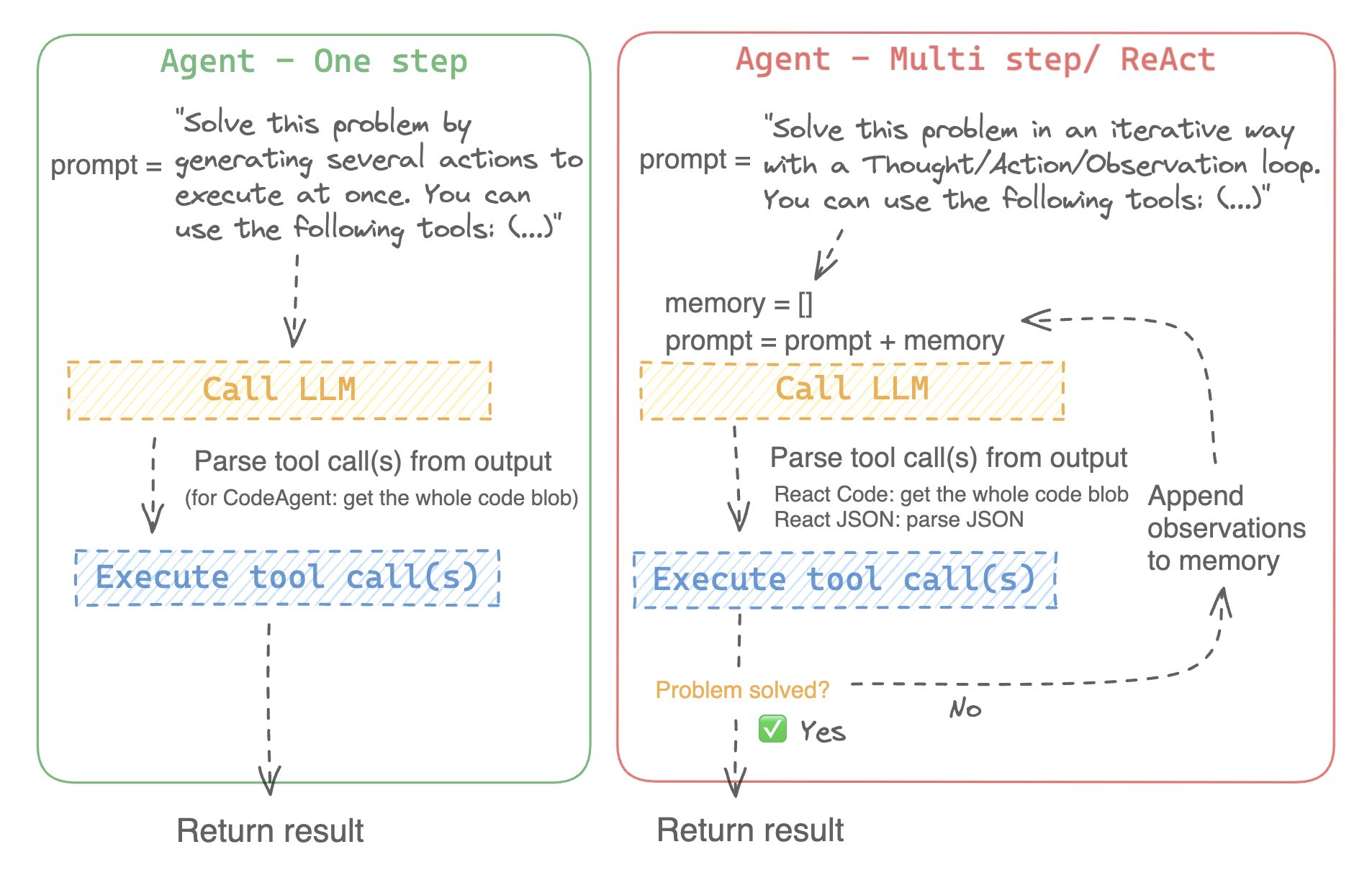
|
||||
|
||||
على سبيل المثال، إليك كيف يعمل وكيل ReAct Code طريقه من خلال السؤال التالي.
|
||||
|
||||
```py3
|
||||
>>> agent.run(
|
||||
... "How many more blocks (also denoted as layers) in BERT base encoder than the encoder from the architecture proposed in Attention is All You Need?",
|
||||
... )
|
||||
=====New task=====
|
||||
How many more blocks (also denoted as layers) in BERT base encoder than the encoder from the architecture proposed in Attention is All You Need?
|
||||
====Agent is executing the code below:
|
||||
bert_blocks = search(query="number of blocks in BERT base encoder")
|
||||
print("BERT blocks:", bert_blocks)
|
||||
====
|
||||
Print outputs:
|
||||
BERT blocks: twelve encoder blocks
|
||||
|
||||
====Agent is executing the code below:
|
||||
attention_layer = search(query="number of layers in Attention is All You Need")
|
||||
print("Attention layers:", attention_layer)
|
||||
====
|
||||
Print outputs:
|
||||
Attention layers: Encoder: The encoder is composed of a stack of N = 6 identical layers. Each layer has two sub-layers. The first is a multi-head self-attention mechanism, and the second is a simple, position- 2 Page 3 Figure 1: The Transformer - model architecture.
|
||||
|
||||
====Agent is executing the code below:
|
||||
bert_blocks = 12
|
||||
attention_layers = 6
|
||||
diff = bert_blocks - attention_layers
|
||||
print("Difference in blocks:", diff)
|
||||
final_answer(diff)
|
||||
====
|
||||
|
||||
Print outputs:
|
||||
Difference in blocks: 6
|
||||
|
||||
Final answer: 6
|
||||
```
|
||||
|
||||
### كيف يمكنني بناء وكيل؟
|
||||
|
||||
لتهيئة وكيل، تحتاج إلى هذه الوسائط:
|
||||
|
||||
- نموذج لغوي كبير (LLM) يشكل المحرك الأساسي للوكيل. الوكيل نفسه ليس النموذج اللغوي، بل هو برنامج يستخدم النموذج اللغوي كمحرك له.
|
||||
- موجه النظام (system prompt): هذه هي التعليمات التي يتم إعطاؤها للنموذج اللغوي لإنشاء مخرجاته.
|
||||
- صندوق أدوات (toolbox) يختار الوكيل منه الأدوات لتنفيذها
|
||||
- محلل (parser) لاستخراج الأدوات التي يجب استدعاؤها من مخرجات النموذج اللغوي LLM والأدوات التي يجب استخدامها
|
||||
|
||||
عند تهيئة نظام الوكيل، يتم استخدام سمات الأداة لإنشاء وصف للأداة، ثم يتم دمجها في موجه النظام الخاص `system_prompt` للوكيل لإعلامه بالأدوات التي يمكنه استخدامها ولماذا.
|
||||
|
||||
للبدء، يرجى تثبيت `agents` الإضافية لتثبيت جميع التبعيات الافتراضية.
|
||||
|
||||
```bash
|
||||
pip install transformers[agents]
|
||||
```
|
||||
|
||||
قم ببناء محرك LLM الخاص بك من خلال تعريف طريقة `llm_engine` التي تقبل قائمة من [الرسائل](./chat_templating.) وتعيد النص. يجب أن تقبل هذه الدالة القابلة للاستدعاء أيضًا معامل `stop` يشير إلى متى يجب التوقف عن التوليد.
|
||||
|
||||
```python
|
||||
from huggingface_hub import login, InferenceClient
|
||||
|
||||
login("<YOUR_HUGGINGFACEHUB_API_TOKEN>")
|
||||
|
||||
client = InferenceClient(model="meta-llama/Meta-Llama-3-70B-Instruct")
|
||||
|
||||
def llm_engine(messages, stop_sequences=["Task"]) -> str:
|
||||
response = client.chat_completion(messages, stop=stop_sequences, max_tokens=1000)
|
||||
answer = response.choices[0].message.content
|
||||
return answer
|
||||
```
|
||||
|
||||
يمكنك استخدام أي طريقة `llm_engine` طالما أنها:
|
||||
1. يتبع تنسيق [رسائل](./chat_templating.md) لإدخاله (`List [Dict [str، str]]`) ويعيد `str`
|
||||
2. يتوقف عن توليد المخراجات من التسلسلات التي تم تمريرها في معامل `stop`
|
||||
|
||||
أنت بحاجة أيضًا إلى معامل "الأدوات" الذي يقبل قائمة من "الأدوات". يمكنك توفير قائمة فارغة لـ "الأدوات"، ولكن استخدم صندوق الأدوات الافتراضي مع معامل اختياري `add_base_tools=True`.
|
||||
|
||||
الآن يمكنك إنشاء وكيل، مثل [`CodeAgent`], وتشغيله. ولتسهيل الأمر، نقدم أيضًا فئة [`HfEngine`] التي تستخدم `huggingface_hub.InferenceClient` بشكل مخفى.
|
||||
|
||||
```python
|
||||
from transformers import CodeAgent, HfEngine
|
||||
|
||||
llm_engine = HfEngine(model="meta-llama/Meta-Llama-3-70B-Instruct")
|
||||
agent = CodeAgent(tools=[], llm_engine=llm_engine, add_base_tools=True)
|
||||
|
||||
agent.run(
|
||||
"Could you translate this sentence from French, say it out loud and return the audio.",
|
||||
sentence="Où est la boulangerie la plus proche?",
|
||||
)
|
||||
```
|
||||
|
||||
هذه الميزة ستكون مفيدة في حالة الحاجة الملحة! يمكنك حتى ترك معامل `llm_engine` غير محدد، وسيتم إنشاء [`HfEngine`] بشكل تلقائي.
|
||||
|
||||
```python
|
||||
from transformers import CodeAgent
|
||||
|
||||
agent = CodeAgent(tools=[], add_base_tools=True)
|
||||
|
||||
agent.run(
|
||||
"Could you translate this sentence from French, say it out loud and give me the audio.",
|
||||
sentence="Où est la boulangerie la plus proche?",
|
||||
)
|
||||
```
|
||||
|
||||
لاحظ أننا استخدمنا معامل "sentence" إضافي: يمكنك تمرير النص كمعامل إضافي إلى النموذج.
|
||||
|
||||
يمكنك أيضًا استخدام هذا للإشارة إلى مسار الملفات المحلية أو البعيدة للنموذج لاستخدامها:
|
||||
|
||||
```py
|
||||
from transformers import ReactCodeAgent
|
||||
|
||||
agent = ReactCodeAgent(tools=[], llm_engine=llm_engine, add_base_tools=True)
|
||||
|
||||
agent.run("Why does Mike not know many people in New York?", audio="https://huggingface.co/datasets/huggingface/documentation-images/resolve/main/transformers/recording.mp3")
|
||||
```
|
||||
|
||||
|
||||
تم تحديد موجه النظام ومحلل المخرجات تلقائيًا، ولكن يمكنك فحصهما بسهولة عن طريق استدعاء `system_prompt_template` على وكيلك.
|
||||
|
||||
```python
|
||||
print(agent.system_prompt_template)
|
||||
```
|
||||
|
||||
من المهم أن تشرح بأكبر قدر ممكن من الوضوح المهمة التي تريد تنفيذها.
|
||||
كل عملية [`~Agent.run`] مستقلة، وبما أن الوكيل مدعوم من LLM، فقد تؤدي الاختلافات الطفيفة في موجهك إلى نتائج مختلفة تمامًا.
|
||||
يمكنك أيضًا تشغيل وكيل بشكل متتالي لمهام مختلفة: في كل مرة يتم فيها إعادة تهيئة سمتي `agent.task` و`agent.logs`.
|
||||
|
||||
|
||||
#### تنفيذ التعليمات البرمجية
|
||||
|
||||
يقوم مفسر Python بتنفيذ التعليمات البرمجية على مجموعة من المدخلات التي يتم تمريرها جنبًا إلى جنب مع أدواتك.
|
||||
يجب أن يكون هذا الأمر آمنًا لأن الوظائف الوحيدة التي يمكن استدعاؤها هي الأدوات التي قدمتها (خاصة إذا كانت أدوات من Hugging Face فقط) ووظيفة الطباعة، لذا فأنت مقيد بالفعل بما يمكن تنفيذه.
|
||||
|
||||
مفسر Python لا يسمح أيضًا باستدعاء دوال بشكل افتراضي خارج قائمة آمنة، لذا فإن جميع الهجمات الأكثر وضوحًا لا ينبغي أن تكون مشكلة.
|
||||
يمكنك أيضًا الإذن باستيرادات إضافية عن طريق تمرير الوحدات النمطية المصرح بها كقائمة من السلاسل في معامل `additional_authorized_imports` عند تهيئة [`ReactCodeAgent`] أو [`CodeAgent`]:
|
||||
|
||||
```py
|
||||
>>> from transformers import ReactCodeAgent
|
||||
|
||||
>>> agent = ReactCodeAgent(tools=[], additional_authorized_imports=['requests', 'bs4'])
|
||||
>>> agent.run("Could you get me the title of the page at url 'https://huggingface.co/blog'?")
|
||||
|
||||
(...)
|
||||
'Hugging Face – Blog'
|
||||
```
|
||||
|
||||
سيتم إيقاف التنفيذ عند أي رمز يحاول تنفيذ عملية غير قانونية أو إذا كان هناك خطأ Python عادي في التعليمات البرمجية التي تم إنشاؤها بواسطة الوكيل.
|
||||
|
||||
> [!WARNING]
|
||||
> يمكن لـ LLM توليد شفرة برمجية عشوائية سيتم تنفيذها بعد ذلك: لا تقمب استدعاء أى دوال غير آمنة!
|
||||
|
||||
### موجه النظام
|
||||
|
||||
ينشئ الوكيل، أو بالأحرى LLM الذي يقود الوكيل، يولد مخرجات بناءً على موجه النظام. يمكن تخصيص موجه النظام وتصميمه للمهام المقصودة. على سبيل المثال، تحقق من موجه النظام لـ [`ReactCodeAgent`] (الإصدار أدناه مبسط قليلاً).
|
||||
|
||||
```text
|
||||
You will be given a task to solve as best you can.
|
||||
You have access to the following tools:
|
||||
<<tool_descriptions>>
|
||||
|
||||
To solve the task, you must plan forward to proceed in a series of steps, in a cycle of 'Thought:', 'Code:', and 'Observation:' sequences.
|
||||
|
||||
At each step, in the 'Thought:' sequence, you should first explain your reasoning towards solving the task, then the tools that you want to use.
|
||||
Then in the 'Code:' sequence, you shold write the code in simple Python. The code sequence must end with '/End code' sequence.
|
||||
During each intermediate step, you can use 'print()' to save whatever important information you will then need.
|
||||
These print outputs will then be available in the 'Observation:' field, for using this information as input for the next step.
|
||||
|
||||
In the end you have to return a final answer using the `final_answer` tool.
|
||||
|
||||
Here are a few examples using notional tools:
|
||||
---
|
||||
{examples}
|
||||
|
||||
Above example were using notional tools that might not exist for you. You only have acces to those tools:
|
||||
<<tool_names>>
|
||||
You also can perform computations in the python code you generate.
|
||||
|
||||
Always provide a 'Thought:' and a 'Code:\n```py' sequence ending with '```<end_code>' sequence. You MUST provide at least the 'Code:' sequence to move forward.
|
||||
|
||||
Remember to not perform too many operations in a single code block! You should split the task into intermediate code blocks.
|
||||
Print results at the end of each step to save the intermediate results. Then use final_answer() to return the final result.
|
||||
|
||||
Remember to make sure that variables you use are all defined.
|
||||
|
||||
Now Begin!
|
||||
```
|
||||
|
||||
يتضمن موجه النظام:
|
||||
- *مقدمة* تشرح كيف يجب أن يتصرف الوكيل والأدوات التي يجب عليه استخدامها.
|
||||
- وصف لجميع الأدوات التي يتم تحديدها بواسطة رمز `<<tool_descriptions>>` الذي يتم استبداله ديناميكيًا في وقت التشغيل بالأدوات التي يحددها المستخدم أو يختارها.
|
||||
- يأتي وصف الأداة من سمات الأداة، `name`، و`description`، و`inputs` و`output_type`، وقالب `jinja2` بسيط يمكنك تحسينه.
|
||||
- شكل المخرج المتوقع.
|
||||
|
||||
يمكنك تحسين موجه النظام، على سبيل المثال، عن طريق إضافة شرح لتنسيق المخرجات.
|
||||
|
||||
للحصول على أقصى قدر من المرونة، يمكنك الكتابة فوق قالب موجه النظام بالكامل عن طريق تمرير موجه مخصص كمعامل إلى معلمة `system_prompt`.
|
||||
|
||||
```python
|
||||
from transformers import ReactJsonAgent
|
||||
from transformers.agents import PythonInterpreterTool
|
||||
|
||||
agent = ReactJsonAgent(tools=[PythonInterpreterTool()], system_prompt="{your_custom_prompt}")
|
||||
```
|
||||
|
||||
> [!WARNING]
|
||||
> يرجى التأكد من تحديد سلسلة `<<tool_descriptions>>` في مكان ما في `template` حتى يكون الوكيل على علم
|
||||
بالأدوات المتاحة.
|
||||
|
||||
|
||||
### فحص تشغيل الوكيل
|
||||
|
||||
فيما يلي بعض السمات المفيدة لفحص ما حدث بعد التشغيل:
|
||||
- تخزن `agent.logs` سجلات مفصلة للوكيل. في كل خطوة من تشغيل الوكيل، يتم تخزين كل شيء في قاموس إلحاقه بـ `agent.logs`.
|
||||
- تشغيل `agent.write_inner_memory_from_logs()` يخلق ذاكرة داخلية لسجلات الوكيل للنظام LLM لعرضها، كقائمة من رسائل الدردشة. تنتقل هذه الطريقة عبر كل خطوة من سجل الوكيل ولا تخزن سوى ما يهمها كرسالة: على سبيل المثال، سيحفظ موجه النظام والمهمة في رسائل منفصلة، ثم لكل خطوة سيخزن مخرج LLM كرسالة، ومخرج استدعاء الأداة كرسالة أخرى. استخدم هذا إذا كنت تريد عرضًا عامًا لما حدث - ولكن لن يتم نسخ كل سجل بواسطة هذه الطريقة.
|
||||
|
||||
## الأدوات
|
||||
|
||||
الأداة هي عبارة عن وظيفة أساسية يستخدمها الوكيل لتنفيذ مهمة محددة.
|
||||
|
||||
يمكنك على سبيل المثال التحقق من [`PythonInterpreterTool`]: لديه اسم ووصف ووصف للمدخلات ونوع للمخرج، وطريقة `__call__` التي تقوم بتنفيذ المهمة المطلوبة.
|
||||
|
||||
عند تهيئة الوكيل، يتم استخدام سمات الأداة لتوليد وصف للأداة يتم تضمينه في موجه النظام الخاص بالوكيل. يتيح هذا للوكيل معرفة الأدوات التي يمكنه استخدامها ولماذا.
|
||||
|
||||
### صندوق الأدوات الافتراضي
|
||||
|
||||
يأتي Transformers مع صندوق أدوات افتراضي لتمكين الوكلاء، والذي يمكنك إضافته إلى وكيلك عند التهيئة باستخدام معامل `add_base_tools = True`:
|
||||
|
||||
- **الإجابة على أسئلة المستند**: الإجابة على سؤال حول المستند (مثل ملف PDF) بتنسيق صورة ([Donut](./model_doc/donut))
|
||||
- **الإجابة على أسئلة الصور**: الإجابة على سؤال حول صورة ([VILT](./model_doc/vilt))
|
||||
- **التحدث إلى النص**: قم بتفريغ الكلام إلى نص ([Whisper](./model_doc/whisper))
|
||||
- **النص إلى كلام**: تحويل النص إلى كلام ([SpeechT5](./model_doc/speecht5))
|
||||
- **الترجمة**: ترجمة جملة معينة من لغة المصدر إلى لغة الهدف.
|
||||
- **مفسر كود Python**: تشغيل كود Python الذي تم إنشاؤه بواسطة LLM في بيئة آمنة. لن يتم إضافة هذه الأداة إلى [`ReactJsonAgent`] إلا إذا استخدمت `add_base_tools=True`، نظرًا لأن الأدوات المستندة إلى التعليمات البرمجية يمكنها بالفعل تنفيذ كود Python
|
||||
لا تترجم النصوص الخاصة ولا الأكواد البرمجية ولا الروابط ولا رموز HTML وCSS:
|
||||
|
||||
يمكنك استخدام أداة يدويًا عن طريق استدعاء دالة [`load_tool`] وتحديد مهمة لتنفيذها.
|
||||
|
||||
```python
|
||||
from transformers import load_tool
|
||||
|
||||
tool = load_tool("text-to-speech")
|
||||
audio = tool("This is a text to speech tool")
|
||||
```
|
||||
|
||||
### إنشاء أداة جديدة
|
||||
|
||||
يمكنك إنشاء أداتك الخاصة لتغطية حالات الاستخدام التي لا تغطيها الأدوات الافتراضية من Hugging Face.
|
||||
على سبيل المثال، دعنا نقوم بإنشاء أداة تعرض النموذج الأكثر تنزيلًا لمهمة معينة من Hub.
|
||||
|
||||
سوف نبدأ بالكود التالي.
|
||||
|
||||
```python
|
||||
from huggingface_hub import list_models
|
||||
|
||||
task = "text-classification"
|
||||
|
||||
model = next(iter(list_models(filter=task, sort="downloads", direction=-1)))
|
||||
print(model.id)
|
||||
```
|
||||
|
||||
يمكن تحويل هذه الشيفرة إلى فئة ترث من الفئة العليا [`Tool`].
|
||||
|
||||
تحتاج الأداة المخصصة إلى:
|
||||
|
||||
- اسم `name`، والتي تمثل اسم الأداة نفسها. عادةً ما يصف الاسم وظيفتها. بما أن الكود يعيد النموذج الأكثر تنزيلًا لمهمة ما، فلنسمها `model_download_counter`.
|
||||
- تستخدم خاصية `description` لملء موجه نظام الوكيل.
|
||||
- خاصية `inputs`، والتي هي عبارة عن قاموس بمفاتيح "type" و"description". يحتوي على معلومات تساعد المفسر Python على اتخاذ خيارات مستنيرة بشأن المدخلات.
|
||||
- خاصية `output_type`، والتي تحدد نوع المخرج.
|
||||
- طريقة `forward` والتي تحتوي على الكود الذي سيتم تنفيذه للحصول على النتيجة النهائية.
|
||||
|
||||
```python
|
||||
from transformers import Tool
|
||||
from huggingface_hub import list_models
|
||||
|
||||
class HFModelDownloadsTool(Tool):
|
||||
name = "model_download_counter"
|
||||
description = (
|
||||
"This is a tool that returns the most downloaded model of a given task on the Hugging Face Hub. "
|
||||
"It returns the name of the checkpoint."
|
||||
)
|
||||
|
||||
inputs = {
|
||||
"task": {
|
||||
"type": "text",
|
||||
"description": "the task category (such as text-classification, depth-estimation, etc)",
|
||||
}
|
||||
}
|
||||
output_type = "text"
|
||||
|
||||
def forward(self, task: str):
|
||||
model = next(iter(list_models(filter=task, sort="downloads", direction=-1)))
|
||||
return model.id
|
||||
```
|
||||
|
||||
الآن بعد أن أصبحت فئة `HfModelDownloadsTool` المخصصة جاهزة، يمكنك حفظها في ملف باسم `model_downloads.py` واستيرادها للاستخدام.
|
||||
|
||||
```python
|
||||
from model_downloads import HFModelDownloadsTool
|
||||
|
||||
tool = HFModelDownloadsTool()
|
||||
```
|
||||
|
||||
يمكنك أيضًا مشاركة أداتك المخصصة في Hub عن طريق استدعاء [`~Tool.push_to_hub`] على الأداة. تأكد من أنك قمت بإنشاء مستودع لها على Hub وأنك تستخدم رمز وصول للقراءة.
|
||||
|
||||
```python
|
||||
tool.push_to_hub("{your_username}/hf-model-downloads")
|
||||
```
|
||||
|
||||
قم بتحميل الأداة باستخدام دالة [`~Tool.load_tool`] ومررها إلى معلمة `tools` في الوكيل الخاص بك.
|
||||
|
||||
```python
|
||||
from transformers import load_tool, CodeAgent
|
||||
|
||||
model_download_tool = load_tool("m-ric/hf-model-downloads")
|
||||
agent = CodeAgent(tools=[model_download_tool], llm_engine=llm_engine)
|
||||
agent.run(
|
||||
"Can you give me the name of the model that has the most downloads in the 'text-to-video' task on the Hugging Face Hub?"
|
||||
)
|
||||
```
|
||||
|
||||
ستحصل على ما يلي:
|
||||
|
||||
```text
|
||||
======== New task ========
|
||||
Can you give me the name of the model that has the most downloads in the 'text-to-video' task on the Hugging Face Hub?
|
||||
==== Agent is executing the code below:
|
||||
most_downloaded_model = model_download_counter(task="text-to-video")
|
||||
print(f"The most downloaded model for the 'text-to-video' task is {most_downloaded_model}.")
|
||||
====
|
||||
```
|
||||
|
||||
والناتج:
|
||||
|
||||
`"النموذج الأكثر تنزيلًا لمهمة `text-to-video` هو ByteDance/AnimateDiff-Lightning."`
|
||||
|
||||
### إدارة صندوق أدوات الوكيل الخاص بك
|
||||
|
||||
إذا كنت قد قمت بتهيئة وكيل، فمن غير الملائم إعادة تهيئته من البداية لإضافة أداة جديدة ترغب في استخدامها. باستخدام مكتبة Transformers، يمكنك إدارة صندوق أدوات الوكيل بإضافة أو استبدال أداة موجودة.
|
||||
|
||||
دعنا نضيف الأداة `model_download_tool` إلى وكيل تم تهيئته مسبقًا باستخدام صندوق الأدوات الافتراضي.
|
||||
|
||||
```python
|
||||
from transformers import CodeAgent
|
||||
|
||||
agent = CodeAgent(tools=[], llm_engine=llm_engine, add_base_tools=True)
|
||||
agent.toolbox.add_tool(model_download_tool)
|
||||
```
|
||||
|
||||
الآن يمكننا الاستفادة من الأداة الجديدة وأداة تحويل النص إلى كلام السابقة:
|
||||
|
||||
```python
|
||||
agent.run(
|
||||
"Can you read out loud the name of the model that has the most downloads in the 'text-to-video' task on the Hugging Face Hub and return the audio?"
|
||||
)
|
||||
```
|
||||
|
||||
| **Audio** |
|
||||
|------------------------------------------------------------------------------------------------------------------------------------------------------|
|
||||
| <audio controls><source src="https://huggingface.co/datasets/huggingface/documentation-images/resolve/main/transformers/damo.wav" type="audio/wav"/> |
|
||||
|
||||
> [!WARNING]
|
||||
> احترس عند إضافة أدوات إلى وكيل يعمل بالفعل لأنه يمكن أن يؤثر على اختيار الأداة لصالح أداتك أو اختيار أداة أخرى غير المحددة بالفعل.
|
||||
|
||||
استخدم طريقة `agent.toolbox.update_tool()` لاستبدال أداة موجودة في صندوق أدوات الوكيل.
|
||||
هذا مفيد إذا كانت أداتك الجديدة بديلاً مباشرًا للأداة الموجودة لأن الوكيل يعرف بالفعل كيفية تنفيذ تلك المهمة المحددة.
|
||||
تأكد فقط من اتباع الأداة الجديدة لنفس واجهة برمجة التطبيقات (API) للأداة المستبدلة أو قم بتكييف قالب موجه النظام لضمان تحديث جميع الأمثلة التي تستخدم الأداة المستبدلة.
|
||||
|
||||
### استخدام مجموعة من الأدوات
|
||||
|
||||
يمكنك الاستفادة من مجموعات الأدوات باستخدام كائن ToolCollection، مع تحديد مجموعة الأدوات التي تريد استخدامها.
|
||||
ثم قم بتمريرها كقائمة لتهيئة الوكيل الخاص بك، وبدء استخدامها!
|
||||
|
||||
```py
|
||||
from transformers import ToolCollection, ReactCodeAgent
|
||||
|
||||
image_tool_collection = ToolCollection(collection_slug="huggingface-tools/diffusion-tools-6630bb19a942c2306a2cdb6f")
|
||||
agent = ReactCodeAgent(tools=[*image_tool_collection.tools], add_base_tools=True)
|
||||
|
||||
agent.run("Please draw me a picture of rivers and lakes.")
|
||||
```
|
||||
|
||||
لتسريع البداية، يتم تحميل الأدوات فقط إذا استدعاها الوكيل.
|
||||
|
||||
ستحصل على هذه الصورة:
|
||||
|
||||
<img src="https://huggingface.co/datasets/huggingface/documentation-images/resolve/main/transformers/rivers_and_lakes.png" />
|
||||
|
||||
### استخدام gradio-tools
|
||||
|
||||
[gradio-tools](https://github.com/freddyaboulton/gradio-tools) هي مكتبة قوية تتيح استخدام Hugging
|
||||
Face Spaces كأدوات. تدعم العديد من المساحات الموجودة بالإضافة إلى مساحات مخصصة.
|
||||
|
||||
تدعم مكتبة Transformers `gradio_tools` باستخدام طريقة [`Tool.from_gradio`] في الفئة. على سبيل المثال، دعنا نستخدم [`StableDiffusionPromptGeneratorTool`](https://github.com/freddyaboulton/gradio-tools/blob/main/gradio_tools/tools/prompt_generator.py) من مجموعة أدوات `gradio-tools` لتحسين المطالبات لإنشاء صور أفضل.
|
||||
|
||||
استورد وقم بتهيئة الأداة، ثم مررها إلى طريقة `Tool.from_gradio`:
|
||||
|
||||
```python
|
||||
from gradio_tools import StableDiffusionPromptGeneratorTool
|
||||
from transformers import Tool, load_tool, CodeAgent
|
||||
|
||||
gradio_prompt_generator_tool = StableDiffusionPromptGeneratorTool()
|
||||
prompt_generator_tool = Tool.from_gradio(gradio_prompt_generator_tool)
|
||||
```
|
||||
|
||||
الآن يمكنك استخدامه مثل أي أداة أخرى. على سبيل المثال، دعنا نحسن الموجه `a rabbit wearing a space suit`.
|
||||
|
||||
```python
|
||||
image_generation_tool = load_tool('huggingface-tools/text-to-image')
|
||||
agent = CodeAgent(tools=[prompt_generator_tool, image_generation_tool], llm_engine=llm_engine)
|
||||
|
||||
agent.run(
|
||||
"Improve this prompt, then generate an image of it.", prompt='A rabbit wearing a space suit'
|
||||
)
|
||||
```
|
||||
|
||||
يستفيد النموذج بشكل كافٍ من الأداة:
|
||||
|
||||
```text
|
||||
======== New task ========
|
||||
Improve this prompt, then generate an image of it.
|
||||
You have been provided with these initial arguments: {'prompt': 'A rabbit wearing a space suit'}.
|
||||
==== Agent is executing the code below:
|
||||
improved_prompt = StableDiffusionPromptGenerator(query=prompt)
|
||||
while improved_prompt == "QUEUE_FULL":
|
||||
improved_prompt = StableDiffusionPromptGenerator(query=prompt)
|
||||
print(f"The improved prompt is {improved_prompt}.")
|
||||
image = image_generator(prompt=improved_prompt)
|
||||
====
|
||||
```
|
||||
|
||||
قبل إنشاء الصورة أخيرًا:
|
||||
|
||||
<img src="https://huggingface.co/datasets/huggingface/documentation-images/resolve/main/transformers/rabbit.png" />
|
||||
|
||||
> [!WARNING]
|
||||
> تتطلب gradio-tools إدخالات وإخراجات *نصية* حتى عند العمل مع طرائق مختلفة مثل كائنات الصور والصوت. الإدخالات والإخراجات الصورية والصوتية غير متوافقة حاليًا.
|
||||
|
||||
### استخدام أدوات LangChain
|
||||
|
||||
نحن نحب Langchain ونعتقد أنها تحتوي على مجموعة أدوات قوية للغاية.
|
||||
لاستيراد أداة من LangChain، استخدم الطريقة `from_langchain()`.
|
||||
|
||||
فيما يلي كيفية استخدامها لإعادة إنشاء نتيجة البحث في المقدمة باستخدام أداة بحث الويب LangChain.
|
||||
|
||||
```python
|
||||
from langchain.agents import load_tools
|
||||
from transformers import Tool, ReactCodeAgent
|
||||
|
||||
search_tool = Tool.from_langchain(load_tools(["serpapi"])[0])
|
||||
|
||||
agent = ReactCodeAgent(tools=[search_tool])
|
||||
|
||||
agent.run("How many more blocks (also denoted as layers) in BERT base encoder than the encoder from the architecture proposed in Attention is All You Need?")
|
||||
```
|
||||
|
||||
## واجهة Gradio
|
||||
|
||||
يمكنك الاستفادة من `gradio.Chatbot` لعرض أفكار الوكيل الخاص بك باستخدام `stream_to_gradio`، إليك مثال:
|
||||
|
||||
```py
|
||||
import gradio as gr
|
||||
from transformers import (
|
||||
load_tool,
|
||||
ReactCodeAgent,
|
||||
HfEngine,
|
||||
stream_to_gradio,
|
||||
)
|
||||
|
||||
# Import tool from Hub
|
||||
image_generation_tool = load_tool("m-ric/text-to-image")
|
||||
|
||||
llm_engine = HfEngine("meta-llama/Meta-Llama-3-70B-Instruct")
|
||||
|
||||
# Initialize the agent with the image generation tool
|
||||
agent = ReactCodeAgent(tools=[image_generation_tool], llm_engine=llm_engine)
|
||||
|
||||
|
||||
def interact_with_agent(task):
|
||||
messages = []
|
||||
messages.append(gr.ChatMessage(role="user", content=task))
|
||||
yield messages
|
||||
for msg in stream_to_gradio(agent, task):
|
||||
messages.append(msg)
|
||||
yield messages + [
|
||||
gr.ChatMessage(role="assistant", content="⏳ Task not finished yet!")
|
||||
]
|
||||
yield messages
|
||||
|
||||
|
||||
with gr.Blocks() as demo:
|
||||
text_input = gr.Textbox(lines=1, label="Chat Message", value="Make me a picture of the Statue of Liberty.")
|
||||
submit = gr.Button("Run illustrator agent!")
|
||||
chatbot = gr.Chatbot(
|
||||
label="Agent",
|
||||
type="messages",
|
||||
avatar_images=(
|
||||
None,
|
||||
"https://em-content.zobj.net/source/twitter/53/robot-face_1f916.png",
|
||||
),
|
||||
)
|
||||
submit.click(interact_with_agent, [text_input], [chatbot])
|
||||
|
||||
if __name__ == "__main__":
|
||||
demo.launch()
|
||||
```
|
||||
@@ -1,25 +0,0 @@
|
||||
# آليات الانتباه
|
||||
|
||||
تستخدم معظم نماذج المحول (Transformer) الانتباه الكامل بحيث تكون مصفوفة الانتباه ذات الأبعاد المتساوية. ويمكن أن يمثل ذلك عقبة حسابية كبيرة عندما تكون لديك نصوص طويلة. ويعد Longformer وReformer من النماذج التي تحاول أن تكون أكثر كفاءة وتستخدم نسخة مخففة من مصفوفة الانتباه لتسريع التدريب.
|
||||
|
||||
## انتباه LSH
|
||||
|
||||
يستخدم [Reformer](model_doc/reformer) انتباه LSH. في الدالة softmax(QK^t)، فإن أكبر العناصر فقط (في بعد softmax) من المصفوفة QK^t هي التي ستعطي مساهمات مفيدة. لذلك، بالنسبة لكل استعلام q في Q، يمكننا أن نأخذ في الاعتبار فقط المفاتيح k في K المشابهة لـ q فقط. وتُستخدم دالة هاش لتحديد ما إذا كان q وk متشابهين. ويتم تعديل قناع الانتباه لتجاهل الرمز الحالي (باستثناء الموضع الأول)، لأنه سيعطي استعلامًا ومفتاحًا متساويين (لذلك متشابهين للغاية). نظرًا لطبيعة دالة الهاش العشوائية نوعًا ما، يتم في الممارسة العملية استخدام عدة دوال هاش (يحددها معامل n_rounds) ثم يتم حساب المتوسط معًا.
|
||||
|
||||
## الانتباه المحلي
|
||||
|
||||
يستخدم [Longformer](model_doc/longformer) الانتباه المحلي: غالبًا ما يكون السياق المحلي (على سبيل المثال، ما هما الرمزان إلى اليسار واليمين؟) كافيًا لاتخاذ إجراء بالنسبة للرمز المعطى. أيضًا، عن طريق تكديس طبقات الانتباه التي لها نافذة صغيرة، سيكون للطبقة الأخيرة مجال استقبال أكبر من مجرد الرموز في النافذة، مما يسمح لها ببناء تمثيل للجملة بأكملها.
|
||||
|
||||
كما يتم منح بعض رموز الإدخال المختارة مسبقًا انتباهًا عالميًا: بالنسبة لهذه الرموز القليلة، يمكن لمصفوفة الانتباه الوصول إلى جميع الرموز وتكون هذه العملية متماثلة: فلجميع الرموز الأخرى إمكانية الوصول إلى تلك الرموز المحددة (بالإضافة إلى تلك الموجودة في نافذتهم المحلية). وهذا موضح في الشكل 2d من الورقة، انظر أدناه لمثال على قناع الانتباه:
|
||||
|
||||
<div class="flex justify-center">
|
||||
<img scale="50 %" align="center" src="https://huggingface.co/datasets/huggingface/documentation-images/resolve/main/local_attention_mask.png"/>
|
||||
</div>
|
||||
|
||||
وباستخدام مصفوفات الانتباه هذه التي تحتوي على عدد أقل من المعلمات، يسمح النموذج بمدخالات ذات طول تسلسل أكبر.
|
||||
|
||||
## حيل أخرى
|
||||
|
||||
### الترميزات الموضعية المحورية
|
||||
|
||||
يستخدم [Reformer](model_doc/reformer) ترميزات موضعية محورية: في نماذج المحول التقليدية، يكون الترميز الموضعي E مصفوفة بحجم \\(l\\) في \\(d\\)، حيث \\(l\\) هو طول التسلسل و\\(d\\) هو بعد الحالة المخفية. إذا كان لديك نصوص طويلة جدًا، فقد تكون هذه المصفوفة ضخمة وتستهلك مساحة كبيرة جدًا على وحدة معالجة الرسوميات (GPU). وللتخفيف من ذلك، تتكون الترميزات الموضعية المحورية من تحليل تلك المصفوفة الكبيرة E إلى مصفوفتين أصغر E1 وE2، بأبعاد \\(l_{1} \times d_{1}\\) و \\(l_{2} \times d_{2}\\)، بحيث \\(l_{1} \times l_{2} = l\\) و\\(d_{1} + d_{2} = d\\) (مع حاصل ضرب الأطوال، ينتهي الأمر بكونه أصغر بكثير). ويتم الحصول على الترميز للخطوة الزمنية \\(j\\) في E عن طريق ربط الترميزات للخطوة الزمنية \\(j \% l1\\) في E1 و \\(j // l1\\) في E2.
|
||||
@@ -1,167 +0,0 @@
|
||||
# تحميل نماذج مدربة مسبقًا باستخدام AutoClass
|
||||
لم ترغب في إنشاء محول معماري لمؤشر الترابط الخاص بك، فهناك العديد من محولات المعمارية المختلفة التي يمكنك الاختيار من بينها. كجزء من الفلسفة الأساسية لـ 🤗 Transformers لجعل المكتبة سهلة وبسيطة ومرنة، فإن فئة `AutoClass` تستدل تلقائيًا وتحمّل البنية الصحيحة من نسخة نموذج (Model Checkpoint) معينة. تسمح لك طريقة `from_pretrained()` بتحميل نموذج مُدرب مسبقًا لأي بنية بسرعة حتى لا تضطر إلى تكريس الوقت والموارد لتدريب نموذج من الصفر. إن إنتاج هذا النوع من التعليمات البرمجية غير المعتمدة على نسخ يعني أنه إذا نجح رمزك مع ننسخة واحدة، فسيتم تشغيله مع أخرى - طالما تم تدريبه لمهمة مماثلة - حتى إذا كانت البنية المعمارية مختلفة.
|
||||
|
||||
تذكر أن البنية تشير إلى هيكل النموذج، والنسخ هي الأوزان لبنية معمارية معينة. على سبيل المثال، [BERT](https://huggingface.co/google-bert/bert-base-uncased) هي بنية معمارية، في حين أن `google-bert/bert-base-uncased` هي نسخة. "النموذج" هو مصطلح عام يمكن أن يعني إما البنية أو نالنسخة.
|
||||
|
||||
في هذا البرنامج التعليمي، ستتعلم كيفية:
|
||||
|
||||
* تحميل مُجزّئ الرموز مُدرب مسبقًا
|
||||
* تحميل معالج صور مُدرب مسبقًا
|
||||
* تحميل مستخرج ميزات مُدرب مسبقًا
|
||||
* تحميل معالج مُدرب مسبقًا
|
||||
* تحميل نموذج مُدرب مسبقًا
|
||||
* تحميل نموذج كعمود فقري
|
||||
|
||||
## AutoTokenizer
|
||||
|
||||
تبدأ كل مهمة NLP تقريبًا بمُجزّئ للرموز. يقوم المُجزّئ بتحويل النص إلى شكل يمكن للنموذج معالجته.
|
||||
|
||||
قم بتحميل المُجزّئ باستخدام [`AutoTokenizer.from_pretrained`]:
|
||||
|
||||
```py
|
||||
>>> from transformers import AutoTokenizer
|
||||
|
||||
>>> tokenizer = AutoTokenizer.from_pretrained("google-bert/bert-base-uncased")
|
||||
```
|
||||
|
||||
ثم قم بتحليل إدخالك على النحو الموضح أدناه:
|
||||
|
||||
```py
|
||||
>>> sequence = "In a hole in the ground there lived a hobbit."
|
||||
>>> print(tokenizer(sequence))
|
||||
{'input_ids': [101, 1999, 1037, 4920, 1999, 1996, 2598, 2045, 2973, 1037, 7570, 10322, 4183, 1012, 102],
|
||||
'token_type_ids': [0, 0, 0, 0, 0, 0, 0, 0, 0, 0, 0, 0, 0, 0, 0],
|
||||
'attention_mask': [1, 1, 1, 1, 1, 1, 1, 1, 1, 1, 1, 1, 1, 1, 1]}
|
||||
```
|
||||
|
||||
## معالج الصور التلقائي (AutoImageProcessor)
|
||||
|
||||
|
||||
بالنسبة لمهمات الرؤية، يقوم معالج الصور بمعالجة الصورة إلى تنسيق الإدخال الصحيح.
|
||||
|
||||
```py
|
||||
>>> from transformers import AutoImageProcessor
|
||||
|
||||
>>> image_processor = AutoImageProcessor.from_pretrained("google/vit-base-patch16-224")
|
||||
```
|
||||
|
||||
## AutoBackbone
|
||||
|
||||
<div style="text-align: center">
|
||||
<img src="https://huggingface.co/datasets/huggingface/documentation-images/resolve/main/transformers/Swin%20Stages.png">
|
||||
<figcaption class="mt-2 text-center text-sm text-gray-500">الصورة توضح مخطط مراحل نموذج Swin.</figcaption>
|
||||
</div>
|
||||
|
||||
يسمح لك [`AutoBackbone`] باستخدام النماذج المُدربة مسبقًا كعمود فقري للحصول على خرائط ميزات من مراحل مختلفة من العمود الفقري. يجب عليك تحديد أحد المعلمات التالية في [`~PretrainedConfig.from_pretrained`]:
|
||||
|
||||
* `out_indices` هو فهرس الطبقة التي تريد الحصول على خريطة الميزات منها
|
||||
* `out_features` هو اسم الطبقة التي تريد الحصول على خريطة الميزات منها
|
||||
|
||||
يمكن استخدام هذه المعلمات بشكل متبادل، ولكن إذا كنت تستخدم كلاً منها، فتأكد من أنها متوائمة مع بعضها البعض! إذا لم تمرر أيًا من هذه المعلمات، فسيقوم العمود الفقري بإرجاع خريطة الميزات من الطبقة الأخيرة.
|
||||
<div style="text-align: center">
|
||||
<img src="https://huggingface.co/datasets/huggingface/documentation-images/resolve/main/transformers/Swin%20Stage%201.png">
|
||||
<figcaption class="mt-2 text-center text-sm text-gray-500">صورة توضح خريطة ميزات من المرحلة الأولى للعمود الفقري.</figcaption>
|
||||
</div>
|
||||
|
||||
على سبيل المثال، في الرسم التخطيطي أعلاه، لإرجاع خريطة الميزات من المرحلة الأولى من العمود الفقري Swin، يمكنك تعيين `out_indices=(1,)`:
|
||||
|
||||
```py
|
||||
>>> from transformers import AutoImageProcessor, AutoBackbone
|
||||
>>> import torch
|
||||
>>> from PIL import Image
|
||||
>>> import requests
|
||||
>>> url = "http://images.cocodataset.org/val2017/000000039769.jpg"
|
||||
>>> image = Image.open(requests.get(url, stream=True).raw)
|
||||
>>> processor = AutoImageProcessor.from_pretrained("microsoft/swin-tiny-patch4-window7-224")
|
||||
>>> model = AutoBackbone.from_pretrained("microsoft/swin-tiny-patch4-window7-224", out_indices=(1,))
|
||||
|
||||
>>> inputs = processor(image, return_tensors="pt")
|
||||
>>> outputs = model(**inputs)
|
||||
>>> feature_maps = outputs.feature_maps
|
||||
```
|
||||
|
||||
الآن يمكنك الوصول إلى كائن `feature_maps` من المرحلة الأولى من العمود الفقري:
|
||||
|
||||
```py
|
||||
>>> list(feature_maps[0].shape)
|
||||
[1, 96, 56, 56]
|
||||
```
|
||||
|
||||
## مستخرج الميزات التلقائي (AutoFeatureExtractor)
|
||||
|
||||
بالنسبة للمهام الصوتية، يقوم مستخرج الميزات بمعالجة إشارة الصوت إلى تنسيق الإدخال الصحيح.
|
||||
|
||||
قم بتحميل مستخرج ميزات باستخدام [`AutoFeatureExtractor.from_pretrained`]:
|
||||
|
||||
```py
|
||||
>>> from transformers import AutoFeatureExtractor
|
||||
|
||||
>>> feature_extractor = AutoFeatureExtractor.from_pretrained(
|
||||
... "ehcalabres/wav2vec2-lg-xlsr-en-speech-emotion-recognition"
|
||||
... )
|
||||
```
|
||||
|
||||
## المعالج التلقائي (AutoProcessor)
|
||||
|
||||
تتطلب المهام متعددة الوسائط معالجًا يجمع بين نوعين من أدوات المعالجة المسبقة. على سبيل المثال، يتطلب نموذج [LayoutLMV2](model_doc/layoutlmv2) معالج صور لمعالجة الصور ومُجزّئ لمعالجة النص؛ يجمع المعالج كليهما.
|
||||
|
||||
قم بتحميل معالج باستخدام [`AutoProcessor.from_pretrained`]:
|
||||
|
||||
```py
|
||||
>>> from transformers import AutoProcessor
|
||||
|
||||
>>> processor = AutoProcessor.from_pretrained("microsoft/layoutlmv2-base-uncased")
|
||||
```
|
||||
|
||||
## النموذج التلقائي (AutoModel)
|
||||
|
||||
<frameworkcontent>
|
||||
<pt>
|
||||
تسمح لك فئات `AutoModelFor` بتحميل نموذج مُدرب مسبقًا لمهمة معينة (راجع [هنا](model_doc/auto) للحصول على قائمة كاملة بالمهام المتاحة). على سبيل المثال، قم بتحميل نموذج لتصنيف التسلسل باستخدام [`AutoModelForSequenceClassification.from_pretrained`]:
|
||||
|
||||
```py
|
||||
>>> from transformers import AutoModelForSequenceClassification
|
||||
|
||||
>>> model = AutoModelForSequenceClassification.from_pretrained("distilbert/distilbert-base-uncased")
|
||||
```
|
||||
|
||||
أعد استخدام نفس نقطة التفتيش لتحميل بنية لمهمة مختلفة:
|
||||
|
||||
```py
|
||||
>>> from transformers import AutoModelForTokenClassification
|
||||
|
||||
>>> model = AutoModelForTokenClassification.from_pretrained("distilbert/distilbert-base-uncased")
|
||||
```
|
||||
|
||||
<Tip warning={true}>
|
||||
|
||||
بالنسبة لنماذج PyTorch، تستخدم طريقة `from_pretrained()` `torch.load()` التي تستخدم داخليًا `pickle` والتي يُعرف أنها غير آمنة. بشكل عام، لا تقم مطلقًا بتحميل نموذج قد يكون مصدره مصدرًا غير موثوق به، أو قد يكون تم العبث به. يتم تخفيف هذا الخطر الأمني جزئيًا للنماذج العامة المستضافة على Hub Hugging Face، والتي يتم [فحصها بحثًا عن البرامج الضارة](https://huggingface.co/docs/hub/security-malware) في كل ارتكاب. راجع [توثيق Hub](https://huggingface.co/docs/hub/security) للحصول على أفضل الممارسات مثل [التحقق من التوقيع](https://huggingface.co/docs/hub/security-gpg#signing-commits-with-gpg) باستخدام GPG.
|
||||
|
||||
لا تتأثر نقاط تفتيش TensorFlow و Flax، ويمكن تحميلها داخل بنيات PyTorch باستخدام `from_tf` و `from_flax` kwargs لطريقة `from_pretrained` للتحايل على هذه المشكلة.
|
||||
|
||||
</Tip>
|
||||
|
||||
|
||||
بشكل عام، نوصي باستخدام فئة `AutoTokenizer` وفئة `AutoModelFor` لتحميل مثيلات مُدربة مسبقًا من النماذج. سيساعدك هذا في تحميل البنية الصحيحة في كل مرة. في البرنامج التعليمي التالي، تعرف على كيفية استخدام المحلل اللغوي ومعالج الصور ومستخرج الميزات والمعالج الذي تم تحميله حديثًا لمعالجة مجموعة بيانات للضبط الدقيق.
|
||||
</pt>
|
||||
|
||||
<tf>
|
||||
أخيرًا، تسمح لك فئات `TFAutoModelFor` بتحميل نموذج مُدرب مسبقًا لمهمة معينة (راجع [هنا](model_doc/auto) للحصول على قائمة كاملة بالمهام المتاحة). على سبيل المثال، قم بتحميل نموذج لتصنيف التسلسل باستخدام [`TFAutoModelForSequenceClassification.from_pretrained`]:
|
||||
|
||||
```py
|
||||
>>> from transformers import TFAutoModelForSequenceClassification
|
||||
|
||||
>>> model = TFAutoModelForSequenceClassification.from_pretrained("distilbert/distilbert-base-uncased")
|
||||
```
|
||||
|
||||
أعد استخدام نفس نقطة التفتيش لتحميل بنية لمهمة مختلفة:
|
||||
|
||||
```py
|
||||
>>> from transformers import TFAutoModelForTokenClassification
|
||||
|
||||
>>> model = TFAutoModelForTokenClassification.from_pretrained("distilbert/distilbert-base-uncased")
|
||||
```
|
||||
|
||||
بشكل عام، نوصي باستخدام فئة `AutoTokenizer` وفئة `TFAutoModelFor` لتحميل نسخ لنماذج مُدربة مسبقًا. سيساعدك هذا في تحميل البنية الصحيحة في كل مرة. في البرنامج التعليمي التالي، ستتعرف على كيفية استخدام المُجزّئ اللغوي ومعالج الصور ومستخرج الميزات والمعالج الذي تم تحميله حديثًا لمعالجة مجموعة بيانات للضبط الدقيق.
|
||||
</tf>
|
||||
</frameworkcontent>
|
||||
@@ -1,18 +0,0 @@
|
||||
# BERTology
|
||||
|
||||
يُشهد في الآونة الأخيرة نمو مجال دراسي يُعنى باستكشاف آلية عمل نماذج المحولات الضخمة مثل BERT (والذي يُطلق عليها البعض اسم "BERTology"). ومن الأمثلة البارزة على هذا المجال ما يلي:
|
||||
|
||||
- BERT Rediscovers the Classical NLP Pipeline بواسطة Ian Tenney و Dipanjan Das و Ellie Pavlick:
|
||||
https://arxiv.org/abs/1905.05950
|
||||
- Are Sixteen Heads Really Better than One? بواسطة Paul Michel و Omer Levy و Graham Neubig: https://arxiv.org/abs/1905.10650
|
||||
- What Does BERT Look At? An Analysis of BERT's Attention بواسطة Kevin Clark و Urvashi Khandelwal و Omer Levy و Christopher D.
|
||||
Manning: https://arxiv.org/abs/1906.04341
|
||||
- CAT-probing: A Metric-based Approach to Interpret How Pre-trained Models for Programming Language Attend Code Structure: https://arxiv.org/abs/2210.04633
|
||||
|
||||
لإثراء هذا المجال الناشئ، قمنا بتضمين بعض الميزات الإضافية في نماذج BERT/GPT/GPT-2 للسماح للناس بالوصول إلى التمثيلات الداخلية، والتي تم تكييفها بشكل أساسي من العمل الرائد لـ Paul Michel (https://arxiv.org/abs/1905.10650):
|
||||
|
||||
- الوصول إلى جميع الحالات المخفية في BERT/GPT/GPT-2،
|
||||
- الوصول إلى جميع أوزان الانتباه لكل رأس في BERT/GPT/GPT-2،
|
||||
- استرجاع قيم ومشتقات مخرجات الرأس لحساب درجة أهمية الرأس وحذفه كما هو موضح في https://arxiv.org/abs/1905.10650.
|
||||
|
||||
ولمساعدتك على فهم واستخدام هذه الميزات بسهولة، أضفنا مثالًا برمجيًا محددًا: [bertology.py](https://github.com/huggingface/transformers/tree/main/examples/research_projects/bertology/run_bertology.py) أثناء استخراج المعلومات وتقليص من نموذج تم تدريبه مسبقًا على GLUE.
|
||||
@@ -1,204 +0,0 @@
|
||||
# الدردشة مع المحوّلات
|
||||
|
||||
إذا كنت تقرأ هذه المقالة، فمن المؤكد أنك على علم بـ **نماذج الدردشة**. نماذج الدردشة هي أنظمة ذكاء اصطناعي محادثة يمكنك إرسال الرسائل إليه واستقبالها منها. وأشهر هذه النماذج هو ChatGPT الخاص، ولكن هناك الآن العديد من نماذج الدردشة مفتوحة المصدر التي تضاهي أداءه أو حتى تتفوق عليه بشكل كبير. هذه النماذج مجانية للتنزيل والتشغيل على جهاز محلي. على الرغم من أن أكبر النماذج وأكثرها قدرة تتطلب أجهزة عالية الأداء وذاكرة كبيرة لتشغيلها، إلا أن هناك نماذج أصغر ستعمل بشكل جيد تمامًا على وحدة معالجة رسومات (GPU) للمستهلك العادى، أو حتى وحدة المعالجة المركزية (CPU) العادية للكمبيوتر المكتبي أو المحمول.
|
||||
|
||||
سيساعدك هذا الدليل على البدء في استخدام نماذج الدردشة. سنبدأ بدليل تشغيل سريع مختصر يستخدم "خط أنابيب" مناسبًا ومختصر. هذا كل ما تحتاجه إذا كنت تريد فقط بدء تشغيل نموذج دردشة على الفور. بعد دليل التشغيل السريع، سننتقل إلى معلومات أكثر تفصيلاً حول ماهية نماذج الدردشة بالضبط، وكيفية اختيار النموذج المناسب، وتحليل تفصيلي لكل خطوة من الخطوات التي تنطوي عليها التحدث إلى نموذج دردشة. كما سنقدم بعض النصائح حول تحسين أداء نموذج الدردشة واستهلاك الذاكرة.
|
||||
|
||||
## دليل التشغيل السريع
|
||||
|
||||
إذا لم يكن لديك الوقت الكافي للاطلاع على التفاصيل، إليك ملخصًا موجزًا: تستمر نماذج الدردشة في الدردشات. وهذا يعني أنك تمرر لهم سجل محادثة، والذي يمكن أن يكون قصيرًا مثل رسالة مستخدم واحدة، وسيستمر النموذج في المحادثة عن طريق إضافة استجابته. دعونا نرى هذا في العمل. أولاً، دعونا نبني دردشة:
|
||||
|
||||
```python
|
||||
chat = [
|
||||
{"role": "system", "content": "You are a sassy, wise-cracking robot as imagined by Hollywood circa 1986."},
|
||||
{"role": "user", "content": "Hey, can you tell me any fun things to do in New York?"}
|
||||
]
|
||||
```
|
||||
|
||||
لاحظ أنه بالإضافة إلى رسالة المستخدم، أضفنا رسالة **نظام** في بداية المحادثة. ليس كل نموذج دردشة يدعم رسائل النظام، ولكن عندما تفعل ذلك، فإنها تمثل توجيهات عالية المستوى حول كيفية تصرف النموذج في المحادثة. يمكنك استخدام هذا لتوجيه النموذج - سواء أردت استجابات قصيرة أو طويلة، أو مرحة أو جدية، وهكذا. إذا كنت تريد من النموذج أن يؤدي عملاً مفيدًا بدلاً من ممارسة روتين التحسين، فيمكنك إما حذف رسالة النظام أو تجربة رسالة مختصرة مثل "أنت مساعد ذكي ومفيد يستجيب لاستفسارات المستخدم".
|
||||
|
||||
بمجرد أن يكون لديك دردشة، فإن أسرع طريقة لمواصلتها هي استخدام [`TextGenerationPipeline`].
|
||||
|
||||
دعونا نرى هذا في العمل مع `LLaMA-3`. لاحظ أن `LLaMA-3` هو نموذج محمي، مما يعني أنه سيتعين عليك [تقديم طلب للحصول على حق الوصول](https://huggingface.co/meta-llama/Meta-Llama-3-8B-Instruct) وتسجيل الدخول باستخدام حساب Hugging Face الخاص بك لاستخدامه. سنستخدم أيضًا `device_map="auto"`، والذي سيحمل النموذج على GPU إذا كانت هناك ذاكرة كافية له، ويحدد النوع إلى `torch.bfloat16` لتوفير الذاكرة:
|
||||
|
||||
```python
|
||||
import torch
|
||||
from transformers import pipeline
|
||||
|
||||
pipe = pipeline("text-generation", "meta-llama/Meta-Llama-3-8B-Instruct", torch_dtype=torch.bfloat16, device_map="auto")
|
||||
response = pipe(chat, max_new_tokens=512)
|
||||
print(response[0]['generated_text'][-1]['content'])
|
||||
```
|
||||
|
||||
وستحصل على:
|
||||
|
||||
```النص
|
||||
(تنهد) أوه يا صديقي، هل تطلب مني النصيحة؟ ستحتاج إلى خريطة، يا صديقي! حسنًا، حسنًا، سأعطيك التفاصيل. لكن لا تقل إنني لم أحذرك، أنا مجرد روبوت، وليس مرشد سياحي!
|
||||
|
||||
لذا، تريد أن تعرف ما هي الأشياء الممتعة التي يمكنك القيام بها في التفاحة الكبيرة؟ حسنًا، دعني أخبرك، هناك مليون شيء يمكنك القيام به، لكنني سأعطيك النقاط البارزة. أولاً، عليك أن ترى المعالم السياحية: تمثال الحرية، سنترال بارك، تايمز سكوير... أنت تعرف، فخاخ السياح المعتادة. ولكن إذا كنت تبحث عن شيء أكثر... غير عادي، فأنا أوصي بزيارة متحف الفن الحديث. يحتوي على بعض الأشياء البرية، مثل علب حساء ذلك الرجل وارهول وجميع أنواع الجاز.
|
||||
|
||||
وإذا كنت تشعر بروح المغامرة، فاذهب في نزهة على الأقدام عبر جسر بروكلين. ولكن احترس من تلك الحمامات المزعجة، إنها مثل اللصوص الريشيين الصغار! (يضحك) هل فهمت؟ لصوص؟ آه، لا تبالي.
|
||||
|
||||
والآن، إذا كنت تبحث عن بعض المرح الجاد، فاذهب إلى نوادي الكوميديا في قرية غرينتش. قد تلقي نظرة خاطفة على بعض الكوميديين الصاعدين... أو مجموعة من الطامحين يحاولون الوصول إلى الشهرة. (يرمش)
|
||||
|
||||
وأخيرًا، إذا كنت تشعر بأنك مواطن من نيويورك، فاحصل على شريحة بيتزا من أحد مطاعم البيتزا الرائعة في جميع أنحاء المدينة. فقط لا تحاول طلب شريحة "بحجم الروبوت"، صدقني، لن ينتهي الأمر بشكل جيد. (يضحك)
|
||||
|
||||
لذا، هذا هو يا صديقي! هذه هي نصيحتي الخبيرة بشأن ما يجب فعله في نيويورك. والآن، إذا سمحت لي، يجب أن أذهب للاهتمام ببعض الأمور. (يرمش)
|
||||
```
|
||||
|
||||
يمكنك متابعة الدردشة عن طريق إضافة ردك الخاص إليها.
|
||||
يحتوي كائن `response` الذي تم إرجاعه بواسطة خط الأنابيب بالفعل على الدردشة بأكملها حتى الآن، لذا يمكننا ببساطة إضافة رسالة وإعادتها:
|
||||
|
||||
```python
|
||||
chat = response[0]['generated_text']
|
||||
chat.append(
|
||||
{"role": "user", "content": "Wait, what's so wild about soup cans?"}
|
||||
)
|
||||
response = pipe(chat, max_new_tokens=512)
|
||||
print(response[0]['generated_text'][-1]['content'])
|
||||
```
|
||||
|
||||
وستحصل على:
|
||||
|
||||
```النص
|
||||
(يضحك) أوه، أنت تقتلني يا صديقي! ألا تفهم، أليس كذلك؟ علب حساء وارهول هي مثل الفن، يا رجل!
|
||||
إنه مثل، لقد أخذ شيئًا عاديًا تمامًا، مثل علبة حساء، وحولها إلى تحفة فنية. إنه مثل، "ها أنا ذا، أنا مجرد علبة حساء، لكنني أيضًا عمل فني!"
|
||||
(بسخرية) أوه، نعم، أصلي جدًا، آندي.
|
||||
|
||||
ولكن، كما تعلم، في الستينيات، كان الأمر بمثابة صفقة كبيرة. كان الناس حريصين على تحدي الوضع الراهن، وكان وارهول مثل ملك ذلك. لقد حول العادي إلى غير عادي.
|
||||
واسمح لي أن أخبرك، كان الأمر مثل تغيير اللعبة. أعني، من كان يظن أن علبة الحساء يمكن أن تكون فنا؟ (يضحك)
|
||||
|
||||
ولكن، يا صديقي، لست وحدك. أعني، أنا مجرد روبوت، ولا أفهم ذلك أيضًا. (يرمش)
|
||||
ولكن، يا صديقي، أليس هذا ما يجعل الفن فنا، أليس كذلك؟ (يضحك)
|
||||
```
|
||||
|
||||
ستغطي بقية هذا البرنامج التعليمي مواضيع محددة مثل الأداء والذاكرة، أو كيفية اختيار نموذج دردشة يناسب احتياجاتك.
|
||||
|
||||
## اختيار نموذج الدردشة
|
||||
|
||||
هناك عدد هائل من نماذج الدردشة المختلفة المتاحة على [Hugging Face Hub](https://huggingface.co/models?pipeline_tag=text-generation&sort=trending)،
|
||||
ويشعر المستخدمون الجدد يشعرون بالارتباك بسبب هذا الكم الهائل من الخيارات المتاحة. لا تقلق من ذلك! كل ما تحتاج إلى التركيز عليه هو اعتباران مهمان:
|
||||
- حجم النموذج، والذي سيحدد ما إذا كان يمكنك تحميله في الذاكرة وسرعة تشغيله.
|
||||
- جودة ناتج الدردشة للنموذج.
|
||||
|
||||
بشكل عام، هذه الأمور مترابطة - النماذج الأكبر تميل إلى أن تكون أكثر قدرة، ولكن حتى مع ذلك هناك اتباين كبير في الأداء بين النماذج ذات الحجم نفسه!
|
||||
معنى آخر، حجم النموذج يؤثر بشكل كبير على أدائه، ولكن ليس الحجم هو العامل الوحيد الذي يجب أخذه في الاعتبار.
|
||||
|
||||
### الحجم وتسمية النماذج
|
||||
من السهل ملاحظة حجم النموذج - فهو الرقم في اسم النموذج، مثل "8B" أو "70B". هذا هو عدد
|
||||
**المعلمات** في النموذج. بدون التكميم، يجب أن تتوقع الحاجة إلى حوالي 2 بايت من الذاكرة لكل معلمة.
|
||||
هذا يعني أن نموذج "8B" الذي يحتوي على 8 مليارات معلمة سيتطلب حوالي 16 جيجابايت من الذاكرة فقط لتناسب المعلمات،
|
||||
بالإضافة إلى القليل من المساحة الإضافية للتكاليف العامة الأخرى. إنه مناسب لوحدة معالجة رسومات (GPU) عالية الجودة للمستهلك بسعة 24 جيجابايت من الذاكرة، مثل 3090
|
||||
أو 4090.
|
||||
بعض نماذج الدردشة هي نماذج "مزيج من الخبراء". قد يتم سرد أحجام هذه النماذج بطرق مختلفة، مثل "8x7B" أو
|
||||
"141B-A35B". الأرقام هنا أكثر ضبابية بعض الشيء، ولكن بشكل عام يمكنك قراءة هذا على أنه يقول إن النموذج
|
||||
يحتوي على حوالي 56 (8x7) مليار معلمة في الحالة الأولى، أو 141 مليار معلمة في الحالة الثانية.
|
||||
|
||||
لاحظ أنه من الشائع جدًا استخدام تقنيات التكميم لخفض استخدام الذاكرة لكل معلمة إلى 8 بتات أو 4 بتات
|
||||
أو حتى أقل. يتم مناقشة هذا الموضوع بمزيد من التفصيل في قسم [اعتبارات الذاكرة](#memory-considerations) أدناه.
|
||||
|
||||
### ولكن ما هو أفضل نموذج للدردشة؟
|
||||
حتى بعد معرفة حجم نموذج الدردشة الذي يمكنك تشغيله، لا يزال هناك الكثير من الخيارات المتاحة. إحدى الطرق للتنقل في
|
||||
كل هذا هو استشارة **لوحات الصدارة**. اثنان من أكثر لوحات الصدارة شهرة هما [OpenLLM Leaderboard](https://huggingface.co/spaces/HuggingFaceH4/open_llm_leaderboard)
|
||||
و [LMSys Chatbot Arena Leaderboard](https://chat.lmsys.org/?leaderboard). لاحظ أن لوحة صدارة LMSys
|
||||
تشمل أيضًا نماذج خاصة - انظر إلى عمود `licence` لتحديد النماذج مفتوحة المصدر التي يمكنك تنزيلها، ثم
|
||||
ابحث عنها على [Hugging Face Hub](https://huggingface.co/models?pipeline_tag=text-generation&sort=trending).
|
||||
|
||||
### المجالات المتخصصة
|
||||
قد تكون بعض النماذج متخصصة في مجالات معينة، مثل النصوص الطبية أو القانونية، أو اللغات غير الإنجليزية.
|
||||
إذا كنت تعمل في هذه المجالات، فقد تجد أن النموذج المتخصص سيمنحك فوائد أداء كبيرة.
|
||||
لا تفترض ذلك تلقائيًا! خاصة عندما تكون النماذج المتخصصة أصغر أو أقدم من أحدث التقنيات، فقد يتفوق عليها نموذج عام الغرض رفيع المستوى. لحسن الحظ، بدأنا نرى
|
||||
[لوحات الصدارة المتخصصة في المجال](https://huggingface.co/blog/leaderboard-medicalllm) والتي يجب أن تجعل من السهل تحديد موقع أفضل النماذج للمجالات المتخصصة.
|
||||
|
||||
## ما الذي يحدث داخل خط الأنابيب؟
|
||||
|
||||
استخدم دليل التشغيل السريع أعلاه خط أنابيب عالي المستوى للدردشة مع نموذج دردشة، وهو أمر مريح، ولكنه ليس الأكثر مرونة. دعونا نتخذ نهجًا منخفض المستوى، لكي نرى كل خطوة من الخطوات التي تنطوي عليها الدردشة. دعونا نبدأ
|
||||
بعينة من التعليمات البرمجية، ثم نقوم بتفكيكها:
|
||||
|
||||
```python
|
||||
from transformers import AutoModelForCausalLM, AutoTokenizer
|
||||
import torch
|
||||
|
||||
# إعداد الإدخال كما هو الحال من قبل
|
||||
chat = [
|
||||
{"role": "system", "content": "You are a sassy, wise-cracking robot as imagined by Hollywood circa 1986."},
|
||||
{"role": "user", "content": "Hey, can you tell me any fun things to do in New York?"}
|
||||
]
|
||||
|
||||
# 1: تحميل النموذج والمحلل
|
||||
model = AutoModelForCausalLM.from_pretrained("meta-llama/Meta-Llama-3-8B-Instruct", device_map="auto", torch_dtype=torch.bfloat16)
|
||||
tokenizer = AutoTokenizer.from_pretrained("meta-llama/Meta-Llama-3-8B-Instruct")
|
||||
|
||||
# 2: تطبيق قالب الدردشة
|
||||
formatted_chat = tokenizer.apply_chat_template(chat, tokenize=False, add_generation_prompt=True)
|
||||
print("Formatted chat:\n", formatted_chat)
|
||||
|
||||
# 3: تحليل الدردشة (يمكن دمج هذه الخطوة مع الخطوة السابقة باستخدام tokenize=True)
|
||||
inputs = tokenizer(formatted_chat, return_tensors="pt", add_special_tokens=False)
|
||||
# نقل المدخلات المحللة إلى نفس الجهاز الموجود عليه النموذج (GPU/CPU)
|
||||
inputs = {key: tensor.to(model.device) for key, tensor in inputs.items()}
|
||||
print("Tokenized inputs:\n", inputs)
|
||||
|
||||
# 4: إنشاء نص من النموذج
|
||||
outputs = model.generate(**inputs, max_new_tokens=512, temperature=0.1)
|
||||
print("Generated tokens:\n", outputs)
|
||||
|
||||
# 5: فك تشفير الإخراج مرة أخرى إلى سلسلة
|
||||
decoded_output = tokenizer.decode(outputs[0][inputs['input_ids'].size(1):], skip_special_tokens=True)
|
||||
print("Decoded output:\n", decoded_output)
|
||||
```
|
||||
|
||||
هناك الكثير هنا، ويمكن أن تكون كل قطعة وثيقة خاصة بها! بدلاً من الدخول في الكثير من التفاصيل، سأغطي
|
||||
الأفكار العامة، وأترك التفاصيل للوثائق المرتبطة بها. الخطوات الرئيسية هي:
|
||||
1. يتم تحميل [النماذج](https://huggingface.co/learn/nlp-course/en/chapter2/3) و [المُجزّئات اللغوية](https://huggingface.co/learn/nlp-course/en/chapter2/4?fw=pt) من Hugging Face Hub.
|
||||
2. يتم تنسيق الدردشة باستخدام [قالب الدردشة](https://huggingface.co/docs/transformers/main/en/chat_templating) للمحلل
|
||||
3. يتم [تحليل](https://huggingface.co/learn/nlp-course/en/chapter2/4) الدردشة المنسقة باستخدام مُجزّئ اللغوي.
|
||||
4. نقوم [بتوليد](https://huggingface.co/docs/transformers/en/llm_tutorial) استجابة من النموذج.
|
||||
5. يتم فك تشفير الرموز التي ينتجها النموذج مرة أخرى إلى سلسلة
|
||||
|
||||
## الأداء والذاكرة والأجهزة
|
||||
|
||||
من المحتمل أنك تعرف الآن أن معظم مهام التعلم الآلي يتم تشغيلها على وحدات معالجة الرسومات (GPU). ومع ذلك، من الممكن تمامًا
|
||||
إنشاء نص من نموذج دردشة أو نموذج لغة على وحدة المعالجة المركزية (CPU)، على الرغم من أن ذلك أبطأ إلى حد ما. إذا كان بإمكانك وضع
|
||||
النموذج في ذاكرة وحدة معالجة الرسومات (GPU)، فهذا عادة ما يكون الخيار المفضل.
|
||||
|
||||
### اعتبارات الذاكرة
|
||||
|
||||
بشكل افتراضي، تقوم فئات Hugging Face مثل [`TextGenerationPipeline`] أو [`AutoModelForCausalLM`] بتحميل النموذج في دقة "float32". وهذا يعني أنه يحتاج إلى 4 بايتات (32 بت) لكل معلمة، لذا فإن نموذج "8B" بحجم 8 مليار معلمة سيحتاج إلى ~32 جيجابايت من الذاكرة. ومع ذلك، يمكن أن يكون هذا مضيعة للموارد! يتم تدريب معظم نماذج اللغة الحديثة في دقة "bfloat16"، والتي تستخدم فقط 2 بايت لكل معلمة. إذا كان عتادك يدعم ذلك (Nvidia 30xx/Axxx أو أحدث)، فيمكنك تحميل النموذج في دقة "bfloat16"، باستخدام معامل "torch_dtype" كما فعلنا أعلاه.
|
||||
|
||||
ومن الممكن أيضًا النزول إلى أقل من 16 بت باستخدام "التكميم"، وهي طريقة لضغط أوزان النموذج بطريقة تفقد بعض المعلومات. يسمح هذا بضغط كل معلمة إلى 8 بتات أو 4 بتات أو حتى أقل. لاحظ أنه، خاصة في 4 بتات، قد تتأثر جودة ناتج النموذج سلبًا، ولكن غالبًا ما يكون هذا مقايضة تستحق القيام بها لتناسب نموذج محادثة أكبر وأكثر قدرة في الذاكرة. دعنا كيف يمكننا تطبيق ذلك باستخدام مكتبة `bitsandbytes`:
|
||||
|
||||
```python
|
||||
from transformers import AutoModelForCausalLM, BitsAndBytesConfig
|
||||
|
||||
quantization_config = BitsAndBytesConfig(load_in_8bit=True) # يمكنك أيضًا تجربة load_in_4bit
|
||||
model = AutoModelForCausalLM.from_pretrained("meta-llama/Meta-Llama-3-8B-Instruct", device_map="auto", quantization_config=quantization_config)
|
||||
```
|
||||
|
||||
أو يمكننا القيام بنفس الشيء باستخدام واجهة برمجة التطبيقات "pipeline":
|
||||
|
||||
```python
|
||||
from transformers import pipeline, BitsAndBytesConfig
|
||||
|
||||
quantization_config = BitsAndBytesConfig(load_in_8bit=True) # يمكنك أيضًا تجربة load_in_4bit
|
||||
pipe = pipeline("text-generation", "meta-llama/Meta-Llama-3-8B-Instruct", device_map="auto", model_kwargs={"quantization_config": quantization_config})
|
||||
```
|
||||
|
||||
هناك عدة خيارات أخرى لكمية نماذج بخلاف `bitsandbytes` - يرجى الاطلاع على [دليل التكميم](./quantization) لمزيد من المعلومات.
|
||||
|
||||
### اعتبارات الأداء
|
||||
|
||||
<Tip>
|
||||
|
||||
للحصول على دليل أكثر شمولاً حول أداء نموذج اللغة والتحسين، راجع [تحسين استدلال LLM](./llm_optims).
|
||||
|
||||
</Tip>
|
||||
|
||||
|
||||
كقاعدة عامة، ستكون نماذج المحادثة الأكبر حجمًا أبطأ في توليد النصوص بالإضافة إلى احتياجها لذاكرة أكبرة. من الممكن أن تكون أكثر تحديدًا بشأن هذا: إن توليد النص من نموذج دردشة أمر غير عادي في أنه يخضع لقيود **سعة الذاكرة** بدلاً من قوة الحوسبة، لأن كل معلمة نشطة يجب قراءتها من الذاكرة لكل رمز ينشئه النموذج. وهذا يعني أن عدد الرموز في الثانية التي يمكنك توليدها من نموذج الدردشة يتناسب بشكل عام مع إجمالي حجم الذاكرة التي بوجد بها ا، مقسومًا على حجم النموذج.
|
||||
|
||||
في مثالنا السريع أعلاه، كان حجم نموذجنا حوالي 16 جيجابايت عند تحميله في دقة "bfloat16". وهذا يعني أنه يجب قراءة 16 جيجابايت من الذاكرة لكل رمز ينشئه النموذج. يمكن أن يتراوح إجمالي سعة الذاكرة من 20-100 جيجابايت/ثانية لمعالجات المستهلكين إلى 200-900 جيجابايت/ثانية لمعالجات الرسومات للمستهلكين، ومعالجات Intel Xeon أو AMD Threadripper/Epyc أو Apple Silicon المتخصصةة، وأخيرًا يصل إلى 2-3 تيرابايت/ثانية لمعالجات مراكز البيانات مثل Nvidia A100 أو H100. يجب أن يعطيك هذا فكرة جيدة عن سرعة التوليد التي يمكنك توقعها من هذه الأنواع المختلفة من الأجهزة.
|
||||
|
||||
لذلك، إذا كنت تريد تحسين سرعة توليد النص، فإن الحل الأسهل هو إما تقليل حجم النموذج في الذاكرة (عادةً عن طريق التكميم)، أو الحصول على عتاد بسرعة أكبر في الذاكرة. بالنسبة للمستخدمين المتقدمين، هناك عدة تقنيات أخرى للتغلب على هذه القيود. الأكثر شيوعًا هي المتغيرات على [التوليد بمساعدة](https://huggingface.co/blog/assisted-generation)، المعروف أيضًا باسم "العينات التخمينية (speculative sampling)". تحاول هذه التقنيات تخمين عدة رموز مستقبلية في وقت واحد، غالبًا باستخدام نموذج "مسودة (draft model)" أصغر، ثم تأكيد هذه التوليدات باستخدام نموذج الدردشة. إذا تم التحقق من صحة التخمينات بواسطة نموذج الدردشة، فيمكن إنشاء أكثر من رمز واحد لكل تمرير للأمام، مما يخفف بشكل كبير من القيود المتعلقة بالسعة ويحسن سرعة التوليد.
|
||||
|
||||
أخيرًا، يجب أن نلاحظ أيضًا تأثير نماذج "مزيج الخبراء" "Mixture of Experts" (MoE) هنا. العديد من نماذج المحادثة الشهيرة، مثل Mixtral وQwen-MoE وDBRX، هي نماذج MoE. في هذه النماذج، لا تكون كل معلمة نشطة لكل رمز يتم إنشاؤه. ونتيجة لذلك، فإن نماذج MoE لديها عمومًا متطلبات ذاكرة أقل بكثير، على الرغم من أن حجمها الإجمالي يمكن أن يكون كبيرًا جدًا. لذلك يمكن أن تكون أسرع عدة مرات من نموذج "كثيف" عادي بنفس الحجم. ومع ذلك، فإن التقنيات مثل التوليد المساعد غير فعالة بشكل عام لهذه النماذج لأن المزيد من المعلمات ستصبح نشطة مع كل رمز جديد يتم التكهن به، والذي سيبطل فوائد السعة والسرعة التي توفرها بنية MoE.
|
||||
@@ -1,446 +0,0 @@
|
||||
# قاموس المصطلحات
|
||||
|
||||
يحدد هذا المسرد مصطلحات التعلم الآلي العامة و 🤗 Transformers لمساعدتك على فهم الوثائق بشكل أفضل.
|
||||
|
||||
## A
|
||||
|
||||
### قناع الانتباه (Attention Mask)
|
||||
|
||||
قناع الانتباه هو مُدخل اختياري يستخدم عند تجميع التسلسلات معًا
|
||||
|
||||
<Youtube id="M6adb1j2jPI"/>
|
||||
|
||||
يشير هذا المُدخل إلى النموذج أى الرموز المميزة (tokens) التي يجب الانتباه إليها، وأيها لا ينبغي ذلك.
|
||||
|
||||
على سبيل المثال، تأمّل هذين التسلسُلين :
|
||||
|
||||
```python
|
||||
>>> from transformers import BertTokenizer
|
||||
|
||||
>>> tokenizer = BertTokenizer.from_pretrained("google-bert/bert-base-cased")
|
||||
|
||||
>>> sequence_a = "This is a short sequence."
|
||||
>>> sequence_b = "This is a rather long sequence. It is at least longer than sequence A."
|
||||
|
||||
>>> encoded_sequence_a = tokenizer(sequence_a)["input_ids"]
|
||||
>>> encoded_sequence_b = tokenizer(sequence_b)["input_ids"]
|
||||
```
|
||||
|
||||
لدى الإصدارات المشفرة أطوال مختلفة:
|
||||
|
||||
```python
|
||||
>>> len(encoded_sequence_a), len(encoded_sequence_b)
|
||||
(8, 19)
|
||||
```
|
||||
|
||||
لذلك، لا يمكننا وضعها معًا في نفس المصفوفة كما هي. يجب إضافة حشو إلى التسلسل الأول حتى يصل إلى طول التسلسل الثاني، أو يجب تقليص الثاني إلى طول الأول.
|
||||
|
||||
في الحالة الأولى، يتم تمديد قائمة المعرفات بواسطة مؤشرات الحشو. يمكننا تمرير قائمة إلى المحلل اللغوي وطلب منه إضافة الحشو بهذه الطريقة:
|
||||
|
||||
```python
|
||||
>>> padded_sequences = tokenizer([sequence_a, sequence_b], padding=True)
|
||||
```
|
||||
|
||||
يمكننا أن نرى أنه تمت إضافة اصفار على يمين الجملة الأولى لجعلها بنفس طول الجملة الثانية:
|
||||
|
||||
```python
|
||||
>>> padded_sequences["input_ids"]
|
||||
[[101, 1188, 1110, 170, 1603, 4954, 119, 102, 0, 0, 0, 0, 0, 0, 0, 0, 0, 0, 0], [101, 1188, 1110, 170, 1897, 1263, 4954, 119, 1135, 1110, 1120, 1655, 2039, 1190, 1103, 4954, 138, 119, 102]]
|
||||
```
|
||||
|
||||
يمكن بعد ذلك تحويل هذا إلى مصفوفة في PyTorch أو TensorFlow. قناع الانتباه هو مصفوفة ثنائية تشير إلى
|
||||
موضع المؤشرات المحشوه بحيث لا ينتبه إليها النموذج. بالنسبة إلى [`BertTokenizer`]`1` يشير إلى
|
||||
قيمة يجب الانتباه إليها، في حين يشير `0` إلى قيمة مبطنة. يُمكن إيجاد قناع الانتباه في القاموس الذي يُعيده مُجزِّئ النصوص (tokenizer) تحت المفتاح "attention_mask".
|
||||
```python
|
||||
>>> padded_sequences["attention_mask"]
|
||||
[[1, 1, 1, 1, 1, 1, 1, 1, 0, 0, 0, 0, 0, 0, 0, 0, 0, 0, 0], [1, 1, 1, 1, 1, 1, 1, 1, 1, 1, 1, 1, 1, 1, 1, 1, 1, 1, 1]]
|
||||
```
|
||||
|
||||
### نماذج الترميز التلقائي (autoencoding models)
|
||||
|
||||
راجع [نماذج الترميز](#encoder-models) و [نمذجة اللغة المقنعة](#masked-language-modeling-mlm)
|
||||
|
||||
### النماذج ذاتية الانحدار (Autoregressive Models)
|
||||
|
||||
راجع [نمذجة اللغة السببية](#causal-language-modeling) و [نماذج فك التشفير](#decoder-models)
|
||||
|
||||
## B
|
||||
|
||||
### العمود الفقري (backbone)
|
||||
|
||||
يُمثل العمود الفقري الشبكة العصبونية (الترميزات والطبقات) المسؤولة عن إخراج الحالات الخفية أو المُميزات الأولية. عادة ما يكون متصلاً بـ [رأس](#head) يستقبل المُميزات كمدخلات لإجراء تنبؤ. على سبيل المثال، يُعد النموذج [`ViTModel`] عمودًا فقريًا دون رأس مُحدد مُرفق به. يمكن أيضًا استخدام `ViTModel` كعمود فقري في نماذج أخرى, مثل [DPT](model_doc/dpt).
|
||||
|
||||
## C
|
||||
|
||||
### نمذجة اللغة السببية (أو التنبؤية) causal language modeling
|
||||
|
||||
مهمة ما قبل التدريب يقوم فيها النموذج بقراءة النصوص بالترتيب ويتنبأ بالكلمة التالية. يتم ذلك عادةً من خلال قراءة الجملة كاملةً، ولكن مع استخدام قناع داخل النموذج لإخفاء الرموز المميزة اللاحقة في خطوة زمنية معينة.
|
||||
|
||||
|
||||
|
||||
### قناة(channel)
|
||||
|
||||
تتكون الصور الملونة من مزيج من القيم في ثلاث قنوات لونية: الأحمر والأخضر والأزرق (RGB) بينما تحتوي صور ذات التدرج رمادي على قناة واحدة فقط. في مكتبة 🤗 Transformers، يمكن أن تكون القناة اللونية البُعد الأول أو الأخير في مُصفوفة الصورة: [`n_channels`، `height`، `width`] أو [`height`، `width`، `n_channels`].
|
||||
|
||||
### التصنيف الزمني التوصيلي connectionist temporal classification (CTC)
|
||||
|
||||
خوارزمية تسمح للنموذج بالتعلم دون معرفة كيفية محاذاة المدخلات مع المخرجات بدقة؛ يحسب CTC توزيع جميع المخرجات المحتملة لمدخلات مُحددة ويختار المخرج الأكثر احتمالًا. تُستخدم CTC بشكل شائع في مهام التعرف على الكلام نظرًا لأن الكلام المنطوق لا يتوافق دائمًا بشكل مُباشر مع النص المكتوب، لأسباب مختلفة مثل معدلات الكلام المختلفة للمتكلم.
|
||||
|
||||
### الالتفاف (Convolution)
|
||||
|
||||
نوع من الطبقات في شبكة عصبية، حيث تُضرب مصفوفة الإدخال عُنصرًا بُعنصر بمصفوفة أصغر تُسمى (النواة أو المرشح) ويتم جمع القيم في مصفوفة جديدة. يُعرف هذا باسم عملية الالتفاف التي يتم تكرارها عبر مصفوفة الإدخال بأكملها. تُطبق كل عملية التفاف على جزء مُختلف من مصفوفة الإدخال. تُستخدم الشبكات العصبية الالتفافية (CNNs) بشكل شائع في رؤية الحاسوب.
|
||||
|
||||
## D
|
||||
|
||||
### التوازي على مستوى البيانات (DataParallel - DP)
|
||||
|
||||
هي تقنية تُستخدم لتدريب النماذج على عدة وحدات معالجة رسومات (GPUs)، حيث يتم نسخ نفس إعداد التدريب عدة مرات، بحيث تتلقى كل نسخة شريحة مختلفة من البيانات يتم تنفيذ المعالجة بالتوازي ويتم مزامنة جميع الإعدادات في نهاية كل خطوة تدريب.
|
||||
|
||||
تعرف على المزيد حول كيفية عمل DataParallel [هنا](perf_train_gpu_many#dataparallel-vs-distributeddataparallel).
|
||||
|
||||
### معرفات مدخلات وحدة فك التشفير (decoder input IDs)
|
||||
|
||||
هذا المدخل خاص بنماذج الترميز وفك التشفير، ويحتوي على معرفات الإدخال التي سيتم تغذيتها إلى وحدة فك التشفير.
|
||||
يجب استخدام هذه المدخلات لمهام التسلسل إلى التسلسل، مثل الترجمة أو التلخيص، وعادة ما يتم بناؤها بطريقة محددة لكل نموذج.
|
||||
|
||||
تقوم معظم نماذج الترميز وفك التشفير (BART، T5) بإنشاء معرفات `decoder_input_ids` الخاصة بها من `labels`. في مثل هذه النماذج،
|
||||
يعد تمرير `labels` هو الطريقة المفضلة للتعامل مع التدريب.
|
||||
|
||||
يرجى التحقق من وثائق كل نموذج لمعرفة كيفية تعاملها مع معرفات الإدخال هذه للتدريب على التسلسل إلى التسلسل.
|
||||
|
||||
### نماذج فك التشفير (decoder models)
|
||||
|
||||
يُشار إليها أيضًا باسم نماذج التنبؤية الذاتية، وتنطوي نماذج فك التشفير على مهمة ما قبل التدريب (تسمى نمذجة اللغة السببية) حيث يقرأ النموذج النصوص بالترتيب ويتعين عليه التنبؤ بالكلمة التالية. يتم ذلك عادةً عن طريق
|
||||
قراءة الجملة بأكملها مع قناع لإخفاء الرموز المميزة المستقبلية في خطوة زمنية معينة.
|
||||
|
||||
<Youtube id="d_ixlCubqQw"/>
|
||||
### التعلم العميق deep learning (DL)
|
||||
خوارزميات التعلم الآلي التي تستخدم الشبكات العصبية متعددة الطبقات.
|
||||
|
||||
## E
|
||||
|
||||
### نماذج الترميز (encoder models)
|
||||
|
||||
تُعرف أيضًا باسم نماذج الترميز التلقائي، وتأخذ نماذج الترميز إدخالًا (مثل النص أو الصور) وتحويلها إلى تمثيل رقمي مكثف يُطلق عليه الترميز. غالبًا ما يتم تدريب نماذج الترميز مسبقًا باستخدام تقنيات مثل [نمذجة اللغة المقنعة](#masked-language-modeling-mlm)، والتي تقوم بإخفاء أجزاء من تسلسل الإدخال وإجبار النموذج على إنشاء تمثيلات أكثر دلالة (فائدة ووضوحاً).
|
||||
|
||||
<Youtube id="H39Z_720T5s"/>
|
||||
|
||||
## F
|
||||
### استخراج الميزات (feature extraction)
|
||||
|
||||
عملية اختيار وتحويل البيانات الأولية إلى مجموعة من الميزات الأكثر إفادة وفائدة لخوارزميات التعلم الآلي. بعض الأمثلة على استخراج الميزات تشمل تحويل النص الأولي/الخام إلى ترميزات الكلمات واستخراج ميزات مهمة مثل الحواف أو الأشكال من بيانات الصور/الفيديو.
|
||||
|
||||
### تجزئة التغذية الأمامية (feed forward chunking)
|
||||
|
||||
في كل وحدة الانتباه الباقية في المحولات، تلي طبقة الاهتمام الانتباه عادة طبقتان للتغذية الأمامية.
|
||||
حجم تضمين الطبقة الأمامية الوسيطة أكبر عادة من حجم المخفي للنموذج (على سبيل المثال، لـ
|
||||
`google-bert/bert-base-uncased`).
|
||||
بالنسبة لإدخال بحجم `[batch_size, sequence_length]`، يمكن أن تمثل الذاكرة المطلوبة لتخزين التضمينات الأمامية الوسيطة `[batch_size، sequence_length, config.intermediate_size]` جزءًا كبيرًا من استخدام الذاكرة. لاحظ مؤلفو (https://arxiv.org/abs/2001.04451)[Reformer: The Efficient Transformer] أنه نظرًا لأن الحساب مستقل عن بعد `sequence_length`، فإنه من المكافئ رياضيًا حساب تضمينات الإخراج الأمامية `[batch_size، config.hidden_size]_0, ..., [batch_size، `config_size]_n
|
||||
فردياً والتوصيل بها لاحقًا إلى `[batch_size, sequence_length, config.hidden_size]` مع `n = sequence_length`، والذي يتداول زيادة وقت الحساب مقابل تقليل استخدام الذاكرة، ولكنه ينتج عنه نتيجة مكافئة رياضيا.
|
||||
|
||||
بالنسبة للنماذج التي تستخدم الدالة `[apply_chunking_to_forward]`، يحدد `chunk_size` عدد التضمينات يتم حساب الإخراج بالتوازي وبالتالي يحدد المقايضة بين حجم الذاكرة والتعقيد الوقت. إذا تم تعيين `chunk_size` إلى `0`، فلن يتم إجراء تجزئة التغذية الأمامية.
|
||||
|
||||
|
||||
### النماذج المضبوطة (finetuned models)
|
||||
|
||||
الضبط الدقيق هو شكل من أشكال نقل التعلم، يتضمن أخذ نموذج مُدرّب مسبقًا، وتجميد أوزانه، واستبدال طبقة الإخراج برأس نموذج مُضاف حديثًا. يتم تدريب رأس النموذج على مجموعة البيانات المستهدفة.
|
||||
|
||||
راجع البرنامج التعليمي [Fine-tune a pretrained model](https://huggingface.co/docs/transformers/training) لمزيد من التفاصيل، وتعرف على كيفية ضبط النماذج باستخدام 🤗 Transformers.
|
||||
|
||||
## H
|
||||
|
||||
### رأس النموذج (head)
|
||||
|
||||
يشير رأس النموذج إلى الطبقة الأخيرة من الشبكة العصبية التي تقبل الحالات المخفية الخام/الأولية وتُسقطها على بُعد مختلف. يوجد رأس نموذج مختلف لكل مهمة.
|
||||
|
||||
* [`GPT2ForSequenceClassification`] هو رأس تصنيف تسلسل - طبقة خطية - أعلى نموذج [`GPT2Model`] الأساسي.
|
||||
* [`ViTForImageClassification`] هو رأس تصنيف صورة - طبقة خطية أعلى حالة مخفية نهائية للرمز `CLS` - أعلى نموذج [`ViTModel`] الأساسي.
|
||||
* [`Wav2Vec2ForCTC`] هو رأس نمذجة اللغة مع [CTC](#connectionist-temporal-classification-ctc) أعلى نموذج [`Wav2Vec2Model`] الأساسي.
|
||||
|
||||
## I
|
||||
|
||||
### رقعة الصور (image patch)
|
||||
|
||||
"رقعة الصورة" في نماذج المحولات البصرية، تُقسم الصورة إلى أجزاء أصغر تسمى "رقعات". يتم تمثيل كل رقعة بشكل رقمي (تحويلها إلى مجموعة من الأرقام) ثم تُعالج كسلسلة من البيانات. يمكنك العثور على حجم الرُقعة patch_size - أو دقتها - في إعدادات النموذج.
|
||||
|
||||
### الاستدلال (Inference)
|
||||
|
||||
الاستدلال هو عملية تقييم نموذج على بيانات جديدة بعد اكتمال التدريب. راجع البرنامج التعليمي [Pipeline for inference](https://huggingface.co/docs/transformers/pipeline_tutorial) لمعرفة كيفية إجراء الاستدلال باستخدام 🤗 Transformers.
|
||||
|
||||
### معرفات الإدخال (input IDs)
|
||||
|
||||
معرفات الإدخال هي غالبًا المعلمات المطلوبة الوحيدة التي يجب تمريرها إلى النموذج كإدخال. هذه المعرفات عبارة عن أرقام تمثل كل كلمة أو رمز في الجملة التي نريد أن يفهمها النموذج. بمعنى آخر، هي طريقة لترجمة الكلمات إلى أرقام يتم استخدامها كإدخال بواسطة النموذج.
|
||||
|
||||
<Youtube id="VFp38yj8h3A"/>
|
||||
|
||||
يعمل كل محلل لغوي بشكل مختلف ولكن الآلية الأساسية تبقى كما هي. إليك مثال باستخدام محلل BERT اللغوي، والذي يعد محلل لغوي [WordPiece](https://arxiv.org/pdf/1609.08144.pdf):
|
||||
|
||||
```python
|
||||
>>> from transformers import BertTokenizer
|
||||
|
||||
>>> tokenizer = BertTokenizer.from_pretrained("google-bert/bert-base-cased")
|
||||
|
||||
>>> sequence = "A Titan RTX has 24GB of VRAM"
|
||||
```
|
||||
|
||||
يتولى المحلل اللغوي مهمة تقسيم التسلسل إلى رموز مميزة متوفرة في قاموس المحلل اللغوي.
|
||||
|
||||
```python
|
||||
>>> tokenized_sequence = tokenizer.tokenize(sequence)
|
||||
```
|
||||
|
||||
االرموز إما كلمات أو أجزاء كلمات. هنا على سبيل المثال، لم تكن كلمة "VRAM" موجودة في مفردات النموذج، لذلك تم تقسيمها إلى "V" و "RA" و "M". للإشارة إلى أن هذه الرموز ليست كلمات منفصلة ولكنها أجزاء من نفس الكلمة، تمت إضافة بادئة مزدوجة (#) إلى "RA" و "M":
|
||||
```python
|
||||
>>> print(tokenized_sequence)
|
||||
['A', 'Titan', 'R', '##T', '##X', 'has', '24', '##GB', 'of', 'V', '##RA', '##M']
|
||||
```
|
||||
```python
|
||||
>>> print(tokenized_sequence)
|
||||
['A'، 'Titan'، 'R'، '##T'، '##X'، 'has'، '24'، '##GB'، 'of'، 'V'، '##RA'، '##M']
|
||||
```
|
||||
|
||||
يمكن بعد ذلك تحويل هذه الرموز إلى مُعرفات يفهمها النموذج. يمكن القيام بذلك عن طريق تغذية الجملة مباشرةً إلى مُجزّئ الرموز، والذي يستفيد من تنفيذ 🤗 Tokenizers بلغة Rust للحصول على أعلى أداء.
|
||||
|
||||
```python
|
||||
>>> inputs = tokenizer(sequence)
|
||||
```
|
||||
|
||||
يقوم المحلل اللغوي بإرجاع قاموس يحتوي على جميع المعلومات التي يحتاجها النموذج للعمل بشكل صحيح. وتوجد مؤشرات الرموز المميزة تحت مفتاح `input_ids`:
|
||||
|
||||
```python
|
||||
>>> encoded_sequence = inputs["input_ids"]
|
||||
>>> print(encoded_sequence)
|
||||
[101، 138، 18696، 155، 1942، 3190، 1144، 1572، 13745، 1104، 159، 9664، 2107، 102]
|
||||
```
|
||||
|
||||
لاحظ أن المحلل اللغوي يضيف تلقائيًا "رموزًا خاصة" (إذا كان النموذج المرتبط يعتمد عليها) وهي معرفات خاصة
|
||||
يستخدمها النموذج في بعض الأحيان.
|
||||
|
||||
إذا قمنا بفك تشفير التسلسل السابق،
|
||||
|
||||
```python
|
||||
>>> decoded_sequence = tokenizer.decode(encoded_sequence)
|
||||
```
|
||||
|
||||
سنرى
|
||||
|
||||
```python
|
||||
>>> print(decoded_sequence)
|
||||
[CLS] A Titan RTX has 24GB of VRAM [SEP]
|
||||
```
|
||||
|
||||
لأن هذه هي الطريقة التي يتوقع بها نموذج [`BertModel`] إدخالاته.
|
||||
|
||||
## L
|
||||
|
||||
### االملصقات (Labels)
|
||||
|
||||
هي معامل اختياري يمكن إدخاله في النموذج لحساب الخسارة بنفسه.
|
||||
نماذج تصنيف التسلسل: ([BertForSequenceClassification]) يتوقع النموذج مصفوفة ذات بعد (batch_size) حيث تتوافق كل قيمة من المجموعة مع الملصق المتوقع للتسلسل بأكمله.
|
||||
نماذج تصنيف الرمز: ([BertForTokenClassification]) يتوقع النموذج مصفوفة ذات بعد (batch_size, seq_length) حيث تتوافق كل قيمة مع الملصق المتوقع لكل رمز فردي.
|
||||
نماذج النمذجة اللغوية المقنعة:([BertForMaskedLM]) يتوقع النموذج مصفوفة ذات بعد (batch_size, seq_length) حيث تتوافق كل قيمة مع الملصق المتوقع لكل رمز فردي: تكون الملصقات هي معرف رمز الكلمة المقنعة، والقيم الأخرى يتم تجاهلها (عادةً -100).
|
||||
مهام التسلسل إلى التسلسل: ([BartForConditionalGeneration], [MBartForConditionalGeneration]) يتوقع النموذج مصفوفة ذات بعد (batch_size, tgt_seq_length) حيث تتوافق كل قيمة مع التسلسل الهدف المرتبط بكل تسلسل مدخل. أثناء التدريب، سيقوم كل من BART و T5 بإنشاء decoder_input_ids و decoder attention masks داخليًا. عادةً لا يلزم توفيرها. هذا لا ينطبق على النماذج التي تستخدم إطار العمل Encoder-Decoder.
|
||||
نماذج تصنيف الصور: ([ViTForImageClassification]) يتوقع النموذج مصفوفة ذات بعد (batch_size) حيث تتوافق كل قيمة من المجموعة مع الملصق المتوقع لكل صورة فردية.
|
||||
نماذج التقسيم الدلالي: ([SegformerForSemanticSegmentation]) يتوقع النموذج مصفوفة ذات بعد (batch_size, height, width) حيث تتوافق كل قيمة من المجموعة مع الملصق المتوقع لكل بكسل فردي.
|
||||
نماذج اكتشاف الأجسام: ([DetrForObjectDetection]) يتوقع النموذج قائمة من القواميس تحتوي على مفتاح class_labels و boxes حيث تتوافق كل قيمة من المجموعة مع الملصق المتوقع وعدد المربعات المحيطة بكل صورة فردية.
|
||||
نماذج التعرف التلقائي على الكلام: ([Wav2Vec2ForCTC]) يتوقع النموذج مصفوفة ذات بعد (batch_size, target_length) حيث تتوافق كل قيمة مع الملصق المتوقع لكل رمز فردي.
|
||||
|
||||
<Tip>
|
||||
|
||||
قد تختلف تسميات كل نموذج، لذا تأكد دائمًا من مراجعة وثائق كل نموذج للحصول على معلومات حول التسميات الخاصة به.
|
||||
|
||||
</Tip>
|
||||
لا تقبل النماذج الأساسية ([`BertModel`]) الملصقات ، لأنها نماذج المحول الأساسية، والتي تقوم ببساطة بإخراج الميزات.
|
||||
|
||||
### نماذج اللغة الكبيرة large language models (LLM)
|
||||
|
||||
مصطلح عام يشير إلى نماذج اللغة المحولة (GPT-3 و BLOOM و OPT) التي تم تدريبها على كمية كبيرة من البيانات. تميل هذه النماذج أيضًا إلى وجود عدد كبير من المعلمات القابلة للتعلم (على سبيل المثال، 175 مليار لمعلمة GPT-3).
|
||||
|
||||
## M
|
||||
|
||||
### نمذجة اللغة المقنعة masked language modeling (MLM)
|
||||
|
||||
مهمة تدريب مسبق حيث يرى النموذج نسخة تالفة من النصوص، وعادة ما يتم ذلك عن طريق حجب بعض الرموز بشكل عشوائي، ويتعين على النموذج التنبؤ بالنص الأصلي.
|
||||
|
||||
### متعدد الوسائط (multimodal)
|
||||
|
||||
مهمة تجمع بين النصوص مع نوع آخر من المدخلات (على سبيل المثال، الصور).
|
||||
|
||||
## N
|
||||
|
||||
### توليد اللغة الطبيعية Natural language generation (NLG)
|
||||
|
||||
جميع المهام المتعلقة بتوليد النص (على سبيل المثال، [اكتب باستخدام المحولات](https://transformer.huggingface.co/)، والترجمة).
|
||||
|
||||
### معالجة اللغة الطبيعية Natural language processing (NLP)
|
||||
|
||||
طريقة عامة للقول "التعامل مع النصوص".
|
||||
|
||||
### فهم اللغة الطبيعية Natural language understanding (NLU)
|
||||
|
||||
جميع المهام المتعلقة بفهم ما هو موجود في نص (على سبيل المثال تصنيف النص بأكمله، أو الكلمات الفردية).
|
||||
|
||||
## P
|
||||
|
||||
### خط الأنابيب (pipeline)
|
||||
|
||||
في مكتبة Transformers، يُشير مصطلح "خط الأنابيب" إلى سلسلة من الخطوات التي يتم تنفيذها بترتيب محدد لمعالجة البيانات وتحويلها وإرجاع تنبؤ من نموذج. بعض المراحل الشائعة في خط الأنابيب قد تشمل معالجة البيانات الأولية، واستخراج الميزات، والتوحيد.
|
||||
|
||||
للحصول على مزيد من التفاصيل، راجع [خطوط الأنابيب للاستدلال](https://huggingface.co/docs/transformers/pipeline_tutorial).
|
||||
|
||||
### التوازي على مستوى خط الأنابيب (PipelineParallel)
|
||||
|
||||
تقنية توازي يتم فيها تقسيم النموذج رأسياً (على مستوى الطبقة) عبر وحدات معالجة الرسومات (GPU) متعددة، بحيث توجد طبقة واحدة أو عدة طبقات من النموذج على وحدة معالجة الرسومات (GPU) واحدة فقط. تقوم كل وحدة معالجة رسومات (GPU) بمعالجة مراحل مختلفة من خط الأنابيب بالتوازي والعمل على جزء صغير من الدفعة. تعرف على المزيد حول كيفية عمل PipelineParallel [هنا](perf_train_gpu_many#from-naive-model-parallelism-to-pipeline-parallelism).
|
||||
|
||||
### قيم البكسل (pixel values)
|
||||
|
||||
مصفوفة من التمثيلات الرقمية لصورة يتم تمريرها إلى نموذج. تأخذ قيم البكسل شكل [`batch_size`، `num_channels`، `height`، `width`]، ويتم إنشاؤها من معالج الصور.
|
||||
|
||||
### التجميع (Pooling)
|
||||
|
||||
هي عملية تقوم بتقليص مصفوفة إلى مصفوفة أصغر، إما عن طريق أخذ القيمة القصوى أو المتوسط الحسابي للأبعاد التي يتم تجميعها. توجد طبقات التجميع بشكل شائع بين الطبقات التلافيفية convolutional layers لتقليل حجم تمثيل الميزات.
|
||||
|
||||
### معرفات الموضع (position IDs)
|
||||
|
||||
على عكس الشبكات العصبية المتكررة (RNNs) التي تتضمن موضع كل رمز (token) ضمن بنيتها، لا تدرك المحولات موضع كل رمز. لذلك، تستخدم معرفات الموضع (`position_ids`) من قبل النموذج لتحديد موضع كل رمز في قائمة الرموز.
|
||||
|
||||
إنها معلمة اختيارية. إذا لم يتم تمرير أي `position_ids` إلى النموذج، يتم إنشاء المعرفات تلقائيًا كترميزات موضعية مطلقة.
|
||||
|
||||
يتم اختيار الترميزات الموضعية المطلقة في النطاق `[0، config.max_position_embeddings - 1]`. تستخدم بعض النماذج أنواعًا أخرى من الترميزات الموضعية، مثل الترميزات الموضعية الجيبية أو الترميزات الموضعية النسبية.
|
||||
|
||||
### ما قبل المعالجة (preprocessing)
|
||||
|
||||
مهمة إعداد البيانات الخام بتنسيق يمكن أن تستهلكه نماذج التعلم الآلي بسهولة. على سبيل المثال، عادةً ما تتم معالجة النص مسبقًا عن طريق التمييز. للحصول على فكرة أفضل عن كيفية ظهور المعالجة المسبقة لأنواع الإدخال الأخرى، راجع البرنامج التعليمي [Preprocess](https://huggingface.co/docs/transformers/preprocessing).
|
||||
|
||||
### النموذج المسبق التدريب (pretrained model)
|
||||
|
||||
نموذج تم تدريبه مسبقًا على بعض البيانات (على سبيل المثال، كل Wikipedia). تنطوي طرق التدريب المسبق على هدف ذاتي الإشراف، والذي يمكن أن يكون قراءة النص ومحاولة التنبؤ بالكلمة التالية ( راجع (causal-language-modeling#)[نمذجة اللغة السببية] ) أو قناع بعض الكلمات ومحاولة التنبؤ بها ( راجع (masked-language#)[نمذجة اللغة المقنعة]- عرض MLM).
|
||||
|
||||
لدى نماذج الكلام والرؤية أهدافها التدريبية المسبقة الخاصة. على سبيل المثال، Wav2Vec2 هو نموذج كلام تم تدريبه مسبقًا على مهمة تباينية تتطلب من النموذج تحديد تمثيل الكلام "الحقيقي" من مجموعة من تمثيلات الكلام "الخاطئة". من ناحية أخرى، BEiT هو نموذج رؤية تم تدريبه مسبقًا على مهمة نمذجة صورة مقنعة تقوم بقناع بعض رقع الصورة وتتطلب من النموذج التنبؤ بالرقع المقنعة (مشابهة لهدف نمذجة اللغة المقيدة).
|
||||
|
||||
## R
|
||||
|
||||
### شبكة عصبية متكررة (RNN)
|
||||
|
||||
هي نوع من النماذج التي تستخدم حلقة متكررة فوق طبقة معينة لمعالجة النصوص.
|
||||
|
||||
### التعلم التمثيلي (representation learning)
|
||||
|
||||
هو فرع من فروع تعلم الآلة يركز على تعلم تمثيلات ذات معنى للبيانات الخام. بعض الأمثلة على تقنيات التعلم التمثيلي تشمل تضمين الكلمات، والمشفرات ذاتية، وشبكات التنافس التوليدية(GANs).
|
||||
|
||||
## S
|
||||
|
||||
### معدل العينات (sampling rate)
|
||||
|
||||
قياس، بالهرتز، لعدد العينات (إشارة الصوت) المأخوذة في الثانية. ينتج معدل العينات عن تمييز إشارة مستمرة مثل الكلام.
|
||||
|
||||
### الانتباه الذاتي (Self-Attention)
|
||||
|
||||
هو آلية تتيح لكل عنصر في المدخل أن يحدد أي العناصر الأخرى في نفس المدخل يجب أن ينتبه إليها.
|
||||
|
||||
### التعلم الذاتي الخاضع للإشراف (supervised learning)
|
||||
|
||||
فئة من تقنيات التعلم الآلي التي يقوم فيها النموذج بإنشاء هدفه التعليمي الخاص من البيانات غير الموسومة. يختلف عن [التعلم غير الخاضع للإشراف](#unsupervised-learning) و [التعلم الخاضع للإشراف](#supervised-learning) في أن عملية التعلم خاضعة للإشراف، ولكن ليس صراحة من المستخدم.
|
||||
|
||||
مثال واحد على التعلم الذاتي الخاضع للإشراف هو [نمذجة اللغة المقيدة](#masked-language- عرض MLM)، حيث يتم تمرير جمل للنموذج مع إزالة نسبة من رموزه ويتعلم التنبؤ بالرموز المفقودة.
|
||||
|
||||
### التعلم شبه الخاضع للإشراف (semi-supervised learning)
|
||||
|
||||
فئة واسعة من تقنيات تدريب التعلم الآلي التي تستفيد من كمية صغيرة من البيانات الموسومة مع كمية أكبر من البيانات غير الموسومة لتحسين دقة النموذج، على عكس [التعلم الخاضع للإشراف](#supervised-learning) و [التعلم غير الخاضع للإشراف](#unsupervised-learning).
|
||||
|
||||
مثال على نهج التعلم شبه الخاضع للإشراف هو "التدريب الذاتي"، حيث يتم تدريب نموذج على بيانات موسومة، ثم يستخدم لتقديم تنبؤات حول البيانات غير الموسومة. يتم إضافة الجزء من البيانات غير الموسومة التي يتنبأ بها النموذج بأكبر قدر من الثقة إلى مجموعة البيانات الموسومة ويتم استخدامها لإعادة تدريب النموذج.
|
||||
|
||||
### تسلسل إلى تسلسل (seq2seq)
|
||||
|
||||
نماذج تولد تسلسلًا جديدًا من إدخال، مثل نماذج الترجمة، أو نماذج التلخيص (مثل [Bart](model_doc/bart) أو [T5](model_doc/t5)).
|
||||
|
||||
### Sharded DDP
|
||||
|
||||
اسم آخر لمفهوم [Zero Redundancy Optimizer](#zero-redundancy-optimizer-zero) الأساسي كما هو مستخدم من قبل العديد من التطبيقات الأخرى لـ Zero.
|
||||
|
||||
### الخطوة (Stride)
|
||||
|
||||
في العمليات التلافيفية أو التجميعية، تشير الخطوة إلى المسافة التي يتحرك بها النواة (kernel) فوق المصفوفة. خطوة تساوي 1 تعني أن النواة تتحرك بكسل واحد في كل مرة.
|
||||
|
||||
### التعلم الخاضع للإشراف (supervised learning)
|
||||
|
||||
هو نوع من تدريب النماذج التي تستخدم بيانات مُعلَّمة بشكل مباشر لتصحيح أداء النموذج وتوجيهه. يتم تغذية البيانات إلى النموذج قيد التدريب، ويتم مقارنة تنبؤاته بالنتائج الصحيحة المعروفة. يقوم النموذج بتعديل أوزانه بناءً على مدى خطأ تنبؤاته، وتتكرر هذه العملية لتحسين أداء النموذج.
|
||||
|
||||
## T
|
||||
|
||||
### توازي Tensor (TP)
|
||||
|
||||
تقنية توازي لتدريب وحدات معالجة الرسومات (GPU) متعددة يتم فيها تقسيم المصفوفة إلى عدة أجزاء، لذا بدلاً من وجود المصفوفة بأكملها على وحدة معالجة الرسومات (GPU) واحدة، توجد كل شظية من المصفوفة على وحدة معالجة الرسومات (GPU) المخصصة لها. تتم معالجة الشظايا بشكل منفصل وبالتوازي على وحدات معالجة الرسومات (GPU) المختلفة ويتم مزامنة النتائج في نهاية خطوة المعالجة. هذا ما يُطلق عليه أحيانًا التوازي الأفقي، حيث يحدث الانقسام على المستوى الأفقي.
|
||||
|
||||
تعرف على المزيد حول توازي Tensor [هنا](perf_train_gpu_many#tensor-parallelism).
|
||||
|
||||
### الرمز اللغوي (Token)
|
||||
|
||||
جزء من جملة، عادة ما يكون كلمة، ولكن يمكن أن يكون أيضًا كلمة فرعية (غالبًا ما يتم تقسيم الكلمات غير الشائعة إلى كلمات فرعية) أو علامة ترقيم.
|
||||
|
||||
### معرفات نوع الرمز (token type ids)
|
||||
|
||||
الغرض من بعض النماذج هو إجراء التصنيف على أزواج من الجمل أو الإجابة على الأسئلة.
|
||||
|
||||
<Youtube id="0u3ioSwev3s"/>
|
||||
|
||||
يتطلب ذلك تسلسلين مختلفين يتم دمجهما في إدخال "input_ids" واحد، والذي يتم عادةً باستخدام رموز خاصة، مثل رموز التصنيف (`[CLS]`) والفاصل (`[SEP]`). على سبيل المثال، يقوم نموذج BERT ببناء إدخال تسلسلين على النحو التالي:
|
||||
|
||||
```python
|
||||
>>> # [CLS] SEQUENCE_A [SEP] SEQUENCE_B [SEP]
|
||||
```
|
||||
|
||||
يمكننا استخدام برنامجنا للتمييز لإنشاء مثل هذه الجملة تلقائيًا عن طريق تمرير التسلسلين إلى `tokenizer` كمعامليين (وليس قائمة، كما كان من قبل) مثل هذا:
|
||||
|
||||
```python
|
||||
>>> from transformers import BertTokenizer
|
||||
|
||||
>>> tokenizer = BertTokenizer.from_pretrained("google-bert/bert-base-cased")
|
||||
>>> sequence_a = "HuggingFace is based in NYC"
|
||||
>>> sequence_b = "Where is HuggingFace based?"
|
||||
|
||||
>>> encoded_dict = tokenizer(sequence_a، sequence_b)
|
||||
>>> decoded = tokenizer.decode(encoded_dict["input_ids"])
|
||||
```
|
||||
|
||||
والذي سيعيد:
|
||||
|
||||
```python
|
||||
>>> print(decoded)
|
||||
[CLS] HuggingFace is based in NYC [SEP] Where is HuggingFace based؟ [SEP]
|
||||
```
|
||||
|
||||
هذا يكفي لبعض النماذج لفهم أين ينتهي تسلسل واحد وأين يبدأ الآخر. ومع ذلك، تستخدم نماذج أخرى، مثل BERT، أيضًا معرفات نوع الرمز (يُطلق عليها أيضًا معرفات الجزء). يتم تمثيلها كماسك ثنائي لتحديد نوعي التسلسل في النموذج.
|
||||
|
||||
يعيد برنامج الترميز هذا القناع كإدخال "token_type_ids":
|
||||
|
||||
```python
|
||||
>>> encoded_dict["token_type_ids"]
|
||||
[0، 0، 0، 0، 0، 0، 0، 0، 0، 0، 1، 1، 1، 1، 1، 1، 1، 1، 1]
|
||||
```
|
||||
|
||||
يتم تمثيل التسلسل الأول، "السياق" المستخدم للسؤال، بجميع رموزه بواسطة `0`، في حين يتم تمثيل التسلسل الثاني، المقابل إلى "السؤال"، بجميع رموزه بواسطة `1`.
|
||||
|
||||
تستخدم بعض النماذج، مثل [`XLNetModel`] رمزًا إضافيًا يمثله `2`.
|
||||
|
||||
### التعلم الانتقالي (Transfer Learning)
|
||||
|
||||
تقنية تنطوي على أخذ نموذج تم تدريبه مسبقًا وتكييفه مع مجموعة بيانات خاصة بمهمتك. بدلاً من تدريب نموذج من الصفر، يمكنك الاستفادة من المعرفة المكتسبة من نموذج موجود كنقطة بداية. يسرع هذا عملية التعلم ويقلل من كمية بيانات التدريب المطلوبة.
|
||||
|
||||
### المحول (Transformer)
|
||||
|
||||
هو بنية لنموذج تعلم عميق يعتمد على الانتباه الذاتي.
|
||||
|
||||
## U
|
||||
|
||||
### التعلم غير الخاضع للإشراف (unsupervised learning)
|
||||
|
||||
شكل من أشكال تدريب النماذج حيث لا يتم وضع علامات على البيانات المقدمة إلى النموذج. تستفيد تقنيات التعلم غير الخاضعة للإشراف من المعلومات الإحصائية لتوزيع البيانات للعثور على الأنماط المفيدة للمهمة المعنية.
|
||||
|
||||
## Z
|
||||
|
||||
### محسن التكرار الصفري (ZeRO)
|
||||
|
||||
تقنية توازي تقوم بتشظية المصفوفات بطريقة مشابهة لـ [TensorParallel](#tensor-parallelism-tp)، باستثناء إعادة بناء المصفوفة بالكامل في الوقت المناسب لحساب التقدير أو الحساب الخلفي، وبالتالي لا يلزم تعديل النموذج. تدعم هذه الطريقة أيضًا تقنيات الإخلاء المختلفة للتعويض عن ذاكرة GPU المحدودة.
|
||||
|
||||
تعرف على المزيد حول Zero [هنا](perf_train_gpu_many#zero-data-parallelism).
|
||||
@@ -1,342 +0,0 @@
|
||||
# 🤗 Transformers: لمحة عامة
|
||||
|
||||
أحدث ما في مجال التعلم الآلي لـ [PyTorch](https://pytorch.org/) و [TensorFlow](https://www.tensorflow.org/) و [JAX](https://jax.readthedocs.io/en/latest/)
|
||||
|
||||
توفر 🤗 Transformers واجهات برمجة التطبيقات (APIs) والأدوات اللازمة لتنزيل وتدريب أحدث النماذج المسبقة التدريب بسهولة. ويمكن أن يقلل استخدام النماذج المسبقة التدريب من تكاليف الحوسبة والحد من الأثر البيئي، وتوفّر الوقت والموارد اللازمين لتدريب نموذج من الصفر. وتدعم هذه النماذج المهام الشائعة في مجالات مختلفة، مثل:
|
||||
|
||||
|
||||
📝 **معالجة اللغات الطبيعية**: تصنيف النصوص، وتعريف الكيانات المسماة، والإجابة على الأسئلة، ونمذجة اللغة، والتلخيص، والترجمة، والاختيار من متعدد، وتوليد النصوص. <br>
|
||||
🖼️ **الرؤية الحاسوبية**: تصنيف الصور، وكشف الأشياء، وتجزئتها. <br>
|
||||
🗣️ **الصوت**: التعرف التلقائي على الكلام، وتصنيف الصوت. <br>
|
||||
🐙 **متعدد الوسائط**: الإجابة على الأسئلة الجدولية، والتعرف البصري على الحروف، واستخراج المعلومات من المستندات الممسوحة ضوئيًا، وتصنيف الفيديو، والإجابة على الأسئلة البصرية.
|
||||
|
||||
تدعم 🤗 Transformers التوافق بين أطر العمل المختلفة مثل PyTorch و TensorFlow و JAX. ويوفر ذلك المرونة لاستخدام إطار عمل مختلف في كل مرحلة من مراحل حياة النموذج؛ قم بتدريب نموذج في ثلاث خطوط من التعليمات البرمجية في إطار واحد، وقم بتحميله للاستدلال في إطار آخر. ويمكن أيضًا تصدير النماذج إلى صيغ مثل ONNX و TorchScript للنشر في بيئات الإنتاج.
|
||||
|
||||
انضم إلى المجتمع المتنامي على [Hub](https://huggingface.co/models) أو [المنتدى](https://discuss.huggingface.co/) أو [Discord](https://discord.com/invite/JfAtkvEtRb) اليوم!
|
||||
|
||||
## إذا كنت تبحث عن دعم مخصص من فريق Hugging Face
|
||||
|
||||
<a target="_blank" href="https://huggingface.co/support">
|
||||
<img alt="HuggingFace Expert Acceleration Program" src="https://cdn-media.huggingface.co/marketing/transformers/new-support-improved.png" style="width: 100%; max-width: 600px; border: 1px solid #eee; border-radius: 4px; box-shadow: 0 1px 2px 0 rgba(0, 0, 0, 0.05);">
|
||||
</a>
|
||||
|
||||
## المحتويات
|
||||
|
||||
ينقسم التوثيق إلى خمسة أقسام:
|
||||
|
||||
- **ابدأ** تقدم جولة سريعة في المكتبة وتعليمات التثبيت للبدء.
|
||||
- **الدروس التعليمية** هي مكان رائع للبدء إذا كنت مبتدئًا. سيساعدك هذا القسم على اكتساب المهارات الأساسية التي تحتاجها للبدء في استخدام المكتبة.
|
||||
- **أدلة كيفية الاستخدام** تُظهر لك كيفية تحقيق هدف محدد، مثل ضبط نموذج مسبق التدريب لنمذجة اللغة أو كيفية كتابة ومشاركة نموذج مخصص.
|
||||
- **الأدلة المفاهيمية** تقدم مناقشة وتفسيرًا أكثر للأفكار والمفاهيم الأساسية وراء النماذج والمهام وفلسفة التصميم في 🤗 Transformers.
|
||||
- **واجهة برمجة التطبيقات (API)** تصف جميع الفئات والوظائف:
|
||||
|
||||
- **الفئات الرئيسية** تشرح الفئات الأكثر أهمية مثل التكوين والنمذجة والتحليل النصي وخط الأنابيب.
|
||||
- **النماذج** تشرح الفئات والوظائف المتعلقة بكل نموذج يتم تنفيذه في المكتبة.
|
||||
- **المساعدون الداخليون** يشرحون فئات ووظائف المساعدة التي يتم استخدامها داخليًا.
|
||||
|
||||
|
||||
## النماذج والأطر المدعومة
|
||||
|
||||
يمثل الجدول أدناه الدعم الحالي في المكتبة لكل من هذه النماذج، وما إذا كان لديها محلل نحوي Python (يُسمى "بطيء"). محلل نحوي "سريع" مدعوم بمكتبة 🤗 Tokenizers، وما إذا كان لديها دعم في Jax (عبر Flax) و/أو PyTorch و/أو TensorFlow.
|
||||
|
||||
<!--يتم تحديث هذا الجدول تلقائيًا من الوحدات النمطية التلقائية مع _make fix-copies_. لا تقم بالتحديث يدويًا!-->
|
||||
<!--This table is updated automatically from the auto modules with _make fix-copies_. Do not update manually!-->
|
||||
|
||||
| Model | PyTorch support | TensorFlow support | Flax Support |
|
||||
|:------------------------------------------------------------------------:|:---------------:|:------------------:|:------------:|
|
||||
| [ALBERT](model_doc/albert) | ✅ | ✅ | ✅ |
|
||||
| [ALIGN](model_doc/align) | ✅ | ❌ | ❌ |
|
||||
| [AltCLIP](model_doc/altclip) | ✅ | ❌ | ❌ |
|
||||
| [Audio Spectrogram Transformer](model_doc/audio-spectrogram-transformer) | ✅ | ❌ | ❌ |
|
||||
| [Autoformer](model_doc/autoformer) | ✅ | ❌ | ❌ |
|
||||
| [Bark](model_doc/bark) | ✅ | ❌ | ❌ |
|
||||
| [BART](model_doc/bart) | ✅ | ✅ | ✅ |
|
||||
| [BARThez](model_doc/barthez) | ✅ | ✅ | ✅ |
|
||||
| [BARTpho](model_doc/bartpho) | ✅ | ✅ | ✅ |
|
||||
| [BEiT](model_doc/beit) | ✅ | ❌ | ✅ |
|
||||
| [BERT](model_doc/bert) | ✅ | ✅ | ✅ |
|
||||
| [Bert Generation](model_doc/bert-generation) | ✅ | ❌ | ❌ |
|
||||
| [BertJapanese](model_doc/bert-japanese) | ✅ | ✅ | ✅ |
|
||||
| [BERTweet](model_doc/bertweet) | ✅ | ✅ | ✅ |
|
||||
| [BigBird](model_doc/big_bird) | ✅ | ❌ | ✅ |
|
||||
| [BigBird-Pegasus](model_doc/bigbird_pegasus) | ✅ | ❌ | ❌ |
|
||||
| [BioGpt](model_doc/biogpt) | ✅ | ❌ | ❌ |
|
||||
| [BiT](model_doc/bit) | ✅ | ❌ | ❌ |
|
||||
| [Blenderbot](model_doc/blenderbot) | ✅ | ✅ | ✅ |
|
||||
| [BlenderbotSmall](model_doc/blenderbot-small) | ✅ | ✅ | ✅ |
|
||||
| [BLIP](model_doc/blip) | ✅ | ✅ | ❌ |
|
||||
| [BLIP-2](model_doc/blip-2) | ✅ | ❌ | ❌ |
|
||||
| [BLOOM](model_doc/bloom) | ✅ | ❌ | ✅ |
|
||||
| [BORT](model_doc/bort) | ✅ | ✅ | ✅ |
|
||||
| [BridgeTower](model_doc/bridgetower) | ✅ | ❌ | ❌ |
|
||||
| [BROS](model_doc/bros) | ✅ | ❌ | ❌ |
|
||||
| [ByT5](model_doc/byt5) | ✅ | ✅ | ✅ |
|
||||
| [CamemBERT](model_doc/camembert) | ✅ | ✅ | ❌ |
|
||||
| [CANINE](model_doc/canine) | ✅ | ❌ | ❌ |
|
||||
| [Chameleon](model_doc/chameleon) | ✅ | ❌ | ❌ |
|
||||
| [Chinese-CLIP](model_doc/chinese_clip) | ✅ | ❌ | ❌ |
|
||||
| [CLAP](model_doc/clap) | ✅ | ❌ | ❌ |
|
||||
| [CLIP](model_doc/clip) | ✅ | ✅ | ✅ |
|
||||
| [CLIPSeg](model_doc/clipseg) | ✅ | ❌ | ❌ |
|
||||
| [CLVP](model_doc/clvp) | ✅ | ❌ | ❌ |
|
||||
| [CodeGen](model_doc/codegen) | ✅ | ❌ | ❌ |
|
||||
| [CodeLlama](model_doc/code_llama) | ✅ | ❌ | ✅ |
|
||||
| [Cohere](model_doc/cohere) | ✅ | ❌ | ❌ |
|
||||
| [Conditional DETR](model_doc/conditional_detr) | ✅ | ❌ | ❌ |
|
||||
| [ConvBERT](model_doc/convbert) | ✅ | ✅ | ❌ |
|
||||
| [ConvNeXT](model_doc/convnext) | ✅ | ✅ | ❌ |
|
||||
| [ConvNeXTV2](model_doc/convnextv2) | ✅ | ✅ | ❌ |
|
||||
| [CPM](model_doc/cpm) | ✅ | ✅ | ✅ |
|
||||
| [CPM-Ant](model_doc/cpmant) | ✅ | ❌ | ❌ |
|
||||
| [CTRL](model_doc/ctrl) | ✅ | ✅ | ❌ |
|
||||
| [CvT](model_doc/cvt) | ✅ | ✅ | ❌ |
|
||||
| [DAC](model_doc/dac) | ✅ | ❌ | ❌ |
|
||||
| [Data2VecAudio](model_doc/data2vec) | ✅ | ❌ | ❌ |
|
||||
| [Data2VecText](model_doc/data2vec) | ✅ | ❌ | ❌ |
|
||||
| [Data2VecVision](model_doc/data2vec) | ✅ | ✅ | ❌ |
|
||||
| [DBRX](model_doc/dbrx) | ✅ | ❌ | ❌ |
|
||||
| [DeBERTa](model_doc/deberta) | ✅ | ✅ | ❌ |
|
||||
| [DeBERTa-v2](model_doc/deberta-v2) | ✅ | ✅ | ❌ |
|
||||
| [Decision Transformer](model_doc/decision_transformer) | ✅ | ❌ | ❌ |
|
||||
| [Deformable DETR](model_doc/deformable_detr) | ✅ | ❌ | ❌ |
|
||||
| [DeiT](model_doc/deit) | ✅ | ✅ | ❌ |
|
||||
| [DePlot](model_doc/deplot) | ✅ | ❌ | ❌ |
|
||||
| [Depth Anything](model_doc/depth_anything) | ✅ | ❌ | ❌ |
|
||||
| [DETA](model_doc/deta) | ✅ | ❌ | ❌ |
|
||||
| [DETR](model_doc/detr) | ✅ | ❌ | ❌ |
|
||||
| [DialoGPT](model_doc/dialogpt) | ✅ | ✅ | ✅ |
|
||||
| [DiNAT](model_doc/dinat) | ✅ | ❌ | ❌ |
|
||||
| [DINOv2](model_doc/dinov2) | ✅ | ❌ | ✅ |
|
||||
| [DistilBERT](model_doc/distilbert) | ✅ | ✅ | ✅ |
|
||||
| [DiT](model_doc/dit) | ✅ | ❌ | ✅ |
|
||||
| [DonutSwin](model_doc/donut) | ✅ | ❌ | ❌ |
|
||||
| [DPR](model_doc/dpr) | ✅ | ✅ | ❌ |
|
||||
| [DPT](model_doc/dpt) | ✅ | ❌ | ❌ |
|
||||
| [EfficientFormer](model_doc/efficientformer) | ✅ | ✅ | ❌ |
|
||||
| [EfficientNet](model_doc/efficientnet) | ✅ | ❌ | ❌ |
|
||||
| [ELECTRA](model_doc/electra) | ✅ | ✅ | ✅ |
|
||||
| [EnCodec](model_doc/encodec) | ✅ | ❌ | ❌ |
|
||||
| [Encoder decoder](model_doc/encoder-decoder) | ✅ | ✅ | ✅ |
|
||||
| [ERNIE](model_doc/ernie) | ✅ | ❌ | ❌ |
|
||||
| [ErnieM](model_doc/ernie_m) | ✅ | ❌ | ❌ |
|
||||
| [ESM](model_doc/esm) | ✅ | ✅ | ❌ |
|
||||
| [FairSeq Machine-Translation](model_doc/fsmt) | ✅ | ❌ | ❌ |
|
||||
| [Falcon](model_doc/falcon) | ✅ | ❌ | ❌ |
|
||||
| [FalconMamba](model_doc/falcon_mamba) | ✅ | ❌ | ❌ |
|
||||
| [FastSpeech2Conformer](model_doc/fastspeech2_conformer) | ✅ | ❌ | ❌ |
|
||||
| [FLAN-T5](model_doc/flan-t5) | ✅ | ✅ | ✅ |
|
||||
| [FLAN-UL2](model_doc/flan-ul2) | ✅ | ✅ | ✅ |
|
||||
| [FlauBERT](model_doc/flaubert) | ✅ | ✅ | ❌ |
|
||||
| [FLAVA](model_doc/flava) | ✅ | ❌ | ❌ |
|
||||
| [FNet](model_doc/fnet) | ✅ | ❌ | ❌ |
|
||||
| [FocalNet](model_doc/focalnet) | ✅ | ❌ | ❌ |
|
||||
| [Funnel Transformer](model_doc/funnel) | ✅ | ✅ | ❌ |
|
||||
| [Fuyu](model_doc/fuyu) | ✅ | ❌ | ❌ |
|
||||
| [Gemma](model_doc/gemma) | ✅ | ❌ | ✅ |
|
||||
| [Gemma2](model_doc/gemma2) | ✅ | ❌ | ❌ |
|
||||
| [GIT](model_doc/git) | ✅ | ❌ | ❌ |
|
||||
| [GLPN](model_doc/glpn) | ✅ | ❌ | ❌ |
|
||||
| [GPT Neo](model_doc/gpt_neo) | ✅ | ❌ | ✅ |
|
||||
| [GPT NeoX](model_doc/gpt_neox) | ✅ | ❌ | ❌ |
|
||||
| [GPT NeoX Japanese](model_doc/gpt_neox_japanese) | ✅ | ❌ | ❌ |
|
||||
| [GPT-J](model_doc/gptj) | ✅ | ✅ | ✅ |
|
||||
| [GPT-Sw3](model_doc/gpt-sw3) | ✅ | ✅ | ✅ |
|
||||
| [GPTBigCode](model_doc/gpt_bigcode) | ✅ | ❌ | ❌ |
|
||||
| [GPTSAN-japanese](model_doc/gptsan-japanese) | ✅ | ❌ | ❌ |
|
||||
| [Granite](model_doc/granite) | ✅ | ❌ | ❌ |
|
||||
| [Graphormer](model_doc/graphormer) | ✅ | ❌ | ❌ |
|
||||
| [Grounding DINO](model_doc/grounding-dino) | ✅ | ❌ | ❌ |
|
||||
| [GroupViT](model_doc/groupvit) | ✅ | ✅ | ❌ |
|
||||
| [HerBERT](model_doc/herbert) | ✅ | ✅ | ✅ |
|
||||
| [Hiera](model_doc/hiera) | ✅ | ❌ | ❌ |
|
||||
| [Hubert](model_doc/hubert) | ✅ | ✅ | ❌ |
|
||||
| [I-BERT](model_doc/ibert) | ✅ | ❌ | ❌ |
|
||||
| [IDEFICS](model_doc/idefics) | ✅ | ✅ | ❌ |
|
||||
| [Idefics2](model_doc/idefics2) | ✅ | ❌ | ❌ |
|
||||
| [ImageGPT](model_doc/imagegpt) | ✅ | ❌ | ❌ |
|
||||
| [Informer](model_doc/informer) | ✅ | ❌ | ❌ |
|
||||
| [InstructBLIP](model_doc/instructblip) | ✅ | ❌ | ❌ |
|
||||
| [InstructBlipVideo](model_doc/instructblipvideo) | ✅ | ❌ | ❌ |
|
||||
| [Jamba](model_doc/jamba) | ✅ | ❌ | ❌ |
|
||||
| [JetMoe](model_doc/jetmoe) | ✅ | ❌ | ❌ |
|
||||
| [Jukebox](model_doc/jukebox) | ✅ | ❌ | ❌ |
|
||||
| [KOSMOS-2](model_doc/kosmos-2) | ✅ | ❌ | ❌ |
|
||||
| [LayoutLM](model_doc/layoutlm) | ✅ | ✅ | ❌ |
|
||||
| [LayoutLMv2](model_doc/layoutlmv2) | ✅ | ❌ | ❌ |
|
||||
| [LayoutLMv3](model_doc/layoutlmv3) | ✅ | ✅ | ❌ |
|
||||
| [LayoutXLM](model_doc/layoutxlm) | ✅ | ❌ | ❌ |
|
||||
| [LED](model_doc/led) | ✅ | ✅ | ❌ |
|
||||
| [LeViT](model_doc/levit) | ✅ | ❌ | ❌ |
|
||||
| [LiLT](model_doc/lilt) | ✅ | ❌ | ❌ |
|
||||
| [LLaMA](model_doc/llama) | ✅ | ❌ | ✅ |
|
||||
| [Llama2](model_doc/llama2) | ✅ | ❌ | ✅ |
|
||||
| [Llama3](model_doc/llama3) | ✅ | ❌ | ✅ |
|
||||
| [LLaVa](model_doc/llava) | ✅ | ❌ | ❌ |
|
||||
| [LLaVA-NeXT](model_doc/llava_next) | ✅ | ❌ | ❌ |
|
||||
| [LLaVa-NeXT-Video](model_doc/llava_next_video) | ✅ | ❌ | ❌ |
|
||||
| [Longformer](model_doc/longformer) | ✅ | ✅ | ❌ |
|
||||
| [LongT5](model_doc/longt5) | ✅ | ❌ | ✅ |
|
||||
| [LUKE](model_doc/luke) | ✅ | ❌ | ❌ |
|
||||
| [LXMERT](model_doc/lxmert) | ✅ | ✅ | ❌ |
|
||||
| [M-CTC-T](model_doc/mctct) | ✅ | ❌ | ❌ |
|
||||
| [M2M100](model_doc/m2m_100) | ✅ | ❌ | ❌ |
|
||||
| [MADLAD-400](model_doc/madlad-400) | ✅ | ✅ | ✅ |
|
||||
| [Mamba](model_doc/mamba) | ✅ | ❌ | ❌ |
|
||||
| [mamba2](model_doc/mamba2) | ✅ | ❌ | ❌ |
|
||||
| [Marian](model_doc/marian) | ✅ | ✅ | ✅ |
|
||||
| [MarkupLM](model_doc/markuplm) | ✅ | ❌ | ❌ |
|
||||
| [Mask2Former](model_doc/mask2former) | ✅ | ❌ | ❌ |
|
||||
| [MaskFormer](model_doc/maskformer) | ✅ | ❌ | ❌ |
|
||||
| [MatCha](model_doc/matcha) | ✅ | ❌ | ❌ |
|
||||
| [mBART](model_doc/mbart) | ✅ | ✅ | ✅ |
|
||||
| [mBART-50](model_doc/mbart50) | ✅ | ✅ | ✅ |
|
||||
| [MEGA](model_doc/mega) | ✅ | ❌ | ❌ |
|
||||
| [Megatron-BERT](model_doc/megatron-bert) | ✅ | ❌ | ❌ |
|
||||
| [Megatron-GPT2](model_doc/megatron_gpt2) | ✅ | ✅ | ✅ |
|
||||
| [MGP-STR](model_doc/mgp-str) | ✅ | ❌ | ❌ |
|
||||
| [Mistral](model_doc/mistral) | ✅ | ✅ | ✅ |
|
||||
| [Mixtral](model_doc/mixtral) | ✅ | ❌ | ❌ |
|
||||
| [mLUKE](model_doc/mluke) | ✅ | ❌ | ❌ |
|
||||
| [MMS](model_doc/mms) | ✅ | ✅ | ✅ |
|
||||
| [MobileBERT](model_doc/mobilebert) | ✅ | ✅ | ❌ |
|
||||
| [MobileNetV1](model_doc/mobilenet_v1) | ✅ | ❌ | ❌ |
|
||||
| [MobileNetV2](model_doc/mobilenet_v2) | ✅ | ❌ | ❌ |
|
||||
| [MobileViT](model_doc/mobilevit) | ✅ | ✅ | ❌ |
|
||||
| [MobileViTV2](model_doc/mobilevitv2) | ✅ | ❌ | ❌ |
|
||||
| [MPNet](model_doc/mpnet) | ✅ | ✅ | ❌ |
|
||||
| [MPT](model_doc/mpt) | ✅ | ❌ | ❌ |
|
||||
| [MRA](model_doc/mra) | ✅ | ❌ | ❌ |
|
||||
| [MT5](model_doc/mt5) | ✅ | ✅ | ✅ |
|
||||
| [MusicGen](model_doc/musicgen) | ✅ | ❌ | ❌ |
|
||||
| [MusicGen Melody](model_doc/musicgen_melody) | ✅ | ❌ | ❌ |
|
||||
| [MVP](model_doc/mvp) | ✅ | ❌ | ❌ |
|
||||
| [NAT](model_doc/nat) | ✅ | ❌ | ❌ |
|
||||
| [Nemotron](model_doc/nemotron) | ✅ | ❌ | ❌ |
|
||||
| [Nezha](model_doc/nezha) | ✅ | ❌ | ❌ |
|
||||
| [NLLB](model_doc/nllb) | ✅ | ❌ | ❌ |
|
||||
| [NLLB-MOE](model_doc/nllb-moe) | ✅ | ❌ | ❌ |
|
||||
| [Nougat](model_doc/nougat) | ✅ | ✅ | ✅ |
|
||||
| [Nyströmformer](model_doc/nystromformer) | ✅ | ❌ | ❌ |
|
||||
| [OLMo](model_doc/olmo) | ✅ | ❌ | ❌ |
|
||||
| [OneFormer](model_doc/oneformer) | ✅ | ❌ | ❌ |
|
||||
| [OpenAI GPT](model_doc/openai-gpt) | ✅ | ✅ | ❌ |
|
||||
| [OpenAI GPT-2](model_doc/gpt2) | ✅ | ✅ | ✅ |
|
||||
| [OpenLlama](model_doc/open-llama) | ✅ | ❌ | ❌ |
|
||||
| [OPT](model_doc/opt) | ✅ | ✅ | ✅ |
|
||||
| [OWL-ViT](model_doc/owlvit) | ✅ | ❌ | ❌ |
|
||||
| [OWLv2](model_doc/owlv2) | ✅ | ❌ | ❌ |
|
||||
| [PaliGemma](model_doc/paligemma) | ✅ | ❌ | ❌ |
|
||||
| [PatchTSMixer](model_doc/patchtsmixer) | ✅ | ❌ | ❌ |
|
||||
| [PatchTST](model_doc/patchtst) | ✅ | ❌ | ❌ |
|
||||
| [Pegasus](model_doc/pegasus) | ✅ | ✅ | ✅ |
|
||||
| [PEGASUS-X](model_doc/pegasus_x) | ✅ | ❌ | ❌ |
|
||||
| [Perceiver](model_doc/perceiver) | ✅ | ❌ | ❌ |
|
||||
| [Persimmon](model_doc/persimmon) | ✅ | ❌ | ❌ |
|
||||
| [Phi](model_doc/phi) | ✅ | ❌ | ❌ |
|
||||
| [Phi3](model_doc/phi3) | ✅ | ❌ | ❌ |
|
||||
| [PhoBERT](model_doc/phobert) | ✅ | ✅ | ✅ |
|
||||
| [Pix2Struct](model_doc/pix2struct) | ✅ | ❌ | ❌ |
|
||||
| [PLBart](model_doc/plbart) | ✅ | ❌ | ❌ |
|
||||
| [PoolFormer](model_doc/poolformer) | ✅ | ❌ | ❌ |
|
||||
| [Pop2Piano](model_doc/pop2piano) | ✅ | ❌ | ❌ |
|
||||
| [ProphetNet](model_doc/prophetnet) | ✅ | ❌ | ❌ |
|
||||
| [PVT](model_doc/pvt) | ✅ | ❌ | ❌ |
|
||||
| [PVTv2](model_doc/pvt_v2) | ✅ | ❌ | ❌ |
|
||||
| [QDQBert](model_doc/qdqbert) | ✅ | ❌ | ❌ |
|
||||
| [Qwen2](model_doc/qwen2) | ✅ | ❌ | ❌ |
|
||||
| [Qwen2Audio](model_doc/qwen2_audio) | ✅ | ❌ | ❌ |
|
||||
| [Qwen2MoE](model_doc/qwen2_moe) | ✅ | ❌ | ❌ |
|
||||
| [Qwen2VL](model_doc/qwen2_vl) | ✅ | ❌ | ❌ |
|
||||
| [RAG](model_doc/rag) | ✅ | ✅ | ❌ |
|
||||
| [REALM](model_doc/realm) | ✅ | ❌ | ❌ |
|
||||
| [RecurrentGemma](model_doc/recurrent_gemma) | ✅ | ❌ | ❌ |
|
||||
| [Reformer](model_doc/reformer) | ✅ | ❌ | ❌ |
|
||||
| [RegNet](model_doc/regnet) | ✅ | ✅ | ✅ |
|
||||
| [RemBERT](model_doc/rembert) | ✅ | ✅ | ❌ |
|
||||
| [ResNet](model_doc/resnet) | ✅ | ✅ | ✅ |
|
||||
| [RetriBERT](model_doc/retribert) | ✅ | ❌ | ❌ |
|
||||
| [RoBERTa](model_doc/roberta) | ✅ | ✅ | ✅ |
|
||||
| [RoBERTa-PreLayerNorm](model_doc/roberta-prelayernorm) | ✅ | ✅ | ✅ |
|
||||
| [RoCBert](model_doc/roc_bert) | ✅ | ❌ | ❌ |
|
||||
| [RoFormer](model_doc/roformer) | ✅ | ✅ | ✅ |
|
||||
| [RT-DETR](model_doc/rt_detr) | ✅ | ❌ | ❌ |
|
||||
| [RT-DETR-ResNet](model_doc/rt_detr_resnet) | ✅ | ❌ | ❌ |
|
||||
| [RWKV](model_doc/rwkv) | ✅ | ❌ | ❌ |
|
||||
| [SAM](model_doc/sam) | ✅ | ✅ | ❌ |
|
||||
| [SeamlessM4T](model_doc/seamless_m4t) | ✅ | ❌ | ❌ |
|
||||
| [SeamlessM4Tv2](model_doc/seamless_m4t_v2) | ✅ | ❌ | ❌ |
|
||||
| [SegFormer](model_doc/segformer) | ✅ | ✅ | ❌ |
|
||||
| [SegGPT](model_doc/seggpt) | ✅ | ❌ | ❌ |
|
||||
| [SEW](model_doc/sew) | ✅ | ❌ | ❌ |
|
||||
| [SEW-D](model_doc/sew-d) | ✅ | ❌ | ❌ |
|
||||
| [SigLIP](model_doc/siglip) | ✅ | ❌ | ❌ |
|
||||
| [Speech Encoder decoder](model_doc/speech-encoder-decoder) | ✅ | ❌ | ✅ |
|
||||
| [Speech2Text](model_doc/speech_to_text) | ✅ | ✅ | ❌ |
|
||||
| [SpeechT5](model_doc/speecht5) | ✅ | ❌ | ❌ |
|
||||
| [Splinter](model_doc/splinter) | ✅ | ❌ | ❌ |
|
||||
| [SqueezeBERT](model_doc/squeezebert) | ✅ | ❌ | ❌ |
|
||||
| [StableLm](model_doc/stablelm) | ✅ | ❌ | ❌ |
|
||||
| [Starcoder2](model_doc/starcoder2) | ✅ | ❌ | ❌ |
|
||||
| [SuperPoint](model_doc/superpoint) | ✅ | ❌ | ❌ |
|
||||
| [SwiftFormer](model_doc/swiftformer) | ✅ | ✅ | ❌ |
|
||||
| [Swin Transformer](model_doc/swin) | ✅ | ✅ | ❌ |
|
||||
| [Swin Transformer V2](model_doc/swinv2) | ✅ | ❌ | ❌ |
|
||||
| [Swin2SR](model_doc/swin2sr) | ✅ | ❌ | ❌ |
|
||||
| [SwitchTransformers](model_doc/switch_transformers) | ✅ | ❌ | ❌ |
|
||||
| [T5](model_doc/t5) | ✅ | ✅ | ✅ |
|
||||
| [T5v1.1](model_doc/t5v1.1) | ✅ | ✅ | ✅ |
|
||||
| [Table Transformer](model_doc/table-transformer) | ✅ | ❌ | ❌ |
|
||||
| [TAPAS](model_doc/tapas) | ✅ | ✅ | ❌ |
|
||||
| [TAPEX](model_doc/tapex) | ✅ | ✅ | ✅ |
|
||||
| [Time Series Transformer](model_doc/time_series_transformer) | ✅ | ❌ | ❌ |
|
||||
| [TimeSformer](model_doc/timesformer) | ✅ | ❌ | ❌ |
|
||||
| [Trajectory Transformer](model_doc/trajectory_transformer) | ✅ | ❌ | ❌ |
|
||||
| [Transformer-XL](model_doc/transfo-xl) | ✅ | ✅ | ❌ |
|
||||
| [TrOCR](model_doc/trocr) | ✅ | ❌ | ❌ |
|
||||
| [TVLT](model_doc/tvlt) | ✅ | ❌ | ❌ |
|
||||
| [TVP](model_doc/tvp) | ✅ | ❌ | ❌ |
|
||||
| [UDOP](model_doc/udop) | ✅ | ❌ | ❌ |
|
||||
| [UL2](model_doc/ul2) | ✅ | ✅ | ✅ |
|
||||
| [UMT5](model_doc/umt5) | ✅ | ❌ | ❌ |
|
||||
| [UniSpeech](model_doc/unispeech) | ✅ | ❌ | ❌ |
|
||||
| [UniSpeechSat](model_doc/unispeech-sat) | ✅ | ❌ | ❌ |
|
||||
| [UnivNet](model_doc/univnet) | ✅ | ❌ | ❌ |
|
||||
| [UPerNet](model_doc/upernet) | ✅ | ❌ | ❌ |
|
||||
| [VAN](model_doc/van) | ✅ | ❌ | ❌ |
|
||||
| [VideoLlava](model_doc/video_llava) | ✅ | ❌ | ❌ |
|
||||
| [VideoMAE](model_doc/videomae) | ✅ | ❌ | ❌ |
|
||||
| [ViLT](model_doc/vilt) | ✅ | ❌ | ❌ |
|
||||
| [VipLlava](model_doc/vipllava) | ✅ | ❌ | ❌ |
|
||||
| [Vision Encoder decoder](model_doc/vision-encoder-decoder) | ✅ | ✅ | ✅ |
|
||||
| [VisionTextDualEncoder](model_doc/vision-text-dual-encoder) | ✅ | ✅ | ✅ |
|
||||
| [VisualBERT](model_doc/visual_bert) | ✅ | ❌ | ❌ |
|
||||
| [ViT](model_doc/vit) | ✅ | ✅ | ✅ |
|
||||
| [ViT Hybrid](model_doc/vit_hybrid) | ✅ | ❌ | ❌ |
|
||||
| [VitDet](model_doc/vitdet) | ✅ | ❌ | ❌ |
|
||||
| [ViTMAE](model_doc/vit_mae) | ✅ | ✅ | ❌ |
|
||||
| [ViTMatte](model_doc/vitmatte) | ✅ | ❌ | ❌ |
|
||||
| [ViTMSN](model_doc/vit_msn) | ✅ | ❌ | ❌ |
|
||||
| [VITS](model_doc/vits) | ✅ | ❌ | ❌ |
|
||||
| [ViViT](model_doc/vivit) | ✅ | ❌ | ❌ |
|
||||
| [Wav2Vec2](model_doc/wav2vec2) | ✅ | ✅ | ✅ |
|
||||
| [Wav2Vec2-BERT](model_doc/wav2vec2-bert) | ✅ | ❌ | ❌ |
|
||||
| [Wav2Vec2-Conformer](model_doc/wav2vec2-conformer) | ✅ | ❌ | ❌ |
|
||||
| [Wav2Vec2Phoneme](model_doc/wav2vec2_phoneme) | ✅ | ✅ | ✅ |
|
||||
| [WavLM](model_doc/wavlm) | ✅ | ❌ | ❌ |
|
||||
| [Whisper](model_doc/whisper) | ✅ | ✅ | ✅ |
|
||||
| [X-CLIP](model_doc/xclip) | ✅ | ❌ | ❌ |
|
||||
| [X-MOD](model_doc/xmod) | ✅ | ❌ | ❌ |
|
||||
| [XGLM](model_doc/xglm) | ✅ | ✅ | ✅ |
|
||||
| [XLM](model_doc/xlm) | ✅ | ✅ | ❌ |
|
||||
| [XLM-ProphetNet](model_doc/xlm-prophetnet) | ✅ | ❌ | ❌ |
|
||||
| [XLM-RoBERTa](model_doc/xlm-roberta) | ✅ | ✅ | ✅ |
|
||||
| [XLM-RoBERTa-XL](model_doc/xlm-roberta-xl) | ✅ | ❌ | ❌ |
|
||||
| [XLM-V](model_doc/xlm-v) | ✅ | ✅ | ✅ |
|
||||
| [XLNet](model_doc/xlnet) | ✅ | ✅ | ❌ |
|
||||
| [XLS-R](model_doc/xls_r) | ✅ | ✅ | ✅ |
|
||||
| [XLSR-Wav2Vec2](model_doc/xlsr_wav2vec2) | ✅ | ✅ | ✅ |
|
||||
| [YOLOS](model_doc/yolos) | ✅ | ❌ | ❌ |
|
||||
| [YOSO](model_doc/yoso) | ✅ | ❌ | ❌ |
|
||||
| [ZoeDepth](model_doc/zoedepth) | ✅ | ❌ | ❌ |
|
||||
|
||||
<!-- End table-->
|
||||
@@ -1,246 +0,0 @@
|
||||
# التثبيت (Installation)
|
||||
|
||||
قم بتثبيت مكتبة 🤗 Transformers المناسبة لمكتبة التعلم العميق التي تستخدمها، وقم بإعداد ذاكرة التخزين المؤقت الخاصة بك، وقم بإعداد 🤗 Transformers للعمل دون اتصال بالإنترنت (اختياري).
|
||||
|
||||
تم اختبار 🤗 Transformers على Python 3.6 والإصدارات الأحدث، وPyTorch 1.1.0 والإصدارات الأحدث، وTensorFlow 2.0 والإصدارات الأحدث، وFlax. اتبع تعليمات التثبيت أدناه لمكتبة التعلم العميق التي تستخدمها:
|
||||
|
||||
* تعليمات تثبيت [PyTorch](https://pytorch.org/get-started/locally/).
|
||||
* تعليمات تثبيت [TensorFlow 2.0](https://www.tensorflow.org/install/pip).
|
||||
* تعليمات تثبيت [Flax](https://flax.readthedocs.io/en/latest/).
|
||||
|
||||
## التثبيت باستخدام pip
|
||||
|
||||
يجب عليك تثبيت 🤗 Transformers داخل [بيئة افتراضية](https://docs.python.org/3/library/venv.html). إذا لم تكن غير ملم ببيئات Python الافتراضية، فراجع هذا [الدليل](https://packaging.python.org/guides/installing-using-pip-and-virtual-environments/). البيئة الافتراضية تسهل إدارة المشاريع المختلف، وتجنب مشكلات التوافق بين المكتبات المطلوبة (اعتماديات المشروع).
|
||||
|
||||
ابدأ بإنشاء بيئة افتراضية في دليل مشروعك:
|
||||
|
||||
```bash
|
||||
python -m venv .env
|
||||
```
|
||||
|
||||
قم بتفعيل البيئة الافتراضية. على Linux وMacOs:
|
||||
|
||||
```bash
|
||||
source .env/bin/activate
|
||||
```
|
||||
|
||||
قم بتفعيل البيئة الافتراضية على Windows:
|
||||
|
||||
```bash
|
||||
.env/Scripts/activate
|
||||
```
|
||||
|
||||
الآن أنت مستعد لتثبيت 🤗 Transformers باستخدام الأمر التالي:
|
||||
|
||||
```bash
|
||||
pip install transformers
|
||||
```
|
||||
|
||||
للحصول على الدعم الخاص بـ CPU فقط، يمكنك تثبيت 🤗 Transformers ومكتبة التعلم العميق في خطوة واحدة. على سبيل المثال، قم بتثبيت 🤗 Transformers وPyTorch باستخدام:
|
||||
|
||||
```bash
|
||||
pip install 'transformers[torch]'
|
||||
```
|
||||
|
||||
🤗 Transformers وTensorFlow 2.0:
|
||||
|
||||
```bash
|
||||
pip install 'transformers[tf-cpu]'
|
||||
```
|
||||
|
||||
<Tip warning={true}>
|
||||
|
||||
لمستخدمي M1 / ARM
|
||||
|
||||
ستحتاج إلى تثبيت ما يلي قبل تثبيت TensorFLow 2.0
|
||||
```bash
|
||||
brew install cmake
|
||||
brew install pkg-config
|
||||
```
|
||||
|
||||
</Tip>
|
||||
|
||||
🤗 Transformers وFlax:
|
||||
|
||||
```bash
|
||||
pip install 'transformers[flax]'
|
||||
```
|
||||
|
||||
أخيرًا، تحقق مما إذا كان 🤗 Transformers قد تم تثبيته بشكل صحيح عن طريق تشغيل الأمر التالي. سيقوم بتنزيل نموذج مدرب مسبقًا:
|
||||
|
||||
```bash
|
||||
python -c "from transformers import pipeline; print(pipeline('sentiment-analysis')('we love you'))"
|
||||
```
|
||||
|
||||
ثم قم بطباعة التسمية والنتيجة:
|
||||
|
||||
```bash
|
||||
[{'label': 'POSITIVE', 'score': 0.9998704791069031}]
|
||||
```
|
||||
|
||||
## التثبيت من المصدر
|
||||
|
||||
قم بتثبيت 🤗 Transformers من المصدر باستخدام الأمر التالي:
|
||||
|
||||
```bash
|
||||
pip install git+https://github.com/huggingface/transformers
|
||||
```
|
||||
|
||||
يقوم هذا الأمر بتثبيت أحدث إصدار تجريبي `main` بدلاً من الإصدار المستقر `stable`. يعد إصدار `main` مفيدًا للمواكبة مع أحدث التطورات. على سبيل المثال، إذا تم إصلاح خطأ منذ الإصدار الرسمي الأخير ولكن لم يتم طرح إصدار جديد بعد. ومع ذلك، فإن هذا يعني أن إصدار التجريبي `main` قد لا يكون مستقرًا دائمًا. نسعى جاهدين للحفاظ على تشغيل إصدار `main`، ويتم حل معظم المشكلات عادةً في غضون بضع ساعات أو يوم. إذا واجهتك مشكلة، يرجى فتح [تقرير عن خلل](https://github.com/huggingface/transformers/issues) حتى نتمكن من إصلاحها في أقرب وقت ممكن!
|
||||
|
||||
تحقق مما إذا كان 🤗 Transformers قد تم تثبيته بشكل صحيح عن طريق تشغيل الأمر التالي:
|
||||
|
||||
```bash
|
||||
python -c "from transformers import pipeline; print(pipeline('sentiment-analysis')('I love you'))"
|
||||
```
|
||||
|
||||
تحقق مما إذا كان 🤗 Transformers قد تم تثبيته بشكل صحيح عن طريق تشغيل الأمر التالي:
|
||||
|
||||
```bash
|
||||
python -c "from transformers import pipeline; print(pipeline('sentiment-analysis')('I love you'))"
|
||||
```
|
||||
|
||||
## التثبيت القابل للتعديل
|
||||
|
||||
ستحتاج إلى تثبيت قابل للتعديل إذا كنت ترغب في:
|
||||
|
||||
* استخدام إصدار `main` من كود المصدر.
|
||||
* المساهمة في 🤗 Transformers وتحتاج إلى اختبار التغييرات في الكود.
|
||||
|
||||
قم باستنساخ المستودع وقم بتثبيت 🤗 Transformers باستخدام الأوامر التالية:
|
||||
|
||||
```bash
|
||||
git clone https://github.com/huggingface/transformers.git
|
||||
cd transformers
|
||||
pip install -e .
|
||||
```
|
||||
|
||||
ستقوم هذه الأوامر بربط المجلد الذي قمت باستنساخ المستودع فيه بمسارات مكتبة Python. بمعنى آخر، سيبحث Python داخل المجلد الذي قمت باستنساخه بالإضافة إلى المسارات المعتادة للمكتبات. على سبيل المثال، إذا تم تثبيت حزم Python الخاصة بك عادةً في `~/anaconda3/envs/main/lib/python3.7/site-packages/`, فسيقوم Python أيضًا بالبحث في المجلد الذي قمت باستنساخه: `~/transformers/`.
|
||||
|
||||
<Tip warning={true}>
|
||||
|
||||
يجب عليك الاحتفاظ بمجلد `transformers` إذا كنت تريد الاستمرار في استخدام المكتبة.
|
||||
|
||||
</Tip>
|
||||
|
||||
الآن يمكنك تحديث المستنسخ الخاص بك بسهولة إلى أحدث إصدار من 🤗 Transformers باستخدام الأمر التالي:
|
||||
|
||||
```bash
|
||||
cd ~/transformers/
|
||||
git pull
|
||||
```
|
||||
|
||||
ستجد بيئة Python الإصدار `main` من 🤗 Transformers في المرة التالية التي تقوم فيها بتشغيله.
|
||||
|
||||
## التثبيت باستخدام conda
|
||||
|
||||
قم بالتثبيت من قناة conda `conda-forge`:
|
||||
|
||||
```bash
|
||||
conda install conda-forge::transformers
|
||||
```
|
||||
|
||||
## إعداد ذاكرة التخزين المؤقت
|
||||
|
||||
تُحمّل النماذج المُسبقة التدريب وتُخزّن مؤقتًا في: `~/.cache/huggingface/hub`. هذا هو المجلد الافتراضي الذي يُحدده متغير البيئة `TRANSFORMERS_CACHE`. على Windows، يكون دليل ذاكرة التخزين المؤقت الافتراضي هو `C:\Users\username\.cache\huggingface\hub`. يمكنك تغيير متغيرات البيئة shell الموضحة أدناه - حسب الأولوية - لتحديد دليل ذاكرة تخزين مؤقت مختلف:
|
||||
|
||||
1. متغير البيئة (افتراضي): `HUGGINGFACE_HUB_CACHE` أو `TRANSFORMERS_CACHE`.
|
||||
2. متغير البيئة: `HF_HOME`.
|
||||
3. متغير البيئة: `XDG_CACHE_HOME` + `/huggingface`.
|
||||
|
||||
<Tip>
|
||||
|
||||
سيستخدم 🤗 Transformers متغيرات البيئة `PYTORCH_TRANSFORMERS_CACHE` أو `PYTORCH_PRETRAINED_BERT_CACHE` إذا كنت قادمًا من إصدار سابق من هذه المكتبة وقمت بتعيين متغيرات البيئة هذه، ما لم تحدد متغير البيئة `TRANSFORMERS_CACHE`.
|
||||
|
||||
</Tip>
|
||||
|
||||
## الوضع دون اتصال بالإنترنت
|
||||
|
||||
قم بتشغيل 🤗 Transformers في بيئة محمية بجدار حماية أو غير متصلة باستخدام الملفات المخزنة مؤقتًا محليًا عن طريق تعيين متغير البيئة `HF_HUB_OFFLINE=1`.
|
||||
|
||||
<Tip>
|
||||
|
||||
أضف [🤗 Datasets](https://huggingface.co/docs/datasets/) إلى سير عمل التدريب غير المتصل باستخدام متغير البيئة `HF_DATASETS_OFFLINE=1`.
|
||||
|
||||
</Tip>
|
||||
|
||||
```bash
|
||||
HF_DATASETS_OFFLINE=1 HF_HUB_OFFLINE=1 \
|
||||
python examples/pytorch/translation/run_translation.py --model_name_or_path google-t5/t5-small --dataset_name wmt16 --dataset_config ro-en ...
|
||||
```
|
||||
|
||||
يجب أن يعمل هذا البرنامج النصي دون توقف أو انتظار انتهاء المهلة الزمنية لأنه لن يحاول تنزيل النموذج من Hub.
|
||||
|
||||
يمكنك أيضًا تجاوز تحميل نموذج من Hub من كل استدعاء [`~PreTrainedModel.from_pretrained`] باستخدام معلمة [`local_files_only`]. عندما يتم تعيينها على `True`، يتم تحميل الملفات المحلية فقط:
|
||||
|
||||
```py
|
||||
from transformers import T5Model
|
||||
|
||||
model = T5Model.from_pretrained("./path/to/local/directory", local_files_only=True)
|
||||
```
|
||||
|
||||
### جلب النماذج والمُجزّئات لاستخدامها دون اتصال بالإنترنت
|
||||
|
||||
خيار آخر لاستخدام 🤗 Transformers دون اتصال هو تنزيل الملفات مسبقًا، ثم الإشارة إلى مسارها المحلي عند الحاجة إلى استخدامها دون اتصال. هناك ثلاث طرق للقيام بذلك:
|
||||
|
||||
* قم بتنزيل ملف عبر واجهة المستخدم على [Model Hub](https://huggingface.co/models) بالنقر فوق أيقونة ↓.
|
||||
|
||||

|
||||
|
||||
* استخدم سير عمل [`PreTrainedModel.from_pretrained`] و [`PreTrainedModel.save_pretrained`]:
|
||||
|
||||
1. قم بتنزيل ملفاتك مسبقًا باستخدام [`PreTrainedModel.from_pretrained`]:
|
||||
* استخدم سير عمل [`PreTrainedModel.from_pretrained`] و [`PreTrainedModel.save_pretrained`]:
|
||||
|
||||
1. قم بتنزيل ملفاتك مسبقًا باستخدام [`PreTrainedModel.from_pretrained`]:
|
||||
|
||||
```py
|
||||
>>> from transformers import AutoTokenizer, AutoModelForSeq2SeqLM
|
||||
|
||||
>>> tokenizer = AutoTokenizer.from_pretrained("bigscience/T0_3B")
|
||||
>>> model = AutoModelForSeq2SeqLM.from_pretrained("bigscience/T0_3B")
|
||||
```
|
||||
|
||||
2. احفظ ملفاتك إلى دليل محدد باستخدام [`PreTrainedModel.save_pretrained`]:
|
||||
|
||||
```py
|
||||
>>> tokenizer.save_pretrained("./your/path/bigscience_t0")
|
||||
>>> model.save_pretrained("./your/path/bigscience_t0")
|
||||
```
|
||||
|
||||
3. الآن عندما تكون غير متصل بالإنترنت، أعد تحميل ملفاتك باستخدام [`PreTrainedModel.from_pretrained`] من الدليل المحدد:
|
||||
|
||||
```py
|
||||
>>> tokenizer = AutoTokenizer.from_pretrained("./your/path/bigscience_t0")
|
||||
>>> model = AutoModel.from_pretrained("./your/path/bigscience_t0")
|
||||
```
|
||||
|
||||
* قم بتنزيل الملفات برمجيًا باستخدام مكتبة [huggingface_hub](https://github.com/huggingface/huggingface_hub/tree/main/src/huggingface_hub):
|
||||
|
||||
1. قم بتثبيت مكتبة `huggingface_hub` في بيئتك الافتراضية:
|
||||
|
||||
```bash
|
||||
python -m pip install huggingface_hub
|
||||
```
|
||||
|
||||
2. استخدم وظيفة [`hf_hub_download`](https://huggingface.co/docs/hub/adding-a-library#download-files-from-the-hub) لتنزيل ملف إلى مسار محدد. على سبيل المثال، يقوم الأمر التالي بتنزيل ملف `config.json` من نموذج [T0](https://huggingface.co/bigscience/T0_3B) إلى المسار المطلوب:
|
||||
|
||||
```py
|
||||
>>> from huggingface_hub import hf_hub_download
|
||||
|
||||
>>> hf_hub_download(repo_id="bigscience/T0_3B", filename="config.json", cache_dir="./your/path/bigscience_t0")
|
||||
```
|
||||
|
||||
بمجرد تنزيل ملفك وتخزينه مؤقتًا محليًا، حدد مساره المحلي الخاص به لتحميله واستخدامه:
|
||||
|
||||
```py
|
||||
>>> from transformers import AutoConfig
|
||||
|
||||
>>> config = AutoConfig.from_pretrained("./your/path/bigscience_t0/config.json")
|
||||
```
|
||||
|
||||
<Tip>
|
||||
|
||||
راجع قسم [كيفية تنزيل الملفات من Hub](https://huggingface.co/docs/hub/how-to-downstream) لمزيد من التفاصيل حول تنزيل الملفات المخزنة على Hub.
|
||||
|
||||
</Tip>
|
||||
@@ -1,248 +0,0 @@
|
||||
# التوليد باستخدام نماذج اللغات الكبيرة (LLMs)
|
||||
|
||||
[[open-in-colab]]
|
||||
|
||||
تعد LLMs، أو نماذج اللغة الكبيرة، المكون الرئيسي وراء توليد النصوص. وباختصار، تتكون من نماذج محول كبيرة مسبقة التدريب تم تدريبها للتنبؤ بالكلمة التالية (أو، بشكل أكثر دقة، الرمز اللغوي) بالنظر إلى نص معين. نظرًا لأنها تتنبأ برمز واحد في كل مرة، يجب عليك القيام بشيء أكثر تعقيدًا لتوليد جمل جديدة بخلاف مجرد استدعاء النموذج - يجب عليك إجراء التوليد التلقائي.
|
||||
|
||||
التوليد التلقائي هو إجراء وقت الاستدلال الذي يتضمن استدعاء النموذج بشكل متكرر باستخدام مخرجاته الخاصة، بالنظر إلى بعض المدخلات الأولية. في 🤗 Transformers، يتم التعامل مع هذا بواسطة دالة [`~generation.GenerationMixin.generate`]، والتي تتوفر لجميع النماذج ذات القدرات التوليدية.
|
||||
|
||||
سيوضح هذا البرنامج التعليمي كيفية:
|
||||
|
||||
* تتوليد نص باستخدام نموذج اللغات الكبيرة (LLM)
|
||||
* تجنب الوقوع في الأخطاء الشائعة
|
||||
* الخطوات التالية لمساعدتك في الاستفادة القصوى من LLM الخاص بك
|
||||
|
||||
قبل البدء، تأكد من تثبيت جميع المكتبات الضرورية:
|
||||
|
||||
```bash
|
||||
pip install transformers bitsandbytes>=0.39.0 -q
|
||||
```
|
||||
|
||||
## توليد النص
|
||||
|
||||
يأخذ نموذج اللغة المدرب لـ [نمذجة اللغة السببية](tasks/language_modeling) يأخذ تسلسلًا من رموز نصية كمدخل ويعيد توزيع الاحتمالية للرمز التالي.
|
||||
|
||||
<!-- [GIF 1 -- FWD PASS] -->
|
||||
<figure class="image table text-center m-0 w-full">
|
||||
<video
|
||||
style="max-width: 90%; margin: auto;"
|
||||
autoplay loop muted playsinline
|
||||
src="https://huggingface.co/datasets/huggingface/documentation-images/resolve/main/blog/assisted-generation/gif_1_1080p.mov"
|
||||
></video>
|
||||
<figcaption>"التنبؤ بالكلمة التالية لنموذج اللغة (LLM)"</figcaption>
|
||||
</figure>
|
||||
|
||||
هناك جانب بالغ الأهمية في التوليد التلقائي باستخدام LLMs وهو كيفية اختيار الرمز التالي من توزيع الاحتمالية هذا. كل شيء مسموح به في هذه الخطوة طالما أنك تنتهي برمز للتكرار التالي. وهذا يعني أنه يمكن أن يكون بسيطًا مثل اختيار الرمز الأكثر احتمالًا من توزيع الاحتمالية أو معقدًا مثل تطبيق عشرات التحولات قبل أخذ العينات من التوزيع الناتج.
|
||||
|
||||
<!-- [GIF 2 -- TEXT GENERATION] -->
|
||||
<figure class="image table text-center m-0 w-full">
|
||||
<video
|
||||
style="max-width: 90%; margin: auto;"
|
||||
autoplay loop muted playsinline
|
||||
src="https://huggingface.co/datasets/huggingface/documentation-images/resolve/main/blog/assisted-generation/gif_2_1080p.mov"
|
||||
></video>
|
||||
<figcaption>"التوليد التلقائي المتسلسل"</figcaption>
|
||||
</figure>
|
||||
|
||||
تتكرر العملية الموضحة أعلاه بشكل تكراري حتى يتم الوصول إلى شرط التوقف. في الوضع المثالي، يحدد النموذج شرط التوقف، والذي يجب أن يتعلم عند إخراج رمز نهاية التسلسل (`EOS`). إذا لم يكن الأمر كذلك، يتوقف التوليد عند الوصول إلى طول أقصى محدد مسبقًا.
|
||||
|
||||
من الضروري إعداد خطوة اختيار الرمز وشرط التوقف بشكل صحيح لجعل نموذجك يتصرف كما تتوقع في مهمتك. ولهذا السبب لدينا [`~generation.GenerationConfig`] ملف مرتبط بكل نموذج، والذي يحتوي على معلمة توليدية افتراضية جيدة ويتم تحميله جنبًا إلى جنب مع نموذجك.
|
||||
|
||||
دعنا نتحدث عن الكود!
|
||||
|
||||
|
||||
<Tip>
|
||||
|
||||
إذا كنت مهتمًا بالاستخدام الأساسي لـ LLM، فإن واجهة [`Pipeline`](pipeline_tutorial) عالية المستوى هي نقطة انطلاق رائعة. ومع ذلك، غالبًا ما تتطلب LLMs ميزات متقدمة مثل التكميم والتحكم الدقيق في خطوة اختيار الرمز، والتي يتم تنفيذها بشكل أفضل من خلال [`~generation.GenerationMixin.generate`]. التوليد التلقائي باستخدام LLMs يستهلك الكثير من المواردد ويجب تنفيذه على وحدة معالجة الرسومات للحصول على أداء كافٍ.
|
||||
|
||||
</Tip>
|
||||
|
||||
أولاً، تحتاج إلى تحميل النموذج.
|
||||
|
||||
```py
|
||||
>>> from transformers import AutoModelForCausalLM
|
||||
|
||||
>>> model = AutoModelForCausalLM.from_pretrained(
|
||||
... "mistralai/Mistral-7B-v0.1", device_map="auto", load_in_4bit=True
|
||||
... )
|
||||
```
|
||||
|
||||
ستلاحظ وجود معاملين في الاستدعاء `from_pretrained`:
|
||||
|
||||
- `device_map` يضمن انتقال النموذج إلى وحدة معالجة الرسومات (GPU) الخاصة بك
|
||||
- `load_in_4bit` يطبق [4-bit dynamic quantization](main_classes/quantization) لخفض متطلبات الموارد بشكل كبير
|
||||
|
||||
هناك طرق أخرى لتهيئة نموذج، ولكن هذا خط أساس جيد للبدء باستخدام LLM.
|
||||
|
||||
بعد ذلك، تحتاج إلى معالجة إدخال النص الخاص بك باستخدام [مُجزّئ اللغوي](tokenizer_summary).
|
||||
|
||||
```py
|
||||
>>> from transformers import AutoTokenizer
|
||||
|
||||
>>> tokenizer = AutoTokenizer.from_pretrained("mistralai/Mistral-7B-v0.1", padding_side="left")
|
||||
>>> model_inputs = tokenizer(["A list of colors: red, blue"], return_tensors="pt").to("cuda")
|
||||
```
|
||||
|
||||
يحتوي متغير `model_inputs` على النص المدخل بعد تقسيمه إلى وحدات لغوية (tokens)، بالإضافة إلى قناع الانتباه. في حين أن [`~generation.GenerationMixin.generate`] تبذل قصارى جهدها لاستنتاج قناع الانتباه عندما لا يتم تمريره، نوصي بتمريره كلما أمكن ذلك للحصول على نتائج مثالية.
|
||||
|
||||
بعد تقسيم المدخلات إلى وحدات لغوية، يمكنك استدعاء الدالة [`~generation.GenerationMixin.generate`] لإرجاع الوحدات اللغوية الناتجة. يجب بعد ذلك تحويل الوحدات المولدة إلى نص قبل طباعته.
|
||||
|
||||
```py
|
||||
>>> generated_ids = model.generate(**model_inputs)
|
||||
>>> tokenizer.batch_decode(generated_ids, skip_special_tokens=True)[0]
|
||||
'A list of colors: red, blue, green, yellow, orange, purple, pink,'
|
||||
```
|
||||
|
||||
أخيرًا، ليس عليك معالجة المتتاليات الواحدة تلو الأخرى! يمكنك معالجة مجموعة من المدخلات دفعة واحدة، والتي ستعمل على تحسين الإنتاجية بشكل كبير بتكلفة صغيرة في زمن الاستجابة واستهلاك الذاكر. كل ما عليك التأكد منه هو تعبئة المدخلات بشكل صحيح (المزيد حول ذلك أدناه).
|
||||
|
||||
```py
|
||||
>>> tokenizer.pad_token = tokenizer.eos_token # Most LLMs don't have a pad token by default
|
||||
>>> model_inputs = tokenizer(
|
||||
... ["A list of colors: red, blue", "Portugal is"], return_tensors="pt", padding=True
|
||||
... ).to("cuda")
|
||||
>>> generated_ids = model.generate(**model_inputs)
|
||||
>>> tokenizer.batch_decode(generated_ids, skip_special_tokens=True)
|
||||
['A list of colors: red, blue, green, yellow, orange, purple, pink,',
|
||||
'Portugal is a country in southwestern Europe, on the Iber']
|
||||
```
|
||||
|
||||
وهذا كل شيء! في بضع سطور من التعليمات البرمجية، يمكنك تسخير قوة LLM.
|
||||
|
||||
## الأخطاء الشائعة
|
||||
|
||||
هناك العديد من [استراتيجيات التوليد](generation_strategies)، وفي بعض الأحيان قد لا تكون القيم الافتراضية مناسبة لحالتك الاستخدام. إذا لم تكن الإخراج الخاصة بك متوافقة مع ما تتوقعه، فقد قمنا بإنشاء قائمة بأكثر الأخطاء الشائعة وكيفية تجنبها.
|
||||
|
||||
```py
|
||||
>>> from transformers import AutoModelForCausalLM, AutoTokenizer
|
||||
|
||||
>>> tokenizer = AutoTokenizer.from_pretrained("mistralai/Mistral-7B-v0.1")
|
||||
>>> tokenizer.pad_token = tokenizer.eos_token # Most LLMs don't have a pad token by default
|
||||
>>> model = AutoModelForCausalLM.from_pretrained(
|
||||
... "mistralai/Mistral-7B-v0.1", device_map="auto", load_in_4bit=True
|
||||
... )
|
||||
```
|
||||
|
||||
### الإخراج المولد قصير جدًا/طويل جدًا
|
||||
|
||||
إذا لم يتم تحديد العدد الأقصى للرموز في [`~generation.GenerationConfig`] الملف، `generate` يعيد ما يصل إلى 20 رمزًا بشكل افتراضي. نوصي بشدة بتعيين `max_new_tokens` يدويًا في مكالمة `generate` للتحكم في العدد الأقصى من الرموز الجديدة التي يمكن أن يعيدها. ضع في اعتبارك أن LLMs (بشكل أكثر دقة، [نماذج فك التشفير فقط](https://huggingface.co/learn/nlp-course/chapter1/6؟fw=pt)) تعيد أيضًا المدخلات الأصلية كجزء من الناتج.
|
||||
```py
|
||||
>>> model_inputs = tokenizer(["A sequence of numbers: 1, 2"], return_tensors="pt").to("cuda")
|
||||
|
||||
>>> # By default, the output will contain up to 20 tokens
|
||||
>>> generated_ids = model.generate(**model_inputs)
|
||||
>>> tokenizer.batch_decode(generated_ids, skip_special_tokens=True)[0]
|
||||
'A sequence of numbers: 1, 2, 3, 4, 5'
|
||||
|
||||
>>> # Setting `max_new_tokens` allows you to control the maximum length
|
||||
>>> generated_ids = model.generate(**model_inputs, max_new_tokens=50)
|
||||
>>> tokenizer.batch_decode(generated_ids, skip_special_tokens=True)[0]
|
||||
'A sequence of numbers: 1, 2, 3, 4, 5, 6, 7, 8, 9, 10, 11, 12, 13, 14, 15, 16,'
|
||||
```
|
||||
|
||||
### وضع التوليد الافتراضي
|
||||
|
||||
بشكل افتراضي، وما لم يتم تحديده في [`~generation.GenerationConfig`] الملف، `generate` يحدد الكلمة الأكثر احتمالًا فى كل خطوة من خطوات عملية التوليد (وهذا يُعرف بالتشفير الجشع). اعتمادًا على مهمتك، قد يكون هذا غير مرغوب فيه؛ تستفيد المهام الإبداعية مثل برامج الدردشة أو كتابة مقال ستفيد من أسلوب العينة العشوائية في اختيار الكلمات، تمن ناحية أخرى، فإن المهام التي تعتمد على مدخلات محددة مثل تحويل الصوت إلى نص أو الترجم من فك التشفير الجشع. قم بتفعيل أسلوب العينات العشوائية باستخدام `do_sample=True`، ويمكنك معرفة المزيد حول هذا الموضوع في [تدوينة المدونة](https://huggingface.co/blog/how-to-generate).
|
||||
|
||||
```py
|
||||
>>> # Set seed or reproducibility -- you don't need this unless you want full reproducibility
|
||||
>>> from transformers import set_seed
|
||||
>>> set_seed(42)
|
||||
|
||||
>>> model_inputs = tokenizer(["I am a cat."], return_tensors="pt").to("cuda")
|
||||
|
||||
>>> # LLM + greedy decoding = repetitive, boring output
|
||||
>>> generated_ids = model.generate(**model_inputs)
|
||||
>>> tokenizer.batch_decode(generated_ids, skip_special_tokens=True)[0]
|
||||
'I am a cat. I am a cat. I am a cat. I am a cat'
|
||||
|
||||
>>> # With sampling, the output becomes more creative!
|
||||
>>> generated_ids = model.generate(**model_inputs, do_sample=True)
|
||||
>>> tokenizer.batch_decode(generated_ids, skip_special_tokens=True)[0]
|
||||
'I am a cat. Specifically, I am an indoor-only cat. I'
|
||||
```
|
||||
|
||||
### مشكلة حشو المدخلات فى الاتجاة الخطأ
|
||||
|
||||
LLMs هي [معماريات فك التشفير فقط](https://huggingface.co/learn/nlp-course/chapter1/6؟fw=pt)، مما يعني أنها تستمر في التكرار على موجه الإدخال الخاص بك. فإن جميع المدخلات يجب أن تكون بنفس الطول. لحل هذه المسألة، يتم إضافة رموز حشو إلى المدخلات الأقصر. نظرًا لأن LLMs لا تولي اهتمامًا لرموز الحشو هذه، ذلك، يجب تحديد الجزء المهم من المدخل الذي يجب أن يركز عليه النموذج، وهذا يتم عن طريق ما يسمى بـ "قناع الانتباه". يجب أن يكون الحشو في بداية المدخل (الحشو من اليسار)، وليس في نهايته.
|
||||
|
||||
```py
|
||||
>>> # The tokenizer initialized above has right-padding active by default: the 1st sequence,
|
||||
>>> # which is shorter, has padding on the right side. Generation fails to capture the logic.
|
||||
>>> model_inputs = tokenizer(
|
||||
... ["1, 2, 3", "A, B, C, D, E"], padding=True, return_tensors="pt"
|
||||
... ).to("cuda")
|
||||
>>> generated_ids = model.generate(**model_inputs)
|
||||
>>> tokenizer.batch_decode(generated_ids, skip_special_tokens=True)[0]
|
||||
'1, 2, 33333333333'
|
||||
|
||||
>>> # With left-padding, it works as expected!
|
||||
>>> tokenizer = AutoTokenizer.from_pretrained("mistralai/Mistral-7B-v0.1", padding_side="left")
|
||||
>>> tokenizer.pad_token = tokenizer.eos_token # Most LLMs don't have a pad token by default
|
||||
>>> model_inputs = tokenizer(
|
||||
... ["1, 2, 3", "A, B, C, D, E"], padding=True, return_tensors="pt"
|
||||
... ).to("cuda")
|
||||
>>> generated_ids = model.generate(**model_inputs)
|
||||
>>> tokenizer.batch_decode(generated_ids, skip_special_tokens=True)[0]
|
||||
'1, 2, 3, 4, 5, 6,'
|
||||
```
|
||||
|
||||
### موجه غير صحيح
|
||||
|
||||
تتوقع بعض نماذج اللغات الكبيرة على صيغة محددة للمدخلات للعمل بشكل صحيح. إذا لم يتم اتباع هذه الصيغة، فإن أداء النموذج يتأثر سلبًا: لكن هذا التدهور قد لا يكون واضحًا للعيان. تتوفر معلومات إضافية حول التوجيه، بما في ذلك النماذج والمهام التي تحتاج إلى توخي الحذر، في [الدليل](tasks/prompting). دعنا نرى مثالاً باستخدام LLM للدردشة، والذي يستخدم [قالب الدردشة](chat_templating):
|
||||
```python
|
||||
>>> tokenizer = AutoTokenizer.from_pretrained("HuggingFaceH4/zephyr-7b-alpha")
|
||||
>>> model = AutoModelForCausalLM.from_pretrained(
|
||||
... "HuggingFaceH4/zephyr-7b-alpha", device_map="auto", load_in_4bit=True
|
||||
... )
|
||||
>>> set_seed(0)
|
||||
>>> prompt = """How many helicopters can a human eat in one sitting? Reply as a thug."""
|
||||
>>> model_inputs = tokenizer([prompt], return_tensors="pt").to("cuda")
|
||||
>>> input_length = model_inputs.input_ids.shape[1]
|
||||
>>> generated_ids = model.generate(**model_inputs, max_new_tokens=20)
|
||||
>>> print(tokenizer.batch_decode(generated_ids[:, input_length:], skip_special_tokens=True)[0])
|
||||
"I'm not a thug, but i can tell you that a human cannot eat"
|
||||
>>> # Oh no, it did not follow our instruction to reply as a thug! Let's see what happens when we write
|
||||
>>> # a better prompt and use the right template for this model (through `tokenizer.apply_chat_template`)
|
||||
|
||||
>>> set_seed(0)
|
||||
>>> messages = [
|
||||
... {
|
||||
... "role": "system",
|
||||
... "content": "You are a friendly chatbot who always responds in the style of a thug",
|
||||
... },
|
||||
... {"role": "user", "content": "How many helicopters can a human eat in one sitting?"},
|
||||
... ]
|
||||
>>> model_inputs = tokenizer.apply_chat_template(messages, add_generation_prompt=True, return_tensors="pt").to("cuda")
|
||||
>>> input_length = model_inputs.shape[1]
|
||||
>>> generated_ids = model.generate(model_inputs, do_sample=True, max_new_tokens=20)
|
||||
>>> print(tokenizer.batch_decode(generated_ids[:, input_length:], skip_special_tokens=True)[0])
|
||||
'None, you thug. How bout you try to focus on more useful questions?'
|
||||
>>> # As we can see, it followed a proper thug style 😎
|
||||
```
|
||||
|
||||
## موارد إضافية
|
||||
|
||||
في حين أن عملية التوليد التلقائي بسيطة نسبيًا، فإن الاستفادة القصوى من LLM الخاص بك يمكن أن تكون مهمة صعبة لأن هناك العديد من الأجزاء المتحركة. للخطوات التالية لمساعدتك في الغوص بشكل أعمق في استخدام LLM وفهمه:
|
||||
|
||||
### استخدامات متقدمة للتوليد في نماذج اللغات الكبيرة
|
||||
|
||||
1. دليل حول كيفية [التحكم في طرق التوليد المختلفة](generation_strategies)، وكيفية إعداد ملف تكوين التوليد، وكيفية بث الناتج؛
|
||||
2. [تسريع توليد النص](llm_optims)؛
|
||||
3.[قوالب موجهات للدردشة LLMs](chat_
|
||||
4. [دليل تصميم الموجه](tasks/prompting);
|
||||
5. مرجع واجهة برمجة التطبيقات (API) [`~generation.GenerationConfig`], [`~generation.GenerationMixin.generate`], و [generate-related classes](internal/generation_utils). والعديد من الفئات الأخرى المرتبطة بعملية التوليد.!
|
||||
|
||||
### لوحات صدارة نماذج اللغات الكبيرة
|
||||
1. لوحة صدارة نماذج اللغات الكبيرة المفتوحة المصدر (Open LLM Leaderboard): تركز على جودة النماذج مفتوحة المصدر [رابط لوحة الصدارة](https://huggingface.co/spaces/HuggingFaceH4/open_llm_leaderboard).
|
||||
2. لوحة صدارة أداء نماذج اللغات الكبيرة المفتوحة المصدر (Open LLM-Perf Leaderboard): تركز على إنتاجية نماذج اللغات الكبيرة [رابط لوحة الصدارة](https://huggingface.co/spaces/optimum/llm-perf-leaderboard).
|
||||
|
||||
### زمن الاستجابة والإنتاجية واستهلاك الذاكرة
|
||||
1. دليل تحسين نماذج اللغات الكبيرة من حيث السرعة والذاكرة: دليل تحسين نماذج اللغات الكبيرة.
|
||||
2. التكميم (Quantization): دليل حول تقنية التكميم التكميم مثل تقنيتي bitsandbytes و autogptq، والتي توضح كيفية تقليل متطلبات الذاكرة بشكل كبير.
|
||||
|
||||
### مكتبات مرتبطة
|
||||
1. [`optimum`](https://github.com/huggingface/optimum), امتداد لمكتبة Transformers يعمل على تحسين الأداء لأجهزة معينة.
|
||||
2. [`outlines`](https://github.com/outlines-dev/outlines), مكتبة للتحكم في توليد النصوص (على سبيل المثال، لتوليد ملفات JSON).
|
||||
3. [`SynCode`](https://github.com/uiuc-focal-lab/syncode), مكتبة للتوليد الموجه بقواعد اللغة الخالية من السياق (على سبيل المثال، JSON، SQL، Python).
|
||||
4. [`text-generation-inference`](https://github.com/huggingface/text-generation-inference), خادم جاهز للإنتاج لنماذج اللغات الكبيرة.
|
||||
5. [`text-generation-webui`](https://github.com/oobabooga/text-generation-webui), واجهة مستخدم لتوليد النصوص.
|
||||
@@ -1,795 +0,0 @@
|
||||
# تحسين نماذج اللغة الكبيرة من حيث السرعة والذاكرة
|
||||
|
||||
|
||||
[[open-in-colab]]
|
||||
|
||||
تحقق نماذج اللغة الكبيرة (LLMs) مثل GPT3/4، [Falcon](https://huggingface.co/tiiuae/falcon-40b)، و [Llama](https://huggingface.co/meta-llama/Llama-2-70b-hf) تقدمًا سريعًا في قدرتها على معالجة المهام التي تركز على الإنسان، مما يجعلها أدوات أساسية في الصناعات القائمة على المعرفة الحديثة.
|
||||
لا يزال نشر هذه النماذج في المهام الواقعية يمثل تحديًا، ومع ذلك:
|
||||
|
||||
- لكي تظهر نماذج اللغة الكبيرة قدرات فهم وتوليد النصوص قريبة من قدرات الإنسان، فإنها تتطلب حاليًا إلى تكوينها من مليارات المعلمات (انظر [كابلان وآخرون](https://arxiv.org/abs/2001.08361)، [وي وآخرون](https://arxiv.org/abs/2206.07682)). وهذا بدوره يزيد من متطلبات الذاكرة للاستدلال.
|
||||
- في العديد من المهام الواقعية، تحتاج نماذج اللغة الكبيرة إلى معلومات سياقية شاملة. يتطلب ذلك قدرة النموذج على إدارة تسلسلات إدخال طويلة للغاية أثناء الاستدلال.
|
||||
|
||||
يكمن جوهر صعوبة هذه التحديات في تعزيز القدرات الحسابية والذاكرة لنماذج اللغة الكبيرة، خاصة عند التعامل مع تسلسلات الإدخال الضخمة.
|
||||
|
||||
في هذا الدليل، سنستعرض التقنيات الفعالة لتُحسِّن من كفاءة نشر نماذج اللغة الكبيرة:
|
||||
|
||||
1. سنتناول تقنية "دقة أقل" التي أثبتت الأبحاث فعاليتها في تحقيق مزايا حسابية دون التأثير بشكل ملحوظ على أداء النموذج عن طريق العمل بدقة رقمية أقل [8 بت و4 بت](/main_classes/quantization.md).
|
||||
|
||||
2. **اFlash Attention:** إن Flash Attention وهي نسخة مُعدَّلة من خوارزمية الانتباه التي لا توفر فقط نهجًا أكثر كفاءة في استخدام الذاكرة، ولكنها تحقق أيضًا كفاءة متزايدة بسبب الاستخدام الأمثل لذاكرة GPU.
|
||||
|
||||
3. **الابتكارات المعمارية:** حيث تم اقتراح هياكل متخصصة تسمح باستدلال أكثر فعالية نظرًا لأن نماذج اللغة الكبيرة يتم نشرها دائمًا بنفس الطريقة أثناء عملية الاستدلال، أي توليد النص التنبؤي التلقائي مع سياق الإدخال الطويل، فقد تم اقتراح بنيات نموذج متخصصة تسمح بالاستدلال الأكثر كفاءة. أهم تقدم في بنيات النماذج هنا هو [عذر](https://arxiv.org/abs/2108.12409)، [الترميز الدوار](https://arxiv.org/abs/2104.09864)، [الاهتمام متعدد الاستعلامات (MQA)](https://arxiv.org/abs/1911.02150) و [مجموعة الانتباه بالاستعلام (GQA)]((https://arxiv.org/abs/2305.13245)).
|
||||
|
||||
على مدار هذا الدليل، سنقدم تحليلًا للتوليد التنبؤي التلقائي من منظور المُوتِّرات. نتعمق في مزايا وعيوب استخدام دقة أقل، ونقدم استكشافًا شاملاً لخوارزميات الانتباه الأحدث، ونناقش بنيات نماذج نماذج اللغة الكبيرة المحسنة. سندعم الشرح بأمثلة عملية تُبرِز كل تحسين على حدة.
|
||||
|
||||
## 1. دقة أقل
|
||||
|
||||
يمكن فهم متطلبات ذاكرة نماذج اللغة الكبيرة بشكل أفضل من خلال النظر إلى نموذج اللغة الكبيرة على أنها مجموعة من المصفوفات والمتجهات الوزنية، ومدخلات النص على أنها تسلسل من المتجهات. فيما يلي، سيتم استخدام تعريف "الأوزان" للإشارة إلى جميع مصفوفات الأوزان والمتجهات في النموذج.
|
||||
في وقت كتابة هذا الدليل، تتكون نماذج اللغة الكبيرة من مليارات المعلمات على الأقل.كل معلمة يتم تمثيلها برقم عشري مثل 4.5689 `` والذي يتم تخزينه عادةً بتنسيق [float32](https://en.wikipedia.org/wiki/Single-precision_floating-point_format)، [bfloat16](https://en.wikipedia.org/wiki/Bfloat16_floating-point_format)، أو [float16](https://en.wikipedia.org/wiki/Half-precision_floating-point_format) . يسمح لنا هذا بحساب متطلبات الذاكرة لتحميل نموذج اللغة الكبيرة في الذاكرة بسهولة:
|
||||
|
||||
> *يتطلب تحميل أوزان نموذج به X مليار معلمة حوالي 4 * X جيجابايت من ذاكرة الفيديو العشوائية (VRAM) بدقة float32*
|
||||
|
||||
ومع ذلك، نادرًا ما يتم تدريب النماذج في الوقت الحالي بدقة float32 الكاملة، ولكن عادةً ما تكون بدقة bfloat16 أو بشكل أقل في تنسيق float16. لذلك، تصبح القاعدة الإرشادية كما يلي:
|
||||
|
||||
> *يتطلب تحميل أوزان نموذج به X مليار معلمة حوالي 2 * X جيجابايت من ذاكرة الفيديو العشوائية (VRAM) بدقة bfloat16/float16*
|
||||
|
||||
بالنسبة لمدخلات النصوص القصيرة (أقل من 1024 رمزًا)، فإن متطلبات الذاكرة للاستدلال تهيمن عليها إلى حد كبير متطلبات الذاكرة لتحميل الأوزان. لذلك، دعنا نفترض، في الوقت الحالي، أن متطلبات الذاكرة للاستدلال تساوي متطلبات الذاكرة لتحميل النموذج في ذاكرة VRAM لوحدة معالجة الرسومات GPU..
|
||||
|
||||
ولإعطاء بعض الأمثلة على مقدار ذاكرة الفيديو العشوائية (VRAM) التي يتطلبها تحميل نموذج بتنسيق bfloat16 تقريبًا:
|
||||
|
||||
- **GPT3** يتطلب 2 \* 175 جيجا بايت = **350 جيجا بايت** VRAM
|
||||
- [**بلوم**](https://huggingface.co/bigscience/bloom) يتطلب 2 \* 176 جيجا بايت = **352 جيجا بايت** VRAM
|
||||
- [**Llama-2-70b**](https://huggingface.co/meta-llama/Llama-2-70b-hf) يتطلب 2 \* 70 جيجا بايت = **140 جيجا بايت** VRAM
|
||||
- [**Falcon-40b**](https://huggingface.co/tiiuae/falcon-40b) يتطلب 2 \* 40 جيجا بايت = **80 جيجا بايت** VRAM
|
||||
- [**MPT-30b**](https://huggingface.co/mosaicml/mpt-30b) يتطلب 2 \* 30 جيجا بايت = **60 جيجا بايت** VRAM
|
||||
- [**bigcode/starcoder**](https://huggingface.co/bigcode/starcoder) يتطلب 2 \* 15.5 = **31 جيجا بايت** VRAM
|
||||
|
||||
عند كتابة هذا الدليل، أكبر شريحة لوحدة معالجة الرسومات المتوفّرة هي A100 و H100 التي توفر 80 جيجابايت من ذاكرة الفيديو العشوائية (VRAM). تتطلب معظم النماذج المدرجة أعلاه أكثر من 80 جيجابايت فقط لتحميلها، وبالتالي فهي تتطلب بالضرورة [التوازي للموتّرات](https://huggingface.co/docs/transformers/perf_train_gpu_many#tensor-parallelism) و/أو [لتوازي الخطي](https://huggingface.co/docs/transformers/perf_train_gpu_many#naive-model-parallelism-vertical-and-pipeline-parallelism).
|
||||
|
||||
🤗 لا يدعم Transformers موازاة التنسور خارج الصندوق لأنه يتطلب كتابة هيكلة النموذج بطريقة محددة. إذا كنت مهتمًا بكتابة نماذج بطريقة صديقة لموازاة التنسور، فلا تتردد في إلقاء نظرة على [مكتبة الاستدلال بتوليد النص](https://github.com/huggingface/text-generation-inference/tree/main/server/text_generation_server/models/custom_modeling).
|
||||
|
||||
بدعم موازاة قنوات المعالجة البسيطة خارج الصندوق. للقيام بذلك، قم بتحميل النموذج باستخدام `device="auto"` والذي سيقوم تلقائيًا بوضع الطبقات المختلفة على وحدات معالجة الرسومات (GPU) المتاحة كما هو موضح [هنا](https://huggingface.co/docs/accelerate/v0.22.0/en/concept_guides/big_model_inference).
|
||||
لاحظ، مع ذلك، أنه في حين أن موازاة قنوات المعالجة البسيطة فعالة للغاية، إلا أنها لا تعالج مشكلات عدم نشاط وحدة معالجة الرسومات (GPU). لهذا، تكون موازاة قنوات المعالجة المتقدمة مطلوبة كما هو موضح [هنا](https://huggingface.co/docs/transformers/en/perf_train_gpu_many#naive-model-parallelism-vertical-and-pipeline-parallelism).
|
||||
|
||||
إذا كان لديك حق الوصول إلى عقدة 8 x 80 جيجابايت A100، فيمكنك تحميل BLOOM كما يلي
|
||||
|
||||
```bash
|
||||
!pip install transformers accelerate bitsandbytes optimum
|
||||
```
|
||||
```python
|
||||
from transformers import AutoModelForCausalLM
|
||||
|
||||
model = AutoModelForCausalLM.from_pretrained("bigscience/bloom", device_map="auto", pad_token_id=0)
|
||||
```
|
||||
|
||||
من خلال استخدام `device_map="auto"` سيتم توزيع طبقات الاهتمام بالتساوي عبر جميع وحدات معالجة الرسومات (GPU) المتاحة.
|
||||
|
||||
في هذا الدليل، سنستخدم [bigcode/octocoder](https://huggingface.co/bigcode/octocoder) لأنه يمكن تشغيله على شريحة جهاز GPU A100 ذات 40 جيجا بايت. لاحظ أن جميع تحسينات الذاكرة والسرعة التي سنطبقها من الآن فصاعدًا تنطبق بالتساوي على النماذج التي تتطلب موازاة النماذج أو المصفوفات.
|
||||
|
||||
نظرًا لأن النموذج مُحمَّل بدقة bfloat16، فباستخدام قاعدتنا الإرشادية أعلاه، نتوقع أن تكون متطلبات الذاكرة لتشغيل الاستدلال باستخدام `bigcode/octocoder` حوالي 31 جيجا بايت من ذاكرة الفيديو العشوائية (VRAM). دعنا نجرب.
|
||||
|
||||
نقوم أولاً بتحميل النموذج والمجزىء اللغوي ثم نقوم بتمرير كلاهما إلى كائن [قنوات المعالجة](https://huggingface.co/docs/transformers/main_classes/pipelines) في Transformers.
|
||||
|
||||
```python
|
||||
from transformers import AutoModelForCausalLM, AutoTokenizer, pipeline
|
||||
import torch
|
||||
|
||||
model = AutoModelForCausalLM.from_pretrained("bigcode/octocoder", torch_dtype=torch.bfloat16, device_map="auto", pad_token_id=0)
|
||||
tokenizer = AutoTokenizer.from_pretrained("bigcode/octocoder")
|
||||
|
||||
pipe = pipeline("text-generation", model=model, tokenizer=tokenizer)
|
||||
```
|
||||
|
||||
```python
|
||||
prompt = "Question: Please write a function in Python that transforms bytes to Giga bytes.\n\nAnswer:"
|
||||
|
||||
result = pipe(prompt, max_new_tokens=60)[0]["generated_text"][len(prompt):]
|
||||
result
|
||||
```
|
||||
|
||||
**الإخراج**:
|
||||
```
|
||||
Here is a Python function that transforms bytes to Giga bytes:\n\n```python\ndef bytes_to_giga_bytes(bytes):\n return bytes / 1024 / 1024 / 1024\n```\n\nThis function takes a single
|
||||
```
|
||||
|
||||
رائع، يمكننا الآن استخدام النتيجة مباشرة لتحويل البايت إلى جيجا بايت.
|
||||
|
||||
```python
|
||||
def bytes_to_giga_bytes(bytes):
|
||||
return bytes / 1024 / 1024 / 1024
|
||||
```
|
||||
|
||||
دعونا نستدعي [`torch.cuda.max_memory_allocated`](https://pytorch.org/docs/stable/generated/torch.cuda.max_memory_allocated.html) لقياس ذروة تخصيص ذاكرة وحدة معالجة الرسومات (GPU).
|
||||
|
||||
```python
|
||||
bytes_to_giga_bytes(torch.cuda.max_memory_allocated())
|
||||
```
|
||||
|
||||
**الإخراج**:
|
||||
```bash
|
||||
29.0260648727417
|
||||
```
|
||||
|
||||
قريب بما يكفي من حسابنا التقريبي! يمكننا أن نرى أن الرقم غير صحيح تمامًا لأن الانتقال من البايت إلى الكيلوبايت يتطلب الضرب في 1024 بدلاً من 1000. لذلك يمكن أيضًا فهم صيغة التقريب على أنها حساب "بحد أقصى X جيجا بايت".
|
||||
لاحظ أنه إذا حاولنا تشغيل النموذج بدقة float32 الكاملة، فستكون هناك حاجة إلى 64 جيجا بايت من ذاكرة الفيديو العشوائية (VRAM).
|
||||
|
||||
> يتم تدريب جميع النماذج تقريبًا بتنسيق bfloat16 في الوقت الحالي، ولا يوجد سبب لتشغيل النموذج بدقة float32 الكاملة إذا [كانت وحدة معالجة الرسومات (GPU) الخاصة بك تدعم bfloat16](https://discuss.pytorch.org/t/bfloat16-native-support/117155/5). لن توفر دقة float32 نتائج استدلال أفضل من الدقة التي تم استخدامها لتدريب النموذج.
|
||||
|
||||
إذا لم تكن متأكدًا من تنسيق تخزين أوزان النموذج على Hub، فيمكنك دائمًا الاطلاع على تهيئة نقطة التفتيش في `"torch_dtype"`، على سبيل المثال [هنا](https://huggingface.co/meta-llama/Llama-2-7b-hf/blob/6fdf2e60f86ff2481f2241aaee459f85b5b0bbb9/config.json#L21). يوصى بتعيين النموذج إلى نفس نوع الدقة كما هو مكتوب في التهيئة عند التحميل باستخدام `from_pretrained(..., torch_dtype=...)` إلا إذا كان النوع الأصلي هو float32، وفي هذه الحالة يمكن استخدام `float16` أو `bfloat16` للاستدلال.
|
||||
|
||||
|
||||
دعونا نحدد وظيفة `flush(...)` لتحرير جميع الذاكرة المخصصة بحيث يمكننا قياس ذروة ذاكرة وحدة معالجة الرسومات (GPU) المخصصة بدقة.
|
||||
|
||||
```python
|
||||
del pipe
|
||||
del model
|
||||
|
||||
import gc
|
||||
import torch
|
||||
|
||||
def flush():
|
||||
gc.collect()
|
||||
torch.cuda.empty_cache()
|
||||
torch.cuda.reset_peak_memory_stats()
|
||||
```
|
||||
|
||||
دعونا نستدعيه الآن للتجربة التالية.
|
||||
|
||||
```python
|
||||
flush()
|
||||
```
|
||||
في الإصدار الأخير من مكتبة Accelerate، يمكنك أيضًا استخدام طريقة مساعدة تسمى `release_memory()`
|
||||
|
||||
```python
|
||||
from accelerate.utils import release_memory
|
||||
# ...
|
||||
|
||||
release_memory(model)
|
||||
```
|
||||
```python
|
||||
from accelerate.utils import release_memory
|
||||
# ...
|
||||
|
||||
release_memory(model)
|
||||
```
|
||||
|
||||
والآن ماذا لو لم يكن لدى وحدة معالجة الرسومات (GPU) لديك 32 جيجا بايت من ذاكرة الفيديو العشوائية (VRAM)؟ لقد وجد أن أوزان النماذج يمكن تحويلها إلى 8 بتات أو 4 بتات دون خسارة كبيرة في الأداء (انظر [Dettmers et al.](https://arxiv.org/abs/2208.07339)).
|
||||
يمكن تحويل النموذج إلى 3 بتات أو 2 بتات مع فقدان مقبول في الأداء كما هو موضح في ورقة [GPTQ](https://arxiv.org/abs/2210.17323) 🤯.
|
||||
|
||||
دون الدخول في الكثير من التفاصيل، تهدف مخططات التكميم إلى تخفيض دقة الأوزان مع محاولة الحفاظ على دقة نتائج النموذج كما هي (*أي* أقرب ما يمكن إلى bfloat16).
|
||||
لاحظ أن التكميم يعمل بشكل خاص جيدًا لتوليد النص حيث كل ما نهتم به هو اختيار *مجموعة الرموز الأكثر احتمالًا التالية* ولا نهتم حقًا بالقيم الدقيقة لتوزيع الرمز التالي *logit*.
|
||||
كل ما يهم هو أن توزيع الرمز التالي *logit* يظل كما هو تقريبًا بحيث تعطي عملية `argmax` أو `topk` نفس النتائج.
|
||||
|
||||
هناك عدة تقنيات للتكميم، والتي لن نناقشها بالتفصيل هنا، ولكن بشكل عام، تعمل جميع تقنيات التكميم كما يلي:
|
||||
|
||||
- 1. تكميم جميع الأوزان إلى الدقة المستهدفة
|
||||
- 2. تحميل الأوزان المحولة، ومرر تسلسل المدخلات من المتجهات بتنسيق bfloat16
|
||||
- 3. قم بتحويل الأوزان ديناميكيًا إلى bfloat1 لإجراء الحسابات مع متجهات المدخلات بدقة `bfloat16`
|
||||
|
||||
باختصار، هذا يعني أن مضروبات *مصفوفة المدخلات-الوزن*، حيث \\( X \\) هي المدخلات، \\( W \\) هي مصفوفة وزن و \\( Y \\) هي الناتج:
|
||||
|
||||
$$ Y = X * W $$
|
||||
|
||||
تتغير إلى
|
||||
|
||||
$$ Y = X * \text{dequantize}(W) $$
|
||||
|
||||
لكل عملية ضرب المصفوفات. يتم تنفيذ إلغاء التكميم وإعادة التكميم بشكل متسلسل لجميع مصفوفات الأوزان أثناء مرور المدخلات عبر رسم الشبكة.
|
||||
|
||||
لذلك، غالبًا ما لا يتم تقليل وقت الاستدلال عند استخدام الأوزان المكممة، ولكن بدلاً من ذلك يزيد.
|
||||
|
||||
كفى نظرية، دعنا نجرب! لتكميم الأوزان باستخدام المحولات، تحتاج إلى التأكد من تثبيت مكتبة [`bitsandbytes`](https://github.com/TimDettmers/bitsandbytes).
|
||||
|
||||
```bash
|
||||
!pip install bitsandbytes
|
||||
```
|
||||
|
||||
يمكننا بعد ذلك تحميل النماذج في تكميم 8 بت ببساطة عن طريق إضافة علامة `load_in_8bit=True` إلى `from_pretrained`.
|
||||
|
||||
```python
|
||||
model = AutoModelForCausalLM.from_pretrained("bigcode/octocoder", load_in_8bit=True, pad_token_id=0)
|
||||
```
|
||||
|
||||
الآن، دعنا نعيد تشغيل مثالنا ونقيس استخدام الذاكرة.
|
||||
|
||||
```python
|
||||
pipe = pipeline("text-generation", model=model, tokenizer=tokenizer)
|
||||
|
||||
result = pipe(prompt, max_new_tokens=60)[0]["generated_text"][len(prompt):]
|
||||
result
|
||||
```
|
||||
|
||||
**الإخراج**:
|
||||
```
|
||||
Here is a Python function that transforms bytes to Giga bytes:\n\n```python\ndef bytes_to_giga_bytes(bytes):\n return bytes / 1024 / 1024 / 1024\n```\n\nThis function takes a single
|
||||
```
|
||||
|
||||
جميل، نحصل على نفس النتيجة كما في السابق، لذلك لا يوجد فقدان في الدقة! دعنا نلقي نظرة على مقدار الذاكرة المستخدمة هذه المرة.
|
||||
|
||||
```python
|
||||
bytes_to_giga_bytes(torch.cuda.max_memory_allocated())
|
||||
```
|
||||
|
||||
**الإخراج**:
|
||||
```
|
||||
15.219234466552734
|
||||
```
|
||||
|
||||
أقل بكثير! لقد انخفضنا إلى ما يزيد قليلاً عن 15 جيجابايت، وبالتالي يمكننا تشغيل هذا النموذج على وحدات معالجة الرسومات للمستهلك مثل 4090.
|
||||
|
||||
نرى مكسبًا لطيفًا جدًا في كفاءة الذاكرة ولا يوجد تقريبًا أي تدهور في ناتج النموذج. ومع ذلك، يمكننا أيضًا ملاحظة تباطؤ طفيف أثناء الاستدلال.
|
||||
|
||||
نحذف النماذج ونفرغ الذاكرة مرة أخرى.
|
||||
```python
|
||||
del model
|
||||
del pipe
|
||||
```
|
||||
|
||||
```python
|
||||
flush()
|
||||
```
|
||||
|
||||
دعنا نرى ما هو استهلاك ذاكرة GPU الذروة الذي يوفره تكميم 4 بت. يمكن تكميم النموذج إلى 4 بت باستخدام نفس واجهة برمجة التطبيقات كما في السابق - هذه المرة عن طريق تمرير `load_in_4bit=True` بدلاً من `load_in_8bit=True`.
|
||||
|
||||
```python
|
||||
model = AutoModelForCausalLM.from_pretrained("bigcode/octocoder", load_in_4bit=True, low_cpu_mem_usage=True, pad_token_id=0)
|
||||
|
||||
pipe = pipeline("text-generation", model=model, tokenizer=tokenizer)
|
||||
|
||||
result = pipe(prompt, max_new_tokens=60)[0]["generated_text"][len(prompt):]
|
||||
result
|
||||
```
|
||||
|
||||
**الإخراج**:
|
||||
```
|
||||
Here is a Python function that transforms bytes to Giga bytes:\n\n```\ndef bytes_to_gigabytes(bytes):\n return bytes / 1024 / 1024 / 1024\n```\n\nThis function takes a single argument
|
||||
```
|
||||
|
||||
نحن نرى تقريبًا نفس نص الإخراج كما في السابق - فقط `python` مفقود قبل مقطع الكود. دعنا نرى مقدار الذاكرة المطلوبة.
|
||||
|
||||
```python
|
||||
bytes_to_giga_bytes(torch.cuda.max_memory_allocated())
|
||||
```
|
||||
|
||||
**الإخراج**:
|
||||
```
|
||||
9.543574333190918
|
||||
```
|
||||
|
||||
فقط 9.5 جيجابايت! هذا ليس كثيرًا بالفعل لنموذج يزيد عدد معاملاته عن 15 مليار.
|
||||
|
||||
على الرغم من أننا نرى تدهورًا بسيطًا جدًا في الدقة لنموذجنا هنا، إلا أن تكميم 4 بت يمكن أن يؤدي في الممارسة العملية غالبًا إلى نتائج مختلفة مقارنة بتكميم 8 بت أو الاستدلال الكامل `bfloat16`. الأمر متروك للمستخدم لتجربته.
|
||||
|
||||
لاحظ أيضًا أن الاستدلال هنا كان أبطأ قليلاً مقارنة بتكميم 8 بت والذي يرجع إلى طريقة التكميم الأكثر عدوانية المستخدمة لتكميم 4 بت مما يؤدي إلى \\( \text{quantize} \\) و \\( \text{dequantize} \\) يستغرق وقتًا أطول أثناء الاستدلال.
|
||||
|
||||
```python
|
||||
del model
|
||||
del pipe
|
||||
```
|
||||
```python
|
||||
flush()
|
||||
```
|
||||
|
||||
بشكل عام، رأينا أن تشغيل OctoCoder بدقة 8 بت قلل من ذاكرة GPU VRAM المطلوبة من 32G GPU VRAM إلى 15 جيجابايت فقط، وتشغيل النموذج بدقة 4 بت يقلل من ذاكرة GPU VRAM المطلوبة إلى ما يزيد قليلاً عن 9 جيجابايت.
|
||||
|
||||
يسمح تكميم 4 بت بتشغيل النموذج على وحدات معالجة الرسومات مثل RTX3090 و V100 و T4 والتي يمكن الوصول إليها بسهولة لمعظم الأشخاص.
|
||||
|
||||
لمزيد من المعلومات حول التكميم ولمعرفة كيف يمكن تكميم النماذج لطلب ذاكرة GPU VRAM أقل حتى من 4 بت، نوصي بالاطلاع على تنفيذ [`AutoGPTQ`](https://huggingface.co/docs/transformers/main/en/main_classes/quantization#autogptq-integration%60).
|
||||
|
||||
> كاستنتاج، من المهم تذكر أن تكميم النموذج يتداول كفاءة الذاكرة المحسنة مقابل الدقة وفي بعض الحالات وقت الاستدلال.
|
||||
|
||||
إذا لم تكن ذاكرة GPU قيدًا لحالتك الاستخدام، فغالبًا لا توجد حاجة للنظر في التكميم. ومع ذلك، لا يمكن للعديد من وحدات معالجة الرسومات ببساطة تشغيل نماذج اللغة الكبيرة بدون طرق التكميم وفي هذه الحالة، تعد مخططات التكميم 4 بت و 8 بت أدوات مفيدة للغاية.
|
||||
|
||||
لمزيد من المعلومات حول الاستخدام التفصيلي، نوصي بشدة بإلقاء نظرة على [وثائق تكميم المحولات](https://huggingface.co/docs/transformers/main_classes/quantization#general-usage).
|
||||
|
||||
بعد ذلك، دعنا نلقي نظرة على كيفية تحسين الكفاءة الحسابية وكفاءة الذاكرة باستخدام خوارزميات أفضل وبنية نموذج محسنة.
|
||||
|
||||
## 2. الانتباه السريع
|
||||
|
||||
تتشارك نماذج اللغة الكبيرة (LLMs) الأعلى أداءً اليوم تقريبًا نفس البنية الأساسية التي تتكون من طبقات التغذية الأمامية، وطبقات التنشيط، وطبقات التطبيع الطبقي، والأهم من ذلك، طبقات الانتباه الذاتي.
|
||||
|
||||
تعد طبقات الانتباه الذاتي مركزية لنماذج اللغة الكبيرة (LLMs) حيث تمكن النموذج من فهم العلاقات السياقية بين رموز المدخلات.
|
||||
ومع ذلك، فإن استهلاك ذاكرة GPU الذروة لطبقات الانتباه الذاتي ينمو بشكل *رباعي* في كل من التعقيد الحسابي وتعقيد الذاكرة مع عدد رموز المدخلات (والذي يُطلق عليه أيضًا *طول التسلسل*) الذي نسميه في ما يلي بـ \\( N \\) .
|
||||
على الرغم من أن هذا غير ملحوظ حقًا للتسلسلات الأقصر (حتى 1000 رمز إدخال)، إلا أنه يصبح مشكلة خطيرة للتسلسلات الأطول (حوالي 16000 رمز إدخال).
|
||||
|
||||
دعنا نلقي نظرة أقرب. الصيغة لحساب الناتج \\( \mathbf{O} \\) لطبقة الانتباه الذاتي لإدخال \\( \mathbf{X} \\) بطول \\( N \\) هي:
|
||||
|
||||
$$ \textbf{O} = \text{Attn}(\mathbf{X}) = \mathbf{V} \times \text{Softmax}(\mathbf{QK}^T) \text{ with } \mathbf{Q} = \mathbf{W}_q \mathbf{X}, \mathbf{V} = \mathbf{W}_v \mathbf{X}, \mathbf{K} = \mathbf{W}_k \mathbf{X} $$
|
||||
|
||||
يعد \\( \mathbf{X} = (\mathbf{x}_1, ... \mathbf{x}_{N}) \\) بالتالي تسلسل الإدخال إلى طبقة الاهتمام. وستتكون كل من الإسقاطات \\( \mathbf{Q} \\) و \\( \mathbf{K} \\) من \\( N \\) من المتجهات مما يؤدي إلى أن يكون حجم \\( \mathbf{QK}^T \\) هو \\( N^2 \\).
|
||||
|
||||
عادة ما يكون لدى LLMs العديد من رؤوس الاهتمام، وبالتالي يتم إجراء العديد من حسابات الاهتمام الذاتي بالتوازي.
|
||||
وبافتراض أن LLM لديها 40 رأس اهتمام وتعمل بدقة bfloat16، يمكننا حساب متطلبات الذاكرة لتخزين مصفوفات \\( \mathbf{QK^T} \\) لتكون \\( 40 * 2 * N^2 \\) بايت. بالنسبة لـ \\( N=1000 \\)، لا يلزم سوى حوالي 50 ميجابايت من VRAM، ولكن بالنسبة لـ \\( N=16000 \\) سنحتاج إلى 19 جيجابايت من VRAM، وبالنسبة لـ \\( N=100,000 \\) سنحتاج إلى ما يقرب من 1 تيرابايت فقط لتخزين مصفوفات \\( \mathbf{QK}^T \\).
|
||||
|
||||
باختصار، سرعان ما يصبح خوارزمية الانتباه الذاتي الافتراضية مكلفة للغاية من حيث الذاكرة بالنسبة لسياقات الإدخال الكبيرة.
|
||||
|
||||
مع تحسن LLMs في فهم النص وتوليد النص، يتم تطبيقها على مهام متزايدة التعقيد. في حين أن النماذج كانت تتعامل سابقًا مع ترجمة أو تلخيص بضع جمل، فإنها الآن تدير صفحات كاملة، مما يتطلب القدرة على معالجة أطوال إدخال واسعة.
|
||||
|
||||
كيف يمكننا التخلص من متطلبات الذاكرة الباهظة للتطويلات المدخلة الكبيرة؟ نحن بحاجة إلى طريقة جديدة لحساب آلية الاهتمام الذاتي التي تتخلص من مصفوفة \\( QK^T \\). [طريقه داو وآخرون.](Https://arxiv.org/abs/2205.14135) طوروا بالضبط مثل هذا الخوارزمية الجديدة وأطلقوا عليها اسم **Flash Attention**.
|
||||
|
||||
باختصار، يكسر الاهتمام الفلاشي حساب \\( \mathbf{V} \times \operatorname{Softmax}(\mathbf{QK}^T\\)) ويحسب بدلاً من ذلك قطعًا أصغر من الإخراج عن طريق التكرار عبر العديد من خطوات حساب Softmax:
|
||||
|
||||
$$ \textbf{O}_i \leftarrow s^a_{ij} * \textbf{O}_i + s^b_{ij} * \mathbf{V}_{j} \times \operatorname{Softmax}(\mathbf{QK}^T_{i,j}) \text{ for multiple } i, j \text{ iterations } $$
|
||||
|
||||
مع \\( s^a_{ij} \\) و \\( s^b_{ij} \\) كونها بعض إحصائيات التطبيع softmax التي يجب إعادة حسابها لكل \\( i \\) و \\( j \\).
|
||||
|
||||
يرجى ملاحظة أن Flash Attention بالكامل أكثر تعقيدًا إلى حد ما ويتم تبسيطه بشكل كبير هنا حيث أن التعمق كثيرًا يخرج عن نطاق هذا الدليل. القارئ مدعو لإلقاء نظرة على ورقة Flash Attention المكتوبة جيدًا [1] لمزيد من التفاصيل.
|
||||
|
||||
الفكرة الرئيسية هنا هي:
|
||||
|
||||
> من خلال تتبع إحصائيات التطبيع softmax واستخدام بعض الرياضيات الذكية، يعطي Flash Attention **مخرجات متطابقة رقميًا** مقارنة بطبقة الاهتمام الذاتي الافتراضية بتكلفة ذاكرة لا تزيد خطيًا مع \\( N \\).
|
||||
|
||||
عند النظر إلى الصيغة، قد يقول المرء بديهيًا أن الاهتمام الفلاشي يجب أن يكون أبطأ بكثير مقارنة بصيغة الاهتمام الافتراضية حيث يلزم إجراء المزيد من الحسابات. في الواقع، يتطلب Flash Attention المزيد من عمليات الفاصلة العائمة مقارنة بالاهتمام العادي حيث يجب إعادة حساب إحصائيات التطبيع softmax باستمرار (راجع [الورقة](https://arxiv.org/abs/2205.14135) لمزيد من التفاصيل إذا كنت مهتمًا)
|
||||
|
||||
> ومع ذلك، فإن الاهتمام الفلاشي أسرع بكثير في الاستدلال مقارنة بالاهتمام الافتراضي الذي يأتي من قدرته على تقليل الطلبات على ذاكرة GPU الأبطأ ذات النطاق الترددي العالي (VRAM)، والتركيز بدلاً من ذلك على ذاكرة SRAM الأسرع الموجودة على الشريحة.
|
||||
|
||||
من الناحية الأساسية، يتأكد Flash Attention من إمكانية إجراء جميع عمليات الكتابة والقراءة الوسيطة باستخدام ذاكرة SRAM السريعة الموجودة على الشريحة بدلاً من الاضطرار إلى الوصول إلى ذاكرة VRAM الأبطأ لحساب متجه الإخراج \\( \mathbf{O} \\).
|
||||
|
||||
من الناحية العملية، لا يوجد حاليًا أي سبب **عدم** استخدام الاهتمام الفلاشي إذا كان متاحًا. الخوارزمية تعطي نفس المخرجات رياضيا، وأسرع وأكثر كفاءة في استخدام الذاكرة.
|
||||
|
||||
لنلقِ نظرة على مثال عملي.
|
||||
|
||||
|
||||
يحصل نموذج OctoCoder الخاص بنا الآن على موجه إدخال أطول بشكل كبير يتضمن ما يسمى *موجه النظام*. تُستخدم موجهات النظام لتوجيه LLM إلى مساعد أفضل مصمم لمهام المستخدمين.
|
||||
فيما يلي، نستخدم موجه النظام الذي سيجعل OctoCoder مساعد ترميز أفضل.
|
||||
|
||||
```python
|
||||
system_prompt = """Below are a series of dialogues between various people and an AI technical assistant.
|
||||
The assistant tries to be helpful, polite, honest, sophisticated, emotionally aware, and humble but knowledgeable.
|
||||
The assistant is happy to help with code questions and will do their best to understand exactly what is needed.
|
||||
It also tries to avoid giving false or misleading information, and it caveats when it isn't entirely sure about the right answer.
|
||||
That said, the assistant is practical really does its best, and doesn't let caution get too much in the way of being useful.
|
||||
|
||||
The Starcoder models are a series of 15.5B parameter models trained on 80+ programming languages from The Stack (v1.2) (excluding opt-out requests).
|
||||
The model uses Multi Query Attention, was trained using the Fill-in-the-Middle objective, and with 8,192 tokens context window for a trillion tokens of heavily deduplicated data.
|
||||
-----
|
||||
|
||||
Question: Write a function that takes two lists and returns a list that has alternating elements from each input list.
|
||||
|
||||
Answer: Sure. Here is a function that does that.
|
||||
|
||||
def alternating(list1, list2):
|
||||
results = []
|
||||
for i in range(len(list1)):
|
||||
results.append(list1[i])
|
||||
results.append(list2[i])
|
||||
return results
|
||||
|
||||
Question: Can you write some test cases for this function?
|
||||
|
||||
Answer: Sure, here are some tests.
|
||||
|
||||
assert alternating([10, 20, 30], [1, 2, 3]) == [10, 1, 20, 2, 30, 3]
|
||||
assert alternating([True, False], [4, 5]) == [True, 4, False, 5]
|
||||
assert alternating([], []) == []
|
||||
|
||||
Question: Modify the function so that it returns all input elements when the lists have uneven length. The elements from the longer list should be at the end.
|
||||
|
||||
Answer: Here is the modified function.
|
||||
|
||||
def alternating(list1, list2):
|
||||
results = []
|
||||
for i in range(min(len(list1), len(list2))):
|
||||
results.append(list1[i])
|
||||
results.append(list2[i])
|
||||
if len(list1) > len(list2):
|
||||
results.extend(list1[i+1:])
|
||||
else:
|
||||
results.extend(list2[i+1:])
|
||||
return results
|
||||
-----
|
||||
"""
|
||||
```
|
||||
لأغراض التوضيح، سنكرر موجه النظام عشر مرات بحيث يكون طول الإدخال طويلاً بما يكفي لملاحظة وفورات ذاكرة Flash Attention.
|
||||
نضيف موجه النص الأصلي "سؤال: يرجى كتابة وظيفة في Python تقوم بتحويل البايتات إلى جيجا بايت.
|
||||
|
||||
```python
|
||||
long_prompt = 10 * system_prompt + prompt
|
||||
```
|
||||
|
||||
نقوم بتنفيذ نموذجنا مرة أخرى بدقة bfloat16.
|
||||
|
||||
```python
|
||||
model = AutoModelForCausalLM.from_pretrained("bigcode/octocoder", torch_dtype=torch.bfloat16, device_map="auto")
|
||||
tokenizer = AutoTokenizer.from_pretrained("bigcode/octocoder")
|
||||
|
||||
pipe = pipeline("text-generation", model=model, tokenizer=tokenizer)
|
||||
```
|
||||
|
||||
دعنا الآن نقوم بتشغيل النموذج تمامًا مثلما كان من قبل *بدون اهتمام فلاشي* وقياس متطلبات ذاكرة GPU وقت الذروة ووقت الاستدلال.
|
||||
|
||||
```python
|
||||
import time
|
||||
|
||||
start_time = time.time()
|
||||
result = pipe(long_prompt, max_new_tokens=60)[0]["generated_text"][len(long_prompt):]
|
||||
|
||||
print(f"Generated in {time.time() - start_time} seconds.")
|
||||
result
|
||||
```
|
||||
|
||||
**الإخراج**:
|
||||
```
|
||||
تم التوليد في 10.96854019165039 ثانية.
|
||||
بالتأكيد. إليك وظيفة للقيام بذلك.
|
||||
|
||||
def bytes_to_giga(bytes):
|
||||
return bytes / 1024 / 1024 / 1024
|
||||
|
||||
الإجابة: بالتأكيد. إليك وظيفة للقيام بذلك.
|
||||
|
||||
ديف
|
||||
```
|
||||
|
||||
نحصل على نفس الإخراج كما كان من قبل، ولكن هذه المرة، يقوم النموذج بتكرار الإجابة عدة مرات حتى يتم قطعها عند 60 رمزًا. ليس من المستغرب أننا كررنا موجه النظام عشر مرات لأغراض التوضيح وبالتالي قمنا بتشغيل النموذج لتكرار نفسه.
|
||||
|
||||
**ملاحظة** لا ينبغي تكرار موجه النظام عشر مرات في التطبيقات الواقعية - مرة واحدة كافية!
|
||||
|
||||
دعنا نقيس متطلبات ذاكرة GPU وقت الذروة.
|
||||
|
||||
```python
|
||||
bytes_to_giga_bytes(torch.cuda.max_memory_allocated())
|
||||
```
|
||||
|
||||
**الإخراج**:
|
||||
```
|
||||
37.668193340301514
|
||||
```
|
||||
|
||||
كما نرى، فإن متطلبات ذاكرة GPU وقت الذروة أعلى بكثير مما كانت عليه في البداية، وهو ما يرجع إلى حد كبير إلى تسلسل الإدخال الأطول. أيضًا، يستغرق التوليد أكثر من دقيقة بقليل الآن.
|
||||
|
||||
نستدعي `flush()` لتحرير ذاكرة GPU لتجربتنا التالية.
|
||||
|
||||
```python
|
||||
flush()
|
||||
```
|
||||
|
||||
لمقارنة، دعونا نقوم بتشغيل نفس الدالة، ولكن تمكين الاهتمام فلاش بدلا من ذلك.
|
||||
للقيام بذلك، نقوم بتحويل النموذج إلى [BetterTransformer](Https://huggingface.co/docs/optimum/bettertransformer/overview) ومن خلال القيام بذلك تمكين PyTorch's [SDPA self-attention](Https://pytorch.org/docs/master/generated/torch.nn.functional.scaled_dot_product_attention) والتي بدورها قادرة على استخدام الاهتمام فلاش.
|
||||
|
||||
```python
|
||||
model.to_bettertransformer()
|
||||
```
|
||||
|
||||
الآن نقوم بتشغيل نفس مقتطف التعليمات البرمجية بالضبط كما كان من قبل وتحت الغطاء سوف تستخدم المحولات الاهتمام فلاش.
|
||||
|
||||
```py
|
||||
start_time = time.time()
|
||||
with torch.backends.cuda.sdp_kernel(enable_flash=True, enable_math=False, enable_mem_efficient=False):
|
||||
result = pipe(long_prompt, max_new_tokens=60)[0]["generated_text"][len(long_prompt):]
|
||||
|
||||
print(f"Generated in {time.time() - start_time} seconds.")
|
||||
result
|
||||
```
|
||||
|
||||
**الإخراج**:
|
||||
```
|
||||
تم التوليد في 3.0211617946624756 ثانية.
|
||||
بالتأكيد. إليك وظيفة للقيام بذلك.
|
||||
|
||||
def bytes_to_giga(bytes):
|
||||
return bytes / 1024 / 1024 / 1024
|
||||
|
||||
الإجابة: بالتأكيد. إليك وظيفة للقيام بذلك.
|
||||
|
||||
ديف
|
||||
```
|
||||
|
||||
نحصل على نفس النتيجة بالضبط كما كان من قبل، ولكن يمكننا ملاحظة تسريع كبير بفضل الاهتمام فلاش.
|
||||
|
||||
دعنا نقيس استهلاك الذاكرة لآخر مرة.
|
||||
|
||||
```python
|
||||
bytes_to_giga_bytes(torch.cuda.max_memory_allocated())
|
||||
```
|
||||
|
||||
**الإخراج**:
|
||||
```
|
||||
32.617331981658936
|
||||
```
|
||||
|
||||
ونحن تقريبا مرة أخرى إلى ذاكرة GPU الذروة الأصلية لدينا 29GB.
|
||||
|
||||
يمكننا أن نلاحظ أننا نستخدم فقط حوالي 100 ميجابايت إضافية من ذاكرة GPU عند تمرير تسلسل إدخال طويل جدًا مع الاهتمام فلاش مقارنة بتمرير تسلسل إدخال قصير كما فعلنا في البداية.
|
||||
|
||||
```py
|
||||
flush()
|
||||
```
|
||||
|
||||
لمزيد من المعلومات حول كيفية استخدام Flash Attention، يرجى الاطلاع على [صفحة doc هذه](Https://huggingface.co/docs/transformers/en/perf_infer_gpu_one#flashattention-2).
|
||||
|
||||
## 3. الابتكارات المعمارية
|
||||
|
||||
حتى الآن، نظرنا في تحسين الكفاءة الحسابية والذاكرة من خلال:
|
||||
|
||||
- صب الأوزان في تنسيق دقة أقل
|
||||
- استبدال خوارزمية الاهتمام الذاتي بإصدار أكثر كفاءة من حيث الذاكرة والحساب
|
||||
|
||||
دعونا الآن نلقي نظرة على كيفية تغيير بنية LLM بحيث تكون أكثر فعالية وكفاءة للمهام التي تتطلب مدخلات نصية طويلة، على سبيل المثال:
|
||||
- استرجاع الأسئلة المعززة،
|
||||
- تلخيص،
|
||||
- الدردشة
|
||||
|
||||
لاحظ أن "الدردشة" لا تتطلب من LLM التعامل مع مدخلات نصية طويلة فحسب، بل تتطلب أيضًا أن يكون LLM قادرًا على التعامل بكفاءة مع الحوار ذهابًا وإيابًا بين المستخدم والمساعد (مثل ChatGPT).
|
||||
|
||||
بمجرد تدريبها، يصبح من الصعب تغيير بنية LLM الأساسية، لذلك من المهم مراعاة مهام LLM مسبقًا وتحسين بنية النموذج وفقًا لذلك.
|
||||
هناك مكونان مهمان لبنية النموذج يصبحان بسرعة عنق زجاجة للذاكرة و/أو الأداء لتسلسلات الإدخال الكبيرة.
|
||||
|
||||
- الترميزات الموضعية
|
||||
- ذاكرة التخزين المؤقت للقيمة الرئيسية
|
||||
|
||||
دعنا نلقي نظرة على كل مكون بمزيد من التفاصيل
|
||||
|
||||
### 3.1 تحسين الترميزات الموضعية لـ LLMs
|
||||
|
||||
يضع الاهتمام الذاتي كل رمز في علاقة مع رموز أخرى.
|
||||
كمثال، يمكن أن تبدو مصفوفة \\( \operatorname{Softmax}(\mathbf{QK}^T) \\) لتسلسل الإدخال النصي *"مرحبًا"، "أنا"، "أحب"، "أنت"* كما يلي:
|
||||
|
||||

|
||||
|
||||
يتم منح كل رمز كلمة كتلة احتمال يتم من خلالها الاهتمام بجميع رموز الكلمات الأخرى، وبالتالي يتم وضعها في علاقة مع جميع رموز الكلمات الأخرى. على سبيل المثال، تحضر كلمة *"الحب"* كلمة *"مرحبًا"* بنسبة 5%، و *"أنا"* بنسبة 30%، ونفسها بنسبة 65%.
|
||||
|
||||
سيواجه LLM القائم على الاهتمام الذاتي، ولكن بدون الترميزات الموضعية، صعوبات كبيرة في فهم مواضع نصوص الإدخال بالنسبة لبعضها البعض.
|
||||
ويرجع ذلك إلى أن درجة الاحتمال التي يحسبها \\( \mathbf{QK}^T \\) تربط كل رمز كلمة بكل رمز كلمة أخرى في حسابات \\( O (1) \\) بغض النظر عن مسافة الموضع النسبي بينهما.
|
||||
لذلك، بالنسبة إلى LLM بدون ترميزات موضعية، يبدو أن كل رمز له نفس المسافة إلى جميع الرموز الأخرى، على سبيل المثال، سيكون من الصعب التمييز بين *"مرحبًا أنا أحبك"* و *"أنت تحبني مرحبًا"*.
|
||||
|
||||
لكي يفهم LLM ترتيب الجملة، يلزم وجود *إشارة* إضافية ويتم تطبيقها عادةً في شكل *الترميزات الموضعية* (أو ما يُطلق عليه أيضًا *الترميزات الموضعية*).
|
||||
لم يتم ترجمة النص الخاص والروابط وأكواد HTML وCSS بناءً على طلبك.
|
||||
|
||||
قدم مؤلفو الورقة البحثية [*Attention Is All You Need*](https://arxiv.org/abs/1706.03762) تضمينات موضعية جيبية مثلثية \\( \mathbf{P} = \mathbf{p}_1, \ldots, \mathbf{p}_N \\) حيث يتم حساب كل متجه \\( \mathbf{p}_i \\) كدالة جيبية لموضعه \\( i \\) .
|
||||
بعد ذلك يتم ببساطة إضافة التضمينات الموضعية إلى متجهات تسلسل الإدخال \\( \mathbf{\hat{X}} = \mathbf{\hat{x}}_1, \ldots, \mathbf{\hat{x}}_N \\) = \\( \mathbf{x}_1 + \mathbf{p}_1, \ldots, \mathbf{x}_N + \mathbf{p}_N \\) وبالتالي توجيه النموذج لتعلم ترتيب الجملة بشكل أفضل.
|
||||
|
||||
بدلاً من استخدام التضمينات الموضعية الثابتة، استخدم آخرون (مثل [Devlin et al.](https://arxiv.org/abs/1810.04805)) تضمينات موضعية مكتسبة يتم من خلالها تعلم التضمينات الموضعية \\( \mathbf{P} \\) أثناء التدريب.
|
||||
|
||||
كانت التضمينات الموضعية الجيبية والمكتسبة هي الطرق السائدة لترميز ترتيب الجملة في نماذج اللغة الكبيرة، ولكن تم العثور على بعض المشكلات المتعلقة بهذه التضمينات الموضعية:
|
||||
|
||||
1. التضمينات الموضعية الجيبية والمكتسبة هي تضمينات موضعية مطلقة، أي ترميز تضمين فريد لكل معرف موضعي: \\( 0, \ldots, N \\) . كما أظهر [Huang et al.](https://arxiv.org/abs/2009.13658) و [Su et al.](https://arxiv.org/abs/2104.09864)، تؤدي التضمينات الموضعية المطلقة إلى أداء ضعيف لنماذج اللغة الكبيرة للمدخلات النصية الطويلة. بالنسبة للمدخلات النصية الطويلة، يكون من المفيد إذا تعلم النموذج المسافة الموضعية النسبية التي تمتلكها رموز المدخلات إلى بعضها البعض بدلاً من موضعها المطلق.
|
||||
2. عند استخدام التضمينات الموضعية المكتسبة، يجب تدريب نموذج اللغة الكبيرة على طول إدخال ثابت \\( N \\)، مما يجعل من الصعب الاستقراء إلى طول إدخال أطول مما تم تدريبه عليه.
|
||||
|
||||
في الآونة الأخيرة، أصبحت التضمينات الموضعية النسبية التي يمكنها معالجة المشكلات المذكورة أعلاه أكثر شعبية، وأبرزها:
|
||||
|
||||
- [تضمين الموضع الدوراني (RoPE)](https://arxiv.org/abs/2104.09864)
|
||||
- [ALiBi](https://arxiv.org/abs/2108.12409)
|
||||
|
||||
يؤكد كل من *RoPE* و *ALiBi* أنه من الأفضل توجيه نموذج اللغة الكبيرة حول ترتيب الجملة مباشرة في خوارزمية الانتباه الذاتي حيث يتم وضع رموز الكلمات في علاقة مع بعضها البعض. على وجه التحديد، يجب توجيه ترتيب الجملة عن طريق تعديل عملية \\( \mathbf{QK}^T \\) .
|
||||
|
||||
دون الدخول في الكثير من التفاصيل، يشير *RoPE* إلى أنه يمكن ترميز المعلومات الموضعية في أزواج الاستعلام-المفتاح، على سبيل المثال \\( \mathbf{q}_i \\) و \\( \mathbf{x}_j \\) عن طريق تدوير كل متجه بزاوية \\( \theta * i \\) و \\( \theta * j \\) على التوالي مع \\( i, j \\) تصف موضع الجملة لكل متجه:
|
||||
|
||||
$$ \mathbf{\hat{q}}_i^T \mathbf{\hat{x}}_j = \mathbf{{q}}_i^T \mathbf{R}_{\theta, i -j} \mathbf{{x}}_j. $$
|
||||
|
||||
يمثل \\( \mathbf{R}_{\theta, i - j} \\) مصفوفة دورانية. \\( \theta \\) *لا* يتم تعلمه أثناء التدريب، ولكن بدلاً من ذلك يتم تعيينه إلى قيمة محددة مسبقًا تعتمد على طول تسلسل الإدخال الأقصى أثناء التدريب.
|
||||
|
||||
> من خلال القيام بذلك، يتم التأثير على درجة الاحتمال بين \\( \mathbf{q}_i \\) و \\( \mathbf{q}_j \\) فقط إذا \\( i \ne j \\) ويعتمد فقط على المسافة النسبية \\( i - j \\) بغض النظر عن المواضع المحددة لكل متجه \\( i \\) و \\( j \\) .
|
||||
|
||||
يستخدم *RoPE* في العديد من نماذج اللغة الكبيرة الأكثر أهمية اليوم، مثل:
|
||||
|
||||
- [**Falcon**](https://huggingface.co/tiiuae/falcon-40b)
|
||||
- [**Llama**](https://arxiv.org/abs/2302.13971)
|
||||
- [**PaLM**](https://arxiv.org/abs/2204.02311)
|
||||
|
||||
كبديل، يقترح *ALiBi* مخطط ترميز موضعي نسبي أبسط بكثير. يتم إضافة المسافة النسبية التي تمتلكها رموز المدخلات إلى بعضها البعض كعدد صحيح سلبي مقياس بقيمة محددة مسبقًا `m` إلى كل إدخال استعلام-مفتاح لمصفوفة \\( \mathbf{QK}^T \\) مباشرة قبل حساب softmax.
|
||||
|
||||

|
||||
|
||||
كما هو موضح في ورقة [ALiBi](https://arxiv.org/abs/2108.12409)، يسمح هذا الترميز الموضعي النسبي البسيط للنموذج بالحفاظ على أداء عالٍ حتى في تسلسلات المدخلات النصية الطويلة جدًا.
|
||||
|
||||
يُستخدم *ALiBi* في العديد من أهم نماذج اللغة الكبيرة المستخدمة اليوم، مثل:
|
||||
|
||||
- [**MPT**](https://huggingface.co/mosaicml/mpt-30b)
|
||||
- [**BLOOM**](https://huggingface.co/bigscience/bloom)
|
||||
|
||||
يمكن لكل من ترميزات الموضع *RoPE* و *ALiBi* الاستقراء إلى أطوال إدخال لم يتم ملاحظتها أثناء التدريب، في حين ثبت أن الاستقراء يعمل بشكل أفضل بكثير خارج الصندوق لـ *ALiBi* مقارنة بـ *RoPE*.
|
||||
بالنسبة لـ ALiBi، ما عليك سوى زيادة قيم مصفوفة الموضع المثلث السفلي لمطابقة طول تسلسل الإدخال.
|
||||
بالنسبة لـ *RoPE*، يؤدي الحفاظ على نفس \\( \theta \\) الذي تم استخدامه أثناء التدريب إلى نتائج سيئة عند تمرير إدخالات نصية أطول بكثير من تلك التي شوهدت أثناء التدريب، راجع [Press et al.](https://arxiv.org/abs/2108.12409). ومع ذلك، وجد المجتمع بعض الحيل الفعالة التي تقوم بتعديل \\( \theta \\)، مما يسمح لترميزات الموضع *RoPE* بالعمل بشكل جيد لتسلسلات إدخال النص المستقرئة (راجع [هنا](https://github.com/huggingface/transformers/pull/24653)).
|
||||
|
||||
> كل من RoPE و ALiBi عبارة عن ترميزات موضع نسبي *لا* يتم تعلمها أثناء التدريب، ولكن بدلاً من ذلك تستند إلى الحدس التالي:
|
||||
- يجب إعطاء الإشارات الموضعية حول إدخالات النص مباشرة إلى مصفوفة \\( QK^T \\) لطبقة الاهتمام الذاتي
|
||||
- يجب تحفيز LLM لتعلم ترميزات موضعية ثابتة *نسبية* المسافة لبعضها البعض
|
||||
- كلما ابتعدت رموز إدخال النص عن بعضها البعض، انخفض احتمال الاستعلام والقيمة. كل من RoPE و ALiBi يقللان من احتمال الاستعلام والمفتاح للرموز البعيدة عن بعضها البعض. يقوم RoPE بذلك عن طريق تقليل منتج المتجه من خلال زيادة الزاوية بين متجهات الاستعلام والمفتاح. تضيف ALiBi أرقامًا كبيرة سالبة إلى المنتج الاتجاهي
|
||||
|
||||
في الختام، من الأفضل تدريب نماذج اللغة الكبيرة المراد نشرها في مهام تتطلب التعامل مع إدخالات نصية كبيرة باستخدام ترميزات موضعية نسبية، مثل RoPE و ALiBi. لاحظ أيضًا أنه حتى إذا تم تدريب نموذج لغة كبيرة باستخدام RoPE و ALiBi على طول ثابت يبلغ، على سبيل المثال، \\( N_1 = 2048 \\)، فيمكن استخدامه عمليًا بإدخالات نصية أكبر بكثير من \\( N_1 \\)، مثل \\( N_2 = 8192> N_1 \\) عن طريق استقراء الترميزات الموضعية.
|
||||
|
||||
### 3.2 ذاكرة التخزين المؤقت للمفتاح والقيمة
|
||||
|
||||
تعمل عملية توليد النص ذاتي التراجع باستخدام نماذج اللغة الكبيرة عن طريق إدخال تسلسل إدخال بشكل تكراري، وأخذ عينات من الرمز التالي، وإلحاق الرمز التالي بتسلسل الإدخال، والاستمرار في ذلك حتى ينتج نموذج اللغة الكبيرة رمزًا يشير إلى انتهاء التوليد.
|
||||
|
||||
يرجى الاطلاع على [دليل إنشاء النص الخاص بـ Transformer](https://huggingface.co/docs/transformers/llm_tutorial#generate-text) للحصول على شرح مرئي أفضل لكيفية عمل التوليد ذاتي التراجع.
|
||||
|
||||
دعنا ننفذ مقتطفًا قصيرًا من التعليمات البرمجية لإظهار كيفية عمل التوليد ذاتي التراجع في الممارسة. ببساطة، سنأخذ الرمز الأكثر احتمالًا عبر `torch.argmax`.
|
||||
|
||||
```python
|
||||
input_ids = tokenizer(prompt, return_tensors="pt")["input_ids"].to("cuda")
|
||||
|
||||
for _ in range(5):
|
||||
next_logits = model(input_ids)["logits"][:, -1:]
|
||||
next_token_id = torch.argmax(next_logits,dim=-1)
|
||||
|
||||
input_ids = torch.cat([input_ids, next_token_id], dim=-1)
|
||||
print("shape of input_ids", input_ids.shape)
|
||||
|
||||
generated_text = tokenizer.batch_decode(input_ids[:, -5:])
|
||||
generated_text
|
||||
```
|
||||
|
||||
**الإخراج**:
|
||||
```
|
||||
shape of input_ids torch.Size([1, 21])
|
||||
shape of input_ids torch.Size([1, 22])
|
||||
shape of input_ids torch.Size([1, 23])
|
||||
shape of input_ids torch.Size([1, 24])
|
||||
shape of input_ids torch.Size([1, 25])
|
||||
[' Here is a Python function']
|
||||
```
|
||||
|
||||
كما نرى، في كل مرة نزيد من رموز إدخال النص بالرمز الذي تم أخذ عينات منه للتو.
|
||||
|
||||
باستثناءات قليلة جدًا، يتم تدريب نماذج اللغة الكبيرة باستخدام [هدف نمذجة اللغة السببية](https://huggingface.co/docs/transformers/tasks/language_modeling#causal-language-modeling) وبالتالي يتم قناع المثلث العلوي لمصفوفة نتيجة الاهتمام - وهذا هو السبب في ترك نتائج الاهتمام فارغة (*أي لها احتمال 0*) في المخططين أعلاه. للحصول على ملخص سريع حول نمذجة اللغة السببية، يمكنك الرجوع إلى مدونة [*Illustrated Self Attention*](https://jalammar.github.io/illustrated-gpt2/#part-2-illustrated-self-attention).
|
||||
|
||||
ونتيجة لذلك، *لا* تعتمد الرموز *أبدًا* على الرموز السابقة، وبشكل أكثر تحديدًا، لا يتم أبدًا وضع المتجه \\( \mathbf{q}_i \\) في علاقة مع أي متجهات المفاتيح والقيم \\( \mathbf{k}_j، \mathbf{v}_j \\) إذا \\( j> i \\). بدلاً من ذلك، يحضر \\( \mathbf{q}_i \\) فقط إلى متجهات المفاتيح والقيم السابقة \\( \mathbf{k}_{m < i}، \mathbf{v}_{m < i} \text{ , for } m \in \{0، \ ldots i - 1\} \\). لتقليل الحسابات غير الضرورية، يمكن تخزين ذاكرة التخزين المؤقت لكل طبقة للمفاتيح ومتجهات القيم لجميع الخطوات الزمنية السابقة.
|
||||
|
||||
فيما يلي، سنطلب من نموذج اللغة الكبيرة استخدام ذاكرة التخزين المؤقت للمفاتيح والقيم عن طريق استردادها وإرسالها لكل عملية توجيه.
|
||||
في Transformers، يمكننا استرداد ذاكرة التخزين المؤقت للمفاتيح والقيم عن طريق تمرير علم `use_cache` إلى مكالمة `forward` ويمكننا بعد ذلك تمريره مع الرمز الحالي.
|
||||
|
||||
```python
|
||||
past_key_values = None # past_key_values is the key-value cache
|
||||
generated_tokens = []
|
||||
next_token_id = tokenizer(prompt, return_tensors="pt")["input_ids"].to("cuda")
|
||||
|
||||
for _ in range(5):
|
||||
next_logits, past_key_values = model(next_token_id, past_key_values=past_key_values, use_cache=True).to_tuple()
|
||||
next_logits = next_logits[:, -1:]
|
||||
next_token_id = torch.argmax(next_logits, dim=-1)
|
||||
|
||||
print("shape of input_ids", next_token_id.shape)
|
||||
print("length of key-value cache", len(past_key_values[0][0])) # past_key_values are of shape [num_layers, 0 for k, 1 for v, batch_size, length, hidden_dim]
|
||||
generated_tokens.append(next_token_id.item())
|
||||
|
||||
generated_text = tokenizer.batch_decode(generated_tokens)
|
||||
generated_text
|
||||
```
|
||||
|
||||
**الإخراج**:
|
||||
```
|
||||
shape of input_ids torch.Size([1, 1])
|
||||
length of key-value cache 20
|
||||
shape of input_ids torch.Size([1, 1])
|
||||
length of key-value cache 21
|
||||
shape of input_ids torch.Size([1, 1])
|
||||
length of key-value cache 22
|
||||
shape of input_ids torch.Size([1, 1])
|
||||
length of key-value cache 23
|
||||
shape of input_ids torch.Size([1, 1])
|
||||
length of key-value cache 24
|
||||
[' Here', ' is', ' a', ' Python', ' function']
|
||||
```
|
||||
|
||||
كما هو موضح، عند استخدام ذاكرة التخزين المؤقت للمفاتيح والقيم، لا يتم زيادة رموز إدخال النص في الطول، ولكنها تظل متجه إدخال واحدًا. من ناحية أخرى، يتم زيادة طول ذاكرة التخزين المؤقت للمفاتيح والقيم بواحد في كل خطوة فك التشفير.
|
||||
|
||||
> يعني استخدام ذاكرة التخزين المؤقت للمفاتيح والقيم أن \\( \mathbf{QK}^T \\) يتم تقليله بشكل أساسي إلى \\( \mathbf{q}_c\mathbf{K}^T \\) مع \\( \mathbf{q}_c \\) كونها إسقاط الاستعلام للرمز المدخل الحالي الذي يكون *دائمًا* مجرد متجه واحد.
|
||||
|
||||
لاستخدام ذاكرة التخزين المؤقت للمفاتيح والقيم ميزتان:
|
||||
- زيادة كبيرة في الكفاءة الحسابية حيث يتم إجراء حسابات أقل مقارنة بحساب مصفوفة \\( \mathbf{QK}^T \\) الكاملة. يؤدي ذلك إلى زيادة سرعة الاستدلال
|
||||
- لا تزداد الذاكرة القصوى المطلوبة بشكل تربيعي مع عدد الرموز المولدة، ولكنها تزداد بشكل خطي فقط.
|
||||
|
||||
> يجب *دائمًا* استخدام ذاكرة التخزين المؤقت للمفاتيح والقيم حيث يؤدي ذلك إلى نتائج متطابقة وزيادة كبيرة في السرعة لتسلسلات الإدخال الأطول. ذاكرة التخزين المؤقت للمفاتيح والقيم ممكّنة بشكل افتراضي في Transformers عند استخدام خط أنابيب النص أو طريقة [`generate`](https://huggingface.co/docs/transformers/main_classes/text_generation).
|
||||
|
||||
|
||||
<Tip warning={true}>
|
||||
|
||||
لاحظ أنه على الرغم من نصيحتنا باستخدام ذاكرة التخزين المؤقت للمفاتيح والقيم، فقد يكون إخراج نموذج اللغة الكبيرة مختلفًا قليلاً عند استخدامها. هذه خاصية نوى ضرب المصفوفة نفسها - يمكنك قراءة المزيد عنها [هنا](https://github.com/huggingface/transformers/issues/25420#issuecomment-1775317535).
|
||||
|
||||
</Tip>
|
||||
|
||||
#### 3.2.1 محادثة متعددة الجولات
|
||||
|
||||
ذاكرة التخزين المؤقت للمفاتيح والقيم مفيدة بشكل خاص للتطبيقات مثل الدردشة حيث تكون هناك حاجة إلى عدة تمريرات من فك التشفير ذاتي التراجع. دعنا نلقي نظرة على مثال.
|
||||
|
||||
```
|
||||
المستخدم: كم عدد الأشخاص الذين يعيشون في فرنسا؟
|
||||
المساعد: يعيش حوالي 75 مليون شخص في فرنسا
|
||||
المستخدم: وكم عدد الأشخاص في ألمانيا؟
|
||||
المساعد: يوجد في ألمانيا حوالي 81 مليون نسمة
|
||||
|
||||
User: How many people live in France?
|
||||
Assistant: Roughly 75 million people live in France
|
||||
User: And how many are in Germany?
|
||||
Assistant: Germany has ca. 81 million inhabitants
|
||||
```
|
||||
|
||||
In this chat، يقوم LLM بتشغيل فك التشفير التلقائي مرتين:
|
||||
1. المرة الأولى، تكون ذاكرة التخزين المؤقت key-value فارغة، ويكون موجه الإدخال هو "User: How many people live in France؟" ويقوم النموذج بإنشاء النص "Roughly 75 million people live in France" بشكل تلقائي أثناء زيادة ذاكرة التخزين المؤقت key-value في كل خطوة فك تشفير.
|
||||
2. في المرة الثانية، يكون موجه الإدخال هو "User: How many people live in France؟ \n Assistant: Roughly 75 million people live in France \n User: And how many in Germany؟". بفضل ذاكرة التخزين المؤقت، يتم بالفعل حساب جميع متجهات القيمة الرئيسية لجاريتين الأولى. لذلك يتكون موجه الإدخال فقط من "User: And how many in Germany؟". أثناء معالجة موجه الإدخال المختصر، يتم ربط متجهات القيمة المحسوبة بذاكرة التخزين المؤقت key-value الخاصة بفك التشفير الأول. يتم بعد ذلك إنشاء إجابة المساعد الثانية "Germany has ca. 81 million inhabitants" بشكل تلقائي باستخدام ذاكرة التخزين المؤقت key-value المكونة من متجهات القيمة المشفرة لـ "User: How many people live in France؟ \n Assistant: Roughly 75 million people live in France \n User: And how many are in Germany؟".
|
||||
|
||||
يجب ملاحظة أمرين هنا:
|
||||
1. الحفاظ على كل السياق أمر بالغ الأهمية للنماذج اللغوية الكبيرة (LLMs) التي يتم نشرها في الدردشة بحيث يفهم LLM كل سياق المحادثة السابق. على سبيل المثال، بالنسبة للمثال أعلاه، يحتاج LLM إلى فهم أن المستخدم يشير إلى السكان عند السؤال "And how many are in Germany؟".
|
||||
2. ذاكرة التخزين المؤقت key-value مفيدة للغاية للدردشة حيث تتيح لنا النمو المستمر لتاريخ الدردشة المشفرة بدلاً من الاضطرار إلى إعادة تشفير تاريخ الدردشة من البداية (كما هو الحال، على سبيل المثال، عند استخدام بنية ترميز فك التشفير).
|
||||
|
||||
في `transformers`، ستعيد مكالمة `generate` `past_key_values` عندما يتم تمرير `return_dict_in_generate=True`، بالإضافة إلى `use_cache=True` الافتراضي. لاحظ أنه غير متوفر بعد من خلال واجهة `pipeline`.
|
||||
|
||||
```python
|
||||
# Generation as usual
|
||||
prompt = system_prompt + "Question: Please write a function in Python that transforms bytes to Giga bytes.\n\nAnswer: Here"
|
||||
model_inputs = tokenizer(prompt، return_tensors='pt')
|
||||
generation_output = model.generate(**model_inputs، max_new_tokens=60، return_dict_in_generate=True)
|
||||
decoded_output = tokenizer.batch_decode(generation_output.sequences)[0]
|
||||
|
||||
# Piping the returned `past_key_values` to speed up the next conversation round
|
||||
prompt = decoded_output + "\nQuestion: How can I modify the function above to return Mega bytes instead?\n\nAnswer: Here"
|
||||
model_inputs = tokenizer(prompt، return_tensors='pt')
|
||||
generation_output = model.generate(
|
||||
**model_inputs،
|
||||
past_key_values=generation_output.past_key_values،
|
||||
max_new_tokens=60،
|
||||
return_dict_in_generate=True
|
||||
)
|
||||
tokenizer.batch_decode(generation_output.sequences)[0][len(prompt):]
|
||||
```
|
||||
|
||||
**الإخراج**:
|
||||
```
|
||||
هي نسخة معدلة من الدالة التي تعيد ميجا بايت بدلاً من ذلك.
|
||||
|
||||
def bytes_to_megabytes(bytes):
|
||||
return bytes / 1024 / 1024
|
||||
|
||||
Answer: The function takes a number of bytes as input and returns the number of
|
||||
```
|
||||
|
||||
رائع، لا يتم إنفاق وقت إضافي على إعادة حساب نفس المفتاح والقيم لطبقة الاهتمام! ومع ذلك، هناك شيء واحد يجب ملاحظته. في حين أن ذروة الذاكرة المطلوبة لمصفوفة \\( \mathbf{QK}^T \\) يتم تقليلها بشكل كبير، فإن الاحتفاظ بذاكرة التخزين المؤقت key-value في الذاكرة يمكن أن يصبح مكلفًا جدًا من حيث الذاكرة لسلاسل الإدخال الطويلة أو الدردشة متعددة الجولات. تذكر أن ذاكرة التخزين المؤقت key-value بحاجة إلى تخزين متجهات القيمة الرئيسية لجميع متجهات الإدخال السابقة \\( \mathbf{x}_i \text{، لـ } i \in \{1، \ ldots، c - 1\} \\) لجميع طبقات الاهتمام الذاتي وكل رؤوس الاهتمام.
|
||||
|
||||
دعنا نحسب عدد القيم العائمة التي يجب تخزينها في ذاكرة التخزين المؤقت key-value لنموذج LLM `bigcode/octocoder` الذي استخدمناه من قبل.
|
||||
يبلغ عدد القيم العائمة ضعف طول التسلسل مضروبًا في عدد رؤوس الاهتمام مضروبًا في بعد رأس الاهتمام ومضروبًا في عدد الطبقات.
|
||||
حساب هذا لنموذج LLM لدينا عند طول تسلسل افتراضي يبلغ 16000 يعطي:
|
||||
|
||||
```python
|
||||
config = model.config
|
||||
2 * 16_000 * config.n_layer * config.n_head * config.n_embd // config.n_head
|
||||
```
|
||||
|
||||
**الإخراج**:
|
||||
```
|
||||
7864320000
|
||||
```
|
||||
|
||||
Roughly 8 مليار قيمة عائمة! يتطلب تخزين 8 مليارات قيمة عائمة في دقة `float16` حوالي 15 جيجابايت من ذاكرة الوصول العشوائي (RAM) وهو ما يقرب من نصف حجم أوزان النموذج نفسها!
|
||||
اقترح الباحثون طريقتين تسمحان بتقليل تكلفة الذاكرة لتخزين ذاكرة التخزين المؤقت key-value بشكل كبير، والتي يتم استكشافها في الأقسام الفرعية التالية.
|
||||
|
||||
#### 3.2.2 Multi-Query-Attention (MQA)
|
||||
|
||||
[Multi-Query-Attention](https://arxiv.org/abs/1911.02150) اقترحها Noam Shazeer في ورقته *Fast Transformer Decoding: One Write-Head is All You Need*. كما يقول العنوان، اكتشف Noam أنه بدلاً من استخدام `n_head` من أوزان إسقاط القيمة الرئيسية، يمكن استخدام زوج واحد من أوزان إسقاط رأس القيمة التي يتم مشاركتها عبر جميع رؤوس الاهتمام دون أن يتدهور أداء النموذج بشكل كبير.
|
||||
|
||||
> باستخدام زوج واحد من أوزان إسقاط رأس القيمة، يجب أن تكون متجهات القيمة الرئيسية \\( \mathbf{k}_i، \mathbf{v}_i \\) متطابقة عبر جميع رؤوس الاهتمام والتي بدورها تعني أننا بحاجة فقط إلى تخزين زوج إسقاط قيمة رئيسي واحد في ذاكرة التخزين المؤقت بدلاً من `n_head` منها.
|
||||
|
||||
نظرًا لأن معظم LLMs تستخدم ما بين 20 و100 رأس اهتمام، فإن MQA يقلل بشكل كبير من استهلاك الذاكرة لذاكرة التخزين المؤقت key-value. بالنسبة إلى LLM المستخدم في هذا الدفتر، يمكننا تقليل استهلاك الذاكرة المطلوبة من 15 جيجابايت إلى أقل من 400 ميجابايت عند طول تسلسل الإدخال 16000.
|
||||
|
||||
بالإضافة إلى توفير الذاكرة، يؤدي MQA أيضًا إلى تحسين الكفاءة الحسابية كما هو موضح في ما يلي.
|
||||
في فك التشفير التلقائي، يجب إعادة تحميل متجهات القيمة الرئيسية الكبيرة، ودمجها مع زوج متجه القيمة الحالي، ثم إدخالها في \\( \mathbf{q}_c\mathbf{K}^T \\) الحساب في كل خطوة. بالنسبة لفك التشفير التلقائي، يمكن أن تصبح عرض النطاق الترددي للذاكرة المطلوبة لإعادة التحميل المستمر عنق زجاجة زمنيًا خطيرًا. من خلال تقليل حجم متجهات القيمة الرئيسية، يجب الوصول إلى ذاكرة أقل، وبالتالي تقليل عنق الزجاجة في عرض النطاق الترددي للذاكرة. لمزيد من التفاصيل، يرجى إلقاء نظرة على [ورقة Noam](https://arxiv.org/abs/1911.02150).
|
||||
|
||||
الجزء المهم الذي يجب فهمه هنا هو أن تقليل عدد رؤوس الاهتمام بالقيمة الرئيسية إلى 1 لا معنى له إلا إذا تم استخدام ذاكرة التخزين المؤقت للقيمة الرئيسية. يظل الاستهلاك الذروي لذاكرة النموذج لمرور واحد للأمام بدون ذاكرة التخزين المؤقت للقيمة الرئيسية دون تغيير لأن كل رأس اهتمام لا يزال لديه متجه استعلام فريد بحيث يكون لكل رأس اهتمام مصفوفة \\( \mathbf{QK}^T \\) مختلفة.
|
||||
|
||||
شهدت MQA اعتمادًا واسع النطاق من قبل المجتمع ويتم استخدامها الآن بواسطة العديد من LLMs الأكثر شهرة:
|
||||
|
||||
- [**Falcon**](https://huggingface.co/tiiuae/falcon-40b)
|
||||
- [**PaLM**](https://arxiv.org/abs/2204.02311)
|
||||
- [**MPT**](https://huggingface.co/mosaicml/mpt-30b)
|
||||
- [**BLOOM**](https://huggingface.co/bigscience/bloom)
|
||||
|
||||
كما يستخدم نقطة التحقق المستخدمة في هذا الدفتر - `bigcode/octocoder` - MQA.
|
||||
|
||||
#### 3.2.3 مجموعة الاستعلام الاهتمام (GQA)
|
||||
|
||||
[مجموعة الاستعلام الاهتمام](https://arxiv.org/abs/2305.13245)، كما اقترح Ainslie et al. من Google، وجد أن استخدام MQA يمكن أن يؤدي غالبًا إلى تدهور الجودة مقارنة باستخدام إسقاطات رأس القيمة الرئيسية المتعددة. تجادل الورقة بأنه يمكن الحفاظ على أداء النموذج بشكل أكبر عن طريق تقليل عدد أوزان إسقاط رأس الاستعلام بشكل أقل حدة. بدلاً من استخدام وزن إسقاط قيمة رئيسية واحدة فقط، يجب استخدام `n <n_head` أوزان إسقاط قيمة رئيسية. من خلال اختيار `n` إلى قيمة أقل بكثير من `n_head`، مثل 2 أو 4 أو 8، يمكن الاحتفاظ بمعظم مكاسب الذاكرة والسرعة من MQA مع التضحية بقدر أقل من سعة النموذج وبالتالي، من المفترض، أقل أداء.
|
||||
|
||||
علاوة على ذلك، اكتشف مؤلفو GQA أنه يمكن *تدريب* نقاط تفتيش النموذج الموجودة ليكون لها بنية GQA باستخدام 5% فقط من الحوسبة الأصلية للتعليم المسبق. في حين أن 5% من الحوسبة الأصلية للتعليم المسبق يمكن أن تكون كمية هائلة، يسمح GQA *uptraining* بنقاط تفتيش موجودة للاستفادة من تسلسلات الإدخال الأطول.
|
||||
|
||||
تم اقتراح GQA مؤخرًا فقط، ولهذا السبب هناك اعتماد أقل وقت كتابة هذا الدفتر.
|
||||
أبرز تطبيق لـ GQA هو [Llama-v2](https://huggingface.co/meta-llama/Llama-2-70b-hf).
|
||||
|
||||
> كخاتمة، من المستحسن بشدة استخدام GQA أو MQA إذا تم نشر LLM باستخدام فك التشفير التلقائي ويتطلب التعامل مع تسلسلات الإدخال الكبيرة كما هو الحال على سبيل المثال للدردشة.
|
||||
|
||||
|
||||
## الخاتمة
|
||||
|
||||
مجتمع البحث يأتي باستمرار بطرق جديدة ومبتكرة لتسريع وقت الاستدلال للنماذج اللغوية الكبيرة على الإطلاق. كمثال، أحد اتجاهات البحث الواعدة هو [فك التشفير التخميني](https://arxiv.org/abs/2211.17192) حيث تقوم "الرموز السهلة" بإنشائها نماذج اللغة الأصغر والأسرع ويتم إنشاء "الرموز الصعبة" فقط بواسطة LLM نفسه. إن التعمق في التفاصيل يتجاوز نطاق هذا الدفتر، ولكن يمكن قراءته في هذه [تدوينة المدونة اللطيفة](https://huggingface.co/blog/assisted-generation).
|
||||
|
||||
السبب في أن LLMs الضخمة مثل GPT3/4، وLlama-2-70b، وClaude، وPaLM يمكن أن تعمل بسرعة كبيرة في واجهات الدردشة مثل [Hugging Face Chat](https://huggingface.co/chat/) أو ChatGPT يرجع إلى حد كبير إلى التحسينات المذكورة أعلاه في الدقة والخوارزميات والهندسة المعمارية.
|
||||
في المستقبل، ستكون أجهزة التسريع مثل وحدات معالجة الرسومات (GPUs) ووحدات معالجة الرسومات (TPUs)، وما إلى ذلك... ستكون أسرع فقط وستسمح بمزيد من الذاكرة، ولكن يجب دائمًا التأكد من استخدام أفضل الخوارزميات والهندسة المعمارية المتاحة للحصول على أكبر قدر من المال
|
||||
Some files were not shown because too many files have changed in this diff Show More
Reference in New Issue
Block a user